---
title: "FAQ"
manual: "How to Document"
version: "main"
permalink: "https://docs.typo3.org/permalink/h2document:tips-extension-authors"
source: "Howto/WritingDocForExtension/FAQ.rst"
rendered: "2026-09-22T14:34:53+00:00"
---
# FAQ {#tips-extension-authors}
## Where is the link to my documentation in the TYPO3 extension repository? {#faq-for-extension-authors-where-link-my}
Short answer: it will take a few hours and up to a day until the documentation for new extensions is linked in the details of your extension in the [TYPO3 Extension Repository (TER)](https://extensions.typo3.org).
Long answer: the documentation of all extensions is exposed by an API which is consumed by the TER through a TYPO3 Scheduler task. The TER first needs to pick up updates of extensions which by itself can take some time due to server and browser caches. Furthermore the search in the TER also needs some time to update its index.
Finally the TER will only link to documentation with a matching version, so make sure that there actually is a documentation version for each of your extension version. See [how to reregister versions](https://docs.typo3.org/permalink/h2document:reregister-versions) to publish documentation for already released versions.
## I am missing some documentation for extension versions {#faq-for-extension-authors-i-am-missing}
If you are missing documentation for some extension versions we have a
[workaround](https://docs.typo3.org/permalink/h2document:reregister-versions) to fix that.
## The repository was moved and is no longer rendered {#faq-for-extension-authors-moved}
This can be fixed by following these steps:
1. Inform us (the [Documentation Team](https://typo3.org/community/teams/documentation/#c9886)) in the [#typo3-documentation](https://typo3.slack.com/archives/C028JEPJL) Slack channel
1. We will remove your existing documentation.
1. You need to register the new repository. Or inform us of the new URL and we can do this for you.
1. We will approve the new repository.
1. You can regenerate existing versions of the documentation by following: [Reregister versions](https://docs.typo3.org/permalink/h2document:reregister-versions)
## Why does the documentation not provide a title? {#faq-for-extension-authors-why-documentation-provide}
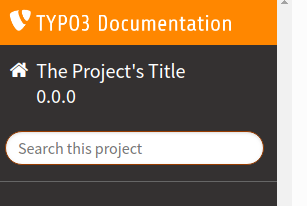
Refer to the [migration guide](https://docs.typo3.org/permalink/h2document:migrate) in order to fix this issue.
You must add the project title to your `Settings.cfg`:
```rst
[general]
# .................................................................................
# ... (required) title (displayed in left sidebar (desktop) or top panel (mobile)
# .................................................................................
project = title, for example extension name
# .................................................................................
# ... (recommended) version, displayed next to title (desktop) and in Deployments**. At the top right hand side you will see a button
**Add Configuration**. By clicking this button and going through the form,
you can add a repository manually without the hook. Nevertheless we strongly
recommend the usage of the webhook.
## Is the documentation independent of the TER? {#faq-for-extension-authors-documentation-independent-ter}
Yes.
The documentation and the extension at
TER ([https://extensions.typo3.org](https://extensions.typo3.org)) are two separate, independent entities.
In theory you could have the documentation in GitHub (for example)
and the extension (code) somewhere else (or not in Git at all). You just
need to fire the webhook from GitHub/GitLab/Bitbucket to trigger the
documentation rendering.
## Should I add a link to the documentation in TER? {#faq-for-extension-authors-should-i-add}
The documentation link should get updated automatically in TER.
Only use "external documentation" if your documentation is hosted
somewhere else (not on docs.typo3.org).
## Can I use a `README.rst` (or `README.md`) instead? {#faq-can-i-use-a-readmerst-or-readmemd-instead}
GitHub (or Gitlab, bitbucket) etc. automatically render a `README.rst` (or .md)
on the repository homepage.
For TYPO3 documentation I am required to have extra documentation in a `Documentation`
folder. This means I have to maintain 2 documentations. Or not?
**Answer:** No. You have these 2 options:
1. Use a `README.rst` (or .md) **and** a `Documentation/Index.rst` (for example).
This is done in our official manuals. The `README.rst` is not used as documentation,
it is used as an [about the repo file](https://docs.typo3.org/permalink/h2document:about-file). The README is mostly
used to direct users who come via GitHub (or Gitlab, Bitbucket etc.) to the rendered
documentation on docs.typo3.org
1. Or, use `README.rst` (or .md) as main documentation (see [start page](https://docs.typo3.org/permalink/h2document:start-file)) and
put everything in the `README.rst`. The `Documentation/Settings.cfg` file
must also exist, but that is all that needs to be in the `Documentation`
directory.
Actually, you have more options, but we do not want to make things too complicated.
Which one should you choose? That is up to you.
We recommend: Use method 1) for extensive documentation with several chapters,
use method 2) for minimal documentation which can be maintained in one file.
## How do I get an "Edit on GitHub" button? {#tip-edit-me-on-github}
Why might you want an "Edit on GitHub" button on the rendered pages
of your extension documentation?
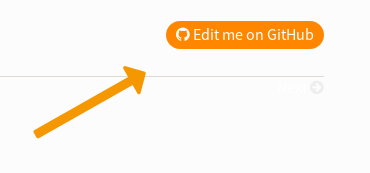
It makes it easier to contribute to the documentation!
**How do you enable this?**
Just add this to your [guides.xml](https://docs.typo3.org/permalink/h2document:settings-cfg) and customize it:
```none
[html_theme_options]
# "Edit on GitHub" button
github_repository = TYPO3-Console/TYPO3-Console
github_branch = main
```
If you used the [sample extension](https://github.com/TYPO3-Documentation/TYPO3CMS-Example-ExtensionManual)
and followed the [steps to create the Documentation folder](https://docs.typo3.org/permalink/h2document:how-to-start-docs-extension), you should actually already have this.
Look at the [typo3_console](https://docs.typo3.org/typo3cms/extensions/typo3_console/)
extension for a working example.
## How can I link to my issues? {#tip-link-to-issues}
Do you want contributors to find the issues for your extension easily when
reading your extension documentation on docs.typo3.org?
Add `project_issues` to your [guides.xml](https://docs.typo3.org/permalink/h2document:settings-cfg):
```none
[html_theme_options]
project_issues = https://github.com///issues
```
Replace `` and `` with your username and extension key
or replace entire URL with URL to your issues.
A link to the Issues will then be available footer section.
Example extension: [news](https://docs.typo3.org/typo3cms/extensions/news/)
## Further questions? {#faq-for-extension-authors-further-questions}
Get in touch with us, if you have problems, would like to ask questions or make suggestions.
Our [team page](https://typo3.org/community/teams/documentation/#c9886) contains
information about how to contact us.