---
title: "Context-sensitive menus"
manual: "TYPO3 Explained"
version: "11.5"
permalink: "https://docs.typo3.org/permalink/t3coreapi:context-menu@11.5"
source: "ApiOverview/Backend/ContextualMenu.rst"
rendered: "2026-10-21T15:30:00+00:00"
---
> [!WARNING]
> **Attention**
>
> TYPO3 v11 has reached end-of-life as of October 31th 2024 and
> is no longer being maintained. Use the version switcher on the top
> left of this page to select documentation for a supported version of TYPO3.
>
> Need more time before upgrading?
> You can purchase Extended Long Term Support (ELTS) for TYPO3 v11 here:
> [TYPO3 ELTS](https://typo3.com/services/extended-support-elts).
# Context-sensitive menus {#context-menu}
> [!TIP]
> Since TYPO3 v8.6 a new way of configuring and rendering context menu has
> been introduced.
> Both page tree context menu and list view context menu are generated and
> configured in the same way.
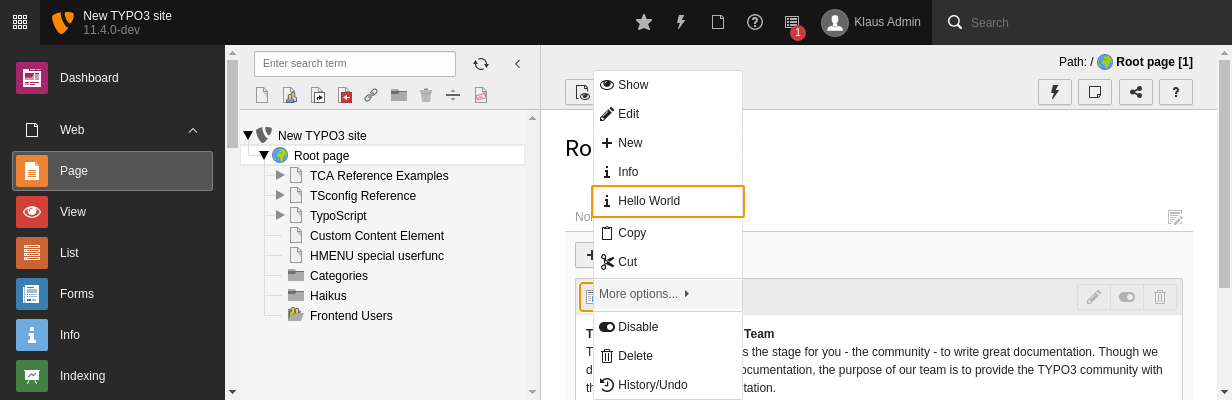
Contextual menus exist in many places in the TYPO3 backend. Just try your
luck clicking on any **icon** that you see. Chances are good that a contextual
menu will appear, offering useful functions to execute.
## Context menu rendering flow {#csm-implementation}
### Markup {#markup}
The context menu is shown after click on the HTML element which has
`class="t3js-contextmenutrigger"` together with `data-table`,
`data-uid` and optional `data-context` attributes.
The JavaScript click event handler is implemented in the
`TYPO3/CMS/Backend/ContextMenu` requireJS module. It takes the
data attributes mentioned above and executes an ajax call to the
`\TYPO3\CMS\Backend\Controller\ContextMenuController->getContextMenuAction()`.
### ContextMenuController {#contextmenucontroller}
`ContextMenuController` asks `\TYPO3\CMS\Backend\ContextMenu\ContextMenu`
to generate an array of items. `ContextMenu` builds a list of available
item providers by asking each whether it can provide items
(`$provider->canHandle()`), and what priority it has
(`$provider->getPriority()`).
#### Item providers registration {#item-providers-registration}
Custom item providers can be registered in global array:
```php
$GLOBALS['TYPO3_CONF_VARS']['BE']['ContextMenu']['ItemProviders'][1486418735] = \TYPO3\CMS\Impexp\ContextMenu\ItemProvider::class;
```
They must implement
`\TYPO3\CMS\Backend\ContextMenu\ItemProviders\ProviderInterface` and can
extend `\TYPO3\CMS\Backend\ContextMenu\ItemProviders\AbstractProvider`.
There are two item providers which are always available (without registration):
- `\TYPO3\CMS\Backend\ContextMenu\ItemProviders\PageProvider`
- `\TYPO3\CMS\Backend\ContextMenu\ItemProviders\RecordProvider`
#### Gathering items {#gathering-items}
A list of providers is sorted by priority, and then each provider is asked to
add items. The generated array of items is passed from an item provider with
higher priority to a provider with lower priority.
After that, a compiled list of items is returned to the
`ContextMenuController` which passes it back to the
`ContextMenu.js` as JSON.
### Menu rendering in JavaScript {#menu-rendering-in-javascript}
Based on the JSON data `ContextMenu.js` is rendering a context menu. If
one of the items is clicked, the according JavaScript `callbackAction` is
executed on the `TYPO3/CMS/Backend/ContextMenuActions` JavaScript module
or other modules defined in the JSON as
`additionalAttributes['data-callback-module']`.
Example of the JSON response:
```javascript
{
"view":{
"type":"item",
"label":"Show",
"icon":"\n\t\n \n\t<\/span>\n\t\n<\/span>",
"additionalAttributes":{
"data-preview-url":"http:\/\/typo37.local\/index.php?id=47"
},
"callbackAction":"viewRecord"
},
"edit":{
"type":"item",
"label":"Edit",
"icon":"",
"additionalAttributes":[
],
"callbackAction":"editRecord"
},
"divider1":{
"type":"divider",
"label":"",
"icon":"",
"additionalAttributes":[
],
"callbackAction":""
},
"more":{
"type":"submenu",
"label":"More options...",
"icon":"",
"additionalAttributes":[
],
"callbackAction":"openSubmenu",
"childItems":{
"newWizard":{
"type":"item",
"label":"'Create New' wizard",
"icon":"",
"additionalAttributes":{
},
"callbackAction":"newContentWizard"
}
}
}
}
```
## API usage in the Core {#api-usage-in-the-core}
Several TYPO3 Core modules are already using this API for adding or modifying
items. See following places for a reference:
- EXT:beuser module adds an item with a link to the Access (page permissions)
module for pages context menu.
See item provider `\TYPO3\CMS\Beuser\ContextMenu\ItemProvider` and
requireJS module `TYPO3/CMS/Beuser/ContextMenuActions`
- EXT:impexp module adds import and export options for pages, content elements
and other records. See item provider
`\TYPO3\CMS\Impexp\ContextMenu\ItemProvider` and requireJS module
`TYPO3/CMS/Impexp/ContextMenuActions`
- EXT:filelist module provides several item providers for files, folders,
filemounts, filestorage, and drag-drop context menu for the folder tree.
See following item providers:
`\TYPO3\CMS\Filelist\ContextMenu\ItemProviders\FileDragProvider`,
`\TYPO3\CMS\Filelist\ContextMenu\ItemProviders\FileProvider`,
`\TYPO3\CMS\Filelist\ContextMenu\ItemProviders\FileStorageProvider`,
`\TYPO3\CMS\Filelist\ContextMenu\ItemProviders\FilemountsProvider`
and requireJS module `TYPO3/CMS/Filelist/ContextMenuActions`
## Adding context menu to elements in your backend module {#adding-context-menu-to-elements-in-your-backend-module}
Enabling context menu in your own backend modules is quite straightforward.
The examples below are taken from the "beuser" system extension and
assume that the module is Extbase-based.
The first step is to include the needed JavaScript using the
`includeRequireJsModules` property
of the standard backend container Fluid view helper (or backend page
renderer view helper).
Doing so in your layout is sufficient (see
`typo3/sysext/beuser/Resources/Private/Layouts/Default.html`).
```xml
// ...
```
The second step is to activate the context menu on the icons. This kind of markup
is required (taken from
`typo3/sysext/beuser/Resources/Private/Templates/BackendUser/Index.html`):
```xml
\n\t<\/span>\n\t\n<\/span>",
"additionalAttributes":{
"data-preview-url":"http:\/\/typo37.local\/index.php?id=47"
},
"callbackAction":"viewRecord"
},
"edit":{
"type":"item",
"label":"Edit",
"icon":"",
"additionalAttributes":[
],
"callbackAction":"editRecord"
},
"divider1":{
"type":"divider",
"label":"",
"icon":"",
"additionalAttributes":[
],
"callbackAction":""
},
"more":{
"type":"submenu",
"label":"More options...",
"icon":"",
"additionalAttributes":[
],
"callbackAction":"openSubmenu",
"childItems":{
"newWizard":{
"type":"item",
"label":"'Create New' wizard",
"icon":"",
"additionalAttributes":{
},
"callbackAction":"newContentWizard"
}
}
}
}
```
## API usage in the Core {#api-usage-in-the-core}
Several TYPO3 Core modules are already using this API for adding or modifying
items. See following places for a reference:
- EXT:beuser module adds an item with a link to the Access (page permissions)
module for pages context menu.
See item provider `\TYPO3\CMS\Beuser\ContextMenu\ItemProvider` and
requireJS module `TYPO3/CMS/Beuser/ContextMenuActions`
- EXT:impexp module adds import and export options for pages, content elements
and other records. See item provider
`\TYPO3\CMS\Impexp\ContextMenu\ItemProvider` and requireJS module
`TYPO3/CMS/Impexp/ContextMenuActions`
- EXT:filelist module provides several item providers for files, folders,
filemounts, filestorage, and drag-drop context menu for the folder tree.
See following item providers:
`\TYPO3\CMS\Filelist\ContextMenu\ItemProviders\FileDragProvider`,
`\TYPO3\CMS\Filelist\ContextMenu\ItemProviders\FileProvider`,
`\TYPO3\CMS\Filelist\ContextMenu\ItemProviders\FileStorageProvider`,
`\TYPO3\CMS\Filelist\ContextMenu\ItemProviders\FilemountsProvider`
and requireJS module `TYPO3/CMS/Filelist/ContextMenuActions`
## Adding context menu to elements in your backend module {#adding-context-menu-to-elements-in-your-backend-module}
Enabling context menu in your own backend modules is quite straightforward.
The examples below are taken from the "beuser" system extension and
assume that the module is Extbase-based.
The first step is to include the needed JavaScript using the
`includeRequireJsModules` property
of the standard backend container Fluid view helper (or backend page
renderer view helper).
Doing so in your layout is sufficient (see
`typo3/sysext/beuser/Resources/Private/Layouts/Default.html`).
```xml
// ...
```
The second step is to activate the context menu on the icons. This kind of markup
is required (taken from
`typo3/sysext/beuser/Resources/Private/Templates/BackendUser/Index.html`):
```xml
|
```
the relevant line being highlighted. The class `t3js-contextmenutrigger`
triggers a context menu functionality for the current element. The
`data-table` attribute contains a table name of the record and
`data-uid` the `uid` of the record.
One additional data attribute can be used `data-context` with
values being for example `tree` for context menu triggered from
the page tree. Context is used to hide menu items independently for page tree
independently from other places (disabled items can be configured in TSconfig).
> [!NOTE]
> In most cases the `data-uid` attributes contain an integer value.
> However in case of files and folders this attribute takes file/folder path
> as a value like `data-uid="1:/some-folder/some-file.pdf"`
## Disabling Context Menu Items from TSConfig {#disabling-context-menu-items-from-tsconfig}
Context menu items can be disabled in TSConfig by adding item name to the
`options.contextMenu` option corresponding to the table and context
you want to cover.
For example, disabling `edit` and `new` items for
table `pages` use:
```typoscript
options.contextMenu.table.pages.disableItems = edit,new
```
If you want to disable the items just for certain context (for example tree)
add the `.tree` key after table name like that:
```typoscript
options.contextMenu.table.pages.tree.disableItems = edit,new
```
If configuration for certain context is available, the default configuration
is not taken into account.
For more details see [TSConfig reference](https://docs.typo3.org/m/typo3/reference-tsconfig/11.5/en-us/UserTsconfig/Options.html#useroptions-contextMenu-key-disableItems).
## Tutorial: How to add a custom context menu item {#csm-adding}
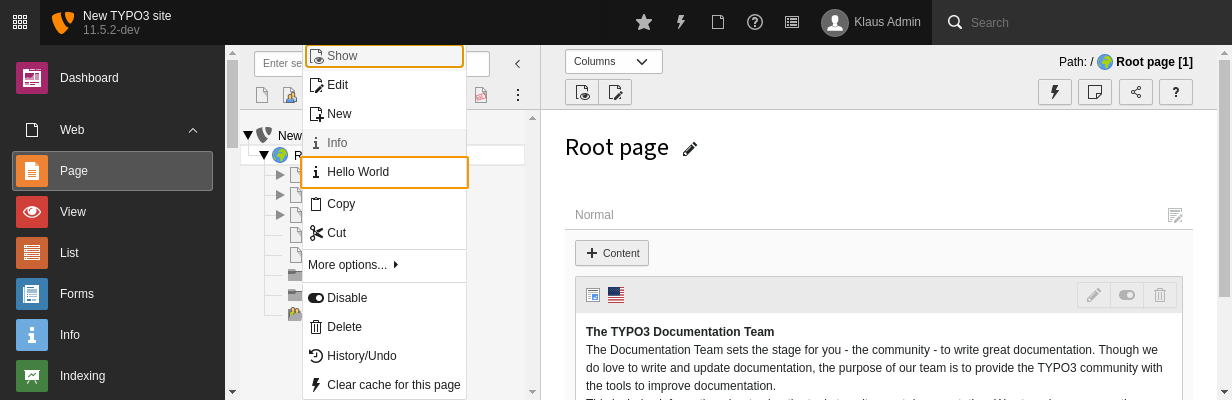
Follow these steps to add a custom menu item for pages records. You will add a
"Hello world" item which will show an info after clicking.
### Step 1: Item Provider Registration {#step-1-item-provider-registration}
First you need to add an item provider registration to the
`ext_localconf.php` of your extension.
```php
[
'type' => 'item',
'label' => 'Hello World', // you can use "LLL:" syntax here
'iconIdentifier' => 'actions-document-info',
'callbackAction' => 'helloWorld' //name of the function in the JS file
]
];
/**
* Checks if this provider may be called to provide the list of context menu items for given table.
*
* @return bool
*/
public function canHandle(): bool
{
// Current table is: $this->table
// Current UID is: $this->identifier
// return $this->table === 'pages';
return true;
}
/**
* Returns the provider priority which is used for determining the order in which providers are processing items
* to the result array. Highest priority means provider is evaluated first.
*
* This item provider should be called after PageProvider which has priority 100.
*
* BEWARE: Returned priority should logically not clash with another provider.
* Please check @see \TYPO3\CMS\Backend\ContextMenu\ContextMenu::getAvailableProviders() if needed.
*
* @return int
*/
public function getPriority(): int
{
return 55;
}
/**
* Registers the additional JavaScript RequireJS callback-module which will allow to display a notification
* whenever the user tries to click on the "Hello World" item.
* The method is called from AbstractProvider::prepareItems() for each context menu item.
*
* @param string $itemName
* @return array
*/
protected function getAdditionalAttributes(string $itemName): array
{
return [
// BEWARE!!! RequireJS MODULES MUST ALWAYS START WITH "TYPO3/CMS/" (and no "Vendor" segment here)
'data-callback-module' => 'TYPO3/CMS/Examples/ContextMenuActions',
// Here you can also add any other useful "data-" attribute you'd like to use in your JavaScript (e.g. localized messages)
];
}
/**
* This method adds custom item to list of items generated by item providers with higher priority value (PageProvider)
* You could also modify existing items here.
* The new item is added after the 'info' item.
*
* @param array $items
* @return array
*/
public function addItems(array $items): array
{
$this->initDisabledItems();
// renders an item based on the configuration from $this->itemsConfiguration
$localItems = $this->prepareItems($this->itemsConfiguration);
if (isset($items['info'])) {
//finds a position of the item after which 'hello' item should be added
$position = array_search('info', array_keys($items), true);
//slices array into two parts
$beginning = array_slice($items, 0, $position+1, true);
$end = array_slice($items, $position, null, true);
// adds custom item in the correct position
$items = $beginning + $localItems + $end;
} else {
$items = $items + $localItems;
}
//passes array of items to the next item provider
return $items;
}
/**
* This method is called for each item this provider adds and checks if given item can be added
*
* @param string $itemName
* @param string $type
* @return bool
*/
protected function canRender(string $itemName, string $type): bool
{
// checking if item is disabled through TSConfig
if (in_array($itemName, $this->disabledItems, true)) {
return false;
}
$canRender = false;
switch ($itemName) {
case 'hello':
$canRender = $this->canSayHello();
break;
}
return $canRender;
}
/**
* Helper method implementing e.g. access check for certain item
*
* @return bool
*/
protected function canSayHello(): bool
{
//usually here you can find more sophisticated condition. See e.g. PageProvider::canBeEdited()
return true;
}
}
```
### Step 3: JavaScript actions {#step-3-javascript-actions}
Third step is to provide a JavaScript file (RequireJS module) which will be
called after clicking on the context menu item.
This file can be found in `EXT:examples/Resources/Public/JavaScript/ContextMenuActions.js`
**Extension examples, file Resources/Public/JavaScript/ContextMenuActions.js**
```javascript
/**
* Module: TYPO3/CMS/Example/ContextMenuActions
*
* JavaScript to handle the click action of the "Hello World" context menu item
* @exports TYPO3/CMS/Example/ContextMenuActions
*/
define(function () {
'use strict';
/**
* @exports TYPO3/CMS/Example/ContextMenuActions
*/
var ContextMenuActions = {};
/**
* Say hello
*
* @param {string} table
* @param {int} uid of the page
*/
ContextMenuActions.helloWorld = function (table, uid) {
if (table === 'pages') {
//If needed, you can access other 'data' attributes here from $(this).data('someKey')
//see item provider getAdditionalAttributes method to see how to pass custom data attributes
top.TYPO3.Notification.error('Hello World', 'Hi there!', 5);
}
};
return ContextMenuActions;
});
```