---
title: "Icon API"
manual: "TYPO3 Explained"
version: "11.5"
permalink: "https://docs.typo3.org/permalink/t3coreapi:icon@11.5"
source: "ApiOverview/Icon/Index.rst"
rendered: "2026-10-21T15:30:00+00:00"
---
> [!WARNING]
> **Attention**
>
> TYPO3 v11 has reached end-of-life as of October 31th 2024 and
> is no longer being maintained. Use the version switcher on the top
> left of this page to select documentation for a supported version of TYPO3.
>
> Need more time before upgrading?
> You can purchase Extended Long Term Support (ELTS) for TYPO3 v11 here:
> [TYPO3 ELTS](https://typo3.com/services/extended-support-elts).
# Icon API {#icon}
TYPO3 provides an icon API for all icons in the TYPO3 backend.
## Registration {#icon-registration}
All icons must be registered in the icon registry.
To register icons for your own extension, create a file called
`Configuration/Icons.php` in your extension - for example:
`typo3conf/ext/my_extension/Configuration/Icons.php`.
> [!NOTE]
> In versions below TYPO3 v11.4 the configuration was done in the
> `ext_localconf.php` file.
>
> It [migrates the icon registration](https://docs.typo3.org/permalink/t3coreapi:icon-migration@11.5) to
> new format. There is also a Rector rule.
The file needs to return a PHP configuration array with the following keys:
**EXT:my_extension/Configuration/Icons.php**
```php
[
// icon provider class
'provider' => \TYPO3\CMS\Core\Imaging\IconProvider\SvgIconProvider::class,
// the source SVG for the SvgIconProvider
'source' => 'EXT:my_extension/Resources/Public/Icons/mysvg.svg',
],
'mybitmapicon' => [
'provider' => \TYPO3\CMS\Core\Imaging\IconProvider\BitmapIconProvider::class,
// the source bitmap file
'source' => 'EXT:my_extension/Resources/Public/Icons/mybitmap.png',
],
'myfontawesomeicon' => [
'provider' => \TYPO3\CMS\Core\Imaging\IconProvider\FontawesomeIconProvider::class,
// the fontawesome icon name
'name' => 'spinner',
// all icon providers provide the possibility to register an icon that spins
'spinning' => true,
],
];
```
### IconProvider {#iconprovider}
The TYPO3 Core ships three icon providers which can be used:
- `BitmapIconProvider` – For all kinds of bitmap icons (GIF, PNG, JPEG, etc.)
- `SvgIconProvider` – For SVG icons
- `FontawesomeIconProvider` – For all icons which can be found in the fontawesome.io icon font
In case you need a custom icon provider, you can add your own by writing a
class which implements the `IconProviderInterface`.
## Using icons in your code {#icon-usage}
You can use the Icon API to receive icons in your PHP
code or directly in Fluid.
### The PHP way {#the-php-way}
You can use the `IconFactory` to request an icon:
**EXT:my_extension/Classes/MyClass.php**
```php
iconFactory = $iconFactory;
}
public function doSomething()
{
$icon = $this->iconFactory->getIcon(
'tx-myext-action-preview',
Icon::SIZE_SMALL,
'overlay-identifier'
);
// Do something with the icon, for example, assign it to the view
// $this->view->assign('icon', $icon);
}
}
```
### The Fluid ViewHelper {#the-fluid-viewhelper}
You can also use the [Fluid core:icon ViewHelper](https://docs.typo3.org/other/typo3/view-helper-reference/11.5/en-us/typo3/core/latest/Icon.html#typo3-core-icon)
to render an icon in your view:
```html
{namespace core = TYPO3\CMS\Core\ViewHelpers}
```
This will render the desired icon using an `img` tag. If you prefer having
the SVG inlined into your HTML (for example, for being able to change colors
with CSS), you can set the optional `alternativeMarkupIdentifier`
attribute to `inline`. By default, the icon will pick up the font color of
its surrounding element if you use this option.
```html
{namespace core = TYPO3\CMS\Core\ViewHelpers}
```
### The JavaScript way {#the-javascript-way}
In JavaScript, icons can be only fetched from the Icon Registry. To achieve this,
add the following dependency to your RequireJS module: `TYPO3/CMS/Backend/Icons`.
In this section, the module is known as `Icons`.
The module has a single public method `getIcon()` which accepts up to five arguments:
- **identifier**
`|` *Condition:* required
`|` *Type:* string
`|`
Identifier of the icon as registered in the Icon Registry.
- **size**
`|` *Condition:* required
`|` *Type:* string
`|`
Desired size of the icon. All values of the `Icons.sizes` enum are allowed, these are: `small`, `default`, `large` and `overlay`.
- **overlayIdentifier**
`|` *Condition:* optional
`|` *Type:* string
`|`
Identifier of an overlay icon as registered in the Icon Registry.
- **state**
`|` *Condition:* optional
`|` *Type:* string
`|`
Sets the state of the icon. All values of the `Icons.states` enum are allowed, these are: `default` and `disabled`.
- **markupIdentifier**
`|` *Condition:* optional
`|` *Type:* string
`|`
Defines how the markup is returned. All values of the `Icons.markupIdentifiers` enum are allowed, these are: `default` and `inline`. Please note that `inline` is only meaningful for SVG icons.
The method `getIcon()` returns a jQuery Promise object, as internally an Ajax request is done.
The icons are cached in the local storage of the client to reduce the workload off the server.
Here is an example code how a usage of the JavaScript Icon API may look like:
Here's an example code how a usage of the JavaScript Icon API may look like:
```js
define(['jquery', 'TYPO3/CMS/Backend/Icons'], function($, Icons) {
// Get a single icon
Icons.getIcon('spinner-circle-light', Icons.sizes.small).done(function(spinner) {
console.log(spinner);
});
});
```
## Available icons {#available-icons}
The TYPO3 Core comes with a number of icons that may be used in your extensions.
To search for available icons, you can use one of these possibilities:
### Install styleguide extension {#install-styleguide-extension}
Install the extension *styleguide* as described in the Readme in the [installation](https://github.com/TYPO3/styleguide#installation) section.
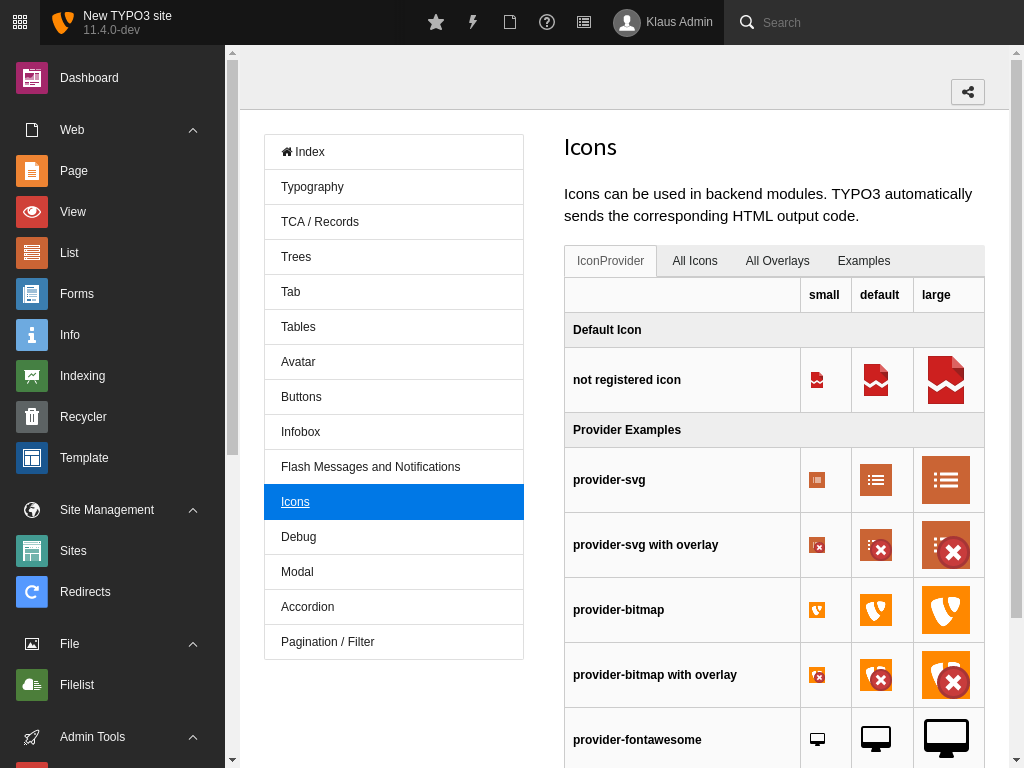
Once, installed, you can view available icons by selecting help (?) on the top in the
TYPO3 backend, then *Styleguide* and then *Icons*, *All Icons*.
There, browse through existing icons. Use the name under the icon (for example
`actions-add`) as first parameter for `IconFactory::getIcon()` in PHP or as value for
the argument `identifier` in Fluid (see code examples above).
### Use TYPO3.Icons {#use-typo3-icons}
An alternative way to look for existing icons is to browse through
[TYPO3.Icons](https://typo3.github.io/TYPO3.Icons/).
## Migration {#icon-migration}
The Rector rule [\\\\Ssch\\\\TYPO3Rector\\\\Rector\\\\v11\\\\v4\\\\RegisterIconToIconFileRector](https://github.com/sabbelasichon/typo3-rector/blob/main/docs/all_rectors_overview.md#registericontoiconfilerector)
can be used for automatic migration.
For manual migration remove all calls
to `\TYPO3\CMS\Core\Imaging\IconRegistry::registerIcon()` from
your `EXT:my_extension/ext_localconf.php` and move the content to
`Configuration/Icons.php` instead.