---
title: "Conditions"
manual: "TYPO3 Explained"
version: "11.5"
permalink: "https://docs.typo3.org/permalink/t3coreapi:typoscript-syntax-conditions@11.5"
source: "Configuration/TypoScriptSyntax/Syntax/Conditions.rst"
rendered: "2026-10-21T15:30:00+00:00"
---
> [!WARNING]
> **Attention**
>
> TYPO3 v11 has reached end-of-life as of October 31th 2024 and
> is no longer being maintained. Use the version switcher on the top
> left of this page to select documentation for a supported version of TYPO3.
>
> Need more time before upgrading?
> You can purchase Extended Long Term Support (ELTS) for TYPO3 v11 here:
> [TYPO3 ELTS](https://typo3.com/services/extended-support-elts).
# Conditions {#typoscript-syntax-conditions}
There is a *possibility* of using so called *conditions* in
TypoScript. Conditions are simple control structures, that evaluate to
TRUE or FALSE based on some criteria (externally validated) and
thereby determine, whether the TypoScript code following the condition
and ending where the next condition is found, should be parsed or not.
Examples of a condition could be:
- Is a usergroup set for the current session?
- Is it Monday?
- Is the GET parameter "&language=uk" set?
- Is it my mother's birthday?
- Do I feel lucky today?
Of these examples admittedly the first few are the most realistic. In
fact they are readily available in the context of TypoScript
Templates. But a condition can theoretically evaluate any circumstance
and return either TRUE or FALSE which subsequently means the parsing
of the TypoScript code that follows.
> [!NOTE]
> **See also**
>
> For conditions usage examples, and available variables and function reference, please refer to
> [the TypoScript Reference conditions chapter](https://docs.typo3.org/m/typo3/reference-typoscript/11.5/en-us/Conditions/Index.html#conditions).
## Where conditions can be used {#typoscript-syntax-conditions-usage}
The *detection of conditions* is a part of the TypoScript syntax but
the *validation* of the condition content always relies on the
context where TypoScript is used. Therefore in plain syntax
highlighting (no context) conditions are just highlighted and nothing
more. In the context of TypoScript Templates there is a
[whole section of TSref](https://docs.typo3.org/m/typo3/reference-typoscript/11.5/en-us/Conditions/Index.html#conditions) which defines the
syntax of the condition contents for TypoScript Templates. For "Page
TSconfig" and "user TSconfig" conditions are implemented as well.
Basically they work the same way as conditions in TypoScript
templates do, but there are some small differences. For details see the
[chapter on conditions in TSconfig](https://docs.typo3.org/m/typo3/reference-tsconfig/11.5/en-us/UsingSetting/Conditions.html#conditions).
## The syntax of conditions {#typoscript-syntax-conditions-syntax}
A condition is written on its own line and is detected by `[`
(square bracket) being the first character on that line:
**Extension examples, file Configuration/TypoScript/Conditions/Syntax/setup.typoscript**
```typoscript
# ... some TypoScript, always parsed
[condition]
# .... some more TypoScript (only parsed if the condition is met.)
[GLOBAL]
# ... some TypoScript, always parsed
```
As you can see from this example, the line `[GLOBAL]` also is a
condition. It is built into TypoScript and always returns TRUE. The
line `[ condition ]` is another condition.
If `[ condition ]` is TRUE, then the TypoScript in the
middle would be parsed until `[GLOBAL]` (or `[END]`) resets the
condition. After that point the TypoScript is parsed for any case
again.
Here is an example of some TypoScript (from the context of TypoScript
Templates) where another text is output if you are logged in or
working locally:
**Extension examples, file Configuration/TypoScript/Conditions/Simple/setup.typoscript**
```typoscript
page = PAGE
page.10 = TEXT
page.10.value = HELLO WORLD!
[loginUser('*') or ip('127.0.0.1')]
page.20 = TEXT
page.20 {
value = Only for logged in users or local setup
stdWrap.case = upper
}
[GLOBAL]
```
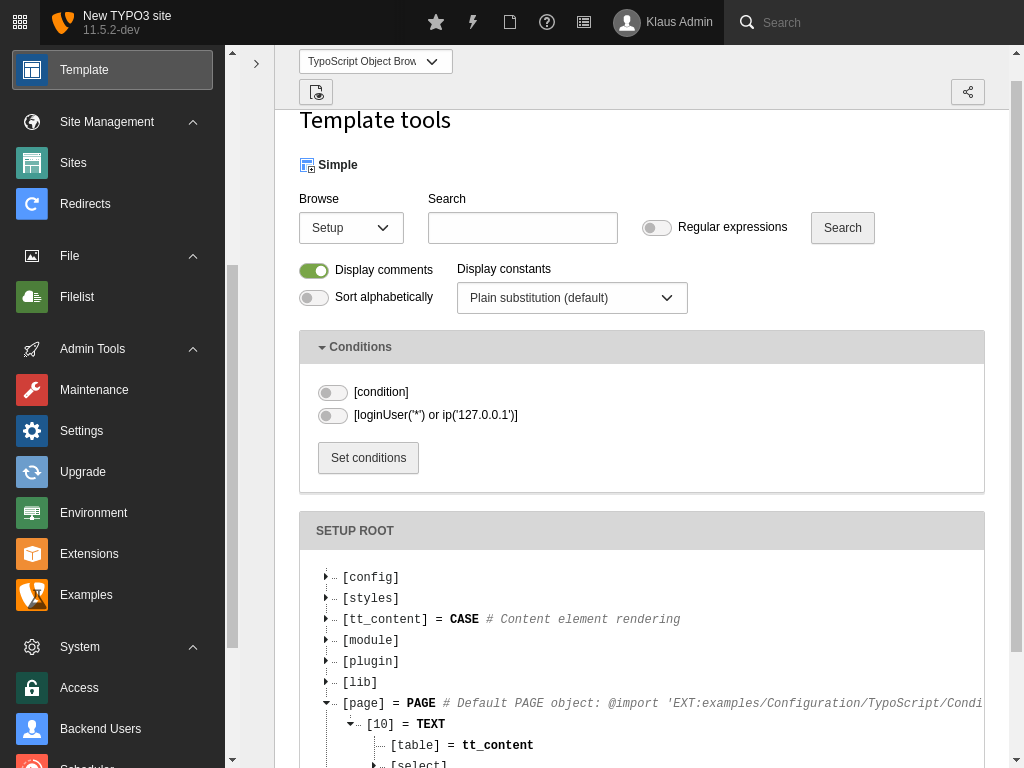
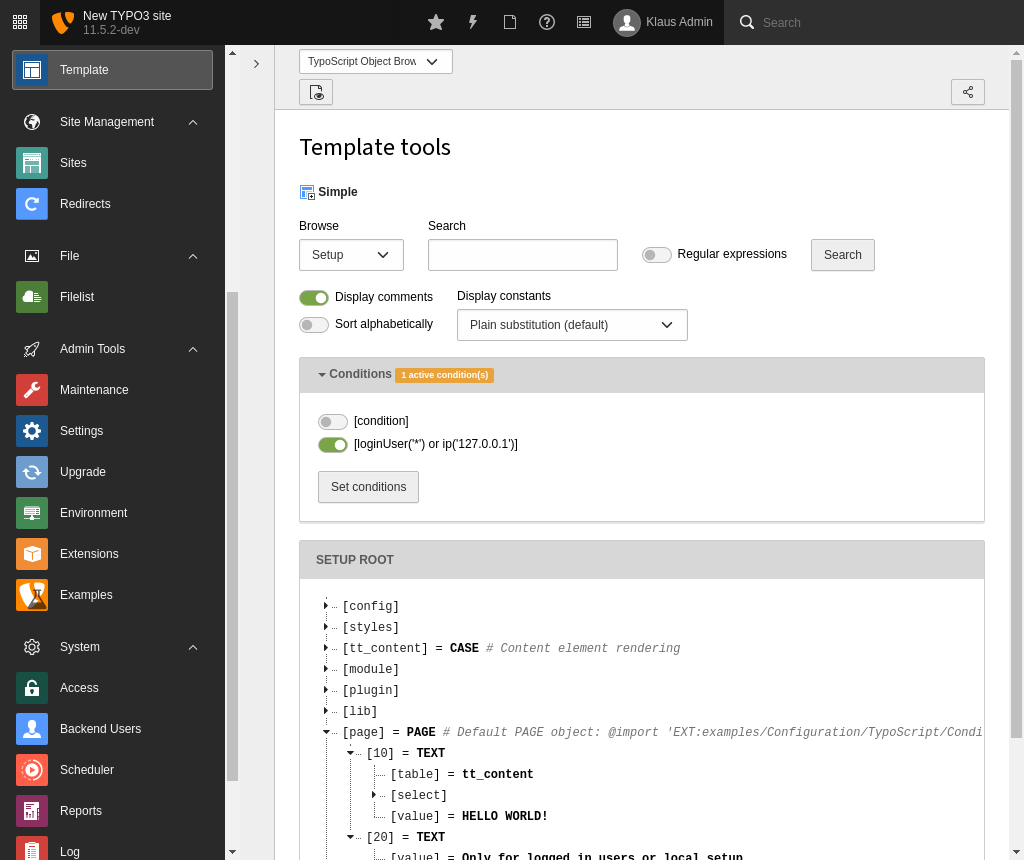
You can now use the Object Browser to actually see the difference in
the parsed object tree depending on whether the condition evaluates to
TRUE or FALSE (which can be simulated with that module as you can
see):
## Combining conditions {#typoscript-syntax-conditions-combine}
As we saw above two or more tests can be combined using logical operators.
The following operators are available:
- **or**
Also available as `||`.
- **and**
Also available as `&&`.
- **not**
Also available as `!`.
TypoScript conditions are using the Symfony Expression Language. For more
information on writing such expressions, you can look up the
[symfony documentation on the expression language](https://symfony.com/doc/current/components/expression_language/syntax.html).
## The Special \[ELSE\], \[END\] and \[GLOBAL\] Conditions {#typoscript-syntax-global-condition}
The special condition `[ELSE]` which will return TRUE if
the previous condition returned FALSE. To end an `[ELSE]` condition you
can use either `[END]` or `[GLOBAL]`. For all three conditions you can
also use them in lower case.
Here's an example of using the `[ELSE]` condition (also in the context
of TypoScript Templates):
**Extension examples, file Configuration/TypoScript/Conditions/Else/setup.typoscript**
```typoscript
page = PAGE
page.10 = TEXT
[loginUser('*')]
page.10.value = Logged in
[ELSE]
page.10.value = Not logged in
[END]
page.10.stdWrap.wrap = |
```
Here we have one output text if a user is logged in and
another if not. No matter what the text is wrapped in a `` tag,
because, as we can see, this wrap is added outside of the condition block
(e.g. after the `[END]` condition).
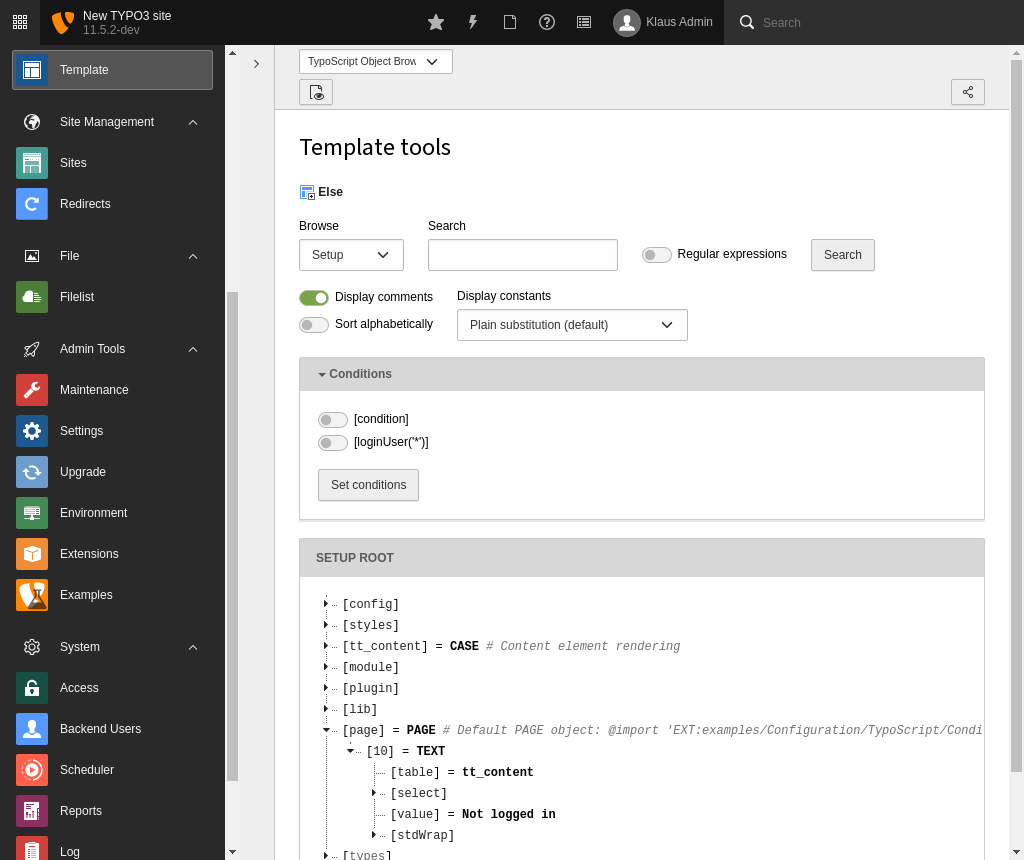
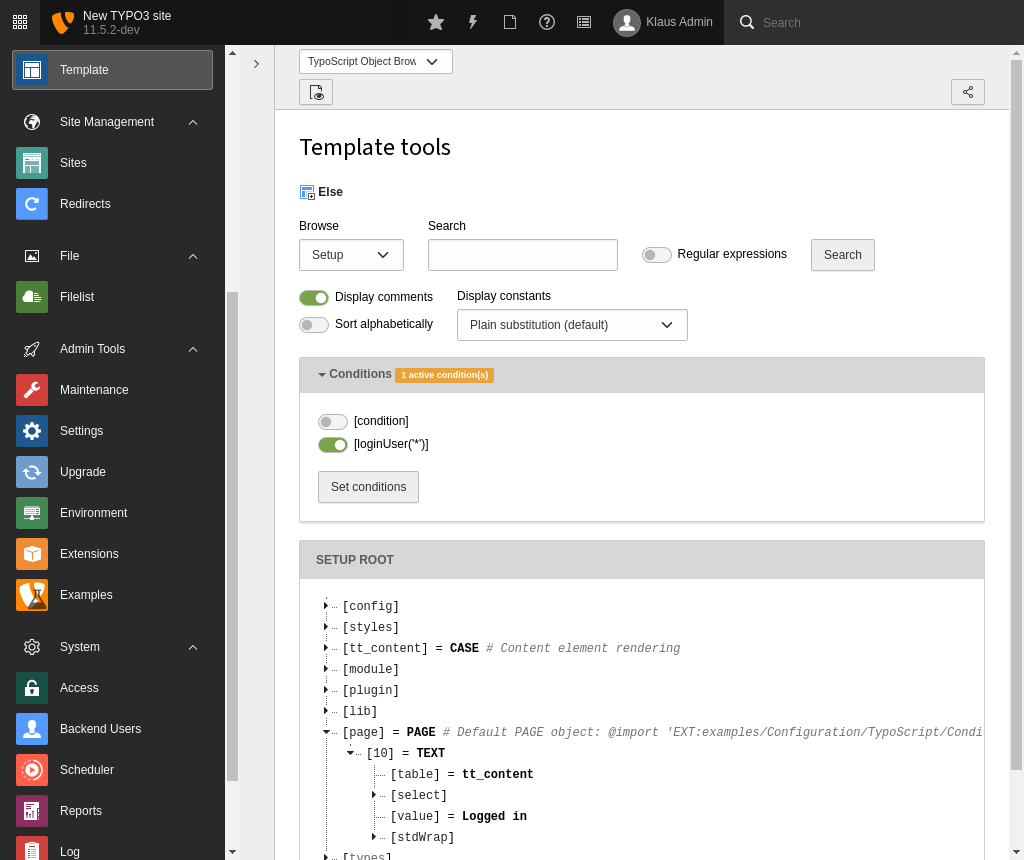
The fact that you can "enable" the condition in the TypoScript Object
Browser is a facility provided to simulate the outcome of any
conditions you insert in a TypoScript Template. Whether or not the
conditions validate correctly is only verified by actually getting
(in this example) a logged in user and hitting the site.
Another example could be if you wanted to do something special in case
a bunch of conditions is NOT true. There's **no negate-character**,
but you could do this:
**Extension examples, file Configuration/TypoScript/Conditions/Not/setup.typoscript**
```typoscript
[!loginUser('*')]
page.10.value = No user is logged in!
[END]
```
## Where to insert conditions in TypoScript? {#typoscript-syntax-conditions-braces}
Conditions can be used *outside* of confinements (curly braces) only!
So, this is valid:
**Extension examples, file Configuration/TypoScript/Conditions/Valid/setup.typoscript**
```typoscript
someObject {
1property = 234
}
[loginUser('*')]
someObject {
2property = 567
}
[GLOBAL]
```
But this is **not valid:**
**Extension examples, file Configuration/TypoScript/Conditions/Invalid/setup.typoscript**
```typoscript
# Invalid: This example is not valid on purpose
# Conditions must not be used within value blocks
someObject {
1property = 234
[loginUser('*')]
2property = 567
[GLOBAL]
}
```
When parsed with syntax highlighting you will see this error:
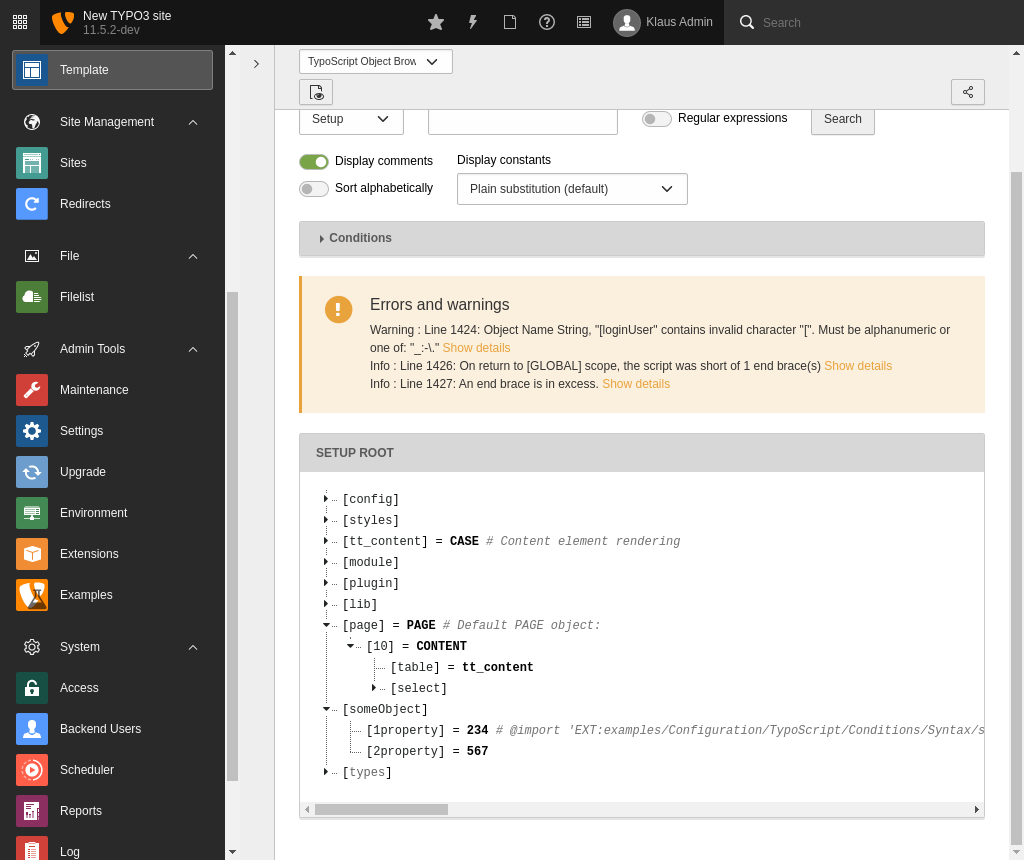
This means that the line was perceived as a regular definition of
TypoScript and not as a condition.
## The \[GLOBAL\] condition {#typoscript-syntax-the-global-condition}
The `[GLOBAL]` special condition (which resets any previous
condition scope) is yet different, in that will be detected at
*any line* except within multiline value definitions.
**Extension examples, file Configuration/TypoScript/Conditions/InvalidGlobal/setup.typoscript**
```typoscript
# Invalid: This example is not valid on purpose
# Conditions must not be used within value blocks
someObject {
1property = 234
[GLOBAL]
2property = 567
}
```
But you will still get some errors if you syntax highlight it:
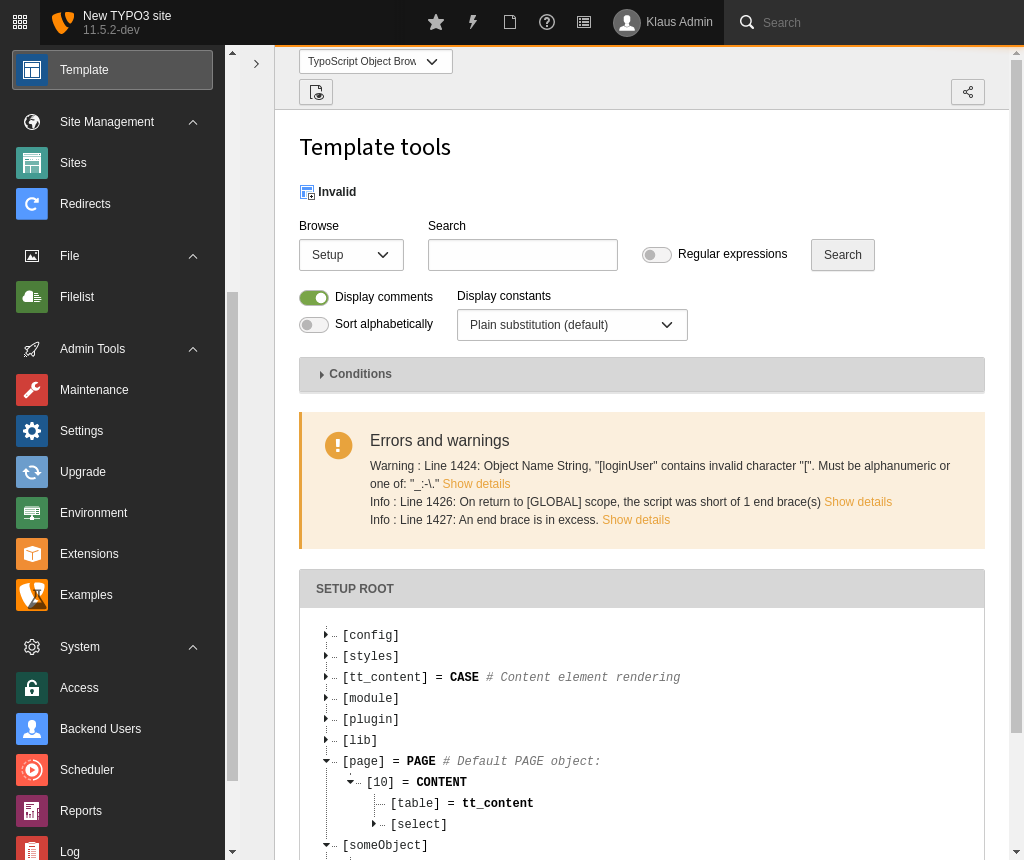
The reason for this is that the `[GLOBAL]` condition aborts the
confinement started in the first line resulting in the first error
("... short of 1 end brace(s)"). The second error appears because the
end brace is now in excess since the "brace level" was reset by
`[GLOBAL]`.
So, in summary; the special `[global]` (or `[GLOBAL]`) condition will
break TypoScript parsing within braces at any time and return to the
global scope (unless entered in a multiline value). This is true for
any TypoScript implementation whether other condition types are
possible or not. Therefore you can use `[GLOBAL]` (put on a single line
for itself) to make sure that following TypoScript is correctly parsed
from the top level. This is normally done when TypoScript code from
various records is combined.
## Custom conditions with the Symfony expression language {#typoscript-syntax-conditions-expression-language}
Further information about how to extend TypoScript with your own custom
conditions can be found at [Symfony within TypoScript conditions](https://docs.typo3.org/permalink/t3coreapi:sel-within-typoscript-conditions@11.5).
## Syntax examples {#typoscript-syntax-conditions-examples}
### Variables and functions {#variables-and-functions}
For a detailed list of the available objects and functions refer to the
[TypoScript Reference](https://docs.typo3.org/m/typo3/reference-typoscript/11.5/en-us/Conditions/Index.html#conditions).
Variables:
**Extension examples, file Configuration/TypoScript/Conditions/Variables/setup.typoscript**
```typoscript
[page["backend_layout"] == 1]
page.42.value = Backend layout 1 choosen
[END]
```
Functions:
**Extension examples, file Configuration/TypoScript/Conditions/Functions/setup.typoscript**
```typoscript
[loginUser('*')]
page.42.value = Frontend user logged in
[END]
[getTSFE().isBackendUserLoggedIn()]
page.42.value = Backend user logged in
[END]
```
### Literals {#literals}
For a complete list have a look at the
[SEL supported literals](https://symfony.com/doc/current/components/expression_language/syntax.html#supported-literals).
Strings:
**Extension examples, file Configuration/TypoScript/Conditions/Strings/setup.typoscript**
```typoscript
[request.getNormalizedParams().getHttpHost() == 'example.org']
page.42.value = Http Host is example.org
[END]
```
Arrays:
**Extension examples, file Configuration/TypoScript/Conditions/Arrays/setup.typoscript**
```typoscript
[page["pid"] in [17,24]]
page.42.value = This page is a child of page 17 or page 24
[END]
```
### Operators {#operators}
Please see a complete list of available operators here:
[SEL syntax operators](https://symfony.com/doc/current/components/expression_language/syntax.html#comparison-operators)
Equality:
**Extension examples, file Configuration/TypoScript/Conditions/Equality/setup.typoscript**
```typoscript
[applicationContext == "Development"]
page.42.value = The application context is exactly "Development"
[END]
```
Wildcards:
**Extension examples, file Configuration/TypoScript/Conditions/Wildcards/setup.typoscript**
```typoscript
[like(applicationContext, "Development*")]
page.42.value = The application context starts with "Development"
[END]
```
> [!NOTE]
> While the other operator are inherent features of the Symphony expression
> language `like` is a function defined by TYPO3. Read more about
> it in [TypoScript Reference, Conditions,
> function like](https://docs.typo3.org/m/typo3/reference-typoscript/11.5/en-us/Conditions/Index.html#condition-function-like)
Regular expressions:
**Extension examples, file Configuration/TypoScript/Conditions/RegularExpressions/setup.typoscript**
```typoscript
[applicationContext matches "/^Development/"]
page.42.value = The application context starts with "Development"
[END]
```
Array operators:
**Extension examples, file Configuration/TypoScript/Conditions/ArrayOperators/setup.typoscript**
```typoscript
[17 in tree.rootLineIds || 24 in tree.rootLineIds]
page.42.value = Pid with id 17 or 24 is in the rootline.
[END]
```
### Combined conditions {#combined-conditions}
And conditions:
**Extension examples, file Configuration/TypoScript/Conditions/AndConditions/setup.typoscript**
```typoscript
[condition1() and condition2()]
page.42.value = Condition 1 and condition 2 met
[END]
```
Or conditions:
**Extension examples, file Configuration/TypoScript/Conditions/OrConditions/setup.typoscript**
```typoscript
[condition1() or condition2()]
temp.value = Condition 1 or condition 2 met
[END]
```
## Summary {#typoscript-syntax-conditions-summary}
- Conditions are detected by `[` as the first line character (whitespace
ignored).
- Conditions are evaluated in relation to the context where TypoScript
is used. They are widely used in TypoScript Templates and can also be
used in page TSconfig or user TSconfig.
- Special conditions `[ELSE]`, `[END]` and `[GLOBAL]` exist.
- Conditions can be used outside of confinements (curly braces) only.
However the `[GLOBAL]` condition will always break a confinement if
entered inside of one.