---
title: "TypoScript syntax"
manual: "TYPO3 Explained"
version: "11.5"
permalink: "https://docs.typo3.org/permalink/t3coreapi:typoscript-syntax-typoscript-syntax@11.5"
source: "Configuration/TypoScriptSyntax/Syntax/TypoScriptSyntax.rst"
rendered: "2026-10-21T15:30:00+00:00"
---
> [!WARNING]
> **Attention**
>
> TYPO3 v11 has reached end-of-life as of October 31th 2024 and
> is no longer being maintained. Use the version switcher on the top
> left of this page to select documentation for a supported version of TYPO3.
>
> Need more time before upgrading?
> You can purchase Extended Long Term Support (ELTS) for TYPO3 v11 here:
> [TYPO3 ELTS](https://typo3.com/services/extended-support-elts).
# TypoScript syntax {#typoscript-syntax-typoscript-syntax}
TypoScript is parsed in a very simple way; line by line. This means
that abstractly said each line normally contains three parts based on
this formula:
```text
[Object Path] [Operator] [Value]
```
**Example:**
**Extension examples, file Configuration/TypoScript/Syntax/General/setup.typoscript**
```typoscript
myObject.myProperty = value 2
```
In this example we have the object `myObject` with the property `myProperty`
and a value `value 2`.
## Object path {#typoscript-syntax-syntax-object-path}
The object path (in this case `myObject.myProperty`) is like the
variable name in a programming language. The object path is the first
block of non-whitespace characters on a line until one of the
characters `=<>{(` or a white space is found. The dot (`.`) is used
to separate objects and properties from each other creating a hierarchy.
**Use only A-Z, a-z, 0-9, "-", "\\\_" and periods (.) for object paths!**
Dots in the object path can be escaped using a backslash.
**Escaping example:**
**Extension examples, file Configuration/TypoScript/Syntax/Escaping/setup.typoscript**
```typoscript
my\.escaped\.key = test
```
This will result in an object named `my.escaped.key` with the value "test".
Here we do **not** have three hierarchically structured objects `my`,
`escaped` and `key`.
## Operator {#typoscript-syntax-syntax-operator}
The operator (in the example it is `=`) can be one of the characters
`=<>{(`. The various operators are described below.
### Value assignment: The "=" operator {#typoscript-syntax-syntax-value-assignment}
This assigns a value to an object path.
**Rules:**
Everything after the `=` sign and *up to the end of the line* is
considered to be the value. In other words: You don't need to quote
anything!
Be aware that the value will be trimmed, which means stripped of
whitespace at both ends.
### Value modifications: The ":=" operator {#typoscript-syntax-syntax-value-modification}
This operator assigns a value to an object path by calling a
predefined function which modifies the existing value of the current
object path in different ways.
This is very useful when a value should be modified without completely
redefining it again.
**Rules:**
The portion after the `:=` operator and *to the end of the line* is
split in two parts: A function and a value. The function is specified
right next to the operator (trimmed) and holding the value in parentheses
(not trimmed).
This is the list of predefined functions:
- **prependString**
Adds a string to the beginning of the existing
value.
- **appendString**
Adds a string to the end of the existing value.
- **removeString**
Removes a string from the existing value.
- **replaceString**
Replaces old with new value. Separate these using
`|`.
- **addToList**
Adds a comma-separated list of values to the end of a
string value. There is no check for duplicate values, and the list is
not sorted in any way.
- **removeFromList**
Removes a comma-separated list of values from an
existing comma-separated list of values.
- **uniqueList**
Removes duplicate entries from a comma-separated list
of values.
- **reverseList**
Reverses the order of entries in a comma-separated
list of values.
- **sortList**
Sorts the entries in a comma-separated list of values.
Optional parameters are:
- **ascending**
Sort the items in ascending order: First numbers
from small to big, then letters in alphabetical order. This is the
default method.
- **descending**
Sort the items in descending order: First letters
in descending order, then numbers from big to small.
- **numeric**
Apply numeric sorting: Numbers from small to big,
letters sorted after "0".
Multiple parameters are separated by comma.
There is a hook inside class `\TYPO3\CMS\Core\TypoScript\Parser\TypoScriptParser`
which can be used to define more such functions.
**Example:**
**Extension examples, file Configuration/TypoScript/Syntax/ValueModification/setup.typoscript**
```typoscript
myObject = TEXT
myObject.value = 1,2,3
myObject.value := addToList(4,5)
myObject.value := removeFromList(2,1)
```
produces the same result as:
**Extension examples, file Configuration/TypoScript/Syntax/ValueModification2/setup.typoscript**
```typoscript
myObject = TEXT
myObject.value = 3,4,5
```
### Code blocks: The { } signs {#typoscript-syntax-syntax-curly-brackets}
Opening and closing curly braces are used to assign many object
properties in a simple way at once. It's called a block or nesting of
properties.
**Rules:**
- Everything on the same line as the opening brace (`{`), but that comes
*after* it is ignored.
- The `}` sign *must* be the first non-space character on a line in
order to close the block. Everything on the same line, but after `}`
is ignored.
- Blocks can be nested. This is actually recommended for **improved
readability**.
> [!IMPORTANT]
> You cannot use conditions inside of braces (except the
> `[GLOBAL]` condition which will be detected and reset the brace-level to
> zero)
> [!NOTE]
> Excessive end braces are ignored, but generate warnings in
> the TypoScript parser.
**Example:**
**Extension examples, file Configuration/TypoScript/Syntax/CodeBlock/setup.typoscript**
```typoscript
myObject = TEXT
myObject.stdWrap.field = title
myObject.stdWrap.ifEmpty.data = leveltitle:0
```
could also be written as:
**Extension examples, file Configuration/TypoScript/Syntax/CodeBlock2/setup.typoscript**
```typoscript
myObject = TEXT
myObject {
stdWrap {
field = title
ifEmpty {
data = leveltitle:0
}
}
}
```
### Multi-line values: The ( ) signs {#typoscript-syntax-syntax-multiline-values}
Opening and closing parenthesis are used to assign a *multi-line
value* . With this method you can define values which span several
lines and thus include line breaks.
> [!IMPORTANT]
> You cannot use multi-line values in constants. They are only available in
> the setup part of TypoScript.
**Rules:**
The end-parenthesis is extremely important. If it is not
found, the parser considers the following lines to be part of the
value and does not return to parsing TypoScript. This includes the
`[GLOBAL]` condition which will not save you in this case! So don't miss
it!
**Example:**
**Extension examples, file Configuration/TypoScript/Syntax/MultiLine/setup.typoscript**
```typoscript
myObject = TEXT
myObject.value (
This is HTML code.
)
```
### Object copying: The "<" sign {#typoscript-syntax-syntax-object-copying}
The `<` sign is used to copy one object path to another. The whole
object is copied - both value and properties - and it overrides any
old objects and values at that position.
**Example:**
**Extension examples, file Configuration/TypoScript/Syntax/ObjectCopying/setup.typoscript**
```typoscript
myObject = TEXT
myObject.value = This is HTML code.
myOtherObject < myObject
```
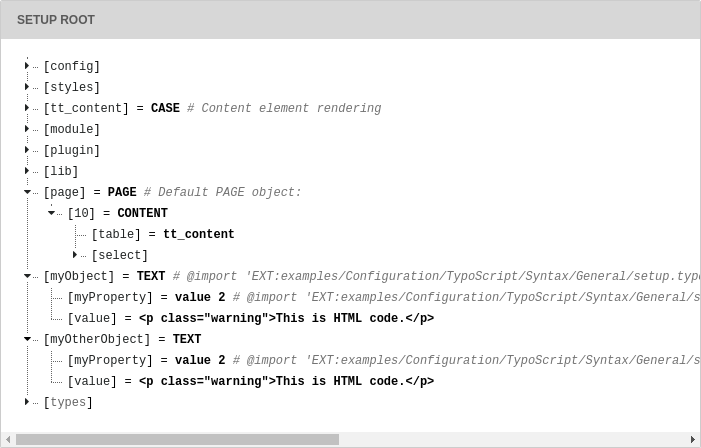
The result of the above TypoScript is two independent sets of
objects/properties which are exactly the same (duplicates). They are
*not* references to each other but actual copies:
Another example with a copy within a code block:
**Extension examples, file Configuration/TypoScript/Syntax/ObjectCopying2/setup.typoscript**
```typoscript
pageObj {
10 = TEXT
10.value = This is HTML code.
20 < pageObj.10
}
```
Here also a copy is made, although inside the `pageObj` object. Note
that the copied object is referred to with its full path
(`pageObj.10`). When **copying on the same level**, you can
refer to the copied object's name, **prepended by a dot**.
The following produces the same result as above:
**Extension examples, file Configuration/TypoScript/Syntax/ObjectCopying3/setup.typoscript**
```typoscript
pageObj {
10 = TEXT
10.value = This is HTML code.
20 < .10
}
```
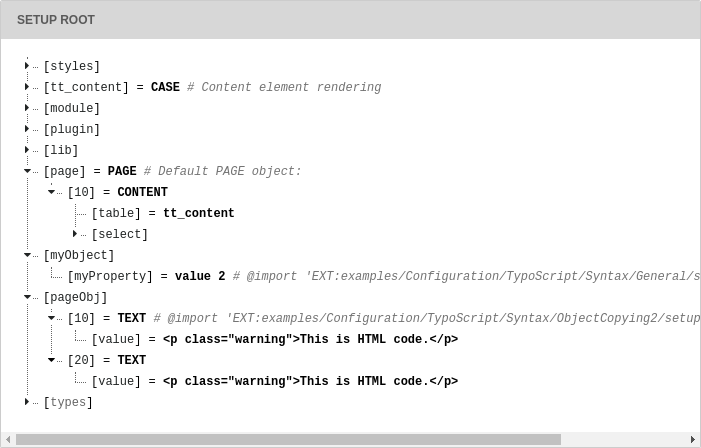
which – in tree view – translates to:
> [!IMPORTANT]
> When the original object is changed after copying, the
> copy does not change! Take a look at the following code:
>
> **Extension examples, file Configuration/TypoScript/Syntax/ObjectCopying4/setup.typoscript**
>
> ```typoscript
> someObject = TEXT
> someObject {
> value = Hello world!
> stdWrap.wrap = |
> }
> anotherObject < someObject
> someObject.stdWrap.wrap =
| ```
>
> The value of the `stdWrap.wrap` property of `anotherObject`
> is `
|
`. It is **not** `|` because this change
> happens **after** the copying. This example may seem trivial, but
> it's easy to loose the oversight in larger pieces of TypoScript.
> [!NOTE]
> If the copy operator does not give you any result, then the reason for this behaviour can
> be a wrong initialization order of the objects. The original object shall be copied, but it has not been
> assigned the intended value at this moment. Try to use the equal smaller "=<" sign instead. Then TYPO3
> will make the intended object still available after its initialization.
### Object references: the equal smaller "=<" sign {#typoscript-syntax-syntax-object-referencing}
**In the context of TypoScript Templates** it is possible to create
references from one object to another. References mean that multiple
positions in an object tree can use the same object at another
position without making an actual copy of the object but by
pointing to the objects full object path.
The obvious advantage is that a **change of code to the original
object affects all references**. It avoids the risk mentioned above
with the copy operator to forget that a change at a later point does
not affect earlier copies. On the other hand there's the reverse risk:
It is easy to forget that changing the original object will have an
impact on all references. References are very convenient, but should
be used with caution.
*Note:* Changing or adding attributes in the object holding a reference
will not change the original object that was referenced.
**Example:**
**Extension examples, file Configuration/TypoScript/Syntax/ObjectReference/setup.typoscript**
```typoscript
someObject = TEXT
someObject {
value = Hello world!
stdWrap.wrap =
|
}
anotherObject =< someObject
someObject.stdWrap.wrap =
|
```
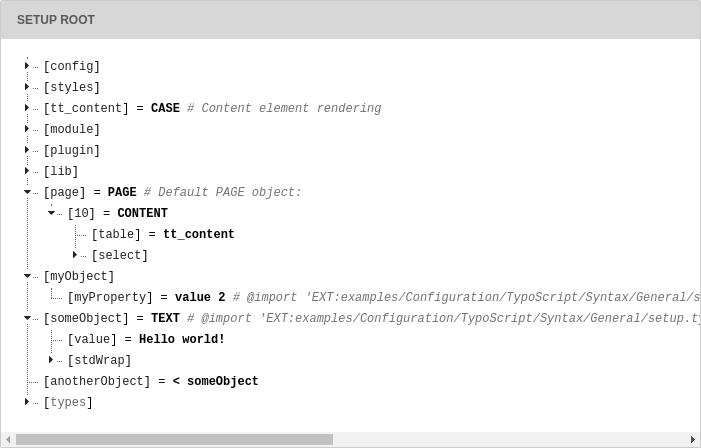
In this case, the `stdWrap.wrap` property of `anotherObject`
will indeed be `|`. In tree view the properties
of the reference are not shown. Only the reference itself is visible:
Remember:
- References are only available in TypoScript templates, not in TSconfig
(user TSconfig or page TSconfig)
- References are only resolved for Content Objects, otherwise references are
not resolved. For example, you **cannot** use a
reference `< plugin.tx_example.settings.foo` to find the value of `foo`.
The value you get will be just `< plugin.tx_example.settings.foo` instead.
### Object unsetting: The ">" Sign {#typoscript-syntax-syntax-unsetting-operator}
This is used to unset an object and all of its properties.
**Example:**
**Extension examples, file Configuration/TypoScript/Syntax/ObjectUnsetting/setup.typoscript**
```typoscript
myObject = TEXT
myObject.value = HTML - code
myObject >
```
In this last line `myObject` is totally wiped out (removed).
### Conditions: Lines starting with "\[" {#typoscript-syntax-syntax-conditions}
Conditions break the parsing of TypoScript in order to evaluate the
content of the condition line. If the evaluation returns true, parsing
continues, otherwise the following TypoScript is ignored until the
next condition is found, at which point a new evaluation takes place.
The next section in this document describes conditions in more
details.
**Rules:**
Conditions apply *only* when outside of any code block (i.e. outside
of any curly braces).
**Example:**
**Extension examples, file Configuration/TypoScript/Syntax/Conditions/setup.typoscript**
```typoscript
[date("j") == 9]
page.10.value = It is the 9th day of the month!
[ELSE]
page.10.value = It is NOT the 9th day of the month!
[END]
```
## Value {#typoscript-syntax-syntax-value}
The value (in case of the above example "value 2") is whatever characters
follow the operator until the end of the line, but trimmed for whitespace
at both ends. Notice that values are *not* encapsulated in quotes! The
value starts after the operator and ends with the line break.
## Comments {#typoscript-syntax-syntax-comments}
TypoScript support single line comments as well as multiline comment blocks.
### Single line comments {#single-line-comments}
When a line starts with `//` or `#` it is considered to be a comment
and will be ignored.
**Example:**
**Extension examples, file Configuration/TypoScript/Syntax/CommentsSingleLine/setup.typoscript**
```typoscript
// This is a comment
myObject = TEXT
myObject.value = Some HTML code
# This line also is a comment.
```
### Comment blocks {#typoscript-syntax-syntax-comment-blocks}
When a line starts with `/*` or `*/` it defines the beginning or the
end of a comment section respectively. Anything, excluding imports, inside a comment
section is ignored.
> [!WARNING]
> Imports within a block comment are still resolved. This is true for both imports
> with the `@import` and ``
> syntax. Always use single line comments to comment out imports.
**Rules:**
`/*` and `*/` **must** be the very first characters of a trimmed line in
order to be detected.
Comment blocks are not detected inside a multi-line value block (see
parenthesis operator below).
**Example:**
**Extension examples, file Configuration/TypoScript/Syntax/CommentsBlock/setup.typoscript**
```typoscript
/* This is a comment
.. and this line is within that comment which...
ends here:
*/ ... this is not parsed either though - the whole line is still within the comment
myObject = TEXT
myObject.value (
Here is a multiline value which
/*
This is not a comment because it is inside a multi-line value block
*/
)
```