---
title: "Create a custom content element type"
manual: "TYPO3 Explained"
version: "12.4"
permalink: "https://docs.typo3.org/permalink/t3coreapi:adding-your-own-content-elements@12.4"
source: "ApiOverview/ContentElements/AddingYourOwnContentElements.rst"
rendered: "2026-10-21T15:29:37+00:00"
---
> [!WARNING]
> **Attention**
>
> TYPO3 v12 has reached end-of-life as of April 30th 2026 and
> is no longer being maintained. Use the version switcher on the top
> left of this page to select documentation for a supported version of TYPO3.
>
> Need more time before upgrading?
> You can purchase Extended Long Term Support (ELTS) for TYPO3 v12 here:
> [TYPO3 ELTS](https://typo3.com/services/extended-support-elts).
# Create a custom content element type {#adding-your-own-content-elements}
This page explains how to create your own custom content element types. These
are comparable to the predefined content element types supplied by TYPO3. The latter
can be found in the system extension `fluid_styled_content`.
A content element can be based on fields already available in the `tt_content`
table.
It is also possible to add extra fields to the `tt_content`
table, see [Extending tt_content](https://docs.typo3.org/permalink/t3coreapi:configurece-extend-tt-content@12.4).
The data of the content element is then passed to a TypoScript object, in most
cases to a [FLUIDTEMPLATE](https://docs.typo3.org/m/typo3/reference-typoscript/12.4/en-us/ContentObjects/Fluidtemplate/Index.html#cobj-fluidtemplate).
Some data might need additional [Data processing](https://docs.typo3.org/permalink/t3coreapi:configurece-dataprocessors@12.4). Data
processors are frequently used for example to process files
([files data processor](https://docs.typo3.org/m/typo3/reference-typoscript/12.4/en-us/DataProcessing/FilesProcessor.html#FilesProcessor)) or to fetch related records
([database-query data processor](https://docs.typo3.org/m/typo3/reference-typoscript/12.4/en-us/DataProcessing/DatabaseQueryProcessor.html#DatabaseQueryProcessor)).
A data processor can also be used to convert a string to an array,
as is done for example in the *table* content element with the field `bodytext`.
In these cases Fluid does not have to deal with these manipulations or transformation.
You can find the example below in the TYPO3 Documentation Team extension
[EXT:examples](https://extensions.typo3.org/extension/examples).
## Prerequisites {#prerequisites}
The following examples require the system extension
[fluid_styled_content](https://docs.typo3.org/c/typo3/cms-fluid-styled-content/12.4/en-us/Index.html).
It can be installed via Composer with:
```console
composer req typo3/cms-fluid-styled-content
```
## Use an extension {#addingce-use-an-extension}
We recommend to create your own extension for new custom content element types.
The following example uses the extension key `examples`.
Here you can find information on how to
[create an extension](https://docs.typo3.org/permalink/t3coreapi:extension-create-new@12.4).
## Register the content element type {#addingce-tca-overrides-tt-content}
First we need to define the key of the new content element type. We use
`examples_newcontentelement` throughout the simple example.
Next the key needs to be added to the select field `CType`. This will make it
available in **Type** dropdown in the backend.
The following call needs to be added to the file
[`Configuration/TCA/Overrides/tt_content.php`](../../ExtensionArchitecture/FileStructure/Configuration/TCA/Index.md#file-extension-configuration-tca-tablename-php).
**EXT:my_extension/Configuration/TCA/Overrides/tt_content.php**
```php
'LLL:EXT:my_extension/Resources/Private/Language/locallang.xlf:myextension_newcontentelement_title',
// plugin signature: extkey_identifier
'value' => 'myextension_newcontentelement',
// icon identifier
'icon' => 'content-text',
// group
'group' => 'default',
// description
'description' => 'LLL:EXT:my_extension/Resources/Private/Language/locallang.xlf:myextension_newcontentelement_description',
],
'textmedia',
'after',
);
// Adds the content element icon to TCA typeicon_classes
$GLOBALS['TCA']['tt_content']['ctrl']['typeicon_classes']['myextension_newcontentelement'] = 'content-text';
// ...
```
Now the new content element is available in the backend form. However it
currently contains no fields but the CType field.

### About the icon {#addingce-icon}
You can either use an existing [icon from the TYPO3 core](https://typo3.github.io/TYPO3.Icons/icons/content.html) or register your
own icon using the [Icon API](https://docs.typo3.org/permalink/t3coreapi:icon@12.4). In this example we use the icon
`content-text`, the same icon as the **Regular Text Element** uses.
## Add it to the new content element wizard {#addingce-pagetsconfig}
Content elements in the **New Content Element Wizard** are easier
to find for editors. It is therefore advised to add the new content element
to this wizard (via page TSconfig).
**EXT:my_extension/Configuration/page.tsconfig**
```typoscript
mod.wizards.newContentElement.wizardItems {
// add the content element to the tab "common"
common {
elements {
myextension_newcontentelement {
iconIdentifier = content-text
title = LLL:EXT:my_extension/Resources/Private/Language/locallang.xlf:myextension_newcontentelement_title
description = LLL:EXT:my_extension/Resources/Private/Language/locallang.xlf:myextension_newcontentelement_description
tt_content_defValues {
CType = myextension_newcontentelement
}
}
}
show := addToList(myextension_newcontentelement)
}
}
```
Starting with TYPO3 version 12.0 file EXT:examples/Configuration/page.tsconfig
is automatically included. For version 11.5 and below this file has to be included in the
ext_localconf.php. See Setting global page TSconfig, compatible with TYPO3
11 and 12.
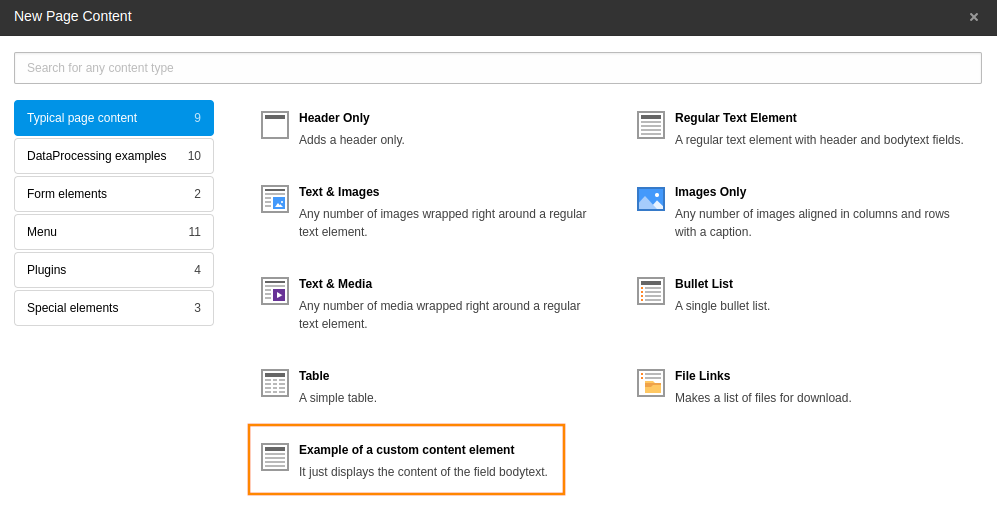
The content element wizard configuration is described in detail in
[Add content elements to the Content Element Wizard](https://docs.typo3.org/permalink/t3coreapi:content-element-wizard@12.4).
## Configure the backend form {#configurece-fields}
Then you need to configure the backend fields for your new content element in
the file [`Configuration/TCA/Overrides/tt_content.php`](../../ExtensionArchitecture/FileStructure/Configuration/TCA/Index.md#file-extension-configuration-tca-tablename-php):
**EXT:my_extension/Configuration/TCA/Overrides/tt_content.php**
```php
'
--div--;LLL:EXT:core/Resources/Private/Language/Form/locallang_tabs.xlf:general,
--palette--;;general,
header; Internal title (not displayed),
bodytext;LLL:EXT:frontend/Resources/Private/Language/locallang_ttc.xlf:bodytext_formlabel,
--div--;LLL:EXT:core/Resources/Private/Language/Form/locallang_tabs.xlf:access,
--palette--;;hidden,
--palette--;;access,
',
'columnsOverrides' => [
'bodytext' => [
'config' => [
'enableRichtext' => true,
'richtextConfiguration' => 'default',
],
],
],
];
```
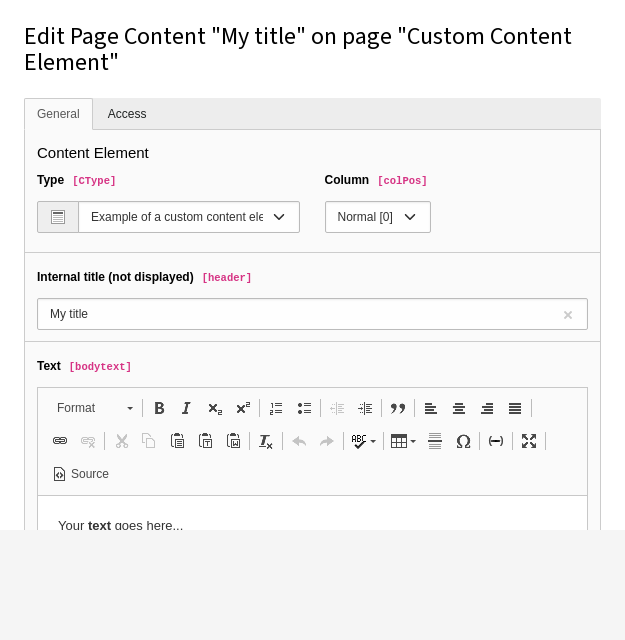
Now the backend form for the new content elements looks like this:
## Configure the frontend rendering {#configurece-frontend}
The output in the frontend gets configured in the setup TypoScript. See
[Add TypoScript to your extension](https://docs.typo3.org/m/typo3/reference-typoscript/12.4/en-us/UsingSetting/AddTypoScriptWithExtensions.html#extdev-add-typoscript) about how
to add TypoScript.
In the `examples` extension the TypoScript can be found at
[`Configuration/TypoScript/setup.typoscript`](../../ExtensionArchitecture/FileStructure/Configuration/TypoScript/Index.md#file-extension-configuration-typoscriptsetup-typoscript)
The Fluid templates for our custom content element will be saved in our
extension. Therefore we need to add the path to the
[Properties](https://docs.typo3.org/m/typo3/reference-typoscript/12.4/en-us/ContentObjects/Fluidtemplate/Index.html#cobj-fluidtemplate-properties-templaterootpaths):
**EXT:my_extension/Configuration/TypoScript/setup.typoscript**
```typoscript
lib.contentElement {
templateRootPaths.200 = EXT:my_extension/Resources/Private/Templates/
}
```
You can use any index (`200` in this example), just make sure it is unique.
If needed you can also add paths for partials and layouts.
Now you can register the rendering of your custom content element:
**EXT:my_extension/Configuration/TypoScript/setup.typoscript**
```typoscript
tt_content {
myextension_newcontentelement =< lib.contentElement
myextension_newcontentelement {
templateName = NewContentElement
}
}
```
The `lib.contentElement` path is defined in file
`EXT:fluid_styled_content/Configuration/TypoScript/Helper/ContentElement.typoscript`.
and uses a [FLUIDTEMPLATE](https://docs.typo3.org/m/typo3/reference-typoscript/12.4/en-us/ContentObjects/Fluidtemplate/Index.html#cobj-fluidtemplate).
We reference [fluid_styled_content](https://docs.typo3.org/c/typo3/cms-fluid-styled-content/12.4/en-us/Index.html)
`lib.contentElement` from our new content element and only change
the Fluid template to be used.
The Fluid template is configured by the
[Properties](https://docs.typo3.org/m/typo3/reference-typoscript/12.4/en-us/ContentObjects/Fluidtemplate/Index.html#cobj-fluidtemplate-properties-templatename) property as
`NewContentElement`.
This will load a `NewContentElement.html` template file from the path
defined at the `templateRootPaths`.
In the example extension you can find the file at
`EXT:examples/Resources/Private/Templates/NewContentElement.html`
`tt_content` fields can now be used in the Fluid template by accessing them via the `data` variable.
The following example shows the text entered in the richtext enabled field `bodytext`, using the html
saved by the richtext editor:
**EXT:examples/Resources/Private/Templates/NewContentElement.html**
```html
Data available to the content element:
{_all}
Output
{data.bodytext}
```
All fields of the table `tt_content` are now available in the variable
`data`. Since we saved the content of `bodytext` in the richt text editor we
have to run it through `f:format.html` to resolve all links and other
formatting. Read more about [Fluid](https://docs.typo3.org/permalink/t3coreapi:fluid@12.4).
> [!TIP]
> During development you can output all available variables in a Fluid
> template by adding `{_all}`.
>
> Even more convenient:
> `{_all}`
> lets you easily turn debugging on or off, depending on whether you
> fill in "1" or "0" for *condition*.
>
> **Example lines**
>
> ```html
> {settings}
> {data}
> {current}
> ```
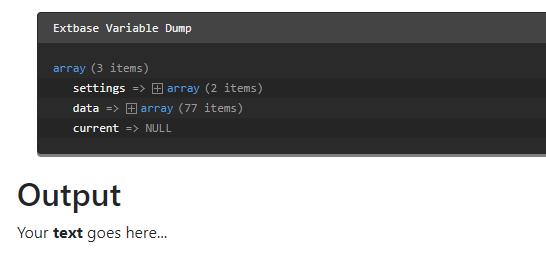
Below you can see the example output of the new content element and a
dump of all available data:
## Extended example: Extend tt_content and use data processing {#addingce-extended-example}
You can find the complete example in the TYPO3 Documentation Team extension
[EXT:examples](https://extensions.typo3.org/extension/examples). The steps for
creating a simple new content element as above need to be repeated. We use the
key *examples_newcontentcsv* in this example.
We want to output comma separated values (CSV) stored in the field bodytext.
As different programs use different separators to store CSV we want to make
the separator configurable.
### Extending tt_content {#configurece-extend-tt-content}
If the available fields in the table tt_content are not sufficient you can add
your own fields. In this case we need a field `tx_examples_separator` from
which to choose the desired separator.
#### Extending the database schema {#configurece-extend-tt-content-database}
First we extend the database schema by adding the following to the file
[`ext_tables.sql`](../../ExtensionArchitecture/FileStructure/ExtTablesSql.md#file-extension-ext-tables-sql):
**EXT:my_extension/ext_tables.sql**
```sql
CREATE TABLE tt_content (
myextension_separator varchar(255) DEFAULT '' NOT NULL,
myextension_reference int(11) unsigned DEFAULT '0' NOT NULL,
);
```
> [!TIP]
> Do a database compare in the **Admin Tools > Maintenance** module
> after changing the database schema (system maintainers only). Or call the
> console command:
>
> **Composer-based installation**
>
> ```bash
> vendor/bin/typo3 extension:setup
> ```
>
> **Classic mode installation (no Composer)**
>
> ```bash
> typo3/sysext/core/bin/typo3 extension:setup
> ```
#### Defining the field in the TCA {#configurece-extend-tt-content-tca}
The new field *tx_examples_separator* is added to the TCA definition of the table *tt_content* in the file
[`Configuration/TCA/Overrides/tt_content.php`](../../ExtensionArchitecture/FileStructure/Configuration/TCA/Index.md#file-extension-configuration-tca-tablename-php):
**EXT:my_extension/Configuration/TCA/Overrides/tt_content.php**
```php
[
'exclude' => 0,
'label' => 'LLL:EXT:examples/Resources/Private/Language/locallang_db.xlf:tt_content.myextension_separator',
'config' => [
'type' => 'select',
'renderType' => 'selectSingle',
'items' => [
['Standard CSV data formats', '--div--'],
['Comma separated', ','],
['Semicolon separated', ';'],
['Special formats', '--div--'],
['Pipe separated (TYPO3 tables)', '|'],
['Tab separated', "\t"],
],
'default' => ',',
],
],
];
\TYPO3\CMS\Core\Utility\ExtensionManagementUtility::addTCAcolumns('tt_content', $temporaryColumn);
```
You can read more about defining fields via TCA in the [TCA Reference](https://docs.typo3.org/m/typo3/reference-tca/12.4/en-us/Index.html#start).
Now the new field can be used in your Fluid template just like any other
tt_content field.
Another example shows the connection to a foreign table. This allows you to be
more flexible with the possible values in the select box. The new field
`myextension_reference` is a reference to another table of the extension
called `tx_myextension_mytable`:
**EXT:my_extension/Configuration/TCA/Overrides/tt_content.php**
```php
[
'exclude' => 0,
'label' => 'LLL:EXT:my_extension/Resources/Private/Language/locallang_db.xlf:' .
'tt_content.myextension_reference',
'config' => [
'type' => 'select',
'renderType' => 'selectSingle',
'items' => [
['None', '0'],
],
'foreign_table' => 'tx_myextension_mytable',
'foreign_table_where' =>
'AND {#tx_myextension_mytable}.{#pid} = ###PAGE_TSCONFIG_ID### ' .
'AND {#tx_myextension_mytable}.{#hidden} = 0 ' .
'AND {#tx_myextension_mytable}.{#deleted} = 0 ' .
'ORDER BY sys_category.uid',
'default' => '0',
],
],
];
\TYPO3\CMS\Core\Utility\ExtensionManagementUtility::addTCAcolumns('tt_content', $temporaryColumn);
```
#### Defining the field in the TCE {#defining-the-field-in-the-tce}
An individual modification of the newly added field `myextension_reference`
to the TCA definition of the table `tt_content` can be done in the
TYPO3 Core Engine (TCE) page TSconfig. In most cases it is necessary to set the page
id of the general storage folder. Then the examples extension will only use
the content records from the given page id.
**EXT:my_extension/Configuration/page.tsconfig**
```typoscript
TCEFORM.tt_content.myextension_reference.PAGE_TSCONFIG_ID = 18
```
If more than one page id is allowed, this configuration must be used instead
(and the above TCA must be modified to use the marker `###PAGE_TSCONFIG_IDLIST###`
instead of `###PAGE_TSCONFIG_ID###`):
**EXT:my_extension/Configuration/page.tsconfig**
```typoscript
TCEFORM.tt_content.myextension_reference.PAGE_TSCONFIG_IDLIST = 18, 19, 20
```
> [!NOTE]
> As we are working with pure Fluid without Extbase here the new fields can
> be used right away. They need not be added to a model.
### Data processing {#configurece-dataprocessors}
Data processors can be used for data manipulation or fetching before the
variables get passed on to the template.
This is done in the
[dataProcessing](https://docs.typo3.org/m/typo3/reference-typoscript/12.4/en-us/DataProcessing/Index.html#cobj-fluidtemplate-properties-dataprocessing)
section where you can add an arbitrary number of data processors.
You can see a complete list of available
[data processors in the Typoscript Reference](https://docs.typo3.org/m/typo3/reference-typoscript/12.4/en-us/DataProcessing/Index.html#cobj-fluidtemplate-properties-dataprocessing) or write a [custom
data processor](https://docs.typo3.org/permalink/t3coreapi:content-elements-custom-data-processor@12.4).
Each processor has to be added with a fully qualified class name and optional
parameters to be used in the data processor:
**EXT:my_extension/Configuration/TypoScript/setup.typoscript**
```typoscript
tt_content {
myextension_newcontentcsv =< lib.contentElement
myextension_newcontentcsv {
templateName = DataProcCsv
dataProcessing.10 = TYPO3\CMS\Frontend\DataProcessing\CommaSeparatedValueProcessor
dataProcessing.10 {
fieldName = bodytext
fieldDelimiter.field = myextension_separator
fieldEnclosure = "
maximumColumns.field = imagecols
as = myTable
}
}
}
```
You can now iterate over the variable `myTable` in the Fluid template, in this
example `Resources/Private/Templates/ContentElements/DataProcCsv.html`
**EXT:examples/Resources/Private/Templates/ContentElements/DataProcCsv.html**
```html
Data in variable "myTable"
{myTable}
Output, {data.imagecols} columns separated by char {data.tx_examples_separator}
```
The output would look like this (we added a debug of the variable `myTable`):