---
title: "FlexForms"
manual: "TYPO3 Explained"
version: "12.4"
permalink: "https://docs.typo3.org/permalink/t3coreapi:flexforms@12.4"
source: "ApiOverview/FlexForms/Index.rst"
rendered: "2026-10-21T15:29:37+00:00"
---
> [!WARNING]
> **Attention**
>
> TYPO3 v12 has reached end-of-life as of April 30th 2026 and
> is no longer being maintained. Use the version switcher on the top
> left of this page to select documentation for a supported version of TYPO3.
>
> Need more time before upgrading?
> You can purchase Extended Long Term Support (ELTS) for TYPO3 v12 here:
> [TYPO3 ELTS](https://typo3.com/services/extended-support-elts).
# FlexForms {#flexforms}
FlexForms can be used to store data within an XML structure inside a single DB
column.
More information on this data structure is available in the section
[T3DataStructure](https://docs.typo3.org/permalink/t3coreapi:t3ds@12.4).
FlexForms can be used to configure [content elements (CE) or plugins](https://docs.typo3.org/permalink/t3coreapi:content-elements@12.4), but they are optional so you can create plugins or
content elements without using FlexForms.
Most of the configuration below is the same, whether you are adding configuration
for a plugin or content element. The main difference is how `addPiFlexFormValue()`
is used.
You may want to configure
individual plugins or content elements differently, depending on where they are added. The
configuration set via the FlexForm mechanism applies to only the content
record it has been configured for. The FlexForms configuration for a plugin or CE
can be changed by editors in the backend. This gives editors more control
over plugin features and what is to be rendered.
Using FlexForms you have all the features of TCA, so it is possible
to use input fields, select lists, show options conditionally and more.
The superfluous array key TCEforms was removed and is not evaluated
anymore. Its sole purpose was to wrap real TCA definitions. The TCEforms tags should
be removed upon dropping TYPO3 v11 support. In TYPO3 v12 there is an automatic migration
that will be removed in a future version.
## Example use cases {#example-use-cases}
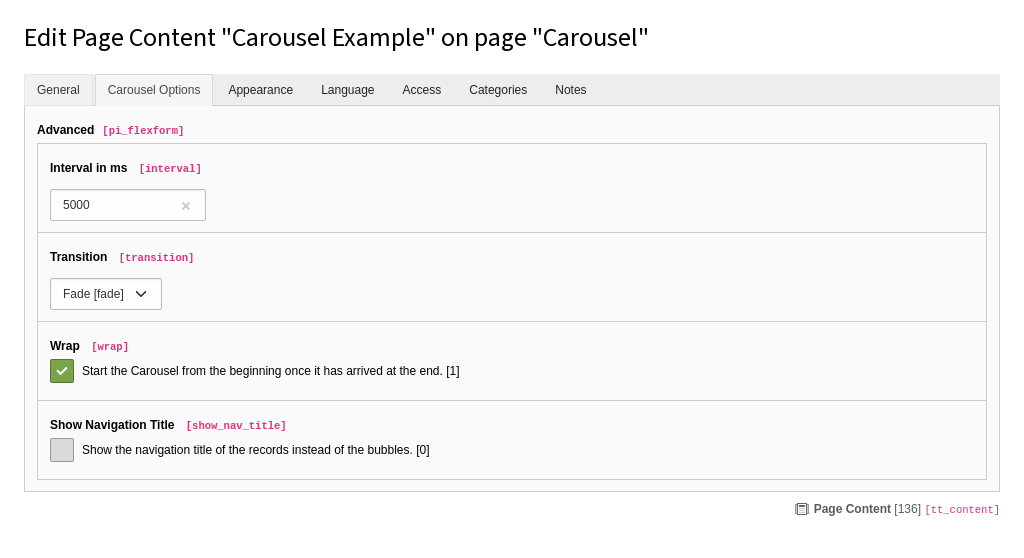
The [bootstrap_package](https://github.com/benjaminkott/bootstrap_package)
uses FlexForms to configure rendering options,
e.g. a transition interval and transition type (slide, fade)
for the carousel content element.
Another extensions that utilize FlexForms and can be used as example is:
- [georgringer/news](https://github.com/georgringer/news)
## How it works {#how-it-works}
1. In the extension, a configuration schema is defined and attached to
one or more content elements or plugins.
1. When the CE or plugin is added to a page, it can be configured as defined
by the configuration
schema.
1. The configuration for this content element is automatically saved to `tt_content.pi_flexform`.
1. The extension can read current configuration and act according to
the configuration.
> [!TIP]
> The data structure of a FlexForm may change over time. Also, when switching
> from one plugin with a FlexForm to another plugin with a FlexForm in an
> element, the old values are not removed in the FlexForm field. This
> may cause problems and errors. You can avoid this by calling the
> [CLI](https://docs.typo3.org/permalink/t3coreapi:symfony-console-commands@12.4) command `cleanup:flexforms` which is
> provided by the [lowlevel system extension](https://docs.typo3.org/c/typo3/cms-lowlevel/12.4/en-us/Index.html). It
> updates all database records which have a FlexForm field and the XML data
> does not match the chosen data structure.
## Steps to perform (extension developer) {#steps-to-perform-extension-developer}
1. Create configuration schema in [T3DataStructure](https://docs.typo3.org/permalink/t3coreapi:t3ds@12.4) format (XML)
**Example:**
**EXT:examples/Configuration/Flexforms/PluginHaikuList.xml**
```xml
LLL:EXT:examples/Resources/Private/Language/locallang_db.xlf:examples.pi_flexform.sheetGeneral
arraygrouppages101nav_title, alias, urlAND pages.doktype = 1
```
1. The configuration schema is attached to one or more plugins in the folder
`Configuration/TCA/Overrides` of an extension.
Example for the FlexForm registration of a basic plugin:
**EXT:examples/Configuration/TCA/Overrides/tt_content_plugin_haiku_list.php**
```php
The method ExtensionUtility::registerPlugin() returns the plugin signature.When registering Extbase plugins you can use the return value of
`ExtensionUtility::registerPlugin()` to figure out the plugin
signature to use:
**EXT:blog_example/Configuration/TCA/Overrides/tt_content.php (Excerpt)**
```php
$pluginSignature = ExtensionUtility::registerPlugin(
'blog_example',
'Pi1',
'A Blog Example',
);
$GLOBALS['TCA']['tt_content']['types']['list']['subtypes_addlist'][$pluginSignature]
= 'pi_flexform';
ExtensionManagementUtility::addPiFlexFormValue(
$pluginSignature,
'FILE:EXT:blog_example/Configuration/FlexForms/PluginSettings.xml'
);
```
If you are using a content element with a custom CType (recommend, both with and without
Extbase), the example
looks like this:
**EXT:my_extension/Configuration/TCA/Overrides/tt_content.php**
```php
\TYPO3\CMS\Core\Utility\ExtensionManagementUtility::addPiFlexFormValue(
// 'list_type' does not apply here
'*',
// FlexForm configuration schema file
'FILE:EXT:example/Configuration/FlexForms/Registration.xml',
// ctype
'accordion'
);
```
Finally, according to "Configuration of the displayed order of fields in FormEngine
and their tab alignment." the field containing the FlexForm still needs to be
added to the `showitem` directive.
The following example shows line from the accordion element of the Bootstrap Package.
**EXT:your_extension/Configuration/TCA/Overrides/tt_content.php**
```php
// Configure element type
$GLOBALS['TCA']['tt_content']['types']['accordion'] = array_replace_recursive(
$GLOBALS['TCA']['tt_content']['types']['accordion'],
[
'showitem' => '
--div--;General,
--palette--;General;general,
--palette--;Headers;headers,
tx_bootstrappackage_accordion_item,
--div--;Options,
pi_flexform'
]
);
```
1. Access the settings in your extension:
The settings can be read using one of the methods described below, e.g.
[from an Extbase controller action](https://docs.typo3.org/permalink/t3coreapi:read-flexforms-extbase@12.4),
[from a PHP function](https://docs.typo3.org/permalink/t3coreapi:read-flexforms-php@12.4) (without using the
Extbase framework), from [TypoScript](https://docs.typo3.org/permalink/t3coreapi:read-flexforms-ts@12.4) or
from within a [Fluid template](https://docs.typo3.org/permalink/t3coreapi:read-flexforms-fluid@12.4).
## More examples {#more-examples}
The definition of the data types and parameters used complies to the
[column types defined by TCA](https://docs.typo3.org/m/typo3/reference-tca/12.4/en-us/ColumnsConfig/Index.html#columns-types).
The settings must be added within the `` element in the FlexForm
configuration schema file.
### Select field {#select-field}
```xml
selectselectSinglecrdatetitle
```
> [!NOTE]
> **See also**
>
> - [Select fields](https://docs.typo3.org/m/typo3/reference-tca/12.4/en-us/ColumnsConfig/Type/Select/Index.html#columns-select) in TCA reference.
### Populate a `select` field with a PHP Function (itemsProcFunc) {#flexforms-itemsprocfunc}
```xml
selectMyVendor\Example\Backend\ItemsProcFunc->user_orderBy
selectSingle
```
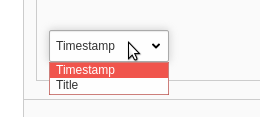
The function `user_orderBy` populates the select field in
`Backend/ItemsProcFunc.php`:
```php
class ItemsProcFunc
{
/**
* Modifies the select box of orderBy-options.
*
* @param array &$config configuration array
*/
public function user_orderBy(array &$config)
{
// simple and stupid example
// change this to dynamically populate the list!
$config['items'] = [
// label, value
['Timestamp', 'timestamp'],
['Title', 'title']
];
}
// ...
}
```
How this looks when configuring the plugin:
> [!NOTE]
> **See also**
>
> - [-](https://docs.typo3.org/m/typo3/reference-tca/12.4/en-us/ColumnsConfig/Type/Select/Single/Index.html#columns-select-properties-itemsprocfunc) in TCA reference.
### Display fields conditionally (displayCond) {#flexformdisplaycond}
Some settings may only make sense, depending on other settings.
For example in one setting you define a sorting order (by date, title etc.)
and all sort orders except "title" have additional settings. These
should only be visible, if sort order "title" was not selected.
You can define conditions using displayCond. This dynamically defines
whether a setting should be displayed when the plugin is configured.
The conditions may for example depend on one or more other settings in the FlexForm,
on database fields of current record or be defined by a user function.
```xml
selectFIELD:settings.orderBy:!=:title
```
Again, the syntax and available fields and comparison operators is documented
in the TCA reference:
> [!NOTE]
> **See also**
>
> - [-](https://docs.typo3.org/m/typo3/reference-tca/12.4/en-us/Columns/Index.html#columns-properties-displaycond) in TCA Reference
### Reload on change {#flexformreload}
Especially in combination with conditionally displaying settings with
[displayCond](https://docs.typo3.org/permalink/t3coreapi:flexformdisplaycond@12.4), you may want to trigger
a reloading of the form when specific settings are changed. You
can do that with:
```xml
reload
```
The `onChange` element is optional and must be placed on the same level as the `` element.
### How to read FlexForms from an Extbase controller action {#read-flexforms-extbase}
The settings can be read using `$this->settings` in an
Extbase controller.
```php
$includeCategories = (bool) ($this->settings['includeCategories'] ?? false);
```
> [!WARNING]
> **Attention**
>
> If you wish to access a setting from your controller via
> `$this->settings`, the name of the setting must be prefixed with `settings.`,
> so literally `settings` directly followed by a dot (`.`).
### Read FlexForms values in PHP {#read-flexforms-php}
You can use the `FlexFormService` to read the content of a FlexForm field:
**EXT:my_extension/Classes/Controller/NonExtbaseController.php**
```php
use TYPO3\CMS\Core\Service\FlexFormService;
use TYPO3\CMS\Core\Utility\GeneralUtility;
final class NonExtbaseController
{
// Inject FlexFormService
public function __construct(
private readonly FlexFormService $flexFormService,
) {
}
// ...
private function loadFlexForm($flexFormString): array
{
return $this->flexFormService
->convertFlexFormContentToArray($flexFormString);
}
}
```
Using `FlexFormService->convertFlexFormContentToArray` the resulting
array can be used conveniently in most use cases:
```php
var_export(
$this->flexFormService->convertFlexFormContentToArray($flexFormString)
);
/* Output:
[
'settings' => [
'singlePid' => 25,
'listPid' => 380,
],
]
*/
```
The result of `GeneralUtility::xml2array()` preserves the internal
structure of the XML FlexForm, and is usually used to modify a FlexForm
string. See section [How to modify FlexForms from PHP](https://docs.typo3.org/permalink/t3coreapi:modify-flexforms-php@12.4) for an example.
```php
var_export(GeneralUtility::xml2array($flexFormString)));
/* Output:
[
'data' =>
[
'sDEF' =>
[
'lDEF' =>
[
'settings.singlePid' =>['vDEF' => '4',],
'settings.listPid' =>['vDEF' => '',],
],
],
],
];
*/
```
### How to modify FlexForms from PHP {#modify-flexforms-php}
Some situation make it necessary to modify FlexForms via PHP.
In order to convert a FlexForm to a PHP array, preserving the structure,
the `xml2array` method in `GeneralUtility` can be used to read
the FlexForm data, then the `FlexFormTools` can be used to write back the
changes.
```php
use \TYPO3\CMS\Core\Utility\GeneralUtility;
use \TYPO3\CMS\Core\Configuration\FlexForm\FlexFormTools;
$flexFormArray = GeneralUtility::xml2array($flexFormString);
$changedFlexFormArray = $this->doSomething($flexFormArray);
$flexFormTools = new FlexFormTools();
$flexFormString = $flexFormTools->flexArray2Xml($changedFlexFormArray, addPrologue: true);
```
### How to access FlexForms From TypoScript {#read-flexforms-ts}
It is possible to read FlexForm properties from TypoScript:
```typoscript
lib.flexformContent = CONTENT
lib.flexformContent {
table = tt_content
select {
pidInList = this
}
renderObj = COA
renderObj {
10 = TEXT
10 {
data = flexform: pi_flexform:settings.categories
}
}
}
```
The key `flexform` is followed by the field which holds the FlexForm data
(`pi_flexform`) and the name of the property whose content should be retrieved
(`settings.categories`).
> [!NOTE]
> **See also**
>
> - [TypoScript: flexform](https://docs.typo3.org/m/typo3/reference-typoscript/12.4/en-us/Functions/Data.html#data-type-gettext-flexform)
### Providing default values for FlexForms attributes {#default-flexforms-attribute}
When a new content element with an attached FlexForm is created, the
default values for each FlexForm attribute is fetched from the
`` XML attribute within the specification of each
FlexForm attribute. If that is missing, an empty value will be
shown in the backend ([FormEngine](https://docs.typo3.org/permalink/t3coreapi:formengine@12.4))
fields.
While you can use page TSconfig's [TCAdefaults](https://docs.typo3.org/m/typo3/reference-typoscript/12.4/en-us/PageTsconfig/TcaDefaults.html#pageTsTcaDefaults) to
modify defaults of usual TCA-based attributes, this is not
possible on FlexForms. This is because the values are calculated
at an earlier step in the Core workflow, where FlexForm values
have not yet been extracted.
### How to access FlexForms from Fluid {#read-flexforms-fluid}
If you are using an Extbase controller, FlexForm settings can be read from within a Fluid template using
`{settings}`. See the note on naming restrictions in [How to Read FlexForms From an Extbase Controller Action](https://docs.typo3.org/permalink/t3coreapi:read-flexforms-extbase@12.4).
If you defined your `FLUIDTEMPLATE` in TypoScript, you can assign single variables like that:
```typoscript
my_content = FLUIDTEMPLATE
my_content {
variables {
categories = TEXT
categories.data = flexform: pi_flexform:categories
}
}
```
In order to have all FlexForm fields available, you can use the FlexFormProcessor. See also
[FlexFormProcessor in the TypoScript Reference](https://docs.typo3.org/m/typo3/reference-typoscript/12.4/en-us/DataProcessing/FlexFormProcessor.html#FlexFormProcessor).
This example would make your FlexForm data available as Fluid variable `{myOutputVariable}`:
```typoscript
my_content = FLUIDTEMPLATE
my_content {
dataProcessing {
10 = TYPO3\CMS\Frontend\DataProcessing\FlexFormProcessor
10.fieldName = my_flexform_field
10.as = myOutputVariable
}
}
```
> [!NOTE]
> **See also**
>
> [FlexFormProcessor](https://docs.typo3.org/m/typo3/reference-typoscript/12.4/en-us/DataProcessing/FlexFormProcessor.html#FlexFormProcessor).
## Steps to Perform (Editor) {#steps-to-perform-editor}
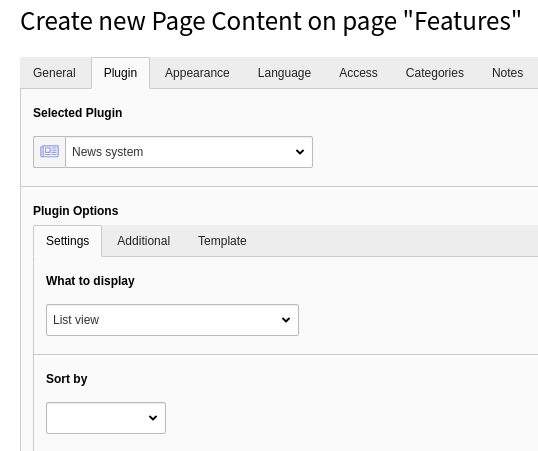
After inserting a plugin, the editor can configure this plugin by switching
to the tab "Plugin" or whatever string you defined to replace this.
## Credits {#credits}
Some of the examples were taken from the extensions
[EXT:news](https://extensions.typo3.org/extension/news) (by Georg Ringer)
and [EXT:bootstrap_package](https://extensions.typo3.org/extension/bootstrap_package)
(by Benjamin Kott).
Further enhancements by the TYPO3 community are welcome!
## T3DataStructure {#t3datastructure}
More information on the used data structures within FlexForms can be found
in these following chapters:
- [T3DataStructure](https://docs.typo3.org/permalink/t3coreapi:t3datastructure@12.4)
- [Elements](https://docs.typo3.org/permalink/t3coreapi:elements@12.4)
- [Sheet References](https://docs.typo3.org/permalink/t3coreapi:sheet-references@12.4)
- [Parsing a Data Structure](https://docs.typo3.org/permalink/t3coreapi:parsing-a-data-structure@12.4)