---
title: "Content security policy"
manual: "TYPO3 Explained"
version: "main"
permalink: "https://docs.typo3.org/permalink/t3coreapi:content-security-policy@main"
source: "ApiOverview/ContentSecurityPolicy/Index.rst"
rendered: "2026-09-19T06:56:03+00:00"
---

# Content security policy {#content-security-policy}

-   [Introduction](https://docs.typo3.org/permalink/t3coreapi:introduction@main)
-   [Terminology](https://docs.typo3.org/permalink/t3coreapi:terminology@main)
-   [Example scenario](https://docs.typo3.org/permalink/t3coreapi:example-scenario@main)
-   [Configuration](https://docs.typo3.org/permalink/t3coreapi:configuration@main)
-   [Nonce](https://docs.typo3.org/permalink/t3coreapi:nonce@main)
-   [Reporting of violations, "Content Security Policy" (CSP) backend module](https://docs.typo3.org/permalink/t3coreapi:reporting-of-violations-content-security-policy-csp-backend-module@main)
-   [PSR-14 events](https://docs.typo3.org/permalink/t3coreapi:psr-14-events@main)

## Introduction {#content-security-policy-introduction}

Content Security Policy (CSP) is a security standard introduced to prevent
[cross-site scripting (XSS)](https://docs.typo3.org/permalink/t3coreapi:security-xss@main), clickjacking and other code
injection attacks resulting of malicious content being executed in the trusted
web page context.

Think of CSP in terms of an "allow/deny" list for remote contents.

> [!NOTE]
> **See also**
>
> If you are not familiar with Content Security Policy, please read the
> following resources:
>
> -   [Introduction to Content Security Policy (CSP)](https://b13.com/blog/introduction-to-content-security-policy-csp)
> -   [https://developer.mozilla.org/en-US/docs/Web/HTTP/CSP](https://developer.mozilla.org/en-US/docs/Web/HTTP/CSP)
> -   [https://developer.mozilla.org/en-US/docs/Web/HTTP/Headers/Content-Security-Policy](https://developer.mozilla.org/en-US/docs/Web/HTTP/Headers/Content-Security-Policy)
>
> At the TYPO3 Developer Days 2023 Oliver Hader talked about Content Security
> Policy in general and in TYPO3:
>
> -   [https://www.youtube.com/watch?v=a_cS2XfCplI&t=28766s](https://www.youtube.com/watch?v=a_cS2XfCplI&t=28766s)
>
> Another great and often updated resource from Chris Müller from his CSP workshops:
>
> -   [Google translation](https://brotkrueml-dev.translate.goog/presentations/t3cmd25/csp_einfuehrung.html?_x_tr_sl=auto&_x_tr_tl=en&_x_tr_hl=en&_x_tr_pto=wapp&_x_tr_hist=true)
>     of [Introduction to CSP](https://brotkrueml.dev/presentations/t3cmd25/csp_einfuehrung.html)
> -   [Google translation](https://brotkrueml-dev.translate.goog/presentations/t3cmd25/csp_typo3.html?_x_tr_sl=auto&_x_tr_tl=en&_x_tr_hl=en&_x_tr_pto=wapp&_x_tr_hist=true)
>     of [CSP in TYPO3](https://brotkrueml.dev/presentations/t3cmd25/csp_typo3.html)

CSP rules are used to describe, which external assets or functionality are allowed for
certain HTML tags (like `<script>`, `<img>`, `<iframe>`). This allows
to restrict external resources or JavaScript execution with security in mind. When
accessing a page, these rules are sent as part of the HTTP request from the server to
the browser, and the browser will enforce these rules (and reject non-allowed content).
These rejection are always logged in the browser console. Additionally, external tools
can be configured to receive and track violations of the policy.

Content Security Policy declarations can be applied to a TYPO3 website in
frontend and backend scope with a dedicated API. This API allows for site-specific or
extension-specific configuration instead of manually setting the CSP rules with
server-side configuration through `httpd.conf/nginx.conf` or `.htaccess` files.

To delegate Content Security Policy handling to the TYPO3 frontend, at least one of
the feature flags:

-   [security.frontend.enforceContentSecurityPolicy](https://docs.typo3.org/permalink/t3coreapi:confval-globals-typo3-conf-vars-sys-features-security-frontend-enforcecontentsecuritypolicy@main)
    (for enforcing)
-   [security.frontend.reportContentSecurityPolicy](https://docs.typo3.org/permalink/t3coreapi:confval-globals-typo3-conf-vars-sys-features-security-frontend-reportcontentsecuritypolicy@main)
    (for report-only mode)

needs to be enabled, **or** the site-specific `csp.yaml` configuration
file needs to set the `enforce` or `report` disposition like this:

**config/sites/\<my_site>/csp.yaml | typo3conf/sites/\<my_site>/csp.yaml**

```yaml
enforce:
  inheritDefault: true
  # site-specific mutations could also be listed, like this:
  # mutations:
  #  - mode: "append"
  #    directive: "img-src"
  #    sources:
  #      - "cdn.example.com"
  #      - "assets.example.com"

# alternatively (or additionally!), reporting can be set too,
# for example when testing stricter rules than above
# (note the missing 'assets.example.com')
# report:
#   inheritDefault: true
#   mutations:
#    - mode: "append"
#      directive: "img-src"
#      sources:
#        - "cdn.example.com"
#

```

Within the TYPO3 backend, a specific backend module is available to inspect policy
violations / reports, and there is also a list to see all configured CSP rules,
see section [Active content security policy rules](https://docs.typo3.org/permalink/t3coreapi:content-security-policy-backend-rules@main).

## Terminology {#content-security-policy-terminology}

This document will use very specific wording that is part of the CSP W3C specification,
these terms are not "invented" by TYPO3. Since reading the W3C RFC can be very
intimidating, here are a few key concepts.

> [!NOTE]
> Skip to the section [Example scenario](https://docs.typo3.org/permalink/t3coreapi:content-security-policy-example@main) to see a "real-life" usage
> scenario, if you can better understand from actual code examples.

### Directives {#content-security-policy-terminology-directives}

-   CSP consists of multiple rules (or "directives"), that are part of a "policy". This
    policy says, what functionality the site's output is allowed to use.
-   With that, several HTML tags can be controlled, like from which URLs images can be
    requested from, if and from where iframes are allowed, if and from where JavaScripts
    are allowed and so on. There is a long list of applicable directives, see
    [https://developer.mozilla.org/en-US/docs/Web/HTTP/Headers/Content-Security-Policy#directives](https://developer.mozilla.org/en-US/docs/Web/HTTP/Headers/Content-Security-Policy#directives)
    with specific identifiers like `default-src`, `img-src` and so on.
-   Each directive may have several "attributes" (like the allowed URLs).
-   Directives may build upon each other, a bit like CSS definitions (`Cascading Style Sheet`)
    do. However, these are more meant to modify a basic rule on an earlier level,
    and called "mutations". The relation of a "child rule" to its "parent" is
    also called "ancestor chain". An example:

    If `frame-src` is not defined, it falls back to `child-src`, and finally falls
    back to `default-src`. But if `frame-src` is defined, it is used, and
    the sources from `default-src` are not used. In such a case, `default-src` listed
    sources have to be repeated (when wanted) explicitly in `frame-src`.

### Applying the policy {#content-security-policy-terminology-policy}

-   A final policy is compiled of all these directives, and then sent as a HTTP
    response header `Content-Security-Policy: ...` (respectively
    `Content-Security-Policy-Reporty-Only`).
-   In TYPO3, directives can be specified via PHP syntax (within Extensions) and
    YAML syntax (within site configuration). Additionally, rules can be
    set via the PSR-14 event [PolicyMutatedEvent](https://docs.typo3.org/permalink/t3coreapi:policymutatedevent@main).

### Mutations {#content-security-policy-terminology-mutations}

-   These rules can influence each other, this is where the concept of "mutations" come in.
    The "policy builder" of TYPO3 applies each configured mutation, no matter where it was
    defined.
-   Because of this, each mutation (directive definition) needs a specific "mode" that can
    instruct, how this mutation is applied: Should an existing directive be
    set, inherited, appended, remove or extended to the final policy (see
    [Content security police modes](https://docs.typo3.org/permalink/t3coreapi:content-security-policy-modes@main)).
-   Each directive is then applied in regard to its defined mode and can list one or more
    "sources" with the values of additional parameters of a directive. Sources are
    web site addresses / URLs (or just protocols), and also include some special keywords like
    `self`/`none`/`data:`.

### Nonces {#content-security-policy-terminology-nonces}

-   There are possible exemptions to directives for specific content created on specific
    pages created by TYPO3 in your frontend (or backend modules). To verify, that these
    exemptions are valid in a policy, a so-called "Nonce" (a unique "**n**umber used **once**")
    is created (details on [https://developer.mozilla.org/en-US/docs/Web/HTML/Global_attributes/nonce](https://developer.mozilla.org/en-US/docs/Web/HTML/Global_attributes/nonce)).

    -   TYPO3 can manage these Nonces and apply them where configured.
    -   Nonces are retrieved from `\TYPO3\CMS\Core\Security\ContentSecurityPolicy\ConsumableNonce`
        and will be used for any directive within the scope of a single HTTP request.
    -   More details are covered in [Nonce](https://docs.typo3.org/permalink/t3coreapi:content-security-policy-nonce@main).

### Policy violations and reporting {#content-security-policy-terminology-violations}

-   When a webpage with activated policies is shown in a client's browser, each HTML tag
    violating the policy will not be interpreted by the browser.
-   Depending on a configuration of a possible "Report", such violations can be submitted
    back to a server and be evaluated there. TYPO3 provides such an endpoint to receive
    and display reports in a backend module, but also third-party servers are usable.
-   Policies can be declared with "dispositions", to indicate how they are handled.
    "Enforce" means that a policy is in effect, and "Report" allows to only pretend
    a policy is in effect, to gather knowledge about possible improvements of a
    webpage's output. Both dispositions can be set independently in TYPO3.
-   All active rules can be seen in the backend configuration section, see
    [Active content security policy rules](https://docs.typo3.org/permalink/t3coreapi:content-security-policy-backend-rules@main).

## Example scenario {#content-security-policy-example}

Let's define a small real-world scenario:

-   You have one TYPO3 installation with two sites (frontend), `example.com` and `example.org`.
-   You have created custom backend modules for some distinct functionality.
-   `example.com` is a site where your editors fully control all frontend content, and they
    want to have full flexibility of what and how to embed. You use a CDN network to deliver
    your own large assets, like videos.
-   `example.org` is a community-driven site, where users can manage profiles and post chats,
    and where you want to prevent exploits on your site. Some embedding to a set of allowed
    web services (YouTube, Google Analytics) must be possible.

So you need to take care of security measures, and find a pragmatic way how to allow foreign
content (like YouTube, widgets, tracking codes, assets)

Specifically you want to to set these following rules, as an example.

> [!NOTE]
> The domains listed are for demonstration only, and will not match real requirements;
> for example, YouTube is already allowed by the default TYPO3 frontend CSP configuration,
> which can be inherited.

### Rules for example.com (editorial) {#content-security-policy-example-rules-example-com}

-   `<iframe>` to many services should be allowed
-   `<img>` sources to anywhere should be allowed
-   `<script>` sources to `cdn.example.com` and `*.youtube.com` and `*.google.com`
    should be allowed

### Rules for example.org (community) {#content-security-policy-example-rules-example-org}

-   `<iframe>` to `cdn.example.com`, `*.youtube.com` should be allowed
-   `<img>` sources to `cdn.example.com` and `*.instagram.com` should be allowed
-   `<script>` sources to `cdn.example.com` and `*.youtube.com` and `*.google.com`
    should be allowed

### Rules for the TYPO3 backend {#content-security-policy-example-rules-typo3-backend}

Normal TYPO3 backend rules need to be applied, so we only want to add some
rules for custom backend modules:

-   `<iframe>` to `cdn.example.com` should be allowed
-   `<img>` sources to `cdn.example.com` should be allowed
-   `<script>` sources to `cdn.example.com` should be allowed

### Resulting configuration example: {#content-security-policy-example-resulting-configuration-example}

And this is how you would do that with a CSP YAML configuration file, one per site:

**config/sites/example-com/csp.yaml | typo3conf/sites/example-com/csp.yaml**

```yaml
# Inherits default frontend policy mutations provided by Core and 3rd-party extensions (enabled per default)
inheritDefault: true
mutations:
  # Allow frames/iframes to TRUSTED specific locations
  # Avoid "protocol only" white-list like "https:" here,
  # because it could inject javascript easily, the most important reason
  # why CSP was invented was to block security issues like this.
  # (Note: it's "frame-src" not "iframe-src")
  - mode: "extend"
    directive: "frame-src"
    sources:
      - "https://*.example.org"
      - "https://*.example.com"
      - "https://*.instagram.com"
      - "https://*.vimeo.com"
      - "https://*.youtube.com"

  # Allow img src to anyhwere (HTTPS only, not HTTP)
  - mode: "extend"
    directive: "img-src"
    sources:
      - "https:"

  # Allow script src to the specified domains (HTTPS only)
  - mode: "extend"
    directive: "script-src"
    sources:
      - "https://cdn.example.com"
      - "https://*.youtube.com"
      - "https://*.google.com"

```

**config/sites/example-org/csp.yaml | typo3conf/sites/example-org/csp.yaml**

```yaml
# Inherits default frontend policy mutations provided by Core and 3rd-party extensions (enabled per default)
inheritDefault: true
mutations:
  # Allow frame/iframe src to the specified domains (HTTPS only)
  - mode: "extend"
    # (Note: it's "frame-src" not "iframe-src")
    directive: "frame-src"
    sources:
      - "https://cdn.example.com"
      - "https://*.youtube.com"

  # Allow img src to the specified domains (HTTPS only)
  - mode: "extend"
    directive: "img-src"
    sources:
      - "https://cdn.example.com"
      - "https://*.instagram.com"

  # Allow script src to the specified domains (HTTPS only)
  - mode: "extend"
    directive: "script-src"
    sources:
      - "https://cdn.example.com"
      - "https://*.youtube.com"
      - "https://*.google.com"

```

**EXT:my_extension/Configuration/ContentSecurityPolicies.php**

```php
<?php

declare(strict_types=1);

use TYPO3\CMS\Core\Security\ContentSecurityPolicy\Directive;
use TYPO3\CMS\Core\Security\ContentSecurityPolicy\Mutation;
use TYPO3\CMS\Core\Security\ContentSecurityPolicy\MutationCollection;
use TYPO3\CMS\Core\Security\ContentSecurityPolicy\MutationMode;
use TYPO3\CMS\Core\Security\ContentSecurityPolicy\Scope;
use TYPO3\CMS\Core\Security\ContentSecurityPolicy\UriValue;
use TYPO3\CMS\Core\Type\Map;

return Map::fromEntries([
  // Provide declarations for the backend only
  Scope::backend(),
  new MutationCollection(
    new Mutation(
      MutationMode::Extend,
      // Note: it's "FrameSrc" not "IFrameSrc"
      Directive::FrameSrc,
      new UriValue('https://cdn.example.com'),
    ),
    new Mutation(
      MutationMode::Extend,
      Directive::ImgSrc,
      new UriValue('https://cdn.example.com'),
    ),
    new Mutation(
      MutationMode::Extend,
      Directive::ScriptSrc,
      new UriValue('https://cdn.example.com'),
    ),
  ),
]);

```

This is really just a simple demo, that has room for improvements. For example,
the allowed list of `*-src` values to any directive could actually be set through their common
parent, the `default-src` attribute. There is a very deep and nested possibility
to address the attributes of many HTML5 tags, which is covered in depth on
[https://developer.mozilla.org/en-US/docs/Web/HTTP/Headers/Content-Security-Policy#directives](https://developer.mozilla.org/en-US/docs/Web/HTTP/Headers/Content-Security-Policy#directives).

You can take a look into the PHP enum `\TYPO3\CMS\Core\Security\ContentSecurityPolicy\Directive`,
which gives you an overview of all supported directives.

Read on to understand more of the underlying API builder concepts below.

## Configuration {#content-security-policy-configuration}

### Policy builder approach {#content-security-policy-configuration-policy-builder-approach}

The following approach illustrates how a policy is build:

**EXT:my_extension/Configuration/ContentSecurityPolicies.php**

```php
<?php

use TYPO3\CMS\Core\Security\ContentSecurityPolicy\Directive;
use TYPO3\CMS\Core\Security\ContentSecurityPolicy\Policy;
use TYPO3\CMS\Core\Security\ContentSecurityPolicy\SourceKeyword;
use TYPO3\CMS\Core\Security\ContentSecurityPolicy\SourceScheme;
use TYPO3\CMS\Core\Security\ContentSecurityPolicy\UriValue;
use TYPO3\CMS\Core\Security\Nonce;

$nonce = Nonce::create();
$policy = (new Policy())
    // Results in `default-src 'self'`
    ->default(SourceKeyword::self)

    // Extends the ancestor directive ('default-src'),
    // thus reuses 'self' and adds additional sources
    // Results in `img-src 'self' data: https://*.typo3.org`
    ->extend(Directive::ImgSrc, SourceScheme::data, new UriValue('https://*.typo3.org'))

    // Extends the ancestor directive ('default-src'),
    // thus reuses 'self' and adds additional sources
    // Results in `script-src 'self' 'nonce-[random]'`
    // ('nonce-proxy' is substituted when compiling the policy)
    ->extend(Directive::ScriptSrc, SourceKeyword::nonceProxy)

    // Sets (overrides) the directive,
    // thus ignores 'self' of the 'default-src' directive
    // Results in `worker-src blob:`
    ->set(Directive::WorkerSrc, SourceScheme::blob);

header('Content-Security-Policy: ' . $policy->compile($nonce));

```

The result of the compiled and serialized result as HTTP header would look
similar to this (the following sections are using the same example, but utilize
different techniques for the declarations):

```none
Content-Security-Policy: default-src 'self';
    img-src 'self' data: https://*.typo3.org; script-src 'self' 'nonce-[random]';
    worker-src blob:
```

> [!NOTE]
> The policy builder is the low-level representation and interaction in PHP,
> any other configuration is using the same verbs to describe the CSP
> instructions. The `\TYPO3\CMS\Core\Security\ContentSecurityPolicy\Policy`
> object is used for compiling the CSP in a [middleware](https://docs.typo3.org/permalink/t3coreapi:request-handling@main).
> Thus, custom controllers or middlewares could use this approach; the last
> line
>
> ```php
> header('Content-Security-Policy: ' . $policy->compile($nonce));
> ```
>
> is an example to show the basic principle without having to explain
> [PSR-7](https://docs.typo3.org/permalink/t3coreapi:typo3-request@main)/[PSR-15](https://docs.typo3.org/permalink/t3coreapi:request-handling@main) details.
>
> For project integrations, the "mutations" (via
> [configuration](https://docs.typo3.org/permalink/t3coreapi:content-security-policy-extension@main),
> [YAML](https://docs.typo3.org/permalink/t3coreapi:content-security-policy-site@main),
> [resolutions in the UI](https://docs.typo3.org/permalink/t3coreapi:content-security-policy-reporting@main) or
> [events](https://docs.typo3.org/permalink/t3coreapi:content-security-policy-events@main)) shall be used.

### Extension-specific {#content-security-policy-extension}

Policies for frontend and backend can be applied automatically by providing a
[`Configuration/ContentSecurityPolicies.php`](../../ExtensionArchitecture/FileStructure/Configuration/ContentSecurityPolicies.md#file-extension-configuration-contentsecuritypolicies-php) file in an extension, for
example:

**EXT:my_extension/Configuration/ContentSecurityPolicies.php**

```php
<?php

declare(strict_types=1);

use TYPO3\CMS\Core\Security\ContentSecurityPolicy\Directive;
use TYPO3\CMS\Core\Security\ContentSecurityPolicy\Mutation;
use TYPO3\CMS\Core\Security\ContentSecurityPolicy\MutationCollection;
use TYPO3\CMS\Core\Security\ContentSecurityPolicy\MutationMode;
use TYPO3\CMS\Core\Security\ContentSecurityPolicy\Scope;
use TYPO3\CMS\Core\Security\ContentSecurityPolicy\SourceKeyword;
use TYPO3\CMS\Core\Security\ContentSecurityPolicy\SourceScheme;
use TYPO3\CMS\Core\Security\ContentSecurityPolicy\UriValue;
use TYPO3\CMS\Core\Type\Map;

return Map::fromEntries(
  [
    // Provide declarations for the backend
    Scope::backend(),
    // NOTICE: When using `MutationMode::Set` existing declarations will be overridden

    new MutationCollection(
      // Results in `default-src 'self'`
      new Mutation(
        MutationMode::Set,
        Directive::DefaultSrc,
        SourceKeyword::self,
      ),

      // Extends the ancestor directive ('default-src'),
      // thus reuses 'self' and adds additional sources
      // Results in `img-src 'self' data: https://*.typo3.org`
      new Mutation(
        MutationMode::Extend,
        Directive::ImgSrc,
        SourceScheme::data,
        new UriValue('https://*.typo3.org'),
      ),
      // NOTICE: the following two instructions for `Directive::ImgSrc` are identical to the previous instruction,
      // `MutationMode::Extend` is a shortcut for `MutationMode::InheritOnce` and `MutationMode::Append`
      // new Mutation(MutationMode::InheritOnce, Directive::ImgSrc, SourceScheme::data),
      // new Mutation(MutationMode::Append, Directive::ImgSrc, SourceScheme::data, new UriValue('https://*.typo3.org')),

      // Extends the ancestor directive ('default-src'),
      // thus reuses 'self' and adds additional sources
      // Results in `script-src 'self' 'nonce-[random]'`
      // ('nonce-proxy' is substituted when compiling the policy)
      new Mutation(
        MutationMode::Extend,
        Directive::ScriptSrc,
        SourceKeyword::nonceProxy,
      ),

      // Sets (overrides) the directive,
      // thus ignores 'self' of the 'default-src' directive
      // Results in `worker-src blob:`
      new Mutation(
        MutationMode::Set,
        Directive::WorkerSrc,
        SourceScheme::blob,
      ),
    ),
  ],
  [
    // You can also additionally provide frontend declarations
    Scope::frontend(),
    new MutationCollection(
      // Sets (overrides) the directive,
      // thus ignores 'self' of the 'default-src' directive
      // Results in `worker-src https://*.workers.example.com:`
      new Mutation(
        MutationMode::Set,
        Directive::WorkerSrc,
        new UriValue('https://*.workers.example.com'),
      ),
    ),
  ],
);

```

The API here is much like the YAML syntax. The PHP code needs to return
a mapped array of an `MutationCollection`
instance with all rules put into a sub-array, containing instances of a
single `Mutation`.

Each `Mutation`
instance is like a Data Object (DO) where its constructor allows you to
specifiy a `mode` (type `MutationMode`),
a `directive` (type `Directive`)
and one ore more actual values ("sources", type
`UriValue` or
`SourceKeyword`).

Each entry in the returned map is keyed by a
`Scope` instance —
either `\TYPO3\CMS\Core\Security\ContentSecurityPolicy\Scope::backend()`
or `\TYPO3\CMS\Core\Security\ContentSecurityPolicy\Scope::frontend()`.
The scope is required, not optional: there is no way to apply a single set
of mutations to both frontend and backend at once. To apply the same
mutations to both, add two separate entries, one per scope.

A good PHP IDE will allow for good autocompletion and hinting, and using
a boilerplate configuration like the example above helps you to get started.

### Backend-specific {#content-security-policy-backend-specification}

The YAML configuration only applies to the frontend part of TYPO3.
Backend policies need to be set using the PHP API, within an extension
as described in the [section above](https://docs.typo3.org/permalink/t3coreapi:content-security-policy-extension@main).

You need to ensure that `Scope::backend()` is set in the mapped return array
for the rules you want to setup.

### Site-specific (frontend) {#content-security-policy-site}

In frontend, a dedicated `sites/<my_site>/csp.yaml` can be
used to declare policies for a specific site, for example:

**config/sites/\<my_site>/csp.yaml | typo3conf/sites/\<my_site>/csp.yaml**

```yaml
# Inherits default site-unspecific frontend policy mutations (enabled per default)
inheritDefault: true
mutations:
  # Results in `default-src 'self'`
  - mode: "set"
    directive: "default-src"
    sources:
      - "'self'"

  # Extends the ancestor directive ('default-src'),
  # thus reuses 'self' and adds additional sources
  # Results in `img-src 'self' data: https://*.typo3.org`
  - mode: "extend"
    directive: "img-src"
    sources:
      - "data:"
      - "https://*.typo3.org"

  # Extends the ancestor directive ('default-src'),
  # thus reuses 'self' and adds additional sources
  # Results in `script-src 'self' 'nonce-[random]'`
  # ('nonce-proxy' is substituted when compiling the policy)
  - mode: "extend"
    directive: "script-src"
    sources:
      - "'nonce-proxy'"

  # Results in `worker-src blob:`
  - mode: "set"
    directive: "worker-src"
    sources:
      - "blob:"

```

#### Disable CSP for a site {#content-security-policy-site-active}

The Content Security Policy for a particular site can be disabled with the
`active` key set to `false`:

**config/sites/\<my_site>/csp.yaml | typo3conf/sites/\<my_site>/csp.yaml**

```yaml
# "active" is enabled by default if omitted
active: false

```

#### Site-specific Content-Security-Policy endpoints {#content-security-policy-site-endpoints}

The reporting endpoint is used to receive browser reports about violations to
the security policy, for example if a YouTube URL was requested, but could
not be displayed in an iframe due to a directive not allowing this.

Reports like this can help to gain insight, what URLs are used by editors
and might need inclusion into the policy.

Since reports can be sent by any browser, they can possibly easily flood
a site with requests and take up storage space. Reports are stored in the
`sys_http_report` database table when using the endpoint provided by TYPO3.

To influence whether this endpoint accepts reports,
the disposition-specific property `reportingUrl` can be configured and
set to either:

-   **`true`**

    to enable the reporting endpoint

-   **`false`**

    to disable the reporting endpoint

-   **(string)**

    to use the given value as external reporting endpoint

If defined, the site-specific configuration takes precedence over
the global configuration [contentSecurityPolicyReportingUrl](https://docs.typo3.org/permalink/t3coreapi:content-security-policy-reporting-contentsecuritypolicyreportingurl@main).

In case the explicitly disabled endpoint still would be called, the
server-side process responds with a 403 HTTP error message.

##### Example: disabling the reporting endpoint {#content-security-policy-site-endpoints-disable}

**config/sites/\<my-site>/csp.yaml | typo3conf/sites/\<my_site>/csp.yaml**

```yaml
enforce:
  inheritDefault: true
  mutations: {}
  reportingUrl: false

```

##### Example: using custom external reporting endpoint {#content-security-policy-site-endpoints-custom}

**config/sites/\<my-site>/csp.yaml | typo3conf/sites/\<my_site>/csp.yaml**

```yaml
enforce:
  inheritDefault: true
  mutations: {}
  reportingUrl: https://example.org/csp-report

```

### Content security police modes {#content-security-policy-modes}

Adjusting specific directives / mutations for a policy can be performed
via the following modes:

-   **append**

    -   *YAML:* `append`
    -   *PHP:* `\TYPO3\CMS\Core\Security\ContentSecurityPolicy\MutationMode::Append`

    Appends to a given directive.

    Example:

    **config/sites/\<my_site>/csp.yaml | typo3conf/sites/\<my_site>/csp.yaml**

    ```yaml
    mutations:
      - mode: "set"
        directive: "default-src"
        sources:
          - "'self'"

      - mode: "set"
        directive: "img-src"
        sources:
          - "example.org"

      - mode: "append"
        directive: "img-src"
        sources:
          - "example.com"

    ```

    **EXT:my_extension/Configuration/ContentSecurityPolicies.php**

    ```php
    <?php

    declare(strict_types=1);

    use TYPO3\CMS\Core\Security\ContentSecurityPolicy\Directive;
    use TYPO3\CMS\Core\Security\ContentSecurityPolicy\Mutation;
    use TYPO3\CMS\Core\Security\ContentSecurityPolicy\MutationCollection;
    use TYPO3\CMS\Core\Security\ContentSecurityPolicy\MutationMode;
    use TYPO3\CMS\Core\Security\ContentSecurityPolicy\Scope;
    use TYPO3\CMS\Core\Security\ContentSecurityPolicy\SourceKeyword;
    use TYPO3\CMS\Core\Security\ContentSecurityPolicy\UriValue;
    use TYPO3\CMS\Core\Type\Map;

    return Map::fromEntries([
      Scope::frontend(),
      new MutationCollection(
        new Mutation(
          MutationMode::Set,
          Directive::DefaultSrc,
          SourceKeyword::self,
        ),
        new Mutation(
          MutationMode::Set,
          Directive::ImgSrc,
          new UriValue('example.org'),
        ),
        new Mutation(
          MutationMode::Append,
          Directive::ImgSrc,
          new UriValue('example.com'),
        ),
      ),
    ]);

    ```

    Results in:

    ```http
    Content-Security-Policy: default-src 'self'; img-src example.org example.com
    ```

-   **extend**

    -   *YAML:* `extend`
    -   *PHP:* `\TYPO3\CMS\Core\Security\ContentSecurityPolicy\MutationMode::Extend`

    Extends the given directive. It is a shortcut for
    [inherit-once](https://docs.typo3.org/permalink/t3coreapi:confval-content-security-policy-mode-inherit-once@main) and
    [append](https://docs.typo3.org/permalink/t3coreapi:confval-content-security-policy-mode-append@main).

    Example:

    **config/sites/\<my_site>/csp.yaml | typo3conf/sites/\<my_site>/csp.yaml**

    ```yaml
    mutations:
      - mode: "set"
        directive: "default-src"
        sources:
          - "'self'"

      - mode: "extend"
        directive: "img-src"
        sources:
          - "example.com"

    ```

    **EXT:my_extension/Configuration/ContentSecurityPolicies.php**

    ```php
    <?php

    declare(strict_types=1);

    use TYPO3\CMS\Core\Security\ContentSecurityPolicy\Directive;
    use TYPO3\CMS\Core\Security\ContentSecurityPolicy\Mutation;
    use TYPO3\CMS\Core\Security\ContentSecurityPolicy\MutationCollection;
    use TYPO3\CMS\Core\Security\ContentSecurityPolicy\MutationMode;
    use TYPO3\CMS\Core\Security\ContentSecurityPolicy\Scope;
    use TYPO3\CMS\Core\Security\ContentSecurityPolicy\SourceKeyword;
    use TYPO3\CMS\Core\Security\ContentSecurityPolicy\UriValue;
    use TYPO3\CMS\Core\Type\Map;

    return Map::fromEntries([
      Scope::frontend(),
      new MutationCollection(
        new Mutation(
          MutationMode::Set,
          Directive::DefaultSrc,
          SourceKeyword::self,
        ),
        new Mutation(
          MutationMode::Extend,
          Directive::ImgSrc,
          new UriValue('example.com'),
        ),
      ),
    ]);

    ```

    Results in:

    ```http
    Content-Security-Policy: default-src 'self'; img-src 'self' example.com
    ```

-   **inherit-again**

    -   *YAML:* `inherit-again`
    -   *PHP:* `\TYPO3\CMS\Core\Security\ContentSecurityPolicy\MutationMode::InheritAgain`

    Inherits again from the corresponding ancestor chain and merges existing
    sources.

    Example:

    **config/sites/\<my_site>/csp.yaml | typo3conf/sites/\<my_site>/csp.yaml**

    ```yaml
    inheritDefault: false
    mutations:
      - mode: "set"
        directive: "default-src"
        sources:
          - "'self'"

      - mode: "inherit-again"
        directive: "img-src"

      - mode: "append"
        directive: "img-src"
        sources:
          - "example.com"

      - mode: "set"
        directive: "default-src"
        sources:
          - "data:"

      - mode: "inherit-again"
        directive: "img-src"

    ```

    **EXT:my_extension/Configuration/ContentSecurityPolicies.php**

    ```php
    <?php

    declare(strict_types=1);

    use TYPO3\CMS\Core\Security\ContentSecurityPolicy\Directive;
    use TYPO3\CMS\Core\Security\ContentSecurityPolicy\Mutation;
    use TYPO3\CMS\Core\Security\ContentSecurityPolicy\MutationCollection;
    use TYPO3\CMS\Core\Security\ContentSecurityPolicy\MutationMode;
    use TYPO3\CMS\Core\Security\ContentSecurityPolicy\Scope;
    use TYPO3\CMS\Core\Security\ContentSecurityPolicy\SourceKeyword;
    use TYPO3\CMS\Core\Security\ContentSecurityPolicy\SourceScheme;
    use TYPO3\CMS\Core\Security\ContentSecurityPolicy\UriValue;
    use TYPO3\CMS\Core\Type\Map;

    return Map::fromEntries([
      Scope::frontend(),
      new MutationCollection(
        new Mutation(
          MutationMode::Set,
          Directive::DefaultSrc,
          SourceKeyword::self,
        ),
        new Mutation(
          MutationMode::InheritAgain,
          Directive::ImgSrc,
        ),
        new Mutation(
          MutationMode::Append,
          Directive::ImgSrc,
          new UriValue('example.com'),
        ),
        new Mutation(
          MutationMode::Set,
          Directive::DefaultSrc,
          SourceScheme::data,
        ),
        new Mutation(
          MutationMode::InheritAgain,
          Directive::ScriptSrc,
        ),
      ),
    ]);

    ```

    Results in:

    ```http
    Content-Security-Policy: default-src data:; img-src data: 'self' example.com
    ```

    Note that `data:` is inherited to `img-src`
    (in opposite to [inherit-once](https://docs.typo3.org/permalink/t3coreapi:confval-content-security-policy-mode-inherit-once@main)).

-   **inherit-once**

    -   *YAML:* `inherit-once`
    -   *PHP:* `\TYPO3\CMS\Core\Security\ContentSecurityPolicy\MutationMode::InheritOnce`

    Inherits once from the corresponding ancestor chain. When `inherit-once` is
    called multiple times on the same directive, only the first time is applied.

    Example:

    **config/sites/\<my_site>/csp.yaml | typo3conf/sites/\<my_site>/csp.yaml**

    ```yaml
    inheritDefault: false
    mutations:
      - mode: "set"
        directive: "default-src"
        sources:
          - "'self'"

      - mode: "inherit-once"
        directive: "img-src"

      - mode: "append"
        directive: "img-src"
        sources:
          - "example.com"

      - mode: "set"
        directive: "default-src"
        sources:
          - "data:"

      - mode: "inherit-once"
        directive: "img-src"

    ```

    **EXT:my_extension/Configuration/ContentSecurityPolicies.php**

    ```php
    <?php

    declare(strict_types=1);

    use TYPO3\CMS\Core\Security\ContentSecurityPolicy\Directive;
    use TYPO3\CMS\Core\Security\ContentSecurityPolicy\Mutation;
    use TYPO3\CMS\Core\Security\ContentSecurityPolicy\MutationCollection;
    use TYPO3\CMS\Core\Security\ContentSecurityPolicy\MutationMode;
    use TYPO3\CMS\Core\Security\ContentSecurityPolicy\Scope;
    use TYPO3\CMS\Core\Security\ContentSecurityPolicy\SourceKeyword;
    use TYPO3\CMS\Core\Security\ContentSecurityPolicy\SourceScheme;
    use TYPO3\CMS\Core\Security\ContentSecurityPolicy\UriValue;
    use TYPO3\CMS\Core\Type\Map;

    return Map::fromEntries([
      Scope::frontend(),
      new MutationCollection(
        new Mutation(
          MutationMode::Set,
          Directive::DefaultSrc,
          SourceKeyword::self,
        ),
        new Mutation(
          MutationMode::InheritOnce,
          Directive::ImgSrc,
        ),
        new Mutation(
          MutationMode::Append,
          Directive::ImgSrc,
          new UriValue('example.com'),
        ),
        new Mutation(
          MutationMode::Set,
          Directive::DefaultSrc,
          SourceScheme::data,
        ),
        new Mutation(
          MutationMode::InheritOnce,
          Directive::ImgSrc,
        ),
      ),
    ]);

    ```

    Results in:

    ```http
    Content-Security-Policy: default-src data:; img-src 'self' example.com
    ```

    Note that `data:` is not inherited to `img-src`. If you want to inherit
    also `data:` to `img-src` use
    [inherit-again](https://docs.typo3.org/permalink/t3coreapi:confval-content-security-policy-mode-inherit-again@main).

-   **reduce**

    -   *YAML:* `reduce`
    -   *PHP:* `\TYPO3\CMS\Core\Security\ContentSecurityPolicy\MutationMode::Reduce`

    Reduces a directive by a given aspect.

    Example:

    **config/sites/\<my_site>/csp.yaml | typo3conf/sites/\<my_site>/csp.yaml**

    ```yaml
    mutations:
      - mode: "set"
        directive: "img-src"
        sources:
          - "'self'"
          - "data:"
          - "example.com"

      - mode: "reduce"
        directive: "img-src"
        sources:
          - "data:"

    ```

    **EXT:my_extension/Configuration/ContentSecurityPolicies.php**

    ```php
    <?php

    declare(strict_types=1);

    use TYPO3\CMS\Core\Security\ContentSecurityPolicy\Directive;
    use TYPO3\CMS\Core\Security\ContentSecurityPolicy\Mutation;
    use TYPO3\CMS\Core\Security\ContentSecurityPolicy\MutationCollection;
    use TYPO3\CMS\Core\Security\ContentSecurityPolicy\MutationMode;
    use TYPO3\CMS\Core\Security\ContentSecurityPolicy\Scope;
    use TYPO3\CMS\Core\Security\ContentSecurityPolicy\SourceKeyword;
    use TYPO3\CMS\Core\Security\ContentSecurityPolicy\SourceScheme;
    use TYPO3\CMS\Core\Security\ContentSecurityPolicy\UriValue;
    use TYPO3\CMS\Core\Type\Map;

    return Map::fromEntries([
      Scope::frontend(),
      new MutationCollection(
        new Mutation(
          MutationMode::Set,
          Directive::ImgSrc,
          SourceKeyword::self,
          SourceScheme::data,
          new UriValue('example.com'),
        ),
        new Mutation(
          MutationMode::Reduce,
          Directive::ImgSrc,
          SourceScheme::data,
        ),
      ),
    ]);

    ```

    Results in:

    ```http
    Content-Security-Policy: default-src 'self' example.com
    ```

-   **remove**

    -   *YAML:* `remove`
    -   *PHP:* `\TYPO3\CMS\Core\Security\ContentSecurityPolicy\MutationMode::Remove`

    Removes a directive completely.

    Example:

    **config/sites/\<my_site>/csp.yaml | typo3conf/sites/\<my_site>/csp.yaml**

    ```yaml
    mutations:
      - mode: "set"
        directive: "default-src"
        sources:
          - "'self'"

      - mode: "set"
        directive: "img-src"
        sources:
          - "data:"

      - mode: "remove"
        directive: "img-src"

    ```

    **EXT:my_extension/Configuration/ContentSecurityPolicies.php**

    ```php
    <?php

    declare(strict_types=1);

    use TYPO3\CMS\Core\Security\ContentSecurityPolicy\Directive;
    use TYPO3\CMS\Core\Security\ContentSecurityPolicy\Mutation;
    use TYPO3\CMS\Core\Security\ContentSecurityPolicy\MutationCollection;
    use TYPO3\CMS\Core\Security\ContentSecurityPolicy\MutationMode;
    use TYPO3\CMS\Core\Security\ContentSecurityPolicy\Scope;
    use TYPO3\CMS\Core\Security\ContentSecurityPolicy\SourceKeyword;
    use TYPO3\CMS\Core\Security\ContentSecurityPolicy\SourceScheme;
    use TYPO3\CMS\Core\Type\Map;

    return Map::fromEntries([
      Scope::frontend(),
      new MutationCollection(
        new Mutation(
          MutationMode::Set,
          Directive::DefaultSrc,
          SourceKeyword::self,
        ),
        new Mutation(
          MutationMode::Set,
          Directive::ImgSrc,
          SourceScheme::data,
        ),
        new Mutation(
          MutationMode::Remove,
          Directive::ImgSrc,
        ),
      ),
    ]);

    ```

    Results in:

    ```http
    Content-Security-Policy: default-src 'self'
    ```

-   **set**

    -   *YAML:* `set`
    -   *PHP:* `\TYPO3\CMS\Core\Security\ContentSecurityPolicy\MutationMode::Set`

    Sets (overrides) a directive completely.

    Example:

    **config/sites/\<my_site>/csp.yaml | typo3conf/sites/\<my_site>/csp.yaml**

    ```yaml
    mutations:
      - mode: "set"
        directive: "img-src"
        sources:
          - "'self'"

    ```

    **EXT:my_extension/Configuration/ContentSecurityPolicies.php**

    ```php
    <?php

    declare(strict_types=1);

    use TYPO3\CMS\Core\Security\ContentSecurityPolicy\Directive;
    use TYPO3\CMS\Core\Security\ContentSecurityPolicy\Mutation;
    use TYPO3\CMS\Core\Security\ContentSecurityPolicy\MutationCollection;
    use TYPO3\CMS\Core\Security\ContentSecurityPolicy\MutationMode;
    use TYPO3\CMS\Core\Security\ContentSecurityPolicy\Scope;
    use TYPO3\CMS\Core\Security\ContentSecurityPolicy\SourceKeyword;
    use TYPO3\CMS\Core\Type\Map;

    return Map::fromEntries([
      Scope::frontend(),
      new MutationCollection(
        new Mutation(
          MutationMode::Set,
          Directive::ImgSrc,
          SourceKeyword::self,
        ),
      ),
    ]);

    ```

    Results in:

    ```http
    Content-Security-Policy: img-src 'self'
    ```

## Nonce {#content-security-policy-nonce}

> The nonce attribute is useful to allowlist specific elements, such as a
> particular inline script or style elements. It can help you to avoid using
> the CSP unsafe-inline directive, which would allowlist all inline scripts or
> styles.
>
> -- MDN Web Docs, [https://developer.mozilla.org/en-US/docs/Web/HTML/Global_attributes/nonce](https://developer.mozilla.org/en-US/docs/Web/HTML/Global_attributes/nonce)

It may look like this in your HTML code:

**HTML output**

```html
<link
    rel="stylesheet"
    href="/_assets/af46f1853e4e259cbb8ebcb816eb0403/Css/styles.css?1687696548"
    media="all"
    nonce="sqK8LkqFp-aWHc7jkHQ4aT-RlUp5cde9ZW0F0-BlrQbExX-PRMoTkw"
>

<style nonce="sqK8LkqFp-aWHc7jkHQ4aT-RlUp5cde9ZW0F0-BlrQbExX-PRMoTkw">
    /* some inline styles */
</style>

<script
    src="/_assets/27334a649e36d0032b969fa8830590c2/JavaScript/scripts.js?1684880443"
    nonce="sqK8LkqFp-aWHc7jkHQ4aT-RlUp5cde9ZW0F0-BlrQbExX-PRMoTkw"
></script>

<script nonce="sqK8LkqFp-aWHc7jkHQ4aT-RlUp5cde9ZW0F0-BlrQbExX-PRMoTkw">
    /* some inline JavaScript */
</script>
```

The nonce changes with each request so that (possibly malicious) inline scripts
or styles are blocked by the browser.

The nonce is applied automatically, when scripts or styles are defined with the
TYPO3 API, like TypoScript (`page.includeJS`, etc.) or the
[asset collector](https://docs.typo3.org/permalink/t3coreapi:assets@main). This only refers to referenced files
(via `src` and `href` attributes) and not inline scripts
or inline styles. For those, you should either use the PHP/Fluid approach
as listed below, or use TypoScript only for passing DOM attributes
and using external scripts to actually evaluate these attributes to control
functionality.

> [!NOTE]
> Using a nonce in your HTML is not enough on its own — the relevant
> policy directive (for example `script-src` or `style-src`) must also
> allow the source keyword `nonce-proxy`, otherwise the nonce is never
> added to the compiled `Content-Security-Policy` header and the browser
> still blocks the content. See the `nonce-proxy` source in the
> [extension-specific](https://docs.typo3.org/permalink/t3coreapi:content-security-policy-extension@main) and
> [site-specific](https://docs.typo3.org/permalink/t3coreapi:content-security-policy-site@main) examples above.

TYPO3 provides APIs to get the nonce for the current request:

### Retrieve with PHP {#content-security-policy-nonce-retrieve-php}

The nonce can be retrieved via the
[nonce request attribute](https://docs.typo3.org/permalink/t3coreapi:typo3-request-attribute-nonce@main):

**EXT:my_extension/Classes/MyClass.php (excerpt)**

```php
// use TYPO3\CMS\Core\Security\ContentSecurityPolicy\ConsumableNonce
// use TYPO3\CMS\Core\Security\ContentSecurityPolicy\Directive

/** @var ConsumableNonce|null $nonceAttribute */
$nonceAttribute = $this->request->getAttribute('nonce');
if ($nonceAttribute instanceof ConsumableNonce) {
    $nonce = $nonceAttribute->consumeInline(Directive::ScriptSrcElem); // inline script
    // or
    $nonce = $nonceAttribute->consumeStatic(Directive::StyleSrcElem);  // static style
}
```

### In a Fluid template {#content-security-policy-nonce-fluid-template}

The [f:security.nonce](https://docs.typo3.org/other/typo3/view-helper-reference/main/en-us/Global/Security/Nonce.html#typo3-fluid-security-nonce) ViewHelper
is available, which provides the nonce in a Fluid template, for example:

**EXT:my_extension/Resources/Private/Templates/SomeTemplate.fluid.html**

```html
<script nonce="{f:security.nonce()}">
    const inline = 'script';
</script>

<style nonce="{f:security.nonce()}">
    .some-style { color: red; }
</style>
```

You can also use the [f:asset.script](https://docs.typo3.org/other/typo3/view-helper-reference/main/en-us/Global/Asset/Script.html#typo3-fluid-asset-script)
or [f:asset.css](https://docs.typo3.org/other/typo3/view-helper-reference/main/en-us/Global/Asset/Css.html#typo3-fluid-asset-css)
ViewHelpers with the `useNonce` attribute:

**EXT:my_extension/Resources/Private/Templates/SomeTemplate.fluid.html**

```html
<f:asset.script identifier="my-inline-script" useNonce="1">
    const inline = 'script';
</f:asset.script>

<f:asset.css identifier="my-inline-style" useNonce="1">
    .some-style { color: red; }
</f:asset.css>
```

### Notes about nonces and caching {#content-security-policy-nonce-caching}

Nonces are implemented via a PSR middleware and thus applied dynamically. This
also means, they are somewhat "bad" for caching (especially for reverse proxies),
since they create unique output for a specific visitor.

Since the goal of nonces are to allow "exemptions" for otherwise forbidden content,
this closely relates to validity or integrity of this forbidden content. Instead
of emitting unique nonces, another possibility is to utilize hashing functionality
to content regarded as "safe".

This can be done with sha256/sha384/sha512 hashing of referenced script, and including
them as a valid directive, like this:

The "sha256-..." block would be the SHA256 hash created from a file like 'script.js'.

For example, a file like this:

**script.js (some javascript file that is included in your website)**

```javascript
console.log('Hello.');
```

would correspond to a SHA256 hash of `6c7d3c1bf856597a2c8ae2ca7498cb4454a32286670b20cf36202fa578b491a9`.

> [!NOTE]
> These hashes can be created by shell scripts like `sha256` and several libraries,
> also in nodeJS bundling tools.

The browser would evaluate a reference JavaScript file and calculate it's SHA256
hash and compare it to the list of allowed hashes.

The downside of this is: Everytime an embedded file changes (like via build processes),
the CSP SHA hash would need to be adopted. This could be automated by a PHP definition
of CSP rules and hashing files automatically, which would be a performance-intense
process and call for its own caching.

There is no automatism for this kind of hashing in TYPO3 (yet, see
[https://forge.typo3.org/issues/100887](https://forge.typo3.org/issues/100887)), so it has to be done manually
as outlined above.

## Reporting of violations, "Content Security Policy" (CSP) backend module {#content-security-policy-reporting}

<!-- TODO: no Markdown rendering for "versionchanged" -->

This module has been moved from Admin tools to Settings.
See also: Feature: #107628 - Improved backend module naming and structure.

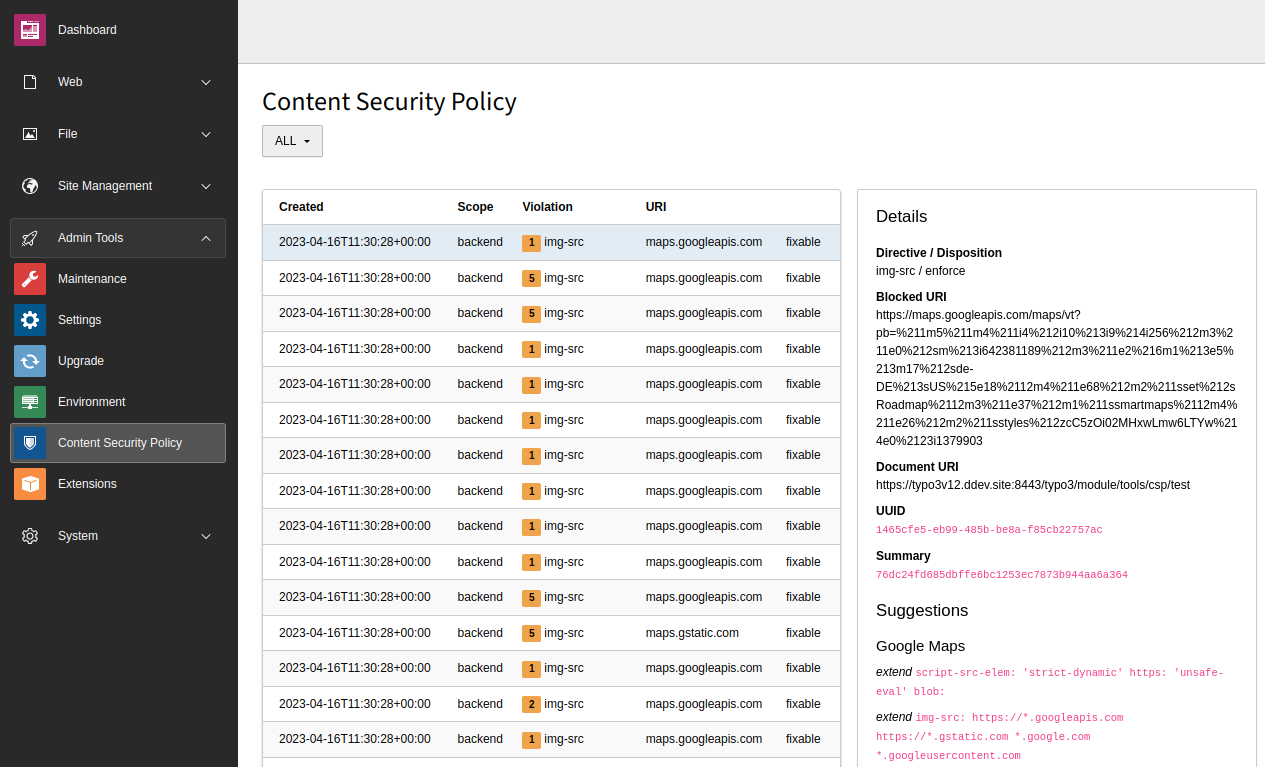
Potential CSP violations are reported back to the TYPO3 system and persisted
internally in the database table `sys_http_report`. A corresponding
**System > Content Security Policy** backend module supports users
to keep track of recent violations and - if applicable - to select potential
resolutions (stored in the database table `sys_csp_resolution`) which
extends the Content Security Policy for the given scope during runtime:
![](../../Images/ManualScreenshots/ContentSecurityPolicy/BackendModule.png)

Clicking on a row displays the details of this violation on the right side
including suggestions on how to resolve this violation. You have the choice to
apply this suggestion, or to mute or delete the specific violation.

> [!NOTE]
> If you apply the suggestion, it is stored in the database table
> `sys_csp_resolution`. To have all policies in one place, you
> should consider adding the suggestion to your
> [extension-specific](https://docs.typo3.org/permalink/t3coreapi:content-security-policy-extension@main) or
> [site-specific](https://docs.typo3.org/permalink/t3coreapi:content-security-policy-site@main) CSP definitions
> manually.

> [!WARNING]
> Resolutions, once applied, can not be removed again via the GUI. You would
> need to manually remove entries in the `sys_csp_resolution` database
> table.

### Using a third-party service {#content-security-policy-reporting-contentsecuritypolicyreportingurl}

As an alternative to the built-in reporting module, an external reporting URL
can be configured to use a third-party service as well:

**config/system/additional.php**

```php
<?php

// For backend
$GLOBALS['TYPO3_CONF_VARS']['BE']['contentSecurityPolicyReportingUrl']
    = 'https://csp-violation.example.org/';

// For frontend
$GLOBALS['TYPO3_CONF_VARS']['FE']['contentSecurityPolicyReportingUrl']
    = 'https://csp-violation.example.org/';

```

Violations are then sent to the third-party service instead of the TYPO3
endpoint. Resolutions would then not be applied dynamically.

### Disabling content security policy reporting globally {#content-security-policy-reporting-disable}

Administrators can disable the reporting endpoint globally or configure it per
site as needed. (See [Example: disabling the reporting endpoint](https://docs.typo3.org/permalink/t3coreapi:content-security-policy-site-endpoints-disable@main)).

If defined, the site-specific configuration takes precedence over
the global configuration.

In case the explicitly disabled endpoint still would be called, the
server-side process responds with a 403 HTTP error message.

The global scope-specific setting `contentSecurityPolicyReportingUrl` can
be set to zero ('0') to disable the CSP reporting endpoint:

**config/system/additional.php**

```php
<?php

// For backend
$GLOBALS['TYPO3_CONF_VARS']['BE']['contentSecurityPolicyReportingUrl'] = '0';

// For frontend
$GLOBALS['TYPO3_CONF_VARS']['FE']['contentSecurityPolicyReportingUrl'] = '0';

```

### Active content security policy rules {#content-security-policy-backend-rules}

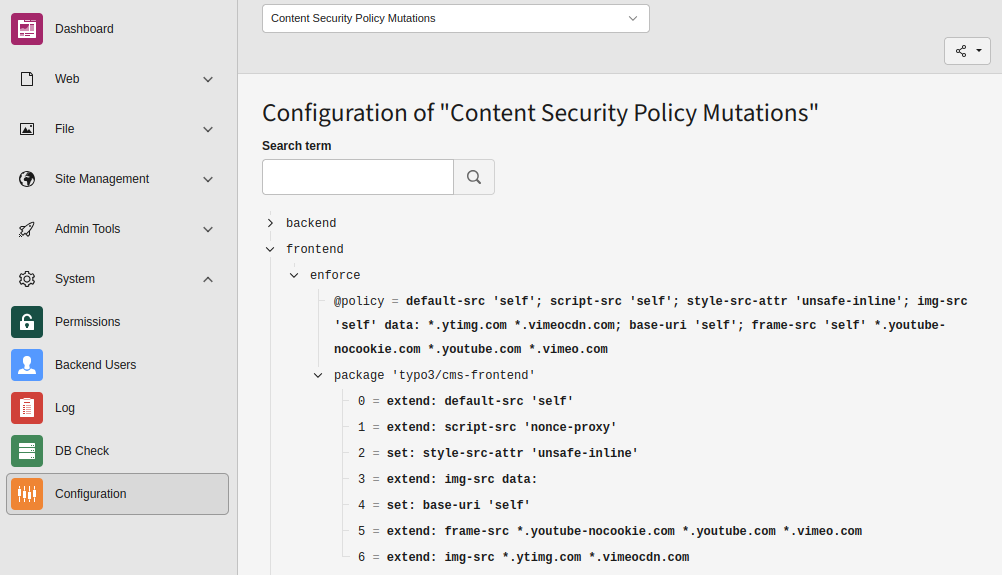
The backend module **System > Configuration > Content Security Policy Mutations**
uses a simple tree display of all configured directives, grouped by
frontend or backend. Each rule shows where it is defined, and what
its final policy is set to:
![](../../Images/ManualScreenshots/ContentSecurityPolicy/CspBackendConfiguration.png)

## PSR-14 events {#content-security-policy-events}

The following PSR-14 events are available:

-   [BeforePersistingReportEvent](https://docs.typo3.org/permalink/t3coreapi:beforepersistingreportevent@main)
-   [InvestigateMutationsEvent](https://docs.typo3.org/permalink/t3coreapi:investigatemutationsevent@main)
-   [PolicyMutatedEvent](https://docs.typo3.org/permalink/t3coreapi:policymutatedevent@main)
