---
title: "comma-separated-value data processor"
manual: "TypoScript Explained"
version: "13.4"
permalink: "https://docs.typo3.org/permalink/t3tsref:commaseparatedvalueprocessor@13.4"
source: "DataProcessing/CommaSeparatedValueProcessor.rst"
modified: "2026-09-15T07:24:16+00:00"
---
# `comma-separated-value` data processor
The `\TYPO3\CMS\Frontend\DataProcessing\CommaSeparatedValueProcessor`,
alias `comma-separated-value`, allows to split values into a
two-dimensional array used for CSV files or
`tt_content` records of CType `table`.
The table data is transformed to a multi-dimensional array, taking the delimiter
and enclosure into account, before it is passed to the view.
**Table of contents**
- [Options:](https://docs.typo3.org/permalink/t3tsref:options@13.4)
- [Example: Transforming comma separated content into a html table](https://docs.typo3.org/permalink/t3tsref:example-transforming-comma-separated-content-into-a-html-table@13.4)
## Options:
**if**
- **if**
- *Type:* [if](https://docs.typo3.org/permalink/t3tsref:if@13.4) condition
- *Required:* false
- *Default:* ''
If the condition is met, the data processor is processed.
**fieldName**
- **fieldName**
- *Type:* [string](https://docs.typo3.org/permalink/t3tsref:data-type-string@13.4) / [stdWrap](https://docs.typo3.org/permalink/t3tsref:stdwrap@13.4)
- *Required:* true
- *Default:* ''
Name of the field in the processed ContentObjectRenderer.
**as**
- **as**
- *Type:* [string](https://docs.typo3.org/permalink/t3tsref:data-type-string@13.4)
- *Required:* false
- *Default:* defaults to the fieldName
The variable's name to be used in the Fluid template.
**maximumColumns**
- **maximumColumns**
- *Type:* [integer](https://docs.typo3.org/permalink/t3tsref:data-type-integer@13.4) / [stdWrap](https://docs.typo3.org/permalink/t3tsref:stdwrap@13.4)
- *Required:* false
- *Default:* `0`
Maximal number of columns to be transformed. Surplus columns will be
silently dropped. When set to `0` (default) all columns will be
transformed.
**fieldDelimiter**
- **fieldDelimiter**
- *Type:* [string](https://docs.typo3.org/permalink/t3tsref:data-type-string@13.4) / [stdWrap](https://docs.typo3.org/permalink/t3tsref:stdwrap@13.4)
- *Required:* false
- *Default:* `,`
The field delimiter, a character separating the values.
**fieldEnclosure**
- **fieldEnclosure**
- *Type:* [string](https://docs.typo3.org/permalink/t3tsref:data-type-string@13.4) / [stdWrap](https://docs.typo3.org/permalink/t3tsref:stdwrap@13.4)
- *Required:* false
- *Default:* `"`
The field enclosure, a character surrounding the values.
## Example: Transforming comma separated content into a html table
Please see also [About the examples](https://docs.typo3.org/permalink/t3tsref:dataprocessing-about-examples@13.4).
In this example, the `bodytext` field contains comma-separated
values (CSV) data. To support different formats, the separator between
the values can be specified.
This example is also described in-depth in [TYPO3 Explained:
Extended content element example](https://docs.typo3.org/m/typo3/reference-coreapi/13.4/en-us/ApiOverview/ContentElements/AddingYourOwnContentElements.html#AddingCE-Extended-Example).
**Example data in the field `bodytext`**
Field `bodytext` in table `tt_content`:
```text
"This is row 1 column 1","This is row 1 column 2","This is row 1 column 3"
"This is row 2 column 1","This is row 2 column 2","This is row 2 column 3"
"This is row 3 column 1","This is row 3 column 2","This is row 3 column 3"
```
**TypoScript**
We define the `dataProcessing` property to use the
`CommaSeparatedValueProcessor`:
**EXT:examples/Configuration/TypoScript/DataProcessors/Processors/CommaSeparatedValueProcessor.typoscript**
```typoscript
tt_content {
examples_newcontentcsv =< lib.contentElement
examples_newcontentcsv {
templateName = DataProcCsv
dataProcessing.10 = comma-separated-value
dataProcessing.10 {
if.isTrue.field = bodytext
fieldName = bodytext
fieldDelimiter.field = tx_examples_separator
fieldEnclosure = "
maximumColumns.field = imagecols
as = myTable
}
}
}
```
**The Fluid template**
In the Fluid template, you can iterate over the processed data. "myContentTable" can
be used as a variable `{myContentTable}` inside Fluid for iteration.
**EXT:examples/Resources/Private/Templates/ContentElements/DataProcCsv.html**
```html
Data in variable "myTable"
{myTable}
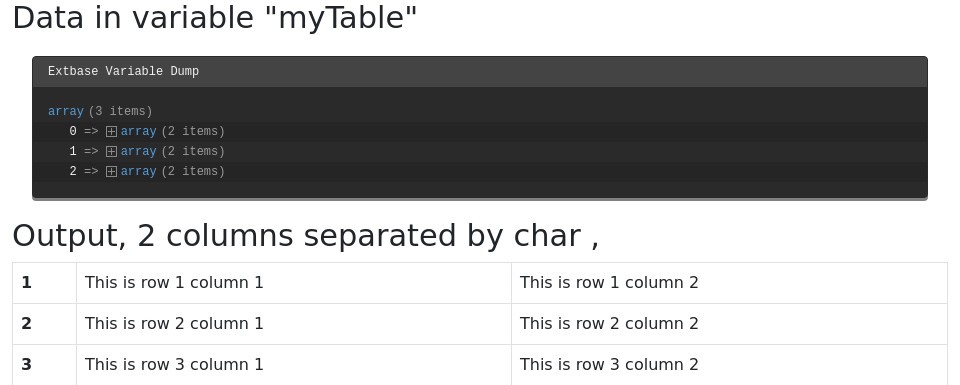
Output, {data.imagecols} columns separated by char {data.tx_examples_separator}
```
**Output**
Using `maximumColumns` limits the amount of columns in the multi dimensional array.
In this example, the field data of the last column will be stripped off. Therefore the output would be: