---
title: "wizards"
manual: "TypoScript Explained"
version: "14.3"
permalink: "https://docs.typo3.org/permalink/t3tsref:page-mod-wizard@14.3"
source: "PageTsconfig/Mod/Wizards.rst"
rendered: "2026-10-01T16:17:37+00:00"
---
# wizards {#page-mod-wizard}
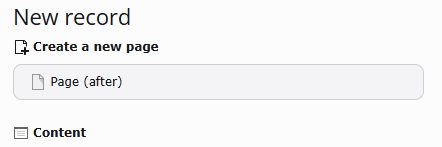
The `wizards` section allows to customize the *New record wizard* and the
*New content element wizard*.
- [newContentElement.wizardItems](https://docs.typo3.org/permalink/t3tsref:newcontentelement-wizarditems@14.3)
- [newRecord.order](https://docs.typo3.org/permalink/t3tsref:newrecord-order@14.3)
- [newRecord.pages](https://docs.typo3.org/permalink/t3tsref:newrecord-pages@14.3)
## newContentElement.wizardItems {#pagenewcontentelementwizard}
New content elements added via TCA to the
[items](https://docs.typo3.org/m/typo3/reference-tca/14.3/en-us/ColumnsConfig/Type/Select/Single/Index.html#columns-select-properties-items) of field `CType`
of table `tt_content` are automatically added to the New Content Element
Wizard. The following page TSconfig can be used to override values set via
TCA.
**newContentElement.wizardItems**
- **newContentElement.wizardItems**
- *Type:* array
- *Page TSconfig path:* mod.wizards.newContentElement.wizardItems
In the New Content Element Wizard, content element types are grouped
together by type. Each such group can be configured independently. The
four default groups are: `default`, `special`, `forms` and `plugins`.
**removeItems**
- **removeItems**
- *Type:* comma separated list of groups
- *Page TSconfig path:* mod.wizards.newContentElement.wizardItems.removeItems
With this setting one or several groups with all their content
elements can be hidden in the New Content Element Wizard.
```typoscript
# This will remove the "menu" group
mod.wizards.newContentElement.wizardItems.removeItems := addToList(menu)
```
**\[group\].before**
- **\[group\].before**
- *Type:* string
- *Page TSconfig path:* mod.wizards.newContentElement.wizardItems.\[group\].before
Sorts \[group\] in front of the group given.
**\[group\].after**
- **\[group\].after**
- *Type:* string
- *Page TSconfig path:* mod.wizards.newContentElement.wizardItems.\[group\].after
Sorts \[group\] after the group given.
**\[group\].header**
- **\[group\].header**
- *Type:* plain text label or [label reference](https://docs.typo3.org/permalink/t3coreapi:label-reference)
- *Page TSconfig path:* mod.wizards.newContentElement.wizardItems.\[group\].header
Name of the group.
**\[group\].elements**
- **\[group\].elements**
- *Type:* array
- *Page TSconfig path:* mod.wizards.newContentElement.wizardItems.\[group\].elements
List of items in the group.
**\[name\]**
- **\[name\]**
- *Type:* array
- *Page TSconfig path:* mod.wizards.newContentElement.wizardItems.\[group\].elements.\[name\]
Configuration for a single item.
**iconIdentifier**
- **iconIdentifier**
- *Type:* string
- *Page TSconfig path:* mod.wizards.newContentElement.wizardItems.\[group\].elements.\[name\].iconIdentifier
The icon identifier of the icon you want to display.
**iconOverlay**
- **iconOverlay**
- *Type:* string
- *Page TSconfig path:* mod.wizards.newContentElement.wizardItems.\[group\].elements.\[name\].iconOverlay
The icon identifier of the overlay icon you want to use.
**title**
- **title**
- *Type:* plain text label or [label reference](https://docs.typo3.org/permalink/t3coreapi:label-reference)
- *Page TSconfig path:* mod.wizards.newContentElement.wizardItems.\[group\].elements.\[name\].title
Name of the item.
**description**
- **description**
- *Type:* plain text label or [label reference](https://docs.typo3.org/permalink/t3coreapi:label-reference)
- *Page TSconfig path:* mod.wizards.newContentElement.wizardItems.\[group\].elements.\[name\].description
Description text for the item.
**tt_content_defValues**
- **tt_content_defValues**
- *Type:* array
- *Page TSconfig path:* mod.wizards.newContentElement.wizardItems.\[group\].elements.\[name\].tt_content_defValues
Default values for tt_content fields.
**saveAndClose**
- **saveAndClose**
- *Type:* bool
- *Default:* `false`
- *Page TSconfig path:* mod.wizards.newContentElement.wizardItems.\[group\].elements.\[name\].saveAndClose
If `true`, directs the user back to the **Page** module
directly instead of showing the FormEngine.
**before**
- **before**
- *Type:* string (comma separated list)
- *Default:* \[empty string\]
- *Page TSconfig path:* mod.wizards.newContentElement.wizardItems.\[group\].elements.\[name\].before
Influences the order of content elements within wizard tabs
in the new content element wizard by setting `before` and `after` values in Page TSconfig.
**after**
- **after**
- *Type:* string (comma separated list)
- *Default:* \[empty string\]
- *Page TSconfig path:* mod.wizards.newContentElement.wizardItems.\[group\].elements.\[name\].after
Same as described in `before` section.
If no before or after configuration is specified for elements,
they will retain their default order (typically the order defined in TCA).
**\[group\].removeItems**
- **\[group\].removeItems**
- *Type:* Comma separated list
- *Page TSconfig path:* mod.wizards.newContentElement.wizardItems.\[group\].removeItems
Comma separated list of content elements that should be hidden in
\[group\].
**EXT:my_sitepackage/Configuration/page.tsconfig**
```typoscript
mod.wizards.newContentElement.wizardItems {
special.removeItems := addToList(html)
}
```
### Example: Add a new element to the "common" group {#pageexample1}
**EXT:my_sitepackage/Configuration/page.tsconfig**
```typoscript
# Add a new element (header) to the "common" group
mod.wizards.newContentElement.wizardItems.common.elements.header {
iconIdentifier = content-header
title = Header
description = Adds a header element only
tt_content_defValues {
CType = header
}
}
mod.wizards.newContentElement.wizardItems.common.show := addToList(header)
```
### Example: Create a new group and add an element to it {#pageexample2}
**EXT:my_sitepackage/Configuration/page.tsconfig**
```typoscript
# Create a new group and add a (pre-filled) element to it
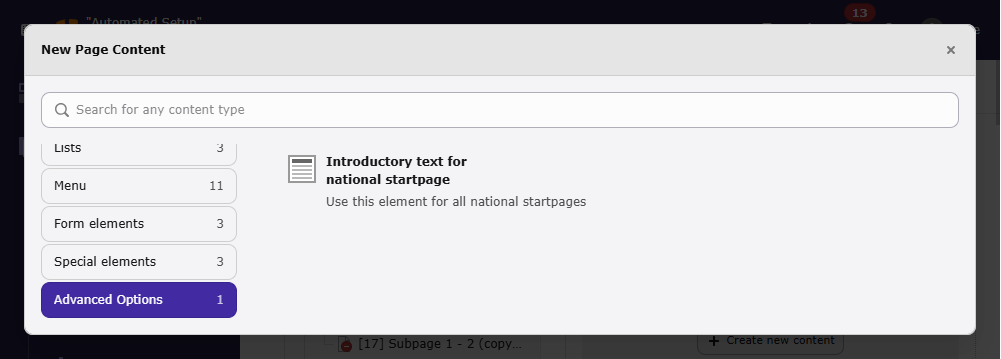
mod.wizards.newContentElement.wizardItems.myGroup {
header = LLL:my_extension.backend:advancedFunctions
elements.customText {
iconIdentifier = content-text
title = Introductory text for national startpage
description = Use this element for all national startpages
tt_content_defValues {
CType = text
bodytext (
Section Header
Lorem ipsum dolor sit amet, consectetur, sadipisci velit ...
)
header = Section Header
header_layout = 100
}
}
}
mod.wizards.newContentElement.wizardItems.myGroup.show = customText
```
With the second example, the bottom of the new content element wizard shows:
## newRecord.order {#mod-wizards-newrecord-order}
- **newRecord.order**
- *Type:* list of values
Define an alternate order for the groups of records in the new records
wizard. Pages and content elements will always be on top, but the
order of other record groups can be changed.
Records are grouped by extension keys, plus the special key "system"
for records provided by the TYPO3 Core.
### Example: Place the tt_news group at the top of the new record dialog {#mod-wizards-newrecord-order-example}
Place the tt_news group at the top (after pages and content
elements), other groups follow unchanged:
**EXT:my_sitepackage/Configuration/page.tsconfig**
```typoscript
mod.wizards.newRecord.order = tt_news
```
## newRecord.pages {#mod-wizards-newrecord-pages}
- **newRecord.pages**
- *Type:* boolean
Use the following sub-properties to show or hide the specified links.
Setting any of these properties to 0 will hide the corresponding link,
but setting to 1 will leave it visible.
- **show.pageAfter**
Show or hide the link to create new pages after the selected page.
- **show.pageInside**
Show or hide the link to create new pages inside the selected page.
- **show.pageSelectPosition**
Show or hide the link to create new pages at a selected position.
### Example: Hide the "Page (inside)" link in the "New Record" dialog {#mod-wizards-newrecord-pages-example}
**EXT:my_sitepackage/Configuration/page.tsconfig**
```typoscript
mod.wizards.newRecord.pages.show {
# Hide the "Page (inside)" link.
pageInside = 0
}
```