---
title: "database-query data processor"
manual: "TypoScript Explained"
version: "main"
permalink: "https://docs.typo3.org/permalink/t3tsref:databasequeryprocessor@main"
source: "DataProcessing/DatabaseQueryProcessor.rst"
rendered: "2026-09-26T07:34:53+00:00"
---
# `database-query` data processor {#databasequeryprocessor}
The `\TYPO3\CMS\Frontend\DataProcessing\DatabaseQueryProcessor`,
alias `database-query`, fetches records from the database, using
standard TypoScript [select](https://docs.typo3.org/permalink/t3tsref:select@main) semantics. The result is then passed to the
[FLUIDTEMPLATE](https://docs.typo3.org/permalink/t3tsref:cobj-fluidtemplate@main) as an array.
This way a [FLUIDTEMPLATE](https://docs.typo3.org/permalink/t3tsref:cobj-fluidtemplate@main) cObject can iterate over the
array of records.
The `database-query` processor can be used in combination with the
[record-transformation data processor](https://docs.typo3.org/permalink/t3tsref:recordtransformationprocessor@main) to use additional computed information.
**Table of contents**
- [Options:](https://docs.typo3.org/permalink/t3tsref:options@main)
- [Example: Usage in combination with the RecordTransformationProcessor](https://docs.typo3.org/permalink/t3tsref:example-usage-in-combination-with-the-recordtransformationprocessor@main)
- [Example: Display haiku records](https://docs.typo3.org/permalink/t3tsref:example-display-haiku-records@main)
- [Example: Display sorted records from an MM table working with workspaces](https://docs.typo3.org/permalink/t3tsref:example-display-sorted-records-from-an-mm-table-working-with-workspaces@main)
## Options: {#databasequeryprocessor-options}
**if**
- **if**
- *Type:* [if](https://docs.typo3.org/permalink/t3tsref:if@main) condition
- *Required:* false
- *Default:* ''
Only if the condition is met the data processor is executed.
**table**
- **table**
- *Type:* [string](https://docs.typo3.org/permalink/t3tsref:data-type-string@main) / [stdWrap](https://docs.typo3.org/permalink/t3tsref:stdwrap@main)
- *Required:* true
- *Default:* ''
Name of the table from which the records should be fetched.
**as**
- **as**
- *Type:* [string](https://docs.typo3.org/permalink/t3tsref:data-type-string@main) / [stdWrap](https://docs.typo3.org/permalink/t3tsref:stdwrap@main)
- *Required:* false
- *Default:* 'records'
The variable's name to be used in the Fluid template.
**dataProcessing**
- **dataProcessing**
- *Type:* array of [Data processors](https://docs.typo3.org/permalink/t3tsref:dataprocessing@main)
- *Required:* false
- *Default:* \[\]
Array of data processors to be applied to all fetched records.
> [!NOTE]
> All other options will be interpreted as in the TypoScript function
> `select`, including `pidInList`,
> `orderBy`, `where`, etc. See the reference of
> [select](https://docs.typo3.org/permalink/t3tsref:select@main).
> [!WARNING]
> When using the DatabaseQueryProcessor, you may encounter issues with
> language and/or versioning overlays, that currently can not be resolved.
> See [here](https://forge.typo3.org/issues/85284#note-5) for more
> information.
## Example: Usage in combination with the RecordTransformationProcessor {#databasequeryprocessor-example-record-transformation}
Example usage for the data processor in conjunction with the
[record-transformation data processor](https://docs.typo3.org/permalink/t3tsref:recordtransformationprocessor@main).
**EXT:my_extension/Configuration/Sets/Main/setup.typoscript**
```typoscript
page = PAGE
page {
10 = PAGEVIEW
10 {
paths.10 = EXT:my_extension/Resources/Private/Templates/
dataProcessing {
10 = database-query
10 {
as = categories
table = sys_category
where = parent=0
dataProcessing.10 = record-transformation
}
}
}
}
```
For usage of the variables within Fluid see
[Example: Usage with FLUIDTEMPLATE](https://docs.typo3.org/permalink/t3tsref:recordtransformationprocessor-fluidtemplate-example@main).
## Example: Display haiku records {#databasequeryprocessor-examples}
Please see also [About the examples](https://docs.typo3.org/permalink/t3tsref:dataprocessing-about-examples@main).
**TypoScript**
We define the `dataProcessing` property to use the
`\TYPO3\CMS\Frontend\DataProcessing\DatabaseQueryProcessor`:
**The Fluid template**
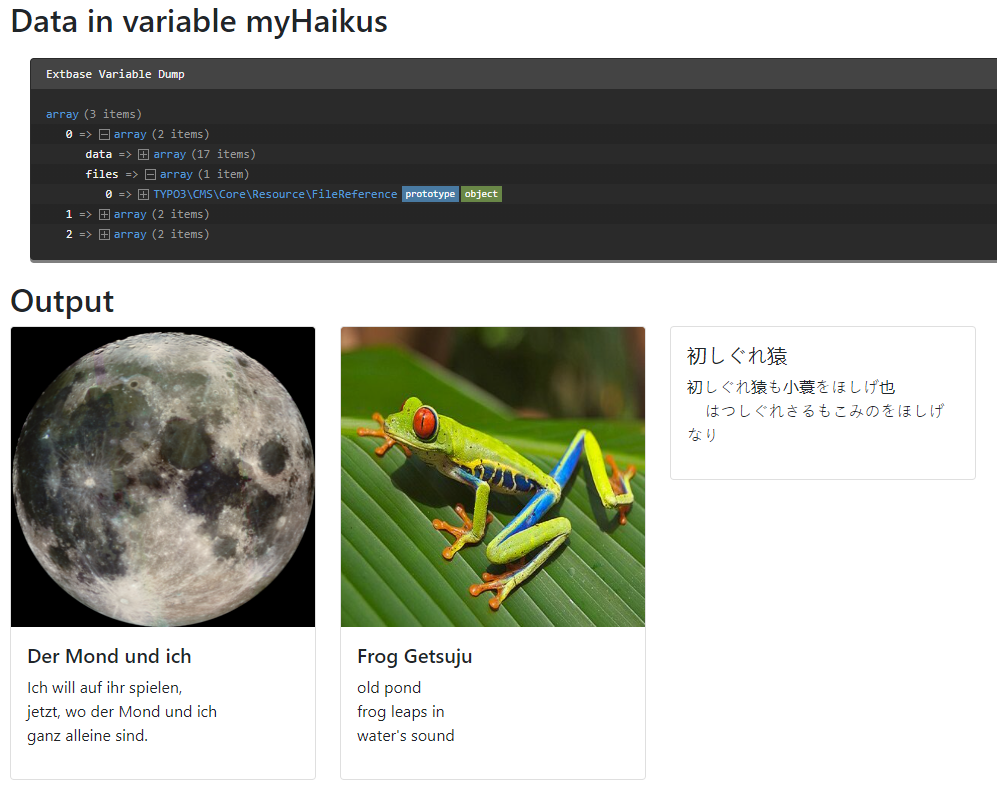
In the Fluid template then iterate over the records. As we used the recursive
data processor [files data processor](https://docs.typo3.org/permalink/t3tsref:filesprocessor@main) on the image records, we can also output
the images.
**EXT:examples/Resources/Private/Templates/ContentElements/DataProcDb.fluid.html**
```html
Data in variable myHaikus
{myHaikus}
Output
{haiku.data.title}
{haiku.data.poem}
```
**Output**
Each entry of the records array contains the data of the table in `data`
and the data of the images in `files`.
## Example: Display sorted records from an MM table working with workspaces {#databasequeryprocessor-examples}
Please see also [About the examples](https://docs.typo3.org/permalink/t3tsref:dataprocessing-about-examples@main).
We define the `dataProcessing` property to use the
`\TYPO3\CMS\Frontend\DataProcessing\DatabaseQueryProcessor`. To make
use of the `sorting` field in the MM table, a join is required.
However, performing this join will cause the fields from the MM table to be selected in the query. This can break the output when previewing the page using workspaces.
To prevent this issue, we use the `selectFields` property to explicitly define which fields should be retrieved.
**config/sites/my-site/setup.typoscript**
```typoscript
tt_content.myextension_mycontentelement =< lib.contentElement
tt_content.myextension_mycontentelement {
templateName = MyContentElement
templateRootPaths {
102 = EXT:my_extension/Resources/Private/Templates/
}
partialRootPaths {
102 = EXT:my_extension/Resources/Private/Partials/
}
layoutRootPaths {
102 = EXT:my_extension/Resources/Private/Layouts/
}
dataProcessing {
10 = database-query
10 {
table = tx_myextension_myrecord
pidInList.data = site:rootPageId
selectFields = tx_myextension_myrecord.*
join = tx_myextension_myrecord_mm mm ON mm.uid_foreign = tx_myextension_myrecord.uid
where.data = field:uid
where.intval = 1
where.wrap = mm.uid_local=|
orderBy = mm.sorting
as = myrecord
# resolving the image reference
dataProcessing {
10 = TYPO3\CMS\Frontend\DataProcessing\FilesProcessor
10 {
references.fieldName = image
as = images
}
}
}
}
}
```