---
title: "files data processor"
manual: "TypoScript Explained"
version: "main"
permalink: "https://docs.typo3.org/permalink/t3tsref:filesprocessor@main"
source: "DataProcessing/FilesProcessor.rst"
rendered: "2026-09-19T06:55:14+00:00"
---
# `files` data processor {#filesprocessor}
This data processor `\TYPO3\CMS\Frontend\DataProcessing\FilesProcessor`,
alias `files`, can be used for processing file information:
- relations to file records (`sys_file_reference`)
- fetch files records by their uids in table (`sys_file`)
- all files from a certain folder
- all files from a collection
A `FLUIDTEMPLATE` can then iterate over processed data
automatically.
**Table of contents**
- [Options:](https://docs.typo3.org/permalink/t3tsref:options@main)
- [Example 1: Render the images stored in field image](https://docs.typo3.org/permalink/t3tsref:example-1-render-the-images-stored-in-field-image@main)
- [Example 2: use stdWrap property on references](https://docs.typo3.org/permalink/t3tsref:example-2-use-stdwrap-property-on-references@main)
- [Example 3: files from a FlexForm](https://docs.typo3.org/permalink/t3tsref:example-3-files-from-a-flexform@main)
## Options: {#filesprocessor-options}
**if**
- **if**
- *Type:* [if](https://docs.typo3.org/permalink/t3tsref:if@main) condition
- *Required:* false
- *Default:* ''
Only, if the condition is met the data processor is executed.
**references**
- **references**
- *Type:* [string](https://docs.typo3.org/permalink/t3tsref:data-type-string@main) (comma-separated integers) / [stdWrap](https://docs.typo3.org/permalink/t3tsref:stdwrap@main)
- *Required:* false
- *Default:* ''
- *Example:* '1,303,42'
If this option contains a comma-separated list of integers, these are
treated as uids of file references (`sys_file_reference`).
The corresponding file records are added to the output array.
[stdWrap](https://docs.typo3.org/permalink/t3tsref:stdwrap@main) properties can also be used, see
[Example 2: use stdWrap property on references](https://docs.typo3.org/permalink/t3tsref:filesprocessor-stdwrap-on-references@main).
**references.fieldName**
- **references.fieldName**
- *Type:* [string](https://docs.typo3.org/permalink/t3tsref:data-type-string@main) / [stdWrap](https://docs.typo3.org/permalink/t3tsref:stdwrap@main)
- *Required:* false
- *Default:* ''
- *Example:* 'media'
If both `references.fieldName` and
`references.table` are set, the file records are fetched from
the referenced table and field, for example the `media` field of a
`tt_content` record.
**references.table**
- **references.table**
- *Type:* [string](https://docs.typo3.org/permalink/t3tsref:data-type-string@main) / [stdWrap](https://docs.typo3.org/permalink/t3tsref:stdwrap@main)
- *Required:* false
- *Default:* ''
- *Example:* 'tt_content'
If `references` should be interpreted as TypoScript
[select](https://docs.typo3.org/permalink/t3tsref:select@main) function, `references.fieldName` must be set to
the desired field name of the table to be queried.
**files**
- **files**
- *Type:* [string](https://docs.typo3.org/permalink/t3tsref:data-type-string@main) (comma-separated integers) / [stdWrap](https://docs.typo3.org/permalink/t3tsref:stdwrap@main)
- *Required:* false
- *Default:* ''
- *Example:* '1,303,42'
If this option contains a comma-separated list of integers,
these are treated as uids of files (`sys_file`).
**collections**
- **collections**
- *Type:* [string](https://docs.typo3.org/permalink/t3tsref:data-type-string@main) (comma-separated integers) / [stdWrap](https://docs.typo3.org/permalink/t3tsref:stdwrap@main)
- *Required:* false
- *Default:* ''
- *Example:* '1,303,42'
If this option contains a comma-separated list of integers,
these are treated as uids of collections. The file records in each
collection are then being added to the output array.
**folders**
- **folders**
- *Type:* [string](https://docs.typo3.org/permalink/t3tsref:data-type-string@main) (comma-separated folders), [stdWrap](https://docs.typo3.org/permalink/t3tsref:stdwrap@main)
- *Required:* false
- *Default:* ""
- *Example:* "23:/other/folder/"
Fetches all files from the referenced folders. The following syntax is
possible:
- **`t3://folder?storage=2&identifier=/my/folder/`**
Folder `/my/folder/` from storage with uid `2`
- **`23:/other/folder/`**
Folder `/other/folder/` from storage with uid `23`
- **`/folderInMyFileadmin/something/`:**
Folder `/folderInMyFileadmin/something/` from the default storage
`0` (`fileadmin`)
**folders.recursive**
- **folders.recursive**
- *Type:* bool / [stdWrap](https://docs.typo3.org/permalink/t3tsref:stdwrap@main)
- *Required:* false
- *Default:* 0
- *Example:* 1
If set to a non-empty value file, records will be added from folders
recursively.
**sorting**
- **sorting**
- *Type:* [string](https://docs.typo3.org/permalink/t3tsref:data-type-string@main) / [stdWrap](https://docs.typo3.org/permalink/t3tsref:stdwrap@main)
- *Required:* false
- *Default:* ""
- *Example:* "filesize"
The property of the file records by which they should be sorted.
For example, filesize or title.
**sorting.direction**
- **sorting.direction**
- *Type:* [string](https://docs.typo3.org/permalink/t3tsref:data-type-string@main) / [stdWrap](https://docs.typo3.org/permalink/t3tsref:stdwrap@main)
- *Required:* false
- *Default:* "ascending"
- *Example:* "descending"
The sorting direction (`ascending` or `descending`).
**as**
- **as**
- *Type:* [string](https://docs.typo3.org/permalink/t3tsref:data-type-string@main) / [stdWrap](https://docs.typo3.org/permalink/t3tsref:stdwrap@main)
- *Required:* false
- *Default:* "files"
The variable name to be used in the Fluid template.
## Example 1: Render the images stored in field image {#filesprocessor-example-render-image}
Please see also [About the examples](https://docs.typo3.org/permalink/t3tsref:dataprocessing-about-examples@main).
**TypoScript**
Using the `FilesProcessor` the
following scenario is possible:
**The Fluid template**
Then iterate over the files in the [Fluid](https://docs.typo3.org/m/typo3/reference-coreapi/main/en-us/ApiOverview/Fluid/Index.html#fluid) template:
**EXT:examples/Resources/Private/Templates/ContentElements/DataProcFiles.fluid.html**
```html
Data in variable images
{images}
Data in variable images
{image.title}
{image.description}
```
**Output**
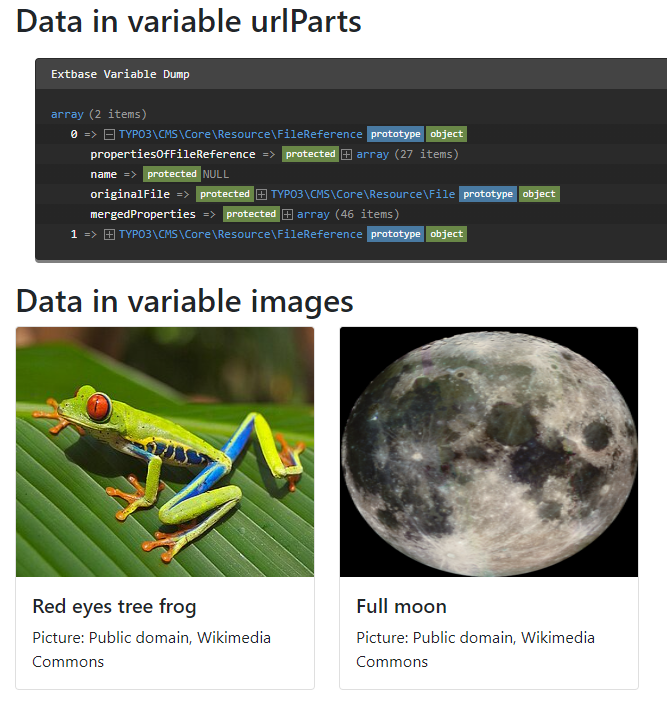
The array `images` contains the data of the files now:
> [!NOTE]
> For technical reasons file references do not show all available data on
> using debug. See [Using FAL in the frontend](https://docs.typo3.org/m/typo3/reference-coreapi/main/en-us/ApiOverview/Fal/UsingFal/Frontend.html#fal-using-fal-frontend).
## Example 2: use stdWrap property on references {#filesprocessor-stdwrap-on-references}
The following example implements a slide functionality on root line
for file resources:
**EXT:site_package/Configuration/Sets/Main/setup.typoscript**
```typoscript
page.10.dataProcessing {
10 = TYPO3\CMS\Frontend\DataProcessing\FilesProcessor
10 {
references.data = levelmedia: -1, slide
as = myfiles
}
}
```
The `FilesProcessor` can slide up
the root line to collect images for Fluid templates. One usual feature is to
take images attached to pages and use them on the page tree as header images in
the frontend.
## Example 3: files from a FlexForm {#filesprocessor-flexform}
If the files are stored in a [FlexForm](https://docs.typo3.org/m/typo3/reference-coreapi/main/en-us/ApiOverview/FlexForms/Index.html#flexforms), the entry in
the table `sys_file_reference` uses the name of the main table, for example
`tt_content` and the FlexForm key as `fieldname`.
Therefore, you can do the following:
**EXT:site_package/Configuration/Sets/Main/setup.typoscript**
```typoscript
page.10.dataProcessing {
10 = TYPO3\CMS\Frontend\DataProcessing\FilesProcessor
10 {
references.table = tt_content
references.fieldName = settings.myImage
as = myImageFromFlexForm
}
}
```
This assumes that the image was stored in a FlexForm in the table
`tt_content` like this:
**EXT:site_package/Configuration/FlexForm/MyFlexForm.xml**
```xml
Somethingarrayfile6common-image-types
```
Three images in the same content element (uid 15) having the FlexForm above
would look like this in the the database table `sys_file_reference`:
| uid | pid | uid_local | uid_foreign | tablenames | fieldnames | ... |
| --- | --- | --- | --- | --- | --- | --- |
| 42 | 120 | 12 | 15 | tt_content | settings.myImage | ... |
| 43 | 120 | 25 | 15 | tt_content | settings.myImage | ... |
| 44 | 120 | 128 | 15 | tt_content | settings.myImage | ... |