---
title: "menu data processor"
manual: "TypoScript Explained"
version: "main"
permalink: "https://docs.typo3.org/permalink/t3tsref:menuprocessor@main"
source: "DataProcessing/MenuProcessor/Index.rst"
modified: "2026-09-15T19:22:01+00:00"
---
# `menu` data processor
The `\TYPO3\CMS\Frontend\DataProcessing\MenuProcessor`,
alias `menu`, utilizes [HMENU](https://docs.typo3.org/permalink/t3tsref:cobj-hmenu@main) to generate a list
of menu items which can be assigned to `FLUIDTEMPLATE` as a
variable.
Additional data processing is supported and will be applied to each record.
**Table of contents**
- [Options](https://docs.typo3.org/permalink/t3tsref:options@main)
- [Special menu types](https://docs.typo3.org/permalink/t3tsref:special-menu-types@main)
- [Example: Two level menu of the web page](https://docs.typo3.org/permalink/t3tsref:example-two-level-menu-of-the-web-page@main)
> [!TIP]
> **Hint**
>
> The third party extension [b13/menus](https://extensions.typo3.org/extension/menus) also provides menu
> processors like `\B13\Menus\DataProcessing\TreeMenu` and
> `\B13\Menus\DataProcessing\BreadcrumbsMenu`.
>
> Refer to the [manual of the extension b13/menus](https://github.com/b13/menus/blob/master/README.md) for more
> information.
## Options
**as**
- **as**
- *Type:* [string](https://docs.typo3.org/permalink/t3tsref:data-type-string@main)
- *Required:* false
- *Default:* "menu"
Name for the variable in the Fluid template.
**alwaysActivePIDlist**
- **alwaysActivePIDlist**
- *Type:* list of [integer](https://docs.typo3.org/permalink/t3tsref:data-type-integer@main) /[stdWrap](https://docs.typo3.org/permalink/t3tsref:stdwrap@main)
This is a list of page UID numbers that will always be regarded as
active menu items and thereby automatically opened regardless of the
rootline.
**entryLevel**
- **entryLevel**
- *Type:* [integer](https://docs.typo3.org/permalink/t3tsref:data-type-integer@main) / [stdWrap](https://docs.typo3.org/permalink/t3tsref:stdwrap@main)
- *Default:* 0
Defines at which level in the rootLine the menu should start.
Default is "0" which gives us a menu of the very first pages on the
site.
If the value is < 0, entryLevel is chosen from "behind" in the
rootLine. Thus "-1" is a menu with items from the outermost level,
"-2" is the level before the outermost...
**Note:** `entryLevel` does not show a menu **of a certain level of pages**
(use `special = directory` for that)
but it means that it will start to be visible **from that level on**.
So, for example if you build a simple "sitemap" menu like this one:
**EXT:site_package/Configuration/Sets/Main/setup.typoscript**
```typoscript
page.10 {
dataProcessing {
10 = menu
10 {
special = list
special.value.field = pages
levels = 7
entryLevel = 4
as = menu
expandAll = 1
titleField = nav_title // title
}
}
}
```
it will start to be visible from the 4th level (and will contain only
the subpages from that level).
**excludeDoktypes**
- **excludeDoktypes**
- *Type:* list of [integer](https://docs.typo3.org/permalink/t3tsref:data-type-integer@main)
- *Default:* 6,254
Enter the list of page document types (doktype) to exclude from menus.
By default pages that are "backend user access only" (6) or "folder"
(254) are excluded.
**excludeUidList**
- **excludeUidList**
- *Type:* list of [integer](https://docs.typo3.org/permalink/t3tsref:data-type-integer@main) / [stdWrap](https://docs.typo3.org/permalink/t3tsref:stdwrap@main)
This is a list of page uids to exclude when the select statement is
done. Comma-separated. You may add "current" to the list to exclude
the current page.
**Example:**
The pages with these uid-numbers will **not** be within the menu!
Additionally the current page is always excluded too.
**EXT:site_package/Configuration/Sets/Main/setup.typoscript**
```typoscript
page.10.dataProcessing.20.excludeUidList = 34,2,current
```
**expandAll**
- **expandAll**
- *Type:* [boolean](https://docs.typo3.org/permalink/t3tsref:data-type-boolean@main) / [stdWrap](https://docs.typo3.org/permalink/t3tsref:stdwrap@main)
- *Required:* true
- *Default:* 1
- *Example:* 0
Include all submenus (`1`) or only those of the active pages (`0`).
**levels**
- **levels**
- *Type:* [integer](https://docs.typo3.org/permalink/t3tsref:data-type-integer@main) / [stdWrap](https://docs.typo3.org/permalink/t3tsref:stdwrap@main)
- *Required:* true
- *Default:* 1
- *Example:* 5
Maximal number of levels to be included in the output array.
**includeNotInMenu**
- **includeNotInMenu**
- *Type:* [boolean](https://docs.typo3.org/permalink/t3tsref:data-type-boolean@main) / [stdWrap](https://docs.typo3.org/permalink/t3tsref:stdwrap@main)
If set, pages with the checkbox "Page enabled in menus" disabled will still be included
in menus.
**includeSpacer**
- **includeSpacer**
- *Type:* [boolean](https://docs.typo3.org/permalink/t3tsref:data-type-boolean@main) / [stdWrap](https://docs.typo3.org/permalink/t3tsref:stdwrap@main)
- *Required:* true
- *Default:* 0
- *Example:* 1
Include pages with type "spacer".
**protectLvar**
- **protectLvar**
- *Type:* [boolean](https://docs.typo3.org/permalink/t3tsref:data-type-boolean@main) / keyword
If set, then for each page in the menu it will be checked if an
Alternative Page Language record for the language defined in
the site exists for the
page. If that is not the case and the pages "Localization settings"
have the "Hide page if no translation for current language exists"
flag set, then the menu item will link to a non accessible page that
will yield an error page to the user. Setting this option will prevent
that situation by adding "&L=0" for such pages, meaning that
they will switch to the default language rather than keeping the
current language.
The check is only carried out if a translation is requested, not for the
standard language.
**Keyword: "all"**
When set to "all" the same check is carried out but it will not look
if "Hide page if no translation for current language exists" is set -
it always reverts to default language if no translation is found.
**special**
- **special**
- *Type:* \*"directory" / "list" / "updated" / "rootline" / "browse" / "keywords" / "categories"
Lets you define special types of menus.
For backward compatibility reason the special type `language` can be
used with an HMENU. We recommend to use the
[language-menu data processor](https://docs.typo3.org/permalink/t3tsref:languagemenuprocessor@main)
to create language menus.
See the section about the [.special property](https://docs.typo3.org/permalink/t3tsref:menuprocessor-special@main).
**value**
- **value**
- *Type:* *list of page-uid's* / [stdWrap](https://docs.typo3.org/permalink/t3tsref:stdwrap@main)
List of page uid's to use for the special menu. What they are used
for depends on the menu type as defined by ".special"; see the
section about the [.special property](https://docs.typo3.org/permalink/t3tsref:menuprocessor-special@main).
**titleField**
- **titleField**
- *Type:* [string](https://docs.typo3.org/permalink/t3tsref:data-type-string@main) / [stdWrap](https://docs.typo3.org/permalink/t3tsref:stdwrap@main)
- *Required:* true
- *Default:* "nav_title // title"
- *Example:* "subtitle"
Fields to be used as title.
## Special menu types
The following special menu types are available:
- [Browse](https://docs.typo3.org/permalink/t3tsref:menuprocessor-special-browse@main)
- [Categories](https://docs.typo3.org/permalink/t3tsref:hmenu-special-categories@main)
- [Directory](https://docs.typo3.org/permalink/t3tsref:hmenu-special-directory@main)
- [Keywords](https://docs.typo3.org/permalink/t3tsref:hmenu-special-keywords@main)
- [Language](https://docs.typo3.org/permalink/t3tsref:hmenu-special-language@main)
- [List](https://docs.typo3.org/permalink/t3tsref:hmenu-special-list@main)
- [Rootline / Breadcrumb](https://docs.typo3.org/permalink/t3tsref:hmenu-special-rootline@main)
- [Updated](https://docs.typo3.org/permalink/t3tsref:hmenu-special-updated@main)
- [Userfunction](https://docs.typo3.org/permalink/t3tsref:hmenu-special-userfunction-examples@main)
## Example: Two level menu of the web page
Please see also [About the examples](https://docs.typo3.org/permalink/t3tsref:dataprocessing-about-examples@main).
**TypoScript**
Using the `MenuProcessor` the
following scenario is possible:
**EXT:examples/Configuration/TypoScript/DataProcessors/Processors/MenuProcessor.typoscript**
```typoscript
tt_content {
examples_dataprocmenu =< lib.contentElement
examples_dataprocmenu {
templateName = DataProcMenu
dataProcessing.10 = menu
dataProcessing.10 {
levels = 2
as = headerMenu
expandAll = 1
includeSpacer = 1
titleField = nav_title // title
dataProcessing {
10 = files
10 {
references.fieldName = media
}
}
}
}
}
```
**The Fluid template**
This generated menu can be used in Fluid like this:
**EXT:examples/Resources/Private/Templates/ContentElements/DataProcMenu.fluid.html**
```html
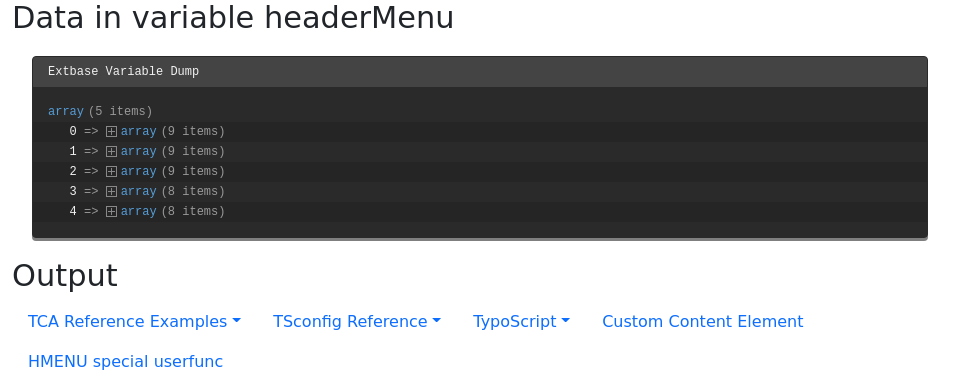
Data in variable headerMenu
{headerMenu}
Output
```
**Output**
The array now contains the menu items on level one. Each item in return has the
menu items of level 2 in an array called `children`.