---
title: "A minimal page created by pure TypoScript"
manual: "Getting Started"
version: "main"
permalink: "https://docs.typo3.org/permalink/t3start:typoscript@main"
source: "Concepts/TypoScript/Index.rst"
modified: "2026-09-15T08:44:38+00:00"
---
# A minimal page created by pure TypoScript
TypoScript is the basic configuration language used to configure the frontend
output of a page in TYPO3.
Learn more about TypoScript in
[Getting started: A quick introduction into TypoScript](https://docs.typo3.org/m/typo3/reference-typoscript/main/en-us/Guide/Index.html#guide) in
the [TypoScript Reference](https://docs.typo3.org/m/typo3/reference-typoscript/main/en-us/Index.html#start).
You can find detailed information about the
[TypoScript Syntax](https://docs.typo3.org/m/typo3/reference-typoscript/main/en-us/Syntax/Index.html#typoscript-syntax) and a listing of all objects
and with their properties and functions in the
[TypoScript Reference](https://docs.typo3.org/m/typo3/reference-typoscript/main/en-us/Index.html#start).
## "Hello world" example in TypoScript
Put the following TypoScript in a file called `setup.typoscript` within
your [Site set](https://docs.typo3.org/m/typo3/reference-coreapi/main/en-us/ApiOverview/SiteHandling/SiteSets/Index.html#site-sets). The site set is the folder
containing your [site configuration](https://docs.typo3.org/permalink/t3start:site-configuration@main).
**config/sites/main/setup.typoscript**
```typoscript
# Create the frontend output of the page
page = PAGE
page {
# Show a text with value "Hello world."
10 = TEXT
10.value = Hello, world.
}
```
1. Is a comment. See the Syntax of comments in TypoScript:
[Comments](https://docs.typo3.org/m/typo3/reference-typoscript/main/en-us/Syntax/Comments/Index.html#typoscript-syntax-syntax-comment-blocks).
1. Assigns a top level object of type [PAGE](https://docs.typo3.org/m/typo3/reference-typoscript/main/en-us/TopLevelObjects/Page/Index.html#object-type-page)
to a variable called `page`.
1. The `page` gets more options in this block. See the
[Blocks in the TypoScript syntax](https://docs.typo3.org/m/typo3/reference-typoscript/main/en-us/Syntax/CodeBlocks/Index.html#typoscript-syntax-syntax-curly-brackets).
1. Another comment.
1. Assigns a content object (also called "cObject") of type
[TEXT](https://docs.typo3.org/m/typo3/reference-typoscript/main/en-us/ContentObjects/Text/Index.html#cobj-text) to
[index number 10](https://docs.typo3.org/m/typo3/reference-typoscript/main/en-us/TopLevelObjects/Page/Index.html#confval-page-array) of `page`. It has the path
`page.10` if you want to change it later.
1. Assigns the value `Hello, world.` to the `value` property of the TEXT
cObject stored in path `page.10`.
Clear all caches via the following console command or the button in the backend:
```bash
ddev typo3 cache:flush
```
You can now preview the result.
## Resulting web page
Here is the resulting web page HTML source for both the TypoScript-only and
the Fluid-based implementations. Notice how TYPO3 has added default markup
around the single line of content:
**Example frontend output**
```html
Example site - Start page
Hello, world.
```
## Debug the TypoScript in the backend module "Active TypoScript"
Open the backend module
**Sites > TypoScript > Active TypoScript**.
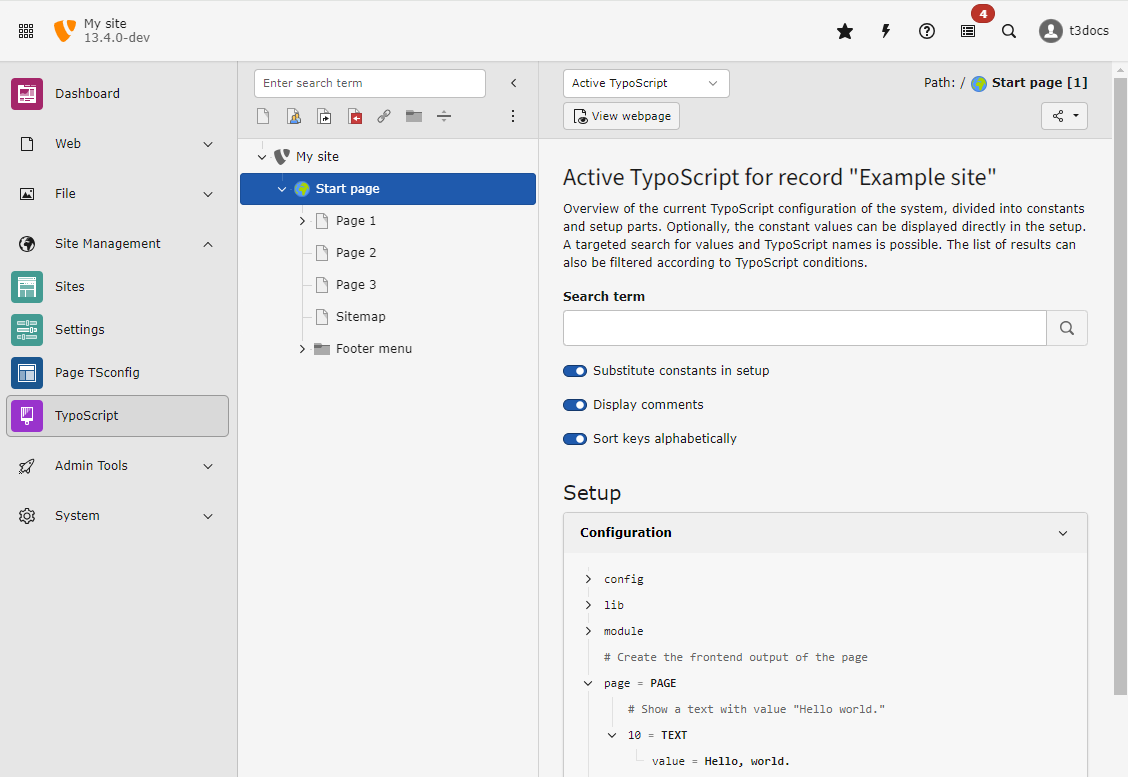
You can find the variable `page` that you just defined. The other variables have
been created by TypoScript loaded globally by the TYPO3 Core and system
extensions. They are some of the
[Reserved top-level objects](https://docs.typo3.org/m/typo3/reference-typoscript/main/en-us/TopLevelObjects/Other.html#top-level-objects-other-reserved-tlo-s).
## Play around with TypoScript
You can now try out a couple of TypoScript commands to familiarize yourself
with TypoScript.
Here are some examples:
### Wrap "Hello, world." in p-tags
**config/sites/main/setup.typoscript**
```typoscript
page = PAGE
page {
10 = TEXT
10 {
value = Hello, world.
stdWrap.wrap = |
}
}
```
1. As we now have several options for [TEXT](https://docs.typo3.org/m/typo3/reference-typoscript/main/en-us/ContentObjects/Text/Index.html#cobj-text) object
with path `page.10`, we switch to the
[block syntax](https://docs.typo3.org/m/typo3/reference-typoscript/main/en-us/Syntax/CodeBlocks/Index.html#typoscript-syntax-syntax-curly-brackets) here.
1. Assign the text to the [value](https://docs.typo3.org/m/typo3/reference-typoscript/main/en-us/ContentObjects/Text/Index.html#confval-text-value) property of
the TEXT object.
1. We use the [stdWrap](https://docs.typo3.org/m/typo3/reference-typoscript/main/en-us/ContentObjects/Text/Index.html#confval-text-stdwrap) property of the TEXT
object to configure the [stdWrap](https://docs.typo3.org/m/typo3/reference-typoscript/main/en-us/Functions/Stdwrap.html#stdwrap) function.
In this function we use the option [wrap](https://docs.typo3.org/m/typo3/reference-typoscript/main/en-us/Functions/Stdwrap.html#confval-stdwrap-wrap).
It surrounds the current content of the TEXT object as set in line 5 with
the value defined here. The pipe `|` character is replaced by the text that corresponds to the value property.
> [!NOTE]
> You may sometimes see that [stdWrap](https://docs.typo3.org/m/typo3/reference-typoscript/main/en-us/ContentObjects/Text/Index.html#confval-text-stdwrap)
> functionality is directly applied to a TEXT object like this:
>
> **config/sites/main/setup.typoscript**
>
> ```typoscript
> page = PAGE
> page {
> 10 = TEXT
> 10 {
> value = Hello, world.
> wrap = |
> }
> }
>
> ```
>
> For backward compatibility reasons it is possible to apply stdWrap
> properties directly to TEXT object. This is only true for TEXT objects, not
> any other TypoScript cObject types. So we recommend to always use
> stdWrap to stay consistent.
### Display the title of the current page on top
**config/sites/main/setup.typoscript**
```typoscript
page = PAGE
page {
5 = TEXT
5 {
stdWrap.field = title
stdWrap.wrap = |
}
10 = TEXT
10 {
value = Hello, world.
stdWrap.wrap = |
}
}
```
1. We assign a second content object (also called "cObject") of type
[TEXT](https://docs.typo3.org/m/typo3/reference-typoscript/main/en-us/ContentObjects/Text/Index.html#cobj-text) to
[index number 5](https://docs.typo3.org/m/typo3/reference-typoscript/main/en-us/TopLevelObjects/Page/Index.html#confval-page-array) of `page`. As the index is
smaller than the index 10 of the TEXT object containing the text
"Hello World", it is displayed before the other object.
1. Uses the [block syntax](https://docs.typo3.org/m/typo3/reference-typoscript/main/en-us/Syntax/CodeBlocks/Index.html#typoscript-syntax-syntax-curly-brackets)
to apply properties to the TEXT object.
1. Uses the stdWrap property [field](https://docs.typo3.org/m/typo3/reference-typoscript/main/en-us/Functions/Stdwrap.html#confval-stdwrap-field) to fetch
the field `title` from the [database record](https://docs.typo3.org/m/typo3/reference-coreapi/main/en-us/ApiOverview/Database/DatabaseRecords/Index.html#database-records)
of the current page.
1. Uses the stdWrap property [wrap](https://docs.typo3.org/m/typo3/reference-typoscript/main/en-us/Functions/Stdwrap.html#confval-stdwrap-wrap) to wrap the
current string fetched in line 5 in `` tags.
> [!NOTE]
> The order in which the content objects are defined in the TypoScript file
> does not matter. They are output from the smallest index to the largest.
> Therefore the following would give you the same output:
>
> **config/sites/main/setup.typoscript**
>
> ```typoscript
> page = PAGE
> page {
> 10 = TEXT
> 10 {
> value = Hello, world.
> stdWrap.wrap =
|
> }
> 5 = TEXT
> 5 {
> stdWrap.field = title
> stdWrap.wrap = |
> }
> }
>
> ```