---
title: "Overriding the default templates of content elements"
manual: "Site Package Tutorial"
version: "14.3"
permalink: "https://docs.typo3.org/permalink/t3sitepackage:content-element-rendering@14.3"
source: "ContentElementRendering/Index.rst"
rendered: "2026-09-24T15:39:20+00:00"
---
# Overriding the default templates of content elements {#content-element-rendering}
The content elements that are rendered up to this point are rendered by the
TYPO3 system extension Fluid Styled Content ([`typo3/cms-fluid-styled-content`](https://packagist.org/packages/typo3/cms-fluid-styled-content)).
This extensions offers default templates to render content elements. Without
such an extension, no content would be rendered at all. The default
templates provided by this extension can be overridden with site settings
provided by Fluid Styled Content.
Your site package, if generated by the Site Package Builder already overrides
two templates from Fluid Styled Content and you are free to override additional
ones.
- [Use Settings to override template paths of Fluid Styled Content](https://docs.typo3.org/permalink/t3sitepackage:use-settings-to-override-template-paths-of-fluid-styled-content@14.3)
- [Override the "Menu of Subpages" template](https://docs.typo3.org/permalink/t3sitepackage:override-the-menu-of-subpages-template@14.3)
- [Override the sitemap template](https://docs.typo3.org/permalink/t3sitepackage:override-the-sitemap-template@14.3)
- [Override the partial template for image rendering](https://docs.typo3.org/permalink/t3sitepackage:override-the-partial-template-for-image-rendering@14.3)
## Use Settings to override template paths of Fluid Styled Content {#content-element-rendering-settings}
Your site package already configures the paths to override the templates of
Fluid Styled Content content elements in file
`packages/site_package/Configuration/Sets/SitePackage/settings.yaml`:
**packages/my_site_package/Configuration/Sets/SitePackage/settings.yaml**
```yaml
styles:
templates:
layoutRootPath: EXT:site_package/Resources/Private/ContentElements/Layouts
partialRootPath: EXT:site_package/Resources/Private/ContentElements/Partials
templateRootPath: EXT:site_package/Resources/Private/ContentElements/Templates
content:
textmedia:
maxW: 1200
maxWInText: 600
linkWrap:
lightboxEnabled: true
lightboxCssClass: lightbox
```
If you wanted to create this file yourself you could do it as follows:
Site settings can be saved both in the site configuration and in the site
package extension.
We will save the settings to the site package but use the settings editor to
write the YAML for us.
Go to module **Sites > Setup** and edit the settings of
your site by clicking on the button **Edit site settings**. Override
the paths to the templates of Fluid Styled Content like this:
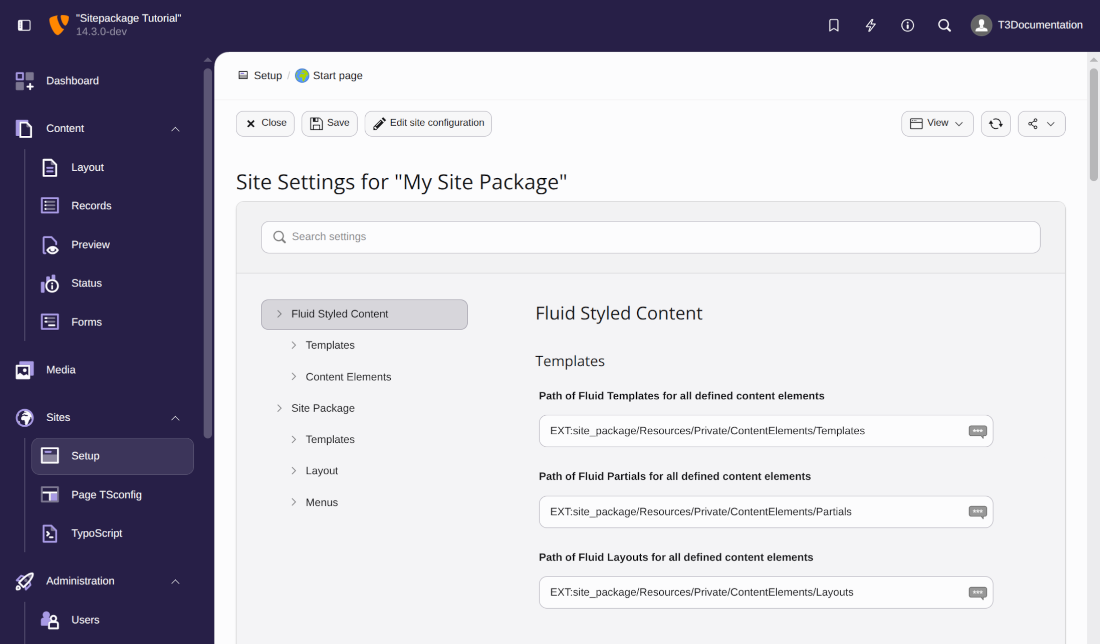
If you would click **Save** now, the settings would be saved to your
site configuration at `config/sites/my-site/settings.yaml`. We however
want to save the settings to the site set of our site package extension.
Click the button **YAML export** to copy the configuration to your
Clipboard instead, then save it to the following file:
**packages/my_site_package/Configuration/Sets/SitePackage/settings.yaml**
```yaml
styles:
templates:
templateRootPath: 'EXT:my_site_package/Resources/Private/ContentElements/Templates'
partialRootPath: 'EXT:my_site_package/Resources/Private/ContentElements/Partials'
layoutRootPath: 'EXT:my_site_package/Resources/Private/ContentElements/Layouts'
```
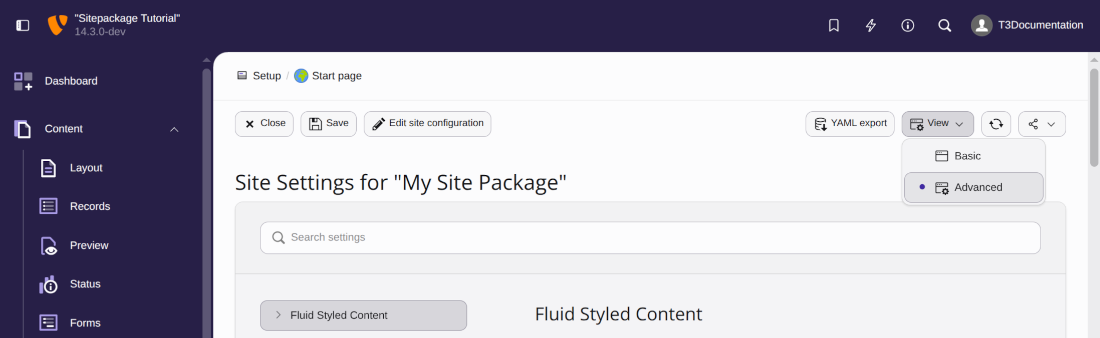
> [!TIP]
> If you don't see the **YAML export** button, click the **View**
> button to switch to the "Advanced" mode.
## Override the "Menu of Subpages" template {#content-element-rendering-menu-subpages}
Your site package already overrides the template `MenuSubpages` of
Fluid Styled Content in file
`packages/my_site_package/Resources/Private/ContentElements/Templates/MenuSubpages.fluid.html`.
If you wanted to create this Template manually you could do it like this:
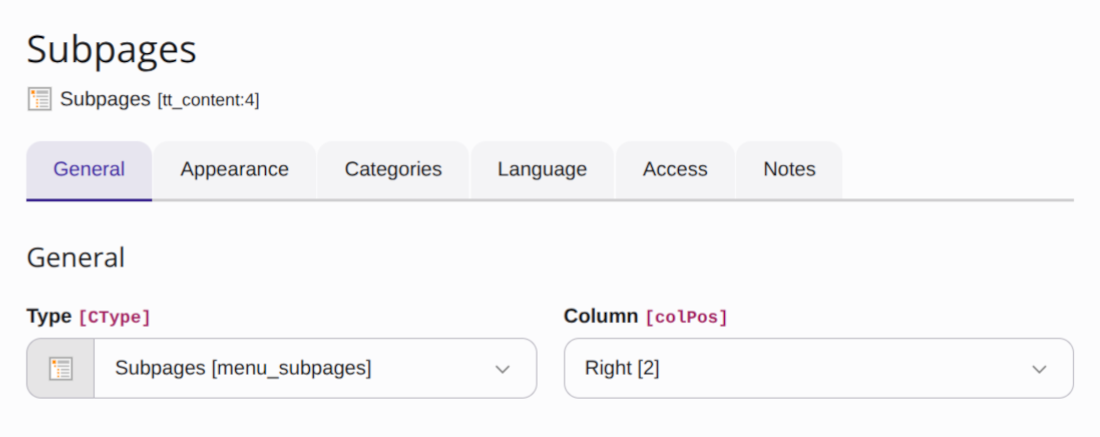
On "Page 1" of the example data a content element of type "Subpages" was added.
We now have to find out what this type is called in the database. The raw values
saved to the database are displayed in the TYPO3 backend when the debug mode
is activated:
Now we must find and copy the original template from Fluid Styled Content. TYPO3
extensions are saved by their composer key, here [`typo3/cms-fluid-styled-content`](https://packagist.org/packages/typo3/cms-fluid-styled-content),
into the folder `vendor` during installation via Composer. You can find
the files belonging to Fluid Styled Content in folder
`vendor/typo3/cms-fluid-styled-content` therefore. This folder is
structured similarly to your site package extension and you can find the original
templates in folder `Resources/Private/Templates` here.
By convention the templates of Fluid Styled Content have the name of the `CType` in CamelCase. Copy file
`vendor/typo3/cms-fluid-styled-content/Resources/Private/Templates/MenuSubpages.fluid.html`
into folder `packages/my_site_package/Resources/Private/ContentElements/Templates/MenuSubpages.fluid.html`
Edit the file to add some classes as used in menus in Bootstrap, for example
like this:
**packages/my_site_package/Resources/Private/ContentElements/Templates/MenuSubpages.fluid.html**
```html
```
In most parts the changes we made are pretty straight forward. In line 9
we use the [Fluid inline notation](https://docs.typo3.org/m/typo3/reference-coreapi/14.3/en-us/ApiOverview/Fluid/Index.html#fluid-inline-notation)
of the [If ViewHelper \](https://docs.typo3.org/other/typo3/view-helper-reference/14.3/en-us/Global/If.html#typo3fluid-fluid-if) to only
output class `active` if the page in the menu is in the root line.
## Override the sitemap template {#content-element-rendering-sitemap}
In a similar fashion we now copy and adjust the template for the sitemap from
`vendor/typo3/cms-fluid-styled-content/Resources/Private/Templates/MenuSitemap.fluid.html`
into folder `packages/site_package/Resources/Private/ContentElements/Templates/MenuSitemap.fluid.html`
and then adjust it:
**packages/my_site_package/Resources/Private/ContentElements/Templates/MenuSitemap.fluid.html**
```html
```
We want to adjust the HTML output of the sitemap for different levels. The
original template however gives us no means to output the level.
Line 5 uses the ViewHelper [Render ViewHelper \](https://docs.typo3.org/other/typo3/view-helper-reference/14.3/en-us/Global/Render.html#typo3-fluid-render)
to render everything in the section defined in lines 8-23.
In the original template the argument `menu` was already passed on as variable to
the section. We now enhance this line to also pass on variable `level` set to 1.
In line 17 the section `Menu` recursively includes itself to display further
levels of the sitemap. We now add 1 to the level so that within the recursive
call we are in level 2.
In line 14 we use that level to determine which class to use for the page link,
using once more the [Fluid inline notation](https://docs.typo3.org/m/typo3/reference-coreapi/14.3/en-us/ApiOverview/Fluid/Index.html#fluid-inline-notation)
of the [If ViewHelper \](https://docs.typo3.org/other/typo3/view-helper-reference/14.3/en-us/Global/If.html#typo3fluid-fluid-if).
## Override the partial template for image rendering {#content-element-rendering-image}
The templates of some content elements use the
[Render ViewHelper \](https://docs.typo3.org/other/typo3/view-helper-reference/14.3/en-us/Global/Render.html#typo3-fluid-render) to include
a partial template. This is true wherever images are displayed for example.
Partials in turn can include different partials.
The templates for "Image" and "Textpic" both contain the following line:
**vendor/typo3/cms-fluid-styled-content/Resources/Private/Templates/Image.fluid.html (Excerpt)**
```html
```
If you open that partial, it includes yet another partial:
**vendor/typo3/cms-fluid-styled-content/Resources/Private/Partials/Media/Gallery.fluid.html (Excerpt)**
```html
```
Which contains another until we finally arrive at
`vendor/typo3/cms-fluid-styled-content/Resources/Private/Partials/Media/Rendering/Image.fluid.html`
which does contain the actual [Media ViewHelper \](https://docs.typo3.org/other/typo3/view-helper-reference/14.3/en-us/Global/Media.html#typo3-fluid-media).
By overriding this one partial we can add a class to all images that are
displayed with the "Image" or "Text with Media" content elements. For example
we could display all images as circles by adding the class `rounded-circle`:
**packages/my_site_package/Resources/Private/ContentElements/Partials/Media/Rendering/Image.fluid.html**
```html
```