---
title: "Carousel Content Block example"
manual: "Site Package Tutorial"
version: "main"
permalink: "https://docs.typo3.org/permalink/t3sitepackage:carousel@main"
source: "ContentBlocks/Carousel.rst"
rendered: "2026-09-24T15:01:46+00:00"
---

# Carousel Content Block example {#carousel}

This content block demonstrates some additional features of
[`friendsoftypo3/content-blocks`](https://packagist.org/packages/friendsoftypo3/content-blocks). We assume that you are already
familiar with the concepts described in chapter
[Custom Content Blocks](https://docs.typo3.org/permalink/t3sitepackage:content-blocks@main).

**Table of contents**

-   [Directory structure of the carousel content element](https://docs.typo3.org/permalink/t3sitepackage:directory-structure-of-the-carousel-content-element@main)
-   [The carousel: A Content Block containing a collection of elements](https://docs.typo3.org/permalink/t3sitepackage:the-carousel-a-content-block-containing-a-collection-of-elements@main)
-   [Frontend template: Fluid template for a Content Block with a Collection](https://docs.typo3.org/permalink/t3sitepackage:frontend-template-fluid-template-for-a-content-block-with-a-collection@main)
-   [Content Block with backend template](https://docs.typo3.org/permalink/t3sitepackage:content-block-with-backend-template@main)
-   [Content Block specific assets](https://docs.typo3.org/permalink/t3sitepackage:content-block-specific-assets@main)

## Directory structure of the carousel content element {#carousel-directory}

Additionally to the files that the jumbotron provides (compare
[Directory structure of a Content Block](https://docs.typo3.org/permalink/t3sitepackage:content-blocks-jumbotron-directory@main)),
the carousel comes with special CSS
and JavaScript needed for this element only.

Additionally it supplies a template for its display in the backend.

-   packages/my_site_package/ContentBlocks/ContentElements/carousel
    -   assets
        -   frontend.css
        -   frontend.js
        -   icon.svg
    -   language
        -   labels.xlf
    -   templates
        -   backend-preview.fluid.html
        -   frontend.fluid.html
    -   config.yaml

## The carousel: A Content Block containing a collection of elements {#carousel-configuration}

The carousel can contain one or several items, each of which has an image,
header, and description:

**packages/my_site_package/ContentBlocks/ContentElements/carousel/config.yaml**

```yaml
name: site-package/carousel
typeName: site_package_carousel
group: site_package
prefixFields: true
fields:
  - identifier: carousel_items
    type: Collection
    minitems: 1
    appearance:
      collapseAll: true
      levelLinksPosition: both
    fields:
      - identifier: image
        type: File
        allowed: common-image-types
        minitems: 1
        relationship: oneToOne
      - identifier: header
        type: Text
      - identifier: description
        type: Textarea
        enableRichtext: true

```

Line 8: We use a field of type
[Collection](https://docs.typo3.org/p/friendsoftypo3/content-blocks/main/en-us/YamlReference/FieldTypes/Collection/Index.html#field_type_collection)
to contain the items to be displayed in the carousel. This field type expects
an array of fields (line 10ff).

Line 15: We use the type
[File](https://docs.typo3.org/p/friendsoftypo3/content-blocks/main/en-us/YamlReference/FieldTypes/File/Index.html#field_type_file)
to reference the image for the carousel item. We allow images only (line 16)
and require exactly one image (lines 17 and 18).

Line 20: The title should be one line of text. We use the type
[Text](https://docs.typo3.org/p/friendsoftypo3/content-blocks/main/en-us/YamlReference/FieldTypes/Text/Index.html#field_type_text).

Line 22: The description may contain rich text. Therefore, we use the type
[Textarea](https://docs.typo3.org/p/friendsoftypo3/content-blocks/main/en-us/YamlReference/FieldTypes/Textarea/Index.html#field_type_textarea)
and enable the Rich-Text Editor (line 23).

## Frontend template: Fluid template for a Content Block with a Collection {#carousel-fluid}

**packages/my_site_package/ContentBlocks/ContentElements/carousel/templates/frontend.fluid.html**

```html
<f:asset.css identifier="content-block-css-t3docs-t3docs/carousel" href="{cb:assetPath()}/frontend.css"/>
<f:asset.script identifier="content-block-js-t3docs-t3docs/carousel" src="{cb:assetPath()}/frontend.js"/>

<div id="carousel{data.uid}" class="carousel slide" data-bs-ride="carousel">
    <div class="carousel-indicators">
        <f:for each="{data.carousel_items}" as="item" iteration="iteration">
            <button type="button" data-bs-target="#carousel{data.uid}" data-bs-slide-to="{iteration.index}" class="{f:if(condition: '{iteration.isFirst}', then:' active')}" aria-current="true" aria-label="{item.header}"></button>
        </f:for>
    </div>
    <div class="carousel-inner">
        <f:for each="{data.carousel_items}" as="item" iteration="iteration">
            <div class="carousel-item{f:if(condition: '{iteration.isFirst}', then:' active')}">
                <f:image image="{item.image}" class="d-block w-100"/>
                <div class="carousel-caption d-none d-md-block">
                    <h5>{item.header}</h5>
                    <f:render.text field="description">{item}</f:render.text>
                </div>
            </div>
        </f:for>
    </div>
    <button class="carousel-control-prev" type="button" data-bs-target="#carousel{data.uid}" data-bs-slide="prev">
        <span class="carousel-control-prev-icon" aria-hidden="true"></span>
        <span class="visually-hidden"><f:translate key="{cb:languagePath()}:previous.label"/></span>
    </button>
    <button class="carousel-control-next" type="button" data-bs-target="#carousel{data.uid}" data-bs-slide="next">
        <span class="carousel-control-next-icon" aria-hidden="true"></span>
        <span class="visually-hidden"><f:translate key="{cb:languagePath()}:next.label"/></span>
    </button>
</div>

```

Line 1: We use [Asset.css ViewHelper \<f:asset.css>](https://docs.typo3.org/other/typo3/view-helper-reference/main/en-us/Global/Asset/Css.html#typo3-fluid-asset-css)
to load the provided CSS file only if a carousel is displayed on that page. The
[Asset collector](https://docs.typo3.org/m/typo3/reference-coreapi/main/en-us/ApiOverview/Assets/Index.html#asset-collector)
takes care that the file is not loaded more then once per page. All Fluid
ViewHelpers prefixed with `cb:` are provided by [`friendsoftypo3/content-blocks`](https://packagist.org/packages/friendsoftypo3/content-blocks)
they are therefore not listed in the official View Helper reference. The inline
ViewHelper `cb:assetPath()` resolves paths to the `asset` folder of the current
content block.

Line 2: We use the [Asset.script ViewHelper \<f:asset.script>](https://docs.typo3.org/other/typo3/view-helper-reference/main/en-us/Global/Asset/Script.html#typo3-fluid-asset-script)
to load the JavaScript file the same way.

Line 6: We use the [For ViewHelper \<f:for>](https://docs.typo3.org/other/typo3/view-helper-reference/main/en-us/Global/For.html#typo3fluid-fluid-for)
to loop through each item. We then render a button for each carousel item.

Line 11: We loop the items a second time to now display all carousel slides.

Line 13: The field `image` was defined with option `relationship: oneToOne` in
the [config.yaml](https://docs.typo3.org/permalink/t3sitepackage:carousel-configuration@main) it can therefore only contain
one image at maximum. As supplying an image is also mandatory `minitems: 1`
we can be sure there is always exactly one image. And just use the
[Image ViewHelper \<f:image>](https://docs.typo3.org/other/typo3/view-helper-reference/main/en-us/Global/Image.html#typo3-fluid-image)
to display the image.

Line 16: As the field `{item.description}` is of type Textarea with rich-text
enabled we have to use the [Render.text ViewHelper \<f:render.text>](https://docs.typo3.org/other/typo3/view-helper-reference/main/en-us/Global/Render/Text.html#typo3-fluid-render-text)
to properly display it.

<!-- TODO: no Markdown rendering for "versionadded" -->

The render.text ViewHelper handles the processing of both simple and rich
text fields.
Render.text ViewHelper <f:render.text>
It should be used now instead of the old Format.html ViewHelper <f:format.html>

Line 23, 27: The previous and next buttons use localized text for their labels.
We use the [Translate ViewHelper \<f:translate>](https://docs.typo3.org/other/typo3/view-helper-reference/main/en-us/Global/Translate.html#typo3-fluid-translate)
to translate these labels and a view helper provided by the Content Block
extension to determine the path to the language file.

## Content Block with backend template {#carousel-backend-fluid}

This Content Block contains a template to influence how the content elements
should be displayed in the TYPO3 backend in the Page module:

**packages/my_site_package/ContentBlocks/ContentElements/carousel/templates/backend-preview.fluid.html**

```html
<f:layout name="Preview"/>

<f:section name="Header">
    <f:variable name="itemCount"><f:count subject="{data.carousel_items}" /></f:variable>
    <div>{f:translate(key: '{cb:languagePath()}:backend.itemCount', arguments: {0: '{itemCount}'})}</div>
</f:section>

<f:section name="Content">
    <div class="row">
        <f:for each="{data.carousel_items}" as="item" iteration="iteration">
            <div class="col">
                <f:image image="{item.image}" width="100"/><br/>
                {item.header}
            </div>
        </f:for>
    </div>
</f:section>

<f:section name="Footer">
    <f:variable name="lastUpdated"><f:format.date>{data.rawRecord.crdate}</f:format.date></f:variable>
    <div>{f:translate(key: '{cb:languagePath()}:backend.lastUpdated', arguments: {0: '{lastUpdated}'})}</div>
</f:section>

```

The same fields like for the frontend template are available and the same
ViewHelpers can be used. However we display them in a simplified form.

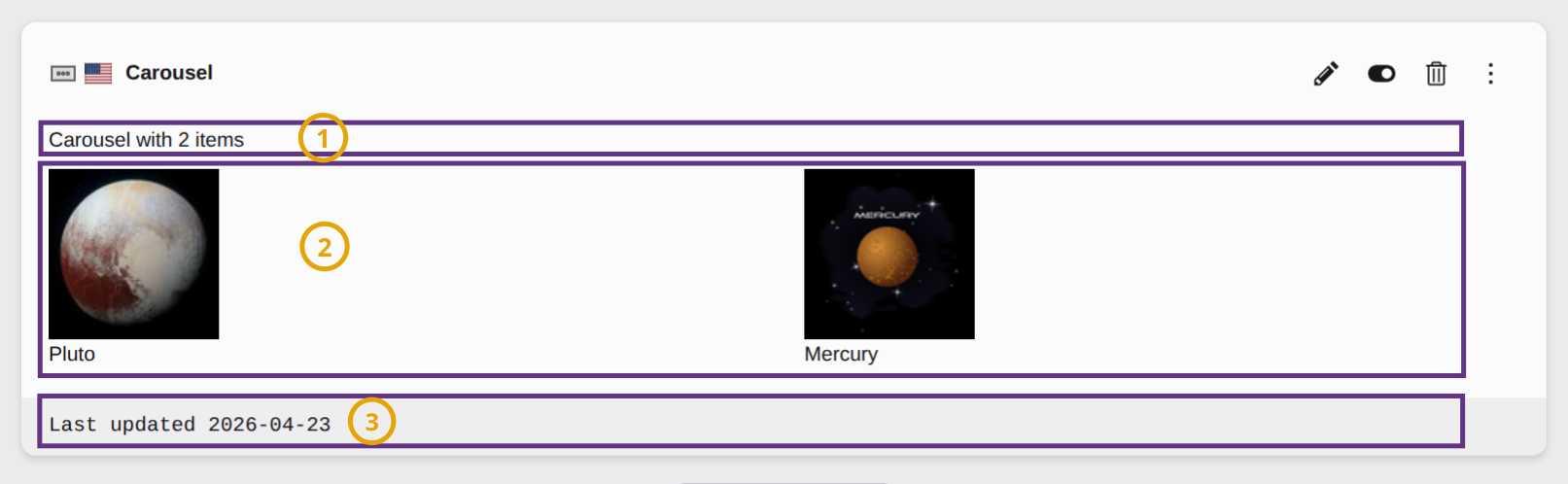
Line 1: We are using the layout `Preview`, which already gives some structure to
the display of the backend element:
![Screenshot of a Content Block in the TYPO3 Backend, demonstrating the sections of the backend preview](../Images/ContentBlocks/BackendPreview.png)

The line on the very top with the name of the content element, the icon and the
edit buttons is generated by TYPO3 automatically and cannot be influenced by
a backend template. It uses the label `title` defined in `language/labels.xlf`
and the icon `assets/icon.svg`.

As always we use the [Layout ViewHelper \<f:layout>](https://docs.typo3.org/other/typo3/view-helper-reference/main/en-us/Global/Layout.html#typo3fluid-fluid-layout)
to select the `Preview` layout.

Each section is declared using the [Section ViewHelper \<f:section>](https://docs.typo3.org/other/typo3/view-helper-reference/main/en-us/Global/Section.html#typo3fluid-fluid-section).

Line 10: We once more use the
[For ViewHelper \<f:for>](https://docs.typo3.org/other/typo3/view-helper-reference/main/en-us/Global/For.html#typo3fluid-fluid-for)
to loop through all items of the slider and display them one by one.

Line 21: Labels can and should also be localized in the backend. To not lose
context we prefixed all labels to be used in the backend with `backend.`.

> [!TIP]
> See also chapter [Backend Preview in the Content Blocks manual](https://docs.typo3.org/p/friendsoftypo3/content-blocks/main/en-us/API/BackendPreview/Index.html#api_backend_preview).

## Content Block specific assets {#carousel-assets}

The assets in folder `assets` can be loaded in the
[Frontend Template](https://docs.typo3.org/permalink/t3sitepackage:carousel-fluid@main). They will only be loaded when the
Content Block is loaded on the current page.

This also has the advantage that your JavaScript is only loaded if needed.
