---
title: "Display the content elements on your page"
manual: "Site Package Tutorial"
version: "main"
permalink: "https://docs.typo3.org/permalink/t3sitepackage:content-mapping@main"
source: "ContentMapping/Index.rst"
rendered: "2026-09-24T15:01:46+00:00"
---
# Display the content elements on your page {#content-mapping}
In step [Move the content into a section](https://docs.typo3.org/permalink/t3sitepackage:create-section@main) we moved the
part of our template, that will
contain the content, into its own section. This section is however still filled
with dummy content:
**Resources/Private/Templates/Pages/Default.fluid.html**
```html
Start page content
The content of the start page is displayed here. [...]
```
- [Include the site sets of fluid-styled-content as dependency](https://docs.typo3.org/permalink/t3sitepackage:include-the-site-sets-of-fluid-styled-content-as-dependency@main)
- [Create a default page layout with page TSconfig](https://docs.typo3.org/permalink/t3sitepackage:create-a-default-page-layout-with-page-tsconfig@main)
- [Content rendering via page-content data processor](https://docs.typo3.org/permalink/t3sitepackage:content-rendering-via-page-content-data-processor@main)
- [Content rendering in Fluid template](https://docs.typo3.org/permalink/t3sitepackage:content-rendering-in-fluid-template@main)
- [Extract the content element rendering to a partial](https://docs.typo3.org/permalink/t3sitepackage:extract-the-content-element-rendering-to-a-partial@main)
- [Splitting up the TypoScript into files](https://docs.typo3.org/permalink/t3sitepackage:splitting-up-the-typoscript-into-files@main)
- [Next steps](https://docs.typo3.org/permalink/t3sitepackage:next-steps@main)
## Include the site sets of fluid-styled-content as dependency {#content-mapping-site-set}
In step [Minimal site package - Create a basic site
set](https://docs.typo3.org/permalink/t3sitepackage:minimal-extension-siteset@main) we created a basic site set for
our site package.
Add a dependency to the sets provided by the system extension
[`typo3/cms-fluid-styled-content`](https://packagist.org/packages/typo3/cms-fluid-styled-content). This step is a prerequisite to
display the content in the next steps.
Your site set configuration should now look like this:
**packages/my_site_package/Configuration/Sets/SitePackage/config.yaml**
```yaml
name: t3docs/site-package
label: 'Site Package'
dependencies:
- typo3/fluid-styled-content
- typo3/fluid-styled-content-css
```
## Create a default page layout with page TSconfig {#content-mapping-backend-layout}
In order to map the content from the backend to the frontend we create a
new file `Configuration/Sets/SitePackage/page.tsconfig` containing [page TSconfig](https://docs.typo3.org/m/typo3/reference-typoscript/main/en-us/UsingSettingTSconfig/PageTSconfig.html#setting-page-tsconfig).
By placing the file within the site set, you created in step
[Create a basic site set](https://docs.typo3.org/permalink/t3sitepackage:minimal-extension-siteset@main), the
newly created file is loaded within the page tree of your site automatically:
**packages/my_site_package/Configuration/Sets/SitePackage/page.tsconfig**
```typoscript
@import './PageTsConfig/'
@import './PageTsConfig/BackendLayouts/'
```
This file automatically includes all `.tsconfig` files from the designated folder
in which we will store the page layouts.
We now create a default page layout with two areas: One for the main content and
one for the stage.
**packages/my_site_package/Configuration/Sets/SitePackage/PageTsConfig/BackendLayouts/default.tsconfig**
```typoscript
#
# BACKENDLAYOUT: DEFAULT
#
mod {
web_layout {
BackendLayouts {
default {
title = LLL:site_package.backend.layouts:default
config {
backend_layout {
colCount = 1
rowCount = 1
rows {
1 {
columns {
1 {
name = LLL:site_package.backend.layouts:column.stage
colPos = 1
identifier = stage
slideMode = slide
allowedContentTypes = site_package_jumbotron,text
}
}
}
2 {
columns {
1 {
name = LLL:site_package.backend.layouts:column.normal
colPos = 0
identifier = main
disallowedContentTypes = site_package_jumbotron
}
}
}
}
}
}
icon = EXT:site_package/Resources/Public/Icons/BackendLayouts/default.svg
}
}
}
}
```
Each area in the page layout becomes an identifier that can be used during
content mapping. If no content element is added in the backend of that page and
the slide mode is activated, content from the parent page is displayed. This is
useful for design elements like side bars, jumbotrons or banners that should be
the same for a page and its subpage. You can find all details of the
Page / backend layouts in the TSconfig reference.
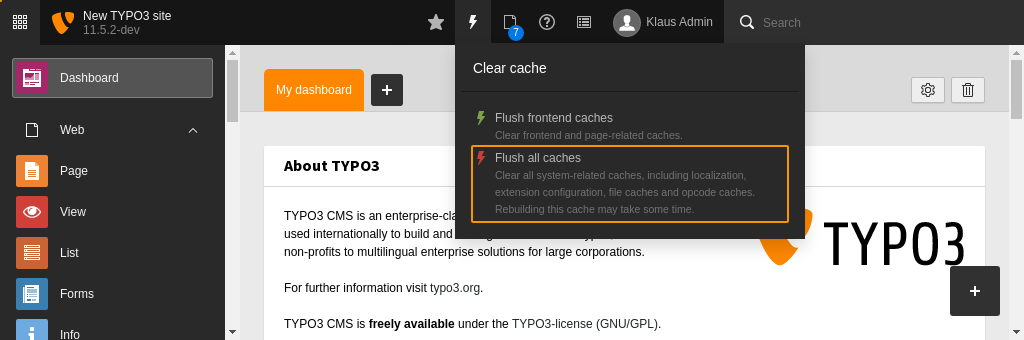
When you make changes to the files of an extension it is usually necessary
to flush all caches by hitting the button.
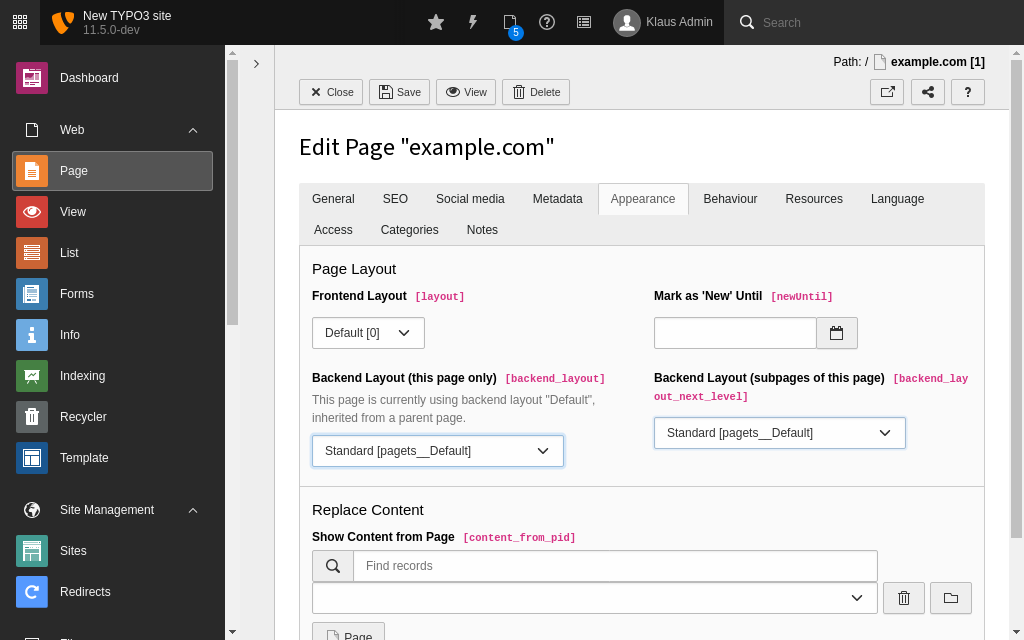
After flushing the all caches the new backend layout is available in the page
properties at **Appearance > Layout > Backend Layout**.
### Choose the page layout in the page properties {#choose-page-layout}
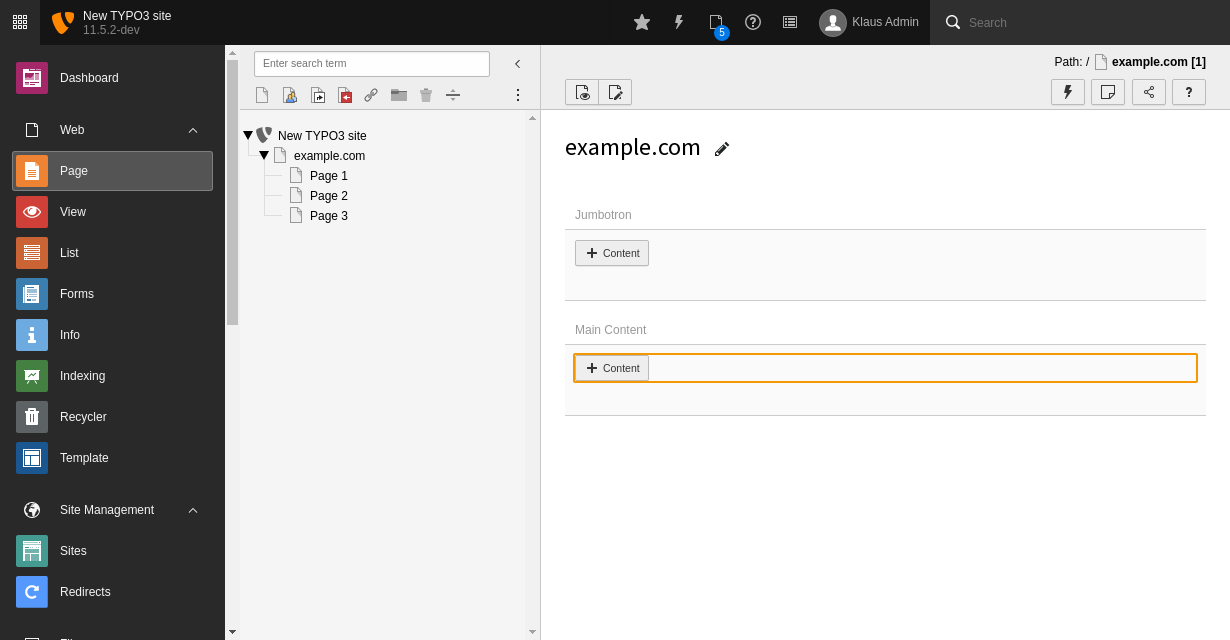
Switch to the new backend layout and save the page properties. In the
**Content > Layout** module you will see two areas called "Stage" and
"Normal" now.
If you followed step
[Load the example data automatically](https://docs.typo3.org/permalink/t3sitepackage:load-example-data@main)
the areas "Stage" and "Normal" should already contain some example content.
In the database each content element record is stored in the table
`tt_content`. This table has a column called `colPos`. If the value stored
in column `colPos` is the same as defined in the page layout in page TSconfig
the content element is displayed in the according area of the page layout.
It is considered best practice to store the main content in an area with
`colPos=0`. This makes switching between different layouts easier.
## Content rendering via page-content data processor {#page-content-data-processor}
The TypoScript object PAGEVIEW and the data processor page-content
have been added.If you are using TYPO3 v12.4 read content element mapping in TYPO3
v12.4
The TypoScript object [PAGEVIEW](https://docs.typo3.org/m/typo3/reference-typoscript/main/en-us/ContentObjects/Pageview/Index.html#cobj-pageview), that we
defined in step [Fluid version of the minimal
site package](https://docs.typo3.org/permalink/t3sitepackage:minimal-extension-fluid@main) enables us to introduce
a data processor to facilitate content mapping.
Edit the TypoScript configuration of the `PAGEVIEW` object to define a
data processor of type [page-content](https://docs.typo3.org/m/typo3/reference-typoscript/main/en-us/DataProcessing/PageContentFetchingProcessor.html#PageContentFetchingProcessor):
**Configuration/Sets/SitePackage/setup.typoscript (diff)**
```diff
page {
10 {
paths {
100 = EXT:my_site_package/Resources/Private/Templates/
}
+ dataProcessing {
+ # makes content elements available as {content} in Fluid template
+ 10 = page-content
+ }
}
}
```
This data processor provides the variable `content` to your Fluid template.
You can debug this variable in the main section of your template using the
[Debug ViewHelper \](https://docs.typo3.org/other/typo3/view-helper-reference/main/en-us/Global/Debug.html#typo3-fluid-debug):
**Resources/Private/Templates/Pages/Default.fluid.html**
```diff
+ {content}
Start page content
The content of the start page is displayed here. [...]
```
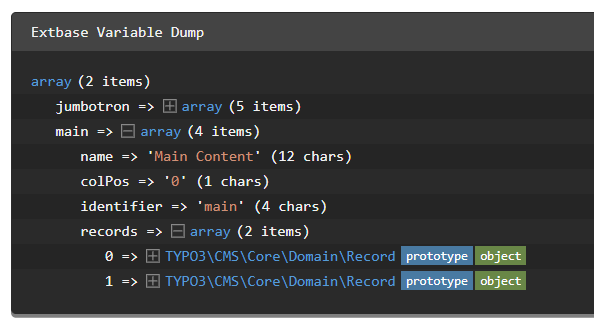
The debug output after clearing all caches and previewing the page should look
like this:
> [!TIP]
> Does your debug output show "NULL" instead? Check the following:
>
> - Is `{content}` spelled correctly and uses the correct syntax?
> - Did you [define and include the page layout](https://docs.typo3.org/permalink/t3sitepackage:backend-page-layouts@main)?
> - Did you [choose the correct page layout in the page properties](https://docs.typo3.org/permalink/t3sitepackage:choose-page-layout@main)?
> - Did you define the correct data processor `page-content` in TypoScript?
> - Did you override the default variable name using
> [as](https://docs.typo3.org/m/typo3/reference-typoscript/main/en-us/DataProcessing/PageContentFetchingProcessor.html#confval-pagecontentfetchingprocessor-as) in the data processor?
## Content rendering in Fluid template {#cm-fluid-typoscript-mapping}
Open the file `Resources/Private/Templates/Page/Default.fluid.html` and locate the
main content area. It contains a headline (look for the ``-tags) and
some dummy content (look for the `
`-tags).
Use the `` ViewHelper
to replace these lines.
That's it! No more loops with TypoScript objects are needed in TYPO3 14 on using
this new ViewHelper.
Just define which identifier (you find the identifiers in the deubg output) from
the backend_layout should be used to render it's content elemnts.
`fluid-styled-content` internally uses
Fluid templates and TypoScript with data processors just like the ones we were
defining above. If you desire to change the output of these content elements
you could override the Fluid templates of the extension
[`typo3/cms-fluid-styled-content`](https://packagist.org/packages/typo3/cms-fluid-styled-content).
## Extract the content element rendering to a partial {#content-element-partial}
Extracting the rendering for content into partials it's not longer necessary and not suggested
with the new `render.contentArea` ViewHelper.
## Splitting up the TypoScript into files {#content-element-typoscript}
At this point the file `packages/my_site_package/Configuration/Sets/SitePackage/setup.typoscript`
has started to have several lines. When we start rendering the
[Menues](https://docs.typo3.org/permalink/t3sitepackage:main-menu-creation@main),
make more sophisticated
[Settings](https://docs.typo3.org/permalink/t3sitepackage:site-sets-configuration@main)
etc the TypoScript configuration file is going to grow more.
We therefore suggest, to use TypoScript imports
and structure your TypoScript in different files that are then combined at this point.
The rest of the Tutorial will assume that your files are in the directory
`packages/my_site_package/Configuration/Sets/SitePackage/TypoScript/` and imported
as described in [TypoScript imports](https://docs.typo3.org/permalink/t3sitepackage:typoscript-configuration@main).
## Next steps {#content-element-next-steps}
- [TypoScript imports](https://docs.typo3.org/permalink/t3sitepackage:typoscript-imports@main)
- [Stage](https://docs.typo3.org/permalink/t3sitepackage:the-stage-fall-back-to-content-of-parent-page-sliding@main)
- [Subpage layout](https://docs.typo3.org/permalink/t3sitepackage:additional-subpage-layout@main)
- [Adding content](https://docs.typo3.org/permalink/t3sitepackage:add-content-in-the-typo3-backend@main)