---
title: "Google Consent Mode V2"
manual: "Coding Freaks Cookie Manager"
version: "main"
source: "Configuration/CookieServices/GoogleConsentMode/Index.rst"
rendered: "2026-09-27T16:07:18+00:00"
---
# Google Consent Mode V2 {#google-consent-mode-v2}
> [!IMPORTANT]
> **Category sorting order matters.** The cookie manager executes service scripts in the order
> their categories appear in the backend. The **Required** category must come **first** so that
> `window.dataLayer` and `window.gtag` are defined before any other service tries to use them. Use the List Module to reorder categories if needed.
>
> Recommended category order in the backend:
>
> 1. **Required Cookies** (Essential) - defines `window.gtag` and consent defaults
> 1. **Performance/Functional** \- updates functional/performance consent signals
> 1. **Analytics** \- loads Google Tag Manager
> 1. **Marketing/Advertising** \- updates advertising consent signals
>
> If the Analytics or Marketing category runs before Required, the `window.gtag` function will
> not exist yet and consent calls will fail.
Google Consent Mode V2 allows Google Tags (Analytics, Ads..) to adjust their behavior based on user consent.
It uses seven consent signals that map to four cookie categories:
| Signal | Purpose | Category |
| --- | --- | --- |
| `security_storage` | Enables storage related to security such as authentication, fraud prevention, and other user protection | Essential |
| `functionality_storage` | Enables storage that supports the functionality of the website or app, for example language settings | Functional |
| `personalization_storage` | Enables storage related to personalization, for example video recommendations | Functional |
| `analytics_storage` | Enables storage such as cookies related to analytics, for example visit duration | Analytics |
| `ad_storage` | Enables storage such as cookies related to advertising | Marketing |
| `ad_user_data` | Sets consent for sending user data to Google for online advertising purposes | Marketing |
| `ad_personalization` | Sets consent for personalized advertising and remarketing | Marketing |
We recommend using **four separate categories** (Essential, Functional, Analytics and Marketing) so visitors
can consent to each purpose separately.
All seven consent signals default to `denied`. The user decides what to opt into.
## Basic vs Advanced Mode {#basic-vs-advanced-mode}
There are two ways to implement Consent Mode V2:
- ****Basic Mode (Recommended by me)****
Google Tag Manager only loads **after** the user gives consent. No data is sent to Google
before consent. No connection to Google servers is made until the user explicitly opts in.
- ****Advanced Mode (Recommended by Google)****
Google Tag Manager loads on every page visit with all consent signals set to `denied`.
Google still receives cookieless pings for modeled conversions, even without user consent.
This means **data is transmitted to Google servers before** the user has given consent.
> [!IMPORTANT]
> We recommend **Basic Mode**. In Advanced Mode, Google Tag Manager
> sends cookieless pings to Google servers on every page load, even when the user has not
> given consent. Loading the Tag Manager only after consent ensures no data leaves the
> browser without explicit user permission.
## Why you must use window.gtag {#why-you-must-use-window-gtag}
> [!WARNING]
> **Do NOT use** `function gtag(){dataLayer.push(arguments);}` **in your opt_in_code.**
> Always use `window.gtag = function(){dataLayer.push(arguments);};` instead.
The cookie manager executes `opt_in_code` and `opt_out_code` inside JavaScript callback functions
(`onAccept` and `onChange`). This causes two problems with a bare `function gtag(){}` declaration:
- ****1\. Function Scoping****
A `function gtag(){}` declaration inside a callback is scoped to that callback. It does not
become available on `window`, so other code blocks (like `opt_out_code`) cannot access it.
- ****2\. Function Hoisting (the hidden trap)****
JavaScript hoists `function` declarations to the top of their enclosing function - even when
they appear inside an `else` branch. This means the cookie manager's generated code looks like:
```javascript
// Generated onChange callback (simplified)
cf_cookieconfig.onChange = function(cookie, changed_preferences) {
// JavaScript hoists "function gtag(){}" from the else branch to HERE
// creating a local variable: var gtag = undefined;
if (!cc.allowedCategory('googletagmanager')) {
// OPT-OUT BRANCH
// typeof gtag === 'function' → FALSE (local gtag is undefined, NOT window.gtag)
// The denied signal is NEVER sent!
} else {
// OPT-IN BRANCH
function gtag(){dataLayer.push(arguments);} // hoisted above!
}
};
```
The hoisted `function gtag(){}` creates a local variable `gtag = undefined` that **shadows**
`window.gtag` in the entire callback - including the opt-out branch where it was never assigned.
This is why `typeof gtag === 'function'` fails even when `window.gtag` exists.
**The fix:** Use `window.gtag` everywhere. The assignment `window.gtag = function(){...}` is not
hoisted and explicitly places the function on the global object. Referencing `window.gtag` in
`opt_out_code` bypasses the local scope entirely.
## Service Architecture {#service-architecture}
Consent Mode signals are **Google-specific**. Other marketing providers (Facebook Pixel, LinkedIn Insight,
TikTok, etc.) do not use `gtag` consent mode - they manage their own consent through their own scripts.
In the cookie manager, `opt_in_code` and `opt_out_code` live on **Services**, not on Categories.
This means you cannot add consent mode code to a category directly. Instead, you create dedicated
services for the consent mode signals.
> [!IMPORTANT]
> **Why consent defaults must live in the Required category:**
>
> The `window.dataLayer`, `window.gtag` function and consent defaults must be defined in a
> service in the **Required** category so they are **always available** \- regardless of which
> optional categories the user accepts.
>
> If `window.gtag` is only defined when the user accepts Analytics, then a user who accepts
> Marketing but not Analytics would cause the Marketing consent updates to be silently lost
> (`window.gtag` would not exist). When the user later accepts Analytics and GTM loads,
> it would not know that Marketing was already granted.
>
> By defining `window.gtag` and `dataLayer` in a Required service:
>
> - `window.gtag` is always available - no `typeof` guards needed anywhere
> - Consent updates from any category are always pushed to `dataLayer`
> - `dataLayer` is a queue - when GTM eventually loads, it processes **all queued entries**
> from the beginning, including consent updates that were pushed before GTM existed
> - The order in which the user accepts categories does not matter
>
> **This is still Basic Mode, not Advanced Mode.** `window.dataLayer` is just a local JavaScript
> array and `window.gtag` is just a local function that pushes to that array. No network requests
> are made, no data leaves the browser, and no connection to Google servers is established.
> What makes Advanced Mode "advanced" is loading the GTM `
)
}
```
Replace `YOUR-GTM-ID` with your Google Tag Manager Container ID.
Since the Tag Manager and `window.gtag` are loaded via TypoScript in Advanced Mode, the **Google Consent
Mode Defaults** service in the Required category is **not needed**. The remaining services are the same
as Basic Mode:
### Google Tag Manager Service (Analytics Category) {#google-tag-manager-service-analytics-category}
**opt_in_code:**
```javascript
window.gtag('consent', 'update', {
'analytics_storage': 'granted'
});
```
**opt_out_code:**
```javascript
window.gtag('consent', 'update', {
'analytics_storage': 'denied'
});
```
### Google Consent Mode Service (Marketing Category) {#google-consent-mode-service-marketing-category}
**opt_in_code:**
```javascript
window.gtag('consent', 'update', {
'ad_storage': 'granted',
'ad_user_data': 'granted',
'ad_personalization': 'granted'
});
```
**opt_out_code:**
```javascript
window.gtag('consent', 'update', {
'ad_storage': 'denied',
'ad_user_data': 'denied',
'ad_personalization': 'denied'
});
```
### Google Consent Mode Service (Functional Category) {#google-consent-mode-service-functional-category}
**opt_in_code:**
```javascript
window.gtag('consent', 'update', {
'functionality_storage': 'granted',
'personalization_storage': 'granted'
});
```
**opt_out_code:**
```javascript
window.gtag('consent', 'update', {
'functionality_storage': 'denied',
'personalization_storage': 'denied'
});
```
## Testing Consent Mode {#testing-consent-mode}
[Watch this video on YouTube](https://www.youtube.com/watch?v=MqAEbshMv84)
- - **Go to your Tag Manager Admin page to test the Consent Mode configuration.**
- Open [https://tagmanager.google.com/#](https://tagmanager.google.com/#) and select your account or tag to open the admin page.
- Open the Tag Manager Configuration Page.
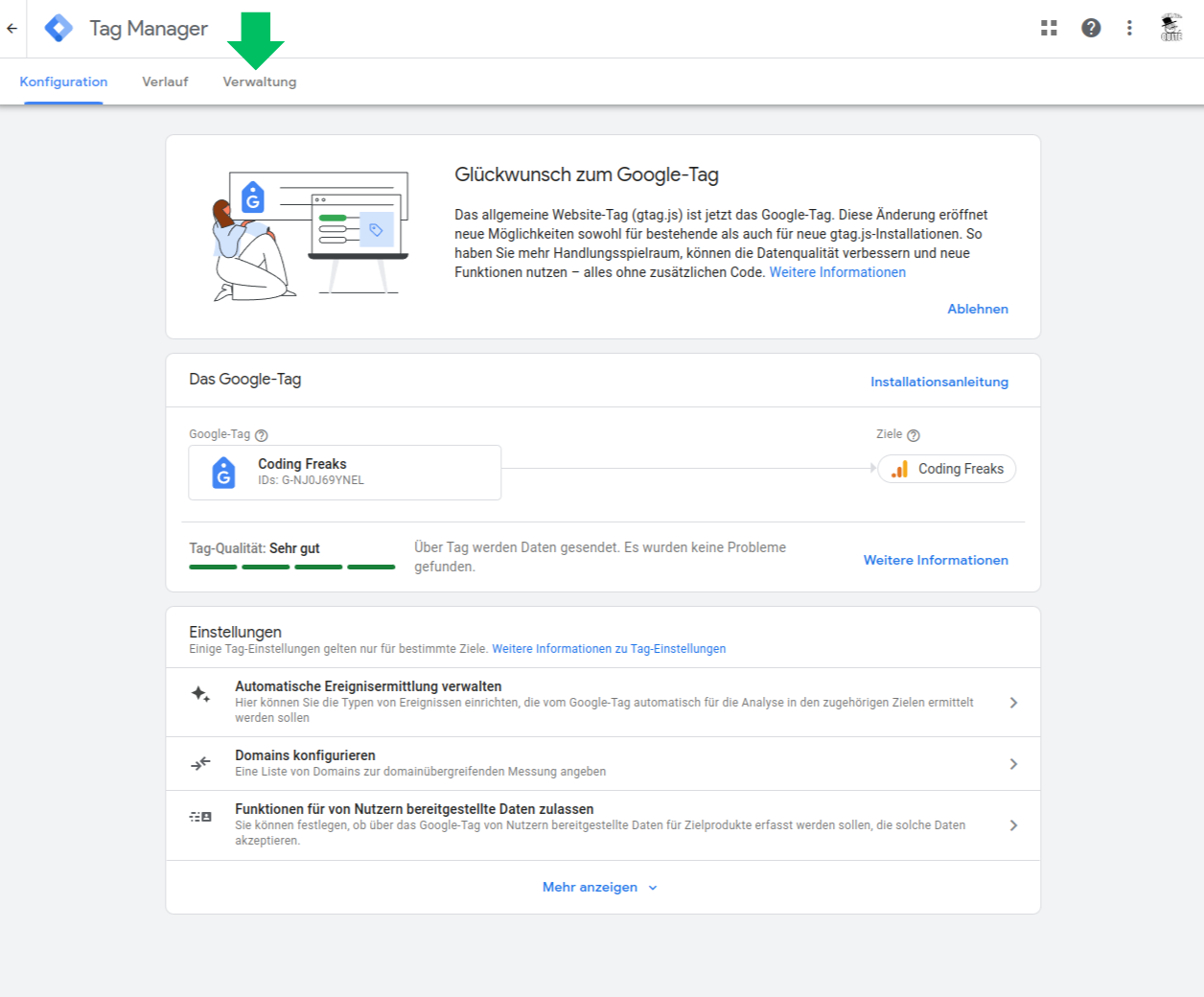
- Select the "Administration" Tab and open the "Container Settings" section.
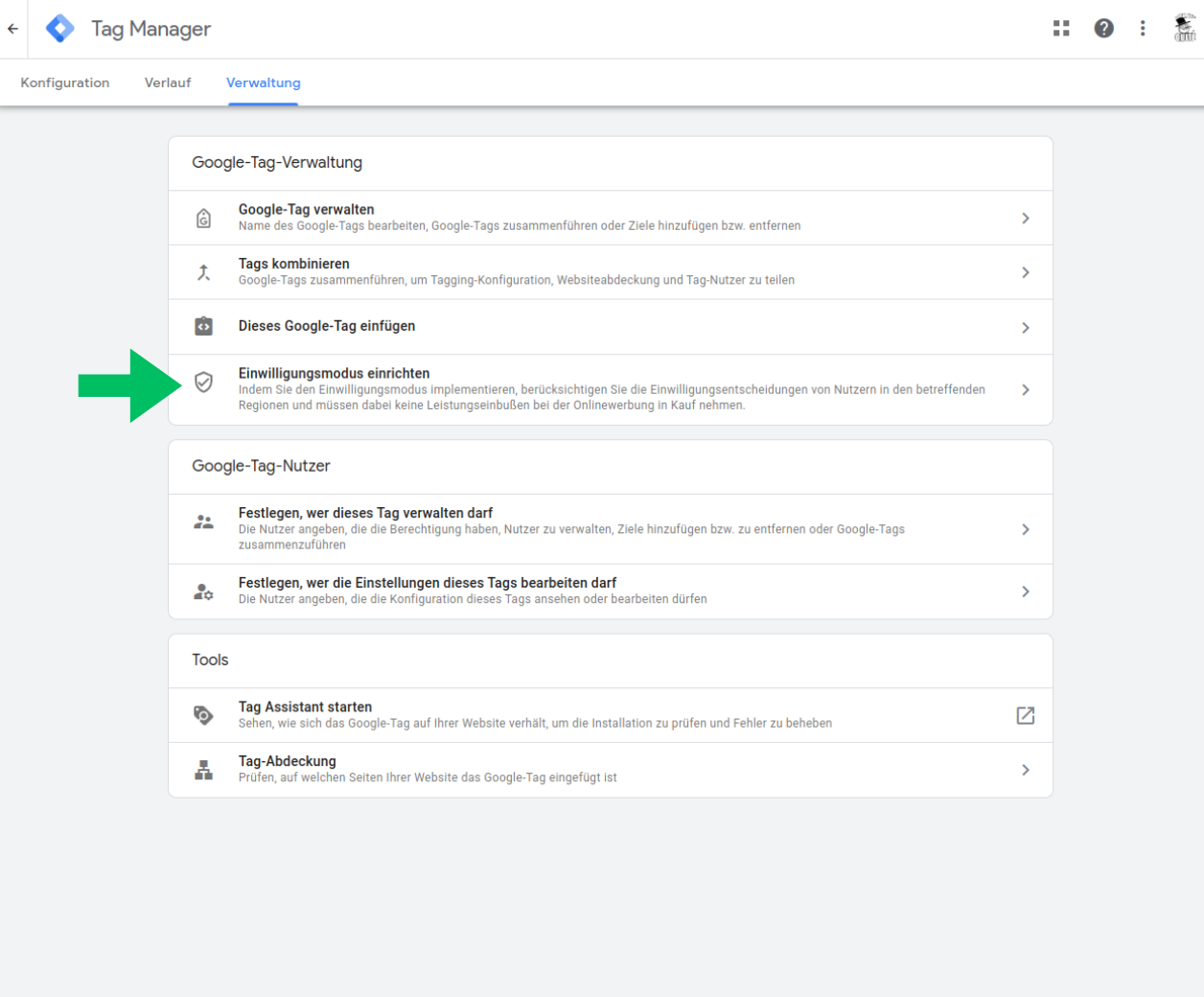
- Press the "Enable Consent Mode" Button to enable the consent mode updates.
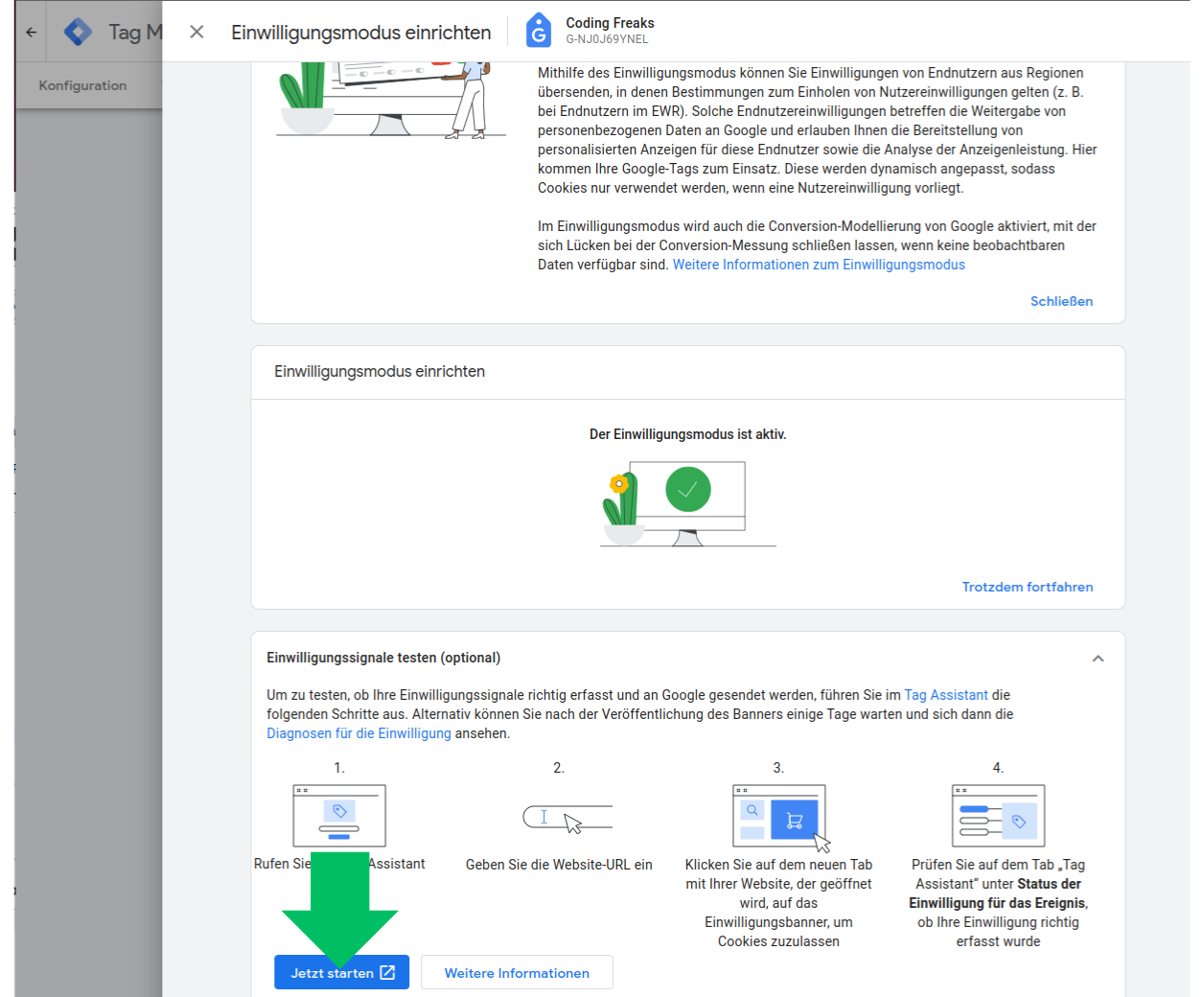
- Switch back to your "Workspace" and open the "Preview / Debug" mode. And open your website in the new opened tab. (Accept all cookies in the cookie manager to see the default state of the consent mode signals)
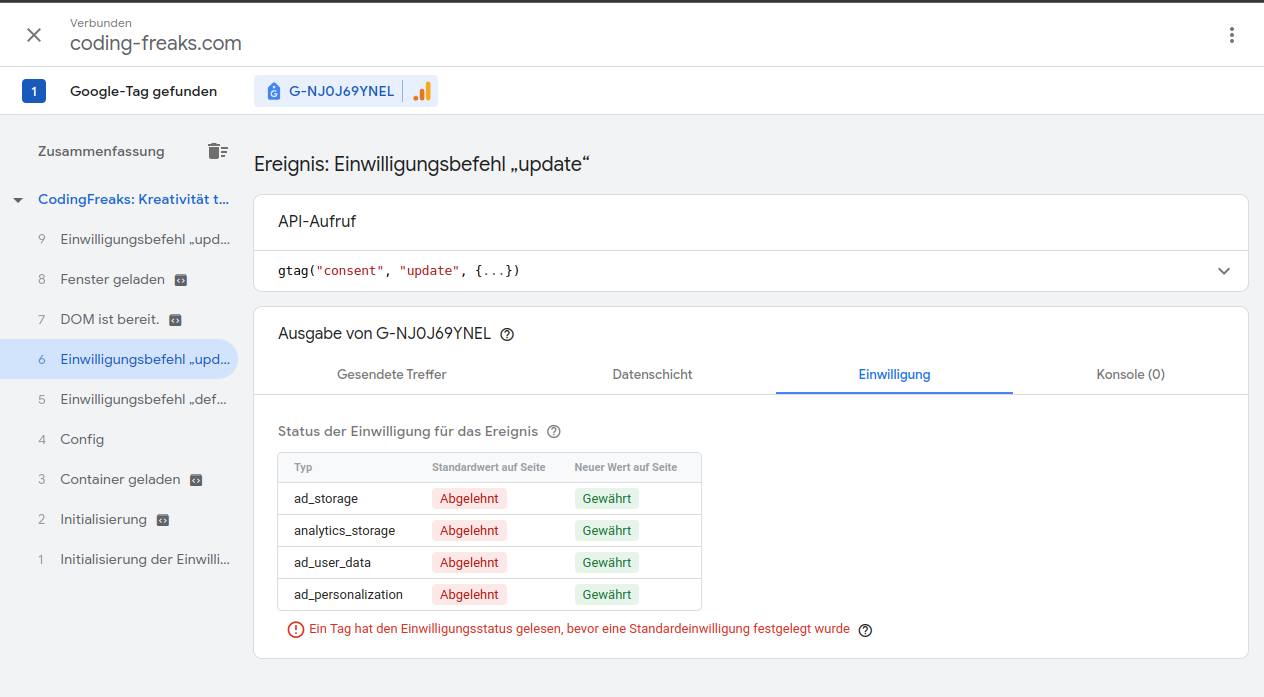
- Opt Out in the Cookie Manager in your TYPO3 Frontend to load the Tag Manager with all consent signals set to granted. (Just accept all)
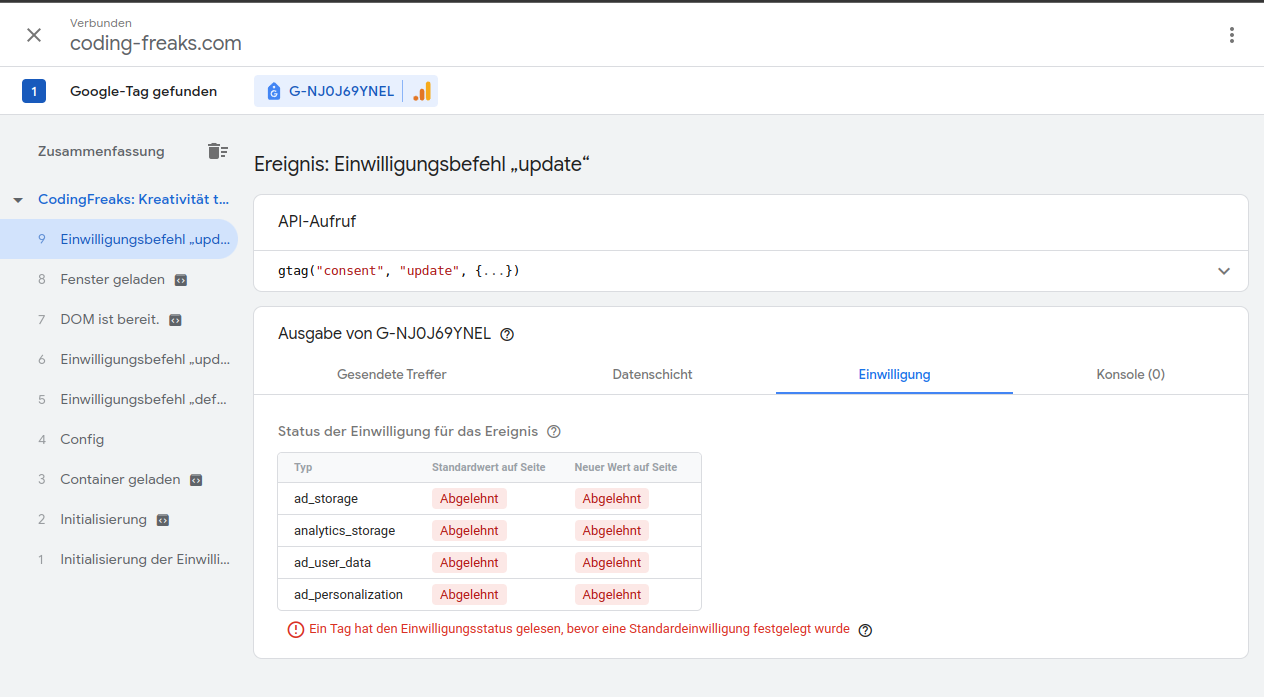
- Opt Out some categories or deny all in the Cookie Manager in your TYPO3 Frontend:
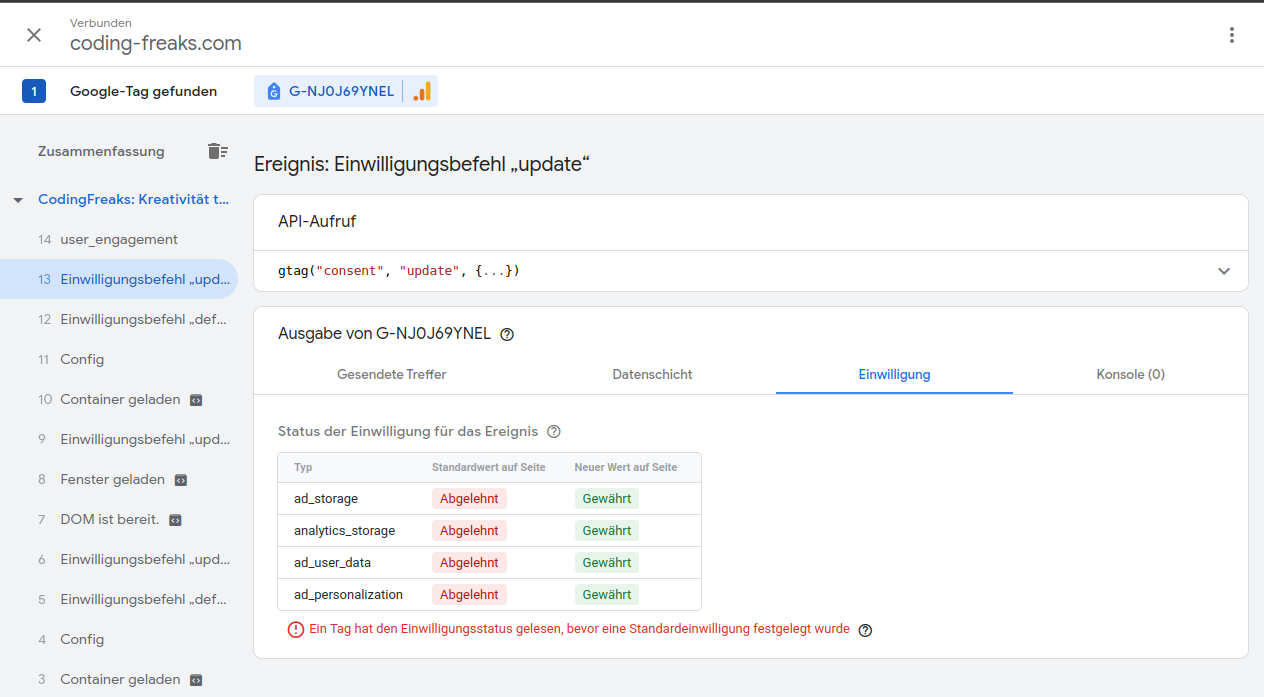
- Try some combinations of accepted and denied categories in the Cookie Manager in your TYPO3 Frontend:
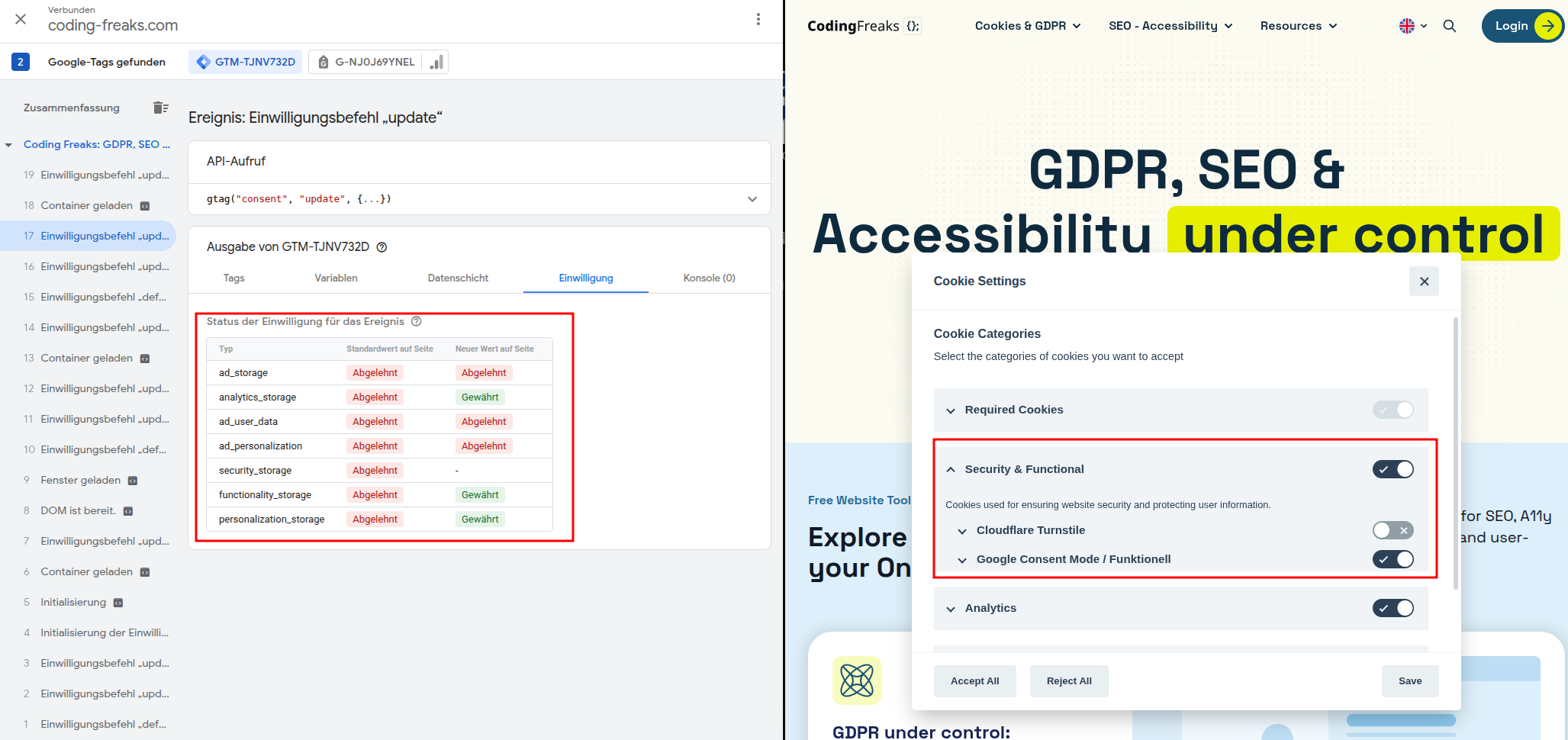
With this setup, you can verify that the correct consent signals are being sent to Google based on the user's choices in the cookie manager.
You should see the consent updates reflected in the Tag Manager debug console as you toggle different categories on and off, confirming that the integration is working as expected.
You can Customize the opt-in and opt-out code to fit your specific tag needs, such as adding additional consent signals or integrating with other marketing providers.
Hope this helps you get started with Google Consent Mode V2 in the CodingFreaks cookie manager! If you have any questions or need further assistance, feel free to ask or join our community Slack channel in the Typo3 Ecosystem.
## Links {#links}
- Google Consent Mode V2 Documentation: [https://developers.google.com/tag-platform/devguides/consent](https://developers.google.com/tag-platform/devguides/consent)
- Google Tag Manager Admin Page: [https://tagmanager.google.com/](https://tagmanager.google.com/)
- CodingFreaks TYPO3 Slack Channel: [https://typo3.slack.com/archives/C04NB2ZP30U](https://typo3.slack.com/archives/C04NB2ZP30U)
- Google Consent Mode V2 YouTube Tutorial: [https://www.youtube.com/watch?v=MqAEbshMv84](https://www.youtube.com/watch?v=MqAEbshMv84)