
TypoScript reference
More TypoScript settings are available on the Events and event-registration page. Also make sure to check the included
setup.txt file for available/default TypoScript settings.
plugin.tx_sfeventmgt
|
Property: |
Data type: |
Description: |
Default: |
|---|---|---|---|
|
view.templateRootPath |
String |
Path to the templates. The default setting is EXT:sf_event_mgt/Resources/Private/Templates/ |
Extbase default |
|
view.partialRootPath |
String |
Path to the partials. The default setting is EXT:sf_event_mgt/Resources/Private/Partials/ |
Extbase default |
|
view.layoutRootPath |
String |
Path to the layouts. The default setting is EXT:sf_event_mgt/Resources/Private/Layouts/ |
Extbase default |
|
settings.calendar.firstDayOfWeek |
Integer |
First day of week 0 (sunday) bis 6 (saturday). The default value "1" is set to monday. |
1 |
|
settings.calendar.includeEventsForEveryDayOfAllCalendarWeeks |
Boolean |
If set, the calendar will show events for all days of all shown weeks of the calendar and not only events for the current month. |
1 (true) |
|
settings.calendar.showWeekNumber |
Boolean |
Definies, if the calendar should show week numbers or not. |
1 (true) |
|
settings.detail.checkPidOfEventRecord |
Boolen |
If set, the detail view checks the incoming event record against the defined starting point(s). If those don’t match, the event record won’t be displayed. |
0 (False) |
|
settings.detail.imageWidth |
Integer |
Default width of images in detail view |
200 |
|
settings.detail.imageHeight |
Integer |
Default height of images in detail view |
Empty |
|
settings.detail.isShortcut |
Boolean |
This setting should be set to "1" if the event should be fetched from the Content Object data. This option should only be set to "1", if events are displayed using the "Insert Record" content element |
0 (false) |
|
settings.registration.checkPidOfEventRecord |
Boolen |
If set, the registration view checks the incoming event record against the defined starting point(s). If those don’t match, the registration to the event is not possible. |
0 (False) |
|
settings.registration.autoConfirmation |
Boolean |
If set to true, new registration will automatically be confirmed by redirecting the user to the confirmRegistration-Action. |
0 (false) |
|
settings.registration.deleteExpiredRegistrations |
Boolean |
If set to true, expired registrations will be deleted by the action in the backend module. If this setting is set to false, expired registrations will just be set to hidden Note, this setting has no effect for the |
0 (false) |
|
settings.registration.formatDateOfBirth |
string |
Date format of field dateOfBirth |
d.m.Y |
|
settings.registration.requiredFields |
String |
List of required fields in registration. The fields firstname, lastname and email are always required and cannot be overridden. The following additional fields are available:
Note, that all fields are just checked, if they are empty or not. If the field "accepttc" (or any other boolean field) is included in the list of required fields, it is checked if the field value is true. |
empty |
- Property
-
settings.registration.linkTermsAndConditions
- :Date type:
- String
- :Description:
- A page or an external URL that can be used in the registration template to show "Terms & Conditions"
- :Default:
- empty
- - :Property:
- settings.reCaptcha.siteKey
- :Date type:
- string
- :Description:
- Sitekey for reCATCHA check. Note: If this setting is left blank, the reCAPTCHA field will not be shown
- :Default:
- empty
- - :Property:
- settings.reCaptcha.secretKey
- :Date type:
- string
- :Description:
- SecretKey for reCATCHA check.
- :Default:
- empty
- - :Property:
- settings.confirmation.prefillFields.{fieldname}
- :Date type:
- String
- :Description:
- Key/value mapping for prefilling fields from fe_users table. The key-field is the fieldname in sf_event_mgt and the value-field is the fieldname in fe_users.
:Default:
- firstname = first_name
- lastname = last_name
- address = address
- zip = zip
- city = city
- country = country
- email = email
- phone = telephone
- - :Property:
- settings.waitlist.moveUp.keepMainRegistrationDependency
- :Date type:
- Boolean
- :Description:
- If set to true (1), a registration will keep the dependency to the main registration if the registration has been submitted using the simultaneous registration process. Note, that it is recommended to set this value to false (0), since cancellation of the main registration will also cancel moved up "child" registrations.
- :Default:
- false,
- - :Property:
- settings.confirmation.linkValidity
- :Date type:
- Integer
- :Description:
- Validity of confirmation link in seconds
- :Default:
- 3600
- - :Property:
- settings.notification.senderEmail
- :Date type:
- String
- :Description:
- E-mail address for emails sent to user
- :Default:
- empty
- - :Property:
- settings.notification.senderName
- :Date type:
- String
- :Description:
- Sender name for emails sent to user
- :Default:
- empty
- - :Property:
- settings.notification.replyToEmail
- :Date type:
- String
- :Description:
- Reply-to email address of emails sent to the user
- :Default:
- empty
- - :Property:
- settings.notification.senderSignature
- :Date type:
- String
- :Description:
- Signature shown in emails sent to user
- :Default:
- empty
- - :Property:
- settings.notification.adminEmail
- :Date type:
- String
- :Description:
- Admin E-mail address
- :Default:
- empty
- - :Property:
- settings.notification.registrationDataAsSenderForAdminEmails
- :Date type:
- Boolean
- :Description:
- If set, admin emails will be sent by the email-address and sender name (firstname and lastname) set in the registration
- :Default:
- false
- - :Property:
- settings.notification.disabled
- :Date type:
- Boolean
- :Description:
-
If set, the email notification feature is completely disabled. This includes user and admin emails as well as user notifications from the backend.
Note, that the functionality of sending Notifications in the backend module is also disabled when this option is set to "true"
- :Default:
- false
- - :Property:
- settings.notification.registrationNew.userSubject
- :Date type:
- String
- :Description:
- User-Subject for new registration
- :Default:
- Your event registration
- - :Property:
- settings.notification.registrationNew.adminSubject
- :Date type:
- String
- :Description:
- Admin-Subject for new registration
- :Default:
- New unconfirmed event registration
- - :Property:
- settings.notification.registrationNew.attachments
- :Date type:
- String
- :Description:
- Attachment configuration for new unconfirmed event registrations. See E-Mail attachments
- :Default:
- empty
- - :Property:
- settings.notification.registrationWaitlistNew.userSubject
- :Date type:
- String
- :Description:
- User-Subject for new registration on the waitlist
- :Default:
- Your event registration on the waitlist
- - :Property:
- settings.notification.registrationWaitlistNew.adminSubject
- :Date type:
- String
- :Description:
- Admin-Subject for new registration on the waitlist
- :Default:
- New unconfirmed event registration on the waitlist
- - :Property:
- settings.notification.registrationWaitlistNew.attachments
- :Date type:
- String
- :Description:
- Attachment configuration for new unconfirmed event registrations on the waitlist. See E-Mail attachments
- :Default:
- empty
- - :Property:
- settings.notification.registrationConfirmed.userSubject
- :Date type:
- String
- :Description:
- User-Subject for confirmed registration
- :Default:
- Event registration successful
- - :Property:
- settings.notification.registrationConfirmed.adminSubject
- :Date type:
- String
- :Description:
- Admin-Subject for confirmed registration
- :Default:
- Event registration confirmed
- - :Property:
- settings.notification.registrationConfirmed.attachments
- :Date type:
- String
- :Description:
- Attachment configuration for confirmed event registrations. See E-Mail attachments
- :Default:
- empty
- - :Property:
- settings.notification.registrationWaitlistConfirmed.userSubject
- :Date type:
- String
- :Description:
- User-Subject for confirmed registration on the waitlist
- :Default:
- Event registration on the waitlist successful
- - :Property:
- settings.notification.registrationWaitlistConfirmed.adminSubject
- :Date type:
- String
- :Description:
- Admin-Subject for confirmed registration on the waitlist
- :Default:
- Event registration on the waitlist confirmed
- - :Property:
- settings.notification.registrationWaitlistConfirmed.attachments
- :Date type:
- String
- :Description:
- Attachment configuration for confirmed event registrations on the waitlist. See E-Mail attachments
- :Default:
- empty
- - :Property:
- settings.notification.registrationCancelled.userSubject
- :Date type:
- String
- :Description:
- User-Subject for cancelled registration
- :Default:
- Event registration cancelled successful
- - :Property:
- settings.notification.registrationCancelled.adminSubject
- :Date type:
- String
- :Description:
- Admin-Subject for cancelled registration
- :Default:
- Event registration cancelled
- - :Property:
- settings.search.dateFormat
- :Date type:
- String
- :Description:
- Date format for date fields in the search view
- :Default:
- Y-m-d
- - :Property:
- settings.search.fields
- :Date type:
- String
- :Description:
- Fields to be included in a query for the search view
- :Default:
- title, teaser
- - :Property:
- settings.search.adjustTime
- :Date type:
- boolean
- :Description:
- When the setting
settings.is set to a date only, it is recommended to set this option to true. The time for a given startdate will be set to 00:00:00 and the time for a given enddate will be set to 23:59:59, so all events for the given dates will be found by a search.search. date Format - :Default:
- true
- - :Property:
- settings.event.errorHandling
- :Date type:
- String
- :Description:
-
If an event for the detail and registration view is not found (e.g. is hidden or deleted), you can configure, if the plugin should redirect to the list view, show a 404 error or render the view (default) without the event data.
Possible values:
- redirectToListView
- pageNotFoundHandler
- showStandaloneTemplate
The "showStandaloneTemplate" option requires a Template and optional an HTTP status code.
Example: showStandaloneTemplate,EXT:sf_event_mgt/Resources/Private/Templates/Event/EventNotFound.html,404
Note: For TYPO3 9.5, this setting has only effect when the event is not passed through GET parameters to the action (e.g. event set in plugin). For all other scenarios, the TYPO3 "sites" error handling steps in.
- :Default:
- showStandaloneTemplate,EXT:sf_event_mgt/Resources/Private/Templates/Event/EventNotFound.html,404
module.tx_sfeventmgt
|
Property: |
Data type: |
Description: |
Default: |
|---|---|---|---|
|
settings.csvExport.fields |
String |
Comma seperated list of fields to include in CSV export. Please note, that you must write the property names of the fields to export (e.g. firstname, lastname, dateOfBirth, event.title) In order to export the values of registration fields, use "registration_fields" as fieldname. Note, that it is only possible to export all registrations fields at once. |
uid, gender, firstname, lastname, title, company, email, address, zip, city, country, registration_fields |
|
settings.csvExport.showFlashMessageForInsufficientAccessRights |
Boolean |
If switched on, a warning message is shown in the backend module, when a backend user does not have read/write access rights to the temp-folder of the default storage. |
true |
|
settings.csvExport.fieldDelimiter |
String |
Comma seperated list delimiter |
, |
|
settings.csvExport.fieldQuoteCharacter |
String |
Comma seperated list quote character |
" |
|
settings.csvExport.prependBOM |
Boolean |
Prepend UTF-8 BOM to export. Switch this setting on, of you have problems when opening the exported CSV file with Microsoft Excel |
false |
|
settings.list.itemsPerPage |
Integer |
Number of items to show per page in backend module |
10 |
|
settings.search.dateFormat |
String |
Date format for search fields in backend module |
d.m.Y H:i |
|
settings.search.fields |
String |
Fields to be included in a query from the backend module |
title, teaser |
|
settings.notification.senderEmail |
String |
E-mail address for emails sent to user |
Empty |
|
settings.notification.senderName |
String |
Sender name for emails sent to user |
Empty |
|
settings.notification.senderSignature |
String |
Signature shown in emails sent to user |
Empty |
|
settings.notification.customNotifications.{templatename} |
String |
Name of custom notification template. Custom notifications can be sent to all registered participants of an event in the administration module. Example for default custom notification 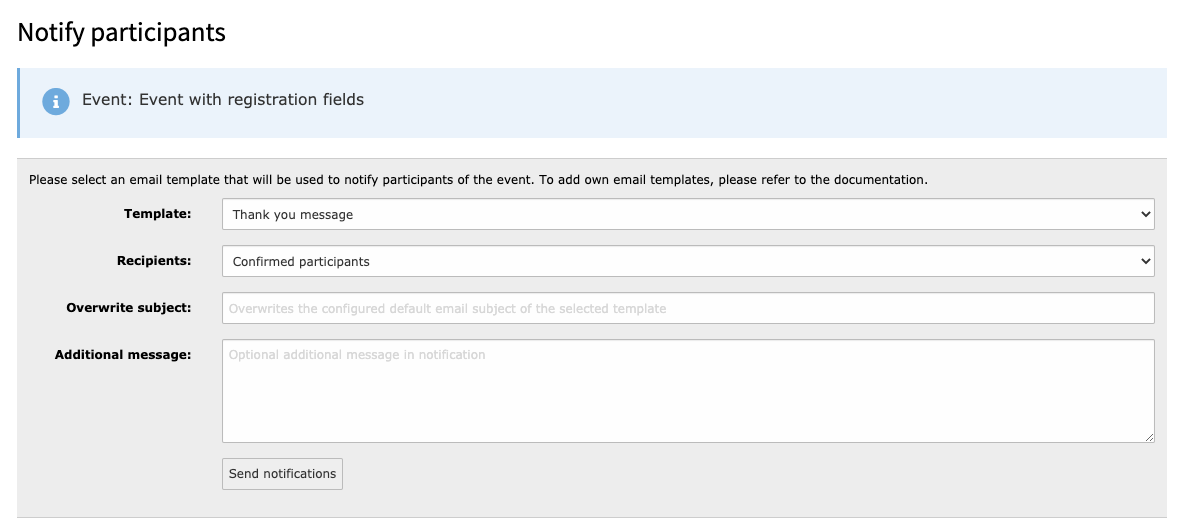
Each custom notification must include a title, a template and a subject Please refer to the default custom notitication for setup example. |
thanksForParticipation |
|
settings.enabledActions.notify |
Boolean |
If set to "1", the Notify-Action / Icon is shown for events with registration enabled. |
1 (true) |
|
settings.enabledActions.export |
Boolean |
If set to "1", the Export-Action / Icon is shown for events with registration enabled. |
1 (true) |