---
title: "For Administrators"
manual: "secure_downloads"
version: "main"
permalink: "https://docs.typo3.org/permalink/leuchtfeuer/secure-downloads:admin@main"
source: "Admin/Index.rst"
rendered: "2026-09-22T10:54:01+00:00"
---
# For Administrators {#admin}
This chapter describes how to install and how to configure this extension within the settings module of your TYPO3 instance.
> [!IMPORTANT]
> This extension cannot secure links to files that you include in CSS, PDF, ... files.
## Installation {#admin-installation}
There are several ways to require and install this extension. We recommend getting this extension via
[composer](https://getcomposer.org/).
### Via Composer {#admin-installation-viacomposer}
If your TYPO3 instance is running in composer mode, you can simply require the extension by running:
```bash
composer req leuchtfeuer/secure-downloads:>=5.0
```
### Via Extension Manager {#admin-installation-viaextensionmanager}
Open the extension manager module of your TYPO3 instance and select "Get Extensions" in the select menu above the upload button.
There you can search for `secure_downlaods` and simply install the extension. Please make sure you are using the latest version
of the extension by updating the extension list before installing the Secure Downloads extension.
### Via ZIP File {#admin-installation-viazipfile}
You need to download the Secure Downloads extension from the
[TYPO3 Extension Repository](https://extensions.typo3.org/extension/secure_downloads/) and upload the ZIP file to the extension
manager of your TYPO3 instance and activate the extension afterwards.
You can also download an archive from [GitHub](https://github.com/Leuchtfeuer/typo3-secure-downloads/releases/latest) and put
its content directly into the `typo3conf/ext` directory of your TYPO3 instance. But please keep in mind, that the name of the
folder must be `secure_downloads` (the repository name will be default).
## Best Practices {#admin-bestpractices}
You can configure this extension to fit your specific needs. However, here are some "best practices" that may help you when first
using Secure Downloads:
- Install this extension as described above
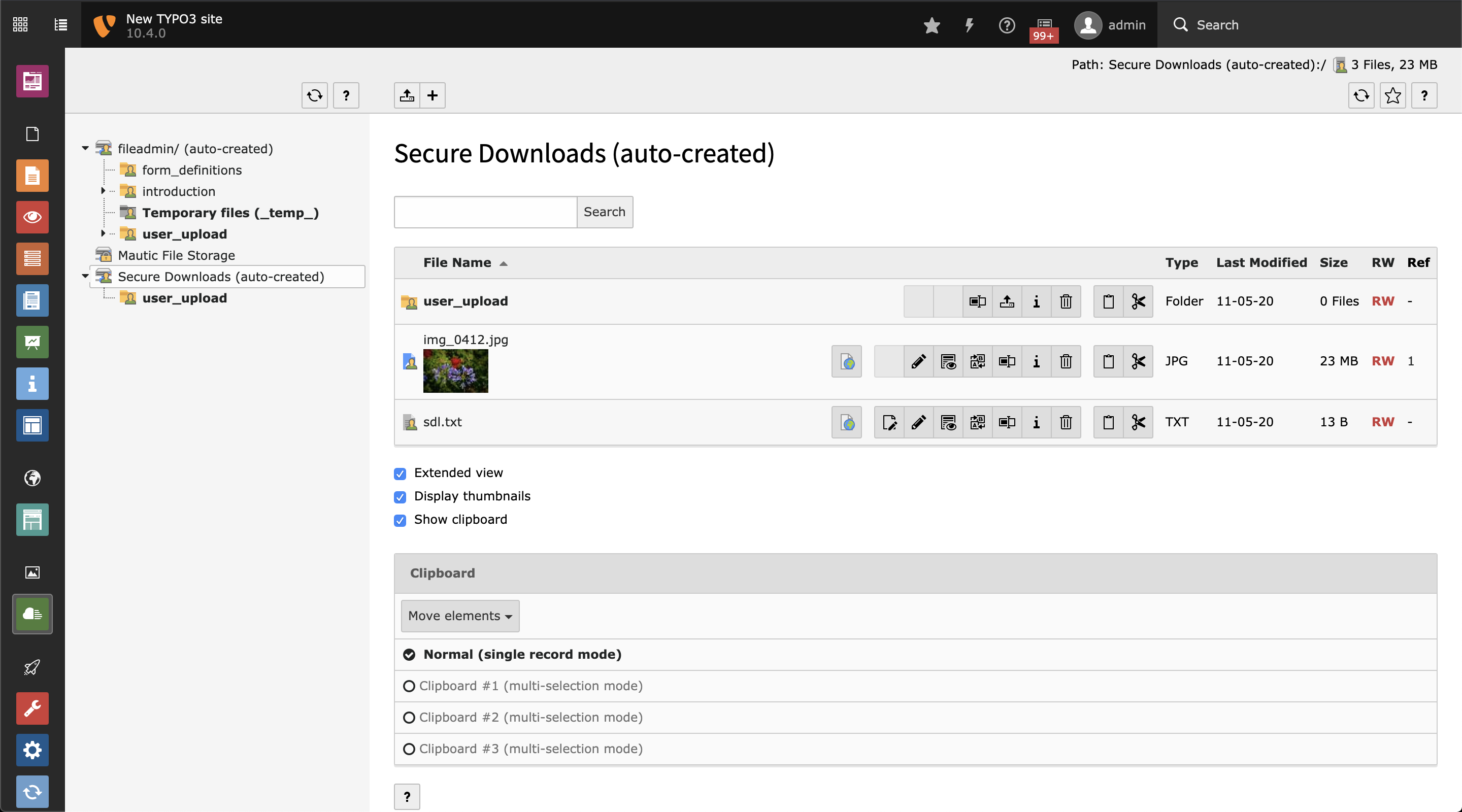
- Enable the [create file storage](https://docs.typo3.org/permalink/leuchtfeuer/secure-downloads:admin-extensionconfiguration-createfilestorage@main) option
- Put your files into that storage
If you need to secure files outside of that directory, you still can adapt the [securedDirs](https://docs.typo3.org/permalink/leuchtfeuer/secure-downloads:admin-extensionconfiguration-secureddirs@main) and
[securedFiletypes](https://docs.typo3.org/permalink/leuchtfeuer/secure-downloads:admin-extensionconfiguration-securedfiletypes@main) options.
## Access Configuration {#admin-accessconfiguration}
You need to secure all the directories and file types by your server configuration. This can be done with `.htaccess` files.
You find some example `.htaccess` files below and in the
[Resources/Private/Examples](https://github.com/Leuchtfeuer/typo3-secure-downloads/tree/master/Resources/Private/Examples)
directory of this extension.
Furthermore, you find a working nginx.conf file for ddev boxes in the same directory.
### Example Configuration {#admin-accessconfiguration-exampleconfiguration}
Please make sure to adapt the file match pattern as configured in [securedFiletypes](https://docs.typo3.org/permalink/leuchtfeuer/secure-downloads:admin-extensionconfiguration-securedfiletypes@main).
**.htaccess deny**
```apache
# Apache 2.4
Require all denied
# Apache 2.2
Order Allow,Deny
Deny from all
```
**.htaccess allow**
```apache
# Apache 2.4
Require all granted
# Apache 2.2
Order Deny,Allow
Allow from all
```
**nginx configuration**
```nginx
# Deny specific files in secured folder
location ~ fileadmin/secure/.*\.(?:[pP][dD][fF]|[jJ][pP][eE]?[gG]|[gG][iI][fF]|[pP][nN][gG]|[oO][dD][tT]|[pP][pP][tT][xX]?|[dD][oO][cC][xX]?|[xX][lL][sS][xX]?|[zZ][iI][pP]|[rR][aA][rR]|[tT][gG][zZ]|[tT][aA][rR]|[gG][zZ])$ {
deny all;
}
# Alternative: deny all files in secured folder
location ~ fileadmin/secure/
deny all;
}
# Some nginx configurations try to process media files directly. The secured uri path must be excluded from this rule
# Media: images, icons, video, audio, HTC
location ~ ^(?:fileadmin/|uploads/|_assets/|sdl/).+\.(?:jpg|jpeg|gif|png|ico|cur|gz|svg|svgz|mp4|ogg|ogv|webm|webp|htc)$ {
expires 1M;
access_log off;
add_header Cache-Control "public";
}
```