---
title: "Linked Images"
manual: "RTE CKEditor Image"
version: "main"
permalink: "https://docs.typo3.org/permalink/netresearch/rte-ckeditor-image:examples-linked-images@main"
source: "Examples/Linked-Images.rst"
rendered: "2026-10-01T01:27:51+00:00"
---
# Linked Images {#examples-linked-images}
Complete link support with TYPO3 link browser integration, additional parameters,
and proper URL handling.
This guide covers how to create and configure linked images in CKEditor,
including the link browser integration, click behavior options, and URL parameters.
**Table of Contents**
- [Click Behavior Options](https://docs.typo3.org/permalink/netresearch/rte-ckeditor-image:click-behavior-options@main)
- [Link Browser Integration](https://docs.typo3.org/permalink/netresearch/rte-ckeditor-image:link-browser-integration@main)
- [TypoLink Format](https://docs.typo3.org/permalink/netresearch/rte-ckeditor-image:typolink-format@main)
- [URL Parameter Handling](https://docs.typo3.org/permalink/netresearch/rte-ckeditor-image:url-parameter-handling@main)
- [Frontend Rendering](https://docs.typo3.org/permalink/netresearch/rte-ckeditor-image:frontend-rendering@main)
- [Clearing Stale Attributes](https://docs.typo3.org/permalink/netresearch/rte-ckeditor-image:clearing-stale-attributes@main)
- [Translations](https://docs.typo3.org/permalink/netresearch/rte-ckeditor-image:translations@main)
- [Troubleshooting](https://docs.typo3.org/permalink/netresearch/rte-ckeditor-image:troubleshooting@main)
- [Related Documentation](https://docs.typo3.org/permalink/netresearch/rte-ckeditor-image:related-documentation@main)
## Click Behavior Options {#click-behavior-options}
The image dialog provides three click behavior options:
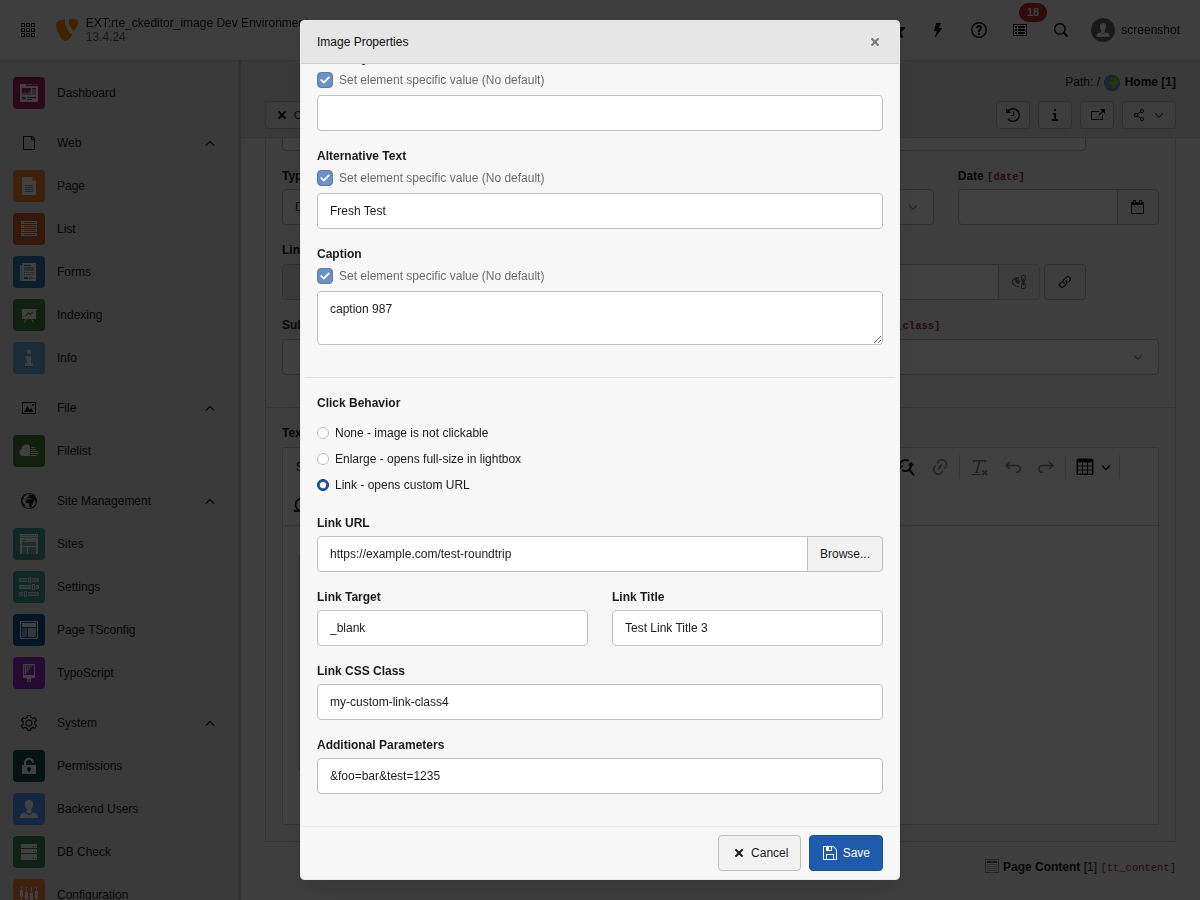
- **None**
Image is not clickable. No link is applied.
- **Enlarge**
Opens the full-size image in a lightbox/popup. Uses the `enableZoom` attribute
and TYPO3's built-in popup handling.
See [Advanced Features](https://docs.typo3.org/permalink/netresearch/rte-ckeditor-image:examples-advanced-features@main) for lightbox integration.
- **Link**
Wraps the image in a custom link. Opens the TYPO3 link browser to select
the link target.
## Link Browser Integration {#link-browser-integration}
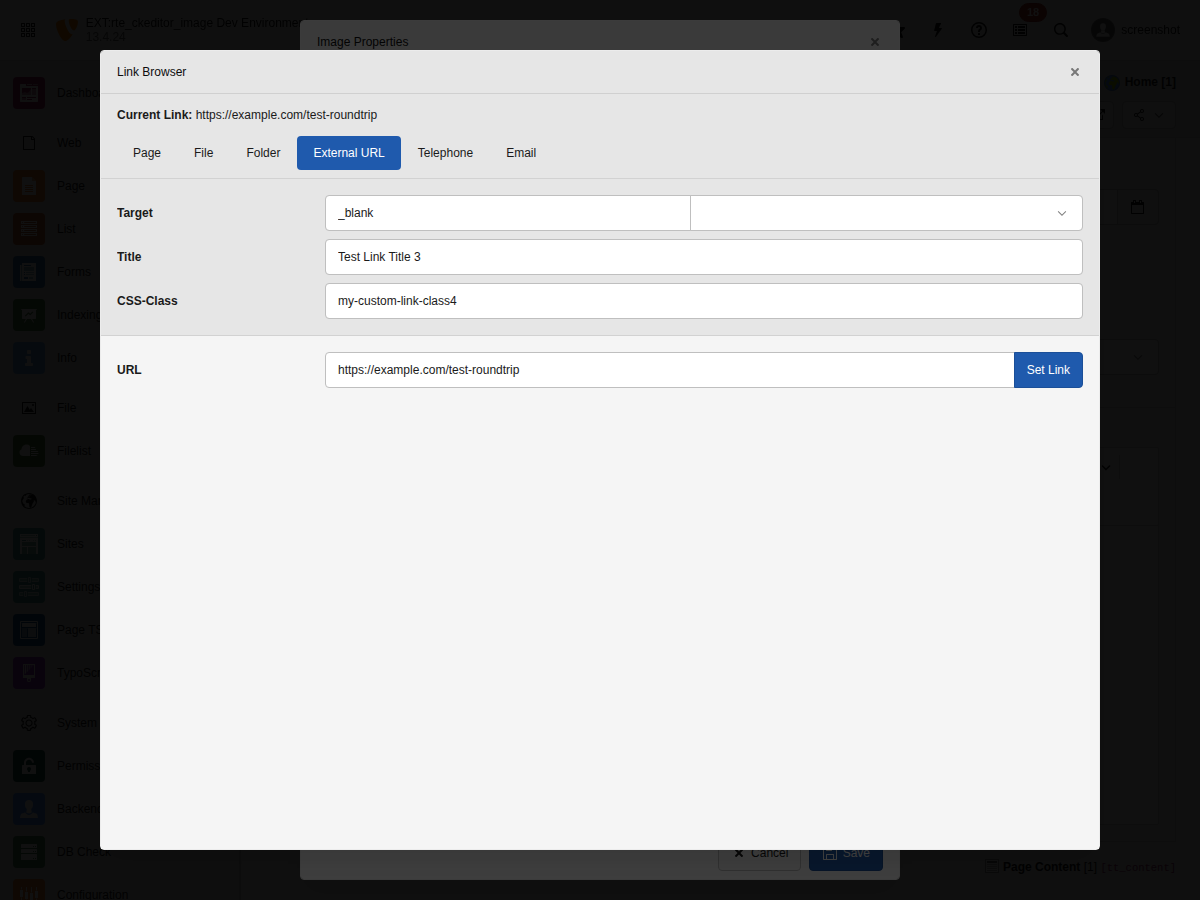
When "Link" click behavior is selected, editors can use TYPO3's link browser
to select link targets:
### Supported Link Types {#supported-link-types}
- **Page**: Internal TYPO3 pages (`t3://page?uid=123`)
- **File**: Files from FAL (`t3://file?uid=456`)
- **Folder**: Folder references
- **URL**: External URLs (`https://example.com`)
- **Email**: Email links (`mailto:info@example.com`)
- **Telephone**: Phone links (`tel:+1234567890`)
### Link Attributes {#link-attributes}
Each link can have the following attributes:
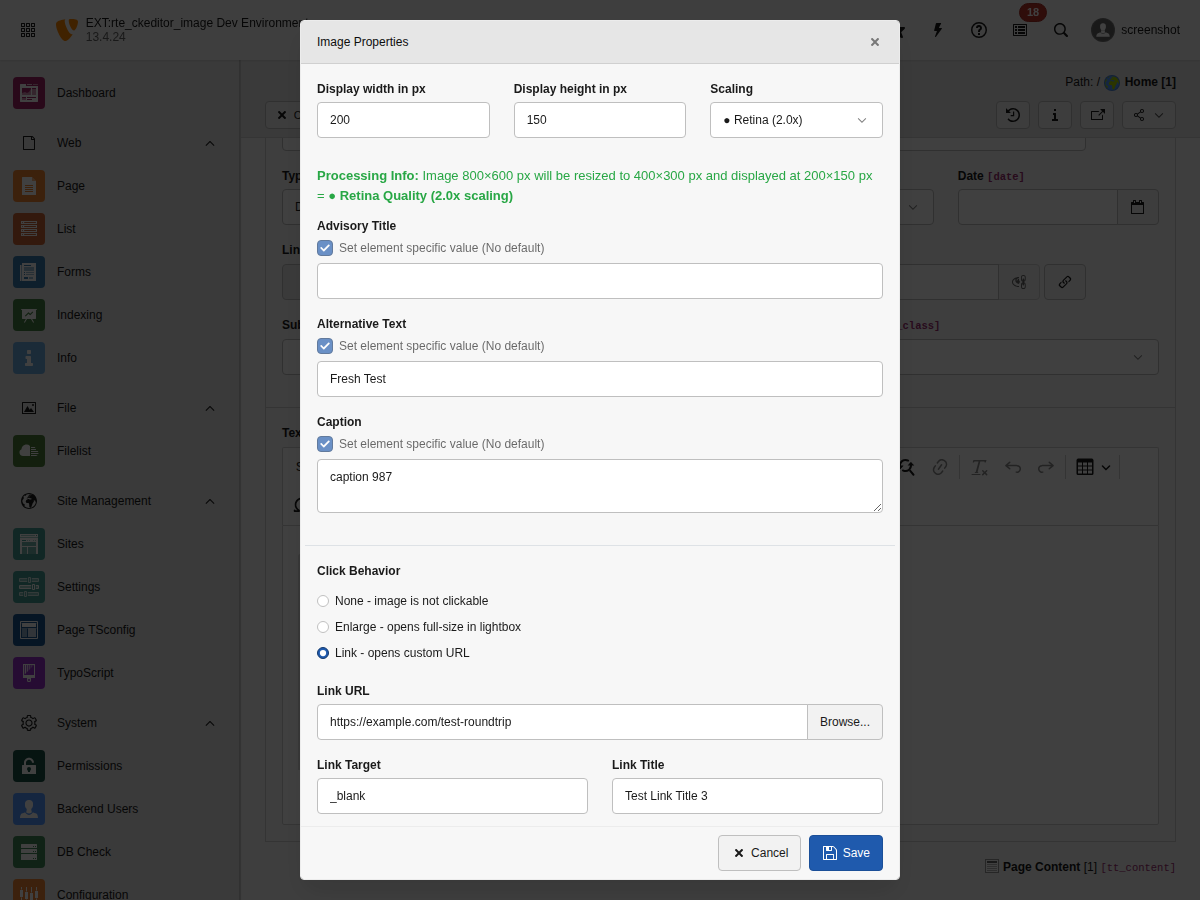
- **Link URL**
The link target. Can be a TYPO3 link (`t3://...`) or external URL.
- **Link Target**
Window target for the link:
- **(default)**: Same window
- **\_blank**: New window/tab
- **\_self**: Same window (explicit)
- **\_parent**: Parent frame
- **\_top**: Top frame
- **Link Title**
Advisory title shown as tooltip on hover.
- **Link CSS Class**
CSS classes applied to the `` element.
- **Additional Parameters**
URL query parameters appended to the link (e.g., `&L=1&type=123`).
## TypoLink Format {#typolink-format}
Linked images use TYPO3's TypoLink format internally. Understanding this format
helps when debugging or customizing:
```php
url target class "title" additionalParams
```
| Position | Parameter | Model Attribute | Example |
| --- | --- | --- | --- |
| 1 | URL | `linkHref` | `t3://page?uid=1` |
| 2 | Target | `linkTarget` | `_blank` |
| 3 | Class | `linkClass` | `external-link` |
| 4 | Title | `linkTitle` | `"Click here"` |
| 5 | Params | `linkParams` | `&L=1&type=123` |
## URL Parameter Handling {#url-parameter-handling}
Additional parameters are intelligently appended to URLs:
### Basic Examples {#basic-examples}
```text
# URL without query string
/page + &L=1 → /page?L=1
# URL with existing query string
/page?foo=bar + &L=1 → /page?foo=bar&L=1
# URL with fragment (preserved at end)
/page#section + &L=1 → /page?L=1#section
# URL with both query and fragment
/page?foo=bar#section + &L=1 → /page?foo=bar&L=1#section
```
### PHP Implementation {#php-implementation}
The `LinkDto::getUrlWithParams()` method handles all edge cases:
```php
use Netresearch\RteCKEditorImage\Domain\Model\LinkDto;
$link = new LinkDto(
url: 'https://example.com/page?existing=param#section',
target: '_blank',
class: 'external',
params: '&utm_source=ckeditor&L=1',
isPopup: false,
jsConfig: null
);
// Returns: https://example.com/page?existing=param&utm_source=ckeditor&L=1#section
$fullUrl = $link->getUrlWithParams();
```
## Frontend Rendering {#frontend-rendering}
Linked images are rendered with the configured attributes. Internal
links retain their original `rel` (or none):
**Internal link with target="\_blank" (no rel injected)**
```html
 ```
External links opening a new browsing context receive `rel="noreferrer"`
automatically — mirroring TYPO3 typolink security semantics. See
[External link security (rel="noreferrer")](https://docs.typo3.org/permalink/netresearch/rte-ckeditor-image:integration-security-rel@main).
**External link with target="\_blank" (rel="noreferrer" injected)**
```html
```
### Fluid Template Access {#fluid-template-access}
In custom Fluid templates, access link properties via the `link` object:
```html
```
## Clearing Stale Attributes {#clearing-stale-attributes}
When selecting a new link from the link browser, all previous link attributes
are cleared automatically. This prevents stale values from being retained:
```javascript
// Before: Image linked to /old-page with target="_blank" and class="old-class"
// User selects new link: /new-page with no target or class
// After: Only the new URL is set, old attributes are cleared
// linkHref: '/new-page'
// linkTarget: null (cleared)
// linkClass: null (cleared)
// linkTitle: null (cleared)
// linkParams: null (cleared)
```
This behavior ensures editors always see the actual link configuration without
inherited values from previous links.
## Translations {#translations}
All link-related UI labels are translatable. The following keys are available
in `locallang_be.xlf`:
```xml
```
Translations are provided for 31 languages. See `Resources/Private/Language/`
for the complete list.
## Troubleshooting {#troubleshooting}
### Link not saved {#link-not-saved}
**Symptom**: Link attributes are lost after saving.
**Cause**: Processing rules may be stripping link attributes.
**Solution**: Ensure your RTE processing configuration allows link attributes:
```yaml
processing:
allowAttributes:
- { attribute: 'href', elements: 'a' }
- { attribute: 'target', elements: 'a' }
- { attribute: 'title', elements: 'a' }
- { attribute: 'class', elements: 'a' }
```
### Link browser doesn't open {#link-browser-doesn-t-open}
**Symptom**: Clicking "Browse..." does nothing.
**Cause**: JavaScript error or missing backend route.
**Solution**: Check browser console for errors. Ensure the extension is properly
installed and the `linkBrowserAction` route is accessible.
### Parameters not appended correctly {#parameters-not-appended-correctly}
**Symptom**: URL shows `/page?foo=bar?L=1` (double question mark).
**Cause**: Parameters are prefixed with `?` instead of `&`.
**Solution**: Always use `&` prefix for additional parameters. The
`getUrlWithParams()` method handles normalization automatically.
## Related Documentation {#related-documentation}
- [Advanced Features](https://docs.typo3.org/permalink/netresearch/rte-ckeditor-image:examples-advanced-features@main) \- Lightbox/popup integration
- [LinkDto](https://docs.typo3.org/permalink/netresearch/rte-ckeditor-image:api-linkdto@main) \- LinkDto API reference
- [CKEditor Model Element Reference](https://docs.typo3.org/permalink/netresearch/rte-ckeditor-image:ckeditor-model-element@main) \- Model attributes reference
- [Template Overrides](https://docs.typo3.org/permalink/netresearch/rte-ckeditor-image:examples-template-overrides@main) \- Custom Fluid templates
```
External links opening a new browsing context receive `rel="noreferrer"`
automatically — mirroring TYPO3 typolink security semantics. See
[External link security (rel="noreferrer")](https://docs.typo3.org/permalink/netresearch/rte-ckeditor-image:integration-security-rel@main).
**External link with target="\_blank" (rel="noreferrer" injected)**
```html
```
### Fluid Template Access {#fluid-template-access}
In custom Fluid templates, access link properties via the `link` object:
```html
```
## Clearing Stale Attributes {#clearing-stale-attributes}
When selecting a new link from the link browser, all previous link attributes
are cleared automatically. This prevents stale values from being retained:
```javascript
// Before: Image linked to /old-page with target="_blank" and class="old-class"
// User selects new link: /new-page with no target or class
// After: Only the new URL is set, old attributes are cleared
// linkHref: '/new-page'
// linkTarget: null (cleared)
// linkClass: null (cleared)
// linkTitle: null (cleared)
// linkParams: null (cleared)
```
This behavior ensures editors always see the actual link configuration without
inherited values from previous links.
## Translations {#translations}
All link-related UI labels are translatable. The following keys are available
in `locallang_be.xlf`:
```xml
```
Translations are provided for 31 languages. See `Resources/Private/Language/`
for the complete list.
## Troubleshooting {#troubleshooting}
### Link not saved {#link-not-saved}
**Symptom**: Link attributes are lost after saving.
**Cause**: Processing rules may be stripping link attributes.
**Solution**: Ensure your RTE processing configuration allows link attributes:
```yaml
processing:
allowAttributes:
- { attribute: 'href', elements: 'a' }
- { attribute: 'target', elements: 'a' }
- { attribute: 'title', elements: 'a' }
- { attribute: 'class', elements: 'a' }
```
### Link browser doesn't open {#link-browser-doesn-t-open}
**Symptom**: Clicking "Browse..." does nothing.
**Cause**: JavaScript error or missing backend route.
**Solution**: Check browser console for errors. Ensure the extension is properly
installed and the `linkBrowserAction` route is accessible.
### Parameters not appended correctly {#parameters-not-appended-correctly}
**Symptom**: URL shows `/page?foo=bar?L=1` (double question mark).
**Cause**: Parameters are prefixed with `?` instead of `&`.
**Solution**: Always use `&` prefix for additional parameters. The
`getUrlWithParams()` method handles normalization automatically.
## Related Documentation {#related-documentation}
- [Advanced Features](https://docs.typo3.org/permalink/netresearch/rte-ckeditor-image:examples-advanced-features@main) \- Lightbox/popup integration
- [LinkDto](https://docs.typo3.org/permalink/netresearch/rte-ckeditor-image:api-linkdto@main) \- LinkDto API reference
- [CKEditor Model Element Reference](https://docs.typo3.org/permalink/netresearch/rte-ckeditor-image:ckeditor-model-element@main) \- Model attributes reference
- [Template Overrides](https://docs.typo3.org/permalink/netresearch/rte-ckeditor-image:examples-template-overrides@main) \- Custom Fluid templates