---
title: "Image Reference Validation"
manual: "RTE CKEditor Image"
version: "main"
permalink: "https://docs.typo3.org/permalink/netresearch/rte-ckeditor-image:troubleshooting-image-reference-validation@main"
source: "Troubleshooting/Image-Reference-Validation.rst"
rendered: "2026-10-01T01:27:51+00:00"
---
# Image Reference Validation {#troubleshooting-image-reference-validation}
The extension ships a validator that detects and fixes stale or broken image
references in RTE content fields. It is available both as a **CLI command** and
as an **Upgrade Wizard** in the TYPO3 Install Tool.
**Table of Contents**
- [Overview](https://docs.typo3.org/permalink/netresearch/rte-ckeditor-image:overview@main)
- [Prerequisites](https://docs.typo3.org/permalink/netresearch/rte-ckeditor-image:prerequisites@main)
- [CLI Command](https://docs.typo3.org/permalink/netresearch/rte-ckeditor-image:cli-command@main)
- [Upgrade Wizard](https://docs.typo3.org/permalink/netresearch/rte-ckeditor-image:upgrade-wizard@main)
- [Page Module Preview Warning](https://docs.typo3.org/permalink/netresearch/rte-ckeditor-image:page-module-preview-warning@main)
- [When to Use](https://docs.typo3.org/permalink/netresearch/rte-ckeditor-image:when-to-use@main)
- [Related Documentation](https://docs.typo3.org/permalink/netresearch/rte-ckeditor-image:related-documentation@main)
## Overview {#overview}
Over time, image references stored inside RTE `bodytext` fields can become
stale. Common causes include TYPO3 major upgrades, bulk file operations in the
Filelist module, and manual database edits. The validator scans every `![]() `
tag that carries a `data-htmlarea-file-uid` attribute, resolves the
corresponding FAL file, and compares the `src` attribute against the file's
current public URL.
Six categories of issues are detected:
| Type | Description | Auto-fixable |
| --- | --- | --- |
| `processed_image_src` | `src` points to a `_processed_/` URL. Processed files are regenerated on demand and their paths change between TYPO3 versions, so storing them as `src` will break after an upgrade. | Yes |
| `src_mismatch` | `src` does not match the FAL file's current public URL. This happens when a file is moved or renamed in the Filelist module while existing RTE content still references the old path. Also covers slashless `src` values (e.g. `fileadmin/x.jpg` without the leading slash) — these are broken relative URLs in modern TYPO3 and are repaired to the canonical leading-slash form. | Yes |
| `broken_src` | `src` is empty or missing, but a valid `data-htmlarea-file-uid` is present. The correct URL can be resolved from FAL. | Yes |
| `orphaned_file_uid` | `data-htmlarea-file-uid` references a FAL file that no longer exists in `sys_file`. The stale `data-htmlarea-file-uid` attribute is removed, but no `src` correction is possible because the file is gone. | Yes (attribute removed) |
| `missing_file_uid` | The `
`
tag that carries a `data-htmlarea-file-uid` attribute, resolves the
corresponding FAL file, and compares the `src` attribute against the file's
current public URL.
Six categories of issues are detected:
| Type | Description | Auto-fixable |
| --- | --- | --- |
| `processed_image_src` | `src` points to a `_processed_/` URL. Processed files are regenerated on demand and their paths change between TYPO3 versions, so storing them as `src` will break after an upgrade. | Yes |
| `src_mismatch` | `src` does not match the FAL file's current public URL. This happens when a file is moved or renamed in the Filelist module while existing RTE content still references the old path. Also covers slashless `src` values (e.g. `fileadmin/x.jpg` without the leading slash) — these are broken relative URLs in modern TYPO3 and are repaired to the canonical leading-slash form. | Yes |
| `broken_src` | `src` is empty or missing, but a valid `data-htmlarea-file-uid` is present. The correct URL can be resolved from FAL. | Yes |
| `orphaned_file_uid` | `data-htmlarea-file-uid` references a FAL file that no longer exists in `sys_file`. The stale `data-htmlarea-file-uid` attribute is removed, but no `src` correction is possible because the file is gone. | Yes (attribute removed) |
| `missing_file_uid` | The `![]() ` tag has no `data-htmlarea-file-uid` attribute at all. Without a file UID there is no way to determine which FAL file the image should reference, so this issue requires manual intervention. | No |
| `nested_link_wrapper` | The `
` tag has no `data-htmlarea-file-uid` attribute at all. Without a file UID there is no way to determine which FAL file the image should reference, so this issue requires manual intervention. | No |
| `nested_link_wrapper` | The `![]() ` tag is wrapped in two or more nested `` tags (e.g., `
` tag is wrapped in two or more nested `` tags (e.g., `![]() `). This typically occurs after upgrading from older extension versions where the `tags.a` and `externalBlocks.a` handlers both wrapped the same image. The inner duplicate `` wrapper is removed, preserving the outer link and its attributes. | Yes |
For fixable issues the validator replaces the `src` attribute with the file's
current `getPublicUrl()` value. The `orphaned_file_uid` type is treated as
fixable in the scan (it is counted and reported), but no `src` update is
applied because the underlying file no longer exists.
## Prerequisites {#prerequisites}
The validator relies on the TYPO3 **reference index** (`sys_refindex`) to
discover which RTE fields contain image references. On a fresh installation or
after large imports, the reference index may be empty or out of date. Always
update it before running the validator:
```bash
bin/typo3 referenceindex:update
```
If the validator reports "Scanned records: 0" despite images existing in RTE
content, this is almost certainly the cause.
## CLI Command {#cli-command}
The `rte_ckeditor_image:validate` command scans RTE content fields and
reports (or fixes) broken image references.
### Dry-run (default) {#dry-run-default}
Run the command without any flags to perform a read-only scan:
```bash
bin/typo3 rte_ckeditor_image:validate
```
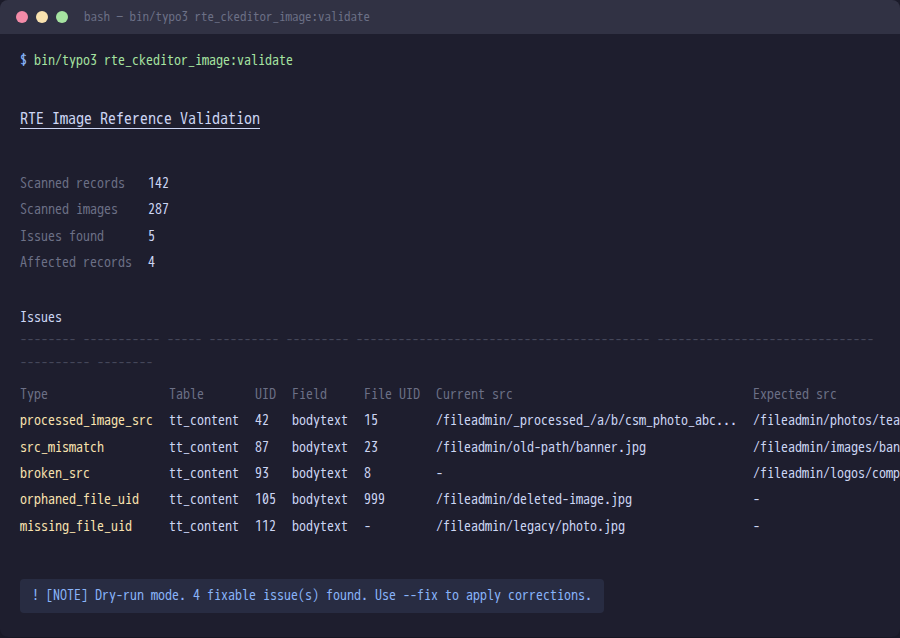
The output shows a summary of scanned records and images, followed by a table
listing every issue found, including the current `src`, the expected `src`,
and whether the issue is auto-fixable.
### Apply fixes {#apply-fixes}
Add the `--fix` flag to write corrected `src` attributes back to the
database:
```bash
bin/typo3 rte_ckeditor_image:validate --fix
```
> [!WARNING]
> `--fix` modifies database records directly. Always run a dry-run scan
> first and create a database backup before applying fixes in production.
### Skipped origins {#skipped-origins}
Not every `
`). This typically occurs after upgrading from older extension versions where the `tags.a` and `externalBlocks.a` handlers both wrapped the same image. The inner duplicate `` wrapper is removed, preserving the outer link and its attributes. | Yes |
For fixable issues the validator replaces the `src` attribute with the file's
current `getPublicUrl()` value. The `orphaned_file_uid` type is treated as
fixable in the scan (it is counted and reported), but no `src` update is
applied because the underlying file no longer exists.
## Prerequisites {#prerequisites}
The validator relies on the TYPO3 **reference index** (`sys_refindex`) to
discover which RTE fields contain image references. On a fresh installation or
after large imports, the reference index may be empty or out of date. Always
update it before running the validator:
```bash
bin/typo3 referenceindex:update
```
If the validator reports "Scanned records: 0" despite images existing in RTE
content, this is almost certainly the cause.
## CLI Command {#cli-command}
The `rte_ckeditor_image:validate` command scans RTE content fields and
reports (or fixes) broken image references.
### Dry-run (default) {#dry-run-default}
Run the command without any flags to perform a read-only scan:
```bash
bin/typo3 rte_ckeditor_image:validate
```
The output shows a summary of scanned records and images, followed by a table
listing every issue found, including the current `src`, the expected `src`,
and whether the issue is auto-fixable.

### Apply fixes {#apply-fixes}
Add the `--fix` flag to write corrected `src` attributes back to the
database:
```bash
bin/typo3 rte_ckeditor_image:validate --fix
```
> [!WARNING]
> `--fix` modifies database records directly. Always run a dry-run scan
> first and create a database backup before applying fixes in production.
### Skipped origins {#skipped-origins}
Not every `![]() ` value can be repaired by the validator. By default the
command classifies each `src` and **skips four out-of-scope categories**:
| Category | Example | Why skipped |
| --- | --- | --- |
| `external` | `https://cdn.example.com/foo.jpg` | Off-site URL — not part of this TYPO3's FAL. |
| `data` | `data:image/png;base64,...` | Inline-encoded image, no FAL reference exists. |
| `legacy` | `typo3conf/ext/some_ext/Resources/...` | Pre-FAL extension path, file lives outside FAL. |
| `securedl` | `/securedl/sk=.../foo.jpg` | URL signed by `EXT:naw_securedl` / similar — the on-disk path differs from the signed URL. |
Skips are surfaced in the CLI summary as a per-origin breakdown so they
stay visible (added to the existing "Scanned records / Scanned images /
Issues found" definition list):
```text
Skipped (out of scope)
16 total (12 external, 3 data, 1 legacy)
```
Use `--include` to opt one or more categories back in if your environment
needs them validated:
```bash
# Re-include external URLs (the validator will then flag them as
# mismatches against FAL) — useful when migrating off a CDN.
bin/typo3 rte_ckeditor_image:validate --include=external
# Re-include multiple categories at once
bin/typo3 rte_ckeditor_image:validate --include=external,legacy
# Disable all skipping (validate every
` value can be repaired by the validator. By default the
command classifies each `src` and **skips four out-of-scope categories**:
| Category | Example | Why skipped |
| --- | --- | --- |
| `external` | `https://cdn.example.com/foo.jpg` | Off-site URL — not part of this TYPO3's FAL. |
| `data` | `data:image/png;base64,...` | Inline-encoded image, no FAL reference exists. |
| `legacy` | `typo3conf/ext/some_ext/Resources/...` | Pre-FAL extension path, file lives outside FAL. |
| `securedl` | `/securedl/sk=.../foo.jpg` | URL signed by `EXT:naw_securedl` / similar — the on-disk path differs from the signed URL. |
Skips are surfaced in the CLI summary as a per-origin breakdown so they
stay visible (added to the existing "Scanned records / Scanned images /
Issues found" definition list):
```text
Skipped (out of scope)
16 total (12 external, 3 data, 1 legacy)
```
Use `--include` to opt one or more categories back in if your environment
needs them validated:
```bash
# Re-include external URLs (the validator will then flag them as
# mismatches against FAL) — useful when migrating off a CDN.
bin/typo3 rte_ckeditor_image:validate --include=external
# Re-include multiple categories at once
bin/typo3 rte_ckeditor_image:validate --include=external,legacy
# Disable all skipping (validate every ![]() regardless of origin)
bin/typo3 rte_ckeditor_image:validate --include=all
```
### Limit to a specific table {#limit-to-a-specific-table}
Use the `--table` (short: `-t`) option to restrict the scan to a single
table:
```bash
bin/typo3 rte_ckeditor_image:validate --table=tt_content
```
This is useful on large installations where you want to process one table at a
time or only care about a particular table.
### Combining options {#combining-options}
Options can be combined freely:
```bash
# Fix issues in tt_content only
bin/typo3 rte_ckeditor_image:validate --fix --table=tt_content
```
### Exit codes {#exit-codes}
| Code | Meaning |
| --- | --- |
| `0` | No issues found, or all fixable issues were repaired successfully. |
| `1` | Issues were found (dry-run mode), or no fixable issues exist while unfixable issues remain. |
## Upgrade Wizard {#upgrade-wizard}
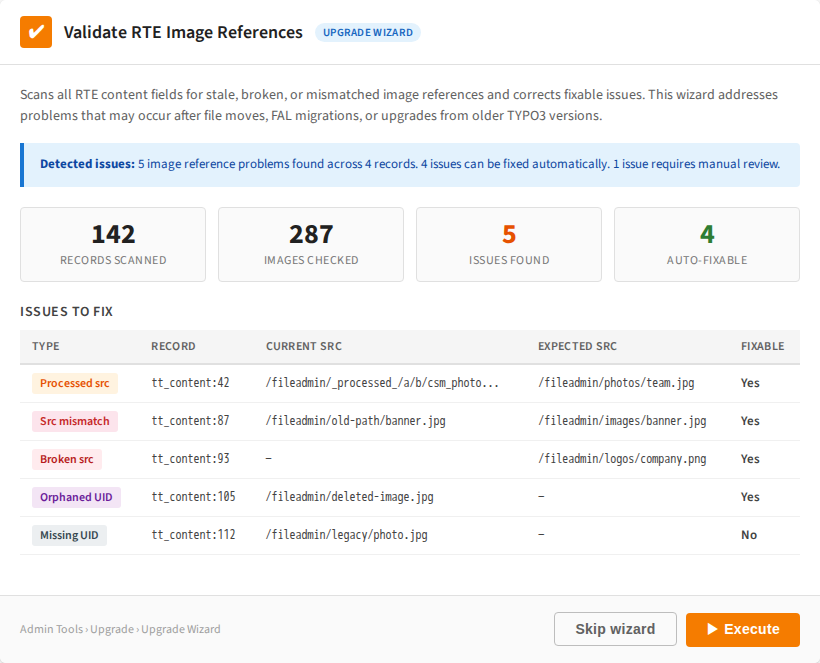
The same validation logic is exposed as a TYPO3 Upgrade Wizard named
**Validate RTE image references**.
To run it:
1. Open **Admin Tools** \> **Upgrade** \> **Upgrade Wizard**.
1. Locate **Validate RTE image references** in the list of available wizards.
1. Click **Execute**.
The wizard scans all RTE fields, and if fixable issues are found it
automatically applies corrections. It implements `RepeatableInterface`, so it
can be executed multiple times safely.
> [!TIP]
> The wizard requires the database to be up-to-date (`DatabaseUpdatedPrerequisite`).
> Run all database schema migrations before executing this wizard.
## Page Module Preview Warning {#page-module-preview-warning}
In addition to the CLI command and upgrade wizard, the extension now detects broken
image references directly in the **TYPO3 page module** preview. When a content element
contains images with validation issues, a yellow warning callout is shown above the
content preview:
```text
┌─────────────────────────────────────────────┐
│ ⚠ Image reference issues detected │
│ 2 orphaned file reference(s), │
│ 1 outdated src path(s). │
│ Run the upgrade wizard │
│ rteImageReferenceValidation or CLI command │
│ bin/typo3 rte_ckeditor_image:validate --fix │
│ to repair. │
└─────────────────────────────────────────────┘
```
This warning appears automatically for all CTypes that use the
`RteImagePreviewRenderer` (see [RtePreviewRendererRegistrar](https://docs.typo3.org/permalink/netresearch/rte-ckeditor-image:api-rtepreviewrendererregistrar@main)).
The detection happens during page module rendering and requires no additional
configuration.
The same five issue types detected by the CLI command are shown in the warning:
`orphaned_file_uid`, `src_mismatch`, `processed_image_src`,
`missing_file_uid`, and `broken_src`.
> [!TIP]
> The warning is purely informational and does not block editing. Editors can
> continue working with the content element while an administrator runs the
> upgrade wizard or CLI command to fix the references.
## When to Use {#when-to-use}
Run the validator in the following situations:
### After a TYPO3 major upgrade {#after-a-typo3-major-upgrade}
Especially when upgrading from **TYPO3 v10, v11, or v12 to v13+**. Older
versions of TYPO3 and of this extension sometimes stored `_processed_/`
URLs in `bodytext` instead of the original file path. These processed paths
break after an upgrade because processed files are regenerated with different
names.
### After bulk file operations {#after-bulk-file-operations}
When files are **moved or renamed** in the Filelist module, the extension
updates references in RTE content automatically (via the
`UpdateImageReferences` listener). However, if files were moved by
other means (direct filesystem operations, TYPO3 CLI, third-party
tools), references may become stale.
### As a periodic maintenance check {#as-a-periodic-maintenance-check}
Run the dry-run scan periodically to detect drift before it causes
broken images in the frontend. The scan is read-only and safe to run at
any time.
### After upgrading on a subpath install {#after-upgrading-on-a-subpath-install}
If TYPO3 is served from a subpath (e.g. `https://example.com/~user/`,
`https://example.com/subsite/`) and the install is on a version
prior to the leading-slash storage convention, existing `src` values
may have been stored without a leading slash. After upgrading, run:
```php
./vendor/bin/typo3 rte_ckeditor_image:validate --fix --table=tt_content
```
to migrate them to the canonical `/fileadmin/...` form.
`--table=tt_content` restricts the scan to the standard content
element table (the common case); omit the flag to scan every table
that has an entry in `sys_refindex` with \``softref_key =
rtehtmlarea_images``. Make sure ``config.absRefPrefix`` is set to the
subpath (see :ref:`troubleshooting-frontend-issues\`) so the rendered
HTML prepends it correctly.
---
## Related Documentation {#related-documentation}
**Other Troubleshooting Topics:**
- [Installation Issues](https://docs.typo3.org/permalink/netresearch/rte-ckeditor-image:troubleshooting-installation-issues@main) \- Extension installation problems
- [Frontend Issues](https://docs.typo3.org/permalink/netresearch/rte-ckeditor-image:troubleshooting-frontend-issues@main) \- Frontend rendering issues
**Additional Resources:**
- [Integration & Configuration](https://docs.typo3.org/permalink/netresearch/rte-ckeditor-image:integration@main) \- Configuration guide
- [System Architecture](https://docs.typo3.org/permalink/netresearch/rte-ckeditor-image:architecture-overview@main) \- System architecture
regardless of origin)
bin/typo3 rte_ckeditor_image:validate --include=all
```
### Limit to a specific table {#limit-to-a-specific-table}
Use the `--table` (short: `-t`) option to restrict the scan to a single
table:
```bash
bin/typo3 rte_ckeditor_image:validate --table=tt_content
```
This is useful on large installations where you want to process one table at a
time or only care about a particular table.
### Combining options {#combining-options}
Options can be combined freely:
```bash
# Fix issues in tt_content only
bin/typo3 rte_ckeditor_image:validate --fix --table=tt_content
```
### Exit codes {#exit-codes}
| Code | Meaning |
| --- | --- |
| `0` | No issues found, or all fixable issues were repaired successfully. |
| `1` | Issues were found (dry-run mode), or no fixable issues exist while unfixable issues remain. |
## Upgrade Wizard {#upgrade-wizard}
The same validation logic is exposed as a TYPO3 Upgrade Wizard named
**Validate RTE image references**.
To run it:
1. Open **Admin Tools** \> **Upgrade** \> **Upgrade Wizard**.
1. Locate **Validate RTE image references** in the list of available wizards.
1. Click **Execute**.
The wizard scans all RTE fields, and if fixable issues are found it
automatically applies corrections. It implements `RepeatableInterface`, so it
can be executed multiple times safely.

> [!TIP]
> The wizard requires the database to be up-to-date (`DatabaseUpdatedPrerequisite`).
> Run all database schema migrations before executing this wizard.
## Page Module Preview Warning {#page-module-preview-warning}
In addition to the CLI command and upgrade wizard, the extension now detects broken
image references directly in the **TYPO3 page module** preview. When a content element
contains images with validation issues, a yellow warning callout is shown above the
content preview:
```text
┌─────────────────────────────────────────────┐
│ ⚠ Image reference issues detected │
│ 2 orphaned file reference(s), │
│ 1 outdated src path(s). │
│ Run the upgrade wizard │
│ rteImageReferenceValidation or CLI command │
│ bin/typo3 rte_ckeditor_image:validate --fix │
│ to repair. │
└─────────────────────────────────────────────┘
```
This warning appears automatically for all CTypes that use the
`RteImagePreviewRenderer` (see [RtePreviewRendererRegistrar](https://docs.typo3.org/permalink/netresearch/rte-ckeditor-image:api-rtepreviewrendererregistrar@main)).
The detection happens during page module rendering and requires no additional
configuration.
The same five issue types detected by the CLI command are shown in the warning:
`orphaned_file_uid`, `src_mismatch`, `processed_image_src`,
`missing_file_uid`, and `broken_src`.
> [!TIP]
> The warning is purely informational and does not block editing. Editors can
> continue working with the content element while an administrator runs the
> upgrade wizard or CLI command to fix the references.
## When to Use {#when-to-use}
Run the validator in the following situations:
### After a TYPO3 major upgrade {#after-a-typo3-major-upgrade}
Especially when upgrading from **TYPO3 v10, v11, or v12 to v13+**. Older
versions of TYPO3 and of this extension sometimes stored `_processed_/`
URLs in `bodytext` instead of the original file path. These processed paths
break after an upgrade because processed files are regenerated with different
names.
### After bulk file operations {#after-bulk-file-operations}
When files are **moved or renamed** in the Filelist module, the extension
updates references in RTE content automatically (via the
`UpdateImageReferences` listener). However, if files were moved by
other means (direct filesystem operations, TYPO3 CLI, third-party
tools), references may become stale.
### As a periodic maintenance check {#as-a-periodic-maintenance-check}
Run the dry-run scan periodically to detect drift before it causes
broken images in the frontend. The scan is read-only and safe to run at
any time.
### After upgrading on a subpath install {#after-upgrading-on-a-subpath-install}
If TYPO3 is served from a subpath (e.g. `https://example.com/~user/`,
`https://example.com/subsite/`) and the install is on a version
prior to the leading-slash storage convention, existing `src` values
may have been stored without a leading slash. After upgrading, run:
```php
./vendor/bin/typo3 rte_ckeditor_image:validate --fix --table=tt_content
```
to migrate them to the canonical `/fileadmin/...` form.
`--table=tt_content` restricts the scan to the standard content
element table (the common case); omit the flag to scan every table
that has an entry in `sys_refindex` with \``softref_key =
rtehtmlarea_images``. Make sure ``config.absRefPrefix`` is set to the
subpath (see :ref:`troubleshooting-frontend-issues\`) so the rendered
HTML prepends it correctly.
---
## Related Documentation {#related-documentation}
**Other Troubleshooting Topics:**
- [Installation Issues](https://docs.typo3.org/permalink/netresearch/rte-ckeditor-image:troubleshooting-installation-issues@main) \- Extension installation problems
- [Frontend Issues](https://docs.typo3.org/permalink/netresearch/rte-ckeditor-image:troubleshooting-frontend-issues@main) \- Frontend rendering issues
**Additional Resources:**
- [Integration & Configuration](https://docs.typo3.org/permalink/netresearch/rte-ckeditor-image:integration@main) \- Configuration guide
- [System Architecture](https://docs.typo3.org/permalink/netresearch/rte-ckeditor-image:architecture-overview@main) \- System architecture