---
title: "Introduction"
manual: "Iconpack"
version: "main"
source: "Introduction/Index.rst"
rendered: "2026-10-10T20:11:07+00:00"
---
# Introduction {#introduction}
This extension provides an iconpack registry for custom iconpacks which can be
used in backend and frontend and are rendered according to the configuration of
the installed iconpacks.
The idea behind the extension is to provide a flexible system by means of which
any icon sets can be used and the desired output can be generated at any time by
separating storage and rendering.
## Features {#features}
The extension `iconpack` is different from previous implementations and will
probably be the only icon extension you will need in the future.
The biggest differences are among others:
- Not limited to a specific iconset! Existing iconpacks can be installed, or
custom iconpacks can be created, depending on your requirements
- Easy to use: Install, [add the provided TypoScript-template](../Configuration/Index.html#configuration) & use it, no further configuration needed (but possible!)
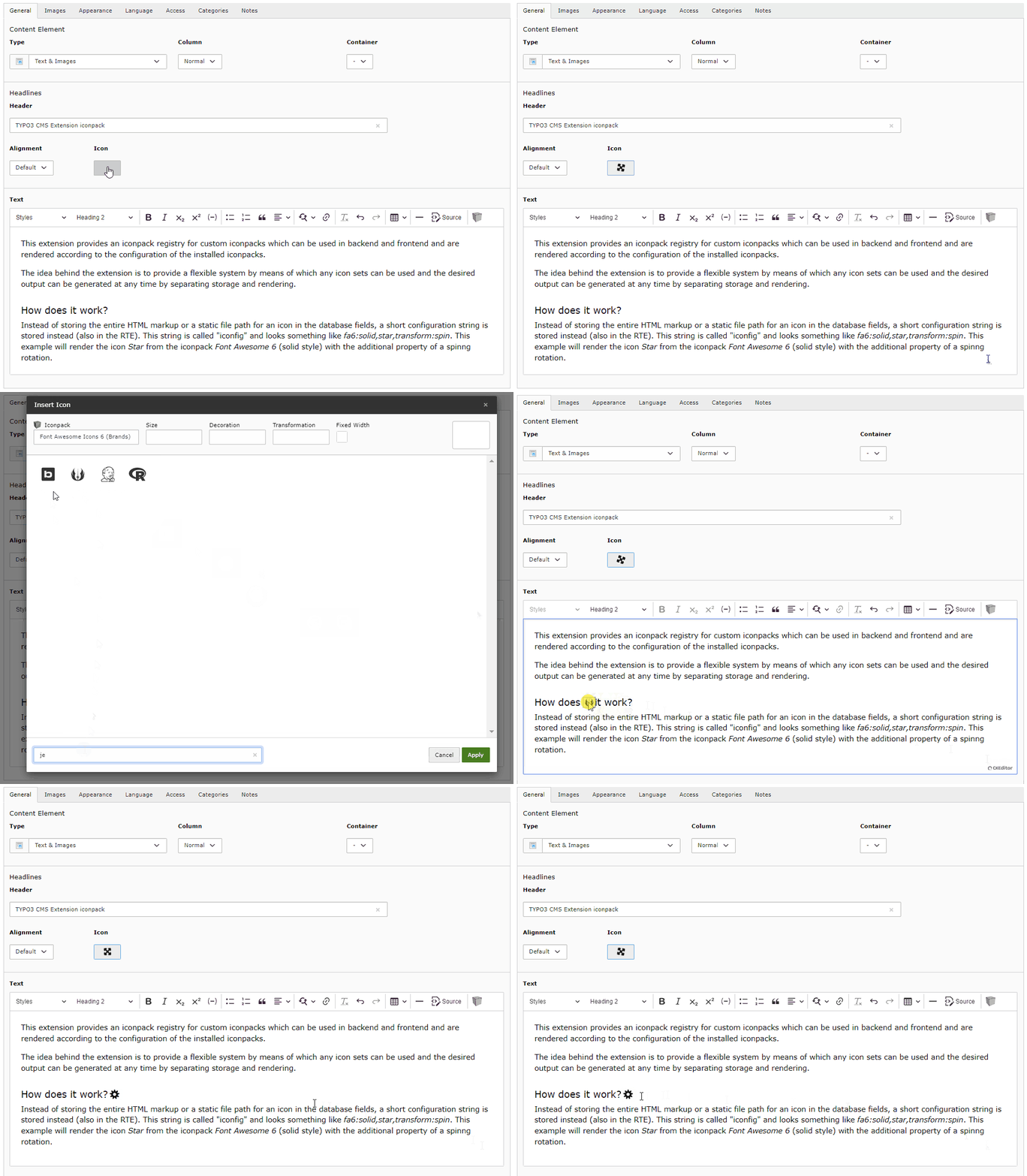
- Offers the use of various icons in the header, page, in the bodytext (CKEditor
4/5) and in your [own fields](../Tutorials/Usage.html#usage)
- All required assets (JavaScripts, StyleSheets, etc.) are automatically added
in frontend and backend by default, depending on the configuration of the icon
set used
- All settings of an iconpack can be overridden via an individual configuration
([YAML](../Tutorials/YamlExamples.html#yamlExamples))
- Individual iconsets can be easily added (see instructions for [creating
your own iconpack provider](../Tutorials/CustomIconpack.html#customIconpack)
- Aliasing/mapping of deprecated icons or entire iconpacks
- Can also be integrated into [own extensions](../Tutorials/Usage.html#usage) via the provided form wizard
- Multilingual labels for icons
- Uses the backend caching integrated in TYPO3 for the configuration of the
installed iconpacks in order not to slow down the system
- The frontend rendering of icons can be changed afterwards (easily switch from
Webfont to SVG with TypoScript)
- Works with [EXT:bootstrap_package](https://github.com/benjaminkott/bootstrap_package/) and other extensions
- No dependency on other extensions or third-party code!
## Planned Features {#planned-features}
- Add contextmenu in CKEditor to edit a previously added icon (and options)
- Optimize the UI/Modal
- Add more detailed information on using and creating your own iconpacks
- [--> Sponsoring required <--](https://www.paypal.me/quellenform)
## How does it work? {#how-does-it-work}
Instead of storing the entire HTML markup or a static file path for an icon in
the database fields, a short configuration string is stored instead (also in the
RTE). This string is called "iconfig" and looks something like
`fa7:solid,star,transform:spin`. This example will render the icon *Star* from
the iconpack *Font Awesome 6* (solid style) with the additional property of a
spinnig rotation.
This string is only converted into HTML code according to the configuration
during rendering in the backend or frontend, which ensures the greatest possible
flexibility. It is possible to choose whether the icons are to be rendered as a
webfont, sprites, inline SVG or as an SVG image without having to change the
content in the database.
To illustrate this behavior better, here is an example.
Only the following code is always (!) stored in the database (RTE):
```html
```
How this code is then displayed in the backend and frontend depends on the
configured `renderTypes` and the icons provided by the respective iconpack.
In the case of *Font Awesome 7*, for example, all possible types are provided:
- Webfont
- SVG sprites
- SVG images
The following possibilities are therefore available as `renderTypes`, which
are displayed in BE/FE as follows:
### svgInline {#svginline}
```html
```
### svgSprite {#svgsprite}
```html
```
### webfont {#webfont}
```html
```
### svg {#svg}
```html
```
The converters included in this extension ensure that only the most necessary
code is stored in the database, and the output in BE/FE always corresponds to
the configuration and requirements.
Furthermore, this extension adds additional icon fields for pages and text
headers, but it can also be used to extend fields of your own extensions.
> [!NOTE]
> This extension does **NOT** have the same approach as the TYPO3 integrated
> `IconRegistry` with its approach to cache all icons including their HTML
> markup for the backend and consider them as absolute, but focuses on
> **dynamically handling icons for editors and frontend output**!
- [Additional Background Information](History.html#history)
 ```
The converters included in this extension ensure that only the most necessary
code is stored in the database, and the output in BE/FE always corresponds to
the configuration and requirements.
Furthermore, this extension adds additional icon fields for pages and text
headers, but it can also be used to extend fields of your own extensions.
> [!NOTE]
> This extension does **NOT** have the same approach as the TYPO3 integrated
> `IconRegistry` with its approach to cache all icons including their HTML
> markup for the backend and consider them as absolute, but focuses on
> **dynamically handling icons for editors and frontend output**!
- [Additional Background Information](History.html#history)
```
The converters included in this extension ensure that only the most necessary
code is stored in the database, and the output in BE/FE always corresponds to
the configuration and requirements.
Furthermore, this extension adds additional icon fields for pages and text
headers, but it can also be used to extend fields of your own extensions.
> [!NOTE]
> This extension does **NOT** have the same approach as the TYPO3 integrated
> `IconRegistry` with its approach to cache all icons including their HTML
> markup for the backend and consider them as absolute, but focuses on
> **dynamically handling icons for editors and frontend output**!
- [Additional Background Information](History.html#history)