The Link Validator checks for broken links and displays results in the
(Info>LinkValidator) backend module.
It can validate all types of links: internal, external and file links. The
Scheduler can run the validator periodically, including the option to
send status mails when broken links are detected.
The LinkValidator is provided by a system extension named linkvalidator
which enables you to conveniently check your website for broken links.
This manual explains how to install and configure the extension for your needs.
What does it do?
The LinkValidator checks the links in your website for validity, reports
broken links or missing files in your TYPO3 installation and provides
a way to conveniently fix these problems.
It includes the following features:
The LinkValidator can check all kinds of links. This includes internal
links to pages and content elements, file links to files in the local
file system and external links to resources somewhere else in the web.
The LinkValidator checks a number of fields by default, for example
header
and
bodytext
fields of content elements.
It can be configured to check any field you like.
The LinkValidator offers a just in time check of your website.
Additionally the TYPO3 Scheduler is fully supported to run checks
automatically. In this case you can choose, if you want to receive an
email report, if broken links were found.
The LinkValidator is extendable. It provides hooks to check special types
of links or override how the checking of external, file and page
links works.
Screenshots
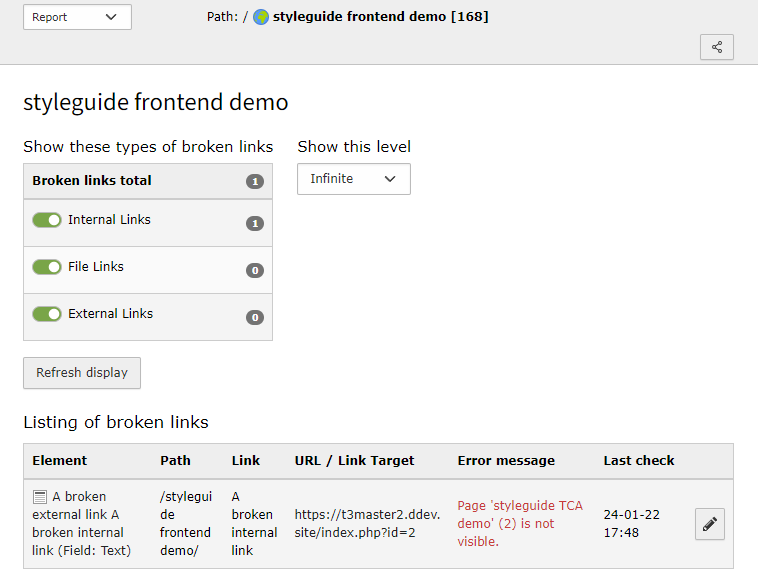
This is the Check Links backend module. It provides two actions:
Report and Check Links. The Report action
is always shown first.
Here you can view the broken links which were found, when your website was
last checked.
Viewing broken links in the Report action
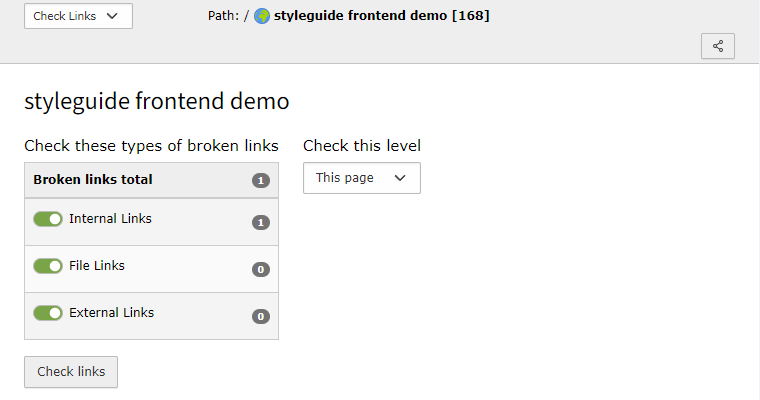
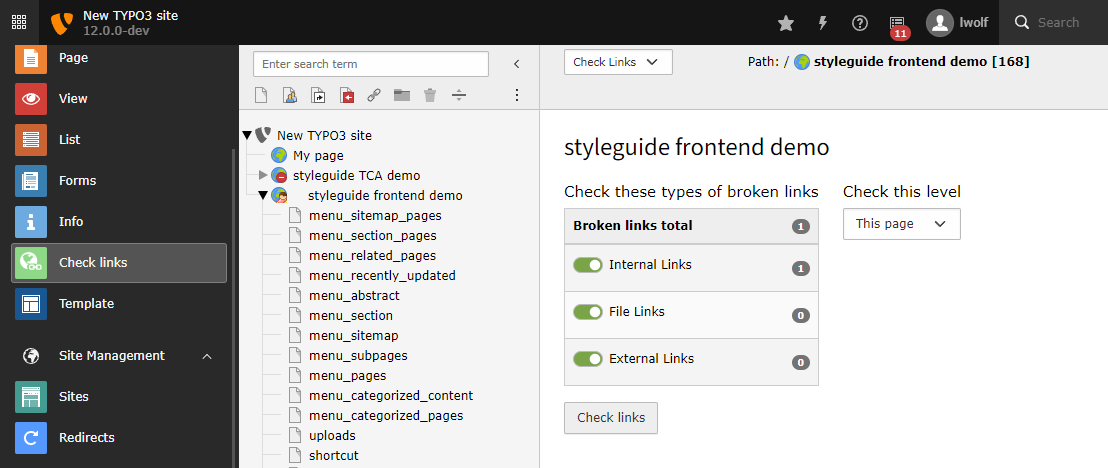
The Check Links tab is used to check links on demand and can be
hidden with TSconfig, if desired.
Checking links live in the TYPO3 Backend
The workflow in the module is the following:
First you set the depth of pages you want to consider when checking
for broken links in the Check Links tab. Then click the
Check Links
button.
Once the checks are done, the module automatically switches to the
Report tab where the results are displayed.
The type and ID of the content containing the broken link become
visible when you move the mouse over the icon for the content type.
The pencil icons at the beginning of each row enable you to quickly
fix the displayed elements.
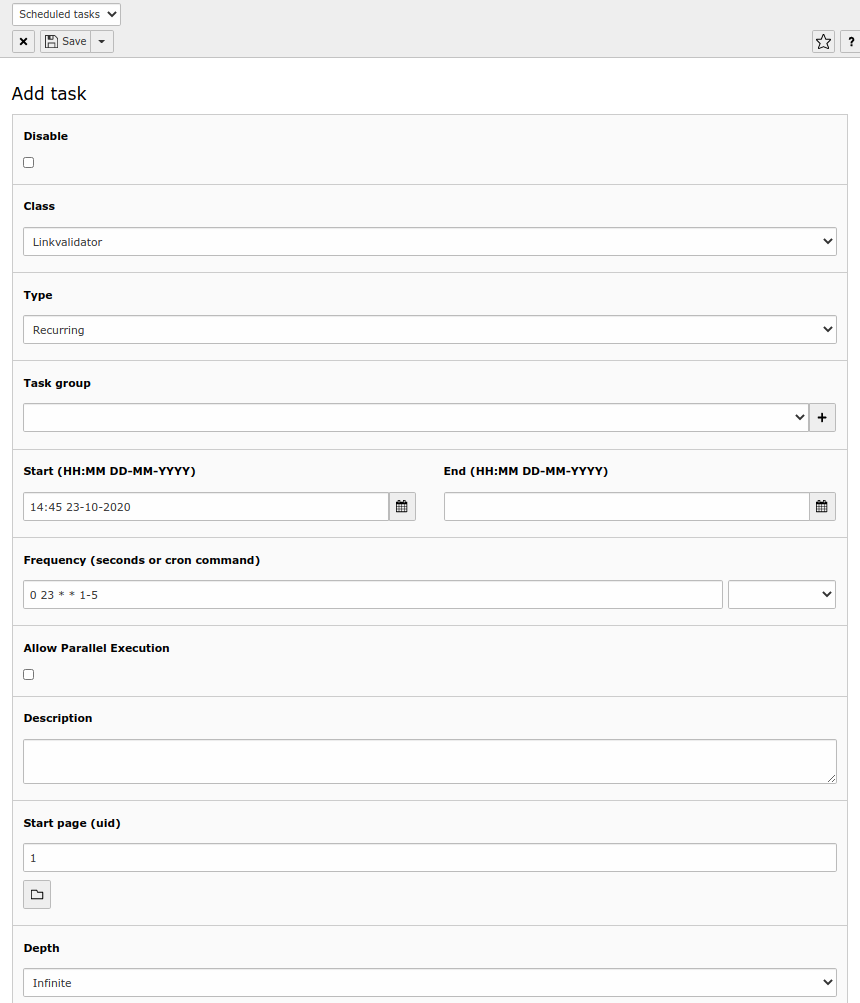
The LinkValidator features full support of the TYPO3 Scheduler. This is
the LinkValidator task:
Defining the LinkValidator task in the Scheduler
With this task you can run LinkValidator regularly via cron without
having to manually update the stored information on broken links.
You can for example overwrite the TSconfig configuration. Without any change,
the LinkValidator settings which apply for the respective pages will
be used. If you set values there, the former will be overwritten.
The LinkValidator task can send you a status report via email. You can
create your own email template as needed.
Credits
This extension is particularly based on the extension
cag_linkchecker, which was originally developed for Connecta AG,
Wiesbaden. cag_linkchecker is maintained by Jochen Rieger and Dimitri
König.
Feedback
If you find a bug in this manual or in the extension in general,
please file an issue in the
TYPO3 bug tracker.
Working with LinkValidator
This page handles how to work with LinkValidator as editor.
It is intended for a non-technical audience.
LinkValidator Report
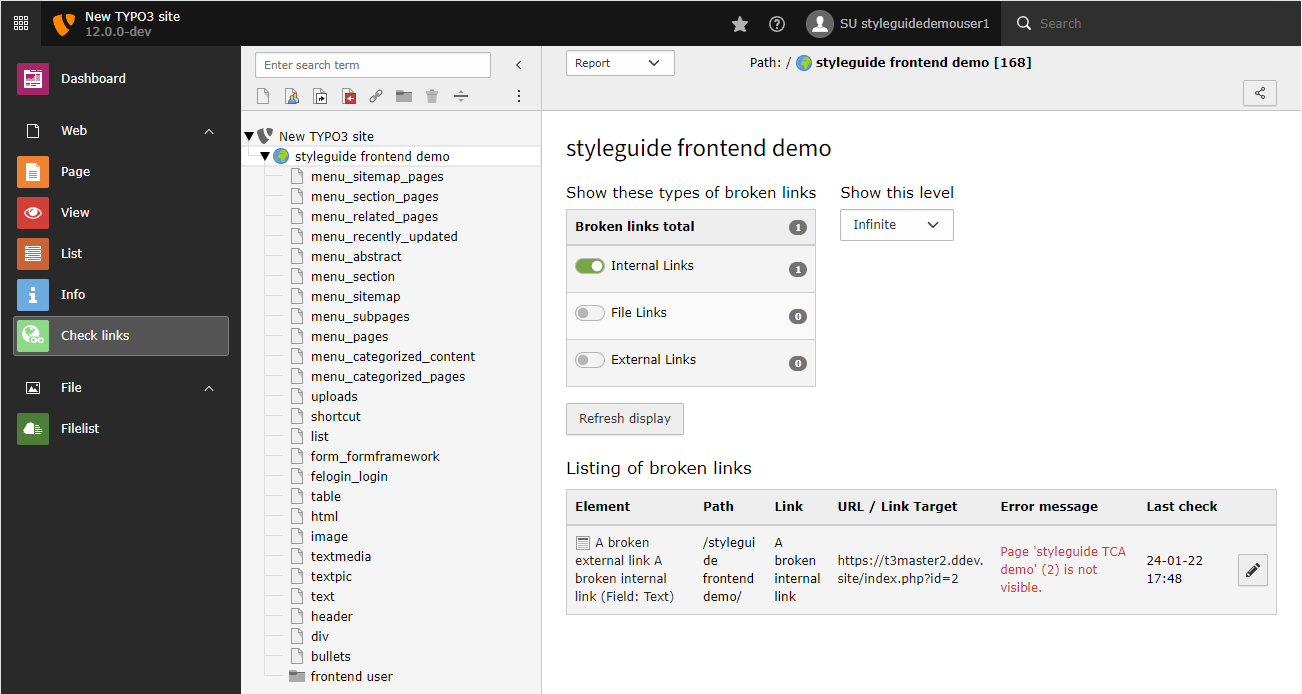
Access the module Check Links.
Select the page you want to work on in the page tree
Access LinkValidator Report via "Check Links" module
You will now see the Report with the list of broken links.
In order to get results, select the checkboxes ("Internal Links",
etc.) and choose the appropriate depth under Show this level.
This will determine the page level, for example for depth This page,
LinkValidator will only show broken links for the page that is
currently selected in the page tree. The deeper you go, the more
broken links may possibly be shown. After you change the settings,
you must click Refresh display.
When you jump to a different page in the page tree, the Report
will be refreshed.
Listing of broken links
LinkValidator Report with results
The list shows the following, from left to right:
Element: The title of the field which contains the broken link
Path: The title of the page and its parents
Link: The anchor text of the link
URL / Link target: The link target, where the link points to.
Error message: Information about the error. Often, this will be
a 404 error, which means the link target simply does not exist.
Last check: When the broken link was detected
The pencil icon can be used to edit the field where the broken
link exists.
You can now fix the broken links one after another, by clicking on
the pencil icon.
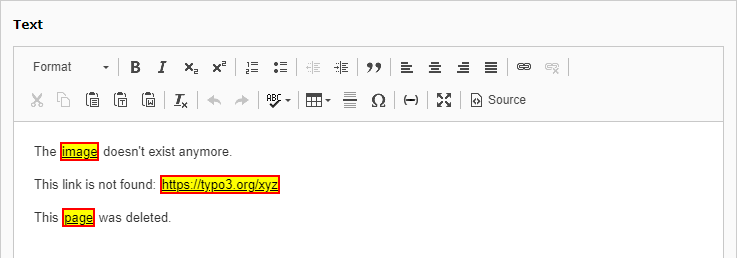
The corresponding form will open. The broken link will be marked
in a special style to make it visually stand out.
Edit a field
You can now double-click on it to open the Link Browser and fix the
link. When you are done, click on save and close in order to
return to the Report.
Installation
This extension is part of the TYPO3 Core, but not installed by default.
Check whether you are already using the extension with:
composer show | grep linkvalidator
Copied!
This should either give you no result or something similar to:
typo3/cms-linkvalidator v12.4.11
Copied!
If it is not installed yet, use the composer require command to install
the extension:
composer require typo3/cms-linkvalidator
Copied!
The given version depends on the version of the TYPO3 Core you are using.
Classic installation without Composer
In an installation without Composer, the extension is already shipped but might
not be activated yet. Activate it as follows:
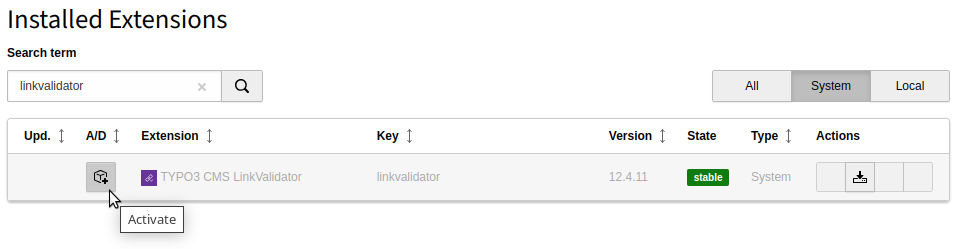
In the backend, navigate to the System > Extensions
module.
Click the Activate icon for the LinkValidator extension.
Extension manager showing LinkValidator extension
Next step
LinkValidator uses the HTTP request library shipped with TYPO3.
Please have a look in the Global Configuration,
particularly at the HTTP settings.
There, you may define a default timeout. Generally, it is recommended
to always specify timeouts when working with the LinkValidator.
Configuration of the Linkvalidator extension
You can find the standard configuration in
EXT:linkvalidator/Configuration/page.tsconfig.
This may serve as an example on how to configure the extension for
your needs.
Note
When checking for broken links in the TYPO3 backend module or the
corresponding Scheduler task, the page TSconfig of the selected start
page is also applied to all subpages - when checking recursive.
In case subpages should behave differently and therefore contain a
different LinkHandler configuration, they must be checked individually.
It is recommended to at least fill out httpAgentUrl and httpAgentEmail.
The latter is only required if
$GLOBALS['TYPO3_CONF_VARS']['MAIL']['defaultMailFromAddress']
is not set.
You can set the following options in the TSconifg of a site, for example in
file config/sites/my-site/page.tsconfig or in the global page TSconfig
file packages/my_sitepackage/Configuration/page.tsconfig of your site
package.
You must prefix them with mod.linkvalidator, for example
mod.linkvalidator.searchFields.pages = canonical_link
.
Comma separated list of table fields in which to check for
broken links. LinkValidator only checks fields that have
been defined in
searchFields
.
LinkValidator ships with sensible defaults that work well
for the TYPO3 core, but additional third party extensions
are not considered.
Warning
Currently, LinkValidator will only detect links for fields if the
TCA configuration meets certain criteria, see
TCA requirements for link validation.
config/sites/my-site/page.tsconfig
mod.linkvalidator.searchFields {
# Usually you want to append fields:
tt_content := addToList(mysitepackage_carousel_morelink)
# or you can set specific columns (overwriting defaults):# tt_content = bodytext# Do not check canonical URL in pages
pages := removeFromList(canonical_link)
}
Copied!
linktypes
linktypes
Type
string
Path
mod.linkvalidator.linktypesConfig.linktypes
Default
db,file
Comma separated list of link types to check.
Possible values:
db
Check links to database records.
file
Check links to files located in your local TYPO3 installation.
Add descriptive email used in 'User-Agent' header when crawling
external URLs.
checkhidden
checkhidden
Type
boolean
Path
mod.linkvalidator.checkhidden
Default
0
If set, disabled pages and content elements are checked for broken
links, too.
showCheckLinkTab
showCheckLinkTab
Type
boolean
Path
mod.linkvalidator.showCheckLinkTab
Default
1
If set, the backend module shows a "Check Links" tab, which you can
use to perform the checks on demand.
The Check links tab is visible
Note
Depending on the number of page levels to check and on the
number of links in these pages, this check can take some time and need
some resources. For large sites it might therefore be advisable to
hide the tab.
Note
LinkValidator uses a database table to store information
about the broken links, which it found in your website. If
showCheckLinkTab is set to 0, you must use the Scheduler task provided
by LinkValidator to update this information.
actionAfterEditRecord
actionAfterEditRecord
Type
string
Path
mod.linkvalidator.actionAfterEditRecord
Default
recheck
Possible values
recheck | setNeedsRecheck
After a record is edited, the list of broken links may no longer be correct,
because broken links were changed or removed or new broken links added. Due
to this, the list of broken links should be updated.
Possible values are:
recheck
The field is rechecked. (Warning: an RTE field may contain a number
of links, rechecking may lead to delays.)
setNeedsRecheck
The entries in the list are marked as needing a recheck
Additional set of HTTP headers to be passed when crawling URLs.
external.method
external.method
Type
string
Path
mod.linkvalidator.linktypesConfig.external.method
Default
HEAD
This specified which method is used for crawling URLs. By
default, we use HEAD (which falls back to GET if HEAD fails).
You can use GET as an alternative, but keep in mind that HEAD
is a lightweight request and should be preferred while GET will
fetch the remote web page (within the limits specified by range,
see next option).
"The HEAD method is identical to GET except that the server MUST
NOT return a message-body in the response."
(w3 RFC2616).
external.range
external.range
Type
string
Path
mod.linkvalidator.linktypesConfig.external.range
Default
0-4048
Additional HTTP request header 'Range' to be passed when crawling URLs.
Use a string to specify the range (in bytes).
HTTP request option. This is the total timeout of the request in
seconds.
If set, this overrides the timeout in
$GLOBALS['TYPO3_CONF_VARS']['HTTP']['timeout']
which defaults to 0.
Important
A value of 0 means no timeout, which may result in the request
not terminating in some edge cases and can also result in Scheduler
tasks to run indefinitely. There is an additional
$GLOBALS['TYPO3_CONF_VARS']['HTTP']['connect_timeout']
which defaults to 10 seconds, but this may not be enough to lead to a request
terminating in some edge cases.
Linkvalidator configuration example
Example configuration that checks the links provided by a custom content element
in a site package. The TCA definition of the fields must fulfill the
TCA requirements for link validation.
Additionally, email reports and the HTTP agent for external URLS are configured.
Fields checked by the Linkvalidator
Changed in version 13.3
The following fields where added to the list of fields that are checked by
default:
pages = canonical_link
sys_redirect = target
sys_file_reference = link
Changed in version 14.0
Field pages.url has been removed in favour of the new pages.link field
as replacement and is used as default now.
The following tables and fields are supported by default:
pages = link, canonical_link
sys_redirect = target
sys_file_reference = link
tt_content = bodytext, header_link
Two special fields are currently defined, but are
not checked yet due to their TCA configuration:
pages = media
has TCA type="file"
tt_content = records
has TCA type="group"
The following fields could theoretically be included in
custom configurations, as their type / softref is available,
but they are specifically not added in the default configuration:
sys_webhook = url
(webhook should not be invoked)
tt_content = subheader
(has softref email[subst]
which is not a supported link type)
Overview of important classes and interfaces in the public API.
Implementation of a custom linktype for the link validator
The LinkValidator uses so called "linktypes" to check for different types of
links, for example internal or external links.
All "linktypes" have to implement the
\TYPO3\CMS\Linkvalidator\Linktype\LinktypeInterface
.
Classes implementing the
LinktypeInterface
are automatically
registered, if autoconfigure
is enabled in packages/my_extension/Configuration/Services.yaml.
Alternatively, one can manually tag a custom link type with the
linkvalidator.linktype
tag:
packages/my_extension/Configuration/Services.yaml
# Other definitionsMyVendor\MyExtension\Linktype\MyCustomLinktype:tags:-name:linkvalidator.linktype
Copied!
Due to the autoconfiguration, the identifier has to be provided by the
class directly, using the method
getIdentifier()
.
When extending
\TYPO3\CMS\Linkvalidator\Linktype\AbstractLinktype
it is sufficient to set the $identifier class property.
For custom naming of a linktype, the additional interface
\TYPO3\CMS\Linkvalidator\Linktype\LabelledLinktypeInterface
.
can be implemented, which is also part of the default
AbstractLinktype
implementation.
The method
LabelledLinktypeInterface->getReadableName()
is used to
return the custom localized name of a linktype.
Example
Add new linktype
You can find the following example in the extension
t3docs/examples.
Extend
\TYPO3\CMS\Linkvalidator\Linktype\AbstractLinktype
to create
a custom linktype:
A new custom class should replace
\TYPO3\CMS\Linkvalidator\Linktype\ExternalLinktype
. The class inherits
existing functionality from
ExternalLinktype
, but will be registered with
the identifier "custom_external":
<?phpnamespaceMyVendor\NyExtension\Linktype\ExternalLinktype;
useTYPO3\CMS\Linkvalidator\LinkAnalyzer;
useTYPO3\CMS\Linkvalidator\Linktype\ExternalLinktypeasLinkvalidatorExternalLinkType;
// This class inherits from ExternalLinktype,// so it is only necessary to override some methods.classExternalLinktypeextendsLinkvalidatorExternalLinkType{
// This class must use a different identifier because "external" is already used.protected string $identifier = 'custom_external';
publicfunctioncheckLink(
string $origUrl,
array $softRefEntry,
LinkAnalyzer $reference
): bool{
// do additional stuff here or after parent::checkLink// ...returnparent::checkLink($origUrl, $softRefEntry, $reference);
}
publicfunctionfetchType(array $value, string $type, string $key): string{
preg_match_all(
'/((?:http|https))(?::\\/\\/)(?:[^\\s<>]+)/i',
(string)$value['tokenValue'],
$urls,
PREG_PATTERN_ORDER
);
if (!empty($urls[0][0])) {
$type = $this->getIdentifier();
}
return $type;
}
}
Since the identifier changes, the configuration should be copied to
mod.linkvalidator.linktypesConfig.custom_external
, so that it will be
passed to the linktype, for example:
If you have a website with many hundreds of pages, checking all links
will take some time and might lead to a time out. It will also need
some resources so that it might make sense to do the check at night.
If you want to check many pages, you should not use the "Check Links"
tab in the backend module of LinkValidator. Use the TYPO3 Scheduler
instead. The task provided by LinkValidator will cache the broken
links just like the button "Check Links" would do. Afterwards you can
use the backend module as usual to fix the according elements.
If you still want to check trees with many pages just in time, set the
depth to a reasonable level like 2 or 3. Do not use "infinite".
Known problems
Problems with external links
The most relevant known problems currently concern "external broken links".
Be polite when crawling external sites: They should not be checked too often.
The extension currently provides no functionality to limit such requests.
There are (at least) 2 possible counter-measures:
Turn off external link checking entirely
by removing external from Page TSconfig TSconfig Reference
Override the ExternalLinktype class
(in your own extension), to check only specific URLs or exclude specific
URLs or handle only specific error types as errors.
Falsely reported broken links
Linkvalidator may find false negatives when checking links. This can be
annoying for editors since there is no way to declare them "ok" manually,
they will be shown to editors over and over again.
There are a couple of scenarios where linkvalidator may show a link as
broken leading to a misleading result:
Automatic server-side external link checking may fail. There are many possible
reasons for false negatives in this area like server connectivity issues or
funny deny rules on the target system.
Sometimes links may not be broken as such, but are considered "broken" due to
HTTP status like 4xx.
The broken link information may be "stale", the link has been checked a while ago
and did lead to a negative result due to temporary a system outage or similar, is
now working again, but has not been rechecked yet.
Sitemap
Reference to the headline
Copy and freely share the link
This link target has no permanent anchor assigned.The link below can be used, but is prone to change if the page gets moved.