
TYPO3 Reactions 

Extension key

reactions

Package name

typo3/cms-reactions

Version

12.4

Language

en

Author

TYPO3 contributors

License

This document is published under the Creative Commons BY-NC-SA 4.0 license.

Rendered

Tue, 02 Dec 2025 11:45:27 +0000


This extension handles incoming webhooks to TYPO3. It also provides a corresponding backend module to manage reaction records in the TYPO3 backend System > Reactions.


Table of Contents:
Introduction 

This system extension adds the possibility to receive webhooks in TYPO3.

A webhook is defined as an authorized POST request to the TYPO3 backend.

It offers a backend module, System > Reactions, that can be used to configure reactions triggered by a webhook.

The extensions provides a basic default reaction that can be used to create database records triggered and enriched by data from the caller.

Additionally, the Core provides the \TYPO3\CMS\Reactions\Reaction\ReactionInterface to allow extension authors to add their own reaction types.

Any reaction record is defined by a unique identifier and also requires a secret. Both information are generated in the backend. The secret is only visible once and stored in the database as an encrypted value like a backend user password.

Installation 

This extension is part of the TYPO3 Core, but not installed by default.

Table of contents

Installation with Composer 

Check whether you are already using the extension with:

composer show | grep reactions
Copied!

This should either give you no result or something similar to:

typo3/cms-reactions       v12.4.11
Copied!

If it is not installed yet, use the composer require command to install the extension:

composer require typo3/cms-reactions
Copied!

The given version depends on the version of the TYPO3 Core you are using.

Installation without Composer 

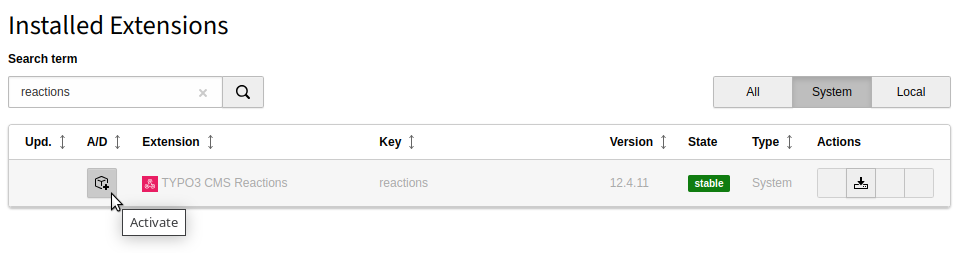
In an installation without Composer, the extension is already shipped but might not be activated yet. Activate it as follows:

  1. In the backend, navigate to the Admin Tools > Extensions module.
  2. Click the Activate icon for the Reactions extension.
Extension manager showing Reactions extension

Extension manager showing Reactions extension

Reactions 

Create database record 

A basic reaction shipped with the system extension can be used to create records triggered and enriched by data from the caller.

Custom reaction type 

A custom reaction type may be useful, if the "Create database record" type is not sufficient.

Create database record 

A basic reaction shipped with the system extension can be used to create records triggered and enriched by data from the caller.

Create a new reaction 

Click on the button Create new reaction to add a new reaction.

Backend form to create a new database record

Backend form to create a new database record

The form provides the following general configuration fields:

Reaction Type
Select one of the available reaction types. The system extension comes with the Create database record.
Name
Give the reaction a meaningful name. The name is displayed on the overview page of the backend module.
Description
You can provide additional information to describe, for example, the purpose of this reaction in detail.
Identifier
Any reaction record is defined by a unique identifier. It is part of the TYPO3 URL when calling this reaction.
Secret
The secret is necessary to authorize the reaction from the outside. It can be re-created anytime, but will be visible only once (until the record is saved). Click on the "dices" button next to the form field to create a random secret. Store the secret somewhere safe.

The content of the "Additional configuration" section depends on the concrete reaction type. For the "Create database record" the following fields are available:

Table
Select one of the tables from the list. The corresponding fields displayed below change depending on the selected table. See also Extend list of tables on how to extend this list.
Storage PID
Select the page on which a new record should be stored.
Impersonate User
Select the user with the appropriate access rights that is allowed to add a record of this type. If in doubt, use the CLI user ("_cli_").
Fields

The available fields depend on the selected table.

Next to static field values, placeholders are supported, which can be used to dynamically set field values by resolving the incoming data from the webhook's payload. The syntax for those values is ${key}. The key can be a simple string or a path to a nested value like ${key.nested}.

For our example we select the Page Content table and populate the following fields:

Form with additional configuration for page content

Form with additional configuration for page content

We now save and close the form - our newly created reaction is now visible:

Backend module with reaction

Backend module with reaction

Call the reaction manually 

TYPO3 can now react on this reaction. Clicking on the Example button, the skeleton of a cURL request for use on the command line is showing up. We can adjust and run it on the console, using our placeholders as payload:

curl -X 'POST' \
    'https://example.com/typo3/reaction/a5cffc58-b69a-42f6-9866-f93ec1ad9dc5' \
      -d '{"header":"my header","text":"<p>my text</p>"}' \
      -H 'accept: application/json' \
      -H 'x-api-key: d9b230d615ac4ab4f6e0841bd4383fa15f222b6b'
Copied!

When everything was okay and the record was created successfully, we receive a confirmation:

{"success":true}
Copied!

If something went wrong, this is also visible, for example:

{"success":false,"error":"Invalid secret given"}
Copied!

The content is now available on the configured page:

The created page content record on the configured page

The created page content record on the configured page

Extend list of tables 

By default, only a few tables can be selected for external creation in the create record reaction. In case you want to allow your own tables to be available in the reaction's table selection, add the table in a corresponding TCA override file:

EXT:my_extension/Configuration/TCA/Overrides/sys_reaction.php
if (\TYPO3\CMS\Core\Utility\ExtensionManagementUtility::isLoaded('reactions')) {
    \TYPO3\CMS\Core\Utility\ExtensionManagementUtility::addTcaSelectItem(
        'sys_reaction',
        'table_name',
        [
            'label' => 'LLL:EXT:myext/Resources/Private/Language/locallang.xlf:tx_myextension_domain_model_mytable',
            'value' => 'tx_myextension_domain_model_mytable',
            'icon' => 'myextension-tx_myextension_domain_model_mytable-icon',
        ]
    );
}
Copied!

In case your extension depends on EXT:reactions the isLoaded() check might be skipped. Please note that tables which configured adminOnly to true are not allowed.

Custom reaction type 

A custom reaction type may be useful, if the create database record type is not sufficient.

As an example the following scenario is used:

We want to synchronize products from an external system into TYPO3. As the synchronization may be time-consuming (think of synchronizing images), the real work is done by a command. Therefore, the reaction receives an ID from a product which was added or changed. This ID is stored in the sys_registry table.

A command (which is not part of this example) runs regularly and synchronizes every product ID stored in the registry entry into TYPO3.

You can find the implemented reaction type in the EXT:examples extension.

Create the reaction type 

To create a custom reaction type, we add a class which implements the EXT:reactions/Classes/Reaction/ReactionInterface.php (GitHub):

EXT:examples/Classes/Reaction/ExampleReactionType.php
<?php

declare(strict_types=1);

namespace T3docs\Examples\Reaction;

use Psr\Http\Message\ResponseFactoryInterface;
use Psr\Http\Message\ResponseInterface;
use Psr\Http\Message\ServerRequestInterface;
use Psr\Http\Message\StreamFactoryInterface;
use TYPO3\CMS\Core\Registry;
use TYPO3\CMS\Reactions\Model\ReactionInstruction;
use TYPO3\CMS\Reactions\Reaction\ReactionInterface;

class ExampleReactionType implements ReactionInterface
{
    private const REGISTRY_KEY = 'changed_ids';

    public function __construct(
        private readonly Registry $registry,
        private readonly ResponseFactoryInterface $responseFactory,
        private readonly StreamFactoryInterface $streamFactory,
    ) {}

    public static function getType(): string
    {
        return 'example-reaction-type';
    }

    public static function getDescription(): string
    {
        return 'Example reaction type';
    }

    public static function getIconIdentifier(): string
    {
        return 'tx_examples-dummy';
    }

    public function react(
        ServerRequestInterface $request,
        array $payload,
        ReactionInstruction $reaction
    ): ResponseInterface {
        $id = $payload['id'] ?? 0;
        if ($id <= 0) {
            $data = [
                'success' => false,
                'error' => 'id not given',
            ];

            return $this->jsonResponse($data, 400);
        }

        $this->updateRegistryEntry($id);

        return $this->jsonResponse(['success' => true]);
    }

    private function updateRegistryEntry(int $id): void
    {
        $ids = $this->registry->get('tx_examples', self::REGISTRY_KEY) ?? [];
        $ids[] = $id;
        $ids = array_unique($ids);
        $this->registry->set('tx_examples', self::REGISTRY_KEY, $ids);
    }

    private function jsonResponse(array $data, int $statusCode = 201): ResponseInterface
    {
        return $this->responseFactory
            ->createResponse($statusCode)
            ->withHeader('Content-Type', 'application/json')
            ->withBody($this->streamFactory->createStream(json_encode($data, JSON_THROW_ON_ERROR)));
    }
}
Copied!

You can use constructor injection to inject necessary dependencies.

Add reaction type to select list in backend module 

In a next step we add the newly created reaction type to the list of reaction types in the backend:

EXT:examples/Configuration/TCA/Overrides/sys_reaction.php
<?php

defined('TYPO3') or die();

\TYPO3\CMS\Core\Utility\ExtensionManagementUtility::addTcaSelectItem(
    'sys_reaction',
    'reaction_type',
    [
        'label' => \T3docs\Examples\Reaction\ExampleReactionType::getDescription(),
        'value' => \T3docs\Examples\Reaction\ExampleReactionType::getType(),
        'icon' => \T3docs\Examples\Reaction\ExampleReactionType::getIconIdentifier(),
    ]
);
Copied!

Now, our newly created type is displayed and can be selected:

Selecting our custom reaction type

Selecting our custom reaction type

Sitemap