During the lifetime of a website, the URLs of pages often change. If no
countermeasures are in place, users will attempt to access pages that no
longer exist when browsing your site. Typically, when this occurs an error page is returned.
This is inefficient and impacts the user experience. When multiple missing pages or 404
/ 410 HTTP status codes are returned, the overall SEO ranking is negatively affected.
Changing URLs can have multiple reasons, sometimes the name of something changes
and the URL should reflect that or pages are restructured on the site.
There are many reasons as to why URLs are changed. This can include a restructure
of the site's pages and also occurs when the name of a page is changed.
and the URL in turn changes as well to reflect this.
HTTP redirects act as an important measure to guide users (and bots) to new
pages. This often happens in the background without the user noticing it
because the browser will automatically resolve the redirect.
This works similar to a forwarding request when you move house and your address
changes.
For more information about the types of redirects, see
HTTP status codes
What does it do?
The TYPO3 system extension EXT:redirects handles redirects within a TYPO3 site.
Features:
Manually create redirects in the backend. The redirect information is
stored in the
sys_redirect
table.
View and edit existing redirect records in the redirects backend module.
Automatic redirect creation on slug changes (based on site configuration).
Console commands to check the integrity and cleanup existing redirects.
System reports that display information about any conflicting redirects.
Note
EXT:redirects does not handle redirects created via page types "Link to External
URL" (pages.doktype=3), "Shortcut" (pages.doktype=4) or redirects created
within the web server (e.g. .htaccess or web server configuration).
Conventions
Visit the Basics page found at the end of this document for a general
definition of terms.
When describing parts of the user interface, we use the gui label
to mark texts within the UI.
Common names are formatted in italics (though this is not used everywhere to
ease readability).
Sometimes the topic of a paragraph is marked in bold to ease skimming of
pages for relevant content.
Installation
This extension is part of the TYPO3 Core, but not installed by default.
Check whether you are already using the extension with:
composer show | grep redirects
Copied!
This should either give you no result or something similar to:
typo3/cms-redirects v12.4.11
Copied!
If it is not installed yet, use the composer require command to install
the extension:
composer require typo3/cms-redirects
Copied!
The given version depends on the version of the TYPO3 Core you are using.
Installation without Composer
In an installation without Composer, the extension is already shipped but might
not be activated yet. Activate it as follows:
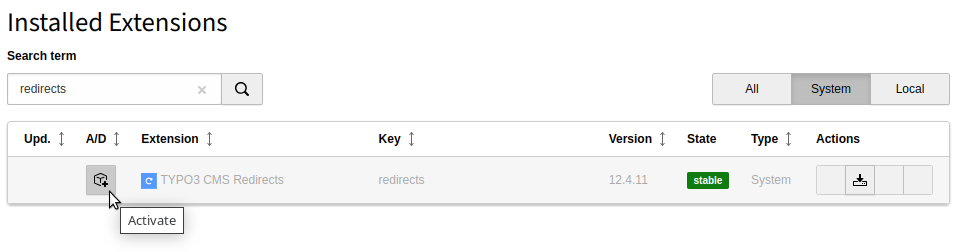
In the backend, navigate to the Admin Tools > Extensions
module.
Click the Activate icon for the Redirects extension.
Extension manager showing Redirects extension
Setup
The redirects extension requires no extra configuration once it is installed.
However, it is recommended to familiarize yourself with
the settings and commands outlined in this page. Depending on your site and how
editing is handled, changes in the configuration and regular maintenance may be
required.
Site configuration
The core comes with the following site settings for redirects which can be
configured per site.
Configuration via backend module
The redirect settings can be configured in the backend via
Site Management > Settings.
Configuration via YAML files
Sites using site sets (TYPO3 v13+)
For sites using site sets, add the settings to
config/sites/<site>/settings.yaml:
Alternatively, you can define these settings in your site package at
mysitepackage/Configuration/Sets/mysiteset/settings.yaml to provide
defaults for all sites using this site set.
Legacy site configuration (TYPO3 v12 and earlier)
In legacy installations without site sets, add the settings to
config/sites/<site>/config.yaml:
In older installations, the file is found in
typo3conf/sites/<site>/config.yaml.
Available settings
The following settings apply to automatically created redirects.
TYPO3 comes with working defaults. It is not necessary to configure these
settings if you use the defaults.
autoUpdateSlugs
Automatically update slugs of all sub pages (default: true)
autoCreateRedirects
Automatically create redirects for pages with a new slug (works only in
LIVE workspace) (default: true)
redirectTTL
Time To Live in days for redirect records to be created - 0 disables
TTL, no expiration (default: 0)
httpStatusCode
HTTP status code for automatically created redirects, see
MDN: HTTP Redirections
(default: 307)
The httpStatusCode does not affect the default status code for manually created
redirects. This can be adjusted via TCA
$GLOBALS['TCA']['sys_redirect']['columns']['target_statuscode']['config']['default']
.
Changed in version 12.1
Since TYPO3 v12.1, automatically created redirect records are stored on the
configured root page ID of the site. Previously, they were initially stored
on the top root page or later on the changed page.
See also
The settings in the site configuration are generally explained in
"TYPO3 Explained" > Site settings.
Console commands
As for commands in general, it is possible to execute them via the command
line or via the TYPO3 scheduler in the backend.
Please see the general information about this in "TYPO3 Explained" >
Console commands (CLI).
We explain executing the commands from the command line here, it is recommended
to automate regular execution, e.g. via cron.
redirects:cleanup
The CLI command redirects:cleanup can be used to periodically cleanup existing
redirects under given conditions.
Use -h to see all options:
vendor/bin/typo3 redirects:cleanup -h
Copied!
typo3/sysext/core/bin/typo3 redirects:cleanup -h
Copied!
Example 1: Remove all redirects with less than 50 hits and older than 30
days.
vendor/bin/typo3 redirects:cleanup -c 50 -a 30
Copied!
typo3/sysext/core/bin/typo3 redirects:cleanup -c 50 -a 30
Copied!
Hint
The -c option does nothing if the
hitcounter feature toggle is not enabled. Be careful
when using the -c (= --hitCount) option. It is advised to combine it with
-a, otherwise this will also cleanup redirects which were just created and
did not have the possibility to accumulate any hits.
Example 2: Clean all redirects for domains foo.com and bar.com older than 90 days
and with hit counter less than 100 which start with the source path /foo/bar
and have a status code of 302 or 303.
The checkintegrity command checks existing redirects for conflicts. A typical
conflict may be a redirect loop. In this case the source
and target point to the same page or the redirect loop affects a number of
redirects, each redirecting to the next and looping back to the first, e.g.
/a => b, /b => /a.
Warning
Currently, there are known problems where the checkintegrity command
may report false positives. This can happen if additional routing enhancers
/ decorators are in place.
This will output one line per redirect conflict. The output may look like
this:
Redirect (Host: *, Path: /test-1) conflicts with http://mysite/test-1
Copied!
You can now search for the affected redirects in the redirects module, e.g.
by filtering with Source Path/test-1.
Configure editor permission
By default, editors (without admin privileges) cannot access redirects directly and they cannot
revert automatic redirects. This can be problematic, because the notification
with the option to revert redirects and the notification that they were reverted
appears regardless, even if an editor does not have access and the redirects
are not reverted.
In order to make reverting redirects possible for non-admin backend users,
configure this in the backend group Access Lists tab:
Activate Redirect [sys_redirect] in Tables (listing)
Activate Redirect [sys_redirect] in Tables (modify)
In order to give editors full access to the redirects module, give them
access to the
sys_redirect
table as outlined above and configure this in
the backend group Access Lists tab:
Activate Site Management>Redirects [site_redirects] in
Modules.
Warning
It is recommended to only give trusted and experienced backend users access
to the redirects module because they will have access to all redirects for
the entire installation and may unintentionally wreak havoc on the site.
Especially problematic can be redirect loops because they result in
broken pages, but these can be detected, using redirects:checkintegrity.
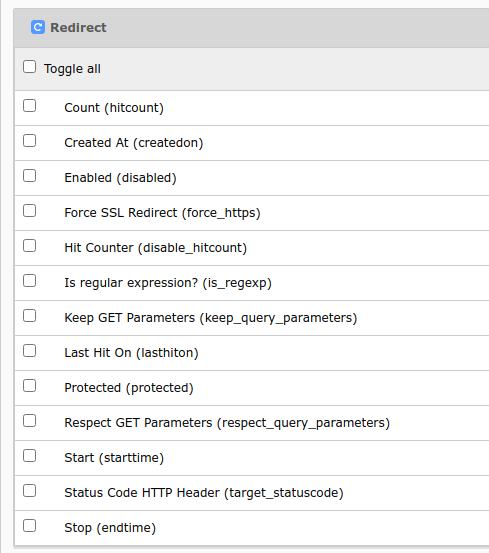
By default the fields Source Domain, Source Path and Target are enabled,
the rest are excluded fields, which must be enabled for the respective backend user
group in the Access Lists tab > Allowed excludefields >
Redirect.
Allowed excludefields
Hit counter
The hit counter can be activated via
Feature Toggle, either in the backend in
Settings > Feature Toggles >
Redirects: hit count or in the
configuration file system/settings.php or
system/additional.php.
This feature toggle is disabled by default, because it comes with a small performance
impact that requires additional SQL
UPDATE
queries.
Every time a page is accessed the hit counter will be incremented. Based on the
hit counter, a delete policy for unnecessary redirects can be defined.
Visit the redirects:cleanup with the option
-c for more information.
System reports
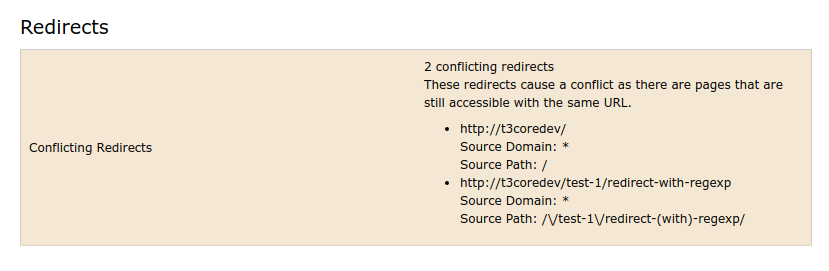
The redirect conflicts will also be shown in the system report, available
via Reports > Status Report in the TYPO3 backend.
It is required to run redirects:checkintegrity regularly, so that the results
can be displayed in the report.
The information is stored in the registry (
sys_registry
table in the
database).
Redirect conflicts in system report
In case redirects:checkintegrity was not run
within the last 24 hours an additional informational status will appear in the
report:
Attention
List of conflicting redirects may not be up to date!
Regularly run the console command redirects:checkintegrity.
This can be configured in the extension configuration with these 2 settings:
Show information in reports if checkintegrity was not run.
Show information in reports if checkintegrity was not run.
Field
showCheckIntegrityInfoInReports
Show informational status in the reports if redirects:checkintegrity was
not run within the last 24 hours, or rather the number of seconds indicated
in the setting
showCheckIntegrityInfoInReportsSeconds.
Number of seconds to consider last checkintegrity report.
Number of seconds to consider last checkintegrity report.
Field
showCheckIntegrityInfoInReportsSeconds
Default
86400 (is 24 hours in seconds)
Number of seconds which must pass until the informational message is shown
about checkintegrity in the reports.
Usage
Redirects module
Access the redirects module in the TYPO3 backend under Site Management
> Redirects.
Open Redirects module
List
Redirect list
You will see a list of the existing redirects with the following columns labels.
Source Domain
Source Path
Target
Count: Number of "hits" (only if hit counter is on)
Last Hit on: When was the most recent redirect "hit" (only if hit
counter is on)
Action buttons: View page, edit, disable and delete
Tip
Hover over the text to see the link markup (underline) and a tooltip.
It is also possible to sort by clicking on the Source Host or
Source Path column headers and changing the sort order by clicking
again, as also done elsewhere in the backend.
By clicking on the Source Path of one of the columns or on the pencil edit
icon , you can edit the record. Clicking on a link in the
Destination column, should open the link target.
The + sign on the top will open an edit form to create a new
redirect.
It is also possible to filter, e.g. by the Source Path, Status Code,
Creation type, Protected or only show redirect records which were "Never hit"
(see Information on Hit counter which must be explicitly
enabled via Feature Toggle).
Edit form
When creating a new redirect or editing an existing one, the edit form will open.
A redirect generally consists of these 2 parts which are separated in the
edit form:
A source part (host, path, query parameters) which is matched against
the URL. If it matches, the redirect is applied
A target part which defines where the redirect should redirect to and
some additional parameters like the HTTP status code, whether to force HTTPS
and keep query parameters
Also, the redirect has some additional parameters that are specific for the
redirect record but not relevant when generating the redirect, such as the
Protected field.
Admin users will see the respective database fields from the table
sys_redirect
in square brackets (e.g.
Source Domain [source_host]) next to the label if in debug mode.
Non-admin users may not see all the fields. By default Source Domain, Source Path
and Target are enabled, the rest are exclude fields and must be enabled in the
backend group permissions, see
backend user configuration.
General tab
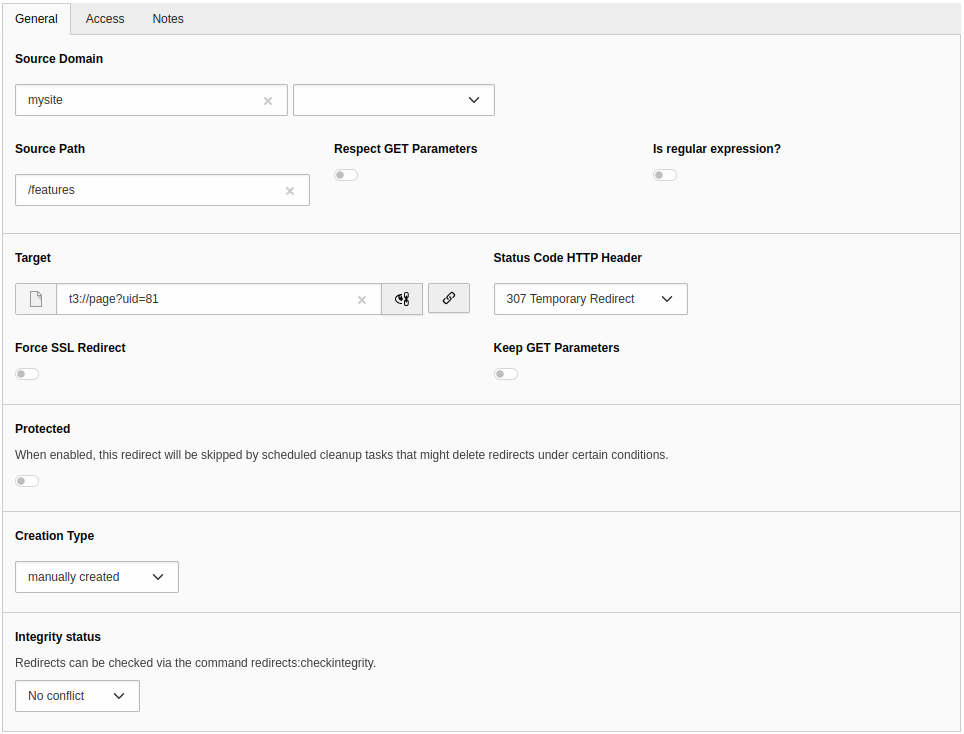
Edit redirect
Source:
Source Domain
Source Domain
Field
source_host
It is possible to select one of the domains from the site configuration or
use the wildcard (*). In this case the redirect applies to all sites!
Source Path
Source Path
Field
source_path
Can be an actual path, e.g. /path. For URLs with different entry points
for languages, you should use the full path, e.g. /en/path.
Regular expressions are possible, but then
is_regexp must be enabled. Regular expressions must be enclosed in
delimiters, e.g. #^/path/([a-zA-Z]{1}[a-zA-Z0-9_/-]+)# or
/^/path/([a-zA-Z]{1}[a-zA-Z0-9_/-]+)/.
Respect GET Parameters
Respect GET Parameters
Field
respect_query_parameters
If on, matching is also performed on query parameters. If off, matching is
only performed on the path.
Is regular expression?
Is regular expression?
Field
is_regexp
Evaluate the Source Path as regular expression.
Target:
Target
Target
Field
target
The redirect target, can be a
path, e.g. /features
URL, e.g. https://example.org/features
page ID or page URI, e.g. t3://page?uid=1
file URI, e.g. t3://file?uid=1
path with reference to
regular expression capturing group if the regular
expression feature is used with e.g. capturing groups in Source Path, e.g.
/newpath/$1
Status Code HTTP Header
Status Code HTTP Header
Field
target_statuscode
The HTTP status code that will be sent to the
client. This is 307 (Temporary Redirect) by default.
Force SSL Redirect
Force SSL Redirect
Field
force_https
When redirecting, use HTTPS when constructing the target URL. This will even
be the case, if a full URL is given as target (e.g.
http://example.com/features) or if the entry point of a site uses HTTP, so
make sure your site supports HTTPS (which is recommended anyway).
Keep GET Parameters
Keep GET Parameters
Field
keep_query_parameters
When redirecting, add query parameters of original URL (with possible
changes) to the target. By default, the query parameters are omitted, so
source URL https://example.com/features?abc=1 would be redirected to
https://example.com/all-features. If there are already query
parameters in the target field, these are used instead.
Protected
Protected
Field
protected
This does not affect the redirect itself. It protects the record from
automatic deletion (e.g. with redirects:cleanup).
Creation Type
Creation Type
Field
creation_type
This field allows to differentiate between redirects that are created
automatically when the slug of a page is changed and those that are created
in the backend module by editors.
Integrity Status
Integrity Status
Field
integrity_status
This field hints about a broken redirect, for example, if the page references
to itself.
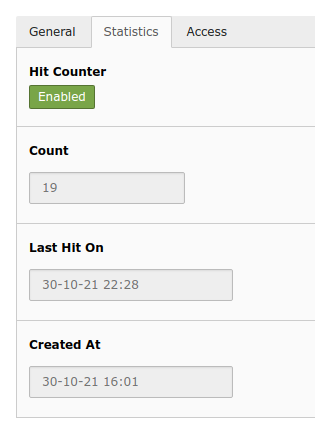
Statistics tab
Statistics tab with hit counter
This tab is only available, if the hit counter is enabled. Here you can disable
the hit counter for a specific redirect and also see read-only statistics.
Hit Counter
Hit Counter
Field
disable_hitcount
Disable the hit counter only for this redirect.
Count
Count
Field
hitcount
Editable
read only
Number of hits for this particular redirect. (How often was the page
accessed which triggered this redirect?)
Last Hit on
Last Hit on
Field
lasthiton
Editable
read only
When was the last hit on this redirect?
Created At
Created At
Field
createdon
Editable
read only
When was this redirect created?
Access tab
Enabled
Enabled
Field
disabled
If disabled, the redirect has no effect.
Start
Start
Field
starttime
If this is not empty, "now" (current time) must be after Start time for the
redirect to have effect.
Stop
Stop
Field
endtime
If this is not empty, "now" (current time) must be before Stop time for the
redirect to have effect.
Notes
Description
Description
Field
description
Add context to the corresponding redirect. The added information is also
displayed in the "Record information" info box above the edit form.
Regex examples
Example 1: Source path with regular expression and capturing group
redirect
Source Path
Is Regular Expression
target
#^/path/([a-zA-Z]{1}[a-zA-Z0-9_/-]+)#
true
https://example.org/newpath/$1
with the following result:
URL
result URL
https://example.org/path/something
https://example.org/newpath/something
Example 2: Source path with regular expression, capturing group and relative target
redirect
Source Path
Is Regular Expression
target
#^/another/path/([a-zA-Z]{1}[a-zA-Z0-9_/-]+)#
true
/newpath/$1
with the following result:
URL
result URL
https://example.org/another/path/something
https://example.org/relative/newpath/something
Using a relative target is necessary if a redirect must work on multiple domains or multiple environments.
Important
TYPO3 will not syntax check the redirect. Make sure you enter working
redirects enclosed in delimiters. Use tools like https://regex101.com/,
if necessary.
Automatic redirects creation
Redirects are created automatically on slug changes, if EXT:redirects is
installed and automatic creation is enabled in
site configuration.
A redirect from the old URL to the new URL will be created. All sub pages are
checked too and the slugs will be updated and redirects will be created for
these as well.
After the creation of the redirects a notification will be shown to the user.
Revert redirect
The notification contains two possible actions:
revert the complete slug update and remove the redirects
or only remove the redirects
Note
No redirects are generated for workspace versions in the TYPO3 backend.
The setting redirect.autoCreateRedirects is internally disabled in this
case.
Best practices
Here are some general tips for managing redirects:
Check for conflicts regularly with
redirects:checkintegrity. This is no
longer as much an issue as with previous versions, because it was resolved
with patch 68202.
Since this patch, a path is no longer used for the target. A redirect is
constructed using the page ID, e.g. t3://page?uid=1 as target. This means
the redirect will still work, even if the slug changes again. This way, it
is less likely that redirect loops and
redirect chains are created because the redirect
always redirects directly to the target page.
Check number of redirects and regularly clean out unnecessary redirects,
e.g. with redirects:cleanup. If you use the
hit counter, be aware that it comes with a small
performance impact.
"Redirect chains" are not as much a problem, but can
become inefficient. A "redirect chain" are several redirects which must be
followed until the destination is reached. Ideally, these should be merged.
Editors
Well curated content and editors which have a good understanding of SEO and
possible problems with redirects are a good idea in any case. TYPO3 comes
with extensive permission and
workspaces management - which gives you the
possibility to only grant advanced editor groups access to parts of the content
(e.g. pages, redirect module) which they are well equipped to handle.
If you give editors access to the redirects module, make sure that they
understand the usage and for example do not create
redirect loops.
Often changing slugs comes with a cost. Redirects are a counter measure
so that pages with changing slugs are still accessible but a better
strategy is to only change slugs when absolutely necessary.
Performance
With a certain number of redirects and depending on your setup, performance
problems may occur through technical limitations.
The following rules of thumb should be followed:
Restrict time-to-live [ttl] of redirects - manual and automatically
created.
Cleanup regularly and remove outdated redirects.
Recheck redirects and aggregate them on a manual basis to lower the number.
Keep the number of redirects for the whole instance in a certain range.
Instruct editors to be careful with slug changes and thus creating redirects
automatically, which may be unnecessary.
Note
Handling redirects through PHP applications has technical limitations,
even more if complex redirects like regexp-style redirects should be
supported. Thus, handling redirects with EXT:redirects is only suitable for
installations with a certain number of redirects.
It is recommended to monitor performance and - if necessary - export
redirects to your webserver configuration or load balancer.
Troubleshooting tools
Since redirects are resolved in the web browser, it may be difficult to
troubleshoot. There are many tools available, for example you can
use a command line tool like curl to follow and show redirects or use the
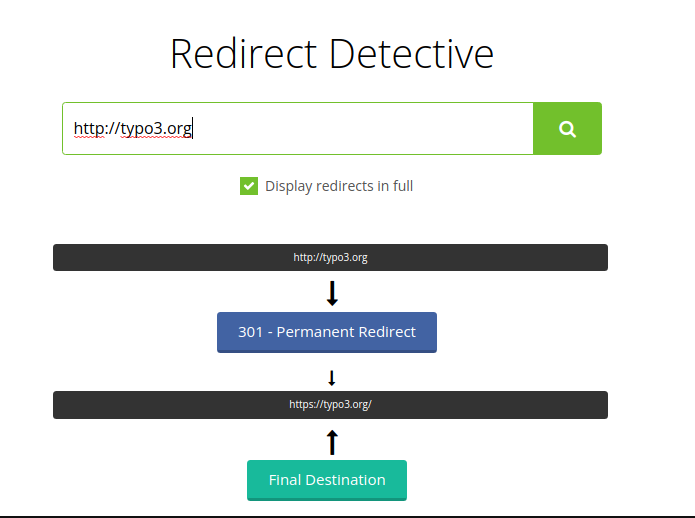
online tool Redirect detective.
Redirect detective also detects redirect loops.
Output of Redirect Detective for http://typo3.org.
Example: Resolve redirects with curl (-L follows redirects):
curl -I -L -s -X GET http://example.org
Copied!
Output:
HTTP/1.1 301 Moved Permanently
...
Location: http://example.com
....

HTTP/1.1 301 Moved Permanently
...
Location: https://example.com
....

HTTP/1.1 200 OK
...
Copied!
As you can see, http://example.org is redirected twice, first to
http://example.com and then to the HTTPS variant.
Note
These are just two simple tools of many you can use.
PSR-14 events
The following PSR-14 events are available to extend the functionality:
AfterAutoCreateRedirectHasBeenPersistedEvent
React on persisted auto-created redirects.
More details
BeforeRedirectMatchDomainEvent
Implement a custom redirect matching upon the loaded redirects or return a
matched redirect record from other sources.
More details
Modify the redirect record before it is persisted to the database.
More details
ModifyRedirectManagementControllerViewDataEvent
Modify or enrich view data for the
\TYPO3\CMS\Redirects\Controller\ManagementController
.
More details
RedirectWasHitEvent
Process the matched redirect further and adjust the PSR-7 response.
More details
SlugRedirectChangeItemCreatedEvent
Manage the redirect sources for which redirects should be created.
More details
Known problems
Problem with constants in LinkHandler TSConfig
It is important, that the storagePid is hard coded in the LinkHandler Page
TSConfig, because using constants, e.g. from the site configuration, won't work
here. More details
If the following terms are used in this documentation, it refers to the parts
of the URL:
scheme
host
path
query parameters
fragment
HTTP status codes
When redirecting, a HTTP status code is sent to the client (usually a browser
or a bot). This status code informs the client
about the type of redirect. We differentiate between a permanent and a temporary
redirect.
Which redirect to use for which use cases is beyond the scope of this
documentation. We give you some pointers here, but information like this
can be outdated and it is best to read up on this elsewhere.
As rule of thumb:
There are "temporary" and "permanent" redirects. 301 and 308 are "permanent"
redirects.
Attention
Don’t use a 301 if you ever want to use that specific (source) URL ever again.
For routine redirect tasks, 301 (permanent redirect) and 307 (temporary
redirect) status codes can be used depending on what type of change you
are implementing on your website.
For automatically created redirects it is not recommended to use 301. You can
use 307, which is also the default in the redirects extension. However,
if you create redirects manually, it may make sense to use 301 for these.
With permanent redirects (301 and 308) the "link juice" (ranking factor) is
transferred to the redirect target. The search engines are notified this way
that the URL has changed permanently and that they should update their index
accordingly. Thus, from SEO point of view, permanent redirects are often a good
choice. If domains are changed or sites restructured, 301 are often used.
Redirect chain
Contrary to the redirects loops, the pages can still be loaded. Redirect
chains are inefficient because a number of redirects must be processed before
the final page is loaded.
Examples for redirect chains:
/a => /b => /c (it would be more efficient if /a redirected to /c
directly and /b redirected to /c)
Redirect loop
A number of one or more redirects which will cause a loop by redirecting back
to the origin. The page can no longer be loaded and a HTTP status code 500 is
usually returned.
Examples for redirect loops:
/a => /a (source and target for a redirect resolve to the same URL)
/a => /b => /a
Slug
A slug is the part of the URL path specific to the page. The slug is stored as
pages.slug
in the database. The slug does not necessarily exactly reflect
the URL path which is used in the URL to access the page. The actual URL may
depend on the entry point configured in the site configuration, additional route
enhancers and decorators.
Example: A slug /path is used, the final URL may be
https://example.org/en/path.html.
Sitemap
Reference to the headline
Copy and freely share the link
This link target has no permanent anchor assigned.The link below can be used, but is prone to change if the page gets moved.



 , you can edit the record. Clicking on a link in the
Destination column, should open the link target.
, you can edit the record. Clicking on a link in the
Destination column, should open the link target.