TYPO3 Reports 

Extension key

reports

Package name

typo3/cms-reports

Version

main

Language

en

Author

TYPO3 contributors

License

This document is published under the Creative Commons BY 4.0 license.

Rendered

Tue, 07 Apr 2026 19:46:15 +0000


This extension shows status reports and installed services in the Administration > Reports backend module.


Introduction 

Written for new users, this chapter introduces the module Reports and what it does.

Installation 

Explains how to install the extension if it is not installed yet.

API Reference 

Explains the underlying API and its interfaces.

Custom reports 

Introduction into developing your own custom reports or status messages.

Scheduler task 

Use the system extension scheduler to configure automatic status reports sent via email.
Introduction 

Table of contents

What does it do? 

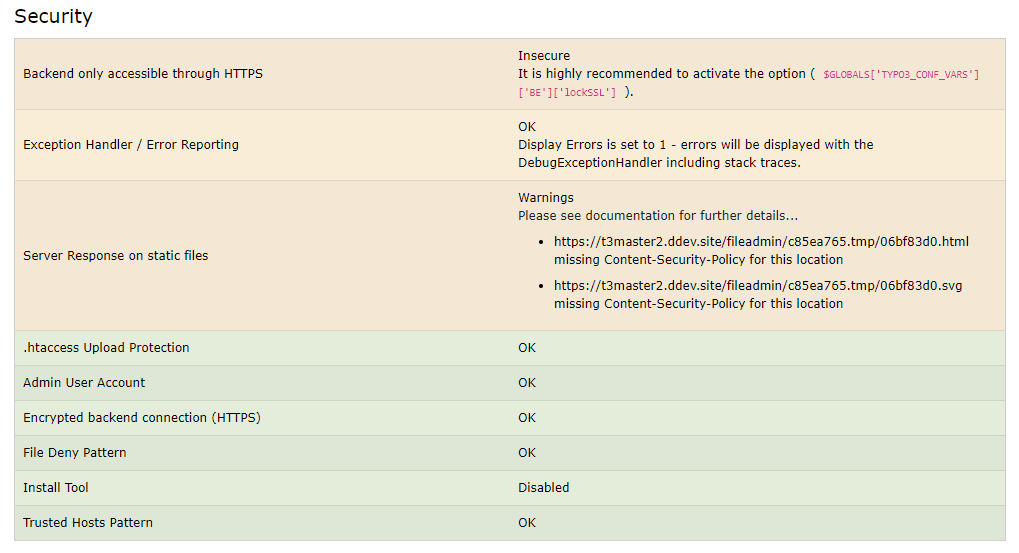
The backend module Administration > Reports

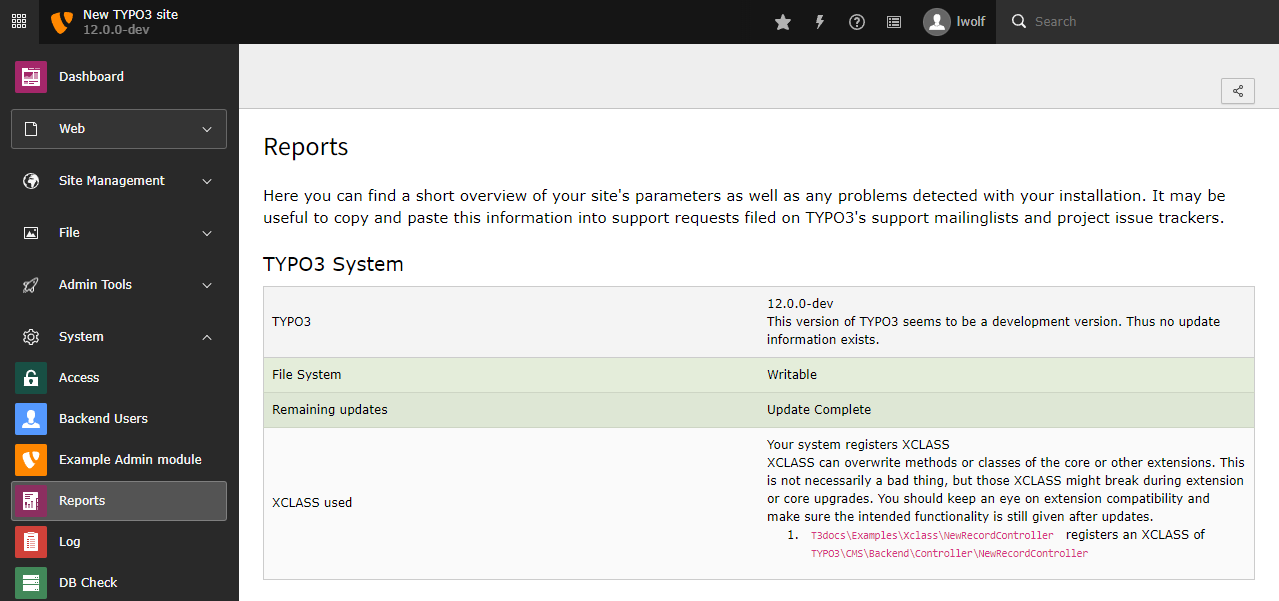
The TYPO3 system extension EXT:reports displays the extendable backend module Administration > Reports for users with administrator role.

The Reports module groups several system reports and gives you a quick overview about important system statuses and site parameters.

Section "Security" 

Regularly check the section Security

From a security perspective, the section Security should be checked regularly: it provides information about the administrator user account, encryption key, file deny pattern, module System > Environment checks and more.

Record Statistics 

Changed in version 14.0

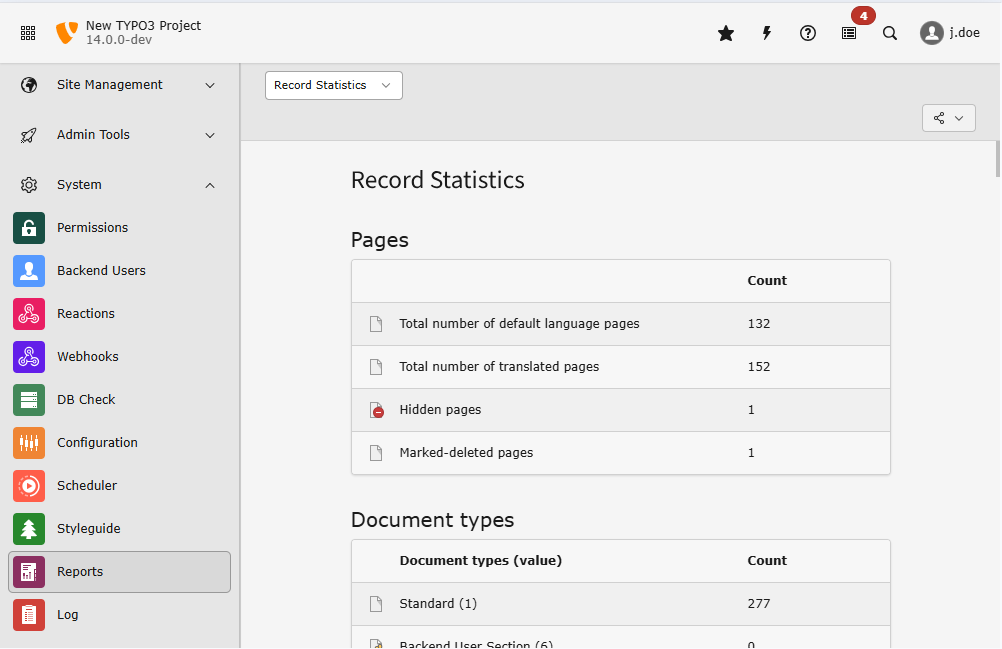
The record statistics have been moved from module System > Database, provided by the system extension typo3/cms-lowlevel into the module Administration > Reports of this extension typo3/cms-reports .

Backend users with administrator permissions can find this module at Administration > Reports > Records Statistics.

This module gives an overview of the count of records of different types.

The TYPO3 backend module "Reports" with submodule "Record Statistics"

The records are counted installation-wide. Soft-deleted (flag deleted = 1) records are ignored.

Installation 

This extension is part of the TYPO3 Core, but not installed by default.

Table of contents

Installation with Composer 

Check whether you are already using the extension with:

composer show | grep reports
Copied!

This should either give you no result or something similar to:

typo3/cms-reports       v12.4.11
Copied!

If it is not installed yet, use the composer require command to install the extension:

composer require typo3/cms-reports
Copied!

The given version depends on the version of the TYPO3 Core you are using.

Installation without Composer 

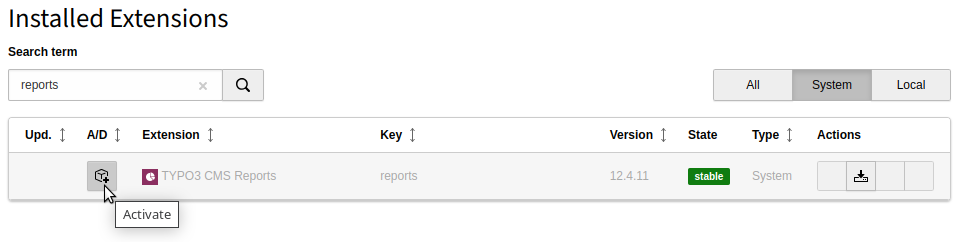
In an installation without Composer, the extension is already shipped but might not be activated yet. Activate it as follows:

  1. In the backend, navigate to the System > Extensions module.
  2. Click the Activate icon for the Reports extension.
Extension manager showing Reports extension

Extension manager showing Reports extension

StatusProviderInterface 

Classes implementing this interface are registered automatically as status in the module Reports > Status if autoconfigure is enabled in Services.yaml or if it was registered manually by the tag reports.status.

If information from the current request is required for the status report implement \TYPO3\CMS\Reports\RequestAwareStatusProviderInterface.

If you need to provide extended information implement \TYPO3\CMS\Reports\ExtendedStatusProviderInterface.

interface StatusProviderInterface
Fully qualified name
\TYPO3\CMS\Reports\StatusProviderInterface

Interface for classes which provide a status report entry.

getStatus ( )

Returns the status of an extension or (sub)system

returntype

array

getLabel ( )

Return label of this status

returntype

string

ExtendedStatusProviderInterface 

This interface extends \TYPO3\CMS\Reports\StatusProviderInterface. It can be used to provide detailed status reports.

interface ExtendedStatusProviderInterface
Fully qualified name
\TYPO3\CMS\Reports\ExtendedStatusProviderInterface

Interface for classes which provide a status report entry.

getDetailedStatus ( )

Returns the detailed status of an extension or (sub)system

RequestAwareStatusProviderInterface 

This interface extends \TYPO3\CMS\Reports\StatusProviderInterface. It can be used if information from the current request is required for the status message.

interface RequestAwareStatusProviderInterface
Fully qualified name
\TYPO3\CMS\Reports\RequestAwareStatusProviderInterface

Interface for classes which provide a status report entry using information from the current request

getStatus ( Psr\\Http\\Message\\ServerRequestInterface request = NULL)

Returns the status of an extension or (sub)system

param Psr\\Http\\Message\\ServerRequestInterface $request

the request, default: NULL

returntype

array

getLabel ( )

Return label of this status

returntype

string

Custom reports registration 

The only report provided by the TYPO3 core is the one called Status.

The status report itself is extendable and shows status messages like a system environment check and the status of the installed extensions.

Reports and status are automatically registered through the service configuration, based on the implemented interface.

Register a custom report 

Create a custom submodule extending the reports module.

<?php
return [
    'system_reports_myreport' => [
        'parent' => 'system_reports',
        'access' => 'admin',
        'path' => '/module/system/reports/myreport',
        'iconIdentifier' => 'my-report-icon',
        'labels' => [
            'title' => 'LLL:EXT:my_extension/Resources/Private/Language/locallang.xlf:myreport.title',
            'description' => 'LLL:EXT:my_extension/Resources/Private/Language/locallang.xlf:myreport.description',
        ],
        'routes' => [
            '_default' => [
                'target' => \Vendor\MyExtension\Controller\MyReportController::class . '::handleRequest',
            ],
        ],
    ],
];
Copied!

Implement the logic into your class:

<?php

declare(strict_types=1);

namespace MyVender\MyExtension\Reports;

use Psr\Http\Message\ResponseInterface;
use Psr\Http\Message\ServerRequestInterface;
use TYPO3\CMS\Backend\Attribute\AsController;
use TYPO3\CMS\Backend\Template\ModuleTemplateFactory;

#[AsController]
final readonly class MyReportController
{
    public function __construct(
        protected ModuleTemplateFactory $moduleTemplateFactory,
    ) {}

    public function handleRequest(ServerRequestInterface $request): ResponseInterface
    {
        $view = $this->moduleTemplateFactory->create($request);
        $view->makeDocHeaderModuleMenu();
        $view->assign('data', $this->collectReportData());
        return $view->renderResponse('MyReport');
    }
}
Copied!

Use a template like below:

<html
    xmlns:f="http://typo3.org/ns/TYPO3/CMS/Fluid/ViewHelpers"
    data-namespace-typo3-fluid="true"
>

<f:layout name="Module"/>
<f:section name="Content">
    <h1>My report</h1>
    <p>Report it!</p>
</f:section>
</html>
Copied!

Register a custom status 

All status providers must implement \TYPO3\CMS\Reports\StatusProviderInterface. If autoconfigure is enabled in Services.yaml, the status providers implementing this interface will be automatically registered.

EXT:my_extension/Configuration/Services.yaml
services:
  _defaults:
    autoconfigure: true
Copied!

Alternatively, one can manually tag a custom report with the reports.status tag:

Scheduler task "System Status Update" 

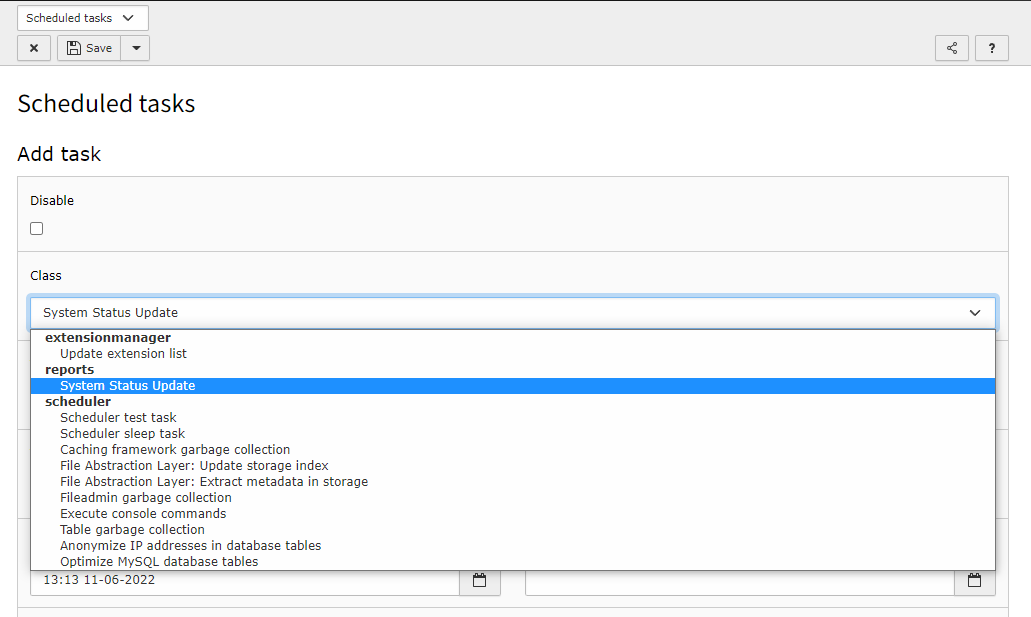
If the system extension typo3/cms-scheduler is installed, you can create automatic reports with the help of a scheduler task.

To create a task for the reports functionality go to Administration > Scheduler, click on + (add Task) and chose System Status Update (reports) as Class.

Enter Notification Email Addresses where the reports should be sent and chose whether you want to be informed with each run.

The remaining settings are standard task settings provided by the scheduler extension.

TYPO3 Backend module "Scheduler", "New task" popup, Category "Reports"

Create a System Status Update task in module Administration > Scheduler

System status notification mail 

You will receive mails looking like this:

Example mail from the System status notification
This report contains all System Status Notifications from your TYPO3
installation. Please check the status report for more information.

Site: [DDEV] TYPO3

Issues:
[WARN] System environment check                 - 1 Test(s)
### Trusted hosts pattern is insecure: 1
Copied!

Sitemap