TYPO3 Search Engine Optimization 

Extension key

seo

Package name

typo3/cms-seo

Version

main

Language

en

Author

TYPO3 contributors

License

This document is published under the Open Content License.

Rendered

Fri, 28 Nov 2025 19:45:05 +0000


This extension offers special fields for search engine optimization (SEO) purposes, HTML meta tags display and sitemaps.

General information on topics about SEO can be found in Search engine optimization (SEO).

Information for editors, including how to use the dashboard widgets can be found in Tutorial for Editors, Search engine optimization (SEO) for TYPO3 editors.


Table of Contents:
Introduction 

The goal of the Core extension typo3/cms-seo is to make sure basic technical Search Engine Optimization (SEO) is done right out of the box. Specific fields for SEO purposes are added, as well as the rendering of HTML meta tags in the frontend.

There are several things you can do to optimize your site for search engines. Some tasks are only solvable with good human writers, others are technical tasks, which need to be implemented.

The goal of the extension seo is to help you with the following parts of your SEO journey.

  • Give editors all the fields needed to set the necessary meta tags.
  • Provide the rendering of meta tags in the frontend for SEO related information, to avoid reimplementing it again and again.
  • Provide stable APIs for developers to give them the chance to change the behaviour when needed in edge cases.

For a list of the features provided by this extension see Features of the TYPO3 system extension "seo".

Installation 

Target group: Administrators

This extension is part of the TYPO3 Core.

Table of contents

Installation with Composer 

Check whether you are already using the extension with:

composer show | grep seo
Copied!

This should either give you no result or something similar to:

typo3/cms-seo       v12.4.11
Copied!

If it is not installed yet, use the composer require command to install the extension:

composer require typo3/cms-seo
Copied!

The given version depends on the version of the TYPO3 Core you are using.

Installation without Composer 

In an installation without Composer, the extension is already shipped but might not be activated yet. Activate it as follows:

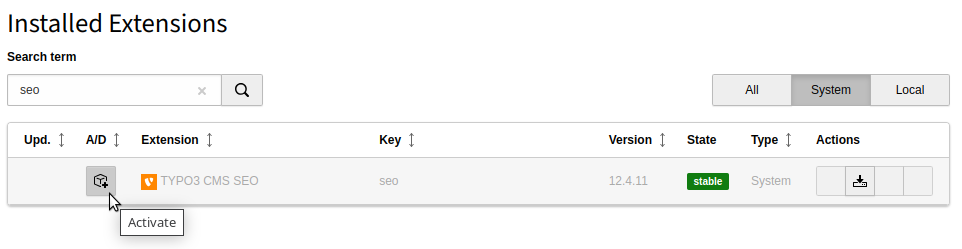
  1. In the backend, navigate to the System > Extensions module.
  2. Click the Activate icon for the SEO extension.
Extension manager showing SEO extension

Extension manager showing SEO extension

Features of the TYPO3 system extension "seo" 

The TYPO3 system extension typo3/cms-seo offers multiple tools and fields that can be used to improve visibility of a TYPO3 site in search engines:

Additional tabs "SEO" and "Social media" in the page properties 

After Installation two additional tabs are available in the page properties.

SEO
This tab contains additional fields for the title tag in the HTML header, for the description meta tag, for robots instruction, the Canonical URL and for priorities used in the XML Sitemap.
Social media
This tab contains additional fields to manage data for the Open Graph (Facebook) meta tags and the X / Twitter Cards.

Usage of these additional fields is described in the Editors Tutorial, Search engine optimization (SEO) for TYPO3 editors.

A Dashboard Widget for SEO 

The extension also offers an additional Dashboard widget. typo3/cms-dashboard needs to be installed. Usage is described in the Editors Tutorial, chapter Dashboard widgets for Search engine optimization (SEO) in TYPO3.

If your editors have one of the standard user groups "Editor" or "Advanced Editor", created by the command typo3 setup:begroups:default they have permissions to use the widget.

If you created the use groups manually you users need to have "Dashboard" in their allowed modules and "Pages missing Meta Description" in the allowed dashboard widgets list: Dashboard manual, permissions of widgets

XML Sitemap 

The extension typo3/cms-seo comes with the site set typo3/seo-sitemap, which you can use to provide an XML sitemap like https://example.org/sitemap.xml.

See chapter XML sitemap for details.

Canonical URL 

When typo3/cms-seo is installed, pages automatically contain a canonical link tag in their HTML head, unless disabled via TypoScript.

example output of a canonical link in the head of a TYPO3 page
<head>

<!-- ... -->

<link rel="canonical" href="https://example.org/somepage"/>
</head>
Copied!

You can use the event ModifyUrlForCanonicalTagEvent to provide an alternative canonical URL if needed.

The API of the canonical link is described in Canonical API, TYPO3 Explained.

SEO page title provider 

While the Page title API, providing a <title> tag in the HTML head is part of a minimal TYPO3 installation, typo3/cms-seo provides an additional field, seo_title in the page properties. The \TYPO3\CMS\Seo\PageTitle\SeoTitlePageTitleProvider provides this title as an alternative title for the <title> tag.

The following default TypoScript setup is provided for the page title provider:

config.pageTitleProviders {
    seo {
        provider = TYPO3\CMS\Seo\PageTitle\SeoTitlePageTitleProvider
        before = record
    }
}
Copied!

Additional meta tag handling 

While the MetaTag API is part of the minimal TYPO3 Core, the meta tag providers for the description meta tag commonly used for search engine optimazation, and the social preview meta tags of Open Graph and Twitter / X are part of typo3/cms-seo .

Hreflang tags 

hreflang link-tags are added automatically for multi-language websites based on the one-tree principle.

The links are based on the site configuration and depend on translations of a page.

hreflang="x-default" indicates the link of the current page in the default language.

The value of hreflang is set for each language in Sites > Setup (see Adding Languages)

XML sitemap 

typo3/cms-seo provides a ready to use XML sitemap that can be included via Site sets (recommended) or include in your TypoScript record.

Changed in version 14.0

The names of the GET parameters used in the sitemap generated by EXT:seo have been changed from page and sitemap to tx_seo[page] and tx_seo[sitemap] respectively.

The routing configuration needs to be slightly adopted.

If the templates of EXT:seo/Resources/Private/Templates/XmlSitemap/Index.xml have been modified, adopt the generated links to fit the original ones.

In case the URL to a single sitemap has been provided to a third party tool like a crawler, search engine, ... it must be added again with the new URL.

How to access your XML sitemap 

You can access the sitemaps by visiting https://example.org/?type=1533906435. You will first see the sitemap index. By default, there is one sitemap in the index. This is the sitemap for pages.

How to setup routing for the XML sitemap 

You can use the PageType decorator to map page types to a fixed suffix. This allows you to expose the sitemap with a readable URL, for example https://example.org/sitemap.xml.

Additionally, you can map the parameter sitemap, so that the links to the different sitemap types (pages and additional ones, for example, from the news extension) are also mapped.

Changed in version 14.0

The names of the GET parameters used in the sitemap generated by EXT:seo have been changed from page and sitemap to tx_seo[page] and tx_seo[sitemap] respectively. The routing configuration needs to be slightly adopted:

config/sites/<your_site>/config.yaml
routeEnhancers:
  PageTypeSuffix:
    type: PageType
    map:
      /: 0
      sitemap.xml: 1533906435
  Sitemap:
    type: Simple
    routePath: 'sitemap-type/{sitemap}'
    aspects:
      sitemap:
        type: StaticValueMapper
        map:
          pages: pages
          tx_news: tx_news
          my_other_sitemap: my_other_sitemap
    _arguments:
      sitemap: 'tx_seo/sitemap'
Copied!

Data providers for XML sitemaps 

The rendering of sitemaps is based on data providers implementing \TYPO3\CMS\Seo\XmlSitemap\XmlSitemapDataProviderInterface .

typo3/cms-seo ships with the following data providers for XML sitemaps:

For pages: PagesXmlSitemapDataProvider 

The \TYPO3\CMS\Seo\XmlSitemap\PagesXmlSitemapDataProvider will generate a sitemap of pages based on the detected site root. You can configure whether you have additional conditions for selecting the pages.

Via setting seo.sitemap.pages.excludedDoktypes it is possible to exclude certain Types of pages.

Additionally, you may exclude page subtrees from the sitemap (for example internal pages). This can be configured using setting seo.sitemap.pages.excludePagesRecursive.

If your site still depend on TypoScript records instead of site sets, you can make these settings via TypoScript constants.

For special use cases you might want to override the default TypoScript provided by the set.

For database records: RecordsXmlSitemapDataProvider 

If you have an extension installed and want a sitemap of those records, the \TYPO3\CMS\Seo\XmlSitemap\RecordsXmlSitemapDataProvider can be used. The following example shows how to add a sitemap for news records:

EXT:my_extension/Configuration/Sets/XmlSitemapNews/setup.typoscript
plugin.tx_seo {
  config {
    xmlSitemap {
      sitemaps {
        myNewsSitemap {
          provider = TYPO3\CMS\Seo\XmlSitemap\RecordsXmlSitemapDataProvider
          config {
            table = news_table
            sortField = sorting
            lastModifiedField = tstamp
            changeFreqField = news_changefreq
            priorityField = news_priority
            additionalWhere = AND ({#no_index} = 0 OR {#no_follow} = 0)
            pid = <page id('s) containing news records>
            recursive = <number of subpage levels taken into account beyond the pid page. (default: 0)>
            url {
              pageId = <your detail page id>
              fieldToParameterMap {
                uid = tx_extension_pi1[news]
              }
              additionalGetParameters {
                tx_extension_pi1.controller = News
                tx_extension_pi1.action = detail
              }
            }
          }
        }
      }
    }
  }
}
Copied!

You can add multiple sitemaps and they will be added to the sitemap index automatically. Use different types to have multiple, independent sitemaps:

EXT:my_extension/Configuration/Sets/XmlSitemapMultiple/setup.typoscript
seo_googlenews < seo_sitemap
seo_googlenews.typeNum = 1571859552
seo_googlenews.10.sitemapType = googleNewsSitemap

plugin.tx_seo {
  config {
    xmlSitemap {
      sitemaps {
        news {
          provider = GeorgRinger\News\Seo\NewsXmlSitemapDataProvider
          config {
            # ...
          }
        }
      }
    }
    googleNewsSitemap {
      sitemaps {
        news {
          provider = GeorgRinger\News\Seo\NewsXmlSitemapDataProvider
          config {
            googleNews = 1
            # ...
            template = GoogleNewsXmlSitemap.xml
          }
        }
      }
    }
  }
}
Copied!

Change frequency and priority 

Change frequencies define how often each page is approximately updated and hence how often it should be revisited (for example: News in an archive are "never" updated, while your home page might get "weekly" updates).

Priority allows you to define how important the page is compared to other pages on your site. The priority is stated in a value from 0 to 1. Your most important pages can get an higher priority as other pages. This value does not affect how important your pages are compared to pages of other websites. All pages and records get a priority of 0.5 by default.

The settings can be defined in the TypoScript configuration of an XML sitemap by mapping the properties to fields of the record by using the options changeFreqField and priorityField. changeFreqField needs to point to a field containing string values (see pages TCA definition of field sitemap_changefreq), priorityField needs to point to a field with a decimal value between 0 and 1.

Sitemap of records without sorting field 

Sitemaps are paginated by default. To ensure that as few pages of the sitemap as possible are changed after the number of records is changed, the items in the sitemaps are ordered. By default, this is done using a sorting field. If you do not have such a field, make sure to configure this in your sitemap configuration and use a different field. An example you can use for sorting based on the uid field:

EXT:my_extension/Configuration/Sets/XmlSitemapTableWithoutSorting/setup.typoscript
plugin.tx_seo {
  config {
    xmlSitemap {
      sitemaps {
        myUnsortedTable {
          config {
            sortField = uid
          }
        }
      }
    }
  }
}
Copied!

Create a custom XML sitemap provider 

If you need more logic in your sitemap, you can also write your own sitemap provider. You can do this by extending the \TYPO3\CMS\Seo\XmlSitemap\AbstractXmlSitemapDataProvider class or implementing \TYPO3\CMS\Seo\XmlSitemap\RecordsXmlSitemapDataProvider .

The main methods of interest are getLastModified() and getItems().

The getLastModified() method is used in the sitemap index and has to return the date of the last modified item in the sitemap.

The getItems() method has to return an array with the items for the sitemap:

EXT:my_extension/Classes/XmlSitemap/MyXmlSitemapProvider.php
$this->items[] = [
    'loc' => 'https://example.org/page1.html',
    'lastMod' => '1536003609'
];
Copied!

The loc element is the URL of the page to be crawled by a search engine. The lastMod element contains the date of the last update of the specific item. This value is a UNIX timestamp. In addition, you can include changefreq and priority as keys in the array to give search engines a hint.

Use a customized sitemap XSL file 

The XSL file used to create a layout for an XML sitemap can be configured at three levels:

  1. For all sitemaps:

    EXT:my_extension/Configuration/TypoScript/setup.typoscript
    plugin.tx_seo.config {
        xslFile = EXT:my_extension/Resources/Public/CSS/mySite.xsl
    }
    Copied!
  2. For all sitemaps of a certain sitemapType:

    EXT:my_extension/Configuration/TypoScript/setup.typoscript
    plugin.tx_seo.config.mySitemapType.sitemaps {
        xslFile = EXT:my_extension/Resources/Public/CSS/mySite.xsl
    }
    Copied!
  3. For a specific sitemap:

    EXT:my_extension/Configuration/TypoScript/setup.typoscript
    plugin.tx_seo.config.xmlSitemap.sitemaps.myNewsSitemap.config {
        xslFile = EXT:my_extension/Resources/Public/CSS/mySite.xsl
    }
    Copied!

The value is inherited until it is overwritten.

If no value is specified at all, EXT:seo/Resources/Public/CSS/Sitemap.xsl is used as default.

Configuration 

Target group: Developers, Integrators

Site sets 

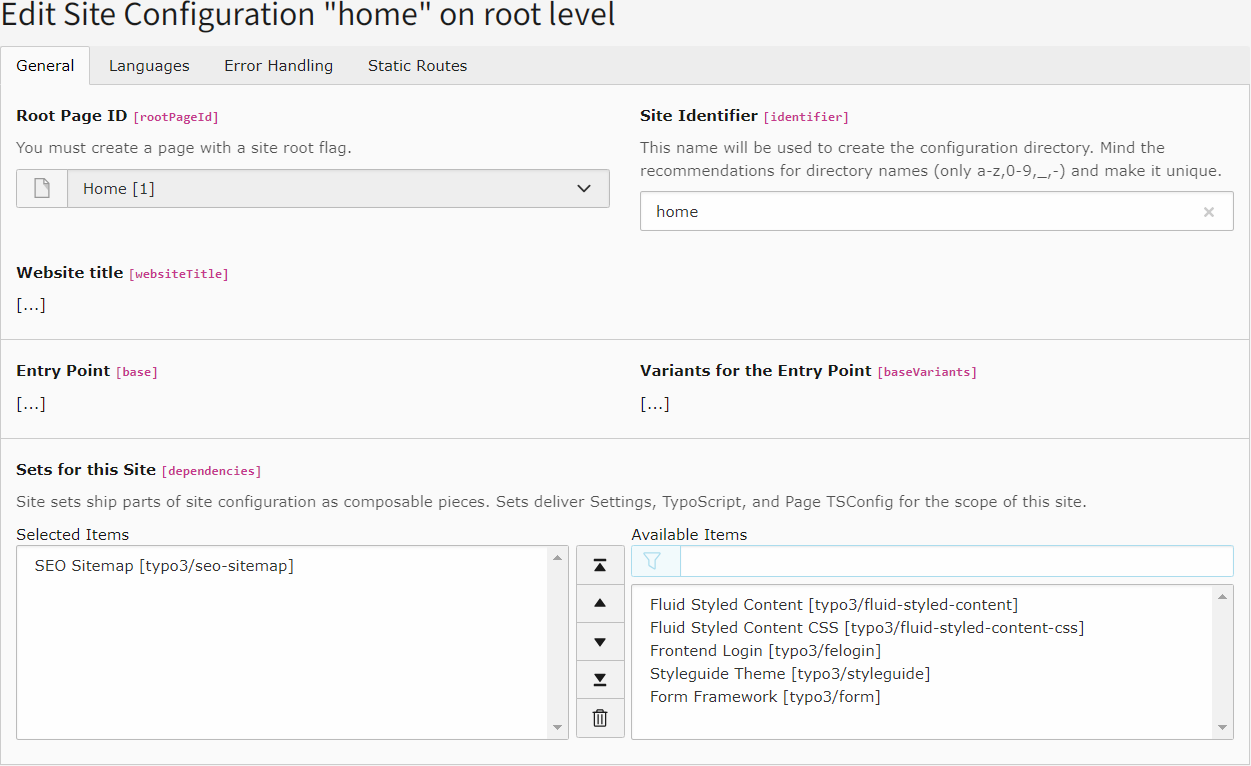
Include the site set "SEO Sitemap", typo3/seo-sitemap via the site set in the site configuration or the custom site package's site set.

Settings for the included set can be adjusted in the Settings editor.

Add the site set "SEO Sitemap"

This will change your site configuration file as follows:

config/sites/my-site/config.yaml (diff)
  base: 'https://example.com/'
  rootPageId: 1
  dependencies:
    - typo3/fluid-styled-content-css
+   - typo3/seo-sitemap
Copied!

If your site has a custom site package, you can also add the "SEO Sitemap" set as dependency in your site's configuration:

EXT:my_site_package/Configuration/Sets/MySite/config.yaml (diff)
name: my-vendor/my-site-package
 label: My Site Package Set
 settings:
   website:
     background:
       color: '#386492'
 dependencies:
   - typo3/fluid-styled-content-css
+  - typo3/seo-sitemap
Copied!

Site sets settings of EXT:seo 

New in version 13.3

Site sets have been added, their settings supersede using TypoScript constants for settings.

The following settings are available via the site set settings and can be adjusted in the Settings editor.

Changed in version 14.0

The names of the GET parameters used in the sitemap generated by EXT:seo have been changed from page and sitemap to tx_seo[page] and tx_seo[sitemap] respectively. If you are overriding the templates for the sitemap, provide separate sets for TYPO3 13.4 and 14.x support.

Name Type Label
SEO Sitemap
Template Paths
string Path to template root (FE)
string Path to template partials (FE)
string Path to template layouts (FE)
string Doktypes to exclude
string List of page uids which should be excluded recursive
string Additional where clause

seo

seo
Label
SEO Sitemap

seo.templates

seo.templates
Label
Template Paths

seo.sitemap.view.templateRootPath

seo.sitemap.view.templateRootPath
Type
string
Default
"EXT:seo/Resources/Private/Templates/"
Label
Path to template root (FE)
Category
SEO Sitemap > Template Paths

seo.sitemap.view.partialRootPath

seo.sitemap.view.partialRootPath
Type
string
Default
"EXT:seo/Resources/Private/Partials/"
Label
Path to template partials (FE)
Category
SEO Sitemap > Template Paths

seo.sitemap.view.layoutRootPath

seo.sitemap.view.layoutRootPath
Type
string
Default
"EXT:seo/Resources/Private/Layouts/"
Label
Path to template layouts (FE)
Category
SEO Sitemap > Template Paths

seo.sitemap.pages.excludedDoktypes

seo.sitemap.pages.excludedDoktypes
Type
string
Default
"3, 4, 6, 7, 199, 254"
Label
Doktypes to exclude
Category
SEO Sitemap

seo.sitemap.pages.excludePagesRecursive

seo.sitemap.pages.excludePagesRecursive
Type
string
Label
List of page uids which should be excluded recursive
Category
SEO Sitemap

seo.sitemap.pages.additionalWhere

seo.sitemap.pages.additionalWhere
Type
string
Default
"{#no_index} = 0 AND {#canonical_link} = ''"
Label
Additional where clause
Category
SEO Sitemap

Settings editor 

When the site set for the SEO sitemap is included, the settings for sitemaps become available in the editor:

You can find the available site settings in module Sites > Setup > Settings

You can change individual settings here. If the site settings are writable you can hit the Save button and the settings will be written directly to the site settings.

If the settings are not writable you can click the YAML export button to export the settings. These can then be added by a developer with sufficient rights.

The available settings are also described in detail in Site sets.

Developer Corner 

When you work with a pages-only approach you most likely don't need to use the meta tag APIs. If you have a special edge-case or have a detail view to show a record, you need the APIs to render the corresponding meta information for your page. You can refer to the documentation of the following APIs:

  • The MetaTagApi (see MetaTag API) to define what metatags should be rendered on your page
  • The PageTitleAPI (see Page title API) will give you the possibility to set the title of the page

Sitemap