Introduction 

What does it do? 

This system extension provides a backend editor with syntax highlighting. The editor is used for TCA fields with type text and renderType t3editor and in the module Filelist.

Screenshots 

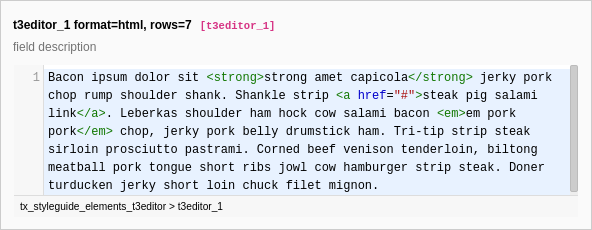
A t3editor with syntax highlighting for HTML and 7 rows.

Configured by the following TCA:

Configuration/TCA/tx_styleguide_elements_t3editor.php
'columns' => [
    't3editor_1' => [
        'exclude' => true,
        'label' => 't3editor_1 format=html, rows=7',
        'description' => 'field description',
        'config' => [
            'type' => 'text',
            'renderType' => 't3editor',
            'format' => 'html',
            'rows' => 7,
        ],
    ],
]
Copied!

Installation 

With Composer 

If your TYPO3 installation is using Composer, install the t3editor extension by:

composer require typo3/cms-t3editor
Copied!

If you are using Composer and not working with the latest version of TYPO3 you will need to add a version constraint:

composer require typo3/cms-t3editor:"^10.4"
Copied!

Installing the extension prior to version 11.4 

Before TYPO3 11.4 it was still necessary to manually activate extensions installed via Composer using the Extension Manager.

If you are using TYPO3 with Composer and are using a version of TYPO3 that is lower than 11.4, you will need to activate the extension:

  • Access Admin Tools > Extension Manager > Installed Extensions
  • Search for t3editor
  • Activate the extension by selecting the Activate button in the column labeled A/D

Without Composer 

If you are working with an installation of TYPO3 that doesn't use Composer, this extension will already be part of the installation due to the fact that legacy .tar & .zip packages come bundled with all system extensions.

However, whilst the extension is already downloaded, it is likely that the extension is not activated.

To activate the t3editor, navigate to Admin Tools > Extension Manager > Installed Extensions and search for "t3editor". If the extension is not active, activate it by selecting the Activate button in the column labeled A/D.

System Maintainer rights are required to activate the extension.

Use t3editor in TCA 

Extensions may configure backend fields to use the t3editor by TCA. The editor is only available for fields of type text. By setting the renderType to t3editor the syntax highlighting can be activated.

By setting the property format the mode for syntax highlighting can be chosen. Allowed values: css, html, javascript, php, typoscript, xml and any custom mode registered by an extension.

New in version 11.3

TCA fields of renderType t3editor support the 'readOnly' => true option. If set, syntax highlighting is applied as usual, but the corresponding text can not be edited.

Examples 

Configuration/TCA/tx_styleguide_elements_t3editor.php
'columns' => [
    't3editor_1' => [
        'exclude' => true,
        'label' => 't3editor_1 format=html, rows=7',
        'description' => 'field description',
        'config' => [
            'type' => 'text',
            'renderType' => 't3editor',
            'format' => 'html',
            'rows' => 7,
        ],
    ],
]
Copied!

Displays an edior like the following:

A t3editor with syntax highlighting for HTML and 7 rows.

Extend T3editor 

Custom modes (used for syntax highlighting) and addons can be registered.

CodeMirror delivers a lot more modes and addons than registered in T3editor by default.

More supported addons and modes are available at:

Prerequisites 

To do this, extensions may have these two files to feed T3editor:

  • Configuration/Backend/T3editor/Addons.php
  • Configuration/Backend/T3editor/Modes.php

Both files return an array, as known as in TCA and Backend Routes, for example.

Register an addon 

To register an addon, the following code may be used:

EXT:myext/Configuration/Backend/T3editor/Addons.php
<?php

return [
    'my/addon' => [
        'module' => JavaScriptModuleInstruction::create('@codemirror/addon', 'addon')->invoke()
        'cssFiles' => [
            'EXT:my_extension/Resources/Public/Css/MyAddon.css',
        ],
        'options' [
            'foobar' => 'baz',
        ],
        'modes' => ['htmlmixed', 'xml'],
    ],
];
Copied!

<identifier>

<identifier>
Type
string
Required
true

Represents the unique identifier of the module (my/addon in this example).

module

module
Type
string
Required
true

Holds the JavaScriptModuleInstruction of the CodeMirror module.

cssFiles

cssFiles
Type
array

Holds all CSS files that must be loaded for the module.

options

options
Type
array

Options that are used by the addon.

modes

modes
Type
array

If set the addon is only loaded if any of the modes supplied here is used.

Register a mode 

To register a mode, the following code may be used:

EXT:myext/Configuration/Backend/T3editor/Modes.php
<?php

return [
    'css' => [
        'module' => 'cm/mode/css/css',
        'extensions' => ['css'],
    ],
];
Copied!

<identifier>

<identifier>
type

string

Required

true

Represents the unique identifier and format code of the mode (css in this example). The format code is used in TCA to define the CodeMirror mode to be used.

Example:

$GLOBALS['TCA']['tt_content']['types']['css']['columnsOverrides']['bodytext']['config']['format'] = 'css';
Copied!

module

module
type

string

Required

true

Holds the JavaScriptModuleInstruction of the CodeMirror module.

extensions

extensions
type

array

Binds the mode to specific file extensions. This is important for using T3editor in the module Filelist.

default

default
type

bool

If set, the mode is used as fallback if no sufficient mode is available. By factory default, the default mode is html.

Sitemap