
Amazon AWS S3 FAL driver (CDN)

Classification

aus_driver_amazon_s3

Version

main

Language

en

Description

Provides a FAL driver for the Amazon Web Service S3.

Keywords

amazon, aws, s3, fal, driver

Author

Markus Hölzle

Email

typo3@markus-hoelzle.de

Rendered

Mon, 15 Sep 2025 09:23:42 +0000

The content of this document is related to TYPO3, a GNU/GPL CMS/Framework available from www.typo3.org.

Table of Contents
What does it do?

This is a driver for the file abstraction layer (FAL) to support Amazon AWS S3.

You can create a file storage which allows you to upload/download and link the files to an AWS S3 bucket. It also supports the TYPO3 CMS image rendering.

Requires TYPO3 CMS 10.4 or higher

Issue tracking: GitHub Issues: AWS S3 FAL Driver

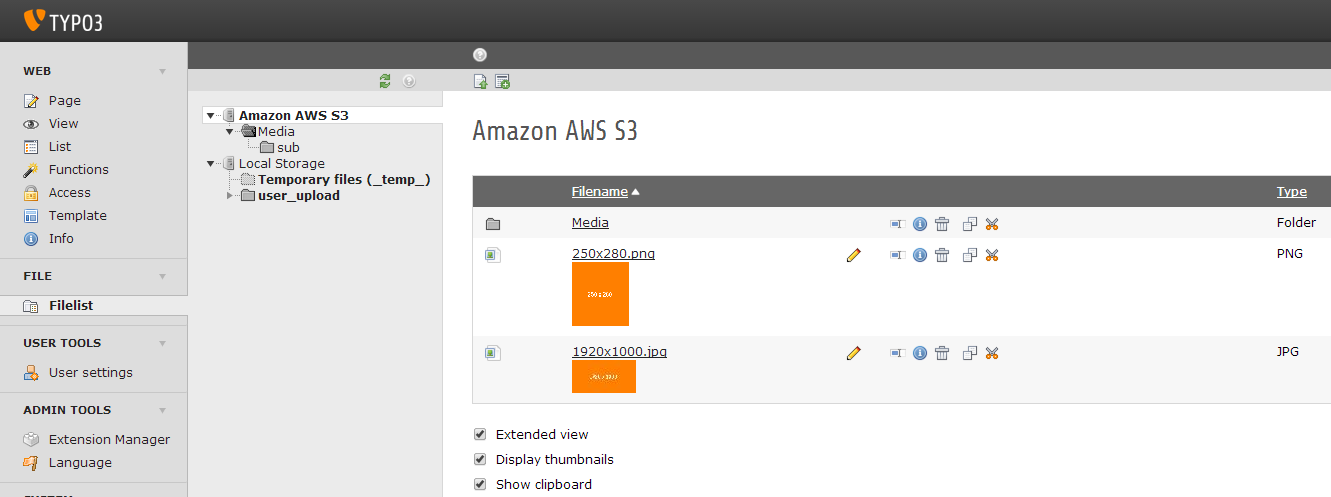
Filelist

Two storages are installed here

Installation

Add a new file storage with the "AWS S3" driver to root page (pid = 0).

AWS S3 config

Driver Configuration

Add the following configurations:

  • Bucket: The name of your AWS S3 bucket
  • Region: The region of your bucket (avoid dots in the bucket name)
  • Key and secret key of your AWS account (optional, you can also use IAM roles or environment variables)
  • Public base url (optional): this is the public url of your bucket, if empty its default to "bucketname.s3.amazonaws.com"
  • Default cache header: max-age in seconds (optional) - Please Notice: AWS S3 set the cache header only once - while uploading / creating or copy the file.
  • Protocol: network protocol (https://, http:// or auto detection)
  • Signature: Here you can set the signature manually to "Version 4" - "auto" should usually work

Example configuration:

AWS S3 config

AWS S3 config

Hint: Amazon AWS S3 bucket configuration

Make sure that your AWS S3 bucket is accessible to public web users.

For example add the following default permissions to "Edit bucket policy":

S3 bucket config

S3 bucket config

Example permissions:

{
	"Version": "2008-10-17",
	"Statement": [
		{
			"Sid": "AddPerm",
			"Effect": "Allow",
			"Principal": "*",
			"Action": "s3:GetObject",
			"Resource": "arn:aws:s3:::bucketname/*"
		}
	]
}
Copied!

Overriding storage configuration

It is possible to override the driver configuration in the config/system/additional.php file. This allows to use environment variable based storage configuration, and no secret keys need to be stored in the database anymore.

Record-based storage configuration can be overridden by defining

$GLOBALS['TYPO3_CONF_VARS']['EXTENSIONS']['aus_driver_amazon_s3']['storage']
Copied!

or

$GLOBALS['TYPO3_CONF_VARS']['EXTENSIONS']['aus_driver_amazon_s3']['storage_X']
Copied!

(where X is the UID of the storage record) in config/system/additional.php.

Storage configuration in the database record is merged with the generic 'storage' configuration, which then with the uid-specific storage config.

Example for defining the credentials in config/system/additional.php:

$GLOBALS['TYPO3_CONF_VARS']['EXTENSIONS']['aus_driver_amazon_s3']['storage_23'] = [
    'key'       => $_ENV['S3_KEY'],
    'secretKey' => $_ENV['S3_SECRET'],
];
Copied!

Extension Configuration

Edit in "Extension Manager" the following extension settings:

  • "dnsPrefetch": Use DNS prefetching tag: If enabled, an HTML tag will be included which prefetchs the DNS of the current CDN
  • "doNotLoadAmazonLib": Don't load Amazon AWS PHP SDK: If enabled, you have to include the SDK by yourself! (http://aws.amazon.com/de/sdk-for-php/)
  • "enablePermissionsCheck": Check S3 permissions for each file and folder. This is disabled by default because it is very slow (TYPO3 has to make an AWS request for each file)

Extend Extension

Initialize S3 Client:

If you use your own Amazon AWS SDK, you may want to work with your own S3 client object.

So you have to use the following hook in your own ext_loaclconf.php:

$GLOBALS['TYPO3_CONF_VARS']['EXTCONF']['aus_driver_amazon_s3']['initializeClient-preProcessing'][] = 'Vendor\ExtensionName\Hooks\AmazonS3DriverHook->initializeClient';
Copied!

A hook class might look like this:

namespace Vendor\ExtensionName\Hooks;

class AmazonS3DriverHook {

	public function initializeClient(&$params, $obj){
		$params['s3Client'] = MyAwsFactory::getAwsS3Client($params['configuration']);
	}

}
Copied!

Initialize public base URL:

You can set the public base URL in the configuration of your driver (TYPO3 backend). But maybe you want to set this on an other place.

So you have to use the following hook in your own ext_loaclconf.php:

$GLOBALS['TYPO3_CONF_VARS']['EXTCONF']['aus_driver_amazon_s3']['initializeBaseUrl-postProcessing'][] = \Vendor\ExtensionName\Hooks\AmazonS3DriverHook::class . '->initializeBaseUrl';
Copied!

A hook class might look like this:

namespace Vendor\ExtensionName\Hooks;

class AmazonS3DriverHook {

	public function initializeBaseUrl(&$params, $obj){
		$params['baseUrl'] = 'https://example.com';
	}

}
Copied!

Cache Control Header:

There is a default setting to set the cache control header's max age for all file types. If you want to use special cache headers, you can use this hook:

$GLOBALS['TYPO3_CONF_VARS']['EXTCONF']['aus_driver_amazon_s3']['getCacheControl'][] = 'Vendor\ExtensionName\Hooks\AmazonS3DriverHook->getCacheControl';
Copied!

You can modify the parameter "cacheControl" as you wish. Please Notice: AWS S3 set the cache header only once - while uploading / creating or copy the file.

More features:

If you wish other hooks - don't be shy: TYPO3 Forge: AWS S3 FAL Driver