Content Animations 

Classification

content_animations

Version

main

Language

en

Description

This extension allows you to set nice animations to your content elements if they are scrolled into the browsers viewport.

Keywords

animations,scroll,effects,content,fx,aos,animate,fluid,styled,higher,eduction,package

Copyright

2024

Author

Sebastian Richter

Email

info@baschte.de

License

This document is published under the Open Publication License available from http://www.opencontent.org/openpub/

Rendered

Thu, 09 Apr 2026 11:30:43 +0000

The content of this document is related to TYPO3, a GNU/GPL CMS/Framework available from www.typo3.org.

Table of Contents
Introduction 

What does it do? 

This extension allows you to set frontend animations to your content elements if they're scrolled into the browsers viewport.

The extension integrates seamlessly with popular TYPO3 rendering engines:

  • Bootstrap Package (v16.x)
  • Fluid Styled Content
  • Content Blocks

Features 

  • ✅ Easy-to-use backend interface for selecting animations
  • ✅ 30+ pre-configured animations (fade, slide, zoom, flip)
  • ✅ Visual animation preview in TYPO3 backend
  • ✅ Timing controls (duration, delay)
  • ✅ Advanced settings for fine-tuning (offset, anchor placement, easing)
  • ✅ Performance-optimized with AOS (Animate On Scroll) library
  • ✅ Mobile-friendly and responsive
  • ✅ TYPO3 13 LTS compatible
  • ✅ Content Blocks support

Screenshot 

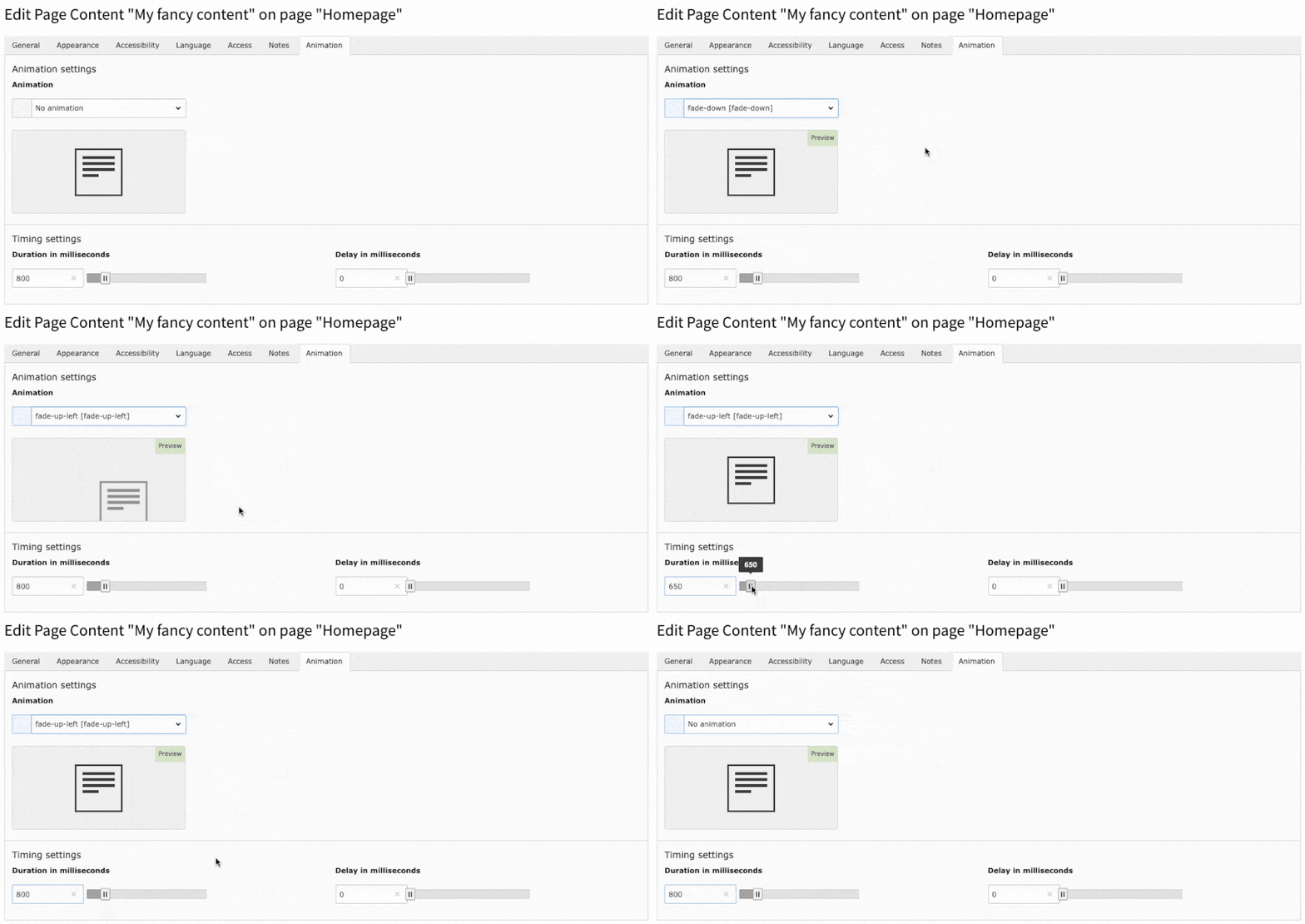
Preview of animation in TYPO3 Backend

The animations TYPO3 backend preview just after installation

Technical Details 

The extension uses the modern Simple-AOS library (maintained fork of AOS - Animate On Scroll) which provides:

  • Lightweight and performant animations
  • CSS3 transitions and transforms
  • Intersection Observer API for efficient scroll detection
  • No jQuery dependency
  • Mobile-optimized performance

Installation 

The extension needs to be installed as any extension of TYPO3 CMS.

If you use composer you can simply get this extension via composer req baschte/content-animations.

Setup 

If installed and activated just include the static typoscript to your site template and you're good to go.

Content Blocks Support 

If you're using the Content Blocks extension (EXT:content_blocks), you can use the dedicated static include:

  • Content Animations: Content Blocks - Provides animation support for content blocks

This include is specifically tailored for projects using Content Blocks and ensures proper integration with the Content Blocks rendering pipeline.

Supported Rendering Engines 

The extension provides out-of-the-box support for the following rendering engines:

Bootstrap Package 

Full support for Bootstrap Package versions 11.x through 16.x with optimized templates and layouts.

Fluid Styled Content 

Native support for TYPO3's default Fluid Styled Content rendering.

Content Blocks 

Dedicated support for the modern Content Blocks extension, enabling animations for all content blocks.

Editor Corner 

As editor you can set an animation to your content elements if you go to the Animation tab.

The screenshot below shows you how to set a animation. You have the possibility to set the animation speed and the delay of that content element as well individually.

Screenshot 

Preview of animation in TYPO3 Backend

The animations TYPO3 backend preview just after installation

Developer Corner 

Content Animations comes with out-of-the-box support for popular TYPO3 rendering engines. Just include the static TypoScript for your rendering engine and you're ready to animate your content elements.

Supported Rendering Engines 

Bootstrap Package 

Full support for Bootstrap Package versions:

  • v16.x (latest)

Static Include: Content Animations: Bootstrap Package v16.x (adjust version number accordingly)

Fluid Styled Content 

Native support for TYPO3's default Fluid Styled Content.

Static Include: Content Animations: Fluid Styled Content

Content Blocks 

Dedicated support for the modern Content Blocks extension (EXT:content_blocks).

Static Include: Content Animations: Content Blocks

This include extends the Default Fluid Layout with the necessary data-attributes to get animations working in the frontend.

Constants 

The following global TypoScript constants are available:

Parameter Data type Description Default
plugin.tx_content_animations.aos-easing option set the global easing of all animations ease
plugin.tx_content_animations.aos-once boolean should the animation only happen once true
plugin.tx_content_animations.aos-mirror boolean should the element animate out while scrolling past them false

Example 

Here is an example of what the rendered HTML should look like:

<div id="c21563" class="frame frame-default frame-type-textpic ..."
     data-aos="fade-up"
     data-aos-duration="800"
     data-aos-delay="0"
     data-aos-once="true"
     data-aos-easing="ease"
     data-aos-mirror="false">
    ...
</div>
Copied!

Extending for Custom Rendering 

If you use your own layouts or a custom rendering engine and want to support content_animations:

  1. Include the static TypoScript: Content Animations: Basic Configuration
  2. Add the animation snippet to the outer HTML tag of your content elements:
{f:if(condition: animationSettings, then: '{animationSettings -> f:format.raw()}')}
Copied!

This will add all necessary data-attributes to the HTML tag.

Custom Content Blocks Integration 

For Content Blocks, the extension provides a dedicated integration that works seamlessly with the Content Blocks rendering pipeline. The animation settings are automatically available in your Content Block templates via the animationSettings variable.

Example Content Block Template:

<div class="my-content-block" {animationSettings -> f:format.raw()}>
    <!-- Your content block markup -->
</div>
Copied!

LayoutRootPath 

Content Animations extends the layoutRootPaths with the key 100 in all TypoScript includes except Content Animations: Basic Configuration.

Available includes with extended layouts:

  • Bootstrap Package (all versions)
  • Fluid Styled Content
  • Content Blocks

If you don't want the extended layout, you can remove it via:

lib.contentElement.layoutRootPaths.100 >
Copied!

JavaScript Loading 

Modern EventListener Approach 

As of version 2.6.0, Content Animations uses a modern PSR-14 EventListener to load JavaScript assets via TYPO3's AssetCollector API.

Key Benefits:

  • ✅ Automatic JavaScript loading (no TypoScript configuration needed)
  • ✅ Proper dependency injection
  • ✅ Better performance through AssetCollector
  • ✅ TYPO3 13+ best practices

Technical Implementation:

The AddAosJavaScriptEventListener class automatically:

  1. Loads the AOS library inline
  2. Initializes AOS with AOS.init()
  3. Adds assets to the page footer

No manual configuration required!

AOS Library 

Content Animations uses the Simple-AOS library by Benjamin Ammann (maintained fork of AOS by Michał Sajnóg):

  • No jQuery or other dependencies required
  • Lightweight and performant
  • Uses modern Intersection Observer API
  • Mobile-optimized

Advanced Customization 

Custom Animation Library 

If you need to use a different animation library or customize the AOS initialization:

  1. Disable the default EventListener in your Services.yaml
  2. Implement your own EventListener
  3. Register it for the BeforeJavaScriptsRenderingEvent

Example:

services:
  # Disable default listener (if needed)
  Baschte\ContentAnimations\EventListener\AddAosJavaScriptEventListener:
    public: false

  # Add your custom listener
  MyVendor\MyExtension\EventListener\CustomAnimationListener:
    tags:
      - name: event.listener
        identifier: 'my-custom-animation-loader'
        event: TYPO3\CMS\Core\Page\Event\BeforeJavaScriptsRenderingEvent
Copied!

API Reference 

DataProcessor 

The AnimationSettingsProcessor processes animation settings and makes them available in Fluid templates:

tt_content {
    dataProcessing {
        78911002 = Baschte\ContentAnimations\DataProcessing\AnimationSettingsProcessor
    }
}
Copied!

This processor is automatically registered when including any static TypoScript template.

EventListener 

AddAosJavaScriptEventListener 

Event: TYPO3\CMS\Core\Page\Event\BeforeJavaScriptsRenderingEvent

Purpose: Automatically loads AOS JavaScript library and initialization code.

Configuration: No configuration needed - works automatically when extension is installed.

Administrator Corner 

Content Animations comes with some features which can be deactivated via the extension settings.

Settings 

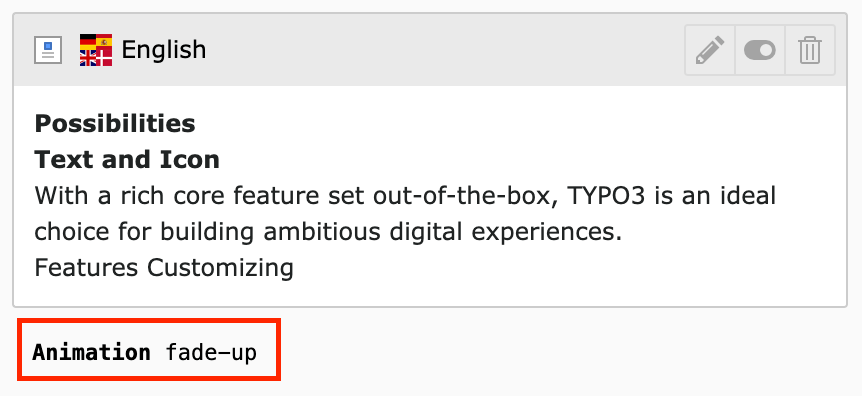
Feature Data type Description Default |
hideFooterAnimationLabel boolean Hide the Animation Footer Label false |
disableAddAnimationsTab boolean Disable the automatic append of the Animations tab to all CTypes false |
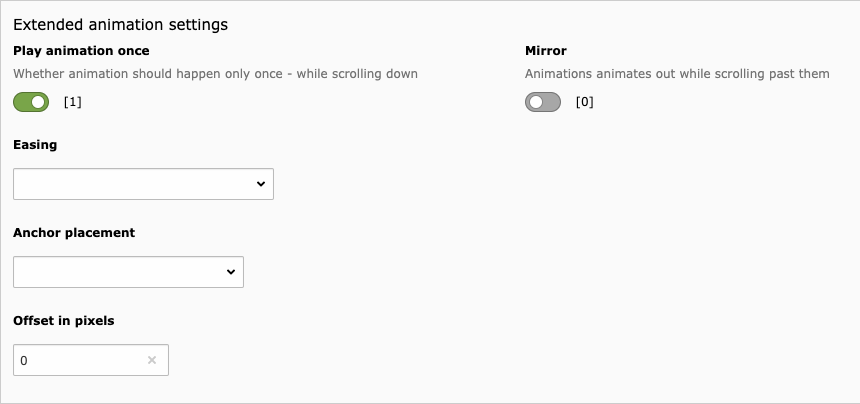
extendedAnimationSettings boolean Activate extended animation settings (for advanced users only) false |

Animation Tab 

You can disable the automatic appending of the Animation Tab to all CTypes. The Tab is added by default.

Animation Tab

Advanced Animation Settings 

You can enable advanced animation settings for all CTypes (offset, anchorPlacement etc...). These settings are disabled by default.

Advanced Animation Settings

Content Security Policy (CSP) 

Content Animations is fully compatible with TYPO3's Content Security Policy (CSP) feature.

How it works 

When CSP is enabled in your TYPO3 installation, the extension automatically:

  • Adds nonce attributes to inline JavaScript code
  • Adds nonce attributes to inline CSS styles
  • Ensures all animation scripts comply with strict CSP rules

No manual configuration needed - CSP support is automatic!

Enabling CSP in TYPO3 

To enable CSP in your TYPO3 installation:

  1. Go to Install Tool > Settings > Feature Toggles
  2. Enable: "Security: frontend enforce content security policy"
  3. Clear all caches

The extension will automatically detect when CSP is active and add the necessary nonce attributes.

Technical Details 

The extension uses two EventListeners to load animation assets:

  • AddAosJavaScriptEventListener - Loads AOS JavaScript with nonce support
  • AddAosStyleEventListener - Loads AOS CSS with nonce support

Both EventListeners automatically detect whether CSP is enabled by checking for nonce availability. When CSP is disabled, no nonce attributes are added, keeping your HTML clean.

Migration Guide (v2.6.0) 

This guide helps you migrate from version 2.5.x to 2.6.0 of the content_animations extension.

What's New in 2.6.0 

Version 2.6.0 brings full TYPO3 13 compliance with modern best practices:

  • ✅ Modern TCA syntax (associative arrays)
  • ✅ PSR-14 EventListener for JavaScript loading
  • ✅ AssetCollector API usage
  • ✅ Proper Icon Registry
  • ✅ Removed deprecated code and version checks
  • ✅ TYPO3 12 support removed (TYPO3 13 only)

Breaking Changes Overview 

  1. TYPO3 12 Support Removed

    This version only supports TYPO3 13.4 LTS and higher.

  2. FILECONTENT Removed

    The deprecated FILECONTENT ContentObject has been replaced with a modern EventListener.

  3. FileContentContentObject Class Removed

    The class Baschte\ContentAnimations\ContentObject\FileContentContentObject no longer exists.

  4. TypoScript Changes

    The JavaScript inclusion via TypoScript has been removed.

  5. ext_tables.php Restructured

    TCA column definitions moved to Configuration/TCA/Overrides/tt_content.php.

Migration Steps 

For Site Administrators 

Good News: No manual migration required! 🎉

The extension automatically includes all necessary JavaScript via the new EventListener system.

Optional Cleanup:

If you have custom TypoScript that manually includes the AOS JavaScript, you can safely remove:

page.jsFooterInline {
    161113 = FILECONTENT
    161113.file = EXT:content_animations/Resources/Public/JavaScript/Vendor/simple-aos/aos.4.2.0.min.js
    161114 = TEXT
    161114.value = AOS.init();
}
Copied!

This is now handled automatically by the AddAosJavaScriptEventListener.

For Extension Developers 

If you extended FileContentContentObject:

The class no longer exists. If you extended or referenced this class:

  1. Remove any class references to Baschte\ContentAnimations\ContentObject\FileContentContentObject
  2. Remove any custom FILECONTENT TypoScript objects that depend on this class
  3. Consider using the TYPO3 AssetCollector API directly if you need similar functionality

Custom JavaScript Loading:

If you need to load additional JavaScript inline, use the AssetCollector:

use TYPO3\CMS\Core\Page\AssetCollector;

public function __construct(
    private readonly AssetCollector $assetCollector
) {}

public function addCustomJavaScript(): void
{
    $this->assetCollector->addInlineJavaScript(
        'my-identifier',
        'console.log("Hello World");',
        [],
        ['priority' => true] // Add to footer
    );
}

Copied!

Technical Changes 

TCA Modernization 

Old Format (TYPO3 <13):

'items' => [
    ['Label', 'value', 'icon.gif'],
    // ...
]
Copied!

New Format (TYPO3 13):

'items' => [
    [
        'label' => 'Label',
        'value' => 'value',
        'icon' => 'icon.gif',
    ],
    // ...
]
Copied!

Field Type Migration 

Old Format:

'config' => [
    'type' => 'input',
    'size' => 5,
    'eval' => 'trim,int',
    'range' => [
        'lower' => 0,
        'upper' => 3000,
    ],
]
Copied!

New Format:

'config' => [
    'type' => 'number',
    'size' => 5,
    'range' => [
        'lower' => 0,
        'upper' => 3000,
    ],
]
Copied!

JavaScript Loading via EventListener 

Old Approach (TypoScript):

page.jsFooterInline {
    161113 = FILECONTENT
    161113.file = EXT:content_animations/.../aos.4.2.0.min.js
    161114 = TEXT
    161114.value = AOS.init();
}
Copied!

New Approach (EventListener):

namespace Baschte\ContentAnimations\EventListener;

use TYPO3\CMS\Core\Page\AssetCollector;

final readonly class AddAosJavaScriptEventListener
{
    public function __construct(
        private AssetCollector $assetCollector
    ) {}

    public function __invoke(): void
    {
        // Load JavaScript via AssetCollector
        $this->assetCollector->addInlineJavaScript(...);
    }
}
Copied!

Registration in Configuration/Services.yaml:

services:
  Baschte\ContentAnimations\EventListener\AddAosJavaScriptEventListener:
    tags:
      - name: event.listener
        identifier: 'content-animations/add-aos-javascript'
        event: TYPO3\CMS\Core\Page\Event\BeforeJavaScriptsRenderingEvent

Copied!

Benefits of the New Approach 

Modern TYPO3 13 Standards 

  • PSR-14 Events: Modern event system
  • Dependency Injection: Proper DI container usage
  • AssetCollector: Built-in asset management
  • Type Safety: Readonly properties, proper types
  • Best Practices: Following TYPO3 core conventions

Better Performance 

  • Efficient Loading: Assets loaded only when needed
  • Caching: Better caching support
  • No TypoScript Overhead: Direct API usage

Improved Maintainability 

  • 🔧 Cleaner Code: Separation of concerns
  • 🔧 Testable: EventListeners are easily testable
  • 🔧 Future-Proof: Ready for TYPO3 14+

Troubleshooting 

JavaScript Not Loading 

Symptoms: - Animations not working on frontend - Console errors about AOS not defined

Solution:

  1. Clear all caches:

    vendor/bin/typo3 cache:flush
    Copied!
  2. Check browser console for errors

Animations Tab Missing 

Symptoms: - Animation tab not visible in content element backend form

Solution:

This should not happen with 2.6.0. If it does:

  1. Clear all caches
  2. Verify ext_tables.php exists
  3. Check extension configuration (disableAddAnimationsTab setting)

Need Help? 

ChangeLog 

All notable changes to this project will be documented in this file.

The format is based on [Keep a Changelog](https://keepachangelog.com/en/1.0.0/), and this project adheres to [Semantic Versioning](https://semver.org/spec/v2.0.0.html).

2.7.1 - 2026-04-09 

Bugfixes 

  • [BUGFIX] Correct TYPO3 CMS core version requirement in composer.json

2.7.0 - 2026-04-09 

Features 

  • [FEATURE] Add support for TYPO3 14

2.6.1 - 2026-04-09 

Tasks 

  • [TASK] Include siteset dependency for fluid_styled_content
  • [TASK] Update input group classes in AnimationPreviewField for consistency
  • [TASK] Refactor AnimationPreviewField and update dependencies in composer.json

2.6.0 - 2025-11-12 

Features 

  • [FEATURE] full TYPO3 13 support with SiteSets - thanks to Stephan Kellermayr
  • [FEATURE] Add content blocks support - thanks to Sebastian Mueller
  • [FEATURE] Modern TYPO3 13 compliance improvements
  • [FEATURE] Replace FILECONTENT with AssetCollector EventListener
  • [FEATURE] Add Icon Registry configuration
  • [FEATURE] Full Content Security Policy (CSP) support with automatic nonce handling
  • [FEATURE] Automatic CSP detection - no manual configuration needed
  • [FEATURE] AddAosStyleEventListener for CSP-compliant CSS loading

Tasks 

  • [TASK] Modernize TCA item syntax to TYPO3 13 standard (label/value/icon arrays)
  • [TASK] Migrate TCA type 'input' with eval 'int' to type 'number'
  • [TASK] Mark required services as public in Services.yaml
  • [TASK] Remove all TYPO3 <13 version checks and compatibility code
  • [TASK] Clean up ext_localconf.php (remove deprecated FILECONTENT registration)
  • [TASK] Update Simple-AOS library to 4.2.1 without CSS injection
  • [TASK] Implement conditional nonce attributes (only when CSP is active)

Breaking Changes 

  • [!!!][BREAKING] remove TYPO3 12 support
  • [!!!][BREAKING] Removed FILECONTENT ContentObject - AOS JavaScript now loaded via EventListener
  • [!!!][BREAKING] Removed FileContentContentObject class (replaced by AddAosJavaScriptEventListener)
  • [!!!][BREAKING] ext_tables.php restructured - TCA columns moved to Configuration/TCA/Overrides/
  • [!!!][BREAKING] TypoScript: page.jsFooterInline.161113 and 161114 removed (automatic via EventListener)

Security 

  • [SECURITY] CSP compatibility resolves inline script/style violations (closes #21)
  • [SECURITY] Nonce attributes added to inline JavaScript and CSS when CSP is enabled
  • [SECURITY] Clean HTML output when CSP is disabled (no unnecessary nonce attributes)

2.5.5 - 2025-11-11 

FEATURE 

  • [FEATURE] add content blocks support

2.5.4 - 2025-03-24 

BUGFIX 

  • [BUGFIX] full PHP 8.4 support
  • [BUGFIX] remove unnecessary animation attributes for empty values

2.5.3 - 2024-12-23 

BUGFIX 

  • [BUGFIX] version constraints for TYPO3

2.5.2 - 2024-11-25 

Tasks 

  • [TASK] remove unnecessary inline css

2.5.1 - 2024-11-18 

Features 

  • [FEATURE] full TYPO3 13 support

2.4.3 - 2024-05-18 

Bugfixes 

  • [BUGFIX] fixing typing issues
  • [BUGFIX] show fallback language value
  • [BUGFIX] show footer label within container elements
  • [BUGFIX] optimizing animation field preview

2.4.2 - 2023-07-25 

Bugfixes 

  • [BUGFIX] js include in AnimationPreviewField

2.4.1 - 2023-07-11 

Features 

  • [TASK] Add official support for the Bootstrap Package v14

2.4.0 - 2023-04-26 

Features 

  • [TASK] Add TYPO3 v12 LTS support and remove support below TYPO3 v10 - (Special thanks to Benni Mack)
  • [TASK] switching outdated version of aos to forked and maintained simple-aos library

Breakings 

  • [!!!][TASK] removed support for TYPO3 v8 and v9
  • [!!!][TASK] removed support for Higher Education Package v10

2.3.2 - 2022-01-13 

Bugfixes 

  • [BUGFIX] PHP 8.1 compatibility

2.3.1 - 2021-10-14 

Bugfixes 

  • [BUGFIX] add missing ext key to composer.json

2.3.0 - 2021-10-13 

Features 

  • [FEATURE] TYPO3 11 LTS support

Bugfixes 

  • [BUGFIX] fixing inline js include

2.2.0 - 2021-09-12 

Features 

  • [FEATURE] adding support for TYPO3 11.*
  • [FEATURE] adding support for Bootstrap Package v12.0.*

2.1.0 - 2020-04-13 

Features 

  • [FEATURE] adding support for TYPO3 10.4.*

2.0.1 - 2020-02-21 

Features 

  • [FEATURE] add typoscript include for basic configuration without fluid layout overwrite for custom packages

2.0.0 - 2020-02-20 

Features 

  • [!!!][FEATURE] introducing AnimationSettingsProcessor to get and render given animation settings into the html
  • [FEATURE] updating to latest AOS library
  • [FEATURE] possibility to enable advanced animation settings
  • [FEATURE] global switch to disable the animation tab for all CTypes

1.2.1 - 2019-07-14 

Features 

  • [FEATURE] add support for version 11 of bootstrap_package

1.2.0 - 2019-04-11 

Features 

  • [FEATURE] adding a new and simple fade animation
  • [!!!][FEATURE] using the same library in the backend for the animation preview as in the frontend to animate the elements
  • [FEATURE] render the animation value as a label to the preview of any content element => can be deactivated via the extension setting
  • [FEATURE] option to deactivate the behaviour where the animation tab is appending to all CTypes => can be also deactivated via the extension setting

Bugfixes 

  • [BUGFIX] fixing the support for the higher_eductaion_package

1.1.0 - 2019-03-21 

Tasks 

  • [!!!][TASK] restructured internal paths of typoscript and fluid layouts

Features 

  • [!!!][FEATURE] adding build in support for bootstrap_package, fluid_styled_content and higher_eductaion_package

1.0.5 - 2019-03-20 

Bugfixes 

  • [BUGFIX] fixing problem where animations in backend are not shown as in the frontend

1.0.4 - 2019-03-18 

Bugfixes 

  • [BUGFIX] fixing support for TYPO3 8 LTS

1.0.3 - 2019-03-18 

Features 

  • [FEATURE] remove the ext:form dependency from AnimationPreview - thx to @jmverges

1.0.2 - 2019-03-13 

Features 

  • [FEATURE] adding new animation preview in TYPO3 backend for better orientation.

1.0.1 - 2019-03-04 

Bugfixes 

  • [BUGFIX] fixing default css classes in Default layout for fluid_styled_content.

1.0.0 - 2019-03-04 

  • first release of content_animations.