FAL Secure Download 

Classification

fal_securedownload

Version

5.0

Language

en

Description

Secure download of assets.

Keywords

fal,download,secure download,filelist,filetree

Copyright

2014

Author

Frans Saris

Email

t3ext@beech.it

License

This document is published under the Open Content License available from http://www.opencontent.org/opl.shtml

Rendered

Thu, 30 Oct 2025 08:35:47 +0000

The content of this document is related to TYPO3, a GNU/GPL CMS/Framework available from www.typo3.org.

Table of Contents

Sponsors 

hemmer.ch SA

Hochschule Rheinmain

Special thanks to 

TRITUM GmbH

What does it do? 

This extension (fal_securedownload) aims to be a general solution to secure your assets.

When you storage is marked as non-public all links to files from that storage are replaced (also for processed files).

The permissions for assets can be set on folder/file bases by setting access to fe_groups in the file module.

There is also a plugin to show your files as a tree on your website.

Set FE permissions for folder

Image 1: Set FE permissions for folder

Features

  • Restrict FE access on folder level
  • Restrict FE access on file level
  • Let editor set permissions in file list
  • Force download for all files (for protected file storages)
  • Force download for specific file extensions (for protected file storages)
  • Keep track of requested downloads (count downloads per user and file)

Installation 

  1. Install ext:fal_securedownload

    Download and install fal_securedownload through extension manager or clone from https://github.com/beechit/fal_securedownload.git in typo3conf/ext/

  2. Create non public file storage (under rootlevel)

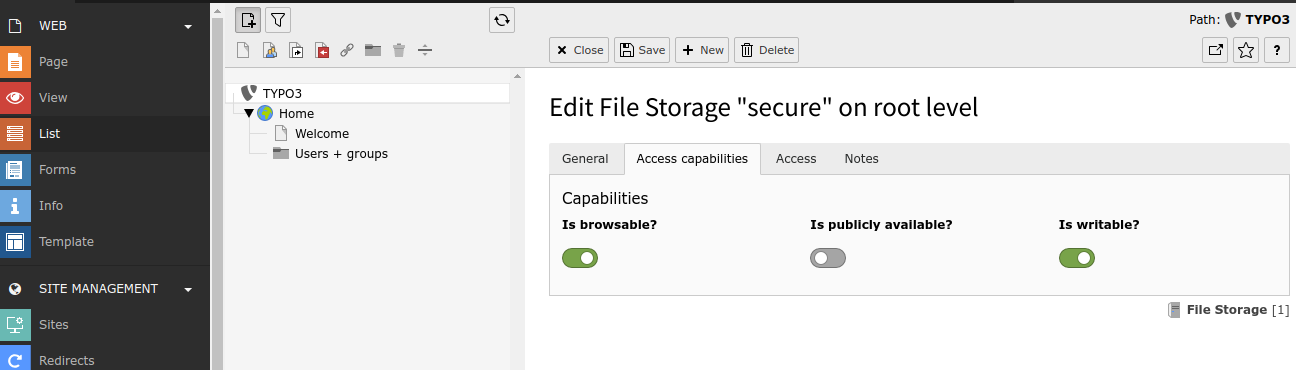
    Un-check the 'public' checkbox for your existing file storage or create a new file storage and set it to non public

    Create non-public file storage

    Image 1: Create non-public file storage

    Best is to have the physical folder outside of your document root. If not, add an .htaccess with "Deny from all" (Apache < 2.3) or "Require all denied" (Apache >= 2.3) in your file storage root folder.

  3. Configure lockRootPath !!! Required >11.5.35 & >12.4.11

    Refer to the TYPO3 Backend Configuration to ensure paths outside the project path are restricted for added security. https://docs.typo3.org/m/typo3/reference-coreapi/main/en-us/Configuration/Typo3ConfVars/BE.html#confval-globals-typo3-conf-vars-be-lockrootpath

  4. Set permissions

    Set fe_group permissions to a file or folder of the non-public file storage

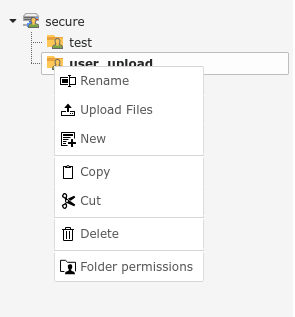
    Set FE permissions for folder

    Image 2: Set FE permissions for folder though context menu item

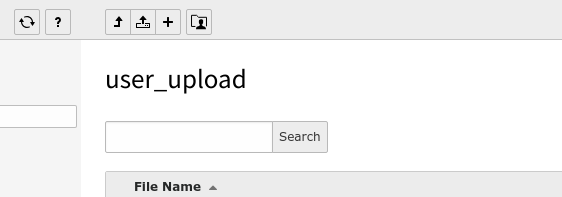
    Set FE permissions for folder

    Image 3: Set FE permissions for folder though button in button bar

FE File Tree 

The fal_securedownload extension comes with a filetree plugin you can use to display your folders/files as a tree in the frondend with force-download links.

Templates 

The default templates can be found like any other extbase/fluid based extension in:

fal_securedownload/Resources/Private/Layouts
fal_securedownload/Resources/Private/Partials
fal_securedownload/Resources/Private/Templates
Copied!

If you want to override these you can set these constants:

plugin.tx_falsecuredownload {
  view {
    layoutRootPath = EXT:your_ext/path/to/your/layouts/folder
    partialRootPath = EXT:your_ext/path/to/your/partials/folder
    templateRootPath = EXT:your_ext/path/to/your/templates/folder
  }
}
Copied!

Collapsible FolderTree 

There is a ready to use jQuery snippet available in the typoscript template of ext:fal_securedownload.

jQuery needs to be included in the FE for this to work.

The state of the collapsed folders is saved in the session of the user. When user is logged-in it is saved in the persisted session.

Extension settings 

In the extension manager you find some options to define some of the behaviour of the extension:

Login redirect 

Option name: login_redirect_url

Instead of throwing a "Authentication required!" message you can redirect the user to a certain page so he can login.

/login/?redirect_url=###REQUEST_URI###

# Or a typolink
t3://page?uid=5&redirect_url=###REQUEST_URI###
Copied!

No Access redirect 

Option name: no_access_redirect_url

Instead of throwing a "Access denied" message you can redirect the user to a certain page to inform the user about the access denied with optional some extra info.

/no-access/?redirect_url=###REQUEST_URI###

# Or a typolink
t3://page?uid=5&redirect_url=###REQUEST_URI###
Copied!

Force download 

Option name: force_download

Force download of all files from protected/non-public storages

Force download for some file extensions only 

Option name: force_download_for_ext

Force download for a given set of file extensions (comma separated list)

Enable resumable downloads 

Option name: resumable_download

Enables resumable download support (default enabled for new installs).

This enables support for HTTP/1.1 206 Partial Content, so the file/download can be requested in multiple parts.

Count downloads per user and create statistics 

Option name: track_downloads

This feature is only available in TYPO3 CMS 7 and above.

All downloads are tracked. Each download will be logged and accounted towards the frontend user downloading it. The download statistics per user can be inspected when editing the frontend user record.

EXT:ke_search support 

To have proper support for ke_search you need at least version 1.8.4 of ke_search and 0.0.8 of fal_secure_download.

EXT:solrfal support 

To have correct urls to indexed files you need to add/adjust following ext:solr typoscript configuration.

   # Make sure the correct public URL is indexed
plugin.tx_solr.index.queue._FILES.default.filePublicUrl = public_url
plugin.tx_solr.index.queue._FILES.default.url = public_url

   # Make sure the fe_groups are considered
   plugin.tx_solr.index.queue._FILES.default.access = TEXT
   plugin.tx_solr.index.queue._FILES.default.access {
       value = r:0
       override {
           cObject = TEXT
           cObject {
               required = 1
               field = fe_groups
               wrap = r:|
           }
       }
   }
Copied!

This feature is sponsored by: STIMME DER HOFFNUNG Adventist Media Center

EventListeners 

BeforeRedirects 

This event will be fired everytime a file is going to download or display. This event will not be fired, if access to requested file is restricted for current logged in frontend user. So you can modify some redirect params if needed.

Example of how to register a listener for this event in your EXT:my_extension/Configuration/Services.yaml:

services:
  Vendor\MyExtension\EventListener\BeforeRedirectsEventListener:
    tags:
      - name: event.listener
        identifier: 'myBeforeRedirectsEventListener'
        event: BeechIt\FalSecuredownload\Events\BeforeRedirectsEvent
Copied!

An example listener EXT:my_extension/Classes/EventListener/BeforeRedirectsEventListener.php could look like this:

<?php
namespace Vendor\MyExtension\EventListener;

   use \BeechIt\FalSecuredownload\Events\BeforeRedirectsEvent;

class BeforeRedirectsEventListener
{
       public function __invoke(BeforeRedirectsEvent $event): void
       {
           $event->setLoginRedirectUrl('XXX');
           $event->setNoAccessRedirectUrl('XXX');
       }
Copied!

That way you can modify 'loginRedirectUrl', 'noAccessRedirectUrl', 'file', 'caller' if needed.

BeforeFileDump 

This event will be fired everytime a file is going to download or display. This event will not be fired, if access to requested file is restricted for current logged in frontend user. BeforeFileDump is useful for e.g. tracking access of downloaded files.

Example of how to register a listener for this event in your EXT:my_extension/Configuration/Services.yaml:

services:
  Vendor\MyExtension\EventListener\BeforeFileDumpEventListener:
    tags:
      - name: event.listener
        identifier: 'myBeforeFileDumpEventListener'
        event: BeechIt\FalSecuredownload\Events\BeforeFileDumpEvent
Copied!

An example listener EXT:my_extension/Classes/EventListener/BeforeFileDumpEventListener.php could look like this:

<?php
namespace Vendor\MyExtension\EventListener;

   use \BeechIt\FalSecuredownload\Events\BeforeFileDumpEvent;

class BeforeFileDumpEventListener
{
       public function __invoke(BeforeFileDumpEvent $event): void
       {
           $event->setFile('XXX');
       }
Copied!

That way you can modify 'file', 'caller' if needed.

AddCustomGroups 

This event is fired every time when the permissions are checked. It will add new groups to the list of authenticated groups, which are not detected by the standard group mechanism. An example is, if you are using ip based authentication, where no frontend user is logged in.

The slot must return an array which contains the array of the custom usergroups. This array will then be merged with the original array of groups.

Example of how to register a listener for this event in your EXT:my_extension/Configuration/Services.yaml:

services:
  Vendor\MyExtension\EventListener\AddCustomGroupsEventListener:
    tags:
      - name: event.listener
        identifier: 'myAddCustomGroupsEventListener'
        event: BeechIt\FalSecuredownload\Events\AddCustomGroupsEvent
Copied!

An example listener EXT:my_extension/Classes/EventListener/AddCustomGroupsEventListener.php could look like this:

<?php
namespace Vendor\MyExtension\EventListener;

   use \BeechIt\FalSecuredownload\Events\AddCustomGroupsEvent;

class AddCustomGroupsEventListener
{
       public function __invoke(AddCustomGroupsEvent $event): void
       {
           $event->setCustomUserGroups($myCustomGroups);
       }
Copied!

Known issues 

  • I got javascript errors after including the provided typoscript template

This is properly because you do not have jQuery available on the FE. You can disable the provided javascript by adding this line to your typoscript template

plugin.tx_falsecuredownload.settings.includeJavascript = 0
Copied!
  • Files in my "secure" folder aren't processed by ext:tika

If the folder is outside of the document root you need to set $GLOBALS['TYPO3_CONF_VARS']['BE']['lockRootPath'] else ext:tika will not process the files.

Todo 

Complete this document

Further development 

The git repository of ext:fal_securedownload can be found on Github.

Pull request and suggestions for improvement are very welcome.