File No-Index 

  • Exclude any single file from search engines, toggled per file in the file list — no developer needed.
Extension key

file_noindex

Package name

bm1/file-noindex

Version

main

Language

en

Author

Phillip Baumgärtner & contributors

License

This document is published under the Open Publication License.

Rendered

Tue, 16 Jun 2026 12:35:34 +0000


Editors can exclude any file (images of all kinds, PDFs, …) from search engine indexing directly in the File list module — one checkbox in the file metadata, no matter where the file is used and without a developer.

The extension serves a dynamically generated robots.txt that contains Disallow entries for every marked file — the original file plus its processed variants. Blocking via robots.txt is the way officially recommended by Google to keep images out of Google Image Search.


Table of contents:
Introduction 

What does it do? 

A person on a team photo asks not to appear in Google Image Search. Instead of touching templates or moving files, an editor opens the file's metadata, ticks "Do not index in search engines", saves — done. The next time crawlers fetch robots.txt, the file and all its rendered variants are disallowed.

file_noindex works for every file type (images, PDFs, …), independently of where and how the file is referenced, and it needs no configuration.

How it works in a nutshell 

A PSR-15 middleware answers GET /robots.txt. It takes the base rules from your site configuration (the staticText route, if present) and appends Disallow entries for every file whose metadata has the "do not index" flag set:

  • the original file path,
  • all currently existing processed variants (_processed_/…),
  • wildcard patterns covering variants that will be generated in the future.

The response is generated live on every request, so toggling the checkbox takes effect immediately — no cache to flush.

What it is — and what it is not 

It keeps files out of search results 

Crawlers that respect robots.txt (Google, Bing, …) stop indexing the marked files. This is the method Google officially recommends for images.

It is not access protection 

The file stays reachable via its direct link. If you need to actually protect files from being downloaded, use EXT:fal_protect instead.

See Known problems and limits for the full list of deliberate limitations.

Installation 

The extension supports TYPO3 ^13.4 and ^14.0 on PHP 8.2 – 8.4 and has no dependencies besides the TYPO3 core.

Classic / Extension Manager 

Install file_noindex from the TYPO3 Extension Repository via the Extension Manager.

Database schema 

After installation, run a database schema update so the new metadata field is created:

  • TYPO3 backend: Admin Tools > Maintenance > Analyze Database Structure, then apply the suggested ADD change.
  • CLI: vendor/bin/typo3 extension:setup

No further configuration is required.

For editors: usage 

  1. Open the File list module and edit the metadata of a file (or open the file resource in the Media module).
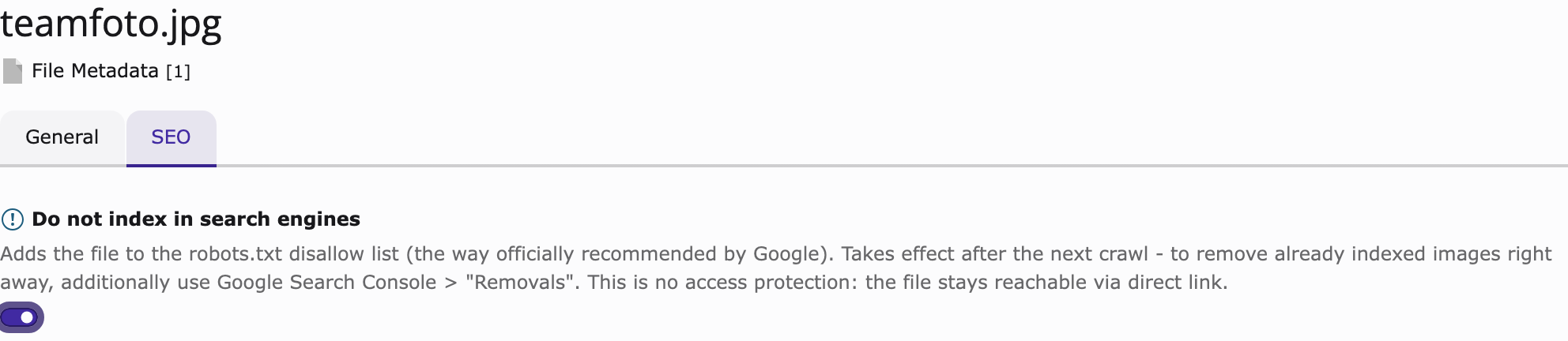
  2. Switch to the SEO tab, enable Do not index in search engines and save.
The "Do not index in search engines" checkbox on the SEO tab

The checkbox on the SEO tab of the file metadata form.

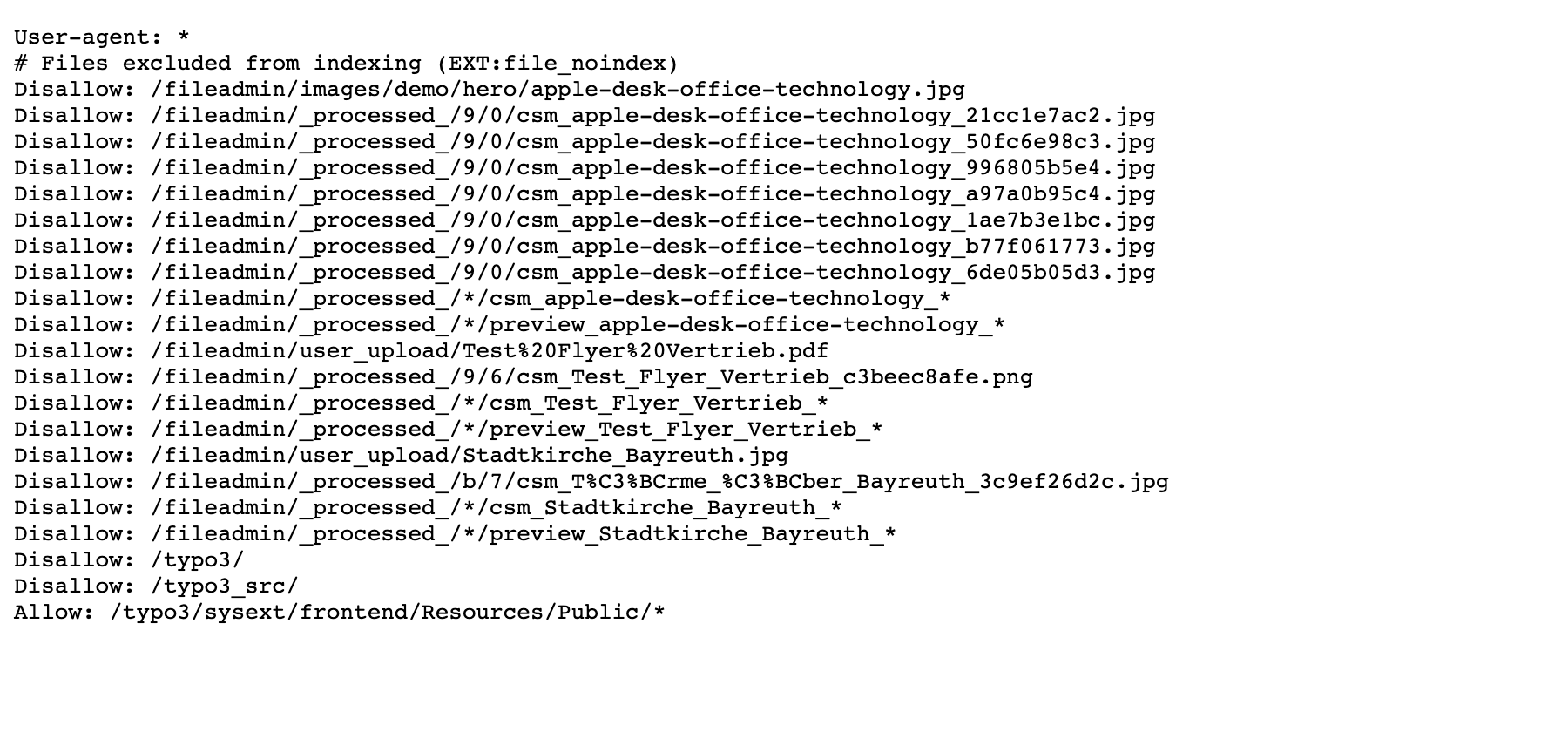
That's it. The file's robots.txt entries appear immediately — no cache flush needed:

Generated robots.txt with disallow entries

The generated robots.txt with the disallow entries for the marked file and its processed variants.

Unticking the box removes the entries just as immediately.

Administration 

The robots.txt middleware 

A PSR-15 middleware answers GET and HEAD requests to exactly /robots.txt in the frontend stack — registered after the site resolver (it needs the resolved site) and before TYPO3's static route resolver (it must win over a configured robots.txt route). Any other request is passed through unchanged.

The response is 200 text/plain; charset=utf-8 with Cache-Control: public, max-age=3600.

Base rules: the staticText route stays the source of truth 

The middleware does not replace your base rules. It takes them from the site configuration's robots.txt route (type staticText) and only appends the file disallows. Your site configuration therefore stays the single place to maintain the base rules:

config/sites/<identifier>/config.yaml
routes:
  -
    route: robots.txt
    type: staticText
    content: "User-agent: *\r\nDisallow: /typo3/\r\n"
Copied!

If no such route exists, a minimal User-agent: * group is used as the base.

The disallow entries are inserted into the last existing User-agent: * group — not appended as a second * group, because not all crawlers merge groups of the same name.

What gets listed per file 

Only files from local, public storages are considered. For each marked file the builder emits:

  1. the original file path (properly URL-encoded),
  2. every currently existing processed variant from sys_file_processedfile,
  3. wildcard patterns (csm_<name>_* and preview_<name>_* inside the storage's processing folder) covering variants generated in the future.

Renamed or moved files are reflected automatically on the next robots.txt request, because the lookup happens live.

Caching 

Version 1 deliberately ships without its own cache. robots.txt is requested rarely (by crawlers); one indexed query per request is uncritical, and live generation makes every checkbox change effective immediately without any cache-invalidation logic.

Fail-safe 

A robots.txt answered with a 5xx status makes crawlers treat the whole site as disallowed. Should the disallow list fail to build (for example, when the extension is installed but the database schema update has not run yet), the middleware logs the error and serves the base rules without file entries instead of letting the request fail.

Known problems and limits 

These are conscious design decisions of version 1, not bugs.

No access protection 

The file stays reachable via its direct link. robots.txt only affects crawlers that respect it (Google, Bing, …). For hard protection use EXT:fal_protect.

Already indexed images 

They disappear only after the next crawl (days to weeks). For immediate removal additionally use Google Search Console > Removals.

Deliberate over-blocking by wildcards 

csm_photo_* also matches variants of a file named photo_2.jpg. When in doubt the extension blocks too much rather than too little.

Specific user-agent groups win 

If your robots.txt contains a more specific group such as User-agent: Googlebot-Image, that crawler ignores the User-agent: * group entirely — including the entries added by this extension. In that case replicate the disallows in the specific group or remove it.

robots.txt size limit 

Google reads robots.txt only up to 500 KiB. With roughly three lines per file this allows thousands of marked files; if you get anywhere near that, reconsider your setup.

Multi-site with a shared fileadmin 

All marked files are listed in the robots.txt of every site that shares the storage. Over-blocking across hosts is accepted in favour of a simple and robust version 1.

Language independent 

The checkbox lives on the default-language metadata record and applies to the file as such (l10n_mode = exclude).