EXT: ods_osm (OpenStreetMap)

Extension key

ods_osm

Package name

bobosch/ods-osm

Version

main

Language

en

Author

Robert Heel <typo3@bobosch.de>, Alexander Bigga <alexander@bigga.de>

License

GPL 3.0

Rendered

Sun, 08 Jun 2025 16:10:41 +0000

Description

Add an interactive OpenStreetMap map to your website. Can also show other tile based maps with OpenLayers or Leaflet.
Introduction

What does it do?

  • Show an interactive OpenStreetMap map with OpenLayers or Leaflet.
  • Store coordinates in fe_users and tt_address tables and show as markers in the map.
  • Show record information in popup window.
  • Display gps tracks (GPX, KML).
  • Display of GeoJSON vector files.

Screenshots

Frontend plugin

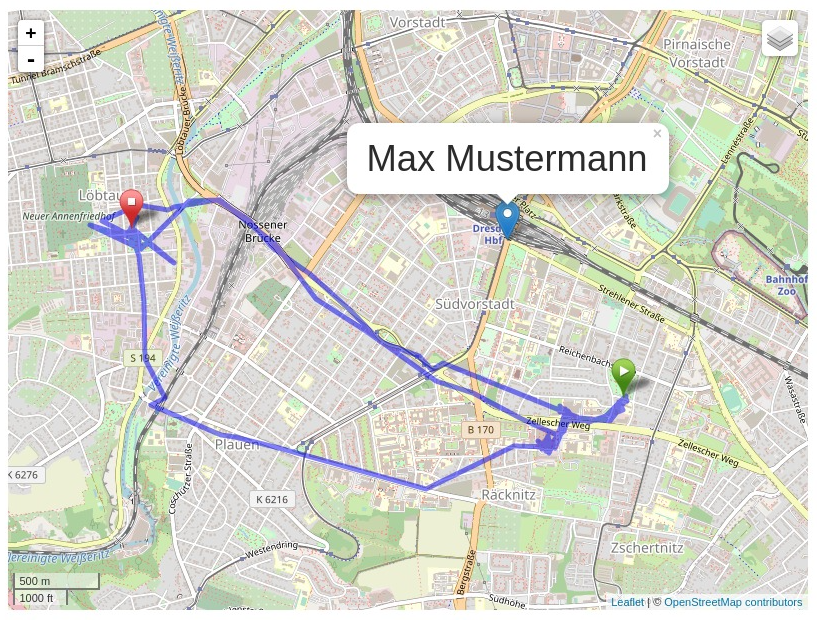
The example shows the output of the frontend plugin with the following settings:

  • Leaflet JavaScript
  • address of "Max Mustermann" as tt_address record with default marker, clickt on the marker
  • GPX track with start and stop marker

Demo Instance

At https://osm.bigga.de a demo instance of EXT:ods_osm is available which presents multiple use cases of this extension.

Donation

This extension was only possible with the help of many other free projects.

You're likely using one of the main map “Mapnik”, “Osmarender” or “Cyclemap” - feel free to donate to the OpenStreetMap project https://supporting.openstreetmap.org/donate/

If you are using the address search (autocomplete longitude and latitude in address records), please donate the service you use:

Geonames: https://www.geonames.org/donations.html or buy some credits there.

Nominatim: https://supporting.openstreetmap.org/donate/

And don't forget the main components: https://typo3.org/ and https://openlayers.org/ or https://leaflet.org/

Users manual

Frontend Plugin

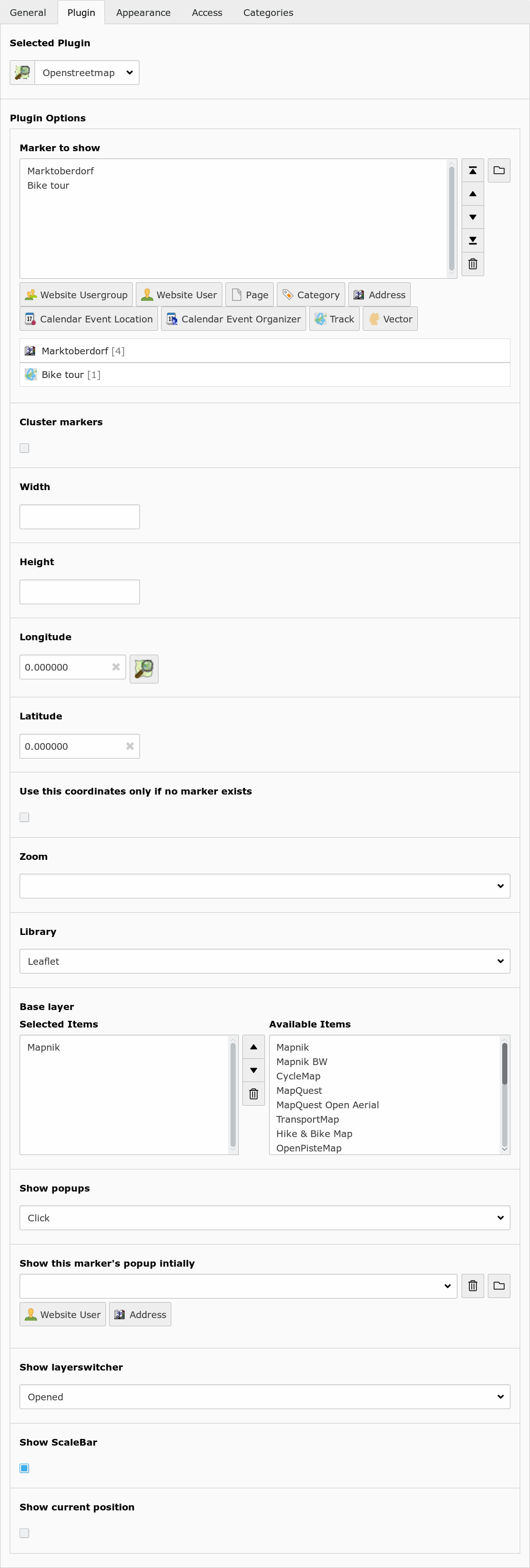
Insert the OpenStreetMap as frontend plugin and define at least one marker to show. The map will center to the average coordinates of the markers.

Plugin option (TS option) Description
Marker to show (marker) Show these records on the map.
Cluster markers (cluster) Group nearby markers.
Width (width) Width of the map in pixels.
Height (height) Height of the map in pixels.
Longitude (lon) Default longitude.
Latitude (lat) Default latitude.
Use this coordinates only if no marker exists (use_coords_only_nomarker) If unset, the map is always centered at the given coordinates. If set, the map is only centered there if no marker exists.
Zoom (zoom) Zoom level.
Library (library) Choose between openlayers, leaflet or static.
Base layer (layer) Show this map. The user can switch between these base layers if the layerswitcher is is enabled.
Show popups (show_popups) Show a popup window with record information if the user hover or click a marker.
Show this marker's popup initially (marker_popup_initial) Open this marker's popup if the user visit the map.
Mouse position (mouse_position) Show position of current mouse cursor.
Show layerswitcher (show_layerswitcher) Show layerswitcher which allows the user to hide markers from the same group.
Show scalebar (show_scalebar) Show pan/zoom element.
Show current position (position) Center the map on the current position of the user (if available)

New elements

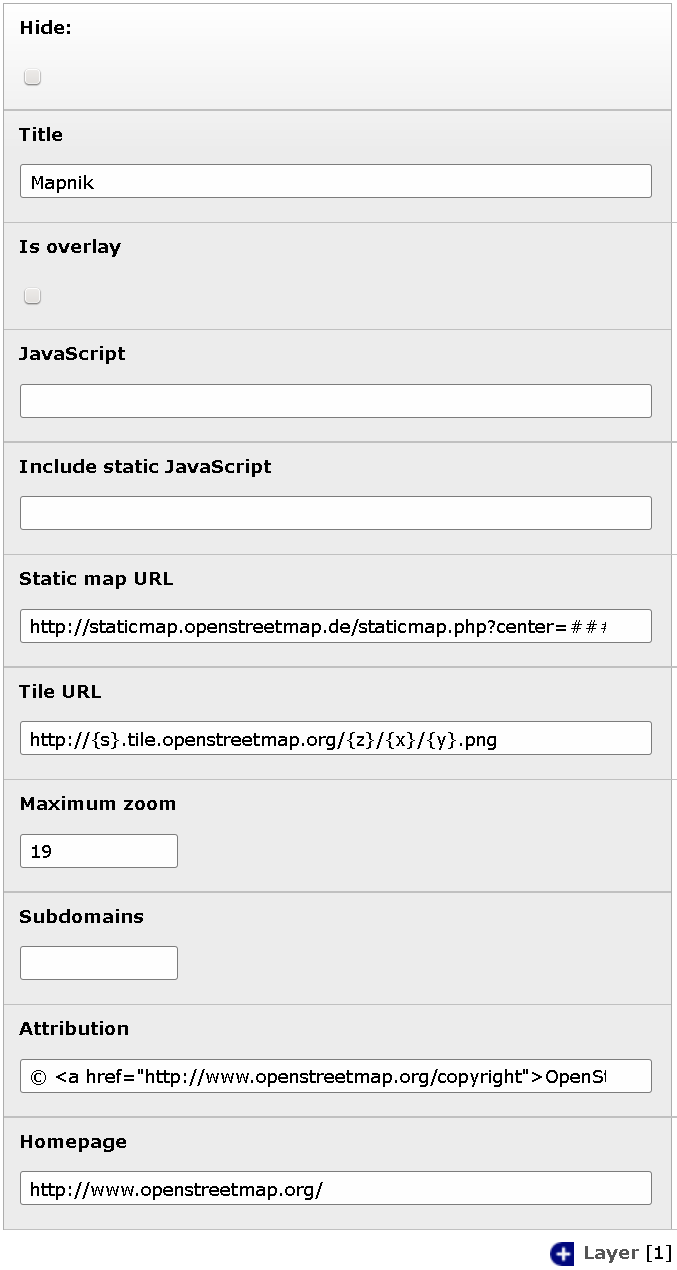
Layer

You can define your own layers on root level.

Element option Description
Title Title of this layer. Shown in layerswitcher.
Is overlay Base layer or overlay layer?
JavaScript
JavaScript part to create this layer.
###TITLE###: Title of layer.
###VISIBLE###: Contains “'visible':true” if is overlay and no layerswitcher activated.
Static map URL
Download static map from this URL.
###lat###: Latitude of map center.
###lon###: Longitude of map center.
###zoom###: Zoom level.
###width###: Image width.
###height###: Image height.
Tile URL URL to fetch tiles. Used by OpenLayers if no JavaScript defined. Used by leaflet.
Maximum zoom Maximum zoom level of this layer.
Subdomains Tile URL subdomains (Variable {s})
Attribution Attribution text of this layer.
Homepage Homepage URL of this layer.

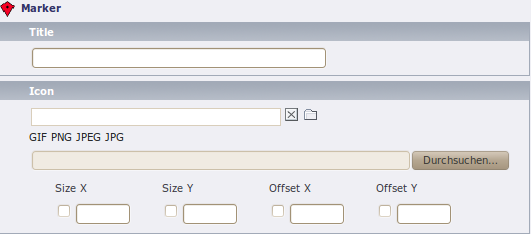
Marker

Element option Description
Title Title for this track. Only shown in backend.
Icon Icon file.
Size The size of the icon. Would determined automatically on save.
Offset The offset of the icon. It describes the arrowhead. Would automatically choose the middle bottom of the image.

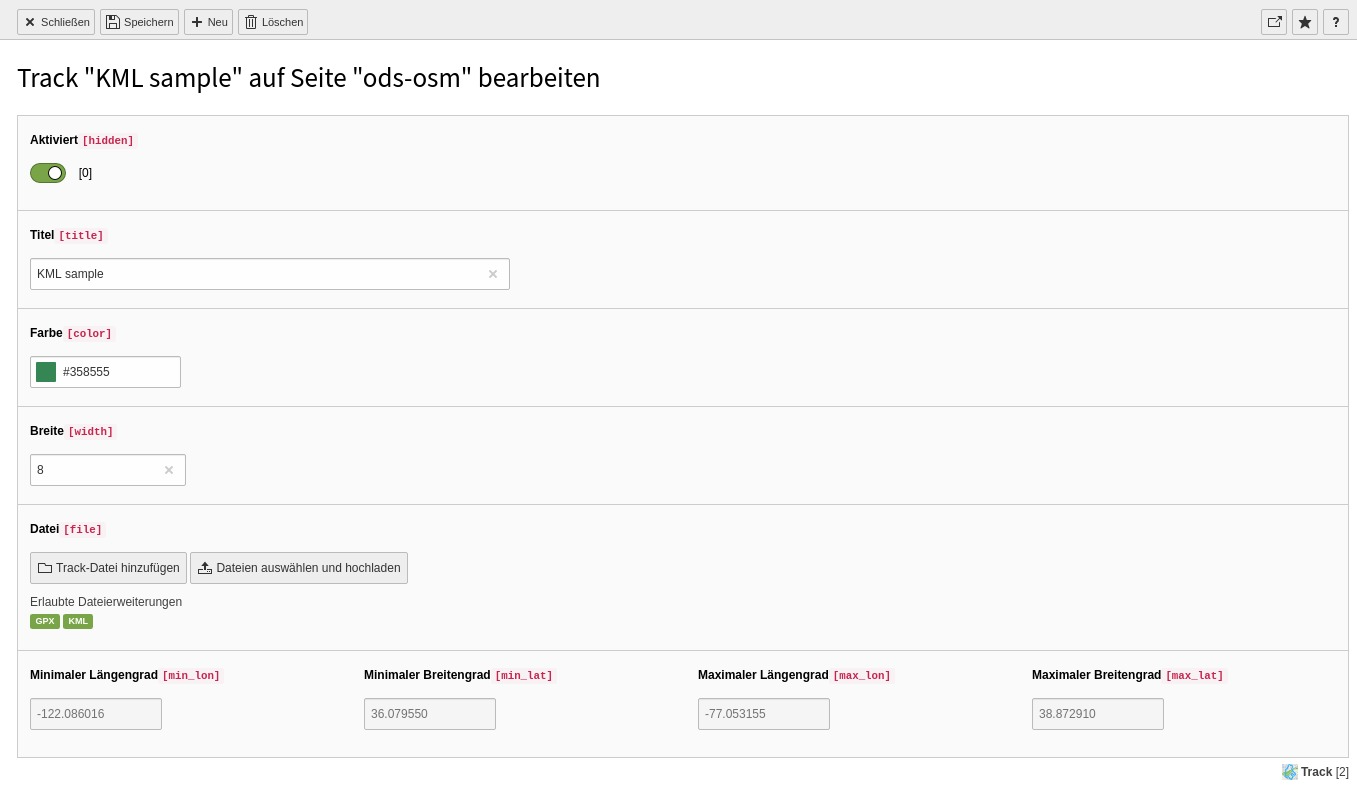
Track

Element option Description
Title Title for this track. Shown in layerswitcher.
Color Color of the track line in the map.
Width Width of the track line.
File Select only one gpx file here.

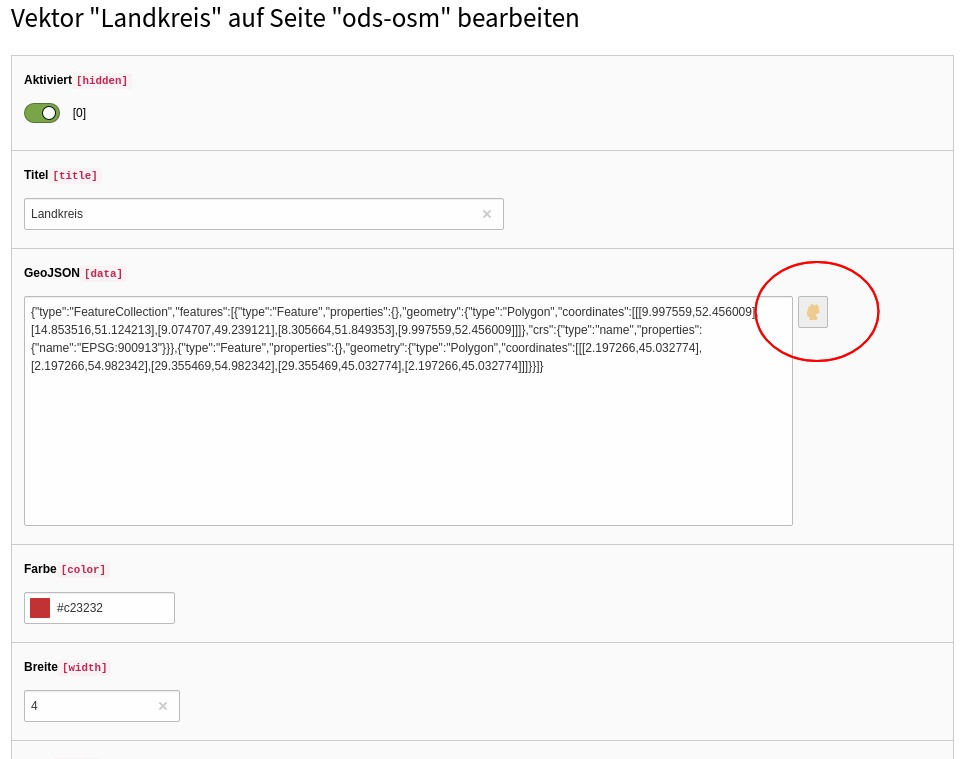
Vector

You can add GeoJSON data and/or a GeoJSON file to display on a new layer. The GeoJSON may contain FeatureCollections. Polygone, Lines and Points are tested and are supported by the vector draw wizard.

Element option Description
Title Title for this vector. Shown in layerswitcher.
GeoJSON Fill GeoJSON data and/or select a GeoJSON file below. You can use the vector draw wizard to create and edit the GeoJSON data in this field.
Color Color of the vector line in the map (optional).
Width Width of the vector polyline. (optional)
File Select only one geojson file here.

Extended elements

Website user

Part of the form of a fe_users record with fields for longitude and latitude.

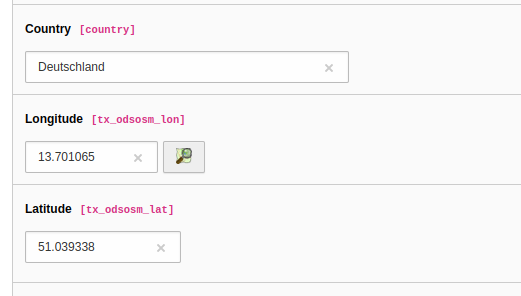
Fields for longitude and latitude of a fe_users record. Click on the OSM icon to launch the map wizard.

Element option Description
Longitude and Latitude Enter the coordinates of an address here. It would determined automatically if zip or city is set and autocompletion is enabled in the extension manager. Use the OpenStreetMap icon to search the coordinates on the map.

Website usergroup

Element option Description
Marker Optionally specify a marker here.

Administration

Extension Configuration

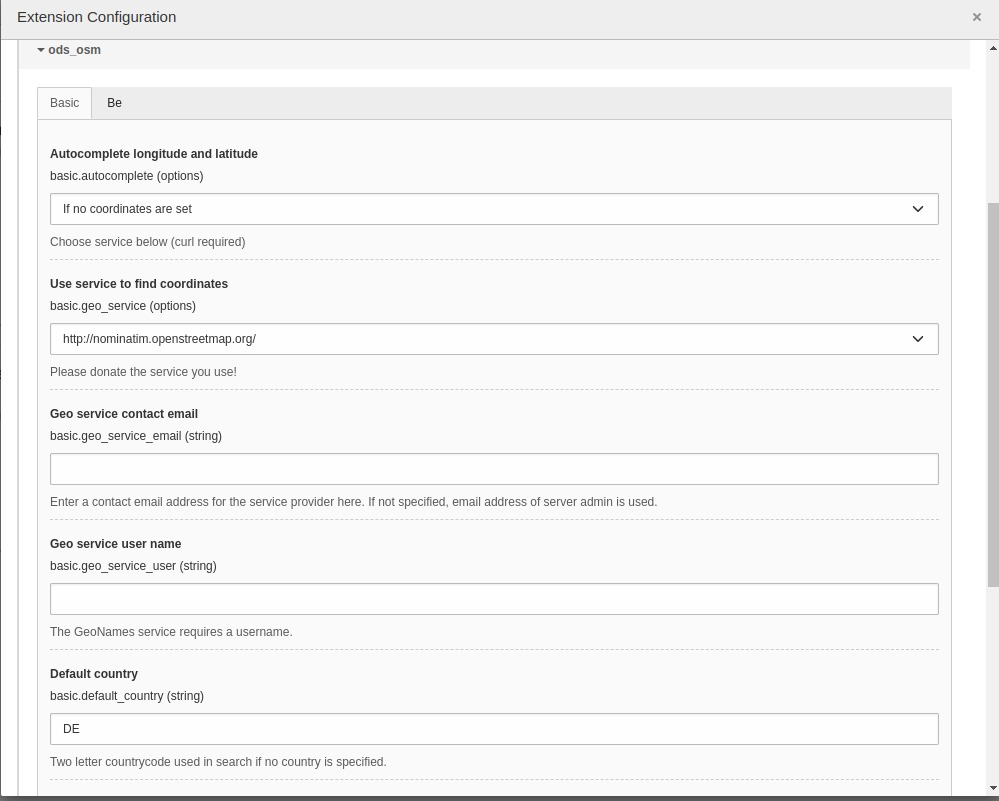
Some global settings of the extension may be configured in Settings -> Extension Configuration -> ods_osm.

Screenshot

Screenshot with first part of the ods_osm settings in the extension configuration

Screenshot of the ods_osm Extension Configuration

Reference

Option Description Default
Autocomplete longitude and latitude You can enable to search the coordinates on geonames.org when saving an fe_users or tt_address element. 1: If no coordinates are set
Use service to find coordinates Use this service to get the coordinates of an address. If you select “Only cache” you have to fill the cache table manually. If you select a provider here, be aware that the fields “zip”, “city” and “country” of every address record you save is sent to the provider. 2: Nominatim
Geo service contact email Enter a contact email address for the service provider here. If not specified, email address of server admin is used.  
Geo service user name The GeoNames service requires a username  
Default country Two letter countrycode used in search if no country is specified. DE
Enable address search cache The result of the geo service is stored in tx_odsosm_geocache if activated. 1
Use local javascripts and images Activate this if you don't like to use the javascript files from CDNs but the local ones from this extension. 1
Default longitude   10.41
Default latitude   51.27
Default zoom   8

TypoScript Configuration

It is mandatory to include the ods_osm TypoScript template "Template OpenStreetMap". This template sets some default values for the ods_osm plugin. The defaults may be configured with the TypoScript Constant Editor.

With these TypoScript defaults, the editor does not need to make a detailed configuration of the ods_osm plugin. Selecting the wanted marker is suffician.

The dimenions of the map, the right JavaScript library and zoom level are set by the defaults. But editors may set and overwrite the defaults in the plugin settings.

Reference

Property Data type Description Default
cluster boolean Cluster marker at lower map zoom. 0
cluster_radius integer Cluster marker in given radius. 80
external_control boolean
Allow control with GET or POST
lon: Map center longitude
lat: Map center latitudezoom: Map zoom level
layers: Comma separated list of tx_odsosm_layer uid's
records: Comma separated list of markers
Don't forget to set no_cache=1
0
height integer

Height of the map div block. This depends on your webdesign. The default value is 80vh which means 80% from current view port.

You can set other values like "80%", 480, 480px

80vh
icon IMAGE or TEXT object Default marker image Library default
JSlibrary string JavaScript library: none / jquery none
layer integer list | Comma separated list of tx_odsosm_layer uid's. | 1: Mapnik | 2: SLUB Renderer | 3: CycleMap | 13: ÖPNV Deutschland | 14: Hike & Bike Map | 15: Hillshading (NASA SRTM3 v2) | 17: Hiking routes | 18: Mapnik BW | 19: MapSurfer.Net Road | 20: MapSurfer.Net Topographic | 21: MapSurfer.Net Hybrid | 25: TransportMap | 28: Cycling routes | 29: Stamen Toner | 30: Stamen Watercolor | 31: Public Transport Lines | 32: Stamen Terrain Labels | 33: Railway Infrastructure 1
library string Library: leaflet / openlayers / openlayers3 / static |ol|
marker array with table name and integer list Tablenames and a comma separated list of record ids. see m
|mpi| integer Open popup of this marker  
no_marker boolean
If no marker is set:
0: Hide map
1: Show map
1
popup TS object There are two additional fields: “group_title” and “group_description” filled with group information. see p
position boolean Get current user postion from browser to center the map. 0
|sls| boolean   0
show_popups boolean
0:No
1:Click
2:Hover
0
show_scalebar boolean Show a scale line on the map. 0
|uconm| boolean Use the default coordinates only if no marker exists. 0
width integer

Height of the map div block. This depends on your webdesign. The default value is 80vw which means 80% from current view port.

You can set other values like "100%", 640, 640px

80vw

Examples

plugin.tx_odsosm_pi1 {
	width = 800
	height = 600
	mouse_position = 1
}
Copied!

Markers

plugin.tx_odsosm_pi1 {
	marker {
		pages =
		fe_users =
		fe_groups =
		tx_odsosm_track =
	}
}
Copied!

Popups

plugin.tx_odsosm_pi1 {
	popup {
		fe_users = COA
		fe_users {
			9 = FILES
			9 {
				references {
					table = fe_users
					fieldName = image
				}
				renderObj = IMAGE
				renderObj {
					file {
						import.data = file:current:uid
						treatIdAsReference = 1
						width = 150c
						height = 150c
					}
					altText.data = file:current:alternative
					titleText.data = file:current:title
					stdWrap.typolink.parameter.data = file:current:link
				}
			}
			10 = TEXT
			10 {
				field = name
				wrap = <h2>|</h2>
				override = {field:first_name} {field:middle_name} {field:last_name}
				override.insertData = 1
				override.if.isFalse.field = name
			}
			20 = TEXT
			20.field = description
			20.htmlSpecialChars = 1
		}
		tt_address = COA
		tt_address {
			9 = FILES
			9 {
				references {
					table = tt_address
					fieldName = image
				}
				renderObj = IMAGE
				renderObj {
					file {
						import.data = file:current:uid
						treatIdAsReference = 1
						width = 150c
						height = 150c
					}
					altText.data = file:current:alternative
					titleText.data = file:current:title
					stdWrap.typolink.parameter.data = file:current:link
				}
			}
			10 = TEXT
			10.field = name
			10.wrap = <h2>|</h2>
			20 = TEXT
			20.field = description
			20.stdWrap.parseFunc < lib.parseFunc_RTE
			20.htmlSpecialChars = 0
		}
	}
}
Copied!

Icon Property

plugin.tx_odsosm_pi1 {
	icon {
		# IMAGE example
		fe_users = IMAGE
		fe_users {
			file = fileadmin/icon.png
			file.width = 60px
		}

		# HTML example
		fe_users = TEXT
		fe_users {
			value = <span>X</span>
			size_x=20
			size_y=30
			offset_x=10
			offset_y=15
		}
	}
}
Copied!

Tutorial

Install Extensions via Composer

The following steps are tested with TYPO3 11.5 LTS.

  1. Install ods_osm

    composer require bobosch/ods-osm:^4.2

  2. Install tt_address (optional)

    composer req friendsoftypo3/tt-address

Configure Extensions

  1. Include static template "OpenStreetMap" into your root-template
  2. (optional) Check settings with the TypoScript constant editor. See TypoScript Configuration.
  3. (optional) Check the extension configuration. See Extension Configuration.

Create Record

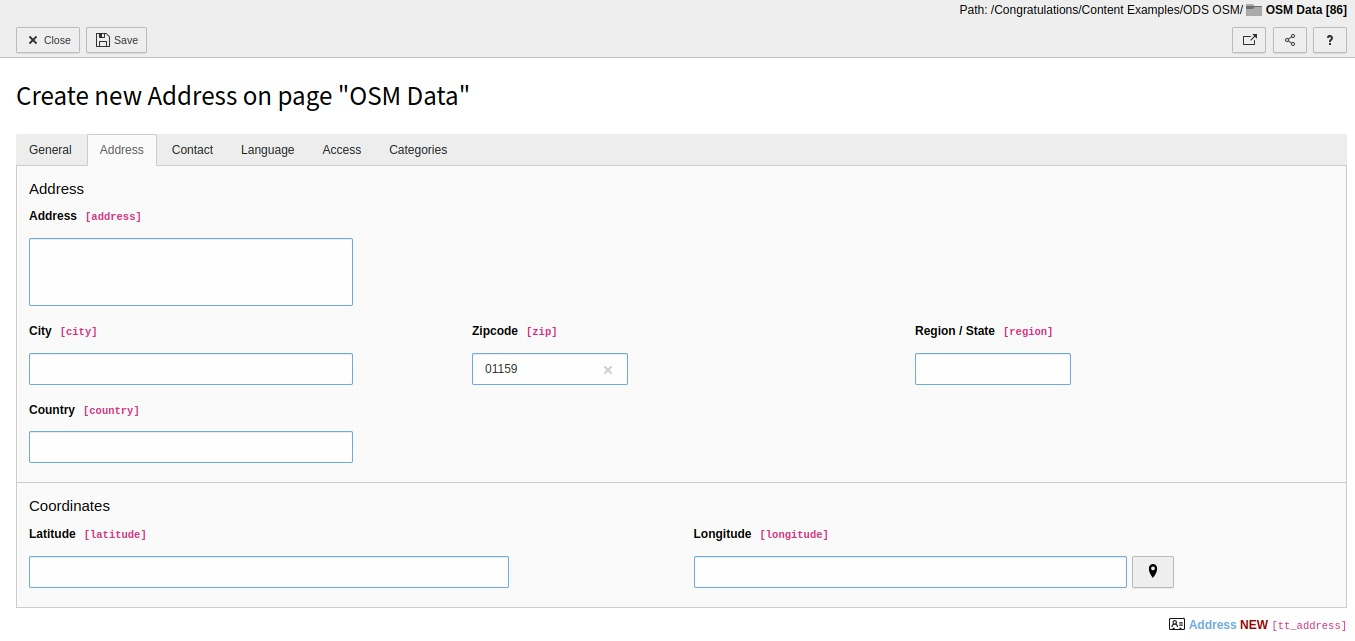
  1. Open or create an fe_users or tt_address record.
  2. Enter zipcode or city and save the record (without closing it).
Screenshot of form to create new address record with input fields for city, postalcode, longitute and latitude

Example with only ZIP is inserted into tt_address form.

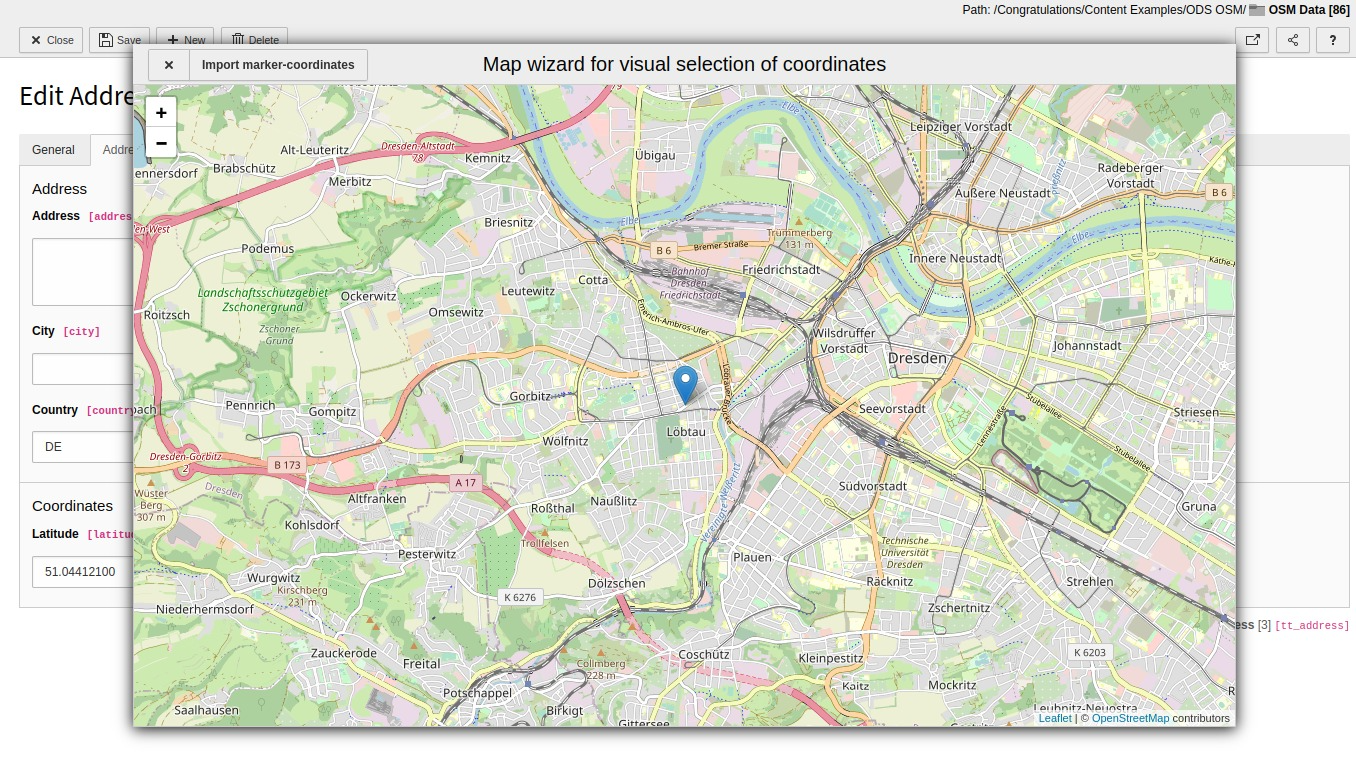
  1. Scroll to the “Longitude” section and use the marker icon to open the map wizard.
Screenshot of same tt_address form with coordinate wizard (map view) as modal overlay

Change latitude and longigute with the map wizard.

  1. Click on the correct position or move the marker and select "Import marker-coordinates".
  2. Save the record again.

Place OSM Plugin

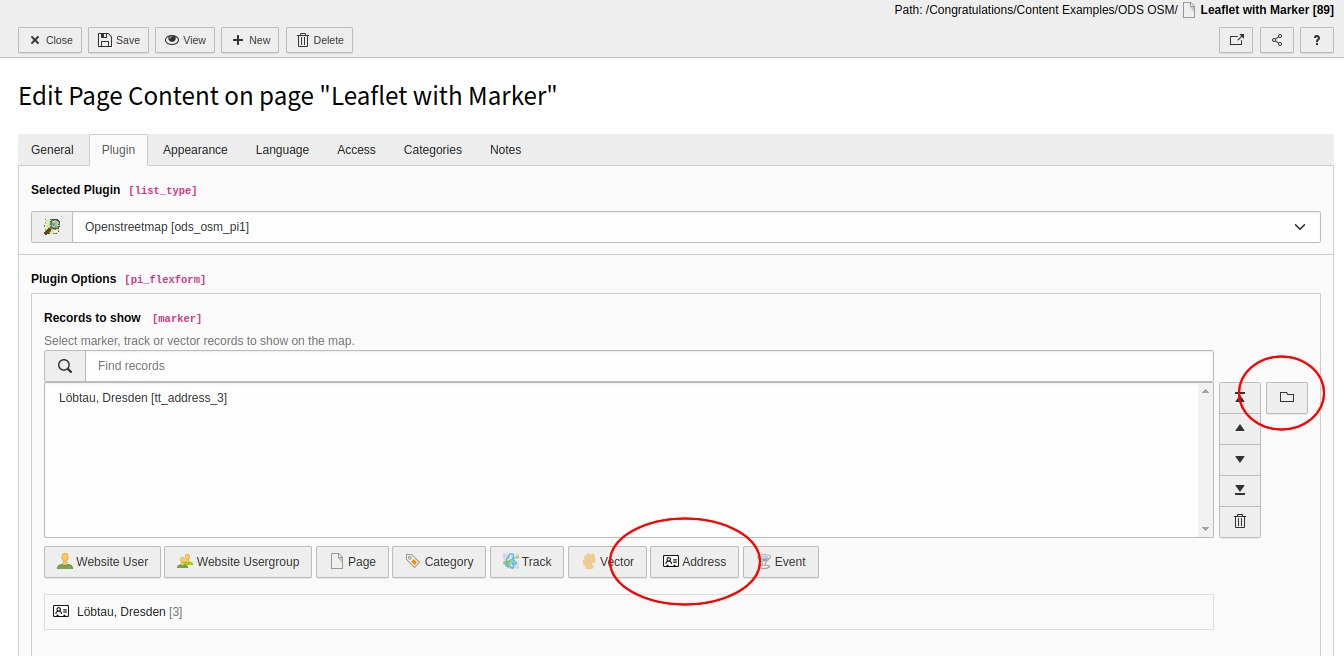
  1. Insert a content element plugin "OpenStreetMap" on your page.
  2. Add your address record in "Records to show”.
Screenshot of the OSM plugin settings with selected tt_address record.

Add tt_address record to OSM plugin field "Records to show".