campus_events_connector 

Version

5.0

Language

en

Authors

Brain Appeal GmbH

Email

info@brain-appeal.com

License

This extension documentation is published under the CC BY-NC-SA 4.0 (Creative Commons) license

With campus_events_connector, you have the ability to import all events via cron-jobs from the CampusEventsAPI in your TYPO3 System as independent records, as well as documents and images.

TYPO3

The content of this document is related to TYPO3 CMS, a GNU/GPL CMS/Framework available from typo3.org .

Community Documentation

This documentation is community documentation for the TYPO3 extension campus_events_connector

It is maintained as part of this third party extension.

Extension Manual

This documentation is for the TYPO3 extension campus_events_connector.
Information 

With campus_events_connector, you have the ability to import all events via cron-jobs from the CampusEventsAPI in your TYPO3 System as independent records, as well as documents and images.

Possibilities of configuration: - API-URL - API-Key - PageID for the imported records - Folder for the imported documents and images

Converters 

  • TYPO3 Extension campus_events_convert2news => EXT:news

Converts the imported records into target extensions records. The Conversation is defined in a configuration record in the respective target folder of the import. In the future, there will be a filter/limitation feature. You can define the position on which the content is displayed, by Fluid-Templates. TYPO3 Admins can overwrite the Fluid-Templates.

Frontend-Extension 

This extension allows the individual display of the imported records. All files can be accessed. Currently there is only a list view (detail view is untested), which redirects directly to Campus-Events. In the future you can adjust the display of the view with Fluid-Templates.

Installation 

Simply install the extension via composer or download it from the TER.

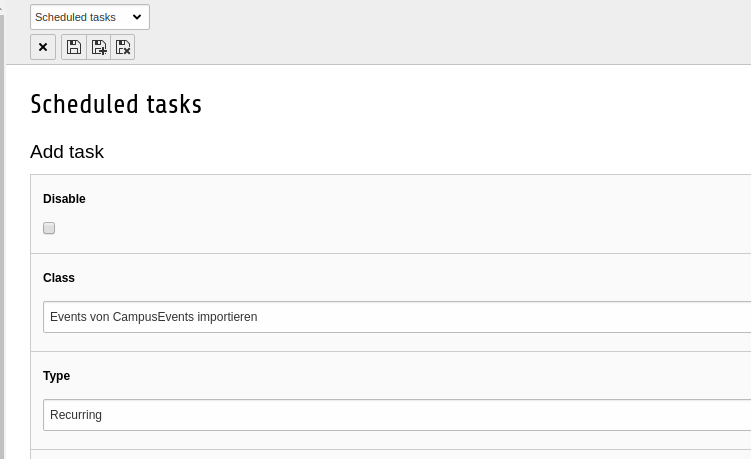
Scheduler Task 

The main part of this extension lies inside the scheduler task.

Scheduler Task

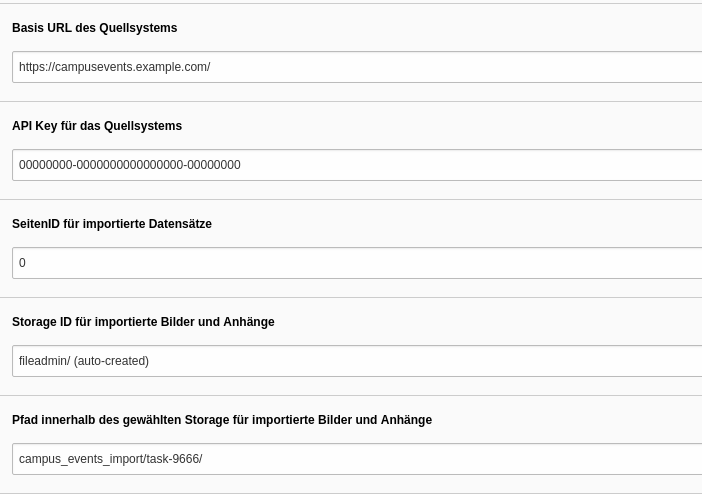
Here you can configure your params.

Scheduler Task

And now I explain the different Parameters.

Base-Url of the source system 

Simply type the URL to your Campus Events System.

API-Key of the source system 

Insert the API-Key from the source system. You can find it at XY.

PageID for imported records 

The page where your imported records should be saved.

Path for imported images and documents 

The folder where your imported images and documents should be saved.

Inner path for imported images and documents 

The folder inside your previously defined folder to save your imported images and documents.

Sitemap