The extension provides classes to generate Atom, JSON and RSS feeds in an
easy way. The target group are developers as the contents of the feeds must be
provided programmatically according to the model.
A PSR-15 middleware is used to determine the URL and call the according feed
implementation class. The feed URL, the format and the optional site(s) are
configured in the implementation class which provides the data via attributes.
Have a look into the Developer corner chapter for examples how this is done.
This extension provides classes and interfaces to implement feeds in different
formats. You don't have to worry about the details of the feeds and how they are
build, you only have to provide the data from your concrete model.
Example
New in version 0.5.0
Instead of implementing the
FeedInterface like described below one can
also extend from the
\Brotkrueml\FeedGenerator\Entity\AbstractFeed
abstract class which returns empty values for each getter method. One can
override the necessary methods. This way, only the methods required for a
specific feed format must be overridden which results in smaller feed
implementation classes.
Let's start with an example to warm up.
EXT:your_extension/Classes/Feed/YourFeed.php
<?phpdeclare(strict_types=1);
namespaceYourVender\YourExtension\Feed;
useBrotkrueml\FeedGenerator\Attributes\Feed;
useBrotkrueml\FeedGenerator\Collection\Collection;
useBrotkrueml\FeedGenerator\Contract\FeedInterface;
useBrotkrueml\FeedGenerator\Contract\ImageInterfaceuseBrotkrueml\FeedGenerator\Entity\Author;
useBrotkrueml\FeedGenerator\Entity\Item;
useBrotkrueml\FeedGenerator\Format\FeedFormat;
#[Feed('/your-feed.atom', FeedFormat::ATOM)]finalclassYourFeedimplementsFeedInterface{
publicfunctiongetId(): string{
return'';
}
publicfunctiongetTitle(): string{
return'Your website title';
}
publicfunctiongetDescription(): string{
return'Here comes the Atom feed for your website.';
}
publicfunctiongetLink(): string{
return'https://example.com/';
}
publicfunctiongetAuthors(): Collection{
return (new Collection())
->add(new Author('Your Company'));
}
publicfunctiongetDatePublished(): ?\DateTimeInterface{
returnnull;
}
// If the method returns an implementation of the DateTimeInterface it is// also used for the "Last-Modified" header in the HTTP response.publicfunctiongetDateModified(): ?\DateTimeInterface{
returnnew \DateTimeImmutable();
}
publicfunctiongetLastBuildDate(): ?\DateTimeInterface{
returnnull;
}
publicfunctiongetLanguage(): string{
return'en';
}
publicfunctiongetCopyright(): string{
return'';
}
publicfunctiongetImage(): ?ImageInterface;
{
returnnew Image('https://example.com/fileadmin/your-logo.png');
}
publicfunctiongetItems(): Collection{
return (new Collection())->add(
(new Item())
->setTitle('Another awesome article')
->setDateModified(new \DateTimeImmutable('2022-06-07T18:22:00+02:00'))
->setLink('https://example.com/another-awesome-article'),
(new Item())
->setTitle('Some awesome article'),
->setDateModified(new \DateTimeImmutable('2022-02-20T20:06:00+01:00')),
->setLink('https://example.com/some-awesome-article'),
);
}
}
Copied!
First, a class which provides the data for one or more feeds must implement
the Brotkrueml\FeedGenerator\Contract\FeedInterface interface. This
marks the class as a feed data provider and requires some methods to be
implemented. Of course, you can use dependency injection to inject service
classes, for example, a repository that provides the needed items.
To define under which URL a feed is available and which format should be used
you have to provide at least one
\Brotkrueml\FeedGenerator\Attributes\Feed
class attribute. As format a name of the
\Brotkrueml\FeedGenerator\Attributes\Feed enum is used which defines the
according format.
The
getItems() method returns a
\Brotkrueml\FeedGenerator\Collection\Collectionobject of
Brotkrueml\FeedGenerator\Entity\Item entities (or to be precise of
objects implementing the
Brotkrueml\FeedGenerator\Contract\ItemInterface).
Note
Based on the
FeedInterface the feed is automatically registered if
autoconfigure is enabled in Configuration/Services.yaml.
Alternatively, you can manually tag a feed:
After adding a class which implements the
FeedInterface or adjusting
the class attributes the DI cache has to be flushed.
Note
Not all properties are used in every format. For example, the last build date
of the feed is only available in an RSS feed and not in an Atom feed.
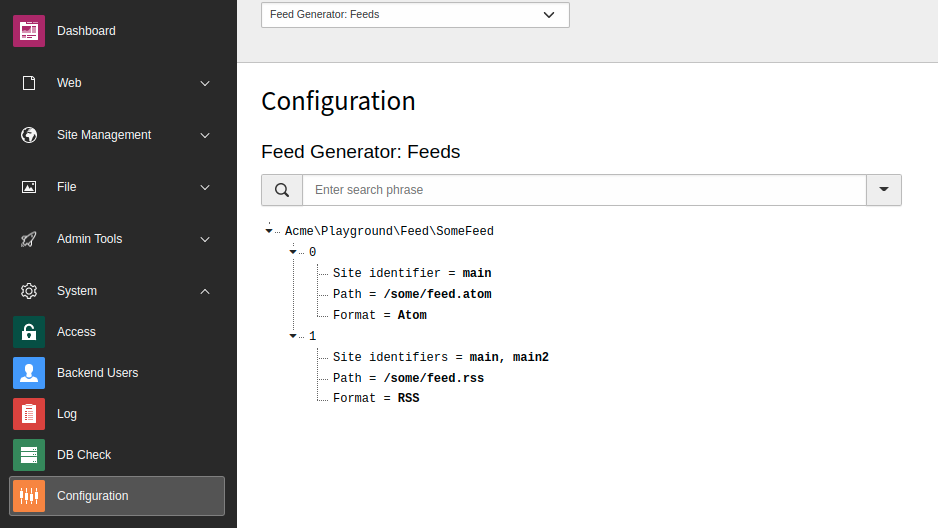
A list of all configured feeds is available in the Configuration module.
Interfaces
Three interfaces for a feed implementation are available and of interest:
FeedInterface
The Brotkrueml\FeedGenerator\Contract\FeedInterface marks the feed –
well – as a feed and requires the implementation of some methods like in the
example above.
FeedFormatAwareInterface
When implementing the Brotkrueml\FeedGenerator\Contract\FeedFormatAwareInterface,
you can access the feed format of the current request. This is helpful if you
define a feed implementation with different formats and want to adjust some
values according to the format.
EXT:your_extension/Classes/Feed/YourFeed.php
// use Brotkrueml\FeedGenerator\Contract\FeedFormatAwareInterface// use Brotkrueml\FeedGenerator\Format\FeedFormat#[Feed('/your-feed.atom', FeedFormat::ATOM)]#[Feed('/your-feed.json', FeedFormat::JSON)]#[Feed('/your-feed.rss', FeedFormat::RSS)]finalclassYourFeedimplementsFeedInterface, FeedFormatAwareInterface{
private FeedFormat $format;
publicfunctionsetFormat(FeedFormat $format): void{
$this->format = $format;
}
publicfunctiongetDescription(): string{
return match ($this->format) {
FeedFormat::ATOM => 'Here comes the Atom feed for your website.',
FeedFormat::JSON => 'Here comes the JSON feed for your website.',
FeedFormat::RSS => 'Here comes the RSS feed for your website.'
};
}
// ... the other methods from the introduction example are untouched
}
Copied!
RequestAwareInterface
The Brotkrueml\FeedGenerator\Contract\RequestAwareInterface injects the
PSR-7 request object via a
setRequest() method, which must be
implemented by yourself.
This way you have access to request attributes, such as normalised parameters,
the site or the language information:
EXT:your_extension/Classes/Feed/YourFeed.php
// use Brotkrueml\FeedGenerator\Contract\RequestAwareInterface;// use Psr\Http\Message\ServerRequestInterface;#[Feed('/your-feed.atom', FeedFormat::ATOM)]finalclassYourFeedimplementsFeedInterface, RequestAwareInterface{
private ServerRequestInterface $request;
publicfunctionsetRequest(ServerRequestInterface $request): void{
$this->request = $request;
}
publicfunctiongetLink(): string{
return$this->request->getAttribute('normalizedParams')->getSiteUrl();
}
publicfunctiongetItems(): array{
$router = $this->request->getAttribute('site')->getRouter();
return [
(new Item())
->setTitle('Another awesome article')
->setDateModified(new \DateTimeImmutable('2022-06-07T18:22:00+02:00'))
->setLink((string)$router->generateUri(43)),
(new Item())
->setTitle('Some awesome article')
->setDateModified(new \DateTimeImmutable('2022-02-20T20:06:00+01:00'))
->setLink((string)$router->generateUri(42)),
),
];
}
// ... the other methods from the introduction example are untouched
}
Copied!
Collection
Where a list of "items" have to be returned a
Brotkrueml\FeedGenerator\Collection\Collection object comes into the
game:
List of authors of a feed or an item (
Collection<AuthorInterface>)
List of attachments of an item (
Collection<AttachmentInterface>)
List of categories of a feed (
Collection<CategoryInterface>)
List of items of a feed (
Collection<ItemInterface>)
A collection can be used like this:
// use Brotkrueml\\FeedGenerator\\Collection\\Collection// use Brotkrueml\\FeedGenerator\\Contract\\AuthorInterface/**
* @var Collection<AuthorInterface> $authorCollection
*/
$authorCollection = new Collection();
$authorCollection->add($author1);
// Also multiple authors can be added at once
$authorCollection->add($author2, $author3);
// ... same for the other items ...
Copied!
Multiple feeds
It is possible to define several feed formats for a class. In this case, it may
be useful to implement the FeedFormatAwareInterface.
If the paths of a feed match the entry point configured in the site
configuration, the PSR-7 request object attribute site is populated with the
corresponding information (such as base path and language).
Multiple sites
For a multi-site installation, it may be necessary to restrict a feed to one or
more sites. Simply add the site identifier(s) as a third argument to the
Feed class attribute:
The cache headers for a feed request can be influenced with the class attribute
\Brotkrueml\FeedGenerator\Attributes\Cache. One can pass the number in
seconds that a feed should be cached by a browser or feed reader:
EXT:your_extension/Classes/Feed/YourFeed.php
// use Brotkrueml\FeedGenerator\Attributes\Cache#[Feed('/your-feed.atom', FeedFormat::ATOM])]#[Cache(3600)] // Cache for one hourfinalclassYourFeedimplementsFeedInterface{
// ...
}
Copied!
To clarify that the number stands for seconds, you can also use a named
argument:
EXT:your_extension/Classes/Feed/YourFeed.php
// use Brotkrueml\FeedGenerator\Attributes\Cache#[Feed('/your-feed.atom', FeedFormat::ATOM)]#[Cache(seconds: 3600)] // Cache for one hourfinalclassYourFeedimplementsFeedInterface{
// ...
}
Copied!
Both examples will result in the following HTTP headers:
Cache-Control: max-age=3600
Expires: Mon, 20 Jun 2022 08:06:03 GMT
Copied!
Hint
When developing with ddev, the nginx proxy used overwrites the Cache-Control
and Expires headers set by the middleware. Use the URL 127.0.0.1:<port>
to see the correct headers, for example:
curl -I https://127.0.0.1:49155/your-feed.atom
Copied!
You can find out the current port number with the command
ddev describe.
If you want to define the cache headers for all available feeds, you can also
set them directly in the configuration of your Apache web server according to
the content type:
.htaccess
# Apache module "mod_expires" has to be active# For Atom feedsExpiresByType application/atom+xml "access plus 1 hour"# For JSON feedsExpiresByType application/feed+json "access plus 1 hour"# For RSS feedsExpiresByType application/rss+xml "access plus 1 hour"
Copied!
XSL stylesheet
A feed implementation may return the path to an XSL stylesheet in the
getStyleSheet() method. This way, the appearance of an Atom or RSS feed
can be customised in a browser.
EXT:your_extension/Classes/Feed/YourFeed.php
#[Feed('/your-feed.atom', FeedFormat::ATOM)]finalclassYourFeedimplementsFeedInterface{
publicfunctiongetStyleSheet(): string{
return'EXT:your_extension/Resources/Public/Xsl/Atom.xsl';
}
// ... the other methods from the introduction example are untouched
}
Copied!
An XSL stylesheet is only considered for XML feeds (Atom and RSS). When
providing a stylesheet for a JSON feed, it is ignored.
This extension comes with two XSL stylesheets, one for an Atom feed and one for
an RSS feed, which can be used directly or copied and adapted to your needs:
When adding an XSL stylesheet to an Atom or RSS feed, the content type of the
HTTP response is changed to application/xml. This way Chrome and some other
browsers apply the stylesheet correctly.
Translations
When configuring a feed for different languages,
it may be convenient to use translations from locallang.xlf files. One
possible implementation could be:
EXT:your_extension/Classes/Feed/YourFeed.php
// use TYPO3\CMS\Core\Localization\LanguageService;// use TYPO3\CMS\Core\Localization\LanguageServiceFactory;#[Feed('/en/your-feed.atom', FeedFormat::ATOM)]#[Feed('/de/dein-feed.atom', FeedFormat::ATOM)]#[Feed('/nl/je-feed.atom', FeedFormat::ATOM)]finalclassYourFeedimplementsFeedInterface, RequestAwareInterface{
private ?LanguageService $languageService = null;
publicfunction__construct(
private readonly LanguageServiceFactory $languageServiceFactory,
){
}
publicfunctiongetDescription(): string{
// feed.description is defined in your extension's locallang.xlfreturn$this->translate('feed.description');
}
publicfunctiongetTitle(): string{
// feed.title is defined in your extension's locallang.xlfreturn$this->translate('feed.title');
}
privatefunctiontranslate(string $key): string{
if ($this->languageService === null) {
$this->languageService = $this->languageServiceFactory->createFromSiteLanguage(
$this->request->getAttribute('language')
?? $this->request->getAttribute('site')->getDefaultLanguage();
);
}
return$this->languageService->sL(
'LLL:EXT:your_extension/Resources/Private/Language/locallang.xlf:' . $key
);
}
// ... the other methods from the introduction example are untouched
}
Copied!
Note
To get the correct language, the configured feed path must be in the defined
entry point of the language in the site configuration.
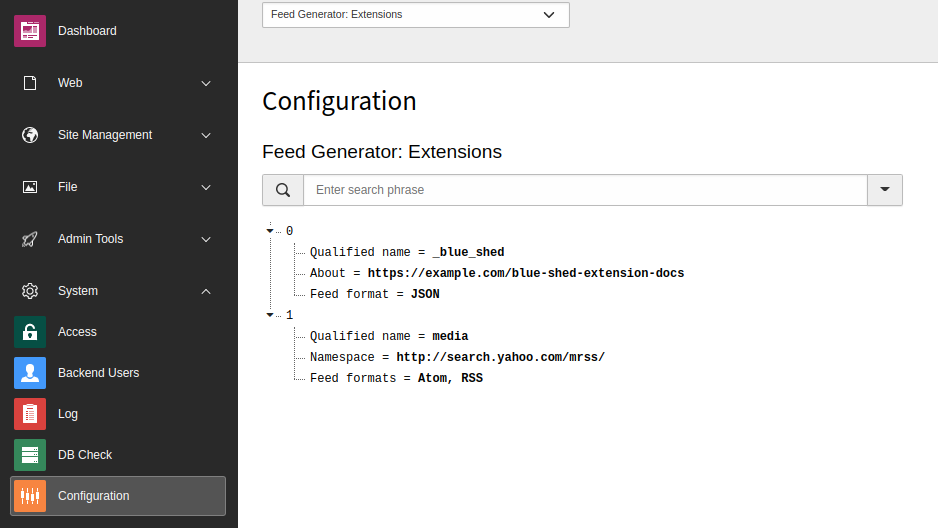
In the upper menu bar of the Configuration module, select
Feed Generator: Extensions.
Available extensions in the Configuration module
You can quickly look up an extension using the search box.
List of configured feeds
In the upper menu bar of the Configuration module, select
Feed Generator: Feeds.
Configured feeds in the Configuration module
The feeds are grouped by the fully-qualified name of the class that implements a
feed.
You can quickly look up a feed using the search box.
API
This chapter provides information about all necessary interfaces, classes and
enumerations. For up-to-date information, please read the source code.
This extension provides some implementations of interfaces as value objects.
However, you can also create your own implementations as long as they implement
the appropriate interfaces.
This class is an implementation of the FeedInterface and returns for every getter
an empty result. It is meant to be extended by custom implementations which then
only have to override the methods that should return something meaningful.
getId()
returntype
string
getTitle()
returntype
string
getDescription()
returntype
string
getLink()
returntype
string
getAuthors()
returntype
Brotkrueml\FeedGenerator\Collection\Collection
getDatePublished()
returntype
DateTimeInterface
getDateModified()
returntype
DateTimeInterface
getLastBuildDate()
returntype
DateTimeInterface
getLanguage()
returntype
string
getCopyright()
returntype
string
getImage()
returntype
Brotkrueml\FeedGenerator\Contract\ImageInterface
getCategories()
returntype
Brotkrueml\FeedGenerator\Collection\Collection
getItems()
returntype
Brotkrueml\FeedGenerator\Collection\Collection
getStyleSheet()
returntype
string
getExtensionContents()
returntype
Brotkrueml\FeedGenerator\Collection\Collection
Brotkrueml\FeedGenerator\ValueObject\Attachment
classAttachment
Fully qualified name
\Brotkrueml\FeedGenerator\ValueObject\Attachment
__construct(string url, string type = '', int length = 0)
param string $url
The URL
param string $type
The type
param int $length
The length
getUrl()
returntype
string
getType()
returntype
string
getLength()
returntype
int
Brotkrueml\FeedGenerator\ValueObject\Author
classAuthor
Fully qualified name
\Brotkrueml\FeedGenerator\ValueObject\Author
__construct(string name, string email = '', string uri = '')
Get a unique identifier associated with this feed. Used in Atom only.
returntype
string
getTitle()
Get the title of the feed.
returntype
string
getDescription()
Get the text description of the feed.
returntype
string
getLink()
Get a URI to the HTML website containing the same or similar information as this feed (i.e. if the feed is from
a blog, it should provide the blog's URI where the HTML version of the entries can be read).
returntype
string
getAuthors()
Get the data for authors.
returntype
Brotkrueml\FeedGenerator\Collection\Collection
getDatePublished()
Get the date on which this feed was published. Used in RSS only.
returntype
DateTimeInterface
getDateModified()
Get the date on which this feed was last modified. Used in Atom only.
returntype
DateTimeInterface
getLastBuildDate()
Get the date on which this feed was last build. Used in RSS only.
returntype
DateTimeInterface
getLanguage()
Get the language of the feed. Used in Atom and RSS.
returntype
string
getCopyright()
Get a copyright notice associated with the feed. Used in Atom and RSS.
returntype
string
getImage()
Get an image. Used in Atom and RSS.
returntype
Brotkrueml\FeedGenerator\Contract\ImageInterface
getCategories()
returntype
Brotkrueml\FeedGenerator\Collection\Collection
getItems()
Get the items of the feed.
returntype
Brotkrueml\FeedGenerator\Collection\Collection
getStyleSheet()
Get the path for an XSL stylesheet. Used in Atom and RSS.
The path should be prefixed with "EXT:".
returntype
string
getExtensionContents()
Get extension contents for the feed
returntype
Brotkrueml\FeedGenerator\Collection\Collection
Brotkrueml\FeedGenerator\Contract\ImageInterface
interfaceImageInterface
Fully qualified name
\Brotkrueml\FeedGenerator\Contract\ImageInterface
Interface for an image. Used in Atom and RSS.
getUrl()
Get the URL of the image. Required.
returntype
string
getTitle()
Get the title. Used and required for RSS.
returntype
string
getLink()
Get the link. Used and required for RSS.
returntype
string
getWidth()
Get the width of the image. Use for RSS.
returntype
int
Returns
144>
getHeight()
Get the height of the image. Use for RSS.
returntype
int
Returns
400>
getDescription()
Get the description of the image. Use for RSS.
returntype
string
Brotkrueml\FeedGenerator\Contract\ItemInterface
interfaceItemInterface
Fully qualified name
\Brotkrueml\FeedGenerator\Contract\ItemInterface
getId()
Get a unique identifier associated with this item. These are optional so long as a link is added; i.e. if no
identifier is provided, the link is used.
Get the content of the item. In JSON this is the HTML content.
returntype
string
getLink()
Get a URI to the HTML website containing the same or similar information as this item (i.e. if the feed is from
a blog, it should provide the blog article's URI where the HTML version of the entry can be read).
returntype
string
getAuthors()
Get the data for authors. For an RSS feed only one author can be assigned.
returntype
Brotkrueml\FeedGenerator\Collection\Collection
getDatePublished()
Get the date on which this item was published. If null, the date used will be the current date and
time.
returntype
DateTimeInterface
getDateModified()
Get the date on which this item was last modified. If null, the date used will be the current date and time.
Used in Atom and JSON.
returntype
DateTimeInterface
getAttachments()
Get the attachments (enclosure). In accordance with the RSS Best Practices Profile of the RSS Advisory Board,
no support is offered for multiple enclosures since such support forms no part of the RSS specification.