
Show info about "Hide default language" 

Extension key

info_hide_default_lang

Package name

brotkrueml/typo3-info-hide-default-lang

Version

2.0

Language

en

Author

Chris Müller

License

This document is published under the Creative Commons BY 4.0 license.

Rendered

Sun, 30 Nov 2025 10:26:03 +0000


When using a multilingual TYPO3 website with a single page tree, the page with the default language can be disabled. By default, this is only visible in the page properties where this can be adjusted. This extension displays a hint on the backend page itself to make editors aware of this setting.


Table of Contents:
Introduction 

What does it do? 

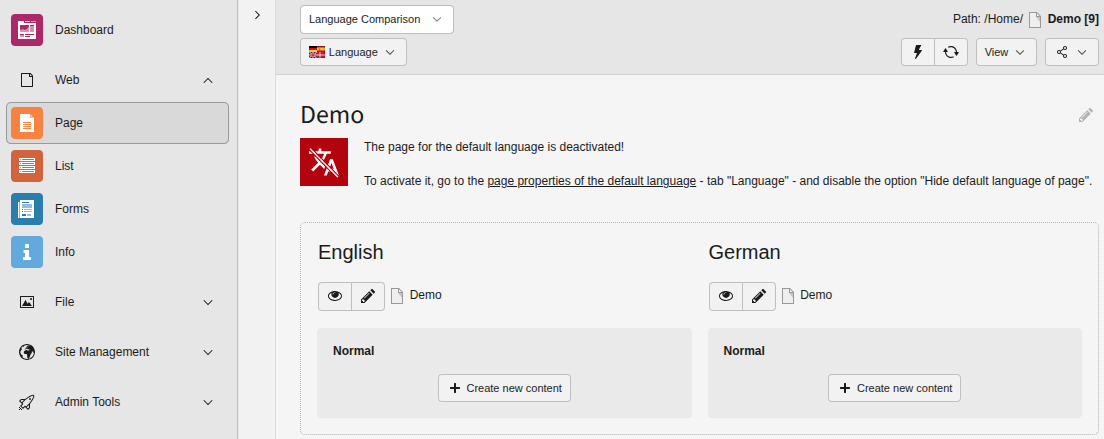
When using a multilingual TYPO3 website with a single page tree, the page with the default language can be disabled. By default, this is only visible in the page properties where this can be adjusted. This extension displays a hint on the backend page itself to make editors aware of this setting:

Display information that the default language of a page is deactivated

Display information that the default language of a page is deactivated

Release management 

This extension uses semantic versioning which basically means for you, that

  • Bugfix updates (for example, 1.0.0 => 1.0.1) just includes small bug fixes or security relevant stuff without breaking changes.
  • Minor updates (for example, 1.0.0 => 1.1.0) includes new features and smaller tasks without breaking changes.
  • Major updates (for example, 1.0.0 => 2.0.0) breaking changes which can be refactorings, features or bug fixes.

The changes between the different versions can be found in the changelog.

Installation 

Target group: Administrators

The recommended way to install this extension is by using Composer. In your Composer-based TYPO3 project root, type:

composer req brotkrueml/typo3-info-hide-default-lang
Copied!

and the recent stable version will be installed.

In a classic installation, you can also install the extension from the TYPO3 Extension Repository (TER).

Sitemap