
Index

Classification

c1_adaptive_images

Version

1.1

Language

en

Description

Manual covering TYPO3 extension c1_adaptive_images

Keywords

adaptive images, fluid-styled-content, lazysizes, viewhelper, image rendering

Copyright

since 2018

Author

Manuel Munz

Email

t3dev@comuno.net

License

This document is published under the Open Publication License available from http://www.opencontent.org/openpub/

Rendered

Sun, 24 Aug 2025 08:16:17 +0000

The content of this document is related to TYPO3, a GNU/GPL CMS/Framework available from www.typo3.org.

Table of Contents
Introduction

What does it do?

This extension brings a set of Fluid ViewHelpers that are useful for adaptive image rendering.

"Higher level" viewhelpers

The viewhelpers ai:image and ai:picture can be used as a replacement for the f:image viewhelper.

ai:image render an adaptive image
ai:picture render an adaptive picture

"Lower level" viewhelpers

Besides those "higher level" viewhelpers there are also viewhelpers, that allow for more experimantation and maximum flexibility. those may be used in combination with Fluids f:image and f:media viewhelpers.

ai:getCropVariants Returns a CropVariantCollection as array for a FileReference
ai:getSrcSet Get a srcset string for a given cropVariant and widths and generate images for srcset candidates
ai:ratioBox Wraps an image or picture tag in a ratio box
ai:placeholder.image Returns a placeholder image
ai:placeholder.svg Returns a placeholder SVG image

Demo Page

There are many pitfalls while using adaptive images and also a lot of options for implementing them. To experiment and test different possibilities there is a demo page using this extension which might give you an idea of different implementations and their problems.

Demo Page for adaptive images: https://ai-demo.comuno.net/

Users Manual

Target group: Editors

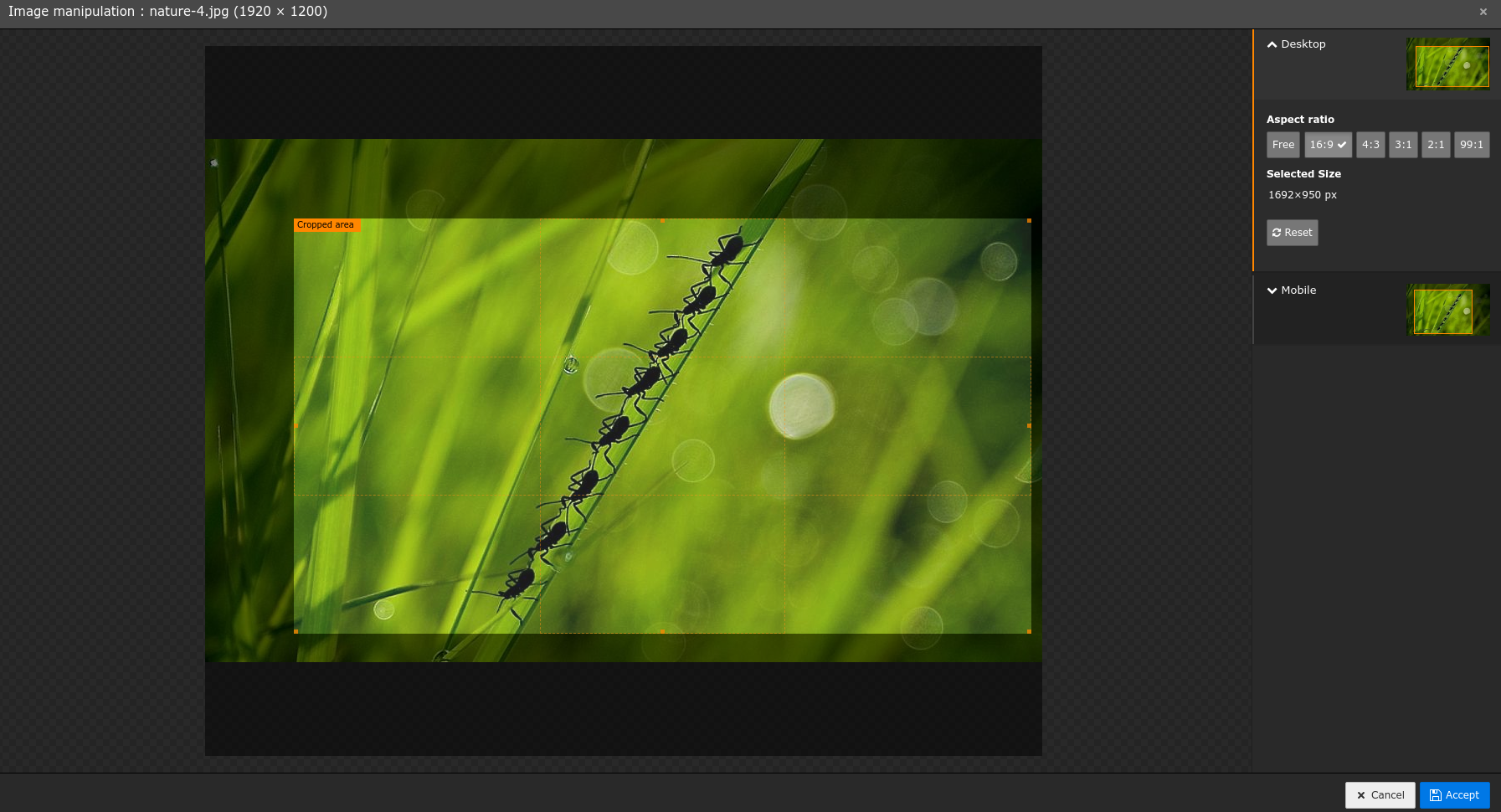
As an editor you shouldn't have to care too much about adaptive images. In most cases all you have to do is select crop settings in the image manipulation wizard for different breakpoints.

The image manipulation wizard with two crop variants for default and mobile in TYPO3 8.7

Administrator Manual

Target group: Administrators

Installation

To install the extension, perform the following steps:

  1. Go to the Extension Manager
  2. Install the extension
  3. Load the static template

Relevant TYPO3_CONF_VARS

GFX/processor_allowUpscaling

If set to false, then images are not upscaled. I.e. if one or more srcset candidates width is bigger than the original images width, then one last image candidate is created with the original images width.

On the other hand, if this setting is true, then images will be upscaled to match the widths of all given srcset candidates.

Respecting this setting was introduced with c1_adaptive_images version 0.1.5

Include third-party JavaScript (if needed)

This extension does currently not include third party JavaScript which is needed for advanced image modes and the integrator/administrator has to add them to the website.

lazysizes.js

Lazysizes.js is needed to render images using lazyloading. It also allows setting the sizes attribute for adaptive images to 'auto'.

Download it at https://github.com/aFarkas/lazysizes

The script should be included early, e.g.:

page.includeJSFooterlibs.lazysizes = EXT:yourtheme/Resources/Public/Js/lazysizes.min.js
Copied!

picturefill

A polyfill to support the picture tag in older browsers, most notably IE11 and Opera Mini. Download it at https://scottjehl.github.io/picturefill/

This script should be included early in the head of the website:

page.includeJSLibs.picturefill = EXT:yourtheme/Resources/Public/Js/picturefill.min.js
Copied!

Hint: As a simpler alternative one could also use https://github.com/aFarkas/lazysizes/tree/gh-pages/plugins/respimg as a picture polyfill.

Configuration Reference

Target group: Developers

TypoScript Reference

These typoscript settings are meant as defaults and can be overwritten by viewHelper arguments.

To be usable in Content Element templates, these settings are injected to the content elements settings in setup.typoscript:

# make settings available as settings.ai in all content elements
lib.contentElement {
    settings.ai < plugin.tx_c1_adaptive_images.settings
}
Copied!

Properties

Debug dimensions and ratio on directly on picture debug

debug

debug
type

boolean

Default

If set to true, debug info (width, height, ratio) is rendered as annotation directly on the image.

This setting is not used in the ViewHelpers, instead it is meant to be used in your templates.

<ai:picture debug="{settings.ai.debug} ...">
Copied!

Debug dimensions and ratio with JavaScript jsdebug

jsdebug

jsdebug
type

boolean

Default
If set, then some debug infos (loaded image dimensions, ratio, container width) are calculated via javascript

and shown near the image (positioning of the debug text with css)

This setting is not used in the ViewHelpers, instead it is meant to be used in your templates, e.g.

<ai:picture jsdebug="{settings.ai.jsdebug} ...">
Copied!

Use ratio box ratioBox

ratioBox

ratioBox
type

boolean

Default

This setting is not used in the ViewHelpers, instead it is meant to be used in your templates, e.g.

<ai:picture ratiobox="{settings.ai.ratiobox} ...">
Copied!

Default srcset widths srcsetWidths

srcsetWidths

srcsetWidths
type

string

Default

'360,768,1024,1440,1920'

Default value for srcsetWidths in Viewhelpers, when no srcsetWidths Viewhelper argument is given.

ViewHelpers

General

Add the fluid namespace declaration to fluid templates

Before version 0.1.5 registering of the global viewhelper namespace ai was not working.

Even if you use a version >= 0.1.5 you might still want to add this namespace declaration to your templates and partials:

<html xmlns:ai="C1\AdaptiveImages\ViewHelpers"
      xmlns:f="http://typo3.org/ns/TYPO3/CMS/Fluid/ViewHelpers"
      data-namespace-typo3-fluid="true">
   ...
</html>
Copied!

ai:image

This viewHelper outputs a complete adaptive image img tag, optionally with ratio box and a placeholder image. Use this when you don't need art direction/different cropVariants. If you need art direction see ai:picture.

Arguments

This viewHelper has all arguments which are available to the f:image viewHelper including fluids universal tag attributes plus the following:

argument required Default Description
lazy no false lazy load images and auto-sizes with lazysizes.js
debug no false Add debug output (width, height, ratio) to the generated images using IM/GM
jsdebug no false Add debug output (width, height, ratio) near the image using javascript
srcsetWidths no [320,640,1024,1440,1920] create srcset candidates with these widths
cropVariant no default select a cropping variant, in case multiple croppings have been specified or stored in FileReference
sizes no 100vw sizes attribute for the img tag. Takes precedence over additionalAttributes["sizes"] if both are given.
placeholderInline no true Include placeholder inline in HTML (base64 encoded)
ratiobox no false The image is wrapped in a ratio box if true. Nowadays browsers calculate the aspect ratio of the image and avoid page reflows, so you most likely don't need this option anymore for <image> tags.

Examples

<ai:image image="{file}"
      class="img-responsive lazyload"
      width="{dimensions.width}"
      height="{dimensions.height}"
      alt="{file.alternative}"
      title="{file.title}"
      srcsetWidths="320,640"
      placeholderInline="1"
      placeholderWidth="128"
      lazy="1"
      debug="1"
      ratiobox="1"
      jsdebug="1"
      sizes="100vw"
/>
Copied!

returns a complete image tag with lazysizes loading and a placeholder image. Important For lazysizes to work you have to add the class lazyload here.

ai:picture

This viewHelper outputs a complete adaptive image picture tag, optionally with ratio box and a placeholder image. If you need to show different cropVariants for different device widths you need to use this viewHelper.

Arguments

This viewHelper has all arguments which are available to the f:image viewHelper including fluids universal tag attributes plus the following:

argument required Default Description
lazy no false lazy load images and auto-sizes with lazysizes.js
debug no false Add debug output (width, height, ratio) to the generated images using IM/GM
jsdebug no false Add debug output (width, height, ratio) near the image using javascript
srcsetWidths no [320,640,1024,1440,1920] create srcset candidates with these widths
cropVariant no default select a cropping variant, in case multiple croppings have been specified or stored in FileReference
sizes no 100vw sizes attribute for the img tag. Takes precedence over additionalAttributes["sizes"] if both are given.
placeholderInline no true Include placeholder inline in HTML (base64 encoded)
ratiobox no false The image is wrapped in a ratio box if true.
sources no [['default' => '']] Array of arrays containing candidates for source tags

Examples

<ai:picture image="{file}"
      class="img-responsive-full lazyload"
        width="{dimensions.width}"
        height="{dimensions.height}"
        alt="{file.alternative}"
        title="{file.title}"
        sources="{
            'mobile': {
                'srcsetWidths': '320,640,768',
                'media': '(max-width: 767px)'
            }
          }"
        srcsetWidths="768,1024"
        placeholderInline="1"
        placeholderWidth="128"
        lazy="1"
        debug="1"
        ratiobox="1"
        jsdebug="1"
        sizes="100vw"
/>
Copied!

returns a complete picture tag with one source for the cropVariant mobile. With lazysizes loading and a placeholder image. Important For lazysizes to work you have to add the class lazyload here.

ai:getCropVariants

Returns a CropVariantCollection as array for a FileReference.

Arguments

argument required default Description
file yes   FileReference to get the cropVariants from.
asString no false Return the result as string (instaed array)

Examples

<ai:getCropVariants file="{file}" />
Copied!

will return (if the FileReference has two cropVariants):

array(2 items)
   default => array(7 items)
      id => 'default' (7 chars)
      title => '' (0 chars)
      cropArea => array(4 items)
         x => 0 (double)
         y => 0.09925 (double)
         width => 0.999 (double)
         height => 0.8991 (double)
      allowedAspectRatios => array(empty)
      selectedRatio => NULL
      focusArea => array(4 items)
         x => 0.33333333333333 (double)
         y => 0.33333333333333 (double)
         width => 0.33333333333333 (double)
         height => 0.33333333333333 (double)
      coverAreas => NULL
   mobile => array(7 items)
Copied!

ai:getSrcSet

Get a srcset string for a given cropVariant and widths and generate images for srcset candidates

Arguments

argument required Default Description
file yes   FileReference to use
cropVariant no default select a cropping variant, in case multiple croppings have been specified or stored in FileReference
widths no [320,640,1024,1440,1920] create srcset candidates with these widths
debug no 0 Add debug output (width, height, ratio) to the generated images

Examples

<ai:getCropVariants file="{file}" />
Copied!

returns

/fileadmin/_processed_/7/9/image_2269306f6a.jpg 360w,/fileadmin/_processed_/7/9/image_5f0de63291.jpg 720w
Copied!

or for cropVariant mobile and widths as array

<ai:getSrcset file="{file}" cropVariant="mobile" widths="[360,720]" debug="1" />
Copied!

returns

/fileadmin/_processed_/7/9/image_cbb4289869.jpg 0w,/fileadmin/_processed_/7/9/image_3e7a2d9258.jpg 720w
Copied!

ai:ratioBox

Wraps an image or picture tag in a ratio box. This also adds generated css style to the header of the page to set the correct padding-bottom to always maintain the ratio and thus prevent page reflows.

Arguments

argument required Default Description
file yes   FileReference to use
mediaQueries no [['default' => '']] Array of arrays containing ratio and media for cropVariants

Examples

<ai:ratioBox file="{file}" mediaQueries="{mobile: '(max-width:767px)', default: ''}">
    <f:comment>Your picture/image tag (f:image, ai:image etc.)</f:comment>
</ai:ratioBox>
Copied!

Assuming that the image has cropVariants default (16:9) and mobile (4:3) this will add css style to the head of the website and return:

<div class="rb rb--62dot5 rb--max-width767px-75">
  <f:comment>Your picture/image tag (f:image, ai:image etc.)</f:comment>
</div>
Copied!

ai:placeholder.image

Returns a placeholder image (base64 encoded data OR uri) width reduced quality and size, but original aspect ratio.

Arguments

argument required Default Description
file yes   FileReference to use
cropVariant no default select a cropping variant, in case multiple croppings have been specified or stored in FileReference
width no 128 create placeholder image with this width
height no   create placeholder image with this height
absolute no false Force absolute URL
dataUri no true Returns the base64 encoded dataUri of the image (for inline usage)

Examples

<ai:placeholder.image file="{file}" cropVariant="mobile" width="192" />
Copied!

returns the images as base64 encoded data-uri

data:image/jpeg;base64,/9j/4AAQSkZJ[...]
Copied!

or return image uri instead:

<ai:placeholder.image file="{file}" cropVariant="mobile" width="192" dataUri="0" />
Copied!

returns

/fileadmin/_processed_/7/9/image_702e24791e.jpg
Copied!

ai:placeholder.svg

Returns a placeholder SVG image (base64 encoded data uri) keeping original aspect ratio by replacing the SVG's width/and height of that of the generated image.

Arguments

argument required Default Description
file yes   FileReference to use
cropVariant no default select a cropping variant, in case multiple croppings have been specified or stored in FileReference

Examples

<ai:placeholder.svg file="{file}" cropVariant="mobile"/>
Copied!

returns the SVG as base64 encoded data-uri

data:image/svg+xml;base64,PHN2ZyB4bWxucz0naHR0[...]
Copied!

Known Problems

High server load because of image processing

When TYPO3 renders a page for the first time, all images on the pages are processed at once. After that, the generated images are cached on the filesystem.

Because this extension creates different sizes of each image, this can quickly escalate, especially when many images with a lot of different sizes are on the page and there are many concurrent requests.

In practice this is not a big problem, as long as you do not clear all generated images.

As long as TYPO3 itself does not support asynchronous image rendering there are some possible workarounds for this problem, if you really want to go that way:

  • Render images async with EXT:deferred_image_processing
  • Use external proxy services for image processing, e.g. Cloudflare or AWS cloudfront to offload the processing work
  • Use vips as faster alternative for image processing. Unfortunately there is currently no fully working implementation available for TYPO3, but for inspiration have a look at EXT:vips.
  • Another interesting approach, also by Christoph Lehmann is EXT:imgproxy which uses a locally hosted imgproxy (which also uses vips and is quite fast)

Contribute

Target group: Developers

If you want contribute to this extension you're welcome to do so.

Here are some hints to get you started.

Code

Please use the repository at github (https://github.com/mmunz/c1_adaptive_images) for issues and pull requests.

Linting and code checks

Please make sure your code passes all linting and code checks before opening an pull request.

To run all checks:

composer ci:static
Copied!

This will lint PHP with php-cs-fixer, run PHPStan and typoscript-linter.

php-cs-fixer

Lint PHP using

composer php:lint
Copied!

To automatically fix the PHP code:

composer php:fix
Copied!

Execute the tests

The are some unit and acceptance tests in the Tests folder.

Please run the tests (see Tests) and make sure they all pass before committing or opening a pull request.

Help with the documentation

If you want to make the documentation better:

ChangeLog

v1.1.1

  • Add editable site settings, thanks @zenoussi
  • Add extension icon, thanks @zenoussi

v1.1.0

  • Support TYPO3 v13
  • Drop support for v11
  • Introduce Site-Sets
  • Modernize PHP: More typing and constructor DI

v1.0.2

  • Fix Array to string conversion when adding focus-area (see #22)

v1.0.1

  • Remove plugin setting mode, this was not used anywhere.
  • Deprecate settings srcsetWidthsMobile and srcsetWidthsDesktop.
  • Reduce number of default srcset candidates in plugin.tx_c1_adaptive_images.settings.srcsetWidths

v1.0.0

  • Add TYPO3 v12 support, drop TYPO3 v10 support
  • Update tests
  • Refactoring

v0.2.0

  • Support TYPO3 9.5 and 10.4 now. Drop support for 8.7.
  • Breaking: rename TypoScript setting plugin.tx_c1_adaptive_images.settings.ratio_box to plugin.tx_c1_adaptive_images.settings.ratioBox for consistency
  • Fix error when a cropVariant other than default was used, see issue #13.
  • Fix exception with missing images, see issue #3.
  • Run tests using a sqlite database now

Tests

For tests you first need to prepare a local typo3 instance for testing inside this extensions root folder using composer.

You can install different TYPO3 versions for testing. From inside the extension folder (typo3conf/ext/c1_adaptive_images):

  • for 12.4: composer require typo3/minimal=^12.4 && git checkout composer.json && rm composer.lock
  • for 13.4: composer require typo3/minimal=^13.4 && git checkout composer.json && rm composer.lock

Unit tests should just work OOTB with: composer tests:unit

Functional and acceptance tests require a working mysql database where the testuser is allowed to create tables. Also some environment variables are required (adapt to your database credentials):

# export typo3DatabaseName=testing
# export typo3DatabaseUsername=testing
# export typo3DatabasePassword=testing
# export typo3DatabaseHost=127.0.0.1
export typo3DatabaseDriver=pdo_sqlite
export TYPO3_PATH_APP=$PWD/.Build
export TYPO3_PATH_ROOT=$PWD/.Build/public
Copied!

For acceptance tests

you also need to start a local webserver serving from the test-instance. This can be done with the builtin webserver in php:

cd typo3conf/ext/c1_adaptive_images
export TYPO3_PATH_APP=$PWD/.Build
export TYPO3_PATH_ROOT=$PWD/.Build/public
php -S 127.0.0.1:8888 -t .Build/public/
Copied!

Also selenium or chromedriver is required.

Start chromedriver with:

chromedriver --url-base=wd/hub
Copied!