Cloudflare Client 

Classification

cloudflare

Version

2.7

Language

en

Description

The Cloudflare extension for TYPO3 is a powerful solution to integrate your website with Cloudflare, whose mission is to help build a better Internet. This extension provides a variety of features to ensure your website is running optimally on the Cloudflare platform, a global leader in web performance and security.

Keywords

cloud, content delivery network, cdn, proxy, reverse proxy, ssl, performance

Copyright

2012-2026

Author

Xavier Perseguers

Email

xavier@causal.ch

License

This document is published under the Open Publication License available from http://www.opencontent.org/openpub/

Rendered

Tue, 24 Mar 2026 12:37:58 +0000

The content of this document is related to TYPO3, a GNU/GPL CMS/Framework available from www.typo3.org.

Table of Contents
Introduction 

What does it do? 

This extension ensures your TYPO3 website is running optimally on the Cloudflare platform. With it, you receive:

  • Correct IP address information for visitors
  • Better protection against common vectors of attacks

Things you need to know:

  • The main purpose of this extension is to ensure you have no change to your originating IPs when using Cloudflare. Since Cloudflare acts as a reverse proxy, connecting IPs now come from Cloudflare's range. This extension will ensure you can continue to see the originating IP [#].
  • In addition, this extension lets you benefit from Cloudflare's caching mechanism transparently and will automatically flush the cache for you, when it is needed.
  • This extension lets you manage multiple domains on Cloudflare, just as TYPO3 does, and lets you easily toggle "Development Mode" from TYPO3 Backend whenever Cloudflare's optimizations should be temporarily bypassed.

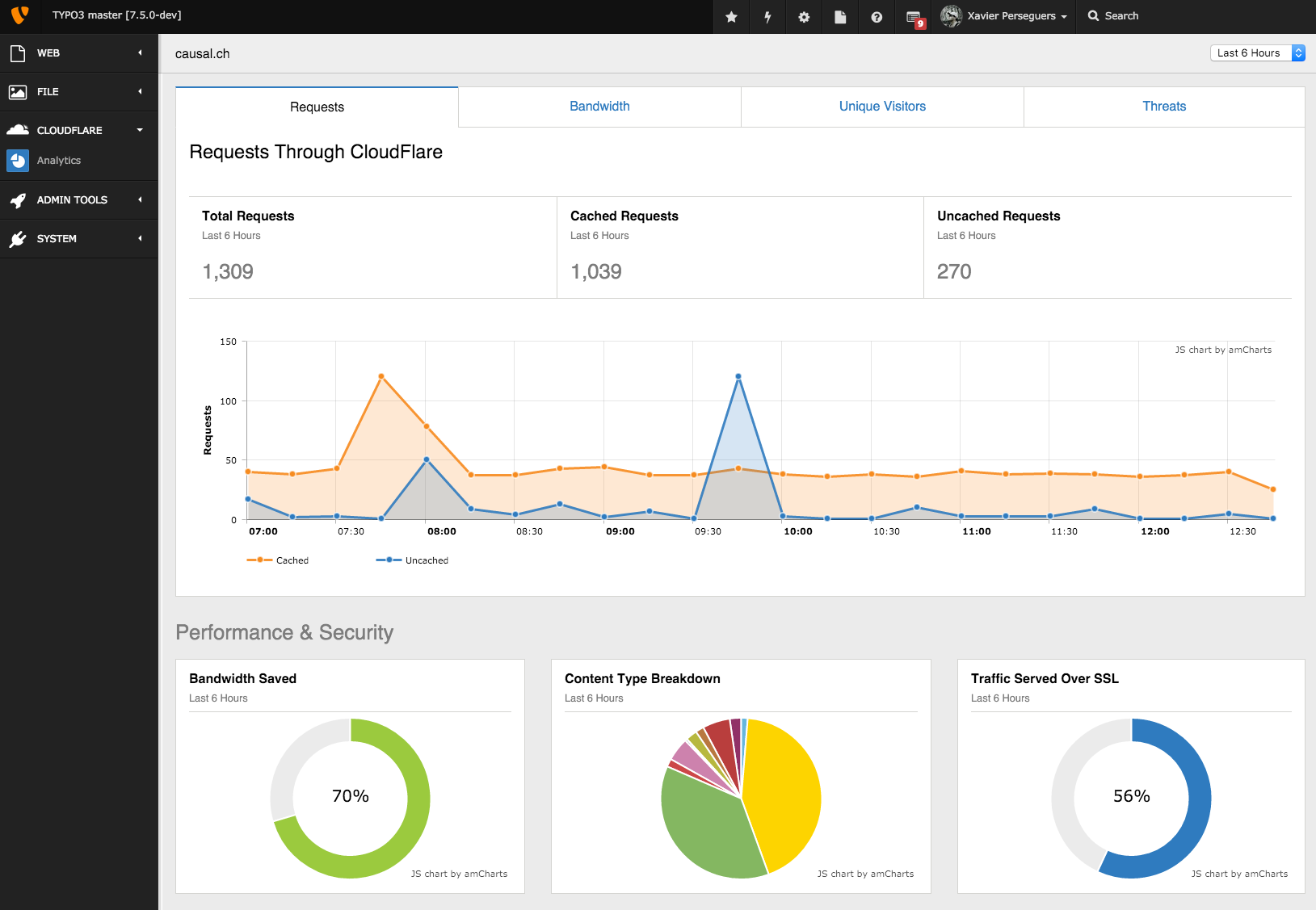
Finally, it provides a handy dashboard as a Backend module featuring some analytics.

Cloudflare Analytics

Backend module featuring Cloudflare analytics for your domain(s) over a configurable period of time.

What is Cloudflare? 

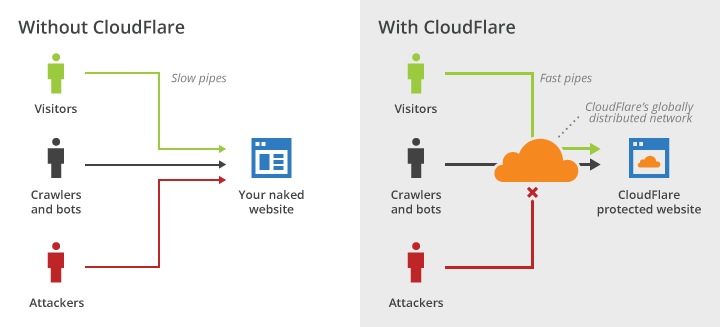
Cloudflare protects and accelerates any website online. Once your website is a part of the Cloudflare community, its web traffic is routed through their intelligent global network. They automatically optimize the delivery of your web pages so your visitors get the fastest page load times and best performance. They also block threats and limit abusive bots and crawlers from wasting your bandwidth and server resources. The result: Cloudflare-powered websites see a significant improvement in performance and a decrease in spam and other attacks.

System overview

System overview with and without Cloudflare.

Cloudflare's system gets faster and smarter as their community of users grows larger. They have designed the system to scale with their goal in mind: helping power and protect the entire Internet.

Cloudflare can be used by anyone with a website and their own domain, regardless of your choice in platform. From start to finish, setup takes most website owners less than 5 minutes. Adding your website requires only a simple change to your domain's DNS settings. There is no hardware or software to install or maintain and you do not need to change any of your site's existing code. If you are ever unhappy you can turn Cloudflare off as easily as you turned it on. Their core service is free and they offer enhanced services for websites who need extra features like real time reporting or advanced SSL protection.

Read more on: https://www.cloudflare.com/.

Footnotes
[1]
TYPO3 lets you fix it but as they are numerous proxy servers, the configuration may be tedious. The best method is to restore the originating IP at the Web Server level but sometimes this is not possible. This is the reason why, in addition to flushing cache on Cloudflare, this extension lets the user restore the originating IP by ticking a configuration checkbox.

Installing the extension 

With thousands of sites on the internet using TYPO3, many TYPO3 sites have decided to use Cloudflare to make their site faster with this free CDN and to make the site more secure with their security services.

We will cover the recommended first steps so that any TYPO3 administrator should be able to get Cloudflare up and running in a few minutes.

Step 1 

Install the Cloudflare TYPO3 extension to restore visitor IP. Since Cloudflare acts as a proxy for sites, Cloudflare's IPs are going to show in your logs, unless you install something to restore the original visitor IP.

This extension can be installed through the typical TYPO3 installation process using the Extension Manager or using composer, if you prefer.

Step 2 

Review your basic security settings.

If you have a site that is frequently the target of spam or botnet attacks, changing your security level to a higher setting will help further reduce the amount of spam you get on your site. Cloudflare defaults all users to a medium setting when you first add the domain to Cloudflare.

Why do this? If you want your site to have less security and protection from various attacks, then you would want to change your setting to a lower level (please keep in mind this makes your site more vulnerable). If you want your site to have higher security, please keep in mind that you may get more false positives from visitors complaining about a challenge page that they have to pass to enter your site.

Step 3 

To do so, create a Page Rule to exclude the typo3 sections from Cloudflare's caching and performance features. You can access Page Rules in your Cloudflare dashboard.

URL pattern: www.example.com/typo3/*
Performance: off
Copied!

Configuration 

This extension comes with a few settings available from Admin Tools > Settings.

Category Basic 

  • Use Bearer Authentication (recommended) : Enables RFC 6750 Bearer Authentication. With this setting enabled, Email is no longer a required field (see below for configuration).
  • Email : The e-mail address associated with the API key.
  • API Key : This is the API key made available on your account page (https://www.cloudflare.com/a/account/my-account)
  • Domains : Once the API key and the email are successfully saved (be sure to click on "Save cloudflare configuration" button first and possibly reload the extension configuration modal dialog), a list of domains (or zones in Cloudflare's terminology) handled by the corresponding account is rendered. Just tick the corresponding check boxes to instruct TYPO3 which domains should get their cache flushed when clearing all caches in TYPO3 Backend.
  • Enable Analytics Backend module : Shows the Analytics module in Backend (under "Cloudflare" dedicated section).

Category Advanced 

  • Purge individual files by URL: This checkbox allows you to purge individual files on Cloudflare's cache using an URL.
  • Purge cache by Cache-Tag: This checkbox allows you to purge individual files on Cloudflare's cache using the associated Cache-Tag. Beware: This option requires an Enterprise account.

  • Originating IPs : This checkbox allows you to restore the originating IPs.

You should consider restoring originating IPs at the Web Server level instead. If using Nginx, please read https://support.cloudflare.com/hc/en-us/articles/200170706-Does-CloudFlare-have-an-IP-module-for-Nginx- for instructions.

The official list of Cloudflare's reverse-proxy IPs (both IPv4 and IPv6) can be found on https://www.cloudflare.com/ips.

Allowing Backend users to clear cache on Cloudflare 

You can enable the "flash icon" clear cache command for common Backend users by adding following code to user's and/or user group's TSconfig:

options.clearCache.cloudflare = 1
Copied!

Configuration of the Bearer Authentication 

  • Go to https://dash.cloudflare.com/profile/api-tokens
  • Under the section "API Tokens", click the button "Create Token"
  • Choose to create a custom token instead of a template
  • This extension requires following permissions:

    • Zone / Zone / Read (to be able to select the zone while configuring the extension)
    • Zone / Zone Settings / Edit (to toggle Development mode)
    • Zone / Cache Purge / Purge (for obvious reason)
    • Zone / Analytics / Read (for the Backend module showing statistics)

Naturally you should restrict your token to one or more zones (zone resources).

Toggling development mode 

A monochrome gear icon in the toolbar lets you manage your domains / zones:

Toggling development mode

Development mode is a way for you to make changes to your site, and see the changes immediately. By entering development mode, you will bypass Cloudflare's proxy and suppress minification. As a result, as you make changes to images, CSS or Javascript, the changes will appear immediately. Development mode stays on for three (3) hours and then automatically toggles off.

The gear icon shows a badge with the number of zones in development mode (if greater than 0).

Support for SSL 

SSL support for Cloudflare originally required a Business plan (formerly "Pro account") but is now freely available to everyone, including free accounts. Please read https://support.cloudflare.com/hc/en-us/articles/200170336-How-do-I-upgrade-to-a-Business-Plan if you want to upgrade your FREE account.

Cloudflare supports either Full SSL (strict) or Flexible SSL. Full SSL requires your web server to run over SSL whereas Flexible SSL will only use SSL from the client to Cloudflare but then your web server will still operate on port 80. This extension is able to deal with Flexible SSL and will automatically set the HTTPS header to "on" if Flexible SSL is detected, allowing you to generate links containing the "https://" prefix.

You may enforce SSL either at the Web Server level or using Page Rules in Cloudflare. If using Apache, please read https://support.cloudflare.com/hc/en-us/articles/200170536-How-do-I-redirect-HTTPS-traffic-with-Flexible-SSL-and-Apache.

Full SSL 

As explained full SSL means Cloudflare provides its own wildcard certificate for your end-users but still connects using SSL to your server. This is of course the most secured option. The common problem with SSL on your own servers is when having virtual hosts (multiple domains on the same IP).

Year ago I successfully checked if Cloudflare would support SNI (an extension to the TLS protocol that indicates what hostname the client is attempting to connect to at the start of the handshaking process) and self-signed certificates and this is the case.

Read more:

ChangeLog 

The following is a very high level overview of the changes in this extension. For more details, read the online log.

Version Changes
2.7.x Compatibility with TYPO3 12 LTS, 13 LTS and 14 LTS
2.6.x Compatibility with TYPO3 11 LTS, 12 LTS and 13 LTS
2.5.x Compatibility with TYPO3 10 LTS and 11 LTS
2.4.x Compatibility with TYPO3 9 LTS and 10 LTS
2.3.x Compatibility with TYPO3 8 LTS and 9 LTS
2.2.x Compatibility with TYPO3 7 LTS to 9 LTS
2.1.x Support for purging cache by Cache-Tags (enterprise)
2.0.x
  • Cloudflare API v4
  • Dashboard with analytics
1.3.x Compatibility with TYPO3 6.2 and 7 LTS
1.2.x Enhanced support of flexible SSL
1.1.x Toolbar menu to manage the domains / zones
1.0.0 First release on TER

Flushing cache on Cloudflare 

When you clear frontend caches in the Backend, the cache on Cloudflare will be flushed as well:

Flushing cache on Cloudflare