The content of this document is related to TYPO3,
a GNU/GPL CMS/Framework available from www.typo3.org.
Adds support for external providers to Direct Mail. This extension extends the
types of recipient lists handled by Direct Mail with an entry for parameterized
custom lists. These custom lists are prepared by user functions and may easily
reuse your own business logic.
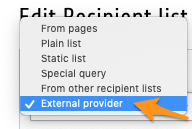
This extension adds an entry "External provider" to the drop-down list of Direct Mail's recipient list definition:
This special type of recipient list lets you dynamically generate the list of recipients.
In short, this means that with a standard user function, you are able to use any logic you wish to define the
recipients. A typical example would be to read the information from an external source, such as a legacy application or
a custom database table. Another example, if having an Extbase-based extension, would be to reuse your domain model and
use it as a source to feed the recipient list.
Screenshots
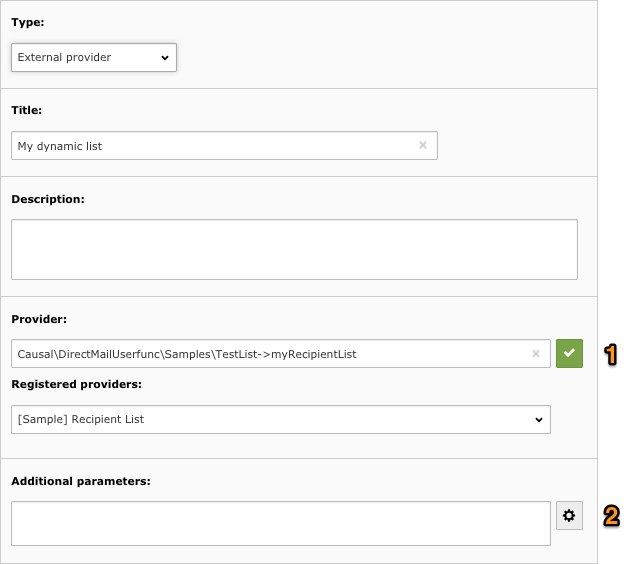
Icon confirms that the provider definition is valid (class \Causal\DirectMailUserfunc\Samples\TestList was
found and method "myRecipientList" exists).
Icon informs you that a wizard is available to configure the additional parameters. Simply click on it to
invoke a user-generated script.
In case either the class or the method was not found, an warning message is shown that explains what is wrong with the
provider definition.
User specified an invalid or not included class or a valid class but an invalid method:
Providers may be registered to enhance the user experience:
Users manual
This chapter describes how to use the extension from a user point of view.
Your lists show the number of records, as with any other recipient list:
As you see, dynamic lists are fully integrated with Direct Mail.
Supported types of recipient lists
With the exception of custom table records, Direct Mail supports recipient lists with basically three types of items:
List of tt_address records
List of fe_users (frontend users) records
Plain list of email addresses
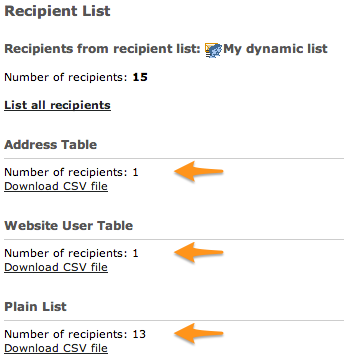
This extension allows you to create dynamic list of recipients using any of these types of items. Screenshot below shows
a dynamic list with 1 record coming from table tt_address, 1 record coming from table fe_users and 13 records given as
plain email addresses:
Developer manual
Simplest class and method you may write to dynamically create a
recipient list.
If you wish to provide records from tables tt_address or fe_users,
this is easily done with:
// Add tt_address record with uid 12 to the list
$params['lists']['tt_address'][] = 12;

// Add fe_users record with uid = 14 to the list
$params['lists']['fe_users'][] = 14;
This will add a new entry "Some Label" that fills in provider yourClass->yourMethod when selected:
Tip
Parameter label of the registration code supports a localized label definition such as
LLL:EXT:direct_mail_userfunc/Resources/Private/Language/locallang.xlf:userfunction.myRecipientList
Providers are automatically sorted by label in the selector
Additional parameters
When creating a recipient list from type external provider, you have the possibility to specify additional parameters
that will be passed as a single string arguments to the provider. Let's suppose the user specify this recipient list:
Method myRecipientList will get additional parameter "13" and will be able to process it the way it likes:
publicfunctionmyRecipientList(array &$params, $pObj){
// Retrieve user parameters (will get "13")
$sizeOfRecipientList = $params['userParams'];
// snip
}
Copied!
The next two sections describe how you may:
Create a JavaScript-based wizard to manipulate the string of additional parameters
Create additional TCA fields to be even more user friendly
Using a wizard for additional parameters
You may need to ask user for more than a single parameter. And as a single string is used to store and pass them to your
method, you will have to encode them in some way, either as a comma-separated list of values or as a JSON string or even
as XML. This means you hardly can expect user to remember the exact syntax to be used to specify all those parameters.
You already know of many extensions providing a wizard to help you prepare plugin configuration. With this extension,
you also have the opportunity to create a wizard. The wizard is typically written in JavaScript and basically supports
whatever you may do with a TCA wizard of type "userFunc".
Screenshot below shows an additional icon next to the parameter field:
In order to display the parameter wizard icon (), you have to write a method getWizard() in your class that
returns either the JavaScript code to be executed when user clicks on the icon:
publicfunctiongetWizard(string $methodName, array &$PA, array $row, bool $checkOnly = false) : ?string{
$js = null;
if ($methodName === 'myRecipientList') {
if ($checkOnly) {
// We just need to return some non-empty string to show the wizard buttonreturn'ok';
}
$js = '
var params = $(\'[data-formengine-input-name="' . $PA['itemFormElName'] . '"]\').val();
if (params == "") params = 2;
';
// Show a standard javascript prompt and assign result to the parameters field// This information will be saved with form and available in myRecipientList
$js .= '
var r = prompt("How many items do you want in your list?", params);
if (r != null) {
$(\'[data-formengine-input-name="' . $PA['itemFormElName'] . '"]\').val(parseInt(r));'.
implode('', $PA['fieldChangeFunc']) .';
}
';
}
return $js;
}
Copied!
Parameters of the getWizard method are:
$methodName : Name of the method for which a wizard may be specified.
$PA : The full TCA configuration for the parameter field. Passed by reference. This allows you to change the way
the input field itself is rendered.
$row : The corresponding database row.
$checkOnly : If true, you should only return an non-empty string if some JS is needed. This is used by the
FormEngine to show the wizard button next to the parameter field. The actual JS should be returned if $checkOnly
is false.
Caution
Make sure to always run JavaScript code stored in $PA['fieldChangeFunc'] when updating the value as it takes
care of telling TCEforms that the value has been updated.
Tip
Your code will effectively be embedded and run from a jQuery context and the jQuery object itself will be available
as the usual $ variable.
If you run code written in method getWizard() above, you will get a standard JavaScript prompt that asks you the
number of recipients you want to get in your recipient list:
Using TCA for additional parameters
The simple JavaScript wizard presented in previous section is fine as long as you want to store a single additional
parameter, e.g., a number or some string. But when you wish to store some complex settings such as various options or
business record references, this quickly becomes less than ideal and has the drawback that you are on your own to
serialize/deserialize your configuration options in the additional parameters text area. Besides, the serialized
configuration is shown in clear in the text area.
Fortunately there is an alternative. This extension lets you define custom TCA to be used for additional parameters.
Once defined, this custom TCA will replace the text area with any field you want:
Upon saving, this extension will take care of automatically and transparently serializing your custom fields and their
corresponding values into the standard tx_directmailuserfunc_params database field (the one that is mapped to the
standard text area) as JSON. You will automatically get decoded values in your itemsProcFunc.
In order to replace the text area, you have to write a method getWizardFields in your class that returns an array
of table configuration (TCA):
Type number "5" corresponds to a list of recipients defined as an external provider, what we are dealing with here.
Tip
Method getWizardFields should return an empty array if no additional parameters are needed and NULL if the
standard additional parameters text area should be kept (useful when the user class is used for both TCA and non
TCA-based additional parameters).
Sample Providers
Three wizards are provided in directory Samples of the extension. To activate them, go to Extension Manager,
click on extension External Providers for Direct Mail, tick the corresponding checkbox and click on Update button:
Once activated, you may use
\Causal\DirectMailUserfunc\Samples\TestList->myRecipientList as provider. This provider
has a simple user parameter wizard using standard JavaScript.
Another provider
\Causal\DirectMailUserfunc\Samples\TestListTca->myRecipientList shows how you may create enhanced
wizard with a TCA definition instead of a JavaScript-based wizard.
This extension is using the same contribution workflow as for TYPO3 Core, but
with GitHub PRs for the review process. Please read more about the workflow in
the TYPO3 Contribution Guide.
Contribution rules
There must be a ticket in the project's bug tracker explaining the problem / the suggested enhancement

 confirms that the provider definition is valid (class
  informs you that a wizard is available to configure the additional parameters. Simply click on it to
invoke a user-generated script.
informs you that a wizard is available to configure the additional parameters. Simply click on it to
invoke a user-generated script.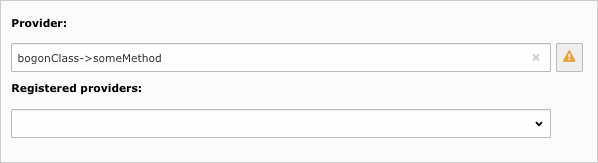




 ), you have to write a method

