Metadata and Content Analysis Service 

Extension key

extractor

Package name

causal/extractor

Version

main

Language

en

Keywords

Metadata, Content Analysis, Tika, FAL, EXIF, IPTC, XMP, ID3

Copyright

2014-2026

Author

Xavier Perseguers

License

This document is published under the Creative Commons BY 4.0 license.

Rendered

Tue, 24 Mar 2026 10:04:09 +0000


This extension detects and extracts metadata (EXIF / IPTC / XMP / ...) from potentially thousand different file types (such as MS Word/Powerpoint/Excel documents, PDF and images) and bring them automatically and natively to TYPO3 when uploading assets. Works with built-in PHP functions but takes advantage of Apache Tika and other external tools for enhanced metadata extraction.


Table of Contents:
Introduction 

What does it do? 

This extension detects and extracts metadata (EXIF / IPTC / XMP / ...) from potentially thousand different file types (such as MS Word/Powerpoint/Excel documents, PDF and images) and bring them automatically and natively to TYPO3 when uploading assets.

It works with built-in PHP functions but takes advantage of Apache Tika and other external tools for enhanced metadata extraction.

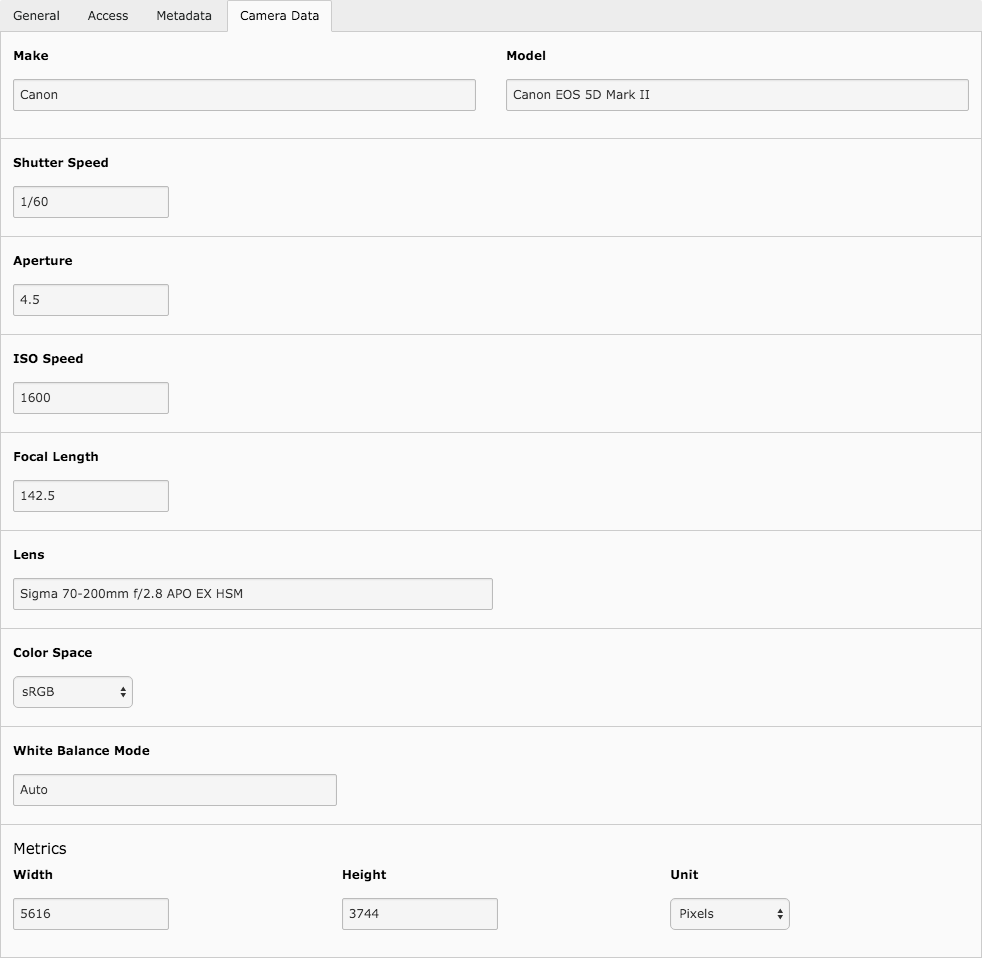
Metadata for an image

Metadata extracted from a digital camera image.

Requirements 

  • PHP methods: exif_read_data, iptcparse

Following tools are optional but recommended for best extraction results:

Apache Tika

The Apache Tika|TM| toolkit detects and extracts metadata and text from over a thousand different file types (such as PPT, XLS, and PDF). All of these file types can be parsed through a single interface, making Tika useful for search engine indexing, content analysis, translation, and much more.

Use of PHP method fsockopen is required when using Tika Server.

ExifTool

ExifTool is a plateform-independant Perl library plus a command-line application for reading, writing and editing meta information in a wide variety of files. ExifTool supports many different metadata formats including EXIF, GPS, IPTC, XMP, JFIF, GeoTIFF, ICC Profile, Photoshop IRB, FlashPix, AFCP and ID3, as well as the maker notes of many digital cameras.

ExifTool is also available as a standalone Windows executable (which does not require Perl) and a Macintosh OS X package.

Pdfinfo
Pdfinfo prints the content of the "Info" dictionary (plus some other useful information) from a Portable Document Format (PDF) file.

Users Manual 

This chapter describes how to use the extension from a user point of view.

Available fields 

Field Title Type
title Title string
width Width integer
height Height integer
alternative Alternative text or headline string
description Description string
visible Visible 0 or 1
status Status
  • 1 (OK)
  • 2 (Pending)
  • 3 (Under review)
keywords Keywords comma-separated list of strings
caption Caption string
creator_tool Creator tool string
download_name Download name string
creator Creator string
publisher Publisher string
source Source string
location_country Country string
location_region Region string
location_city City string
latitude GPS latitude floating point
longitude GPS longitude floating point
altitude GPS altitude integer (meters)
ranking Ranking / Rating integer (0-5)
content_creation Content creation date integer (timestamp)
content_modification Content modification date integer (timestamp)
note Note string
unit Unit (for width/height)
  • "px" - pixels
  • "cm" - centimeters
  • "in" - inches
  • "mm" - millimeters
  • "m" - meters
  • "p" - pica (1 pica = 12 points)
  • "pt" - points (1 inch = 72 points)
duration Duration of the movie/sound integer (number of seconds)
color_space Color space
  • "RGB"
  • "sRGB"
  • "CMYK"
  • "CMY"
  • "YUV"
  • "grey"
  • "indx" (indexed)
pages Number of pages integer
language Language of the file string

Field details 

Standard fields 

alternative 

A headline is a brief publishable synopsis or summary of the contents of the photograph. Like a news story, the Headline should grab attention, and telegraph the content of the image to the audience. Headlines need to be succinct. leave the supporting narrative for the Description field. Do not, however, confuse the Headline term with the Title term.

description 

The Description field, often referred to as a "caption" is used to describe the who, what (and possibly where and when) and why of what is happening in the photograph. If there is a person or people in the image, this caption might include their names, and/or their role in the action that is taking place. If the image is of a location, then it should give information regarding the location. Don't forget to also include this same "geographical" information in the Geographical fields. The amount of detail you include will depend on the image and whether the image is documentary or conceptual. Typically, editorial images come with complete caption text, while advertising images may not.

keywords 

Enter keywords (terms or phrases) used to express the subject of the content seen in the photograph. Keywords may be free text (i.e. they are not required to be taken from a controlled vocabulary). You may enter any number of keywords, terms or phrases into this field, simply separate them with a comma or semi-colon.

Geographical fields 

According to the IPTC standards, the descriptions of geographic fields contained within the IPTC Core Image section did not clearly distinguish whether the value should be the actual location shown in the image, or the location where the photo was taken. Because most GPS systems, by default, indicate where the photographer was standing, the IPTC standard is now suggesting to use the fields City, Region and Country for the location "shown" in the image, whereas the latitude and longitude will logically be related to the position the photographer was standing.

location_country 

Enter the full name of the country pictured in the photograph. This field is at the first level of a top-down geographical hierarchy. The full name should be expressed as a verbal name and not as an ISO country code.

location_region 

Enter the name of the subregion of a country -- usually referred to as either a State or Province -- that is pictured in the image. Since the abbreviation for a State or Province may be unknown to those viewing your metadata internationally, consider using the full spelling of the name. Province/State is a the second level of a top-down geographical hierarchy.

location_city 

Enter the name of the city that is pictured in the image. If there is no city, consider using the name of the location shown in the image. This name could be the name of a specific area within a city (Manhattan) or the name of a well-known location (Pyramides of Giza) or (natural) monument outside a city (Grand Canyon). City is at the third level of a top-down geographical hierarchy.

Installing the extension 

There are a few steps necessary to install the Metadata and content analysis extension. If you have installed other extensions in the past, you will run into little new here.

As usual, install the extension and load it using the Extension Manager. Then configure it by either clicking on the gear icon or on the title of this extension.

Configuring the extension

Click on the title or on the gear icon to configure the extension.

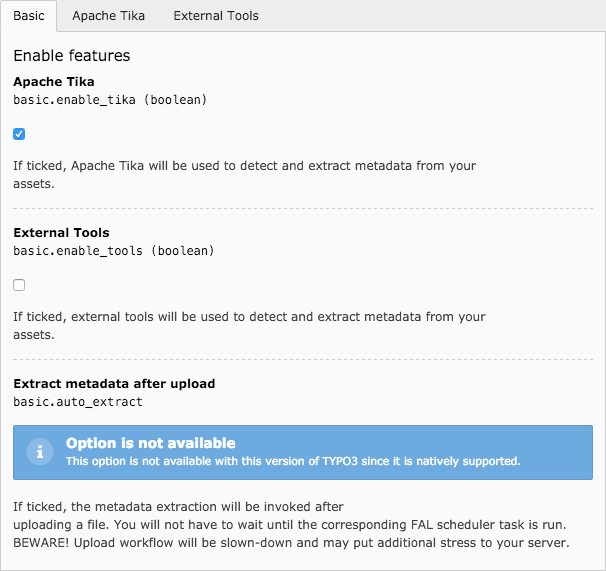
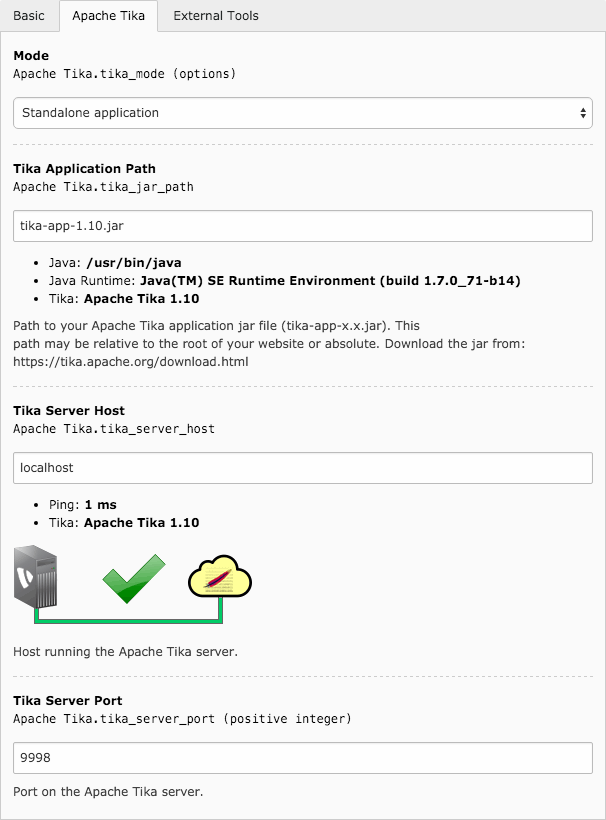
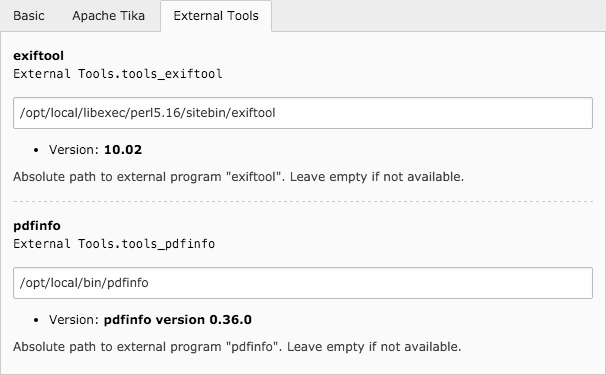
The tabs (see corresponding figures) let you configure the various settings of this extension.

Basic settings

Basic settings to enable or disable the use of external tools or extract metadata on-the-fly when uploading a file (TYPO3 6.2 only since this is the case automatically since TYPO3 7).

Apache Tika

Settings for using Apache Tika (optional).

External tools

Path to various external tools (optional).

Apache Tika 

Using Apache Tika is highly recommended for best extraction results. You may use either the standalone application jar or connect to an Apache Tika server. The latter should probably be quicker to answer since it runs as a daemon.

Apache Tika may be downloaded from https://tika.apache.org/download.html.

Connection to an Apache Tika Server

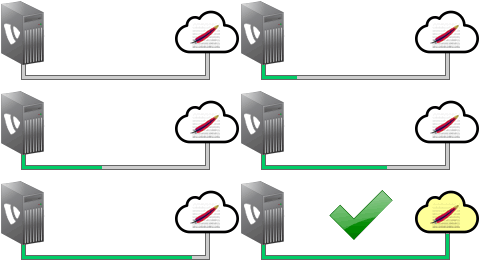
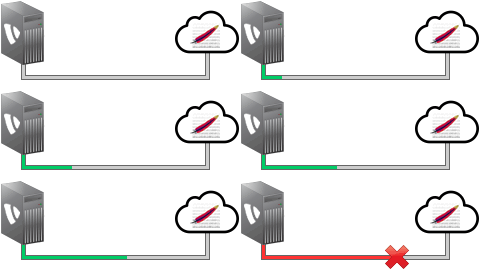
When connecting to a server and not to the standalone Jar application, handy animations, in Extension Manager, will let you easily double check that provided parameters are correct:

Successful connection
Broken connection
Broken connection

External Tools 

This extension is capable of using external tools to extract metadata:

  • exiftool for files containing EXIF, IPTC / XMP
    metadata;
  • pdfinfo for PDF.

Available extraction services 

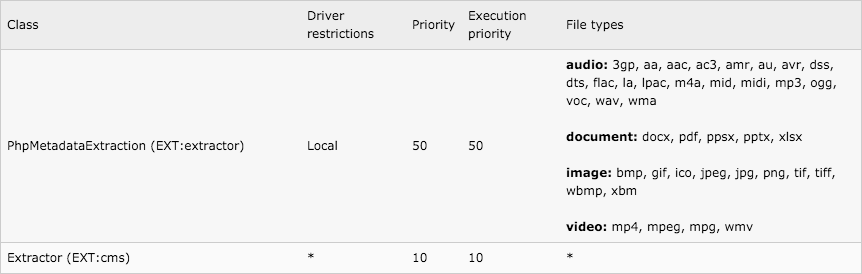
You may open Admin Tools --> Reports --> Installed extraction services to get an overview of installed metadata extraction services, with detailed information about each of them.

Extraction services

Overview of available metadata extraction services, with supported file types.

Logging 

This extension makes use of the Logging system introduced in TYPO3 CMS 6.0. It is far more flexible than the old one writing to the "sys_log" table. Technical details may be found in the TYPO Core API documentation.

As an administrator, what you should know is that the TYPO3 Logger forwards log records to "Writers", which persist the log record.

By default, with a vanilla TYPO3 installation, messages are written to the default log file (typo3temp/logs/typo3_*.log).

Dedicated log file for the extraction of metadata 

If you want to redirect every logging information from this extension to typo3temp/logs/metadata.log and send log entries with level "WARNING" or above to the system log, you may add following configuration to typo3conf/AdditionalConfiguration.php:

$GLOBALS['TYPO3_CONF_VARS']['LOG']['Causal']['Extractor']['writerConfiguration'] = [
    \TYPO3\CMS\Core\Log\LogLevel::DEBUG => [
        'TYPO3\\CMS\\Core\\Log\\Writer\\FileWriter' => [
            'logFile' => 'typo3temp/logs/metadata.log'
        ],
    ],

    // Configuration for WARNING severity, including all
    // levels with higher severity (ERROR, CRITICAL, EMERGENCY)
    \TYPO3\CMS\Core\Log\LogLevel::WARNING => [
        'TYPO3\\CMS\\Core\\Log\\Writer\\SyslogWriter' => [],
    ],
];
Copied!

Developer manual 

This chapter describes some internals of this extension to let you extend it easily.

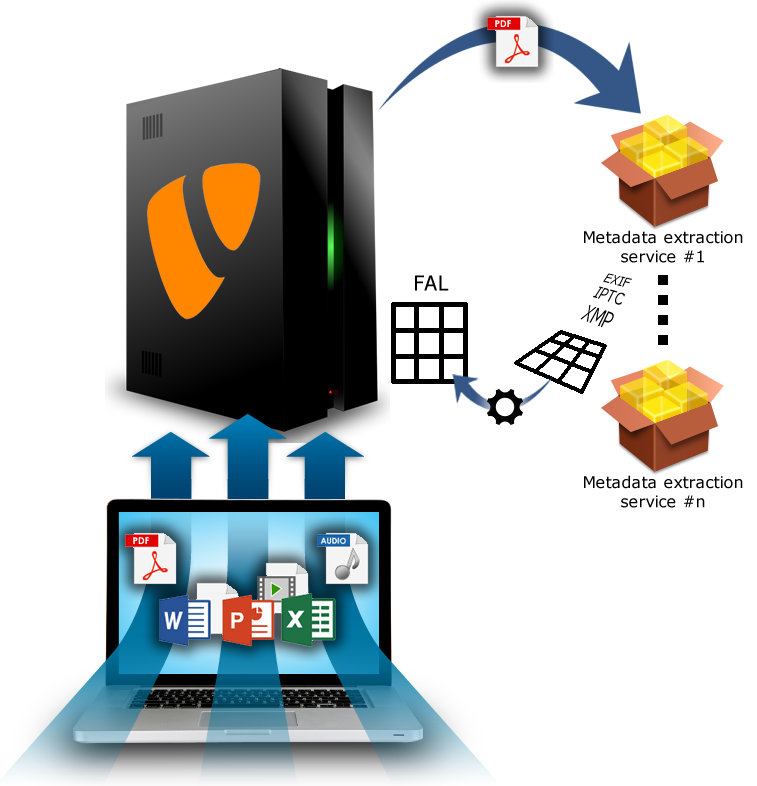
Assets such as PDF, images, documents, ... are uploaded to TYPO3. Metadata extraction services are called, one after another, based on their advertised priority or quality. These services are the various extraction classes you find under Classes/Service/Extraction/).

The service classes invoke the actual wrappers to the extraction tools (Apache Tika, ExifTool, PHP, ...) to be found under Classes/Service/{Wrapper}/.

In order to map the data format used by the various extraction tools to the FAL metadata structure used by TYPO3, a JSON-based configuration file is used. Those mapping configuration files can be found under Configuration/Services/{Wrapper}/.

Overview of the extraction of metadata in TYPO3

Overview of the workflow of metadata extraction in TYPO3 when using this extension.

JSON mapping configuration file 

A mapping configuration file is of the form:

[
  {
    "FAL": "caption",
    "DATA": "CaptionAbstract"
  },
  {
    "FAL": "color_space",
    "DATA": [
      "ColorSpaceData",
      "ColorSpace->Causal\\Extractor\\Utility\\ColorSpace::normalize"
    ]
  }
]
Copied!
FAL
This is the name (column) of the metadata in FAL.
DATA
This is either a unique key or an array of ordered keys to be checked for content in the extracted metadata. In addition, an arbitrary post-processor may be specified using the -> array notation.
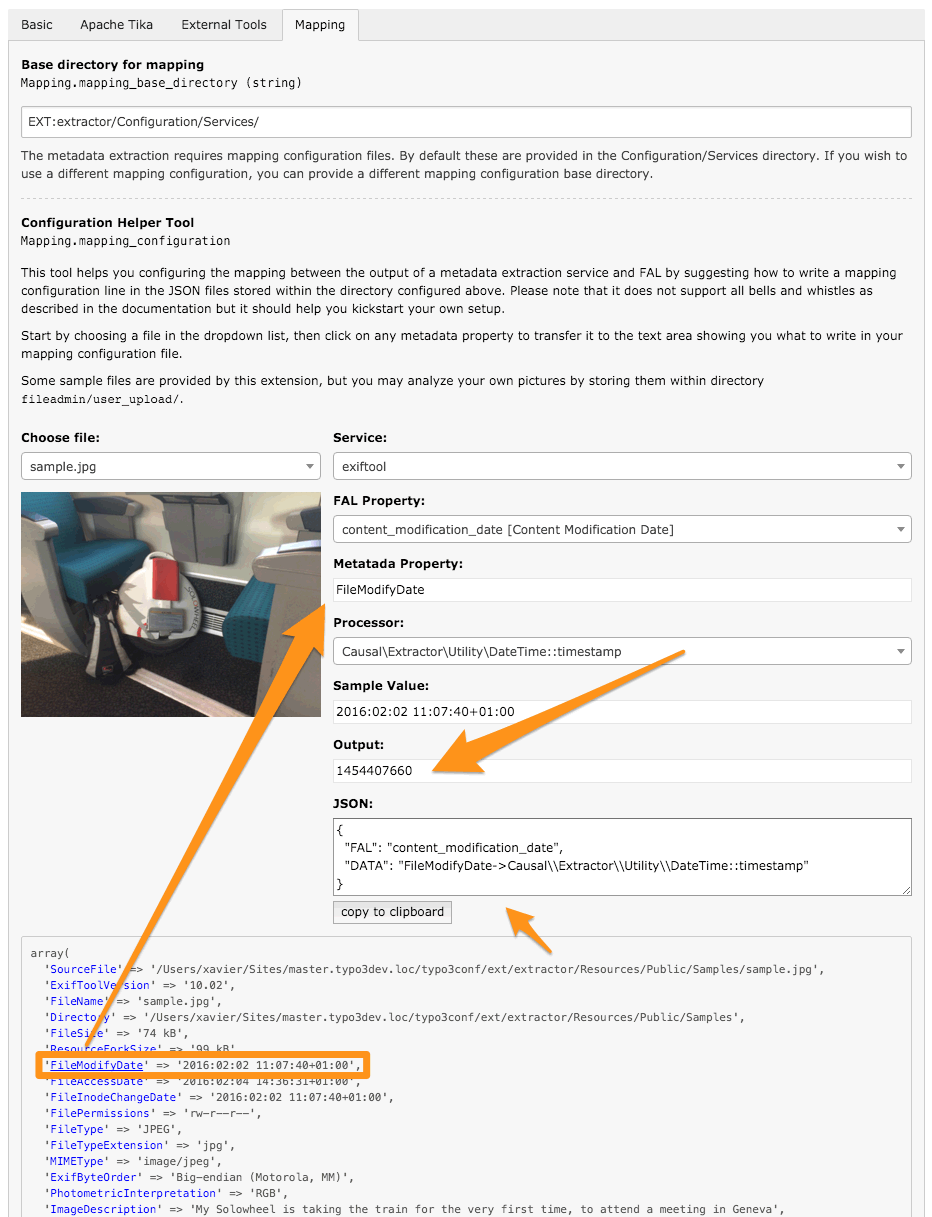
Configuration Helper Tool

A configuration helper tool is available in Extension Manager, prior to TYPO3 v11.

Hook 

The method \Causal\Extractor\Service\Extraction\AbstractExtractionService::getDataMapping() is the central method invoked to map extracted metadata to FAL properties. Developers may dynamically alter the mapping by hooking into the process using $GLOBALS['TYPO3_CONF_VARS']['EXTCONF']['extractor']['dataMappingHook'].

Signal after extraction 

Once the meta data has been extracted, a signal is emitted, which allows other extensions to process the file further. The Signal can be connected to a Slot as follows (e.g., in file file:ext_localconf.php of your extension).

Registration in TYPO3 v8 and v9

// Initiate SignalSlotDispatcher
$signalSlotDispatcher = \TYPO3\CMS\Core\Utility\GeneralUtility::makeInstance(
    \TYPO3\CMS\Extbase\SignalSlot\Dispatcher::class
);

// Connect the Signal "postMetaDataExtraction" to a Slot
$signalSlotDispatcher->connect(
    \Causal\Extractor\Service\AbstractService::class,
    'postMetaDataExtraction',
    \VENDOR\MyExtension\Service\Extractor::class,
    'enhanceMetadata'
);
Copied!

This requires a PHP class \VENDOR\MyExtension\Service\Extractor and a method enhanceMetadata() in this class:

<?php
namespace VENDOR\MyExtension\Service;

use TYPO3\CMS\Core\Resource\FileInterface;

class Extractor
{
    public function enhanceMetadata(FileInterface $file, array &$metadata): void
    {
        // your code
    }
}
Copied!

Registration since TYPO3 v10

The signal slot dispatcher is deprecated since TYPO3 v10 and you should instead register a middleware by creating file Configuration/Services.yaml within your extension:

services:
  _defaults:
    autowire: true
    autoconfigure: true
    public: false

  VENDOR\MyExtension\EventListener\ExtractorEventListener:
    tags:
      - name: event.listener
        identifier: 'causal/extractor'
        method: 'postMetaDataExtraction'
        event: Causal\Extractor\Resource\Event\AfterMetadataExtractedEvent
Copied!

This requires a PHP class \VENDOR\MyExtension\EventListener\ExtractorEventListener and a method enhanceMetadata() in this class:

<?php
namespace VENDOR\MyExtension\EventListener;

use Causal\Extractor\Resource\Event\AfterMetadataExtractedEvent;

class Extractor
{
    public function postMetaDataExtraction(AfterMetadataExtractedEvent $event): void
    {
        // your code
    }
}
Copied!

Associated TYPO3 categories 

By default TYPO3 categories are automatically assigned using keywords found in the metadata due to the mapping associating them to the special FAL field __categories__. This virtual field expects a comma-separated list of TYPO3 category titles.

Since version 2.1.0, we added another special FAL field __category_uids__ which works similarly but expecting a comma-separated list of category uids instead. One would use the signal/event and expand extracted metadata with a custom business logic.

An real-life example is using the geographical coordinates latitude/longitude, send them to the Google reverse geocoding service to translate them into a human-readable address and thus populating the fields "location", "region" and "country" and possibly assign geographical-related TYPO3 categories based on the API output.

Sitemap