
MFA Frontend 

Classification

mfa_frontend

Package name

causal/mfa-frontend

Version

1.3

Language

en

Description

Enable MFA (Multi-Factor Authentication) for Frontend accounts.

Keywords

MFA, multi-factor, 2FA, authentication, otp, one-time, secure, security, protection

Copyright

2023-2026

Author

Xavier Perseguers

Email

xavier@causal.ch

License

This document is published under the Open Publication License available from https://www.opencontent.org/openpub/

Rendered

Fri, 23 Jan 2026 08:44:52 +0000

The content of this document is related to TYPO3, a GNU/GPL CMS/Framework available from www.typo3.org.

Table of Contents
Introduction 

What does it do? 

This extension adds support for Multi-Factor Authentication (MFA) to TYPO3's Frontend.

It supports TYPO3 v10 LTS, v11 LTS and v12 LTS.

MFA can be configured by editing a fe_users record in the TYPO3 Backend. A Frontend plugin is provided to allow users to configure their MFA settings themselves.

Screenshots 

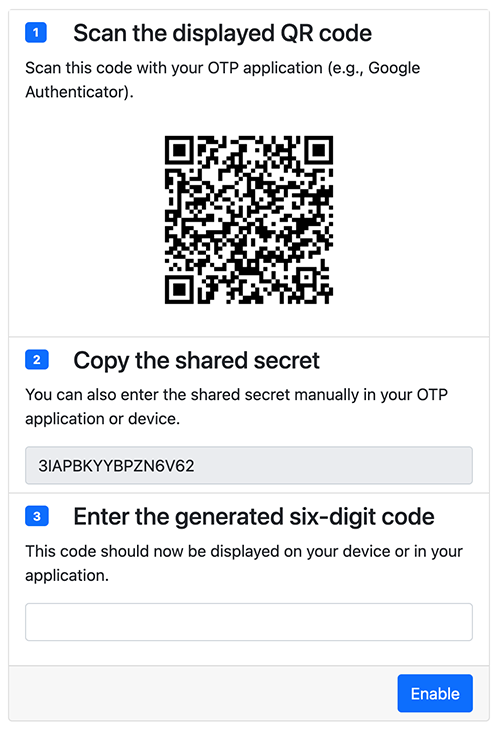
Configuration of the MFA settings for a Frontend user

Configuration of the MFA settings for a Frontend user

Privacy 

This extension does not store any personal data. It only stores the secret used by the configured MFA method in the fe_users table (field mfa_frontend).

When configuring TOTP, a QR code is generated to let the user configure their Authenticator app. The QR code is generated with local libraries and not with any third-party service (like Google's QR code generator) to avoid leaking any information to third parties.

Support 

In case you need help to configure this extension, please ask for free support in TYPO3 Slack or contact the maintainer for paid support.

Installation 

This extension may be installed like any other extension, either from the TYPO3 Extension Repository (TER) or from Packagist:

composer require causal/mfa-frontend
Copied!

Migration from EXT:cf_google_authenticator 

This extension comes with a migration wizard to migrate existing Google Authenticator configuration from both Backend and Frontend users to the new data structure.

Since TYPO3 v11, MFA is natively supported for Backend users, thus the migration wizard will migrate configuration to the native configuration format for TYPO3.

Unfortunately TYPO3 does not correctly support MFA for Frontend users yet (there is a bug described on Forge), so the migration from former extension EXT:cf_google_authenticator is done in a custom mfa_frontend field for Frontend users.

Steps:

  1. Switch to the module "Upgrade" within "Admin Tools"
  2. Click the button "Upgrade Wizard"
  3. Run upgrade wizard "Migrate TOTP settings from cf_google_authenticator"

Migration from your own domain model tables 

If you have implemented Two-factor authentication (2FA) using EXT:cf_google_authenticator's signals to reuse its business logic, you may do so with this extension as well (using PSR-14 Events naturally).

  1. Listen to the PSR-14 event CollectAllowedTablesEvent and add your own table to the list of allowed tables for MFA.
  2. Adapt your TCA to use a new field mfa that shall replace the two former fields tx_cfgoogleauthenticator_enabled and tx_cfgoogleauthenticator_secret in your domain model.

    Please see Extend your TCA for full instructions.

Then just use the migration wizard as described above.

Management of MFA in the Backend 

When you edit a Frontend User (fe_users), you will see a new tab called "Multi-Factor Authentication". There, you can enable MFA for the user by toggling the switch and following the instructions:

Configuration of the MFA settings for a Frontend user

Once you have enabled MFA for a user, you will have to enter a valid TOTP code together with toggling off the switch to disable MFA again.

Management of MFA in the Frontend 

This extension provides a plugin to manage the MFA settings for a logged-in user, that is, from the website itself.

Plugin "Two-Factor Authentication (2FA) Setup" 

You should start by editing your Template record to include the TypoScript template provided by this extension.

TypoScript Configuration 

You can do so like that:

  1. Open the Template module within the Web section.
  2. Select your root page template (usually the one with the world icon).
  3. Make sure you are on the "Info/Modify" view (top selector).
  4. Click on the button "Edit the whole template record".
  5. Switch to tab "Includes".
  6. Include "MFA Frontend (mfa_frontend)" within the "Include static (from extensions)" section.

Insert the Plugin 

  1. Open the page where you want to insert the plugin.
  2. Click the button to add a content to your page.
  3. Choose "General Plugin" from the list of content elements (usually on the tab "Plugins").
  4. Switch to the tab "Plugin" and choose "Two-Factor Authentication (2FA) Setup" from the list of plugins:

    Choosing the plugin to insert
  5. Add access restrictions (typically to logged-in users only) to the plugin or the page itself if necessary.

Now visit that page in the Frontend and you should see the plugin:

Configuration plugin for an logged-in user

Applications 

In order to use the MFA feature, you need to install some Authenticator application. There are many of them, and they are available for all platforms.

Since this extension currently supports Time-based one-time password, you need to install an application that supports this algorithm.

This application may be a browser extension, a desktop application, or an app on your mobile device (smartphone/tablet).

If you look for an Authenticator application for your mobile device, we can name a few of them:

If however you already use a password manager, you may want to use it to store your MFA secrets. There are many password managers, but two well-known of them officially support storing MFA secrets together with your website's credentials:

If you use 1Password, you can use the following link to see how to configure OTP for an existing Login entry (username + password) you have in your vault: https://support.1password.com/one-time-passwords/.

CollectAllowedTablesEvent 

This event is triggered when the extension collects the allowed tables to react on. This is typically the case when it hooks into TYPO3\CMS\Core\DataHandling\DataHandler to check whether MFA (currently TOTP) may be enabled or disabled after editing a record and trying to save it.

If you want to use MFA for your own extension, you can listen to this event and add your own table(s) to the list of allowed tables (by default fe_users).

Registering a listener 

Open your extension's Configuration/Services.yaml file and append:

YourVendor\YourExtension\EventListener\MfaFrontendListener:
  tags:
    - name: event.listener
      identifier: 'yourVendor/yourExtension'
      method: 'collectAllowedTables'
      event: Causal\MfaFrontend\Event\CollectAllowedTablesEvent
Copied!

Create Classes/EventListener/MfaFrontendListener.php to read:

<?php
declare(strict_types=1);

namespace YourVendor\YourExtension\EventListener;

use Causal\MfaFrontend\Event\CollectAllowedTablesEvent;

class MfaFrontendListener
{
    public function collectAllowedTables(CollectAllowedTablesEvent $event): void
    {
        $tables = $event->getTables();
        $tables[] = 'tx_yourextension_domain_model_yourmodel';
        $event->setTables($tables);
    }
}
Copied!

Extend your TCA 

You need to add a new field to your TCA to store the MFA secret. The field must be named mfa.

Edit ext_tables.sql and add the field to your table:

CREATE TABLE tx_yourextension_domain_model_yourmodel (
    ...
    mfa mediumblob
);
Copied!

Create Configuration/TCA/Overrides/tx_yourextension_domain_model_yourmodel.php to add the mfa field as passthrough and two virtual fields for the setup:

<?php
defined('TYPO3') || die();

$tempColumns = [
    'tx_mfafrontend_enable' => [
        'exclude' => false,
        'label' => 'LLL:EXT:mfa_frontend/Resources/Private/Language/locallang_db.xlf:fe_users.tx_mfafrontend_enable',
        'config' => [
            'type' => 'none',
            'renderType' => 'MfaFrontendEnable',
        ]
    ],
    'tx_mfafrontend_secret' => [
        'exclude' => false,
        'label' => 'LLL:EXT:mfa_frontend/Resources/Private/Language/locallang_db.xlf:fe_users.tx_mfafrontend_secret',
        'config' => [
            'type' => 'none',
            'renderType' => 'MfaFrontendTotp',
        ]
    ],
    'mfa' => [
        'config' => [
            'type' => 'passthrough',
        ],
    ],
];

\TYPO3\CMS\Core\Utility\ExtensionManagementUtility::addTCAcolumns(
    'tx_yourextension_domain_model_yourmodel',
    $tempColumns
);

\TYPO3\CMS\Core\Utility\ExtensionManagementUtility::addToAllTCAtypes(
    'tx_yourextension_domain_model_yourmodel',
    'tx_mfafrontend_enable,tx_mfafrontend_secret',
    '',
    'after:password' // Add the 2FA after our custom field "password"
);
Copied!

DefineIssuerLayerEvent 

This event lets you configure/override the issuer layer. You could use it to show your extension's name when you use MFA for your own domain model.

Registering a listener 

Open your extension's Configuration/Services.yaml file and append:

YourVendor\YourExtension\EventListener\MfaFrontendListener:
  tags:
    - name: event.listener
      identifier: 'yourVendor/yourExtension'
      method: 'defineIssuerLayer'
      event: Causal\MfaFrontend\Event\DefineIssuerLayerEvent
Copied!

Create Classes/EventListener/MfaFrontendListener.php to read:

<?php
declare(strict_types=1);

namespace YourVendor\YourExtension\EventListener;

use Causal\MfaFrontend\Event\DefineIssuerLayerEvent;

class MfaFrontendListener
{
    public function defineIssuerLayer(DefineIssuerLayerEvent $event): void
    {
        if ($event->getTable() === 'tx_yourextension_domain_model_yourmodel') {
            $event->setLayer('Your Custom Name');
        }
    }
}
Copied!

ToggleTotpEvent 

This event is triggered when some users uses the usage-plugin-setup to enable or disable the use of 2FA for their account.

Listening to this event allows you e.g., to synchronize the MFA status with some external system or your own domain model if you happen to relate Frontend users to some other domain model.

Registering a listener 

Open your extension's Configuration/Services.yaml file and append:

YourVendor\YourExtension\EventListener\MfaFrontendListener:
  tags:
    - name: event.listener
      identifier: 'yourVendor/yourExtension'
      method: 'toggleTotp'
      event: Causal\MfaFrontend\Event\ToggleTotpEvent
Copied!

Create Classes/EventListener/MfaFrontendListener.php to read:

<?php
declare(strict_types=1);

namespace YourVendor\YourExtension\EventListener;

use Causal\MfaFrontend\Event\ToggleTotpEvent;

class MfaFrontendListener
{
    public function toggleTotp(ToggleTotpEvent $event): void
    {
        $frontendUser = $event->getUser();
        // Do something like synchronizing the MFA status using:
        // $mfa = $frontendUser->getRawMfa()
    }
}
Copied!

ChangeLog 

The following is a very high level overview of the changes in this extension. For more details, read the online log.

Version Changes
1.3.x Compatibility with TYPO3 11 LTS - 13 LTS
1.1.x Add PSR-14 event to let third-party extensions allow a Backend user to disable MFA without providing a valid OTP.
1.0.x Documentation. Extension is now considered stable.
0.3.0 Usage of MFA by third-party extensions.
0.2.0 Compatibility with TYPO3 10 LTS - 12 LTS.
0.1.2 First release to the TER (TYPO3 v11/v12 with PHP 8).