This tutorial is designed to help you get started with the
External import extension.
Indeed configuring tables for receiving external data is
not quite trivial and this document will hopefully make things
clearer by providing examples.
Questions and support
If you have any questions about this extension, please ask them in the
TYPO3 English mailing list, so that others can benefit from the
answers. Please use the bug tracker on forge.typo3.org to report
problem or suggest features
(https://github.com/cobwebch/externalimport_tut/issues).
Credits
Icons for tables come from the Noun Project:
Department Hierarchy by Chameleon Design for the "departments" table
team by OliM for the "teams" table
Keeping the developer happy
Every encouragement keeps the developer ticking, so don't hesitate
to send thanks or share your enthusiasm about the extension.
Upon installation, the extension will create or alter the necessary
tables.
Verifying the configuration
To ensure that the records inserted or deleted by the external import
process don't interfere with the other data in your TYPO3
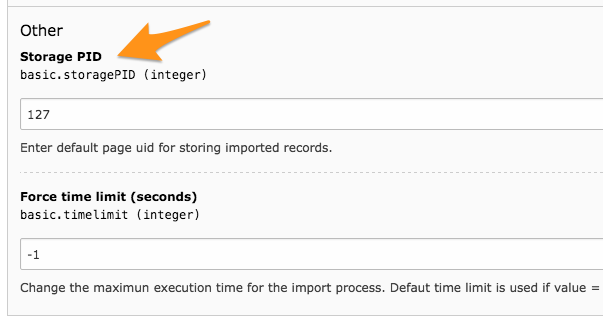
installation, don't forget to properly define a page for storage in
the configuration of the "external_import" extension
(scroll down to find that option).
Setting the general storage page in the Extension Manager
Verifying the setup
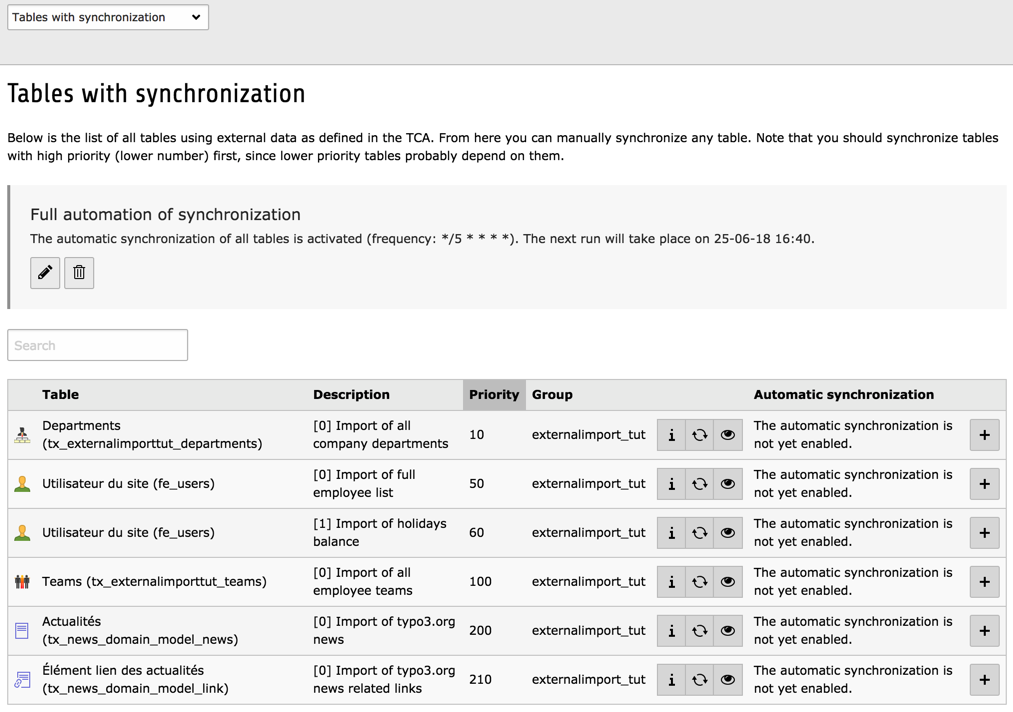
After installation, go to the External Import BE module. It should
look like:
Checking installed import configurations using the BE module
If you want to follow the process in more details, activate logging at "debug" level.
You can also check what happens in each step by using the Preview mode.
The scenario
Main scenario
The basic scenario of this tutorial is the following: we have flat
files exported from some other system, e.g. a company ERP. These
exports contains a list of employees, a list of departments, a list of
holidays balances for each employees and a list of teams along with
their members (employees). The goal is to import all this data into
TYPO3 tables all the while maintaining the relationships.
The departments and the teams will go into new tables. The employees
should go into the fe_users table, so that each employee can then log
into the corporate intranet powered by TYPO3. One implication is that
user names and passwords must be created on the fly for each new
employee.
One particular constraint is the order in which the data is imported.
If we want to keep the relationship between employees and their
departments, we must make sure that the departments are imported
before the employees. On the other hand the relationship between
employees and their teams is found inside the teams file. So teams
must be imported after the employees.
Second scenario
In order to be more complete, this tutorial proposes a second
workflow: in this other case we want to import an RSS feed into the
tx_news_domain_model_news table. This scenario demonstrates the
processing of an XML input.
Running the employees import
This chapter describes how each table was defined (or modified) and
what TCA configuration was used for the import of the external data to
be successful. The results of the imports are discussed.
Note how the External Import configuration is defined at the same level
as the "ctrl" section. It contains a "general" part with the description of the
external source(s) from which the data will come. This general configuration
is itself an indexed array. Two indices are used (english and french),
because the import covers two languages.
The first property used above is "connector". This defines the sub-
type of connector service that is needed for connecting to and reading
data from the external source. In this case we are reading flat files,
so we request an instance of a connector service of sub-type "csv",
which is able to read such files.
Next is the "parameters" property. This is an array of values that are
passed to the connector. What values need to be defined is dependent
upon the sub-type of connector service. In the case of the "csv" sub-
type, the parameters include the name of the file to read, what
delimiter is used to separate the columns (a tab in this case), what
character is used to surround strings (a double quote in this case),
how many rows must be skipped off the top of the file (generally
because they contain header information, and it will generally be only
1 line) and – finally – what is the encoding of the file. This last
information will enable the CSV connector to convert the file's data
as appropriate if the file's charset does not match your BE's charset.
Then the "data" property indicates in what format the data will be
provided by the connector. "array" means that it will be a PHP array.
The "referenceUid" property indicates in which field from the
departments table the primary key from the external source will be
stored.
This is a critical information. Let's look at the contents of the
departments.txt file:
CSV data in the departments.txt file
Each department has a code. It is this code that makes a
department unique in the external data. If we want to be able to keep
track of which item in the external source is new, which has already
been imported at least once and which doesn't exist anymore, we have
to know what primary key is used in the external data and store it
internally, so that we can check it upon the next synchronisation.
Because we will import data in the default language and translations in two
separate imports, we use the "whereClause" property to restrict the selection
of records that we want to work with with a SQL condition on the "sys_language_uid"
field. Only records that match this condition will be considered by External
Import, i.e. only those records will be updated upon future imports, or
deleted if they are not present in the external data anymore. It is as if
we were handling records in different languages as completely different sets of
data, with no interference between them.
The next property is "priority". As was mentioned before, external
data needs to be imported in a precise order if relationships between
tables are to be preserved. The priority property takes care of that.
Lower priorities go first. Since employees are going to be related to
departments in a later import, we want to set a low number for the
import of departments. Furthermore, we want to import the default language
first (priority of 10) and the translation later (priority of 15)
Finally the "description" property is used to stored some useful
information about that particular configuration. This information will
be displayed in the BE module and is there only for reference. So make
it relevant.
The next step is to defined external information for each column.
Indeed this is where the real mapping takes places: which column in
the external data will fit into which field in the internal database.
This is how it looks for the departments table (columns configuration
only, with External Import-related part highlighted):
First of all note that the same indices used in the "external" configuration for
column and in the general external configuration. This is
crucial. If the indices don't match the different bits of "external"
configurations will not know to which other bits they relate.
Now let's take a look at the import of the default language first, which is simpler.
In the configuration, this is the entries that correspond to index english.
The departments table is quite simple and is comprised of only three
fields beyond the usual complement of TYPO3 fields (uid, pid, etc.).
The "hidden" field is not mapped to the external data. The "code"
field is mapped to a similarly named field in the external data (with
the "field" property). The "name" field is mapped to the "name_en" field
in the external data. Note how we use the names in the first row of the CSV file
to match data to map.
Let's move on to the import of translations, corresponding to index french.
The same two fields are mapped, "code" and "name", only the source for "name" changes,
since it is mapped to the field named "name_fr" in the external data. But we need
more in the case of translations:
in order for TYPO3 to know that the record is in a specific language, we need
to set the value of the "sys_language_uid" field. In this example scenario, it is
assumed that French has been defined as a system language and that it has a "uid"
of 1 in the TYPO3 database. So we use the transformation property called "value"
to hard-code a value of 1 upon import.
we also need to relate the translation with its original in the default language.
To do this, we map the "l10n_parent" field to the "code" field in the external data,
and then use the possibility to match existing records in the database. This is the
task of the "mapping" property. Using the "table" sub-property, we point to the
departments table itself (since the original is in the same table). The "referenceField"
sub-property is used to point to the field where the external key is stored
(in this case, the "code" field from the external data). Just as with the general
configuration, we restrict the selection of records using the "whereClause"
property which also exists here. We restrict the selection to records in the default
language, as only these can be used as originals of a translation.
At this point you can run the import of the departments table. The
result that you should have can be represented like this:
Imported CSV data into the database
The employees (and their holidays)
The list of employees will be stored in the fe_users table, which
must be extended to add the necessary fields:
These new columns are added to the TCA of the fe_users table. At this
point we don't yet set the external data for these columns, as we will
do it later for all relevant columns. As this is a standard TCA
operation, it is not repeated here and can be simply looked up in the
Configuration/TCA/Overrides/fe_users.php file.
Next we add the external information to the TCA of the
fe_users table:
The first thing to note is that there are 2 external configurations in
this case. As was described in the description of the scenario, the
fe_users users table will be synchronised with the employees list and
with a second file containing the balance of holidays.
In the first configuration, note how the "enforcePid" property is set to true
so that not all fe_users records will be affected be the import process.
If some fe_users are stored in a different page than the one where the
imported records are stored, those records will not be considered for updates or deletion.
This makes it possible to have several sources of fe_users without interference with one another.
The first configuration also makes use of so-called "additional fields". These
are defined next to the "general" configuration and use the same indexed structure.
In the example above, it means that two fields from the external data
("last_name" and "first_name") will be read and made available all along the
import process, but will not be saved to the database. They are actually used to
assemble the user's full name and its password (see below).
In the second configuration, we make use of the "disabledOperations"
property. Indeed the holidays balance file will contain only
information about the number of holidays still available for each
employee. It does not contain complete information so it cannot be
used as a reference for creating new users. Hence the "insert"
operations is disabled. Since it is not a reference anyway, it does
not make sense to allow this particular synchronisation to delete
users. So the "delete" operation is also disabled.
Finally we set the external configuration for each column that will
receive external data.
Several columns have more interesting configurations than the
departments table described previously. They have been highlighted.
The first three fields will use a user function. The user
functions are defined using a "class" property and a "method"
property. Additional parameters can be passed to the function using
the "parameters" property. So what happens for these three fields?
For the "name" field, a method called assembleName() will be
called, from a class defined in this tutorial extension. Let's look at
what this method does:
The method receives the record being handled, so that all fields
(mapped fields and additional fields) from the external data are
available for calculations. The $index argument contains the
key of the field that is to be affected by the transformation. The
third argument is an array containing additional parameters. In this
case it is not used.
To obtain the user's full name we just concatenate the values from the
"last_name" and "first_name" external fields. This value is returned
as the method's result.
For the "username" field a similar method is called, but which takes
extra care to return a viable user name, i.e. converting any character
that is not strict ASCII and stripping other inappropriate character.
Note that this is just an example. A real-world implementation of such
a method would also check that the generated user name is unique.
The "starttime" field is mapped to the external "start_date". However
that date is stored in a "yyyy-mm-dd" format, which is not convenient
for storing in the "starttime" field. We convert to a timestamp using
a sample user function provided by the external_import extension
itself. This method can perform several transformations, but it
returns a simple timestamp when called without parameters, as is the
case here.
The "company" field is actually not filled with values coming from the
external source, but with a fixed value. This is achieved by using the
"value" property instead of the "field" property. In this example, the
"company" field for every fe_users record will contain the value "The
Empire".
The same goes for the "title" field, but a bit more sophisticated.
In this case the values from the external source are matched to other
values using a simple array. For example, if the external data is "1",
the title will be "Captain". This way we can avoid creating a separate
table for titles, assuming there are only a few and they don't change
often. Furthermore we decided that this field should not be updated
(using the "excludedOperations" property). This means that this field
will be written when a new record is created, but will be left
untouched during further updates. That way the field can be safely
modified from within TYPO3 and changes will not be overwritten.
To ensure that values are safely matched, we first apply a transformation
to cast the external value to integer.
The "tx_externalimporttut_department" will need
to relate to the department the employee works in. Now we don't want
to use the primary key of the external data for departments as a
foreign key in the fe_users table. We want the uid from the
departments as they were inserted into the TYPO3 database. This is the
task of the "mapping" property. The first sub-property – "table" – is
used to point to the table where the records are stored inside the
TYPO3 database. The second sub-property – "referenceField" –
indicates in which field from that table the external primary key for
departments has been stored. The third sub-property - "whereClause" -
ensures that we map the relation only to records in the original language.
What will happen during import is that the
mapping function will build a hash table relating the external primary
keys from the departments table ("code" column) to the internal
primary keys ("uid" column). This hash table is then used to find out
the foreign keys for the fe_users.
Finally comes the "image" field. The external data contains the image information
encoded in base64. So the first thing we want to do is to take this data,
make it into a file and store it in some designated place. This is achieved
by the user function called in the "transformations" property. The user
function returns the "uid" of a "sys_file" record.
Then we need to create a "sys_file_reference" entry for storing along with the
"fe_user" record. This is done with the "children" property, which defines
what table is targeted and what fields need to be filled (the one with the special
__parent.id__ points to the "fe_user" record thus creating the
relationship). Both "controlColumnsForUpdate" and "controlColumnsForDelete"
properties are used to fetch existing records and either update or delete
them, just like what happens for the main table being imported (in this case,
"fe_users").
One more operation happens during the import process, but is not
visible in the TCA. We react to the "insertPreProcess" event with
the
\Cobweb\ExternalimportTut\EventListener\InsertRecordPreprocess class.
This makes it possible to add an automatically generated password to
the data to be stored, but only in the case when it is a new user
(insert operation). To be really clean we could also make use of the
"updatePreProcess" hook to remove the username field from the records
to be updated, as we don't really want to change the username
automatically. This is left as an exercise for the reader. You may
also want to make sure that new users belong to some default
fe_group.
All the external configuration shown above also included information
for importing the holidays balance. There are a couple of things worth
noticing:
The file "holidays.txt" does not contain a header row. Thus it is not
possible to use field names for mapping the external data. Instead we
have to rely on column numbers. So "tx_externalimporttut_code" is
matched to field 0 and " tx_externalimporttut_holidays" is matched
to field 1.
Strictly speaking it is not necessary to store the employee number
again in the "tx_externalimporttut_code" column, so you might think
that this mapping could be dropped. It is however necessary to keep
it, because this is how existing records will be detected (by matching
the value imported into the "tx_externalimporttut_code" column to
the external primary keys already stored in the database).
If you now run the employees and then the holidays synchronisations,
you should end up with a situation that can be represented like this
(note: the base64 information from the "picture" node has been left out):
Imported employees with their holidays into the database
Most importantly we can see that the
"tx_externalimporttut_department" column contains foreign keys that
correspond to the internal (TYPO3) primary keys of the departments
table. If you open a fe_user record in the TYPO3 BE, you will see
that it cleanly relates to a department.
Viewing the imported FE user data in the TYPO3 backend
And since the data manipulation operations rely on DataHandler the
reference index has been kept up to date, as you can see by looking at
the information of any department in the backend:
Viewing the details of an imported department in the BE, with correct number of references
The teams
The last data to be imported is the teams. This is mostly like
departments, except that teams have a many-to-many relationship to
employees. Indeed a team will be comprised of several employees and
any employee may be part of several teams.
In this example the incoming data is denormalised. This means that
if team A contains 3 employees, there will be 3 entries for team A,
each with a relationship to a different employee.
Let's look at the example data:
CSV data in the teams.txt file
We clearly see that the "Planet Destroyers" team appears
three times, because it is comprised of employees 256, 421 and 784.
External import takes this into account by making sure that it keeps a
single copy of each team, based on the external primary key (the
"code" field in this case).
Note
It is also possible to create many-to-many relations with data represented as a
comma-separated list of keys, commonly used in TYPO3.
In the example data above, you can see that there's a "rank" field.
We want to use it for sorting the many-to-many relations, so we define it
as an additional field (you can look up the TCA for yourself).
The SQL for the teams table is not repeated here as it is quite
standard. The MM-relations table is also an absolutely standard TYPO3
table for MM-relations:
The "general" configuration for this import has nothing special about it.
All the action about the many-to-many relations happens in the configuration
of the "members" column:
What happens here? The "multipleRows" tells External Import that the external data
is denormalised and that this is the column for which it should keep every value,
because they represent many-to-many relations. Each of these values will be mapped
to the "fe_users" table, according to the defined transformation.
At a later point, the values will be sorted according to the value found in the field
defined with the "multipleSorting" property (in this case "rank"). For each team, the values
(i.e. the "fe_users" primary keys) are thus sorted and then made into a comma-separated
list for storage by TYPO3.
As a result, only two team records are created in the TYPO3 database instead of 4,
which is what we expect. However the extra rows in the external data have not been
lost and have been used to create the many-to-many relations (of which there are 4,
as expected).
After running the teams import, you should get something like this:
The team data imported into the database with relations to FE users (members)
We can see that the teams were properly related to the
fe_users. The sorting has also been kept correctly although with a
renumbering (done automatically by DataHandler).
Running the RSS import
Our second scenario is about importing an RSS feed into the
tx_news_domain_model_news table (from the "news" extension). As an
example we will take the main RSS feed from typo3.org in Atom format:
http://typo3.org/xml-feeds/rss.xml.
Here's an excerpt of the file (of course, the exact content will vary,
since news keep being added to the feed):
<?xml version="1.0" encoding="utf-8"?><rssversion="2.0"xmlns:content="http://purl.org/rss/1.0/modules/content/"xmlns:atom="http://www.w3.org/2005/Atom"xmlns:f="http://typo3.org/ns/TYPO3/CMS/Fluid/ViewHelpers"xmlns:n="http://typo3.org/ns/GeorgRinger/News/ViewHelpers"><channel><title>Official typo3.org news</title><link>https://www.typo3.org/</link><description></description><language>en-gb</language><copyright>TYPO3 News</copyright><pubDate>
Fri, 19 Nov 2021 05:01:09 +0100
</pubDate><lastBuildDate>
Fri, 19 Nov 2021 05:01:09 +0100
</lastBuildDate><atom:linkhref="https://typo3.org/?type=100"rel="self"type="application/rss+xml"/><generator>TYPO3 EXT:news</generator><item><guidisPermaLink="false">news-2249</guid><pubDate> Thu, 18 Nov 2021 18:42:37 +0100</pubDate><title>Meet Petra Hasenau, TYPO3 Association Board Vice-President, Germany (Application Podcast S02E10)</title><link> https://typo3.org/article/meet-petra-hasenau-typo3-association-board-vice-president-germany-application-podcast-s02e10</link><description>In this episode, I speak with Petra Hasenau, the TYPO3 Association Board Vice President and the CEO of cybercraft GmbH. Today, we cover her introduction to TYPO3 and open source, her inclusive approach to community building, and her cooking channel!</description><content:encoded> <![CDATA[ ... ]]></content:encoded><category>Community</category><category>Podcasts</category></item><item><guidisPermaLink="false">news-2248</guid><pubDate> Tue, 16 Nov 2021 10:30:00 +0100</pubDate><title>TYPO3 11.5.3 maintenance release published</title><link> https://typo3.org/article/typo3-1153-maintenance-release-published</link><description>The version 11.5.3 of the TYPO3 Enterprise Content Management System has just been released.</description><content:encoded> <![CDATA[ ... ]]></content:encoded><category>Development</category><category>TYPO3 CMS</category></item>
...
</channel></rss>
Copied!
The part in which we are really interested has been highlighted: we
want to import the various entries of the RSS feed, which correspond
to the <item> tag. We also want to import their related link
(the URI in the <link> tag).
But to make things more interesting, we don't want to import all news items.
We want only those who are part of the "TYPO3 CMS" category. Let's see
how we can achieve this.
The external import setup
The import of a RSS feed into table tx_news_domain_model_news
poses a particular challenge. We want to store the URI of the news
item in the related links table, which uses IRRE and a "parent" field
to relate links to news items.
We will see later what the trick is. The first important thing to
note is the order of import. Since it is links that are related to
news items, we must import news before links.
A second peculiarity is that both links and news items are in the
same source of data. Thus we will import the RSS feed twice.
Importing news items
Thus we start with the news items. A new column was added to the
tx_news_domain_model_news table. It is used to store the
external id found in the RSS feed.
Note that we don't use the same connector service as before. Indeed,
we now need the "feed" sub-type, which is provided by extension
"svconnector_feed". This connector is specialized in getting XML data
from some source (remote or local), which is defined with the
uri property inside the parameters array.
Next, we declare that the data will be provided in XML format and that
the reference node type in "item". With this instruction, External
Import will take all nodes of type "item" and import each of them. The
enforcePid property is set to true so that the import
takes place only in the predefined page and that existing news items
entered somewhere else are not deleted. This is a useful precaution to
take.
Also note that the delete operation is disabled. This makes sense in
this case, as an RSS feed normally contains only the latest news
items. Thus if you don't want each import to delete the data from the
previous import, the delete operation should be disabled.
In the previous chapter, we said that we wanted to import only the news items
that are part of the "TYPO3 CMS" category. For this, we want to read the
<category> tag, but not store it in the database. Thus we declare it as an
additional field:
The "xpath" property makes it so that only items who have the following:
<category>TYPO3 CMS</category>
Copied!
will have a value in the "category" field. For all other records, it will be empty.
And thus we can filter by using the "isEmpty" transformation property. This property
tests whether a given value is empty or not. By default, it relies on the PHP
empty() function, but it can also use the Symfony Expression Language for
more sophisticated conditions. In this case, we have declared nothing special, so
empty() will be used. We then set the "invalidate" sub-property to true,
meaning that records which have an empty value will be discarded from the imported
dataset. As a result, only items with the "TYPO3 CMS" category are imported.
For most of the fields, the setup is just as simple as if we were
importing database records, thanks to the connector services, which
have abstracted the tediousness of getting data in different formats.
However XML format allows for more complicated retrieval of data via
the use of XPath or attributes.
The only particular configuration above is for the "bodytext" field,
which uses the "rteEnabled" property to indicate that the content from
this field is rich text and RTE transformations should be applied upon
saving. This helps ensure that such content can be edited correctly in
a RTE-enabled field in the TYPO3 backend, although the varying quality
of available HTML makes it impossible to guarantee a 100% smooth
process.
Importing related links
Next we want to run this import again, to store the links and make
them related to their respective news items. Here is the general
section for the tx_news_domain_model_link:
In this case we don't need to add a special field for storing
the external primary key, since we are using the URI and there
is already a field for this.
Now we face slight problem. We want to fill the "parent" column
with the primary key of the related news item, but that field has
no TCA. A field without TCA cannot be manipulated by External Import.
So we need to add a configuration for that field. As we don't need
anything special, we can just give it the
passthrough type.
Furthermore, we don't want to import all links. We want to import only those
links which are related to news that we actually imported (remember, that's
only those which are part of the "TYPO3 CMS" category). To ensure this, we
use two features:
In the "mapping" transformation, we use the sub-property "default" to ensure
that the value after mapping is 0 if no record was matched.
Then the next transformation is as above for news items, the "isEmpty"
transformation with the "invalidate" sub-property set to true.
Since we ensured in the previous transformation that the value is 0
when no parent record was matched, we can safely rely on the default use
of the empty() function.
So here is the complete setup, with the special bit highlighted: