The main idea of Connector services is to have a basic framework for
developing scripts that connect to third-party applications and
retrieve data from them. These services are specifically tagged
(connector.service) and each service has a type corresponding
to a third-party application. Detailed information is provided in the
Developer's manual.
This structure makes connection scripts reusable. It also makes them
easier to use thanks to a general API. Connector services can be
called both from the fronted and the backend. An example of extension
using connector services is “external_import”.
Screenshots
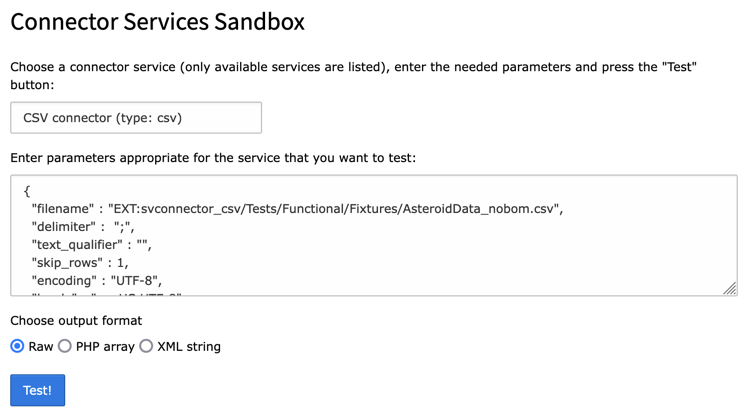
A view of the BE module which makes it possible to test connections
and the data they return.
A view of the connector test module in the BE
Questions and support
If you have any questions about this extension, please ask them in the
TYPO3 English mailing list, so that others can benefit from the
answers. Please use the bug tracker on GitHub to report
problem or suggest features
(https://github.com/cobwebch/svconnector/issues).
Every encouragement keeps the developer ticking, so don't hesitate
to send thanks or share your enthusiasm about the extension (like it in the
Extension Repository).
You may also take a step back and reflect about the beauty of sharing.
Think about how much you are benefiting and how much yourself is
giving back to the community.
Installation
This extension does nothing all by itself. Connectors must be
developed for specific third-party applications. However this
extension must be installed since it provides the base class from
which all connector services inherit.
Updating to 7.0.0
Version 7.0.0 adds support for TYPO3 14 and drops support for TYPO3 12.
It also adds support for PHP 8.5, while dropping support for PHP 8.1.
In version 6.0.0, passing the connector parameters to most API methods,
particularly the fetch*() methods, had been deprecated. Support
for this has been fully removed in version 7.0.0, making it possible to
make the methods
\Cobweb\Svconnector\Service\ConnectorBase
abstract.
This makes it mandatory to implement these methods in a custom connector service,
although it's hard to imagine a custom service that didn't implement them. So you
should be pretty safe. All impacted method signatures have been changed.
Signatures of methods
\Cobweb\Svconnector\Utility\FileUtility::getFileContent()
and
\Cobweb\Svconnector\Utility\FileUtility::getFileAsTemporaryFile()
have been changed,
adding a new argument and deprecating an existing one. If you have developed a custom
connector service using this API, please make sure to adapt your code.
Some method signatures in
\Cobweb\Svconnector\Service\ConnectorServiceInterface
have been changed to ensure stricter typing. You will to adapt your implementations.
The
\Cobweb\Svconnector\Service\ConnectorBase::getCharsetConverter()
has
been removed since the TYPO3 Core does not provide a charset conversion class anymore
as of version 14. Custom connector services should rely on mb_convert_encoding()
instead.
The
\Cobweb\Svconnector\Service\ConnectorBase
constructor now uses dependency injection.
If you overrode the constructor in your custom services, you will need to adapt your code.
All hooks have been removed, leaving only events.
Updating to 6.0.0
Version 6.0.0 adds support for TYPO3 13 and drops support for TYPO3 11.
It also adds support for PHP 8.4, while dropping support for PHP 7.4 and 8.0.
It introduces one new important method to the base API: initialize(), which
is called by the registry when it collects all available services.
Read more about it in the Developer's Guide.
Also new is the availability of a call context which - as its name implies -
contains information about the context in which the service is being used.
Another object called connection information may contain data than can
be used to dynamically change the parameters passed to the service.
Most importantly, passing the connector parameters in the fetch*() methods has been deprecated.
Instead, parameters must be passed when getting the connector from the registry:
When getServiceForType() is called, the connector's isAvailable() method is
now called. If the connector is not available a
\Cobweb\Svconnector\Exception\UnavailableServiceException
is thrown.
This version also provides events in replacement of existing hooks
for all connector services. All hooks have been deprecated and will be removed in the next major version.
Please update your code if you have developed custom connectors.
The
\Cobweb\Svconnector\Utility\FileUtility
class has been modified to allow all connector
services that make use of it to pass another method than GET and to send any array of
headers. See the documentation for each connector service for details.
Version 5.0.0 adds support for TYPO3 12 and drops support for TYPO3 10.
Most importantly it adapts to the deprecation of Services in the TYPO3 Core
by implementing its own registry. As such the way to register services
has completely changed and the Connector API
has been modified as well (some methods were added, some removed
and most methods were hardened with regards to strict typing, changing their
signature).
All existing services need to be adapted, none will work anymore without some work.
The changes to perform are:
change registration from ext_localconf.php to Configurations/Services.yaml
remove methods init() and reset()
add methods getType(), getName() and isAvailable()
all fetch*() methods, checkConfiguration() and query()
need to adapt to the new base method signatures
ensure member variable protected string $extensionKey is declared
Updating to 4.0.0
Version 4.0.0 adds support for TYPO3 11 and PHP 8.0, while dropping support
for TYPO3 9. Apart from that it does not contain other changes and
the update process should be smooth.
Updating to 3.4.0
The sample configuration files have been
changed to JSON format to easily allow for nested properties. If you
have developed your own service and have defined a sample configuration
file, you will need to change it to the new format. As always look at
other existing connector services for examples (in particular, the
"svconnector_json" extension which uses nested properties).
Also a new method was introduced as part of the Connector Sevice API:
checkConfiguration() is expected to parse the connector configuration and return
errors, warnings or notices as needed.
Configuration
The configuration is up to each specific connector according to its
needs.
A BE module is provided to test connections.
A view of the connector test module in the BE
The steps to use this tool are simple:
Choose a particular service from the drop-down menu. Only available
services are in the list. If some services are unavailable, a warning
will be displayed at the top of the screen.
Enter all the necessary parameters in the text field. For each
parameter, enter its name, an equal (=) sign and its value (as in the
screenshot above).
Choose the output format ("raw" will return the native format for the
type of resource being connected to).
Click on the "Test!" button. If the connection is successful, the data
fetched by the connector service will be displayed below the form. If
some error happens, a message will be displayed at the top of the
page.
Developer's manual
The main interest of the connector services is to manage connections
to remote systems and provide a common API for extensions needing such
connections. This chapter describes said API and gives some
indications about how to implement your own connector services.
The Connector Service API is described by interface
\Cobweb\Svconnector\Service\ConnectorServiceInterface
.
This interface is implented in class
\Cobweb\Svconnector\Service\ConnectorBase
,
which also contains a number of convenience methods. Among the methods described below,
some go beyond the public interfance and belong to the connector base. It is
recommended that all custom connector services extend the connector base rather
than reimplementing boilerplate code.
getType()
This method returns the type of the connector service. The type is
representative of the kind of data it can handle, e.g. csv
for the "svconnector_csv" service. When using registration via attribute,
the type comes from the attribute and will be set by the
ConnectorRegistry
class.
Input
none
Output
string
getName()
This method returns a human-readable name for the service. Same remark as above.
Input
none
Output
string
initialize()
This method performs any necessary initialization for the connector service. It is
called automatically by the registry when instanciating the service. The base class
\Cobweb\Svconnector\Service\ConnectorBase
contains a default implementation which
fires an event allowing custom initialization processes. If you should need to implement
your own version of the initialize() method in your connector service, make sure to call
the parent method or to dispatch the :phpCobwebSvconnectorEventInitializeConnectorEvent,
since users of your service will expect that.
Input
none
Output
void
isAvailable()
This method is called when a connector service is requested via the registry.
It is designed to check whether the service is actually available or not.
It is expected to return a boolean value accordingly. If the service is not available,
the registry will throw a
\Cobweb\Svconnector\Exception\UnavailableServiceException
.
Input
none
Output
boolean
getSampleConfiguration()
This method returns the sample configuration that gets loaded in the service
testing backend module (see Configuration sample.
Input
none
Output
string
checkConfiguration()
This method is called whenever the connector configuration needs to be checked.
It is typically called by the
query()
method, but can also be called
by third-party code. It is expected to return a list of errors, warnings and notices
(see:
\Cobweb\Svconnector\Service\ConnectorBase::checkConfiguration()
for the structure of the return array.
This method is used to cleanly report all configuration issues by logging them
using the TYPO3 logging API. This is not automatically done by
checkConfiguration()
because some other form of action might be taken when services are used in
third-party code.
When developing your own service, you should call this method right after
checkConfiguration()
in the
query()
method.
Input
array of errors, warnings or notices
Output
void
query()
Strictly speaking this method is not part of the API, since it is
protected and thus not designed to be called directly. It is designed
to encapsulate the distant source querying mechanism, so it is good
programming practice to use it.
Input
none
Output
mixed (result from the distant source)
fetchRaw()
This method is expected to return the result of the query to the
distant source as is, without transformation.
Input
none
Output
mixed (result from the distant source)
fetchXML()
This method is expected to return the result of the query to the
distant source transformed into a XML structure (as a string).
Input
none
Output
string (XML structure)
fetchArray()
This method is expected to return the result of the query to the
distant source transformed into a PHP array.
Input
none
Output
array
postProcessOperations()
This method is designed to be called back by whatever process called
the connector in the first place when said process is done. It
receives as argument some variable indicating the status of the process
(typically this could be an indication of success or failure).
It doesn't do anything by itself, but just calls events (or hooks).
Input
A status indication (mixed)
Output
void
Call context API
The call context is meant to contain information about the context in which the
Connector service was called. This can be useful when responding to events, in
order to react appropriately. The context may contain serveral pieces of information,
each referenced with a key (the context itself being an associative array). Each
piece of information is also an array. It is recommended to use/include the name
of the extension using the service in the keys, in order to avoid overwriting existing
data (even though the scenario is pretty unlikely).
Example usage:
// Set some data
$service->getCallContext()->add('external_import', ['foo' => 'bar']);

// Get some data
$context = $service->getCallContext()->get();
Copied!
Connection information API
The connection information is meant to contain data relative to the current
connection to the third-party service being accessed by the connector service.
For example, this could be an authentication token retrieved during the service
initialization (i.e. when the initialize() method was called).
Assuming the following data is set:
// Set some data
$service->getConnectionInformation()->add('token', ['sso' => '$$XyZSecureCode42']);
Copied!
it is later used to substitute variables in the connector parameters. The parameters are parsed
when getting a service from the registry. Considering the following parameters:
[
   'headers' => [
      'token' => '{token.sso}'
   ]
]
Copied!
the service would then have the following concrete parameters for usage:
A
\Cobweb\Svconnector\Event\ProcessParametersEvent
event is fired after this
parsing, allowing for further manipulation of the connector parameters.
Implementing a connector service
A custom connector service must implement the interface
\Cobweb\Svconnector\Service\ConnectorServiceInterface
.
However, there is an abstract base class (
\Cobweb\Svconnector\Service\ConnectorBase
)
which contains some base implementations and some useful helper methods, it is thus
recommended to extend that class rather than implementing the interface from scratch.
It is considered a best practice to place your class file in the
Classes/Services folder of your extension. It must declare an
$extensionKey member variable, as this is used by the API to fetch
the sample configuration.
You must then register your service with the connector registry. This is done
using the
\Cobweb\Svconnector\Attribute\AsConnectorService
attribute,
with the service's type and name passed as attribute arguments (the type is
critical, since this is what identifies a service; the name is a description):
A connector service can also be registered in the Configuration/Services.yaml file,
but this is now deprecated in favor of using the PHP attribute described above. Example:
The base service provides an instance
\TYPO3\CMS\Lang\LanguageService
independently of context (FE or BE).
If you need to implement the __construct() method, make sure to call
parent::__construct() within it.
Throwing exceptions
A connector may encounter errors while performing its task that could
not be detected upstream during the initialization phase. In such a
case, it is recommended to interrupt the process and throw an
exception with an informative error message.
Applications using connector services should be ready to receive
exceptions and should thus encapsulate calls to any of the "fetch"
methods in a try/catch block:
All connector services should use the base exception class
\Cobweb\Svconnector\Exception\ConnectorException
or extend it.
Events
The "svconnector" extension provides a number of events which can be used by the concrete
connector implementations. Except is special cases - since all connector services
share a common way of working - it should not be necessary to develop custom events.
It is strongly recommended that you trigger these events in your custom connector services,
because use case may strongly vary from user to user, and they will welcome the possibility
of manipulating the data retrieved by the service in its various forms.
This event is fired by the initialize() method. It is meant to perform custom
initializations needed by specific uses of the service, and can store results in
the :refconnection information object <developers-api-connection-information> for
dynamic usage in the connector parameters.
\Cobweb\Svconnector\Event\ProcessParametersEvent
This event is fired after :refparameters have been parsed <developers-api-connection-information>
and allows for further manipulation of the connector parameters.
\Cobweb\Svconnector\Event\ProcessRawDataEvent
This event is fired after the service has retrieved data in raw format. It is designed
for use in the fetchRaw() method.
\Cobweb\Svconnector\Event\ProcessArrayDataEvent
This event is fired after the service has retrieved data in array format. It is designed
for use in the fetchArray() method.
\Cobweb\Svconnector\Event\ProcessXmlDataEvent
This event is fired after the service has retrieved data in XML format. It is designed
for use in the fetchXml() method.
\Cobweb\Svconnector\Event\ProcessResponseEvent
This event is fired after the service has called the distant source and received a
response from that source. It is designed for use in the query() method.
This event is fired after all operations have been performed by the connector services.
Actually, it will be triggered only if the code that used the service called the
CobwebSvconnectorServiceConnectorServiceInterface::postProcessOperations() method.
Utilities
The extension also provides a couple of utility classes. Their features
are described here.
Format conversions
The CobwebSvconnectorUtilityConnectorUtility class provides a
conversion method utility, which transforms a
XML structure into a PHP array without losing any information. This
method is simply called as:
Of course one's own conversion method may be used if needed. The
conversion from a PHP array to a XML structure can safely rely on
TYPO3 CMS API. e.g.:
Again one's own conversion method may be used if needed.
Reading files
The CobwebSvconnectorUtilityFileUtility provides a general
method for reading the content of a file, even if that is actually an API endpoint.
It will transparently handle the following syntax for pointing to a resource:
an absolute file path (within the TYPO3 root path or TYPO3_CONF_VARS[BE][lockRootPath]),
e.g. /var/foo/web/fileadmin/import/bar.csv
a file path relative to the TYPO3 root, e.g. fileadmin/import/foo.txt
a file reference using the EXT: syntax, e.g. EXT:foo/Resources/Private/Data/bar.txt
a fully qualified URL, e.g. http://www.example.com/foo.txt
a FAL reference including storage ID and file identifier, e.g. FAL:2:/foo.txt
a custom syntax, starting with whatever keyword you want, e.g. MYKEY:whatever_you_want
For the latter, you need to implement a "reader" class which will handle this custom reference.
This class must inherit from CobwebSvconnectorUtilityAbstractFileReader. It must
be declared like a hook, using the custom keyword (without the colon) as a key. Example:
The class must implement the read() method, which is expected to return the
file's content as a string, or false if some problem happened. An error message
about the problem can be reported from within the reader using:
$this->fileUtility->setError('Some reason here');
Copied!
The read() method receives the full syntax as input (in the above example,
MYKEY:whatever_you_want).
Using the CobwebSvconnectorUtilityFileUtility in your own Connector service
is very easy. Here is how it's done in the "svconnector_csv" extension
The getFileContent() method will return false if some error happened reading
the file. An error message is available to retrieve using:
$error = $fileUtility->getError();
Copied!
If you would rather have the content stored into a (temporary) file rather than returned
directly, you can use the getFileAsTemporaryFile(), which will return the
full path to the file where the content is stored. It is up to you to read the file
and delete it once done:
$fileUtility = GeneralUtility::makeInstance(\Cobweb\Svconnector\Utility\FileUtility::class);
// Get the content stored into a temp file
$filename =  $fileUtility->getFileAsTemporaryFile($parameters['filename']);
// Read from the file
$content = file_get_contents($filename);
// Remove the file
unlink($filename);
Copied!
Method getFileAsTemporaryFile() will also return false when something went
wrong reading the distant data.
Configuration sample
The testing BE module can read configuration samples from existing connector services.
This makes it easier to enter a configuration for testing, in particular to avoid
forgetting some important parameter. This sample configuration does
not have to be declared in any way, but is expected to be strictly
located in Resources/Public/Samples/Configuration.json .
It consists of a simple JSON file. Check the
existing connector services (Feed, JSON, SQL, CSV) for examples.
Sitemap
Reference to the headline
Copy and freely share the link
This link target has no permanent anchor assigned.The link below can be used, but is prone to change if the page gets moved.