Introduction 

What does it do? 

With Tile Proxy you can integrate OpenStreetMap maps GDPR in a compliant way without any third party requests from the client. For a given area, the data is loaded from OpenStreetMap and cached, therefore you do not need a cookie banner or blocker to use OpenStreetMap cookie banner or blocker to use OpenStreetMap. A proxy is also provided for geocoding nominatim.

Installation 

Installation Type 

Composer 

You can install tile proxy with the following shell command:

composer req codemacher/tile_proxy
Copied!

Extensionmanager 

If you want to install tile proxy traditionally with ExtensionManager, follow these steps:

  1. Open ExtensionManager
  2. Switch over to Get Extensions
  3. Search for tile proxy
  4. Install extension

Include TypoScript template 

It is necessary to include at least the basic TypoScript provided by this extension.

Go module Web > Template and chose your root page. It should already contain a TypoScript template record. Switch to view Info/Modify and click on Edit the whole template record.

Switch to tab Includes and add the following templates from the list to the right: Tile Proxy (tile_proxy).

Configuration 

Create a page with the type (doktype) "Tile Proxy Endpoint" for a tile proxy or "Nominatim Proxy Endpoint" for a geocoding proxy. The easiest way is to drag a new page of this type from the toolbar and place it in a system folder.

Give the page a name and a slug. That page defines the endpoint from which the data can be retrieved.

Tile Proxy Endpoint 

In the settings of the endpoint page you should make the following settings:

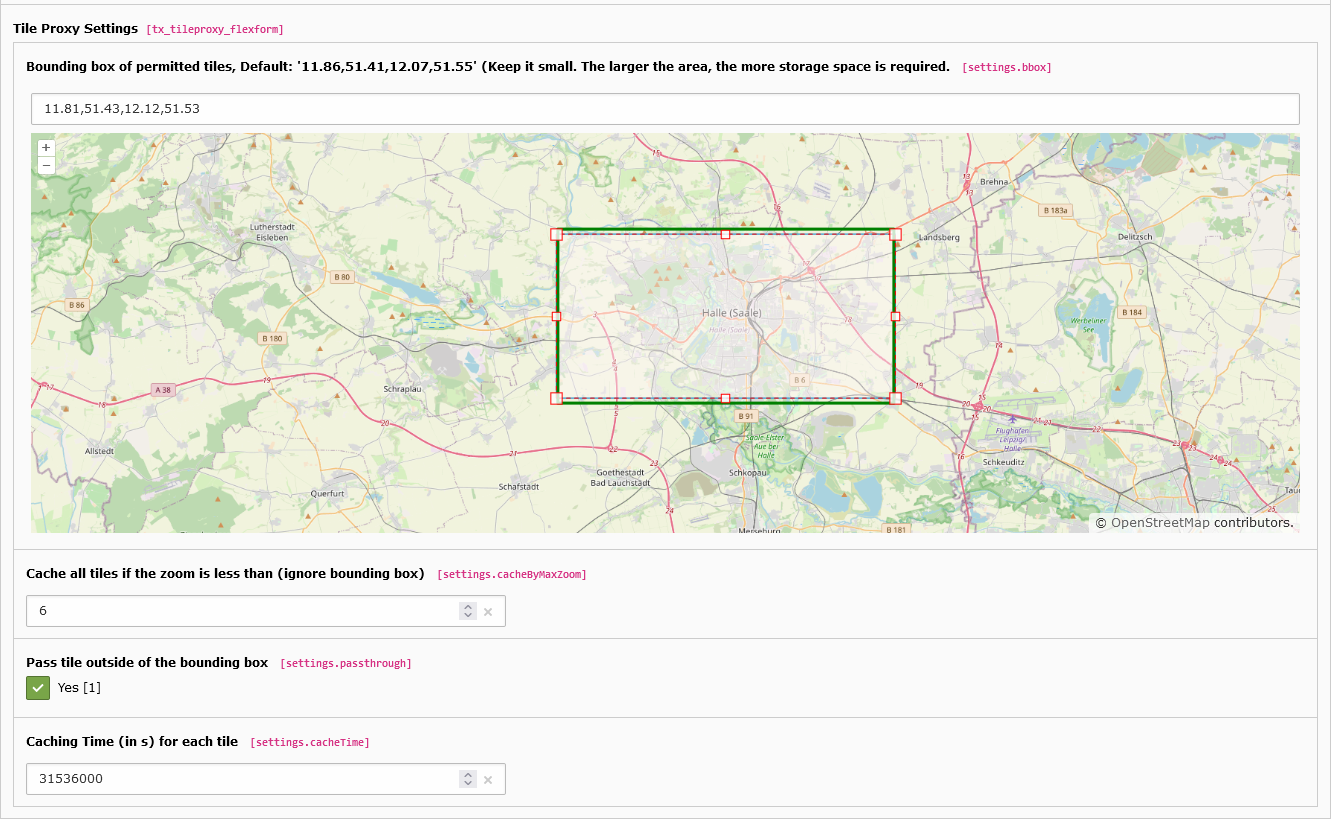
Edit the Bounding Box

Bounding box of permitted tiles 

Define a maximum range for which the data is to be loaded and made available. The bounding box can be determined by the rectangle on the map. The bounding box rectangle (green) may differ from the moving rectangle because the values are rounded.

Pass tile outside of the bounding box 

If this option is set, all tiles outside the bounding box are passed through directly. If this option is switched off, no queries outside the bounding box will be forwarded.

Cache all tiles if the zoom is less than (ignore bounding box) 

All tiles with a zoom level >= this will cached. A zoom level 6 requires about 20MB, but beware, the required size increases exponentially.

Do not caching the tile if the zoom is greater than (ignore bounding box) 

All tiles with a zoom level > this will not cached.

Caching Time (in s) for each tile 

Each tile is stored as an image on your server. This time indicates on the one hand how long this image is not updated again by a request to OpenStreetMap, on the other hand this time is sent as caching time to the client for each tile.

Additional allowed domains 

If an external domain requests the proxy, you can define a list of allowed referrer domains here. In case this is not configured the settings from the extension configuration are used.

Nominatim Proxy Endpoint 

In the settings of the endpoint page you should make the following settings:

Caching Time (in s) for each request 

Each request to nominatim is stored in the database. This time in seconds determines how long the entry is valid and remains stored.

Additional allowed domains 

If an external domain requests the proxy, you can define a list of allowed referrer domains here. In case this is not configured the settings from the extension configuration are used.

Administration 

The following settings can be made under the extension settings:

Delete all cached tiles if the cache is cleared 

If this option is activated, all cached tiles are deleted when the TYPO3 cache is cleared.

Delete all nominatim request caches if the cache is cleared 

If this option is activated, all cached requests are deleted when the TYPO3 cache is cleared.

Maximum number of records stored in the database 

The maximum number of records stored in the database.

Maximum Cache-Size in MB (When the limit is reached, the tiles are only passed through) 

This is the maximum size of the file cache used for tiles over all endpoints (if more than one endpoint is specified)

Path to error tile png (absolute) 

If there is an error when loading a tile, a standard error image is delivered. Here you can define a path to an alternative error image.

Path to empty tile png (absolute) 

If an image outside the defined bounding box is requested, a standard image is returned. Here you can define a path to an alternative image.

Globally allowed referrer domains to request proxy (comma separated) 

If an external domain request the proxy, you can define a list of globally allowed referrer domains here. It's helpful for headless TYPO3 installations, where the frontend and backend are on different domains and you want to configure it by environment variables. This config is a fallback for the allowed referrer domains configured in the page settings of the endpoint. If domains in the config of the page settings, this config won't be used.

Usage 

Tile-Proxy-Endpoint 

With this extension you can define a page in the TYPO3 backend as an endpoint for maps.

If the slug for your page is e.g. tile-proxy, the data can be retrieved from:

/tile-proxy/?provider=osm&z={z}&x={x}&y={y}&s={s}
Copied!

Arguments 

provider

Currently only osm (OpenStreetMap) is supported, so the value must be osm.

z

zoom level (https://wiki.openstreetmap.org/wiki/Slippy_map_tilenames)

x

x-tile coordinate (https://wiki.openstreetmap.org/wiki/Slippy_map_tilenames)

y

y-tile coordinate (https://wiki.openstreetmap.org/wiki/Slippy_map_tilenames)

s

OSM subdomain for CDN

If the tile must be loaded and is not cached, this request will be mapped to:

https://{s}.tile.openstreetmap.org/{z}/{x}/{y}.png
Copied!

The http referrer must be your own domain, localhost or configured in page settings or extension configuration, otherwise you will receive error 1001.

Leaflet Example 

// Initialize the base layer
L.tileLayer('/tile-proxy/?provider=osm&z={z}&x={x}&y={y}&s={s}', {
  attribution: '&#169; <a href="https://www.openstreetmap.org/copyright" target="_blank">OpenStreetMap</a> contributors',

}).addTo(map);
Copied!

OpenLayer Example 

var osmSource = new ol.source.XYZ({
    attributions : '&#169; <a href="https://www.openstreetmap.org/copyright" target="_blank">OpenStreetMap</a> contributors',
    urls: [
      '/tile-proxy/?provider=osm&z={z}&x={x}&y={y}&s=a',
      '/tile-proxy/?provider=osm&z={z}&x={x}&y={y}&s=b',
      '/tile-proxy/?provider=osm&z={z}&x={x}&y={y}&s=c',
    ]
});
Copied!

Nominatim-Proxy-Endpoint 

With this extension you can define a page in the TYPO3 backend as an endpoint for geocoding request to nominatim.

If the slug for your page is e.g. geo-proxy, the data can be retrieved from:

/geo-proxy/?provider=osm&apitype=search&q=06120&format=json&addressdetails=1
Copied!

Arguments 

provider

Currently only osm (OpenStreetMap) is supported, so the value must be osm.

apitype

Type of the api endpoint. Permissible types are: 'search','reverse','lookup' see https://nominatim.org/release-docs/latest/api/Overview/

all other paramers

all other parameters are forwarded directly to the nominatim-api.

If the request must be loaded and is not cached, this request will be mapped to:

https://nominatim.openstreetmap.org/search?q=06120&format=json&addressdetails=1
Copied!

The http referrer must be your own domain, localhost or configured in page settings or extension configuration, otherwise you will receive error 1001.

Example 

Here are simples example for Leaflet and OpenLayers. To try it out, simply save the file in the typo3 webroot and open it in the browser. (The endpoint "/tile-proxy" must of course be defined).

OpenLayers 

<!DOCTYPE html>
<html lang="en">

<head>
<meta charset="utf-8">
<meta name="viewport" content="width=device-width, initial-scale=1">
<title>Quick Start - OpenLayer</title>
<script src="https://cdn.jsdelivr.net/npm/ol@v7.2.2/dist/ol.js"></script>
<link rel="stylesheet" href="https://cdn.jsdelivr.net/npm/ol@v7.2.2/ol.css">

<style>
    html,
    body {
    height: 100%;
    margin: 0;
    }
</style>
</head>

<body>
<div id="map" style="width: 600px; height: 400px;"></div>
<script>
    let osmSource = new ol.source.XYZ({
    attributions: '&#169; ' +
        '<a href="https://www.openstreetmap.org/copyright" target="_blank">OpenStreetMap</a> ' +
        'contributors.',
    crossOrigin: 'anonymous',
    urls: [
        '/tile-proxy/?provider=osm&z={z}&x={x}&y={y}&s=a',
        '/tile-proxy/?provider=osm&z={z}&x={x}&y={y}&s=b',
        '/tile-proxy/?provider=osm&z={z}&x={x}&y={y}&s=c',
    ]
    });

    let extent = ol.proj.transformExtent([11.86, 51.41, 12.07, 51.55], 'EPSG:4326', 'EPSG:3857')
    let center = ol.proj.fromLonLat([11.940057754516602, 51.4974250793457]);
    var map = new ol.Map({

    layers: [
        new ol.layer.Tile({
        source: osmSource
        })
    ],
    target: 'map',
    view: new ol.View({
        center: center,
        zoom: 12,
        minZoom: 14
    })
    });
</script>
</body>

</html>
Copied!

Leaflet 

<!DOCTYPE html>
<html lang="en">

<head>
<meta charset="utf-8">
<meta name="viewport" content="width=device-width, initial-scale=1">
<title>Quick Start - Leaflet</title>
<link rel="stylesheet" href="https://unpkg.com/leaflet@1.9.3/dist/leaflet.css"
    integrity="sha256-kLaT2GOSpHechhsozzB+flnD+zUyjE2LlfWPgU04xyI=" crossorigin="" />
<script src="https://unpkg.com/leaflet@1.9.3/dist/leaflet.js"
    integrity="sha256-WBkoXOwTeyKclOHuWtc+i2uENFpDZ9YPdf5Hf+D7ewM=" crossorigin=""></script>

<style>
    html,
    body {
    height: 100%;
    margin: 0;
    }
</style>
</head>

<body>
    <div id="map" style="width: 600px; height: 400px;"></div>
    <script>
        let markerLocation = [51.4974250793457, 11.940057754516602];

        const map = L.map('map').setView(markerLocation, 13);
        let southWest = L.latLng(51.41, 11.86),
            northEast = L.latLng(51.55, 12.07),
            bounds = L.latLngBounds(southWest, northEast);
        map.setMaxBounds(bounds);
        const tiles = L.tileLayer('/tile-proxy/?provider=osm&z={z}&x={x}&y={y}&s={s}', {
            minZoom: 13,
            attribution: '&copy; <a href="http://www.openstreetmap.org/copyright">OpenStreetMap</a>'
        }).addTo(map);

        const marker = L.marker(markerLocation).addTo(map)
            .bindPopup('<b>Hello world!</b><br />I am a popup.').openPopup();
    </script>
</body>

</html>
Copied!

Sitemap