Introduction 

An awesome simple cookie Manager for your Typo3 installation, with service and script management!

Key features 

  • Script Blocker / Script Management
  • Lazy Load Iframes and Divs for Thirdparty Content
  • Easy custom Implementation
  • Standalone (no external dependencies needed)
  • GDPR compliant
  • Support for multi language (Currently 9 Languages Preconfigured per API)
  • WAI-ARIA compliant
  • Allows you to define different cookie categories with opt in/out toggle
  • Allows you to define custom cookie tables to specify the cookies you use
  • Dark and Lightmode Support in the Typo3 v13 Backend

This plugin provides a solution for the EU Cookie law (ePrivacy, TTDSG). It allows loading of scripts, iframes, and content only after the user has given their consent. However, you don't need to worry about the latest EU laws as this plugin manages your cookies.

Demo 

cookie-manager-frontend-demo-https-cookiedemo-coding-freaks-com

Screenshots 

Frontend Preview of the Consent Manager

Introduction Package

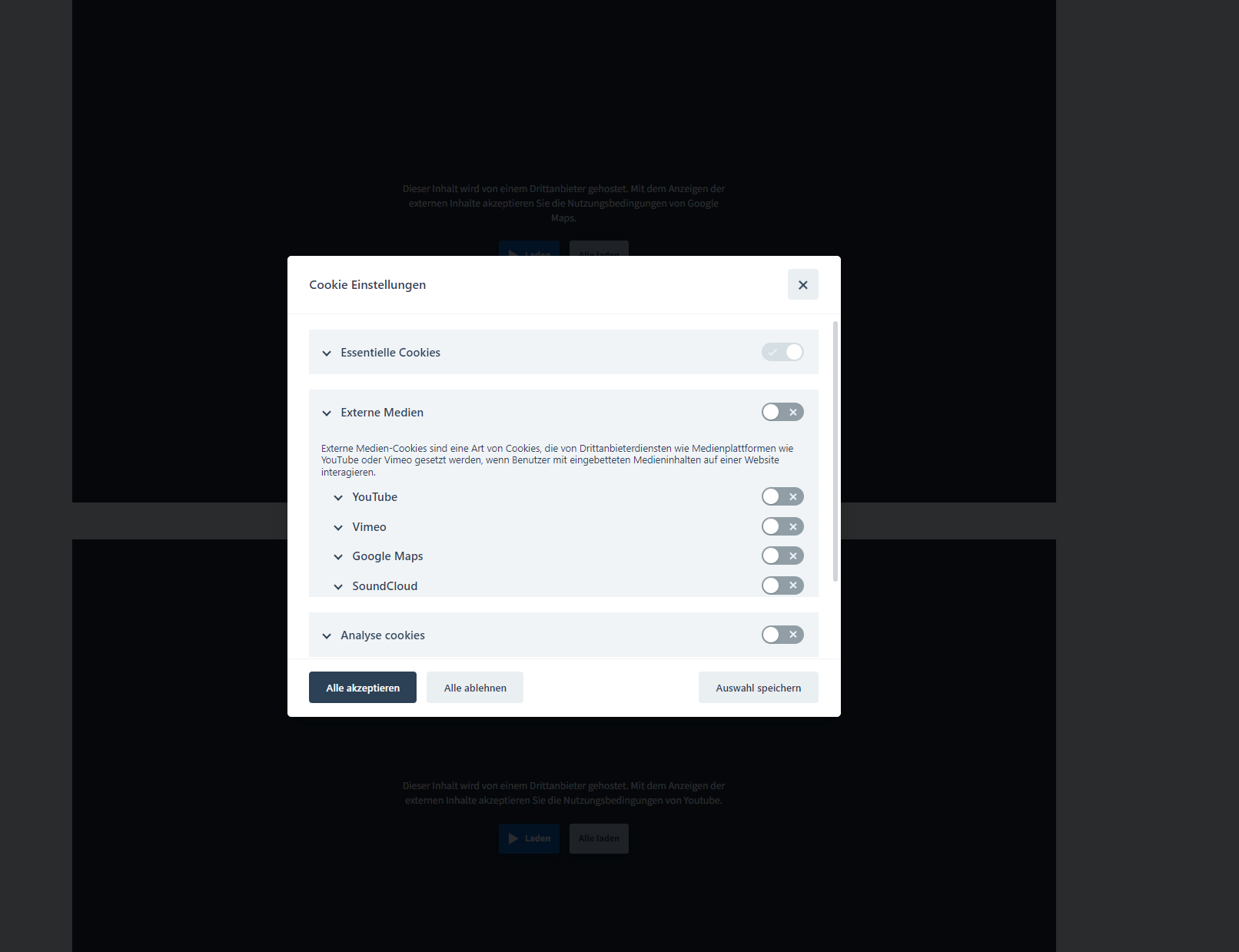
Settings Modal.

Installation 

To use the CodingFreaks cookie plugin in Typo3, you must first install it in your Typo3 system. This can be done by using Composer.

composer require codingfreaks/cf-cookiemanager
Copied!

Include TypoScript template (Deprecated since v12) 

To properly use the plugin, it is necessary to include the basic TypoScript provided by the extension. To do this, go to the Web > Template module in the Typo3 backend, select the root page, and switch to the Info/Modify view.

From there, click on Edit the whole template record and switch to the Includes tab. Next, add the CodingFreaks Cookie Manager (cf_cookiemanager) template from the list on the right.

Use Site sets (for Typo3 v13+) 

  1. Add the Site Set in the Backend:

    • Go to the Typo3 backend.
    • Navigate to Sites.
    • Open your site configuration.
    • Add the CodingFreaks/cf-cookiemanager Site Set as a dependency.
  2. Alternatively, Use YAML Configuration:

    You can also add the Site Set directly in your site's config.yaml file:

typo3installPath/config/sites/your_site/config.yaml
base: 'https://example.com/'
rootPageId: 1
dependencies:
  - CodingFreaks/cf-cookiemanager
Copied!

Backend Installation / Dataset Import 

This extension provides an external API to automatically create cookie assignments to individual services in various languages.

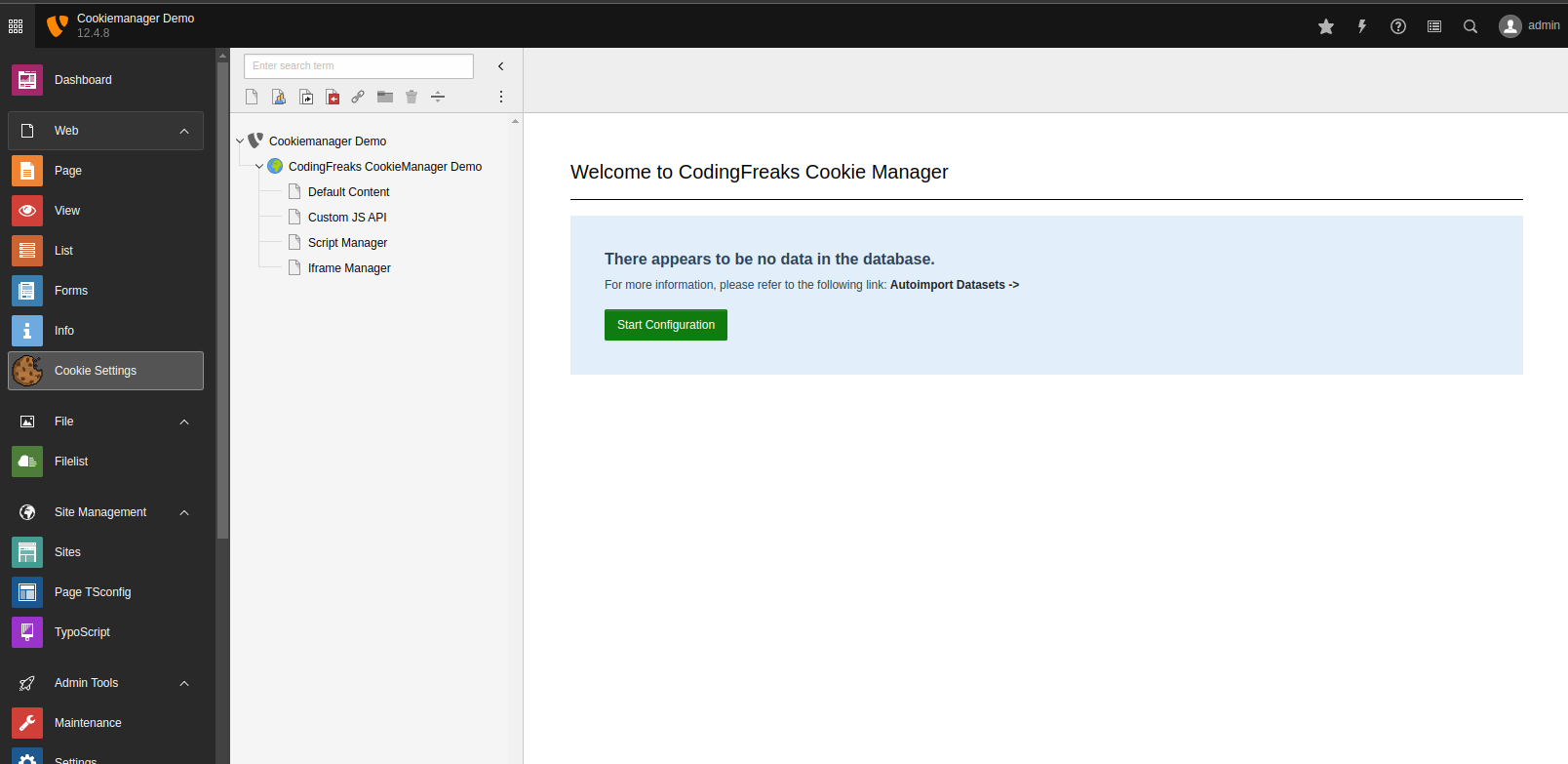
To install the preconfigured data sets, go to the Typo3 backend and select the Cookie Settings module in the Web tab. Click on Start Configuration and follow the instructions.

Introduction Package

Installation Screen

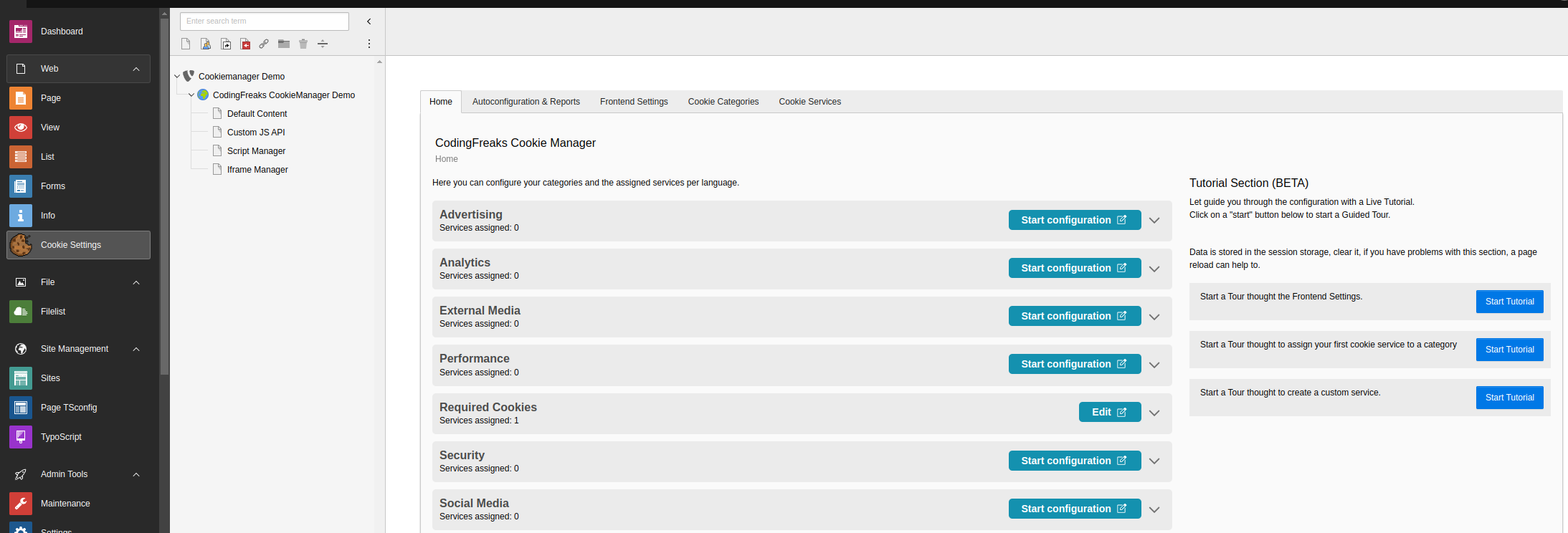
You can now Configure the Extension in the Cookie Settings module.

Configuration 

In general, it is easiest to edit the extension in the backend in the Cookie Settings module.

What you should also consider is that you create the settings for the cookie categories and services in the respective language. This means that if you have a multilingual website, you must create the settings for each language.

Backend

Tracking 

If you want to know how many outouts/optins the Cookie Consent has, you can enable the tracking.

This can be done by enabling the tracking in the Extension Configuration in the settings module from typo3, by clicking Enable Cookie Consent Tracking.

If active the first Action of the Visitor, in the Consent Modal is tracked before any external Javascript is loaded.

The tracking is done by a simple Ajax call to the backend controller, and dose not store any personal data.

You can see the statistics by using the Typo3 Dashboard Module and add the Cookie Consent Widget to the Dashboard.

Table of contents. 

Auto Configuration (Beta) 

This extension is able to automatically configure the cookie categories and services for you.

Please note that the output of this tool may not be completely accurate.

It is intended to assist with analyzing a website's cookie behavior and should not be relied on as the sole source of information.

Use it as a starting point for your analysis.

How to use:
This is done by using the coding-freaks-com service. You can find the configuration in the Cookie Settings module in the backend.

Start Scan 

By clicking on the Scan button, an external web scanner will scan 10 pages of your website and detect any embedded scripts, iframes, and cookies.

These can be imported using the Import button after a successful scan.

Existing services will be ignored and only new services will be added if they are detected.

You can use a custom sitemap.xml to target the 10 Pages. (ex. https://cookiedemo.coding-freaks.com/mysitemap.xml)

Scan Reports from your Website 

Easily and efficiently manage your services with Autoconfiguration.

Here, you can easily import any discovered services on your website.

If you want to learn more about your scans, simply click on the "Open Report" button. This link will take you to our detailed report website, where you will receive a complete overview of all your imported services, iFrames, and scripts.

Ensure your services are always up-to-date and up-to-standards by easily and quickly scanning your website.

Scanning & importing 

By clicking on the Scan button, an external web scanner is called up, which analyzes the website and outputs the Scan Report table.

The Cookie consent ins accepted by default to find all cookies.

If you want to scan the website without accepting the cookie consent, or use custom settings to assist you by finding Services, you can use the public scanner on https://coding-freaks.com/cookie-scanner or the API (https://coding-freaks.com/cookie-database).

These can be imported using the Import button after a successful scan and then edited as required.

Existing services will be ignored and only new services will be added if they are detected.

Important: Unknown Services are ignored, and needed to be added manually.

This can be found on the Report page, by clicking on the Open Report button.

Unknown Services have no Identifier and you need to set the Provider in the Cookie Service manually.

As example the Scanner or your found an Service like:

  • Provider: grimming.panomax.com/.
  • Cookie: _gat_panomax

The service is unknown, add it now by adding a new Cookie Service in the backend.

The Provider field is used to compare the original URL with the URL from the embedded iframe or script.

You can separate different providers by using a comma. grimming.panomax.com/,roma.panomax.com or simply use the domain name .panomax.com to match all subdomains.

Scan

Example Services 

Services in Page Typoscript 

To implement third-party services in the Page Typoscript using the cookie manager, you can follow these steps:

Define the headerData section in your page TypoScript configuration file. This can be done using the PAGE object and the headerData property, similar to the example below.

  • Add the third-party service code to the headerData section using the PAGE object. The key here is to use the "type" attribute with a value of "text/plain". This tells the browser to only load the script if consent is given by the user. You can add as many third-party services as you need by creating additional headerData TEXT objects.
  • Now Configure the cookie manager extension to load the third-party scripts only when the user gives consent. This can usually be done by adding the data-service attribute to the the scrip tag, (witch is the identifier from the Service in the Database)

Here's an example of how you can add a third-party service for Google Analytics and Microsoft Clarity using the headerData in the PAGE object:

Example: EXT:your_sitepackage/Configuration/TypoScript/page.typoscript
page = PAGE
page {
  headerData {
        999 = TEXT
        999.value (
            <!-- Google Tagmanager -->
            <script async type="text/plain" data-service="googleanalytics" src="https://www.googletagmanager.com/gtag/js?id=G-XXXXXXXXX"></script>
            <script type="text/plain" data-service="googleanalytics">
              window.dataLayer = window.dataLayer || [];
              function gtag(){dataLayer.push(arguments);}
              gtag('js', new Date());
              gtag('config', 'G-XXXXXXXXX');
            </script>
            <!-- Google Tagmanager End -->
        )

        888.value (
            <!-- Clarity  -->
            <script  data-service="clarity" type="text/plain">
                (function(c,l,a,r,i,t,y){
                    c[a]=c[a]||function(){(c[a].q=c[a].q||[]).push(arguments)};
                    t=l.createElement(r);t.async=1;t.src="https://www.clarity.ms/tag/"+i;
                    y=l.getElementsByTagName(r)[0];y.parentNode.insertBefore(t,y);
                })(window, document, "clarity", "script", "XXXXXXXXX");
            </script>
            <!-- Clarity  End -->
        )

    }
}
Copied!

That's it!

By following these steps, you can add third-party services to your TYPO3 extension while ensuring that you comply with data privacy regulations and respect the user's choices regarding cookies.

Example Service from Database (No Coding) 

Microsoft Clarity 

Create a new Service in the Typo3 backend like Example: (Microsoft Clarity)

Copy the Clarity Code into opt_in_code

(function(c,l,a,r,i,t,y){
c[a]=c[a]||function(){(c[a].q=c[a].q||[]).push(arguments)};
t=l.createElement(r);t.async=1;t.src="https://www.clarity.ms/tag/"+i;
y=l.getElementsByTagName(r)[0];y.parentNode.insertBefore(t,y);
})(window, document, "clarity", "script", "[##clarityTagID##]");
Copied!

This code is used to Load the Clarity Script only when the user gives consent for this Service or Category.

Create a Variable provider 

The placeholder in the code above [##clarityTagID##] is replaced by the value of the variable provider.

Create an Variable for the Placeholder, or directly insert the value in the code.

  • name Custom Label name (ex. Clarity ID)
  • identifier clarityTagID
  • value Insert your Clarity Tag ID

Extension Settings 

Available Settings 

The following settings can be configured in the admin backend module "settings", Extension Configuration.

General:
  • disablePlugin (boolean): Disables the plugin in the frontend if set to 1.
Experimental:
  • scanApiKey (string): Used for authorization/scan API (optional). Authorization on the API side is required to upgrade scan limits on request.
  • endPoint (string): Specifies the endpoint for the scan API (optional). The default value is https://coding-freaks.com/api.
  • thumbnailApiEnabled (boolean): Enables the thumbnail API. If active, the API is used to generate thumbnails for the iframe preview if content is blocked. (Uses external endpoint), the files are stored in /typo3temp/cfthumbnails/*
Tracking:
  • trackingEnabled (boolean): Enables cookie consent tracking. If active, the first action of the visitor in the consent modal is tracked before any external JavaScript is loaded.
  • trackingObfuscate (boolean): Obfuscates the tracking data. If set to 1, the tracking js is obfuscated before it is sent to the browser. (uses javascript eval function)
Script Blocking:
  • scriptBlocking (boolean): Blocks third-party scripts and iframes. Only unregistered scripts/iframes are not loaded if the user has not given consent.

(Feature): The loading of content such as iframes and scripts from third-party sources, can be Disabled by adding a Data Atribute to the Script or Iframe (data-script-blocking-disabled="true")

Templates:
  • CF_CONSENTMODAL_TEMPLATE (string): Specifies the path to the consent modal template in the extension.
  • CF_SETTINGSMODAL_TEMPLATE (string): Specifies the path to the settings modal template in the extension.
  • CF_SETTINGSMODAL_CATEGORY_TEMPLATE (string): Specifies the path to the settings modal category item template in the extension.

Available Constants 

  • autorun_consent (integer): Run Consent Modal on Page Load
  • force_consent (integer): Enable if you want to block page navigation until user consent action
  • revision_version (integer): Used for consent revision. If changed, all users will need to opt-in again.
  • cookie_expiration (integer): Specifies the number of days before the cookie expires. The default value is 365 days (one year).
  • cookie_path (string): Specifies the path where the cookie will be set. The default value is /.
  • cookie_domain (string): Domain where the cookie will be set. The default value is window.location.hostname.
  • hide_from_bots (boolean): If set to 1, the cookie plugin will not run when a bot/crawler/webdriver is detected.

Note that these settings are provided as an example and may vary depending on the version of the extension you are using.

Developer Corner 

Get some insights on how to customize the plugin and make the most out of it.

Available data-cc actions 

Any button (or link) can use the custom data-cc attribute to perform a few actions without manually invoking the API methods.

Valid values:

  • c-settings: show settings modal
  • accept-all: accept all categories
  • accept-necessary: accept only categories marked as necessary/readonly (reject all)
  • accept-custom: accept currently selected categories inside the settings modal

Examples:

<button type="button" data-cc="c-settings">Show cookie settings</button>
<button type="button" data-cc="accept-all">Accept all cookies</button>
Copied!

All configuration options 

+------------------------+------------+---------+---------------------------------------------------------------------+
| Option                 | Type       | Default | Description                                                         |
+========================+============+=========+=====================================================================+
| autorun                | boolean    | true    | If enabled, show the cookie consent as soon as possible             |
|                        |            |         | (otherwise you need to manually call the .show() method)            |
+------------------------+------------+---------+---------------------------------------------------------------------+
| delay                  | number     | 0       | Number of milliseconds before showing the consent-modal             |
+------------------------+------------+---------+---------------------------------------------------------------------+
| mode                   | string     | 'opt-in'| Accepted values:                                                    |
|                        |            |         | - opt-in: scripts will not run unless consent is given              |
|                        |            |         |   (GDPR compliant)                                                  |
|                        |            |         | - opt-out: scripts - that have categories set as enabled by default |
|                        |            |         |   - will run without consent, until an explicit choice is made      |
+------------------------+------------+---------+---------------------------------------------------------------------+
| cookie_expiration      | number     | 182     | Number of days before the cookie expires                            |
|                        |            |         | (182 days = 6 months)                                               |
+------------------------+------------+---------+---------------------------------------------------------------------+
| cookie_path            | string     | "/"     | Path where the cookie will be set                                   |
+------------------------+------------+---------+---------------------------------------------------------------------+
| cookie_domain          | string     | location| Specify your domain (will be grabbed by default)                    |
|                        |            | .hostname| or a subdomain                                                     |
+------------------------+------------+---------+---------------------------------------------------------------------+
| cookie_same_site       | string     | "Lax"   | SameSite attribute                                                  |
+------------------------+------------+---------+---------------------------------------------------------------------+
| use_rfc_cookie         | boolean    | false   | Enable if you want the value of the cookie to be RFC compliant      |
+------------------------+------------+---------+---------------------------------------------------------------------+
| force_consent          | boolean    | false   | Enable if you want to block page navigation until user action       |
+------------------------+------------+---------+---------------------------------------------------------------------+
| revision               | number     | 0       | Specify this option to enable revisions. Check below for a proper   |
|                        |            |         | usage                                                               |
+------------------------+------------+---------+---------------------------------------------------------------------+
| autoclear_cookies      | boolean    | false   | Enable if you want to automatically delete cookies when user        |
|                        |            |         | opts-out of a specific category inside cookie settings              |
+------------------------+------------+---------+---------------------------------------------------------------------+
| page_scripts           | boolean    | false   | Enable if you want to easily manage existing <script> tags.         |
|                        |            |         | Check manage third-party scripts                                    |
+------------------------+------------+---------+---------------------------------------------------------------------+
| remove_cookie_tables   | boolean    | false   | Enable if you want to remove the HTML cookie tables                 |
|                        |            |         | (but still want to make use of autoclear_cookies)                   |
+------------------------+------------+---------+---------------------------------------------------------------------+
| hide_from_bots         | boolean    | false   | Enable if you don't want the plugin to run when a                   |
|                        |            |         | bot/crawler/webdriver is detected                                   |
+------------------------+------------+---------+---------------------------------------------------------------------+
| gui_options            | object     | -       | Customization option which allows to choose layout, position        |
|                        |            |         | and transition. Check layout options & customization                |
+------------------------+------------+---------+---------------------------------------------------------------------+
| onAccept               | function   | -       | Method run on:                                                      |
|                        |            |         | 1. the moment the cookie consent is accepted                        |
|                        |            |         | 2. after each page load (if cookie consent has already been accepted)|
+------------------------+------------+---------+---------------------------------------------------------------------+
| onChange               | function   | -       | Method run whenever preferences are modified                        |
|                        |            |         | (and only if cookie consent has already been accepted)              |
+------------------------+------------+---------+---------------------------------------------------------------------+
| onFirstAction          | function   | -       | Method run only once when the user makes the initial choice         |
|                        |            |         | (accept/reject)                                                     |
+------------------------+------------+---------+---------------------------------------------------------------------+
Copied!

Custom Service Configuration 

Leaflet & Openstreetmap 

First of all Include leaflet and Openstreetmap like you wish in Typo3.

Add the attribute data-service="leaflet" to the script. Add the attribute type="text/plain to the script. Ensure that the service with the identifier leaflet exists and is enabled.

You can now Include the Script in any Place of your HTML Dom. The Cookie Manager hooks it on Consent accept. <script type="text/plain" data-service="leaflet" src="https://unpkg.com/leaflet@1.9.3/dist/leaflet.js"></script>

For an quick an dirty way to test use this code.

<div
         data-service="leaflet"
         id="makemerandom"
         data-autoscale>
 </div>

 <link rel="stylesheet" href="https://unpkg.com/leaflet@1.9.3/dist/leaflet.css" integrity="sha256-kLaT2GOSpHechhsozzB+flnD+zUyjE2LlfWPgU04xyI=" crossorigin=""/>
 <script type="text/plain"  data-service="leaflet" src="https://unpkg.com/leaflet@1.9.3/dist/leaflet.js" integrity="sha256-WBkoXOwTeyKclOHuWtc+i2uENFpDZ9YPdf5Hf+D7ewM=" crossorigin=""></script>


 <script type="text/plain" data-service="leaflet">

     const map = L.map('makemerandom').setView([51.505, -0.09], 13);
        console.log("RUNmap");
     const tiles = L.tileLayer('https://tile.openstreetmap.org/{z}/{x}/{y}.png', {
         maxZoom: 19,
         attribution: '&copy; <a href="http://www.openstreetmap.org/copyright">OpenStreetMap</a>'
     }).addTo(map);

     const marker = L.marker([51.5, -0.09]).addTo(map)
         .bindPopup('<b>Hello world!</b><br />I am a popup.').openPopup();

     const circle = L.circle([51.508, -0.11], {
         color: 'red',
         fillColor: '#f03',
         fillOpacity: 0.5,
         radius: 500
     }).addTo(map).bindPopup('I am a circle.');

     const polygon = L.polygon([
         [51.509, -0.08],
         [51.503, -0.06],
         [51.51, -0.047]
     ]).addTo(map).bindPopup('I am a polygon.');


     const popup = L.popup()
         .setLatLng([51.513, -0.09])
         .setContent('I am a standalone popup.')
         .openOn(map);

     function onMapClick(e) {
         popup
             .setLatLng(e.latlng)
             .setContent(`You clicked the map at ${e.latlng.toString()}`)
             .openOn(map);
     }

     map.on('click', onMapClick);

 </script>
Copied!

JavaScript API 

the following methods are available:

  • cc.show(<optional_delay>, <create_modal>)
  • cc.hide()
  • cc.showSettings(<optional_delay>)
  • cc.hideSettings()
  • cc.accept(<accepted_categories>, <optional_rejected_categories>)
    • accepted_categories: string or string[]
    • rejected_categories: string[] - optional

Note: **all categories marked as readonly will ALWAYS be enabled/accepted regardless of the categories provided inside the .accept() API call.

cc.accept('all');                // accept all categories
cc.accept([]);                   // accept none (reject all)
cc.accept('analytics');          // accept only analytics category
cc.accept(['cat_1', 'cat_2']);   // accept only these 2 categories
cc.accept();                     // accept all currently selected categories inside modal

cc.accept('all', ['analytics']); // accept all except "analytics" category
cc.accept('all', ['cat_1', 'cat_2']); // accept all except these 2 categories
Copied!

How to later reject a specific category (cookieconsent already accepted)? Same as above:

cc.accept('all', ['targeting']);     // opt out of targeting category
Copied!
  • cc.allowedCategory(<category_name>)

    Note: there are no default cookie categories, you create them!

    A cookie category corresponds to the string of the value property inside the toggle object:

    // ...
    toggle: {
        value: 'analytics',     // cookie category
        enabled: false,         // default status
        readonly: false         // allow to enable/disable
        // reload: 'on_disable',   // allows to reload page when the current cookie category is deselected
    }
    // ...
    Copied!

    Example:

    // Check if user accepts cookie consent with analytics category enabled
    if (cc.allowedCategory('analytics')) {
        // yoo, you might want to load analytics.js ...
    };
    Copied!
  • cc.validCookie(<cookie_name>)

    If cookie exists and has non-empty ('') value => return true, otherwise false.

    // Example: check if '_gid' cookie is set
    if (!cc.validCookie('_gid')) {
        // yoo, _gid cookie is not set, do something ...
    };
    Copied!
  • cc.eraseCookies(<cookie_names>, <optional_path>, <optional_domains>)

    • cookie_names: string[]
    • path: string - optional
    • domains: string[] - optional

    Examples:

    cc.eraseCookies(['cc_cookies']);             // erase "cc_cookie" if it exists
    cc.eraseCookies(['cookie1', 'cookie2']);     // erase these 2 cookies
    
    cc.eraseCookies(['cc_cookie'], "/demo");
    cc.eraseCookies(['cc_cookie'], "/demo", [location.hostname]);
    Copied!
  • cc.loadScript(<path>, <callback_function>, <optional_custom_attributes>)

    Basic example:

    cc.loadScript('https://www.google-analytics.com/analytics.js', function(){
        // Script loaded, do something
    });
    Copied!

    How to load scripts with custom attributes:

    cc.loadScript('https://www.google-analytics.com/analytics.js', function(){
        // Script loaded, do something
    }, [
        {name: 'id', value: 'ga_id'},
        {name: 'another-attribute', value: 'value'}
    ]);
    Copied!
  • cc.set(<field>, <object>)

    The .set() method allows you to set the following values: - data (used to save custom data inside the plugin's cookie) - revision

    How to save custom data:

    // Set cookie's "data" field to whatever the value of the `value` prop. is
    cc.set('data', {value: {id: 21, country: "italy"}});
    
    // Only add/update the specified props.
    cc.set('data', {value: {id: 22, new_prop: 'new prop value'}, mode: 'update'});
    Copied!
  • cc.get(<field>)

    The .get() method allows you to retrieve any of the fields inside the plugin's cookie:

    cc.get('level');     // retrieve all accepted categories (if cookie exists)
    cc.get('data');      // retrieve custom data (if cookie exists)
    cc.get('revision');  // retrieve revision number (if cookie exists)
    Copied!
  • cc.getConfig(<field>)

    The .getConfig() method allows you to read configuration options from the current instance:

    cc.getConfig('current_lang');        // get currently used language
    cc.getConfig('cookie_expiration');   // get configured cookie expiration
    // ...
    Copied!
  • cc.getUserPreferences()

    The .getUserPreferences() returns the following object (for analytics/logging purposes):

    {
        accept_type: string,            // 'all', 'necessary', 'custom'
        accepted_categories: string[],  // e.g. ['necessary', 'analytics']
        rejected_categories: string[]   // e.g. ['ads']
    }
    Copied!
  • cc.updateScripts()

    This method allows the plugin to manage dynamically added/injected scripts that have been loaded after the plugin's execution.

    E.g. dynamic content generated by server-side languages like php, node, ruby ...

EventDispatcher (PSR-14 Events) 

Register ClassifyContent Event Listener 

  1. Open your Services.yaml or Services.php file from your Extension.
  2. Add the following code snippet to register the ClassifyContent event listener:
YourVendor\YourSitepackage\EventListner\ClassifyContent:
  tags:
    - name: event.listener
Copied!

Handling the 'ClassifyContentEvent' 

The ClassifyContent event listener handles the ClassifyContentEvent and performs custom logic.

  1. Create a new PHP class in your TYPO3 extension, e.g., EXT:your_sitepackage/Classes/EventListner/ClassifyContent.php.
  2. Implement the __invoke method in the class, which will handle the event. The method should accept a ClassifyContentEvent object as a parameter.
namespace YourVendor\YourSitepackage\EventListner;

use CodingFreaks\CfCookiemanager\Event\ClassifyContentEvent;
use TYPO3\CMS\Extbase\Utility\DebuggerUtility;

class ClassifyContent
{
    /**
     * Handle the ClassifyContentEvent, handle the provider URL and set the service identifier.
     *
     * @param ClassifyContentEvent $event The ClassifyContentEvent object
     */
    public function __invoke(ClassifyContentEvent $event): void
    {
        // Custom logic goes here

        // Example: Dump a debug message
        // DebuggerUtility::var_dump("SitePackage invoke");

        // Example: Access the provider URL
        // DebuggerUtility::var_dump($event->getProviderURL());

        // Example: Set the service identifier
        // $event->setServiceIdentifier("TESTServiceIdentifier");
    }
}
Copied!

Themes and Styling 

The Cookie Manager includes a default Standalone theme, which features a clean and straightforward design that can be easily customized. Additionally, there are several other themes provided with the Cookie Manager, serving as foundations for creating your own unique theme.

Examples found in: EXT:cf_cookiemanager/Resources/Public/Scss/themes/*.css
page = PAGE
page {
   #Default Theme Loaded by Extension by default
   includeCSS.cookieconsent = EXT:cf_cookiemanager/Resources/Public/Scss/default.css

   #Standalone Theme Overrides:

   #Clean Theme Example
   #includeCSS.cleanTheme = EXT:cf_cookiemanager/Resources/Public/Scss/theme/clean.css

   #Funky Light Theme Example
   #includeCSS.funkylight = EXT:cf_cookiemanager/Resources/Public/Scss/theme/funkylight.css

   #Darkmode Example
   #includeCSS.darkTheme = EXT:cf_cookiemanager/Resources/Public/Scss/theme/darkmode.css

   #Font Override Only
   #includeCSS.fontoverride = EXT:cf_cookiemanager/Resources/Public/Scss/theme/example.css
}
Copied!

Override Fluid Templates 

We basically distinguish between static templates and Fluid templates. The static templates are used in the JavaScript context, you can find more about this in the components-section.

Current Fluid templates are:

  1. The consent button on every page (cookiefrontend - List.html) rendered automatically on every page
  2. The cookie/services list (cookielist - CookieList.html) which you can use to show the cookies in GDPR-Pages as a content element.

We have provided a full UI kit as an example, where you can change the fluid templates and static components. You can use it as a reference for your own theme.

See a full implementation in our example extension Coding-Freaks UI Kit

Fluid Templates Override EXT:your_sitepackage_or_extension/Configuration/TypoScript/setup.typoscript
# Override the template path for the cookie frontend Plugin (Consent-Management-Button on every page)
plugin.tx_cfcookiemanager_cookiefrontend {
    view {
        templateRootPaths.1727778204 = EXT:cf_cookiemanager_uikit/Resources/Private/Templates/CFCookiemanager/
    }
}

# Override the template path for the cookie list Plugin (TT-Content Element)
plugin.tx_cfcookiemanager_cookielist.view.templateRootPaths{
    1727778204 = EXT:cf_cookiemanager_uikit/Resources/Private/Templates/CFCookiemanager/
}
Copied!

Components (Static-Templates) 

Frequently, simple CSS changes may not suffice to meet your requirements. To address this, the Cookie Manager offers several HTML components that enable you to construct your own theme effectively.

You can locate these components in the following directory: EXT:cf_cookiemanager/Resources/Static/*.html.

  • consentmodal.html
  • settingsmodal.html
  • settingsmodal_category.html

Understanding the IDs within the Javascript Context is crucial. While you have the freedom to modify the CSS and HTML structure, it's vital to retain the same dom IDs. These IDs are utilized in the consent.js to identify the elements and establish the associated functionality.

Below is a basic example of the Consent Modal. Please note that the Text areas and Buttons are intentionally left empty, as the actual text content is dynamically added by the Javascript.

Example: EXT:cf_cookiemanager/Resources/Static/consentmodal.html
<div id="cm" role="dialog" aria-modal="true" aria-hidden="false" aria-labelledby="c-ttl" aria-describedby="c-txt" style="visibility: hidden;">
    <div id="c-inr">
        <div id="c-inr-i">
            <div id="c-ttl" role="heading" aria-level="2"></div>
            <div id="c-txt"></div>
        </div>
        <div id="c-bns">
            <button type="button" id="c-p-bn" class="c-bn"></button>
            <button type="button" id="c-s-bn" class="c-bn c_link"></button>
            <button type="button" id="c-t-bn" class="c-bn c_settings"></button>
        </div>
    </div>
</div>
Copied!

If you prefer to utilize your custom HTML structure, you must make adjustments to the Extension Configuration and specify the path to your HTML file.

To do this, follow these steps:

  • Open the Settings Module.
  • Navigate to "Configure Extensions."
  • Search for "cf_cookiemanager" in the list of extensions.
  • Choose the "Template-Tab."
  • Set the path to your HTML file.
  • EXT:your_sitepackage_or_extension/Resources/Static/consentmodal.html
  • EXT:your_sitepackage_or_extension/Resources/Static/settingsmodal.html

By following these steps, you can integrate your own HTML structure into the Cookie Manager extension.

See a full implementation in our example extension Coding-Freaks UI Kit

Environment Tools 

Examples of runTests.sh 

- Install a TYPO3 11 with PHP 7.4:
 ./Build/Scripts/runTests.sh -s composerInstall -p 7.4 -t 11


- Install a TYPO3 12 with PHP 8.1:
 ./Build/Scripts/runTests.sh -s composerInstall -p 8.1 -t 12


-  Unit-Tests with PHP 7.4:
 ./Build/Scripts/runTests.sh -s unit


-  Functional-Tests with PHP 8.1:
 ./Build/Scripts/runTests.sh -s unit -p 8.1


- Run acceptance Tests with PHP 8.1 for TYPO3 12:
 ./Build/Scripts/runTests.sh -s acceptance -p 8.1 -t 12
Copied!

Development Environment 

You can use the Acceptance Tests docker-compose file to setup a development environment for quick testing.

cd Build/testing-docker folder and run: docker-compose run acceptance_test This Launches a container with your runTests.sh install parameters and Setup a basic Frontend and Backend.

Add the following to your /etc/hosts file: 127.0.0.1 web

Frontend is available at: http://web/typo3temp/var/tests/acceptance/

Known Problems 

Use this section for informing about any type of problem. 

  • You can not eat cookies with this Extension. (This is a known problem of the cookiemonster)

Change log 

Version 1.8.2 - URL-Fragments in Thumbnail Generation and Storage UID for Install Controller 

[TASK] Added URL-fragments to the Thumbnail Generation to ensure that the correct URL is used for the thumbnail generation, even if the URL contains fragments.

[TASK] Added Storage UID for Install Controller to ensure that the correct storage is used for the new installation process #66.

Version 1.8.1 - Resolved Runtime Deprecation 

[TASK] Resolved PHP Runtime Deprecation Creation of dynamic property

Version 1.8.0 - Data Administration 

This release introduces Data Administration to the TYPO3 Cookie-backend, enabling full integration of the Cookie Database to check your local datasets for changes/updates.

[TASK] Added a Thumbnail Cache clear option to Cookie-Administration interface

[TASK] Added Update Wizard for Frontend-Datasets

[TASK] Implemented Ignore Update function for Cookies,Services,Categories and Frontends

[TASK] Added new installation logic API and Offline Support

[TASK] Added API Endpoint Error for Updates

[TASK] Admin Tab only and No Updates Feedback

[TASK] Implemented a InsertService for new Datasets

[TASK] Implemented a ComparisonService and a base route for Insert Logic

[TASK] Implemented a base logic for Database Upgrades and Review process for API and Local changes to keep Database Up-To-Date

[TASK] Respect Storage UID from Frontend Controller in addExternalServiceScripts

[BUGFIX] Check for external scripts as an ObjectStorage() thanks to @MarkusEhrlich

Version 1.7.4 - Bugfixes and Stablization 

[BUGFIX] Invalid HTML in Consent-Settings Button #59

[TASK] Check for unknown API Errors in ScanRepository

[BUGFIX] Impress and Data Policy Link colors in Default Theme set to Primary color

[BUGFIX] Remove default value constraints from TEXT fields for MySQL 8.0 compatibility

[BUGFIX] Fixed an issue where starting the configuration for a second pagetree caused an exception due to duplicate mm-table entries for translations from the first pagetree being generated again

[BUGFIX] Table has no field sorting, sort by name #58, thanks to @nlehmkuhl

[BUGFIX] Added missing label for toggle in consent.js to improve accessibility #56, thanks to @nlehmkuhl

[BUGFIX] Prevent duplication of untranslated cookie services

Version 1.7.3 - Features and Stablization 

[TASK] Possibility to set cookie service accepted by default #55

[TASK] Mixed type issue #52

[TASK] Removed Dark-Pattern from defaulttheme (Primary,Secondary buttons - same color) thanks to @nlehmkuhl

[BUGFIX] Keyboard improvements for cookie details #50 thanks to @nlehmkuhl (a11y)

[TASK] Added a Documentation for Google Consent Mode integration

[TASK] Remove aria-hidden on Consent Modal Category and Service to make button clickable in iOS VoiceOver mode (a11y)

Version 1.7.2 - Bugfixes and Stablization 

[TASK] Support Typo3 Site sets

[TASK] Backend Module and Tours - Darkmode Support

[TASK] TCA Migrations to new standards

[TASK] Resolved Deprecation: #96107 #99586, and #97866

[BUGFIX] Creation of dynamic property $foundProvider is deprecated in Scans #45

[BUGFIX] PHP Warning: Undefined array key "path" CookieFrontendController

[BUGFIX] Add missing link viewhelper thanks to @andyhirsch

Version 1.7.1 - Stablization for Typo3 13 

[BUGFIX] Removed Wildcard selector from iframemanager styles #42

[TASK] Migrated MultipleSideBySlide Select Element to new standards

[TASK] Update Functional Wizard-test to init ConfigurationManagerInterface

[TASK] Completed Frontend-Tour todos

[TASK] Stablization for Typo3 13

[TASK] Parse request from controller to ThumbnailService to ensure proper initialization

[TASK] Reorder parameters to resolve deprecation warnings

[BUGFIX] Dead-end in the tutorial #34

[BUGFIX] Increase referrer column length to handle long URLs

Version 1.7.0 - Thumbnail API for Iframe Preview 

[TASK] Added Thumbnail API for Iframe Preview, if content is blocked (Uses external Endpoint) can be enabled in Extension Settings

Version 1.6.4 - Bugfixes and Task Updates 

[BUGFIX] HelperUtility unknown result warning

[BUGFIX] Typo and documentation URL

[TASK] Changed Tracking-URL embed implementation

[TASK] change default position for open frontend settings icon

Version 1.6.3 - Danish language files 

[TASK] Danish language files #35

[TASK] Implemented a SiteWrite for the Functional Testing for Typo3 v13

[TASK] Adding Danish Language to StaticData thanks to @Beltshassar

Version 1.6.2 - Bugfixes on the Iframemanager frontend rendering 

[TASK] Set target _blank by default import from API Issue #32

[BUGFIX] Fixed Problems with translations from iframemanager #30

Version 1.6.1 - Removed Debug console.log 

[TASK] Removed Debug statements from Frontend Rendering #31

Version 1.6.0 - Additional Frontend Settings 

[TASK] Moved some extension configuration settings to site constants

[TASK] Additional Frontend Settings force_consent/autorun_consent #27

Version 1.5.2 - Features 

[TASk] Added an option to enable or disable JavaScript obfuscation in tracking code to avoid "eval" function. #23

[TASk] Refactored tour loading

Version 1.5.1 - Removed Dom Parser Dependencies 

[TASK] Removed Dom Parser Dependencies, now using Regex and str_replace to replace the GDPR-content.

[TASK] Multiple Languages per API English,German,Spanish,Italian,Portuguese,Polish,Dutch,French, fallback to english, if no free API KEY is used on a later state.

Version 1.5.0 - Typo3 v13 Support 

[TASK] Added Typo3 v13 Support

[TASK] Drop Typo3 v11 Support

[TASK] Drop PHP 7.x dependencies

[TASK] Added Composer Requirements for non-Composer installations in Resources/Private/PHP

[TASK] Support PHP 8.3

Version 1.4.4 - Experimental changes (Dynamic Page Content Replacement) 

Since we have issues with the DOM Parser, we have to change the parser to a new one, this solves some issues, but we have to test it in the next weeks, because it also changes the behavior of the Original (maybe invalid) DOM. Experimental changes, ware made, so we don't have to use any DOM Parser by using Regex replacements, this is an solution to keep the Original DOM without any changes, but it's not the best solution, because we have to use Regex to find the right place to replace the content. This can also lead to issues.

[BUGFIX] Respect hidden flag in TCA, fixed issue #21

Version 1.4.3 - Parser Changes and Bugfixes 

[BUGFIX Fixed Issue #19 "updateScan" not in Repository

[TASK] Changed DOM Parser to Masterminds/html5-php - Reference to issue #18 #17 and pull request #16

Version 1.4.2 - Optimizations 

[TASK] Adjust default condition for displaying Cookie-Manager

[TASK] Added Language Labels for CookieSettingsBackendController

[TASK] Ensures the HTML content is saved as UTF-8.

Merge pull request from jakobwid/remove-html_entity_decode

Version 1.4.1 - Offline Dataset Installation 

[TASK] Added offline dataset installation handling when API is unreachable issue (#14)

[TASK] Added short overview of Extension settings in home tab

[BUGFIX] Missing Storages in BasicConfig

[BUGFIX] Adjusted layout, display Button-Text with long Text in Box

Version 1.4.0 - Backend Look & Feel 

Overworked the Backend UI for a standard look and feel.

New Donut chart for Consent Tracking, shows accept types

Added a JavaScript Obfuscator for the Tracking.js (Adblock Detection)

Simplified the Installation process.

Fixed Issue #8 Function always returns true

Fixed a bug in the Iframemanager, remove blocked iframes from the dom.

Version 1.3.5 - Bugfixes 

Fixed issue #12 - broken feature data-script-blocking-disabled

Fixed issue #13 - empty label rendered in the iframemanager

Version 1.3.4 - Added XSD schema validation 

Create default/fixed value nodes during XSD schema validation in RenderUtility

Version 1.3.3 - Bugfixes 

Fixed issue #10 - Middleware Hook brok XML from Sitemap.xml (resulted in invalid sitemap.xml)

Added missing tertiary button in default consent.js fallback.

Version 1.3.2 - CodeQuality changes 

Added Extension Development Section to Documentation

Added API Repository for API Communication

Frontend and Backend Test Beta with codeception

Fixed Issue #9

Moved Content Override to Middleware

Removed Deprecated contentoverride TCA

Added Cookie tests for Update Wizard (Multi Site Usage)

Version 1.3.1 - Small changes 

Removed div[data-service]::before, width and height are set RenderUtility

BUGFIX Unittest fix UNIQUE constraint failed

Version 1.3.0 - New Features 

Added impress and data-policy Link for consent modal in backend. (Database updated needed)

Bugfix Possible unknown array key "id" in BackendView

Cookie-Information: Added the cookie information in the Settings-Modal.

Script-Blocker: Added a Fluid-Template for the Script-Blocker.

Cookie-Translation: Added Cookie language overlays for each cookie on a site-root.

Version 1.2.2 - Template Management with Examples 

Add Templates and Template Management Documentation for extending the Layout.

Removed Deprecation: mb_convert_encoding() in PHP 8.2

Removed Deprecation: #96972

Removed Deprecation: #100053

Fixed Issue: #5

Fixed a bug in the Cookie API import, now Cookies are preconfigured for all rootpages in sites config.

Version 1.2.1 - Reworked Guided Tours 

Reworked the guided tours, removed the old dependencies and bugfixes.

Added Requirejs Module to manage Guided Tours.

Added matomo Service in preconfigured services, old installs need to update the service manually in the Upgrade Wizard.

Version 1.2.0 - Backend UI Improvements and Guided Tours beta 

Added beta guided tours to the cookiemanager backend module, to help you get started with the extension.

Improved the backend home UI, to make it more user friendly.

Fixed a bug in the "create new" viewhelper, that caused a wrong pid in new records.

Fixed a TODO in the CookieService selection, now its possible to filter tough the Cookie selection.

Fixed a bug in the Cookie API import, added the missing isRegex flag for regex cookie detection.

Version 1.1.6 - Bugfixes in Update Wizard 

Fixed a bug in the Update Wizard, that caused a wrong API import if the locale was not installed on the server.

Writing Functional Tests for: Update Wizard and RenderUtility

Improved Release workflow with Github Actions

Version 1.1.5 - Merge 

Merge RenderUtility PSR-14

Added Skip LIBXML_NOERROR to RenderUtility

Version 1.1.4 - Merge 

Merge RenderUtility

Version 1.1.3 - Features (PSR-14 Support) 

Added a new Event Dispatcher to Classify the Content if needed.

Marked @Hook $GLOBALS['TYPO3_CONF_VARS']['SC_OPTIONS']['ext/cf-cookiemanager']['classifyContent'] as deprecated, will be removed in next major release.

Fixed bug through adding html check in RenderUtility

Version 1.1.2 - Version fix 

Fixed missing version in ext_emconf.php

Version 1.1.1 - Bugfix in RenderUtility 

Fixed a bug in RenderUtility, that caused a wrong encoding of UTF-8 characters in the renderer.

Version 1.0.9 - Features and Bugfixes 

API authorization: To extend Scan limits on Request (Optional)

Extended Extension Settings, see in Extension Settings Dokumentation

Added a Script Blocker, to block scripts from third party services, if not found in Consent (Optional)

Version 1.0.8 - Beta Support for Typo3 v12 

Take your website to the next level with our new support for Typo3 v12.

New feature: added a tertiary button to the consent modal.

Added a Button-role "Hide Button", now its possible to have a all behaviors, Settings Button, Accept All Button, Reject all Button and a Hide Button in the Consent Module.

Added an Backend Language Select for Home Tab to view the current configuration in languages

Version 1.0.6 - Bugfixes 

Added missing block description to the settings modal.

Added switch effect for category expand boxes.

Fixed issue with filter-categories that have no category suggestion.

Version 1.0.5 - Frontend Templates 

New feature: added frontend templates to override the base HTML DOM.

Implemented better iframe management for cookie management.

Version 1.0.4 - Tree organization 

New feature: added a select field for the variables to TCA identifier.

Added a counter for missing variables in the treelist/home view.

Version 1.0.3 - Smarter Backend Management 

Get the most out of the localization with our improved UI list management.

Say goodbye to outdated designs and hello to a sleeker, more user-friendly interface.

Keep your scans organized and efficient with our new basic scan management feature.

Version 1.0.2 - Autoconfiguration Made Easy 

Streamline the setup of your public website with our new Autoconfiguration feature.

Our external Python-based Chromium Scanner classifies services and cookies, and Provides all information per API.

Version 1.0.1 - Data import via Upgrade Wizard 

Speak the language of your choice with our support for multiple languages.

Experience a seamless upgrade process with our new Cookie API.

Importing new data has never been easier with our streamlined Upgrade Wizard and our new Cookie API.

Version 1.0.0 - The Foundation of a Great Extension 

Get started with our basic extension release, the foundation for future updates and improvements.

Sitemap