Icon Hub 

Extension key

icon_hub

Package name

danielharing/icon-hub

Version

main

Language

en

Author

Daniel Haring

License

This document is published under the Creative Commons BY 4.0 license.

Rendered

Wed, 15 Apr 2026 09:17:20 +0000


This extension provides a simple way to integrate icons into both the frontend and backend.

Introduction 

Information about the features of the extension.

Installation 

Explains how to install the extension if it is not installed yet.

Configuration 

Reference on how to configure the extension's individual features (site set, icons, TCA).

Usage 

Explains how the icons can be used in the frontend.

Developer Corner 

How to customize the extension to suit your needs.

Introduction 

What does it do? 

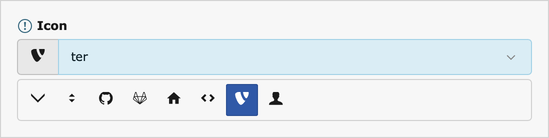
The backend icon selector

The EXT:icon_hub extension enables centralized management of icons on a per-site basis and provides the necessary stylesheets for both the backend and frontend.

A new field type is introduced for the TCA, allowing users to select from the list of configured icons.

The extension ships with the ability to integrate icons from Icomoon, but also allows for easy integration of custom icon providers.

Installation of extension icon_hub 

The extension danielharing/icon-hub can be installed either via Composer (recommended) or in classic mode.

Table of contents

Installation with Composer 

Check whether you are already using the extension with:

composer show | grep icon-hub
Copied!

This should either give you no result or something similar to:

danielharing/icon-hub       13.0.0
Copied!

If it is not installed yet, use the composer require command to install the extension:

composer require danielharing/icon-hub
Copied!

The given version depends on the version of the TYPO3 CMS Core you are using.

Installation in classic mode 

In the backend:

  1. Go to Admin Tools > Extensions
  2. In the Docheader, select Get Extensions
  3. Click Update now

    The button is on the top right.

  4. Enter "icon_hub" in the search field
  5. Click on Go
  6. Click on the Action icon on the left for the extension:

    Import and Install

    Now the extension is installed, but not activated. To activate:

  7. Choose Installed Extensions in the Docheader
  8. Click on the icon with a + sign for the extension in the A/D column.

Configuration of EXT:icon_hub 

Site Sets 

Configures features for the frontend and backend.

Site Settings 

Configures the available icon sets on a per-site basis.

TCA 

Configures the new database field type (TCA).

Using the Site Set 

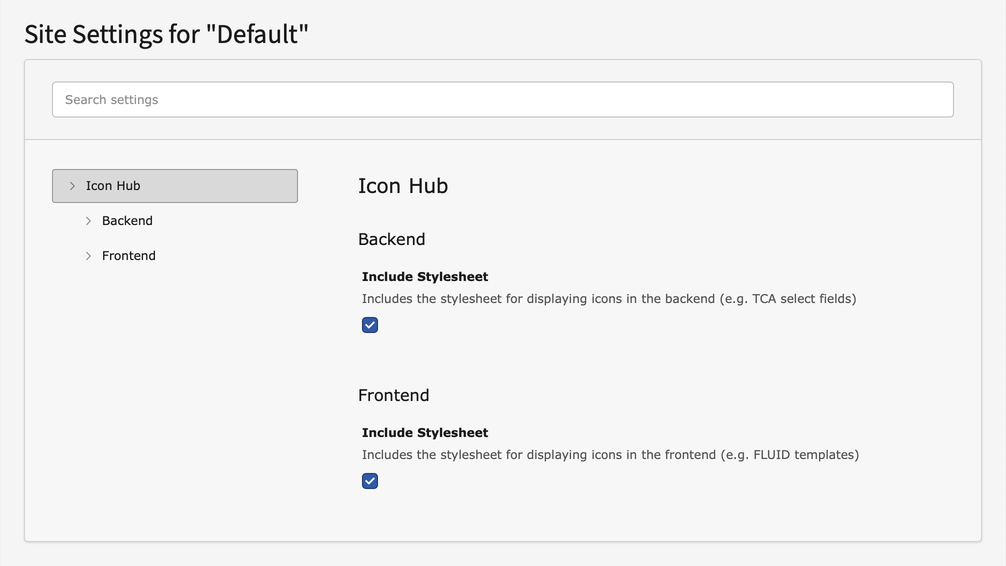
The site set can be used to configure basic features. The following settings are available for each site.

Settings of the site set

Backend 

Include Stylesheet

Include Stylesheet
Type
bool
Path
icons.css.backend.enable
Default
true

Enables the automatic generation of stylesheets for displaying icons in the backend and includes them.

Frontend 

Include Stylesheet

Include Stylesheet
Type
bool
Path
icons.css.frontend.enable
Default
true

Enables the automatic generation of stylesheets for displaying icons in the frontend and includes them.

Site Settings 

Icons are defined on a per-page basis and are specified in the site settings.

Configuration of icon sets 

A single icon set uses a provider (e.g. Icomoon) to make multiple icons available. These icons can then be used in both the backend and frontend.

Multiple icon sets from different providers can be used per site.

config/sites/<my_site>/settings.yaml|typo3conf/sites/<my_site>/settings.yaml
icons:
  sets:
    -
      provider: icomoon
      group: icomoon
      options:
        json: 'EXT:my_ext/Resources/Private/Fonts/Icomoon/selection.json'
        fonts: 'EXT:my_ext/Resources/Public/Fonts/Icomoon/'
Copied!

The following settings are available for a single icon set.

provider

provider
Type
string
Path
icons.sets.<index>.provider

The name of the provider to be used.

Either a predefined abbreviation (e.g. “icomoon”) or the full class name.

config/sites/<my_site>/settings.yaml|typo3conf/sites/<my_site>/settings.yaml
icons:
  sets:
    -
      provider: Vendor\MyExt\Imaging\IconSet\CustomIconSetProvider
Copied!

group

group
Type
string
Path
icons.sets.<index>.group

Assigns the icon set to a group in the backend select fields.

config/sites/<my_site>/settings.yaml|typo3conf/sites/<my_site>/settings.yaml
icons:
  sets:
    -
      provider: Vendor\MyExt\Imaging\IconSet\CustomIconSetProvider
      group: web_icons
Copied!

options

options
Type
array
Path
icons.sets.<index>.options

Configures the respective icon set provider. (See Icon provider options)

Icon provider options 

Each icon set provider uses different options to make icons available.

The extension comes with a provider for integrating Icomoon icons, but can be expanded to include additional providers.

Icomoon 

json

json
Type
string
Path
icons.sets.<index>.options.json

The path to the selection.json file from Icomoon.

Can be specified as either a storage path (1:/fonts/icomoon/selection.json), an extension path (EXT:my_ext/Resources/Private/Fonts/Icomoon/selection.json), or an absolute path (/fonts/icomoon/selection.json).

config/sites/<my_site>/settings.yaml|typo3conf/sites/<my_site>/settings.yaml
icons:
  sets:
    -
      provider: icomoon
      options:
        json: 'EXT:my_ext/Resources/Private/Fonts/Icomoon/selection.json'
Copied!

fonts

fonts
Type
string
Path
icons.sets.<index>.options.fonts

The path to the font files.

Can be specified as either a storage path (1:/fonts/icomoon/), an extension path (EXT:my_ext/Resources/Public/Fonts/Icomoon/), or an absolute path (/fonts/icomoon/).

config/sites/<my_site>/settings.yaml|typo3conf/sites/<my_site>/settings.yaml
icons:
  sets:
    -
      provider: icomoon
      options:
        fonts: '/fonts/icomoon/'
Copied!

Table Configuration Array (TCA) 

The icon database field type functions like a standard single-select field and displays all available icons. All configuration options for a standard single-select field can be applied.

The backend icon selector

EXT:my_ext/Configuration/TCA/tx_myext_elements_icon.php
[
    'columns' => [
        'icon_select' => [
            'label' => 'Icon selector',
            'config' => [
                'type' => 'icon',
                'items' => [
                    ['label' => 'Choose icon…', 'value' => '']
                ],
                'itemGroups' => [
                    'icomoon' => 'Icomoon'
                ]
            ]
        ]
    ]
]
Copied!

Using icons 

Rendering via Fluid 

The <core:icon /> ViewHelper, provided by EXT:core system extension, can be used to render icons in Fluid.

Just make sure that the corresponding namespace is loaded in the template and pass the icon identifier (e.g. retrieved from a database field).

<html
    xmlns:f="http://typo3.org/ns/TYPO3/CMS/Fluid/ViewHelpers"
    xmlns:core="http://typo3.org/ns/TYPO3/CMS/Core/ViewHelpers"
    data-namespace-typo3-fluid="true"
>
<core:icon identifier="{data.icon}" />
</html>
Copied!

Development Corner 

Custom Provider 

How to create a custom Icon Set Provider.

Creating a custom Icon Set Provider 

An icon set provider is responsible for providing icons and writing the necessary stylesheet. The class must implement \DanielHaring\IconHub\Imaging\IconSet\IconSetProviderInterface, but typically extends \DanielHaring\IconHub\Imaging\IconSet\AbstractIconSetProvider instead.

If the abstract class is used, you must specify the icon provider, which will later be responsible for rendering the icons. You can use existing core classes or your own implementations for this purpose.

EXT:my_ext/Classes/Imaging/IconSet/CustomIconSetProvider.php
declare(strict_types=1);
namespace Vendor\MyExt\Imaging\IconSet;

use DanielHaring\IconHub\Imaging\IconSet\AbstractIconSetProvider;
use TYPO3\CMS\Core\Imaging\IconProvider\SvgIconProvider;

class CustomIconSetProvider extends AbstractIconSetProvider
{
    protected function getProviderName(): string
    {
        return SvgIconProvider::class;
    }
}
Copied!

Providing icons 

The actual icons are provided via the generator method provideIcons(). This method is expected to yield instances of \DanielHaring\IconHub\Imaging\IconDefinition.

If the recommended abstract class is used, icons can be created using the helper method createIcon().

EXT:my_ext/Classes/Imaging/IconSet/CustomIconSetProvider.php
declare(strict_types=1);
namespace Vendor\MyExt\Imaging\IconSet;

use DanielHaring\IconHub\Imaging\IconSet\AbstractIconSetProvider;

class CustomIconSetProvider extends AbstractIconSetProvider
{
    public function provideIcons(): \Generator
    {
        yield $this->createIcon('tx-myext-dummy', 'Dummy');
    }
}
Copied!

Write the stylesheet 

The provideIcons() method is also primarily used to generate the stylesheet.

The required styles can be written using $this->styles->write(). This method can be used as often as needed to accumulate styles.

Although not strictly necessary, it is highly recommended to check in advance whether stylesheet writing is enabled to avoid unnecessary computing. $this->styles->isEnabled() can be used for this purpose.

EXT:my_ext/Classes/Imaging/IconSet/CustomIconSetProvider.php
declare(strict_types=1);
namespace Vendor\MyExt\Imaging\IconSet;

use DanielHaring\IconHub\Imaging\IconSet\AbstractIconSetProvider;

class CustomIconSetProvider extends AbstractIconSetProvider
{
    public function provideIcons(): \Generator
    {
        if ($this->styles->isEnabled()) {
            $this->styles->write('/* Base styles to write. */');
            $this->styles->write('/* Icon specific styles to write. */');
        }
        yield $this->createIcon('tx-myext-dummy', 'Dummy');
    }
}
Copied!

Full example 

This is what a simplified, typical icon set provider looks like:

EXT:my_ext/Classes/Imaging/IconSet/CustomIconSetProvider.php
declare(strict_types=1);
namespace Vendor\MyExt\Imaging\IconSet;

use DanielHaring\IconHub\Imaging\IconSet\AbstractIconSetProvider;
use TYPO3\CMS\Core\Imaging\IconProvider\SvgIconProvider;

class CustomIconSetProvider extends AbstractIconSetProvider
{
    public function provideIcons(): \Generator
    {
        if ($this->styles->isEnabled()) {
            $this->styles->write('/* Base styles for the icon set. */');
        }

        foreach (['dummy', 'test'] as $iconName) {
            if ($this->styles->isEnabled()) {
                $this->styles->write('/* Styles for icon "' . $iconName . '". */');
            }
            yield $this->createIcon('tx-myext-' . $iconName, $iconName, [
                'source' => 'EXT:my_ext/Resources/Public/Icons/' . $iconName . '.svg'
            ]);
        }
    }

    protected function getProviderName(): string
    {
        return SvgIconProvider::class;
    }
}
Copied!

Sitemap