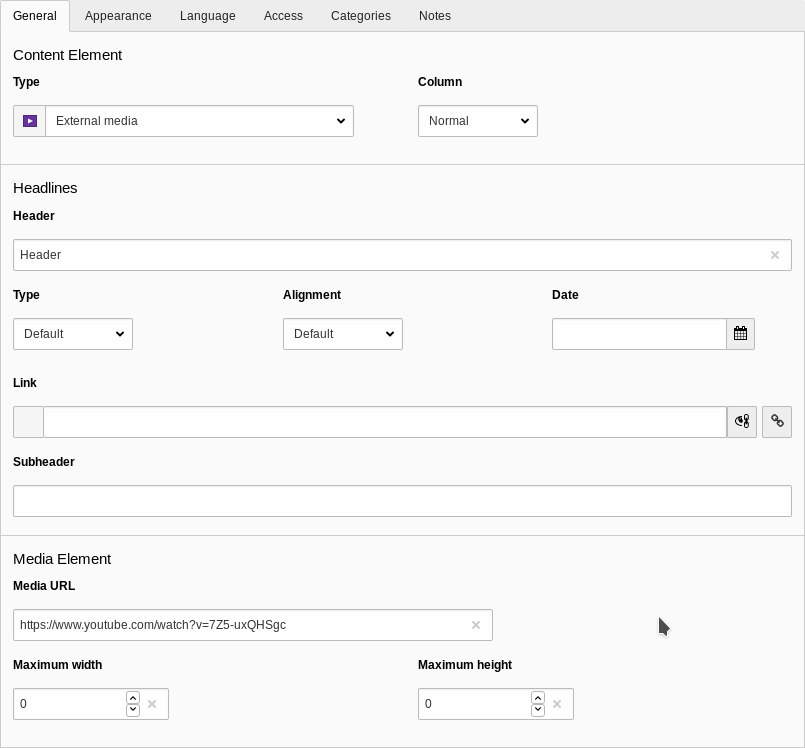
This extension provides a new content type "External media". The editor only needs to provide the URL to
the media he wants to embed.
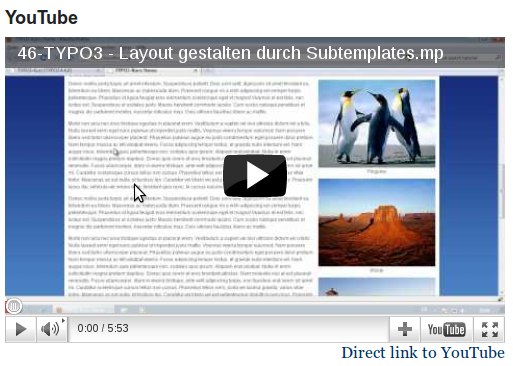
The media will then be embedded via an oEmbed request if a matching provider was found. For more
information on oEmbed see: https://oembed.com
Additionally the extension gives administrators the possibility to manage oEmbed providers. It comes with
a number of default providers out of the box.
Screenshots
Editing an external media content element
A YouTube video embedded with mediaoembed
Users Manual
Using this extension is quite simple. You start editing or creating a content element and select
"External Media" as content type. Then you only need to provide the URL to the media you want to
embed (e.g. a YouTube video) and save the content element.
If a provider is known for this URL the embed code will be retrieved and the media will be embedded.
Otherwise an error will be rendered.
You can use the width and height parameters so specify maximum width and height of the embedded element.
Now enable it and import the static template "Media oEmbed" in you template. You can also import
the "Media oEmbed default providers" to import a set of default providers.
Configuration
Manage providers
Providers are managed via TypoScript in plugin.tx_mediaoembed.settings.providers.
There are two ways of configuring matching URLs of an provider: regular expressions or simple wildcard based schmemes.
Regular Expressions
To make the handling of URLs simpler we use # as the regex delimer.
This is an example configuration using Regular Expressions:
This chapter describes the extension points the mediaoembed extension offers for
developers.
Service Visibility
Response processors, HTML response processors, request handlers and the HTTP client are
all looked up at runtime by their fully qualified class name, taken straight from
TypoScript, via $container->get($fqcn). This only works if that class is registered as
a public service in your extension's dependency injection configuration — TYPO3's and
Symfony's default is private, which makes container->get() throw a
ServiceNotFoundException.
Response processors are called once a provider has answered a request, right after the
raw oEmbed response has been turned into a GenericResponse object and before it is
handed to the view. They can inspect and modify the response, for example to rewrite
the embed HTML or to change response properties.
They are configured per provider, as a numerically sorted list, via
plugin.tx_mediaoembed.settings.providers.<name>.processors:
See Manage providers for how providers are configured. Built-in
examples: Sto\Mediaoembed\Response\Processor\YouTube\NocookieProcessor and
Sto\Mediaoembed\Response\Processor\YouTube\PlayRelatedProcessor.
Similar to response processors, but they run for every provider (instead of being tied
to one) and only if the response implements HtmlAwareResponseInterface, i.e. it
actually carries embed HTML. Use this when a processor should apply regardless of which
provider answered the request.
They are configured globally, as a numerically sorted list, via
plugin.tx_mediaoembed.settings.responseProcessors.html:
A request handler is responsible for actually talking to a provider and returning the
oEmbed-style response data as an array (type, html, provider_name, ...). If a
provider does not configure a request handler, the built-in
Sto\Mediaoembed\Request\RequestHandler\HttpRequestHandler is used, which performs a
regular oEmbed HTTP request against the provider's endpoint.
Implement this interface when a provider needs custom logic instead of a plain oEmbed
HTTP call, for example when the provider does not implement the oEmbed standard itself.
Configure it per provider via
plugin.tx_mediaoembed.settings.providers.<name>.requestHandlerClass, with
optional free-form settings passed through as
plugin.tx_mediaoembed.settings.providers.<name>.requestHandlerSettings and
available in the handler via $provider->getRequestHandlerSettings():
Used by the default HttpRequestHandler to perform the actual GET request to a
provider's oEmbed endpoint. Unlike processors and request handlers this is configured
globally, not per provider, via plugin.tx_mediaoembed.settings.httpClient:
If nothing is configured, the built-in
Sto\Mediaoembed\Request\HttpClient\GetUrlHttpClient is used, which performs the
request via TYPO3's RequestFactory. Implementations should throw
Sto\Mediaoembed\Exception\HttpClientRequestException on failure, with the HTTP status
code passed as the exception's code. HttpRequest (used by HttpRequestHandler) only
translates status codes 401, 404 and 501 into typed exceptions that the surrounding
provider loop catches to try the next matching provider; any other code results in a
plain RuntimeException that is not caught anywhere and propagates as an unhandled
error.
Fluid ViewHelpers
Both ViewHelpers below live in the Sto\Mediaoembed\ViewHelpers namespace, used as
xmlns:mo="http://typo3.org/ns/Sto/Mediaoembed/ViewHelpers" in the shipped templates.
Sto\Mediaoembed\ViewHelpers\EmbedViewHelper (<mo:embed> in the shipped templates)
renders the actual embed container, including the responsive padding/aspect-ratio wrapper
and, if enabled, the consent placeholder (see Rendering). It requires
the configuration and response variables that the extension's controller already
assigns to the view, so it is only usable from templates/partials that override the
shipped ones under EXT:mediaoembed/Resources/Private/, not from arbitrary custom
templates.
Sto\Mediaoembed\ViewHelpers\EmbedResponsivePaddingViewHelper
(<mo:embedResponsivePadding>) takes the same configuration and response arguments
and renders the same responsive wrapper, but without consent support. It predates
EmbedViewHelper and is no longer used by the shipped templates; it is kept for templates
that still reference it directly.
PSR-14 Events
mediaoembed dispatches PSR-14 events at certain points during its request processing,
so listeners can hook into the extension's behavior without having to swap out a whole
class. See the typo3/cms-core:events for general information about
listening to and registering for PSR-14 events.
BeforeMediaUrlResolvedEvent
Sto\Mediaoembed\Event\BeforeMediaUrlResolvedEvent
Dispatched with the raw media URL taken from the content element, before it is used to
resolve a matching provider (see Manage providers).
The event carries two independent URLs, both initialized to the raw media URL from the
content element:
url, exposed via getUrl()/setUrl(string $url), ends up in Configuration::getMediaUrl()
and is what templates show to visitors (the direct link, the consent placeholder text).
requestUrl, exposed via getRequestUrl()/setRequestUrl(string $requestUrl), ends up
in Configuration::getRequestMediaUrl() and is what is used for provider resolving and
for the request to the provider's endpoint.
Listeners can rewrite either or both independently. Typically only requestUrl is rewritten,
for example to translate an alternative or shortened URL format into one that matches a
provider's urlRegexes or urlSchemes, while url is left as entered
so visitors keep seeing the URL they recognize.
The extension itself uses this event to translate YouTube Shorts URLs
(https://www.youtube.com/shorts/{id}) into regular watch URLs
(https://www.youtube.com/watch?v={id}) so that they are still handled by the bundled
youtube provider. It only rewrites requestUrl, so the direct link and consent text still
show the original Shorts URL.
Example listener that rewrites a fictional shortened URL format: