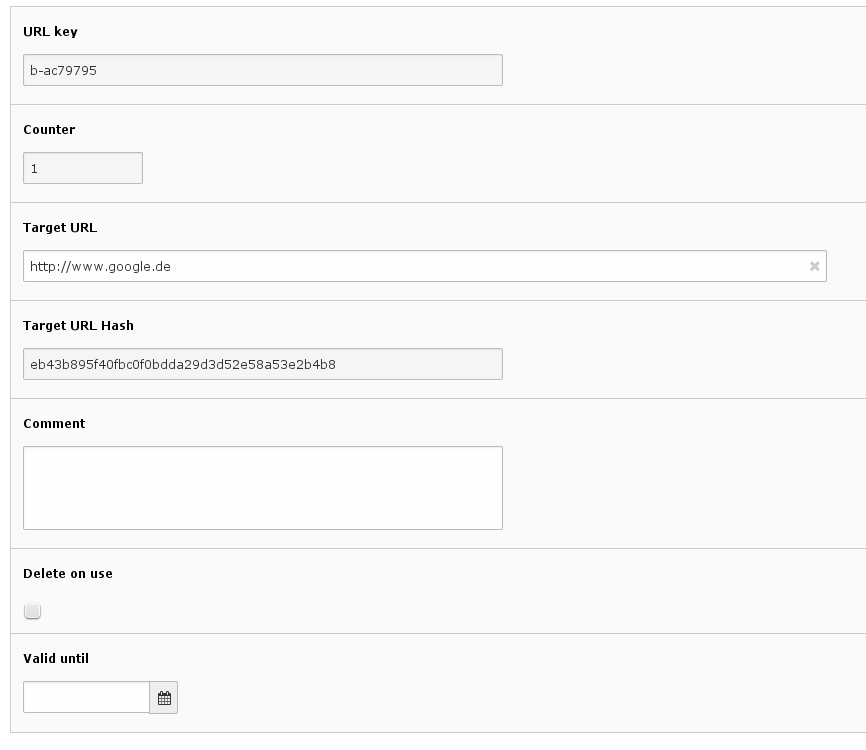
It has multiple integration options. You can create tiny URLs in the backend by adding a tiny URL
database record. You can convert any typolink to a tinyurl by simply adding some configuration
options. And you can use the API of this extension to create tiny URLs in your own extensions.
Screenshots
Settings for a tiny URL in the Backend;
Usage
You can either use the extension as an administrator / integrator by using additional TypoScript
(see Administrator Manual section) or as a developer by using the API of the extension (see
Developer Corner section).
a base62 encoded integer based on a custom dictionary
and an optional random part, seperated by a dash
A URL key might look like this:
Aefc-3E
Copied!
The first part is generated from the UID of the tiny URL database record which is converted to a base62 integer.
The second part (after the dash) is simply a random hexadecimal string.
In the extension configuration you can edit two options that influence the tiny URL key generation. If
minimalTinyurlKeyLength is set the URL key must have at least this amount of characters. If the base62 part is
shorter the missing characters will be appended. An example:
minimalTinyurlKeyLength is 6
the generated base62 part is Aefc
the URL generator will add two more characters after a dash
if the minimalTinyurlKeyLength was only 4 no more characters would have been added
Another option is the minimalRandomKeyLength . If this is set to a value greater than zero the defined number
of random characters will always be appended to the base62 part. Another example:
minimalTinyurlKeyLength is 4
minimalRandomKeyLength is 3
the generated base62 part is Aefc
the URL generator will add three more characters after a dash
Administrator Manual
Installation
The first step, to get this extension up and running is importing it in the extension manager
and install it.
Alternatively you can use composer to install the extension:
Then you can edit the extension configuration according to your needs.
Now you are able to create and use tiny URLs in your TYPO3 instance.
Editing tiny URL records
Once the extension is installed you can add tiny URLs in the TYPO3 backend. If you didn't change the
default value of urlRecordStoragePID in the extension configuration you must add the records
in the TYPO3 root. Otherwise you can add them in the page (folder) with the PID you specified in the config.
Using tinyurls in TypoScript
You can convert any typolink to a tinyurl by simply setting the property tinyurl to 1. For more information about the TypoScript configuration options please have a look in the TypoScript configuration section.
This is a quick example:
page.30 = TEXT
page.30 {
		value = Permalink
		typolink = 1
		typolink.parameter.data = getIndpEnv:REQUEST_URI
		typolink.tinyurl = 1
}
This is not very short and readable. This is why using speaking URLs is recommended. For this to work you need
to set createSpeakingURLs to 1 and maybe edit the speakingUrlTemplate . By default, speaking URLs will look
like this:
Starting with TYPO3 14.2, the TYPO3 core ships a native
Short URL feature
built on top of EXT:redirects. This extension is therefore deprecated and will not
be developed further. The tinyurls:migrate-to-redirects CLI command converts your
existing tiny URL records into sys_redirect records so that you can uninstall this
extension afterward.
What gets migrated
For every tx_tinyurls_urls record found on the given storage PID, the command creates
one sys_redirect record:
tx_tinyurls_urls field
sys_redirect field
urlkey
used to build source_path (see --url-template)
target_url
target
counter
hitcount
comment
description
valid_until
endtime
The redirect is always created with target_statuscode301 (permanent redirect).
Records where valid_until is in the past are migrated as well, with the same (past)
timestamp carried over to endtime. The resulting redirect is therefore created already
expired. Nothing in tx_tinyurls_urls is deleted by this command, so it is entirely up
to you whether to keep, disable or remove those expired redirects afterward.
The following records are skipped and left untouched in tx_tinyurls_urls:
Records with delete_on_use enabled. Redirects have no "delete after first hit"
concept, so a one-time-use tiny URL would silently become a permanent redirect if it was
migrated. If you still need these, note them down before migrating, since the command has
no way to recreate their one-time behaviour on the redirects side.
Records for which a matching redirect (same --host and resulting
source_path) already exists. This makes the command safe to run multiple times,
for example to pick up tiny URLs that were created after an earlier migration run.
If you are not using speaking URLs
By default, a tiny URL is accessed as
index.php?eID=tx_tinyurls&tx_tinyurls[key]=<urlkey> (see What does it do?), unless
you enabled Speaking URL configuration. Because of this, the command cannot derive
a sensible default for --url-template when speaking URLs are disabled and requires you
to pass it explicitly. The --url-template option builds a plain path (for example
/<urlkey>), which matches speaking URLs but not the default eID query string. If
you are not using speaking URLs, links generated by the migration will not automatically catch
requests to the old eID URLs.
In that case, either keep this extension installed until you have confirmed that external
links, bookmarks and search engine listings have moved over to the new redirect URLs, enable
speaking URLs before migrating so that old and new URLs match, or add a webserver-level
rewrite that forwards the old eID URLs to the new path, as described below.
Redirecting old eID URLs at the webserver
If you were not using speaking URLs, you can add a rewrite rule that translates requests for
the old index.php?eID=tx_tinyurls&tx_tinyurls[key]=<urlkey> URLs into the path used by
--url-template, so that old links keep working without keeping this extension
installed. The webserver issues a redirect to the new path, which TYPO3 then matches against
the migrated sys_redirect record and redirects to the final target — one extra hop,
but only for old links still in circulation.
The examples below assume the default --url-template of
/tinyurl/###TINY_URL_KEY###; adjust the target path to whatever template you actually
used. They also assume the default base62Dictionary (alphanumeric characters); widen
the character class if you configured a custom dictionary.
Apache example configuration
Add this to your .htaccess file or virtual host configuration (requires
mod_rewrite):
RewriteEngine On
RewriteCond %{QUERY_STRING} ^eID=tx_tinyurls&tx_tinyurls\[key\]=([A-Za-z0-9-]+)$
RewriteRule ^index\.php$ /tinyurl/%1? [R=301,L]
Copied!
Nginx example configuration
Add this inside the server block, before the location that passes requests to PHP-FPM:
if ($args ~ "^eID=tx_tinyurls&tx_tinyurls\[key\]=([A-Za-z0-9-]+)$") {
return301 /tinyurl/$1;
}
Copied!
Usage
Run the command with TYPO3 Console
(or via vendor/bin/typo3 on TYPO3 v10+):
Always do a dry run first to see how many records would be migrated (this includes
already-expired tiny URLs, see What gets migrated), skipped or have
already been migrated, without writing anything to the database:
The command processes records in batches, so it works the same way regardless of how many
tiny URLs you have.
Options
Option
Shortcut
Default
Description
--pid
-p
(required)
Storage PID of the tiny URLs to migrate. This is the same PID you configured as
urlRecordStoragePID (or the site's tinyurls.urlRecordStoragePID).
--target-pid
—
0
Storage PID for the created sys_redirect records.
--host
—
*
Value for source_host. Use * to match any host, or a specific domain
if your tiny URLs are bound to one site.
--url-template
—
derived from speakingUrlTemplate, otherwise required
Template used to build source_path. ###TINY_URL_KEY### is replaced
with the record's urlkey. If speaking URLs are enabled and a
speakingUrlTemplate containing ###TINY_URL_KEY### is configured, this
defaults to a path derived from it (with any leading host placeholder such as
###TYPO3_SITE_URL### stripped, since source_path must not contain the
host). For example, the extension default
###TYPO3_SITE_URL###tinyurl/###TINY_URL_KEY### becomes
/tinyurl/###TINY_URL_KEY###. If speaking URLs are disabled, or no such template
is configured, there is no sensible default to guess, so the command requires you to
pass this option explicitly and fails otherwise.
--dry-run
—
off
Do not write anything to the database, only report what would happen.
If your tiny URLs are spread across multiple storage pages (for example one per site), run the
command once per --pid, adjusting --host and --url-template for each
site as needed.
Recommended workflow
Update to the latest release of this extension and make sure EXT:redirects is
active.
Run the command with --dry-run and check the summary output.
Run it for real, with --host and --url-template matching your setup.
Check the created records in the backend Redirects module.
This URL will be used as prefix for non speaking URLs and will also override the TYPO3_SITE_URL
placeholder in the speakingUrlTemplate.
Default
<Empty string>
Property
baseUrlFromSiteBase
Data type
boolean
Description
If this enabled the prefix for non speaking URLs and the value of the TYPO3_SITE_URL placeholder in
speaking URLs will be taken from "base" setting of the active site configuration.
Default
0
Property
createSpeakingURLs
Data type
boolean
Description
If true (1) then the tiny URL will be generated depending on the speakingUrlTemplate.
Hint! If you enable this you might need to add a rewrite rule to you webserver!
Default
0
Property
speakingUrlTemplate
Data type
string
Description
The template that is used for creating a speaking URL (only relevant if createSpeakingURLs is set to 1).
You can use all available keys for TYPO3CMSCoreHttpNormalizedParams
as template markers (e.g. ###TYPO3_SITE_URL### and the ###TINY_URL_KEY###
template marker will be replaced with the shortened URL key.
Normally the URL key is generated automatically. Here you can set you own unique urlKey.
This may be used together with the deleteOnUse property for creating one-time valid URLs,
e.g. for activating a subscription.
Default
0
Developer Corner
Using tinyurls in your extension
When you want to generate tiny URLs in your own extension you can use the TxTinyurlsDomainModelTinyUrl
class to set the properties and then use the TxTinyurlsTinyUrlTinyUrlGeneratorInterface service
to generate the Tiny URL.
Please have a look at the PHPDoc annotations for further information. This is a quick example how to use it: