DeepL Translate TYPO3 extension

Extension key

dd_deepl

Package name

dmitryd/dd-deepl

Version

12.7

Language

en

Author

Dmitry Dulepov

License

This document is published under the Creative Commons BY 4.0 license.

Rendered

Thu, 24 Apr 2025 07:55:31 +0000


This extension allows to translate content element, and records using DeepL.


Table of Contents:

Introduction

What does it do?

This extension helps to translate content and records to various languages using DeepL translation service. You will need to register an account with DeepL.

Screenshots

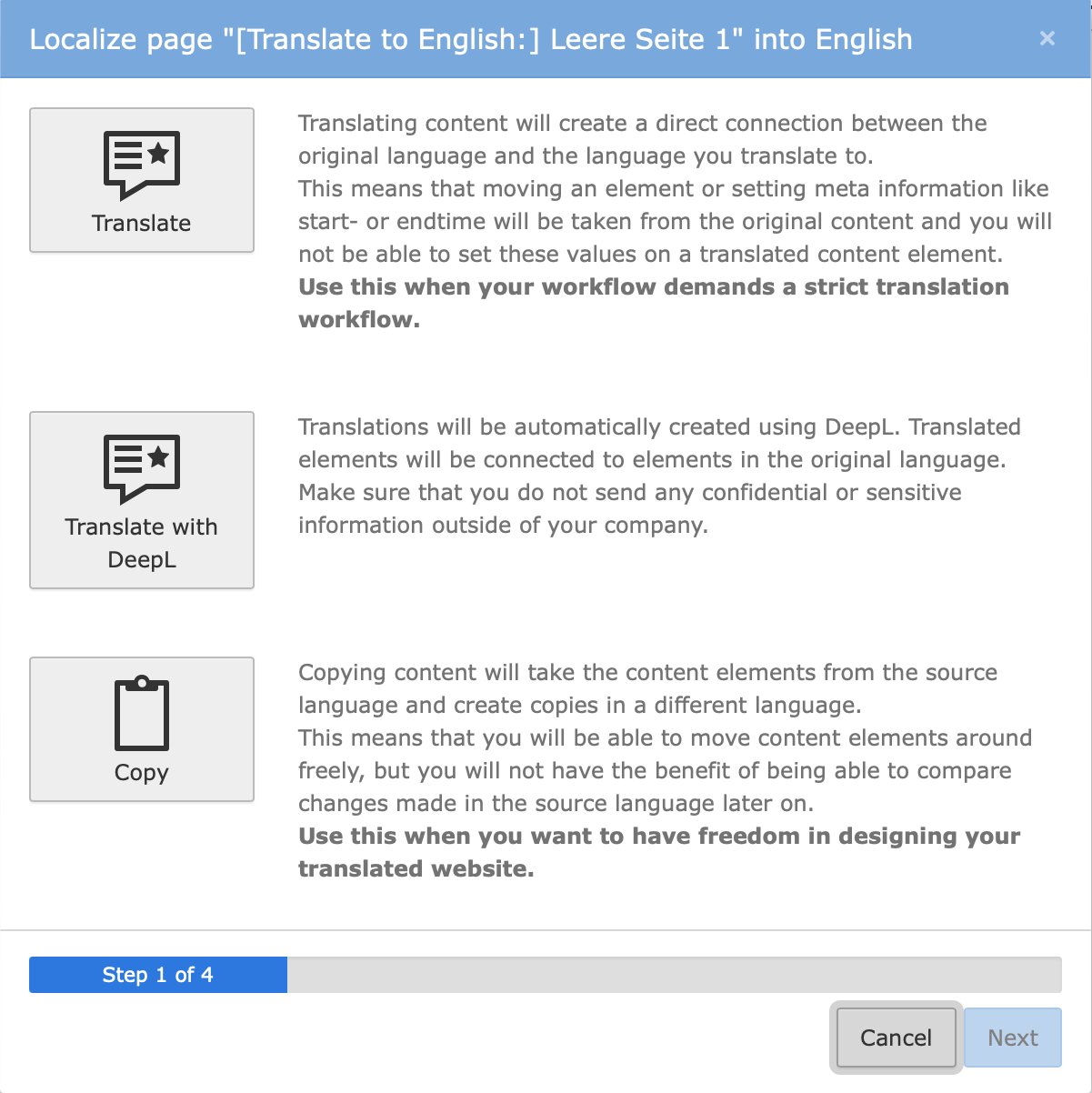
Translation window

Additional button to translate content using DeepL.

List module

Additional button to translate content using DeepL inside the List module.

Why this extension?

There are other similar extensions to this. One is EXT:deepltranslate, which is the first extenstion of the kind. It works for TYPO3 versions 8 and 9 but not later. There is a fork of this extension by web-vision Gmbh named EXT:wv_deepltranslate. This extension works with newer TYPO3 versions but it inherits a lot of old legacy code. While developers at web-vision did really great job at supporting and developing of the fork, having a lot of legacy code, overriding some internal TYPO3 classes, and rejecting some proposed features forced me to write my own extension. Also there is code for supporting Google translator, which looks out of place there.

Also other extensions do not allow you to modify the translation process (such as inspect and change field values before and after the translation, or force/prevent translation of the field). This extension provides several events that can alter the behavior of translation or modify field values before and after the translation.

Starting from version 12.1.0 the extension can translate flexform fields (including sections), which is a very useful feature for custom content elements.

This extension is not in any way based on two above mentioned extensions or contains any of their code. This is completely new code.

Source code, bugs, etc

Project is hosted on GitHib at https://github.com/dmitryd/dd_deepl. Please, note that questions will not be answered in the bug tracker. You should use TYPO3 slack for questions and answers.

Installation

Install the extension using composer:

composer require "dmitryd/dd-deepl"
Copied!

Add the static TypoScript template from EXT:dd_deepl/Configuration/TypoScript/ to your site

Go to https://www.deepl.com/signup and sign up. Get a free API key.

Configure API key in the TypoScript constants like this:

module.tx_dddeepl.settings.apiKey = <Insert your API key here>
Copied!

You can also set DeepL API key via web server environment varable TYPO3_DEEPL_API_KEY.

Constants

apiKey

apiKey
type

string

Default

empty

This is an API key for DeepL.

Example:

module.tx_dddeepl.settings.apiKey = <your value here>
Copied!

maximumNumberOfGlossariesPerLanguage

maximumNumberOfGlossariesPerLanguage
type

integer

Default

2

Maximum number of glossaries that can be added.

Example:

module.tx_dddeepl.settings.maximumNumberOfGlossariesPerLanguage = 2
Copied!

Setup

apiKey

apiKey
type

string / stdWrap

Default

empty

Default is a constant. But if there is environment variable named TYPO3_DEEPL_API_KEY, it will be used instead.

glossaries

glossaries
type

array

Default

empty

An array of mappings betweem language pairs and glossary id values. You can find glossary id in the Backend module or in the output of the glossary console command (see How to manage glossaries). In most cases DeepL uses the glossary automaically but sometimes you need to specify it to be used for translations.

Example:

module.tx_dddeepl {
  settings {
    glossaries {
      de-en = 1a7170f3-edab-4c66-949a-4db3dc6a233f
      de-fr = 00526740-a941-414c-8bbe-6aa69e619222
      de-it = 513e3440-0704-11ef-b551-6a4a7949937b
    }
  }
}
Copied!

maximumNumberOfGlossariesPerLanguage

maximumNumberOfGlossariesPerLanguage
type

integer

Default

{$module.tx_dddeepl.settings.maximumNumberOfGlossariesPerLanguage}

Maximum number of glossaries that can be added.

TSConfig reference

Page TSConfig

localization.enableDeepL

Datatype
boolean
Description
Enables the translation using DeepL in the user interface. Note that DataHandler translations are not affected by these options.
Default
1
Example
mod {
   web_layout {
       localization.enableDeepL = 1
   }
   web_list {
       localization.enableDeepL = 1
   }
}
Copied!

For Integrators

Integrators can do the following with the extension:

  • Add configuration (API key)
  • Manage glossaries

Add configuration

In order to use DeepL, you need to obtain the API key and configure it in the extension. There are two types of the API key: free and paid.

Free API key is great for the development and testing. It has enough limits for both these tasks. Free key ends with :fx.

Paid API key has much higher limits. It is meant to be used in production.

To obtain the API key you need to register with DeepL and get the key in your DeepL account settings.

You can add API key via a _configuration-typoscript-constants: or via the environment variable named TYPO3_DEEPL_API_KEY. Environment is recommended because you can easily set up different keys for different contexts: development, testing and production.

Manage glossaries

Glossaries is a way in DeepL to specify alternative translations to certain words. Some words can have generic accepted translations but if your site is very specific to a certain industry or activity kind, then words of one language may map to something other then DeepL would typically produce. This is where glossaries come in. They contain word pairs that map source words to target words.

DeepL supports glossaries for various language pairs. There can be multiple glossaries per language combination. The extension allows you to add, delete, download and remove glossaries as well as see what glossaries you have.

The extension allows you to specify the limit on the amount of glossaries per language pair. While DeepL itself does not impose any limits, it is good to have that number under control. Refer to the TypoScript configuration reference for more information

How to manage glossaries

Glossary management happens via the shell command or Backend module.

Here is the output of the shell command's help screen:

$ vendor/bin/typo3 deepl:glossary --help
Description:
  Uploads, downloads, lists, or deletes DeepL glossaries using account settings in the current TYPO3 version

Usage:
  deepl:glossary [options] [--] <action>
  This command manages DeepL glossaries.

Usage:
  vendor/bin/typo3 deepl:glossary info
    Fetches information about supported language combinations and existing glossaries.
  vendor/bin/typo3 deepl:glossary add -f file.csv -g "My glossary" -s en-us -t de
    Adds a glossary.
  vendor/bin/typo3 deepl:glossary get -i a1b33a94-ec7e-4ef5-8830-2f7309fab155
    Fetches the glossary by its id. To see the id use the "info" command. Fetched file will be named according to the id.
  vendor/bin/typo3 deepl:glossary delete -i a1b33a94-ec7e-4ef5-8830-2f7309fab155
    Removes the glossary by its id. To see the id use the "info" command.

Arguments:
  action                                   What to do: add, get, delete glossaries or show the information

Options:
  -f, --file[=FILE]                        Glossary in CSV format
  -i, --id[=ID]                            Glossary id
  -g, --name[=NAME]                        Glossary name
  -r, --root[=ROOT]                        Root page id to use (if your instance has more than one)
  -s, --source-language[=SOURCE-LANGUAGE]  Source language
  -t, --target-language[=TARGET-LANGUAGE]  Target language
Copied!

Backend module

There is also Backend module where it is possible to view current API limits as well as information about uploaded glossaries. You can also upload glossaries via this module.

The module is avaiable as Site > DeepL in the main menu.

For Editors

Editors can translate content and records using DeepL.

Translating content happens as usual by pressing a "Translate" button in the Page module. Translation window will show and additional button named "Translate with DeepL":

Translation window

For records each language for each available translation is duplicated and a new button with a DeepL icon on it appears:

List module

Records will get translations if combination of a source and a target language is supported by DeepL.

For Developers

You can use Dmitryd\DdDeepl\Service\DeeplTranslationService class to translate TYPO3 records (must have an entry in $GLOBALS['TCA']), certain fields, or just texts. There is a number of events that can alter the behavior of the service. You can use them to get notified about translations, force or prevent a field from being translated or alter the field value before and after it is sent to DeepL.

API

Translation service

class DeeplTranslationService
Fully qualified name
\Dmitryd\DdDeepl\Service\DeeplTranslationService

This is the class you, as a developer, would use to translate data using DeepL.

__construct ( array $deeplOptions = [])

Creates the instance of the class. You can pass additional options as described in the DeepL documentation.

isAvailable ( ) : bool
returntype

bool

Returns

true if DeepL can process request with the current configuration and API limits.

translateRecord ( string $tableName, array $record, SiteLanguage $targetLanguage, array $exceptFieldNames = []) : array
returntype

array

The method will go through each field in the record, evaluate if it can be translated and call DeepL for translation. The result is an array with translations.

Returns

Array with translated fields

translateField ( string $tableName, string $fieldName, string $fieldValue, SiteLanguage $sourceLanguage, SiteLanguage $targetLanguage) : string
returntype

string

The method will get the value of the field and and call DeepL for translation. Unlike in translateRecord() there are no any kind of checks if the field can be translated at all.

Returns

Translated field value

translateText ( string $text, string $sourceLanguage, string $targetLanguage) : string
returntype

string

The method will get the value of the field and and call DeepL for translation. Unlike in translateRecord() there are no any kind of checks if the field can be translated at all.

Returns

Translated field value

Events

class AfterFieldTranslatedEvent
Fully qualified name
\Dmitryd\DdDeepl\Event\AfterFieldTranslatedEvent

This event is fired after the field was translated by translateRecord or translateField and allows to modify the translated value.

getTableName ( ) : string
returntype

string

Returns

Table name of the field

getFieldName ( ) : string
returntype

string

Returns

The field name

getFieldValue ( ) : string
returntype

string

Returns

The current (translated) field value

getSourceLanguage ( ) : SiteLanguage
returntype

\TYPO3\CMS\Core\Site\Entity\SiteLanguage

Returns

Source language to translate from

getTargetLanguage ( ) : SiteLanguage
returntype

\TYPO3\CMS\Core\Site\Entity\SiteLanguage

Returns

Target language to translate to

setFieldValue ( string $fieldValue) : void

Sets the new value of the field.

class AfterRecordTranslatedEvent
Fully qualified name
\Dmitryd\DdDeepl\Event\AfterRecordTranslatedEvent

This event is fired after the record was translated by translateRecord. You can examine fields and alter their contents by using getTranslatedFields and setTranslatedFields. Note that there is no method for getting the source language because you can get this information from the record.

getTableName ( ) : string
returntype

string

Returns

Table name of the field

getRecord ( ) : array
returntype

array

Returns

Original (non-translated) record

getTargetLanguage ( ) : SiteLanguage
returntype

\TYPO3\CMS\Core\Site\Entity\SiteLanguage

Returns

Target language to translate to

getTranslatedFields ( ) : array
returntype

array

Returns

The current (translated) field values

setTranslatedFields ( array $translatedFields) : void

Replaces translated fields with a new array of fields.

class BeforeFieldTranslationEvent
Fully qualified name
\Dmitryd\DdDeepl\Event\BeforeFieldTranslationEvent

This event is fired before the field is translated by translateRecord or translateField and allows to modify the original field value before it is sent to DeepL.

getTableName ( ) : string
returntype

string

Returns

Table name of the field

getFieldName ( ) : string
returntype

string

Returns

The field name

getFieldValue ( ) : string
returntype

string

Returns

The current field value

getSourceLanguage ( ) : SiteLanguage
returntype

\TYPO3\CMS\Core\Site\Entity\SiteLanguage

Returns

Source language to translate from

getTargetLanguage ( ) : SiteLanguage
returntype

\TYPO3\CMS\Core\Site\Entity\SiteLanguage

Returns

Target language to translate to

setFieldValue ( string $fieldValue) : void

Sets the new value of the field.

class BeforeRecordTranslationEvent
Fully qualified name
\Dmitryd\DdDeepl\Event\BeforeRecordTranslationEvent

This event is fired before the record is translated by translateRecord. You can examine fields and alter their contents by using getTranslatedFields and setTranslatedFields. Note that there is no method for getting the source language because you can get this information from the record.

getTableName ( ) : string
returntype

string

Returns

Table name of the field

getRecord ( ) : array
returntype

array

Returns

Original (non-translated) record

getTargetLanguage ( ) : SiteLanguage
returntype

\TYPO3\CMS\Core\Site\Entity\SiteLanguage

Returns

Target language to translate to

getTranslatedFields ( ) : array
returntype

array

Returns

The current field values

setTranslatedFields ( array $translatedFields) : void

Replaces translated fields with a new array of fields.

class CanFieldBeTranslatedCheckEvent
Fully qualified name
\Dmitryd\DdDeepl\Event\CanFieldBeTranslatedCheckEvent

This event is fired after the DeepL translation service evaluated whether the field can be translated.

getTableName ( ) : string
returntype

string

Returns

Table name of the field

getFieldName ( ) : string
returntype

string

Returns

The field name

getCanBeTranslated(): ?bool ( )
returntype

?bool

Returns

true, if the service thinks that the field can be translated, false, if definitely not, null, if the service could not decide

setCanBeTranslated ( ) : void

Pass true, if the service thinks that the field can be translated, false, if not. Note that you cannot pass null here. If you are unsure, do not set any value. The service will not translate the field unless the value after all events is set to true.

class PreprocessFieldValueEvent
Fully qualified name
\Dmitryd\DdDeepl\Event\PreprocessFieldValueEvent

This event is fired before the field is set to DeepL for translation and allows you to modify the value. A typical example would be, for example, doing data clean up or replacing &nbsp; with a normal space in texts, or removing several <br> tags.

getTableName ( ) : string
returntype

string

Returns

Table name of the field

getFieldName ( ) : string
returntype

string

Returns

The field name

getFieldValue ( ) : string
returntype

string

Returns

The current field value

setFieldValue ( string $fieldValue) : void

Sets the new value of the field.

Examples

Translating a record:

$languageId = 1;
$newsId = 1;
$newsRecord = BackendUtility::getRecord('tx_news_domain_model_news', $newsId);
$site = GeneralUtility::makeInstance(SiteFinder::class)->getSiteByPageId($newsRecord['pid']);
$targetLanguage = $site->getLanguageById($languageId);
$service = GeneralUtility::makeInstance(\Dmitryd\DdDeepl\Service\DeeplTranslationService::class);
$translatedFields = $service->translateRecord('tx_news_domain_model_news', $newsRecord, $targetLanguage);
Copied!

Sitemap

Index